set clock HONDA ACCORD COUPE 2014 9.G Owner's Manual
[x] Cancel search | Manufacturer: HONDA, Model Year: 2014, Model line: ACCORD COUPE, Model: HONDA ACCORD COUPE 2014 9.GPages: 593, PDF Size: 22.22 MB
Page 322 of 593
321
uuCustomized Features u
Continued
Features
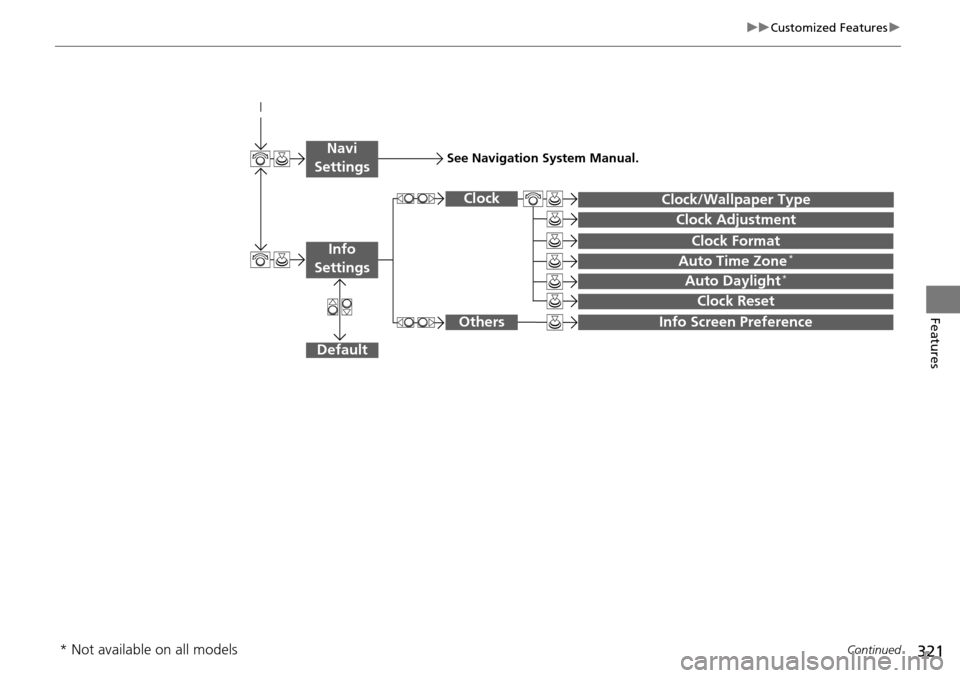
Auto Daylight*
Clock Reset
Info Screen Preference
Clock Format
Auto Time Zone*
Clock/Wallpaper Type
Clock Adjustment
Clock
Default
Others
Info
Settings
Navi
SettingsSee Navigation System Manual.
* Not available on all models
Page 324 of 593
323
uuCustomized Features u
Continued
Features
*1:Default SettingSetup
Group Customizable Features Description Selectable Settings
System
Settings
Voice
Rec
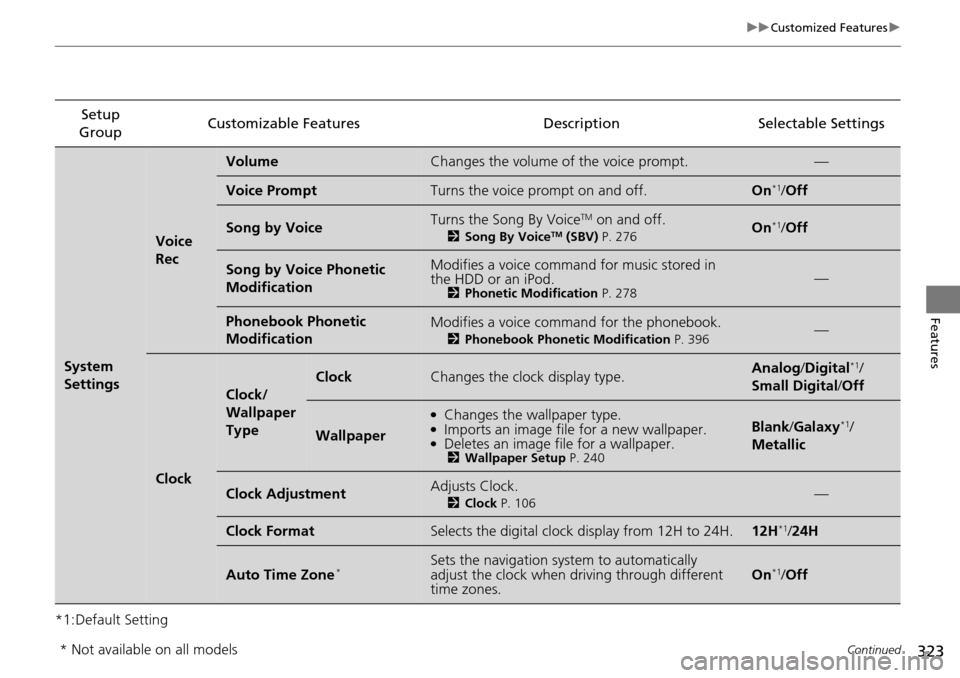
VolumeChanges the volume of the voice prompt.—
Voice PromptTurns the voice prompt on and off.On*1/
Off
Song by VoiceTurns the Song By VoiceTM on and off.
2 Song By VoiceTM (SBV) P. 276On*1/Off
Song by Voice Phonetic
ModificationModifies a voice command for music stored in
the HDD or an iPod.
2 Phonetic Modification P. 278—
Phonebook Phonetic
ModificationModifies a voice command for the phonebook.
2Phonebook Phonetic Modification P. 396—
Clock
Clock/
Wallpaper
Type
ClockChanges the clock display type.Analog/Digital*1/
Small Digital/ Off
Wallpaper
●Changes the wallpaper type.●Imports an image file for a new wallpaper.●Deletes an image file for a wallpaper.2Wallpaper Setup P. 240
Blank/Galaxy*1/
Metallic
Clock AdjustmentAdjusts Clock.
2 Clock P. 106—
Clock FormatSelects the digital clock display from 12H to 24H.12H*1/24H
Auto Time Zone*Sets the navigation syst em to automatically
adjust the clock when driving through different
time zones.On*1/ Off
* Not available on all models
Page 325 of 593
324
uuCustomized Features u
Features
*1:Default SettingSetup
Group Customizable Features Descri
ption Selectable Settings
System
Settings
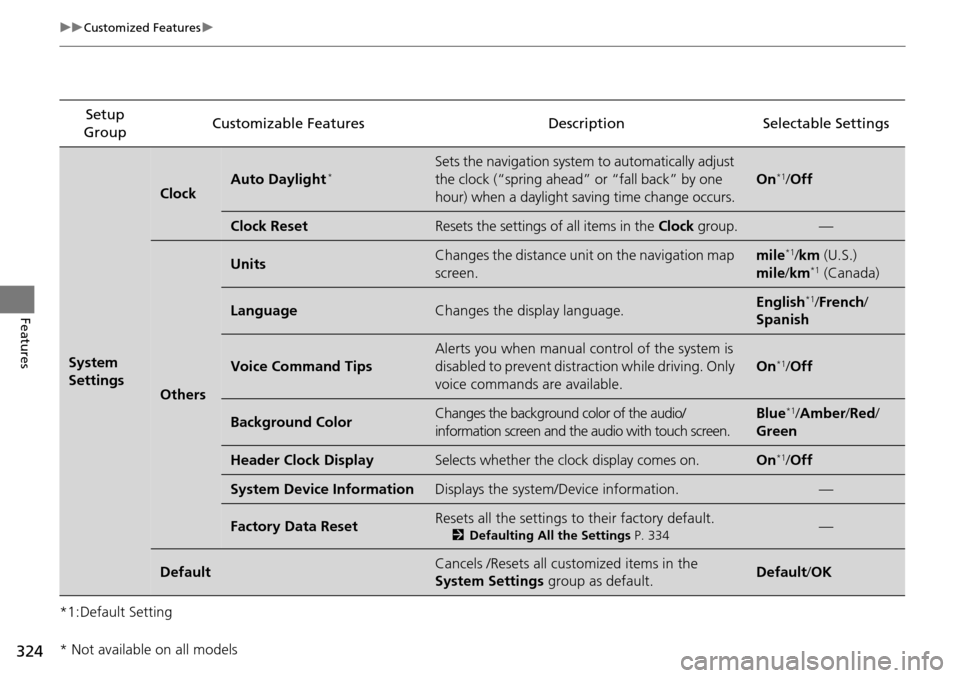
ClockAuto Daylight*Sets the navigation system to automatically adjust
the clock (“spring ahead” or “fall back” by one
hour) when a daylight saving time change occurs.
On*1/Off
Clock ResetResets the settings of all items in the Clock group.—
Others
UnitsChanges the distance unit on the navigation map
screen.mile*1/km (U.S.)
mile /km*1 (Canada)
LanguageChanges the display language.English*1/French /
Spanish
Voice Command Tips
Alerts you when manual control of the system is
disabled to prevent distraction while driving. Only
voice commands are available.
On*1/ Off
Background ColorChanges the background color of the audio/
information screen and the audio with touch screen.Blue*1/Amber /Red/
Green
Header Clock DisplaySelects whether the clock display comes on.On*1/ Off
System Device InformationDisplays the system /Device information.—
Factory Data ResetResets all the settings to their factory default.
2Defaulting All the Settings P. 334—
DefaultCancels /Resets all customized items in the
System Settings group as default.Default/OK
* Not available on all models
Page 333 of 593
332
uuCustomized Features u
Features
*1:Default SettingSetup
Group Customizable Features Descri
ption Selectable Settings
Info
Settings Clock
Clock/
Wallpaper
type
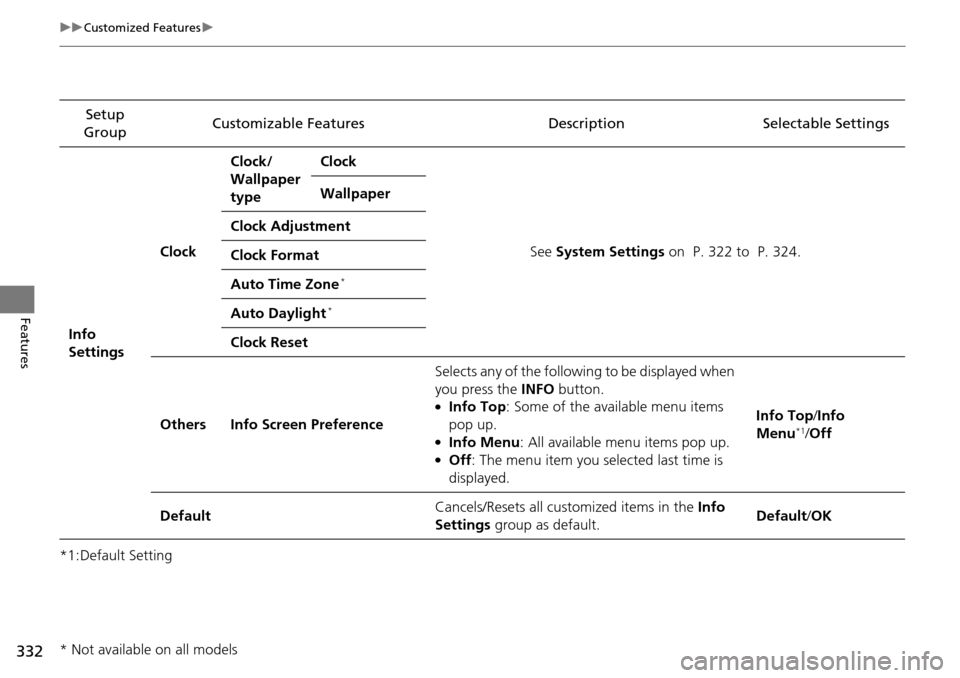
Clock
See System Settings on P. 322 to P. 324.
Wallpaper
Clock Adjustment
Clock Format
Auto Time Zone
*
Auto Daylight*
Clock Reset
Others Info Screen Preference Selects any of the following to be displayed when
you press the
INFO button.
●Info Top : Some of the available menu items
pop up.
●Info Menu: All available menu items pop up.●Off : The menu item you selected last time is
displayed. Info Top
/Info
Menu
*1/ Off
Default Cancels/Resets all cust
omized items in the Info
Settings group as default. Default
/OK
* Not available on all models
Page 533 of 593
532
Maintenance
Battery
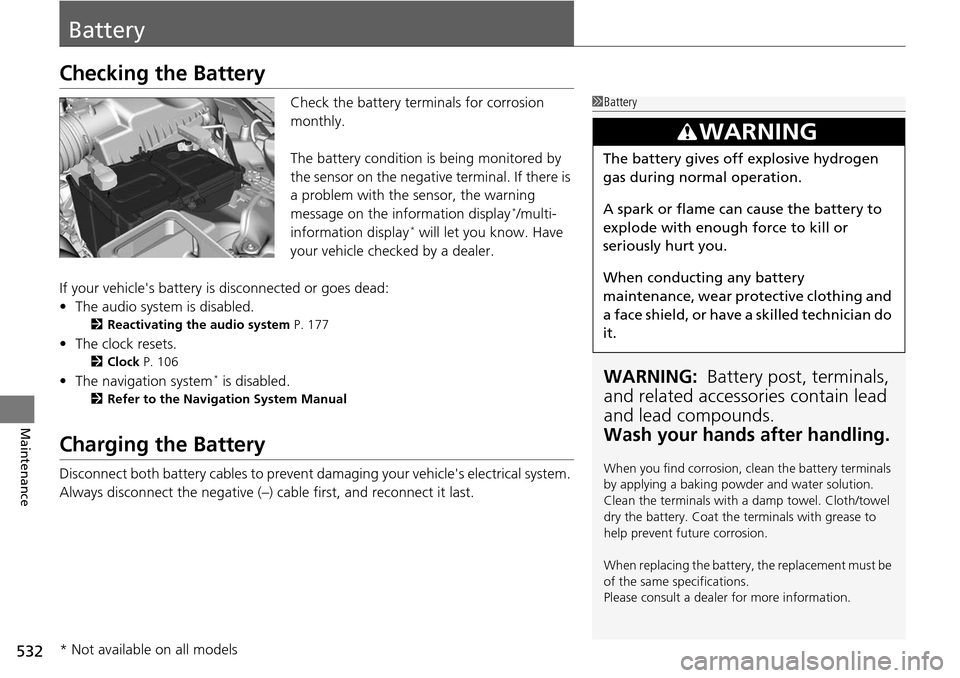
Checking the Battery
Check the battery terminals for corrosion
monthly.
The battery condition is being monitored by
the sensor on the negative terminal. If there is
a problem with the sensor, the warning
message on the information display
*/multi-
information display* will let you know. Have
your vehicle checked by a dealer.
If your vehicle's battery is disconnected or goes dead:
• The audio system is disabled.
2 Reactivating the audio system P. 177
•The clock resets.
2 Clock P. 106
•The navigation system* is disabled.
2 Refer to the Navigation System Manual
Charging the Battery
Disconnect both battery cables to prevent da maging your vehicle's electrical system.
Always disconnect the negative (–) cable first, and reconnect it last.
1 Battery
WARNING: Battery post, terminals,
and related accessories contain lead
and lead compounds.
Wash your hands after handling.
When you find corrosion, cl ean the battery terminals
by applying a baking powder and water solution.
Clean the terminals with a damp towel. Cloth/towel
dry the battery. Coat the terminals with grease to
help prevent future corrosion.
When replacing the battery, the replacement must be
of the same specifications.
Please consult a dealer for more information.
3WARNING
The battery gives off explosive hydrogen
gas during normal operation.
A spark or flame can cause the battery to
explode with enough force to kill or
seriously hurt you.
When conducting any battery
maintenance, wear prot ective clothing and
a face shield, or have a skilled technician do
it.
* Not available on all models