Load HONDA ACCORD COUPE 2017 9.G Owners Manual
[x] Cancel search | Manufacturer: HONDA, Model Year: 2017, Model line: ACCORD COUPE, Model: HONDA ACCORD COUPE 2017 9.GPages: 609
Page 149 of 609
148
uuOperating the Switches Around the Steering Wheel uAuto High-Beam (High Beam Support System)*
Controls
Auto High-Beam (High Beam Support System)*
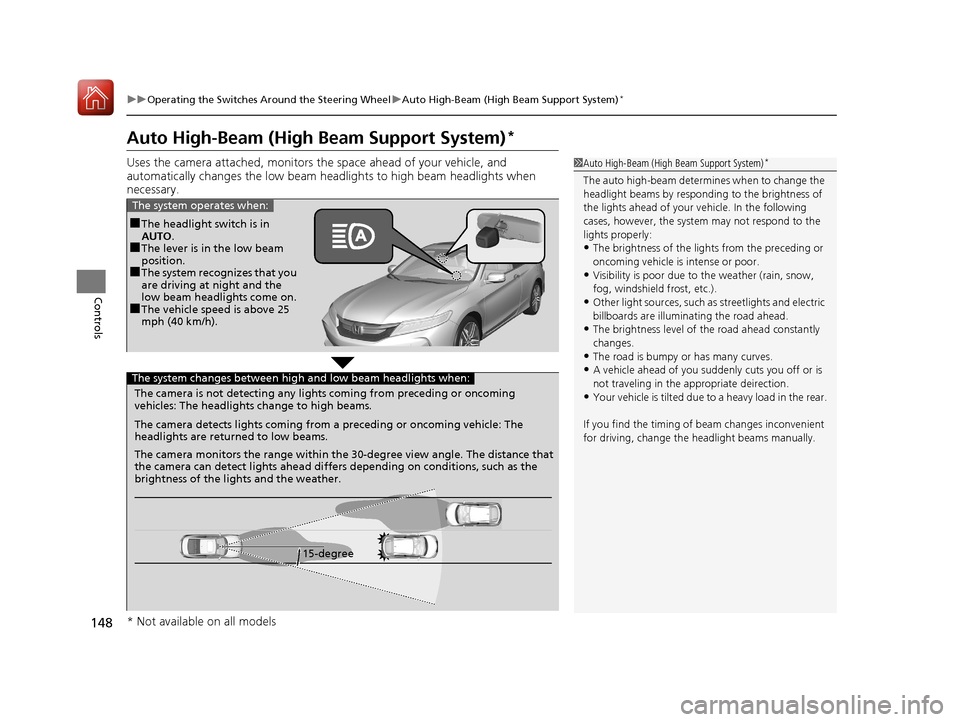
Uses the camera attached, monitors the space ahead of yo ur vehicle, and
automatically changes the low beam he adlights to high beam headlights when
necessary.1 Auto High-Beam (High Beam Support System)*
The auto high-beam determines when to change the
headlight beams by respondi ng to the brightness of
the lights ahead of your vehicle. In the following
cases, however, the system may not respond to the
lights properly:
•The brightness of the lights from the preceding or
oncoming vehicle is intense or poor.
•Visibility is poor due to the weather (rain, snow,
fog, windshield frost, etc.).
•Other light sources, such as streetlights and electric
billboards are illumina ting the road ahead.
•The brightness level of the road ahead constantly
changes.
•The road is bumpy or has many curves.
•A vehicle ahead of you suddenly cuts you off or is
not traveling in the a ppropriate deirection.
•Your vehicle is tilted due to a heavy load in the rear.
If you find the timing of beam changes inconvenient
for driving, change the headlight beams manually.
■The headlight switch is in
AUTO.
■The lever is in the low beam
position.
■The system recognizes that you
are driving at night and the
low beam headlights come on.
■The vehicle speed is above 25
mph (40 km/h).
The system operates when:
The camera is not detecting any lights coming from preceding or oncoming
vehicles: The headlights change to high beams.
15-degree
The camera detects lights coming from a preceding or oncoming vehicle: The
headlights are returned to low beams.
The camera monitors the range within the 30-degree view angle. The distance that
the camera can detect lights ahead differ
s depending on conditions, such as the
brightness of the lights and the weather.
The system changes between high and low beam headlights when:
* Not available on all models
16 US ACCORD 2D (KA KC KL)-31T3L6300.book 148 ページ 2015年9月25日 金曜日 午前11時39分
Page 153 of 609
152
uuOperating the Switches Around the Steering Wheel uWipers and Washers
Controls
Wipers and Washers
The windshield wipers and washers can be
used when the ignition switch is in ON
(w*1.
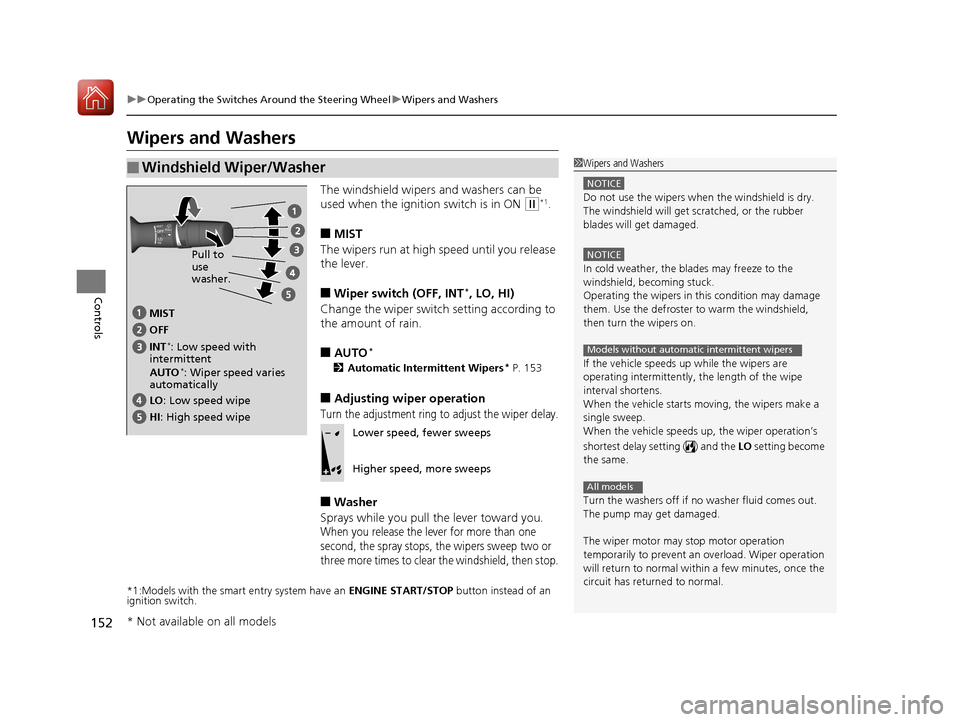
■MIST
The wipers run at high speed until you release
the lever.
■Wiper switch (OFF, INT*, LO, HI)
Change the wiper switch setting according to
the amount of rain.
■AUTO*
2 Automatic Intermittent Wipers* P. 153
■Adjusting wiper operation
Turn the adjustment ring to adjust the wiper delay.
■Washer
Sprays while you pull the lever toward you.
When you release the lever for more than one
second, the spray stops, the wipers sweep two or
three more times to clear the windshield, then stop.
*1:Models with the smart entry system have an ENGINE START/STOP button instead of an
ignition switch.
■Windshield Wiper/Washer1 Wipers and Washers
NOTICE
Do not use the wipers when the windshield is dry.
The windshield will get sc ratched, or the rubber
blades will get damaged.
NOTICE
In cold weather, the blades may freeze to the
windshield, becoming stuck.
Operating the wipers in this condition may damage
them. Use the defroster to warm the windshield,
then turn the wipers on.
If the vehicle speeds up while the wipers are
operating intermittently, the length of the wipe
interval shortens.
When the vehicle starts moving, the wipers make a
single sweep.
When the vehicle speeds up, the wiper operation’s
shortest delay se tting ( ) and the LO setting become
the same.
Turn the washers off if no washer fluid comes out.
The pump may get damaged.
The wiper motor may stop motor operation
temporarily to prevent an overload. Wiper operation
will return to normal within a few minutes, once the
circuit has returned to normal.
Models without automatic intermittent wipers
All models
MIST
INT
*: Low speed with
intermittent OFF
LO: Low speed wipe
HI : High speed wipe Pull to
use
washer.
AUTO
*: Wiper speed varies
automatically
Lower speed, fewer sweeps
Higher speed, more sweeps
* Not available on all models
16 US ACCORD 2D (KA KC KL)-31T3L6300.book 152 ページ 2015年9月25日 金曜日 午前11時39分
Page 178 of 609
Continued177
uuInterior Lights/Interior Convenience Items uInterior Convenience Items
Controls
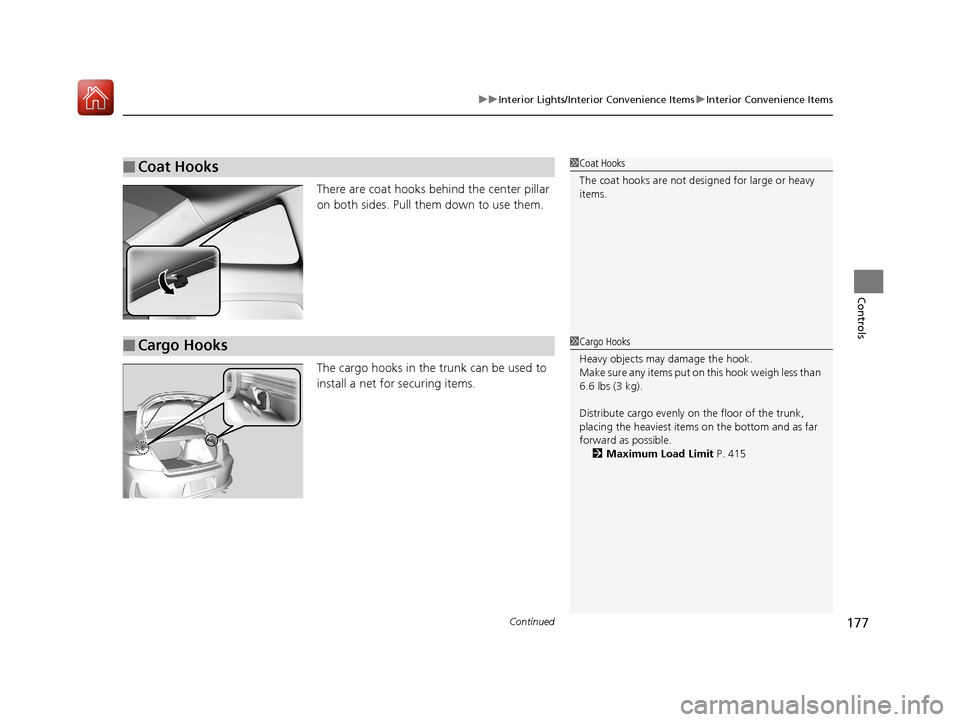
There are coat hooks behind the center pillar
on both sides. Pull them down to use them.
The cargo hooks in the trunk can be used to
install a net for securing items.
■Coat Hooks1Coat Hooks
The coat hooks are not desi gned for large or heavy
items.
■Cargo Hooks1 Cargo Hooks
Heavy objects may damage the hook.
Make sure any items put on this hook weigh less than
6.6 lbs (3 kg).
Distribute cargo evenly on the floor of the trunk,
placing the heaviest item s on the bottom and as far
forward as possible.
2 Maximum Load Limit P. 415
16 US ACCORD 2D (KA KC KL)-31T3L6300.book 177 ページ 2015年9月25日 金曜日 午前11時39分
Page 202 of 609
201
uuAudio System Basic Operation uPlaying a CD
Continued
Features
Playing a CD
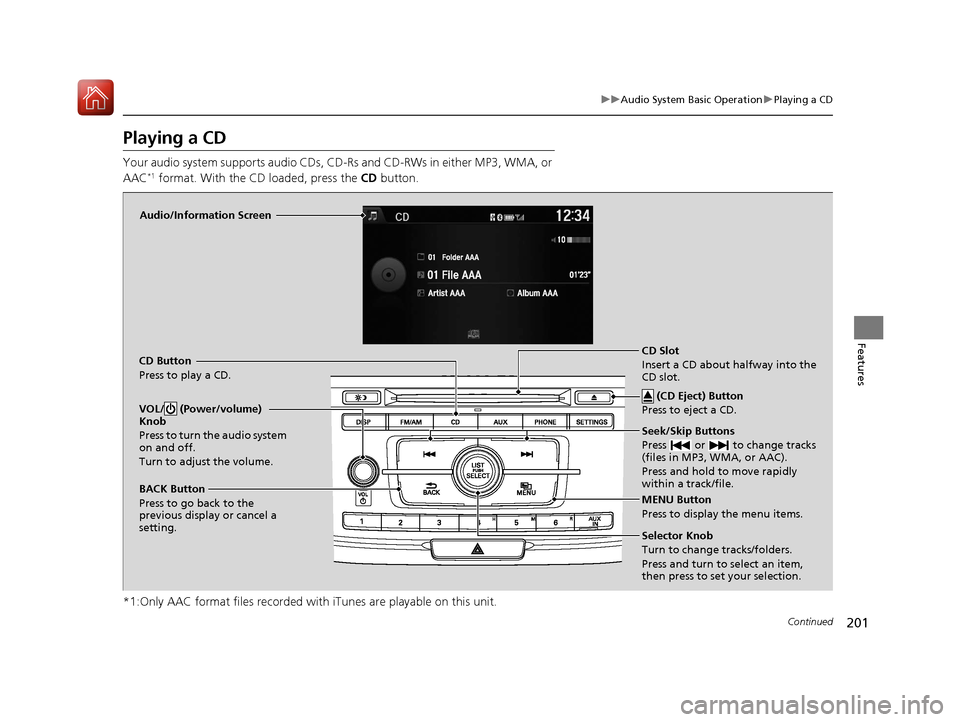
Your audio system supports audio CDs, CD-Rs and CD-RWs in either MP3, WMA, or
AAC*1 format. With the CD loaded, press the CD button.
*1:Only AAC format files recorded with iTunes are playable on this unit.
Audio/Information Screen
CD Button
Press to play a CD. Seek/Skip Buttons
Press or to change tracks
(files in MP3, WMA, or AAC).
Press and hold to move rapidly
within a track/file.
MENU Button
Press to display the menu items.
Selector Knob
Turn to change tracks/folders.
Press and turn to select an item,
then press to set your selection.
VOL/ (Power/volume)
Knob
Press to turn the audio system
on and off.
Turn to adjust the volume.
BACK Button
Press to go back to the
previous display or cancel a
setting.
CD Slot
Insert a CD about halfway into the
CD slot. (CD Eject) Button
Press to eject a CD.
16 US ACCORD 2D (KA KC KL)-31T3L6300.book 201 ページ 2015年9月25日 金曜日 午前11時39分
Page 203 of 609
uuAudio System Basic Operation uPlaying a CD
202
Features
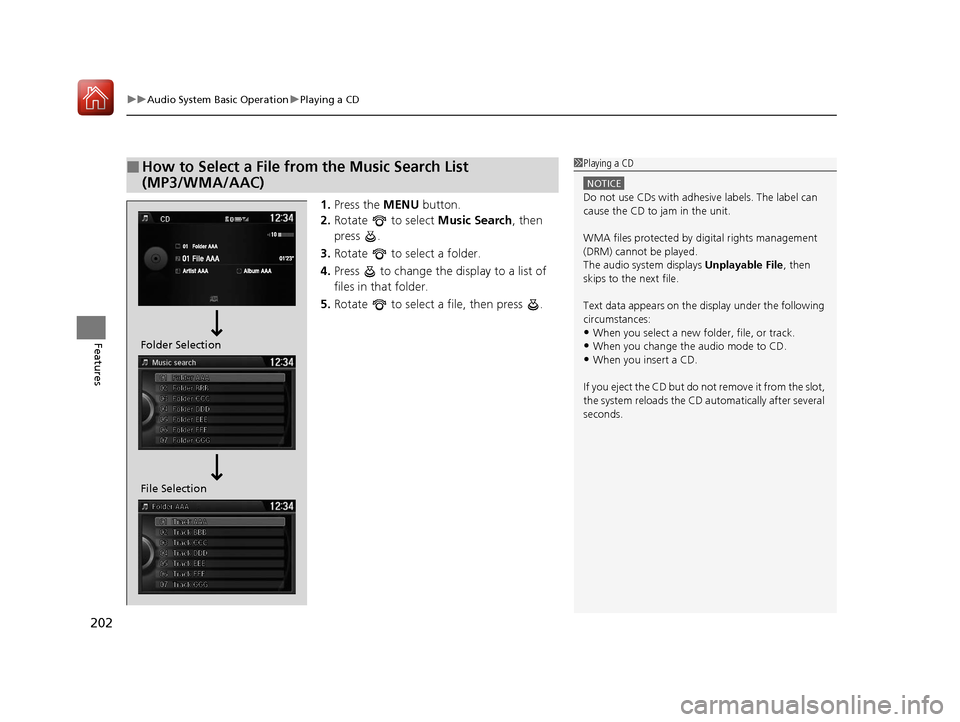
1. Press the MENU button.
2. Rotate to select Music Search, then
press .
3. Rotate to select a folder.
4. Press to change the display to a list of
files in that folder.
5. Rotate to select a file, then press .
■How to Select a File from the Music Search List
(MP3/WMA/AAC)1Playing a CD
NOTICE
Do not use CDs with adhesive labels. The label can
cause the CD to jam in the unit.
WMA files protected by di gital rights management
(DRM) cannot be played.
The audio system displays Unplayable File, then
skips to the next file.
Text data appears on the di splay under the following
circumstances:
•When you select a new folder, file, or track.
•When you change the audio mode to CD.
•When you insert a CD.
If you eject the CD but do not remove it from the slot,
the system reloads the CD automatically after several
seconds.
File Selection Folder Selection
16 US ACCORD 2D (KA KC KL)-31T3L6300.book 202 ページ 2015年9月25日 金曜日 午前11時39分
Page 226 of 609
Continued225
uuAudio System Basic Operation uAudio/Information Touch Screen
Features
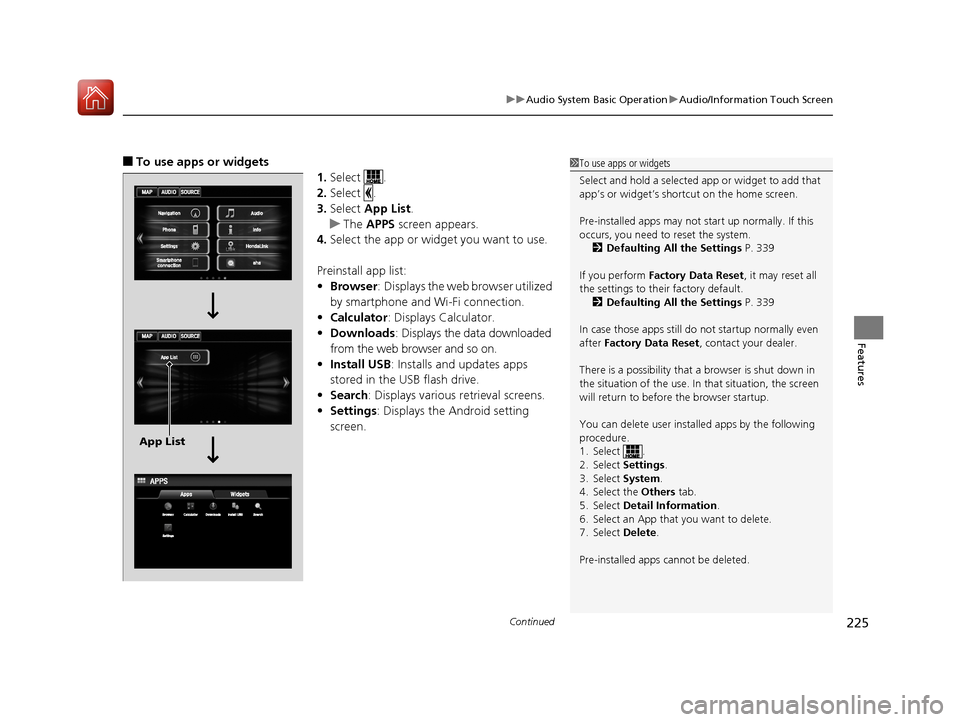
■To use apps or widgets
1.Select .
2. Select .
3. Select App List .
u The APPS screen appears.
4. Select the app or widget you want to use.
Preinstall app list:
• Browser : Displays the web browser utilized
by smartphone and Wi-Fi connection.
• Calculator : Displays Calculator.
• Downloads : Displays the data downloaded
from the web browser and so on.
• Install USB : Installs and updates apps
stored in the USB flash drive.
• Search : Displays various retrieval screens.
• Settings : Displays the Android setting
screen.1 To use apps or widgets
Select and hold a selected app or widget to add that
app’s or widget’s shortcut on the home screen.
Pre-installed apps may not start up normally. If this
occurs, you need to reset the system.
2 Defaulting All the Settings P. 339
If you perform Factory Data Reset , it may reset all
the settings to their factory default. 2 Defaulting All the Settings P. 339
In case those apps still do not startup normally even
after Factory Data Reset , contact your dealer.
There is a possibility that a browser is shut down in
the situation of the use. In that situation, the screen
will return to before the browser startup.
You can delete user installed apps by the following
procedure.
1. Select .
2. Select Settings .
3. Select System .
4. Select the Others tab.
5. Select Detail Information .
6. Select an App that you want to delete.
7. Select Delete .
Pre-installed apps cannot be deleted.
App List
16 US ACCORD 2D (KA KC KL)-31T3L6300.book 225 ページ 2015年9月25日 金曜日 午前11時39分
Page 246 of 609
Continued245
uuAudio System Basic Operation uPlaying SiriusXM ® Radio*
Features
1. Select .
2. Select Tune Mode .
3. Select Channel Mode or Category Mode .
■To Change the Tune Mode1Playing SiriusXM ® Radio*
In the channel mode, all available channels are
selectable. In the categor y mode, you can select a
channel within a ca tegory (Jazz, Rock, Classical, etc.).
There may be instances when SiriusXM ® Radio does
not broadcast all the data fi elds (artist name, title).
This does not indicate a problem with your audio
system.
SiriusXM ® Radio stations load in ascending order,
which can take about a mi nute. Once they have
loaded you will be able to scroll up or down to make
your selections.
Switching the Audio Mode
Press the SOURCE button on the steering wheel or
select SOURCE on the screen.
2 Audio Remote Controls P. 190
Tune Start:
When you change to a pres et channel, a song being
played on that channel restarts from the beginning
with this function. This can be turned on or off from
the Audio settings screen.
2 Customized Features P. 316
* Not available on all models
16 US ACCORD 2D (KA KC KL)-31T3L6300.book 245 ページ 2015年9月25日 金曜日 午前11時39分
Page 253 of 609
252
uuAudio System Basic Operation uPlaying a CD
Features
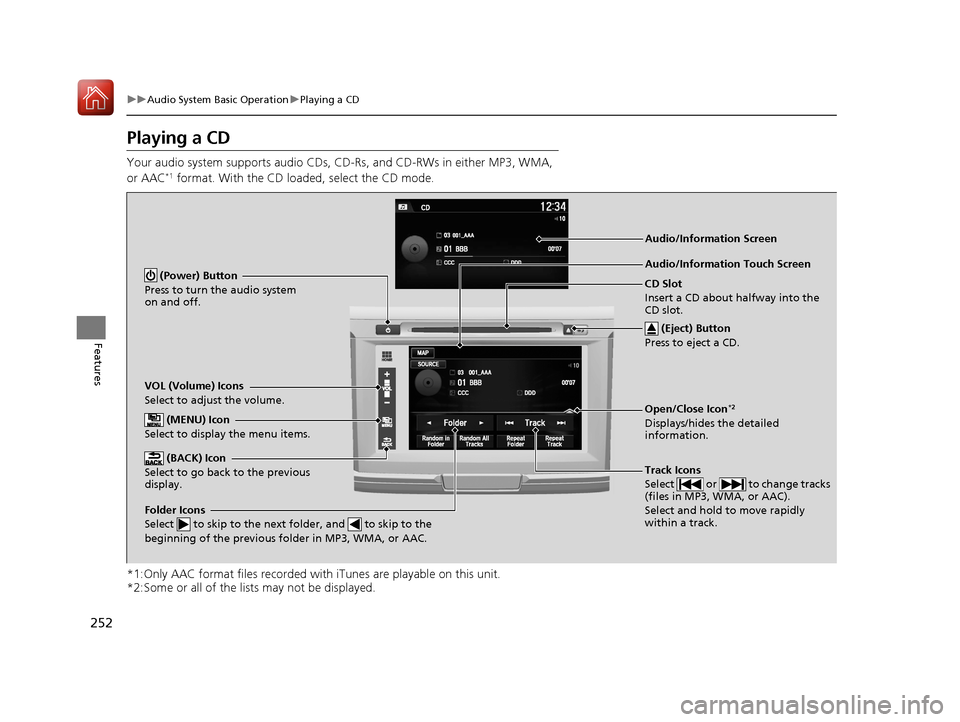
Playing a CD
Your audio system supports audio CDs, CD-Rs, and CD-RWs in either MP3, WMA,
or AAC*1 format. With the CD loaded, select the CD mode.
*1:Only AAC format files recorded with iTunes are playable on this unit.
*2:Some or all of the lists may not be displayed.
VOL (Volume) Icons
Select to adjust the volume.
(BACK) Icon
Select to go back to the previous
display.
Track Icons
Select or to change tracks
(files in MP3, WMA, or AAC).
Select and hold to move rapidly
within a track.
(Power) Button
Press to turn the audio system
on and off.
Open/Close Icon*2
Displays/hides the detailed
information.
(MENU) Icon
Select to display the menu items.
(Eject) Button
Press to eject a CD.
Audio/Information Touch Screen
Folder Icons
Select to skip to the next folder, and to skip to the
beginning of the previous folder in MP3, WMA, or AAC.
Audio/Information Screen
CD Slot
Insert a CD about halfway into the
CD slot.
16 US ACCORD 2D (KA KC KL)-31T3L6300.book 252 ページ 2015年9月25日 金曜日 午前11時39分
Page 254 of 609
Continued253
uuAudio System Basic Operation uPlaying a CD
Features
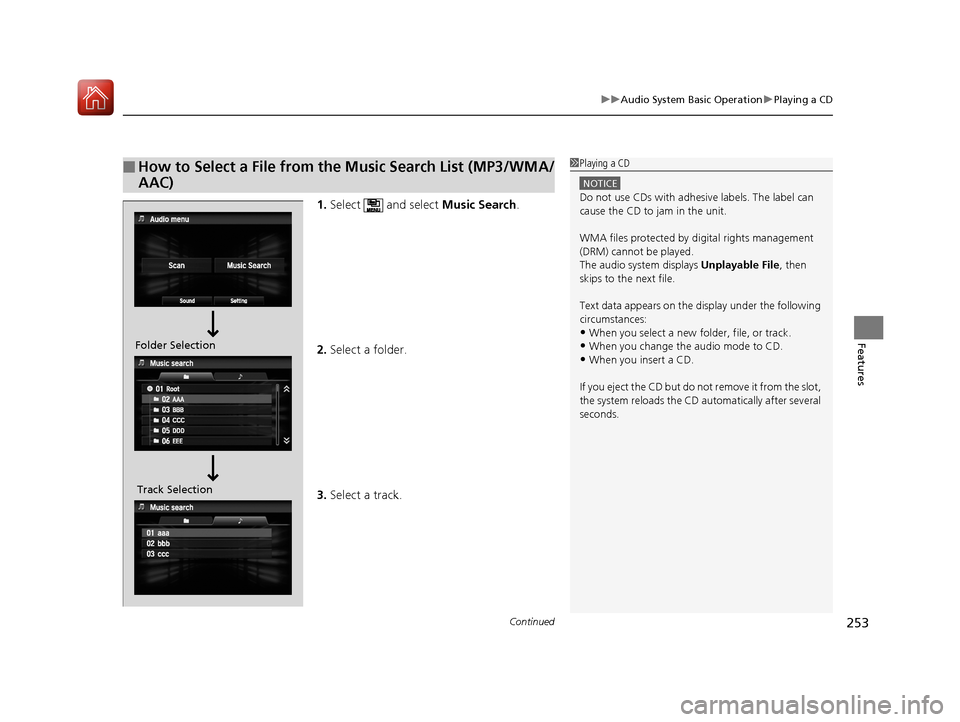
1. Select and select Music Search.
2. Select a folder.
3. Select a track.
■How to Select a File from the Music Search List (MP3/WMA/
AAC)1Playing a CD
NOTICE
Do not use CDs with adhesive labels. The label can
cause the CD to jam in the unit.
WMA files protected by di gital rights management
(DRM) cannot be played.
The audio system displays Unplayable File, then
skips to the next file.
Text data appears on the di splay under the following
circumstances:
•When you select a new folder, file, or track.
•When you change the audio mode to CD.
•When you insert a CD.
If you eject the CD but do not remove it from the slot,
the system reloads the CD automatically after several
seconds.
Folder Selection
Track Selection
16 US ACCORD 2D (KA KC KL)-31T3L6300.book 253 ページ 2015年9月25日 金曜日 午前11時39分
Page 265 of 609
264
uuAudio System Basic Operation uPlaying AhaTM
Features
Playing AhaTM
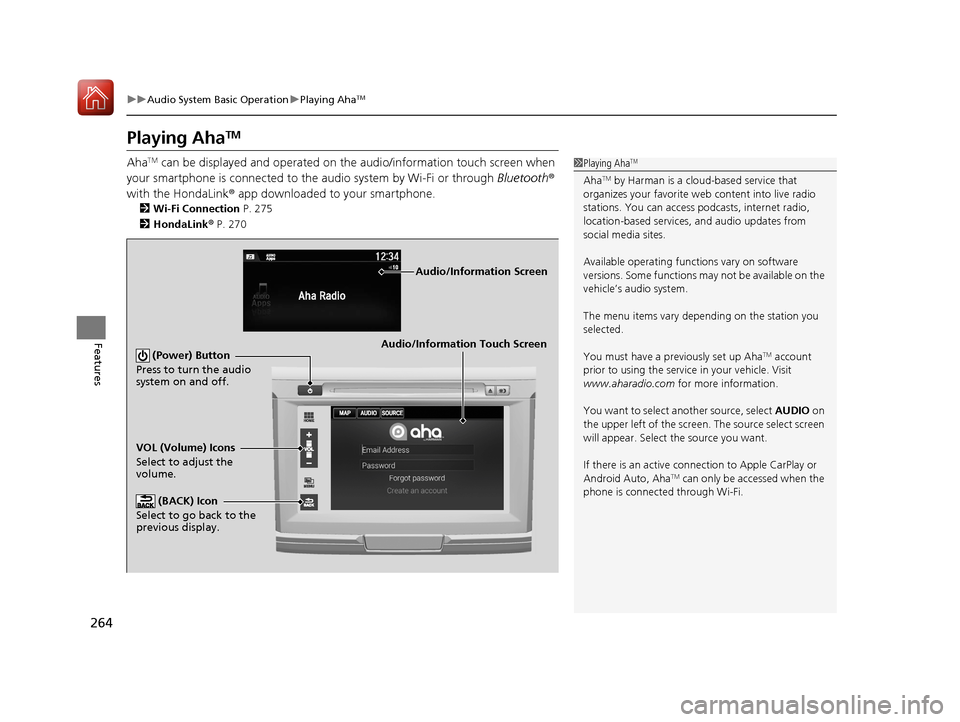
AhaTM can be displayed and operated on the audio/information touch screen when
your smartphone is connected to the audio system by Wi-Fi or through Bluetooth®
with the HondaLink ® app downloaded to your smartphone.
2Wi-Fi Connection P. 275
2 HondaLink ® P. 270
1 Playing AhaTM
AhaTM by Harman is a clou d-based service that
organizes your favorite we b content into live radio
stations. You can access podcasts, internet radio,
location-based services , and audio updates from
social media sites.
Available operating functi ons vary on software
versions. Some functions ma y not be available on the
vehicle’s audio system.
The menu items vary depending on the station you
selected.
You must have a previously set up Aha
TM account
prior to using the service in your vehicle. Visit
www.aharadio.com for more information.
You want to select another source, select AUDIO on
the upper left of the screen. The source select screen
will appear. Select the source you want.
If there is an active connection to Appl e CarPlay or
Android Auto, Aha
TM can only be accessed when the
phone is connected through Wi-Fi.
Audio/Information Touch Screen
VOL (Volume) Icons
Select to adjust the
volume. (BACK) Icon
Select to go back to the
previous display. (Power) Button
Press to turn the audio
system on and off.
Audio/Information Screen
16 US ACCORD 2D (KA KC KL)-31T3L6300.book 264 ページ 2015年9月25日 金曜日 午前11時39分