brake HONDA ACCORD SEDAN 2013 9.G Technology Reference Guide
[x] Cancel search | Manufacturer: HONDA, Model Year: 2013, Model line: ACCORD SEDAN, Model: HONDA ACCORD SEDAN 2013 9.GPages: 26, PDF Size: 2.59 MB
Page 3 of 26
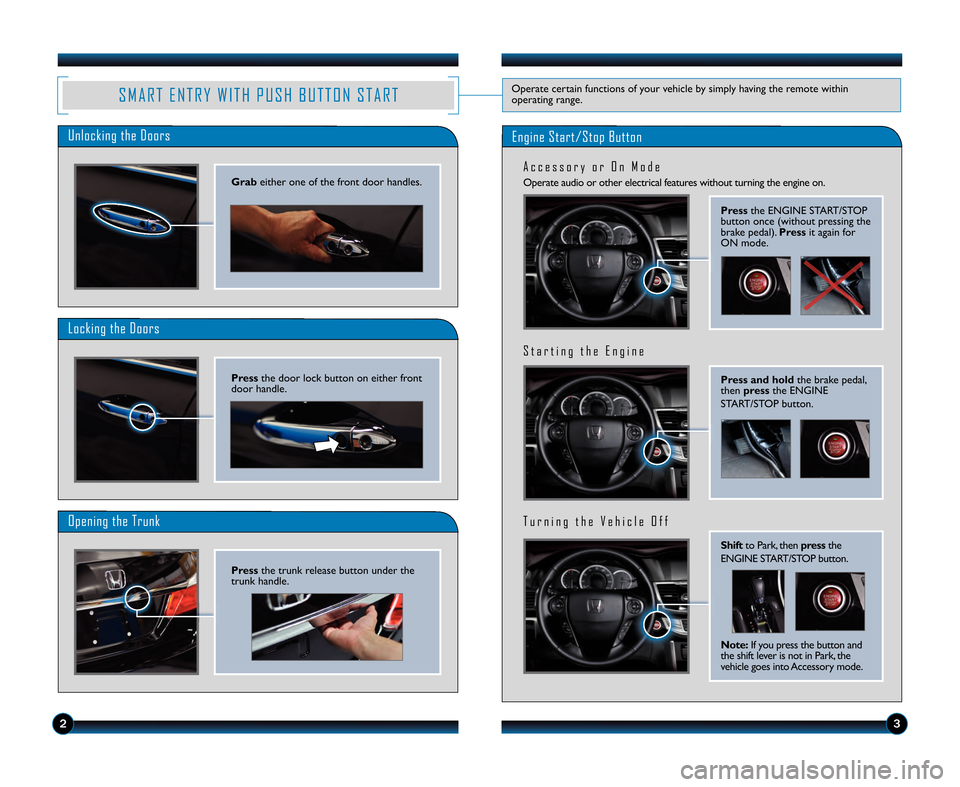
Operate audio or other electrical features without turning the engine on.
A c c e s s o r y o r \f n M o d e
S M A R T E N T R Y W \b T H P U S H B U T T \f N S T A R TOperate certain functions of your vehicle by simply having the remote within
operating range.
Unlocking the Doors
Locking the Doors
\fpening the Trunk
Engine Start/Stop Button
23
Press and \foldthe brake pedal,
then press the E\fGI\fE
ST\bRT/STOP button.
S t a r t i n g t h e E n g i n e
T u r n i n g t h e V e h i c l e \f f f
Press the E\fGI\fE ST\bRT/STOP
button once (without pressing the
brake pedal). Pressit again for
O\f mode.
Gra\b either one of the front door handles.
Press the door lock button on either front
door handle.
Press the trunk release button under the
trunk handle.
S\fift to Park, then pressthe
E\fGI\fE ST\bRT/STOP button.
Note: If you press the button and
the shift lever is not in Park, the
vehicle goes into \bccessory mode.
13 Accord4D TRG_TOURING\fATG_NEW\A STYLE 7/13/2012 5\f17 PM Page 3
Page 5 of 26
67
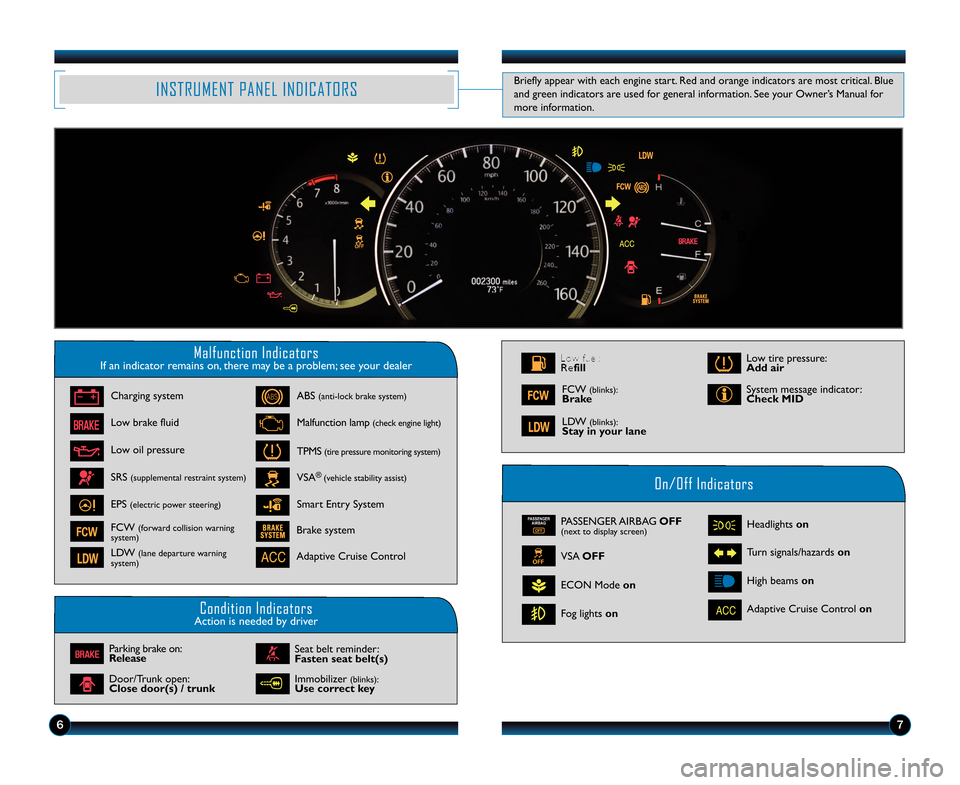
INST\fU\bENT PANEL INDICATO\fS
\balfunction IndicatorsIf an indicator remains on, there may be a problem\b see your dealer
On/Off Indicators
Condition IndicatorsAction is needed by driver
PASSENGER AIRBAG O\b\b(next to display screen)
VSA O\b\b
ECON Mode on
Fog lights on Headlights on
Turn signals/hazards on
High beams on
Charging system
Low brake fluid
ABS
(antilock brake system)
Malfunction lamp (check engine light)
TPMS (tire pressure monitoring system)
VSA®(vehicle stability assist)
Parking brake on:
\felease
Seat belt reminder:
\basten seat belt(s)\S
Brake system
Adaptive Cruise Control
Adaptive Cruise Control on
Smart Entry System
Low oil pressure
SRS
(supplemental restraint system)
EPS (electric power steering)
FCW (forward collision warning
system)
L\fW (lane departure warning
system)
\foor/Trunk open:
Close door(s) / tr\Sunk Low tire pressure:
Add air
System message indicator:
Check MID
Low fuel:
\fefill
L\fW (blinks): Stay in your lane
FCW (blinks): Brake
Immobilizer (blinks):Use correct key
Briefly appear with each engine start. Red and orange indicators a\Ere most critical. Blue
and green indicators are used for general information. See your Owner’s Manual for
more information.
13 Accord 4D TRG_TOUR\AING_ATG_NEW STYLE \A8/9/2012 10\f33 AM \APage 5
Page 12 of 26
2021
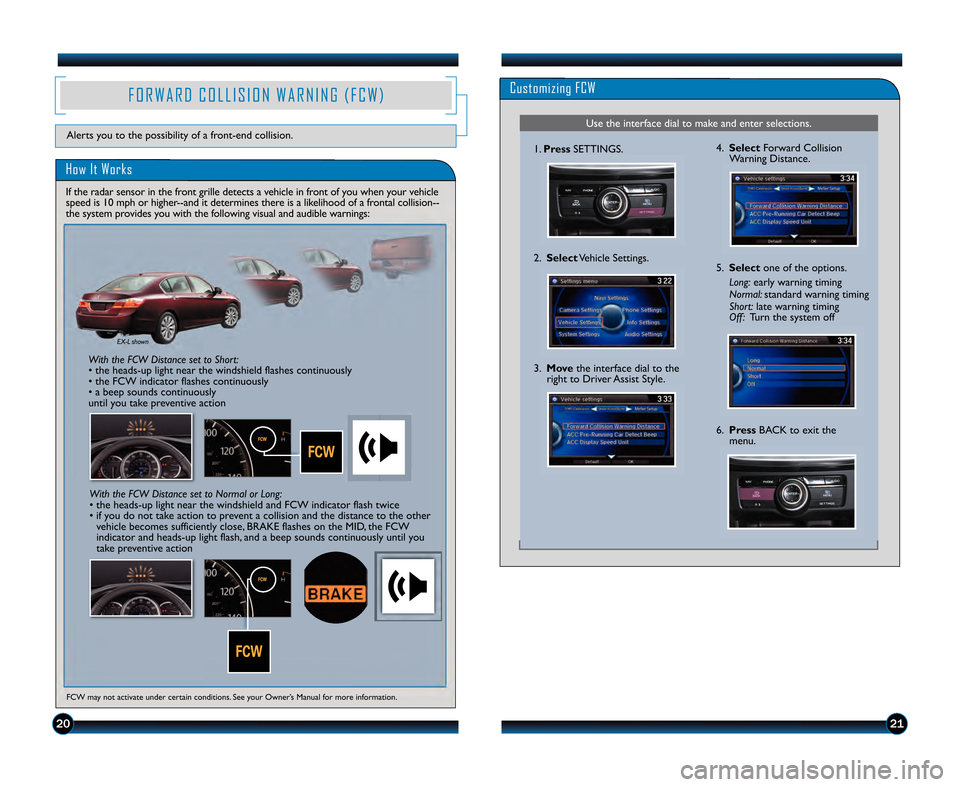
Customizing FCW
Use the interface dial to make and enter selections.
1.Press SETTINGS.
2. Select Vehicle Settings.
5.Select one of the options.
\bong: early warning timing
Normal: standard warning timing
Short: late warning timing
Off: Turn the system off
6.Press BACK to exit the
menu.
3.
Move the interface dial to the
right to Driver Assist Style.
\f. Select Forward Collision
Warning Distance.
FCW may not activate under certain conditions. See your Owner’s Manual for more information.
F O R W A R \b C O L L I S I O N W A R N I N G ( F C W )
\fow It Works
Alerts you to the possibility of a frontend collision.
If the radar sensor in the front grille detects a vehicle in front of you when your vehicle
speed is 1\b mph or higherand it determines there is a likelihood of a frontal collision
the system provides you with the following visual and audible warnings:
\fith the FC\f Distance set to Short:
• the headsup light near the windshield flashes continuously
• the FCW indicator flashes continuously
• a beep sounds continuously
until you take preventive action
EX\b shown
\fith the FC\f Distance set to Normal or \bong:
• the headsup light near the windshield and FCW indicator flash twice
• if you do not take action to prevent a collision and the distance to the othervehicle becomes sufficiently close, BRAKE flashes on the MID, the FCW
indicator and headsup light flash, and a beep sounds continuously until you
take preventive action
13 Accord4D TRG_TOURING\fATG_NEW\A STYLE 7/1\b/2012 4\f13 PM Page 12
Page 13 of 26
2223
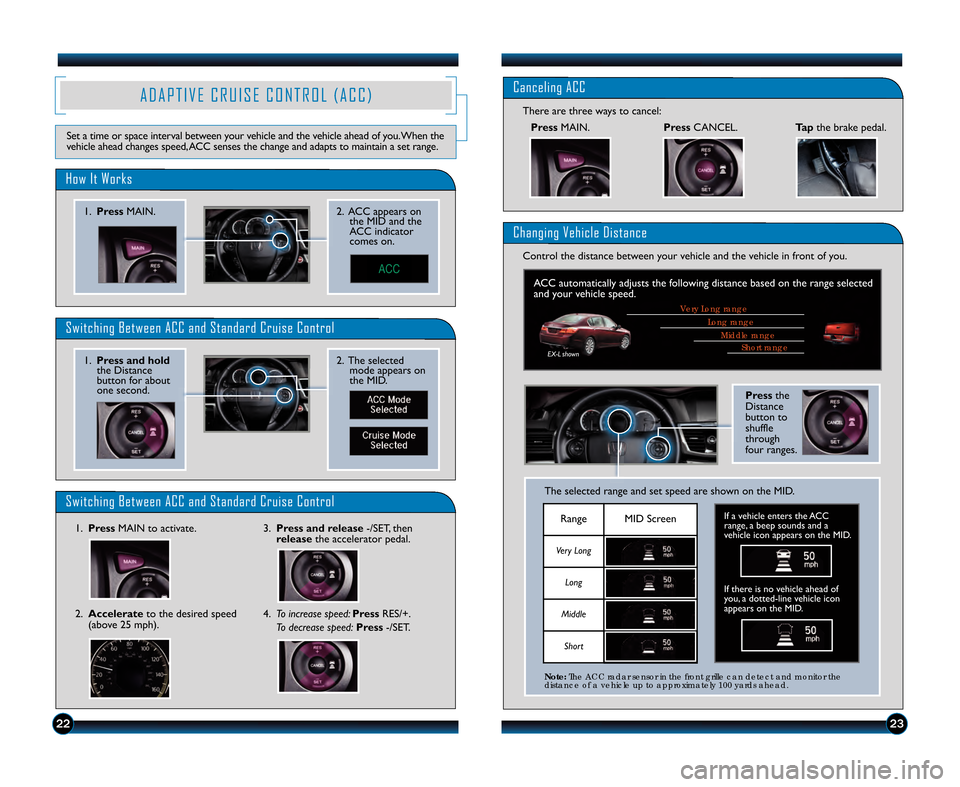
A D A P T I V E C R U I S E C O N T R O L ( A C C )
Set a time or space interval between your vehicle and the vehicle ahead of you.When the
vehicle ahead changes speed\bACC senses the change and adapts to maintain a set range.
How It Works
1.Press MAIN. 2. ACC appears on
the MID and the
ACC indicator
comes on.
Switching Between ACC and Standard Cruise Control
Switching Between ACC and Standard Cruise Control
2. The selectedmode appears on
the MID.1.Press and hold
the Distance
button for about
one second.
1. Press MAIN to activate.3.Press and release /SET\b then
release the accelerator pedal.
Canceling ACC
PressMAIN.
There are three ways to cancel:
Changing Vehicle Distance
Control the distance between your vehicle and the vehicle in front of you.
Press
CANCEL.Tapthe brake pedal.
2.Accelerate to the desired speed
(above 25 mph). 4.
To increase speed: PressRES/+.
To decrease speed: Press/SET.
Short r\fnge\biddle r\fnge
Long r\fnge
Very Long r\fnge
ACC automatically adjusts the following distance based on the range selected
and your vehicle speed.
Pressthe
Distance
button to
shuffle
through
four ranges.
The selected range and set speed are shown on the MID.
RangeMID Screen
Very Long
Long
Middle
Short
If there is no vehicle ahead of
you\b a dottedline vehicle icon
appears on the MID.
Note: The ACC r\fd\fr sensor in the front grille c\fn detect \fnd monitor the
dist\fnce of \f vehicle up to \fpproxim\ftely 100 y\frds \fhe\fd.
If a vehicle enters the ACC
range\b a beep sounds and a
vehicle icon appears on the MID.
EXL shown
13 Accord4D TRG_TOURING\fATG_NEW\A STYLE 7/13/2012 4\f43 PM Page 13