reset HONDA ACCORD SEDAN 2016 (in English) User Guide
[x] Cancel search | Manufacturer: HONDA, Model Year: 2016, Model line: ACCORD SEDAN, Model: HONDA ACCORD SEDAN 2016Pages: 609, PDF Size: 36.38 MB
Page 105 of 609
104
uuGauges and Displays uMulti-Information Display*
Instrument Panel
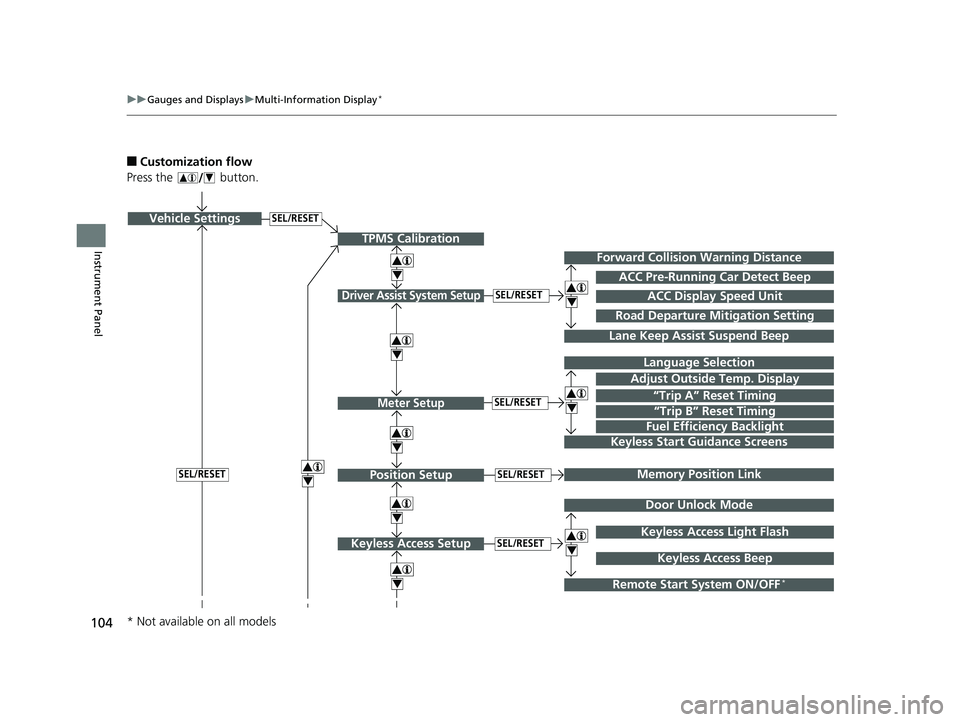
■Customization flow
Press the button.
SEL/RESETVehicle Settings
“Trip A” Reset Timing
Language Selection
Adjust Outside Temp. Display
Memory Position Link
Door Unlock Mode
Keyless Access Light Flash
4
4
4
4
TPMS Calibration
Driver Assist System Setup
Meter Setup
Position Setup
Keyless Access Setup
SEL/RESET
SEL/RESET
SEL/RESET
SEL/RESET
“Trip B” Reset Timing
Fuel Efficiency Backlight
4
ACC Pre-Running Car Detect Beep
ACC Display Speed Unit
4Keyless Start Guidance Screens
SEL/RESET
Keyless Access Beep
Forward Collision Warning Distance
4
4
4
Lane Keep Assist Suspend Beep
Road Departure Mi tigation Setting
Remote Start System ON/OFF*
* Not available on all models
16 US ACCORD 4D (KA KC KL)-31T2A6300.book 104 ページ 2015年9月25日 金曜日 午前10時38分
Page 106 of 609
105
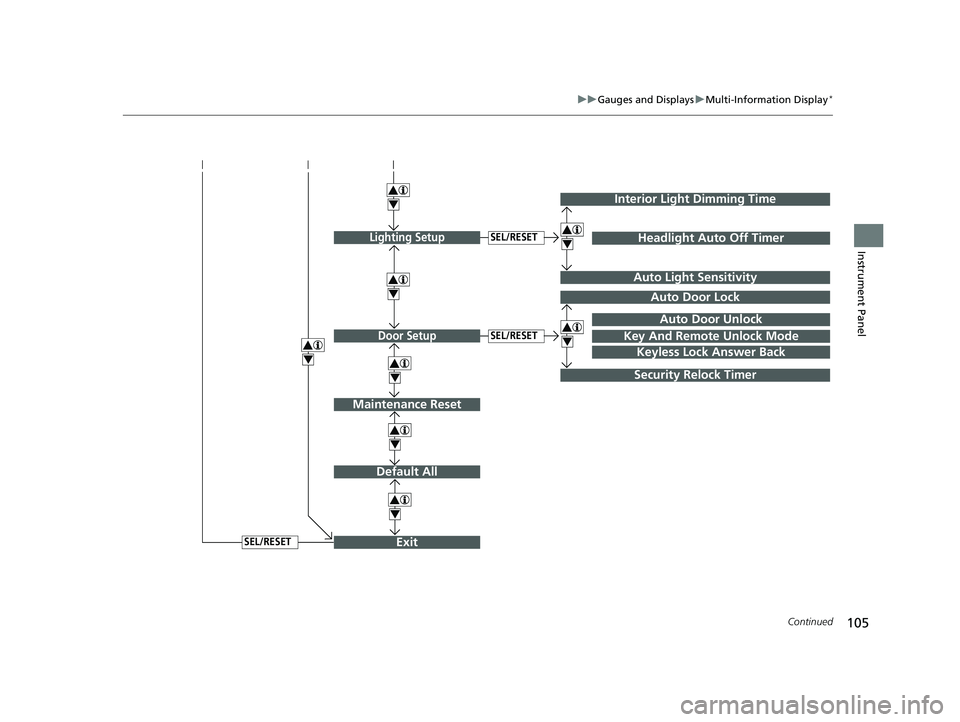
uuGauges and Displays uMulti-Information Display*
Continued
Instrument Panel
Exit
4
4
4
Door Setup
Maintenance Reset
Default All
SEL/RESET
4
SEL/RESET
4
Lighting SetupSEL/RESET
4
Key And Remote Unlock Mode
Auto Door Lock
Auto Door Unlock
Keyless Lock Answer Back
Security Relock Timer
Interior Light Dimming Time
Headlight Auto Off Timer
Auto Light Sensitivity
4
4
16 US ACCORD 4D (KA KC KL)-31T2A6300.book 105 ページ 2015年9月25日 金曜日 午前10時38分
Page 108 of 609
107
uuGauges and Displays uMulti-Information Display*
Continued
Instrument Panel
*1:Default SettingSetup Group Customizable Features
Description Selectable Settings
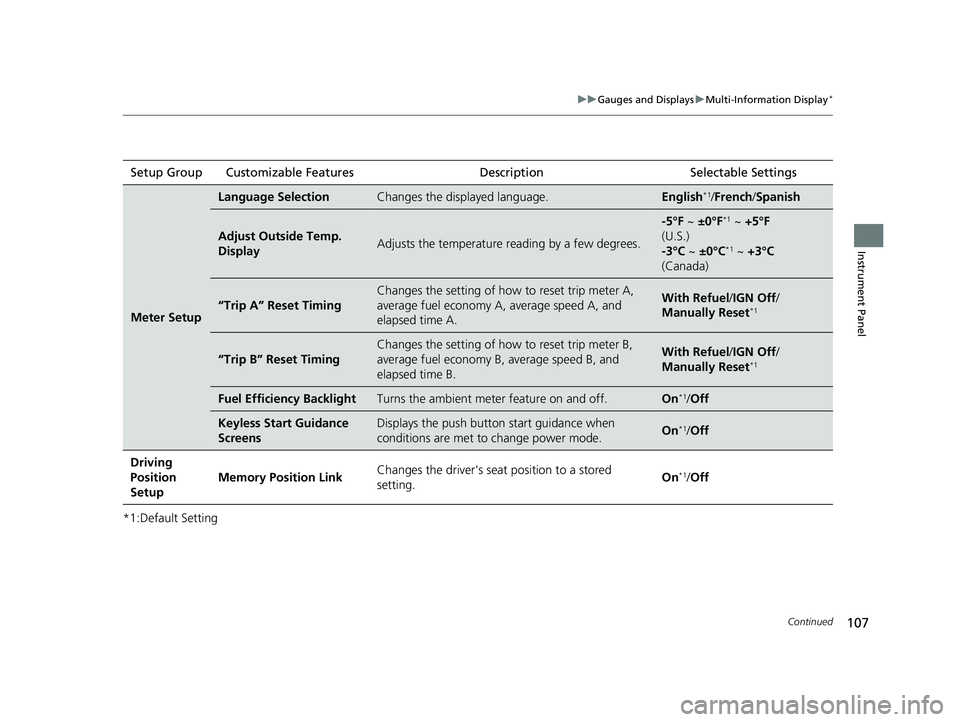
Meter Setup
Language SelectionChanges the displayed language.English*1/French /Spanish
Adjust Outside Temp.
DisplayAdjusts the temperature r eading by a few degrees.
-5°F ~ ±0°F*1 ~ +5°F
(U.S.)
-3°C ~ ±0°C
*1 ~ +3°C
(Canada)
“Trip A” Reset Timing
Changes the setting of how to reset trip meter A,
average fuel economy A, average speed A, and
elapsed time A.With Refuel /IGN Off /
Manually Reset*1
“Trip B” Reset Timing
Changes the setting of ho w to reset trip meter B,
average fuel economy B, average speed B, and
elapsed time B.With Refuel /IGN Off /
Manually Reset*1
Fuel Efficiency BacklightTurns the ambient meter feature on and off.On*1/ Off
Keyless Start Guidance
ScreensDisplays the push button start guidance when
conditions are met to change power mode.On*1/Off
Driving
Position
Setup Memory Position Link
Changes the driver's seat
position to a stored
setting. On
*1/
Off
16 US ACCORD 4D (KA KC KL)-31T2A6300.book 107 ページ 2015年9月25日 金曜日 午前10時38分
Page 110 of 609
109
uuGauges and Displays uMulti-Information Display*
Continued
Instrument Panel
*1: Default SettingSetup Group Customizable Features
Description Selectable Settings
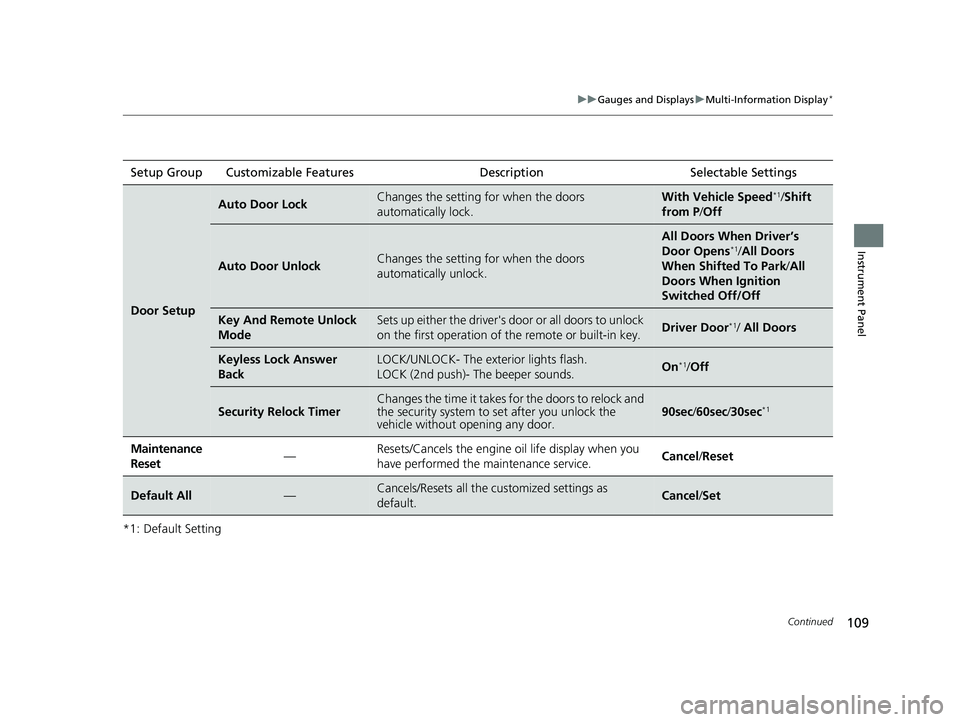
Door Setup
Auto Door LockChanges the setting for when the doors
automatically lock.With Vehicle Speed*1/Shift
from P /Off
Auto Door UnlockChanges the setting for when the doors
automatically unlock.
All Doors When Driver’s
Door Opens*1/All Doors
When Shifted To Park /All
Doors When Ignition
Switched Off/Off
Key And Remote Unlock
ModeSets up either the driver's door or all doors to unlock
on the first operation of the remote or built-in key.Driver Door*1/ All Doors
Keyless Lock Answer
BackLOCK/UNLOCK- The exterior lights flash.
LOCK (2nd push)- The beeper sounds.On*1/Off
Security Relock TimerChanges the time it takes for the doors to relock and
the security system to set after you unlock the
vehicle without opening any door.90sec /60sec /30sec*1
Maintenance
Reset—Resets/Cancels the engine oil life display when you
have performed the maintenance service. Cancel /Reset
Default All—Cancels/Resets all the customized settings as
default.Cancel /Set
16 US ACCORD 4D (KA KC KL)-31T2A6300.book 109 ページ 2015年9月25日 金曜日 午前10時38分
Page 111 of 609
110
uuGauges and Displays uMulti-Information Display*
Instrument Panel
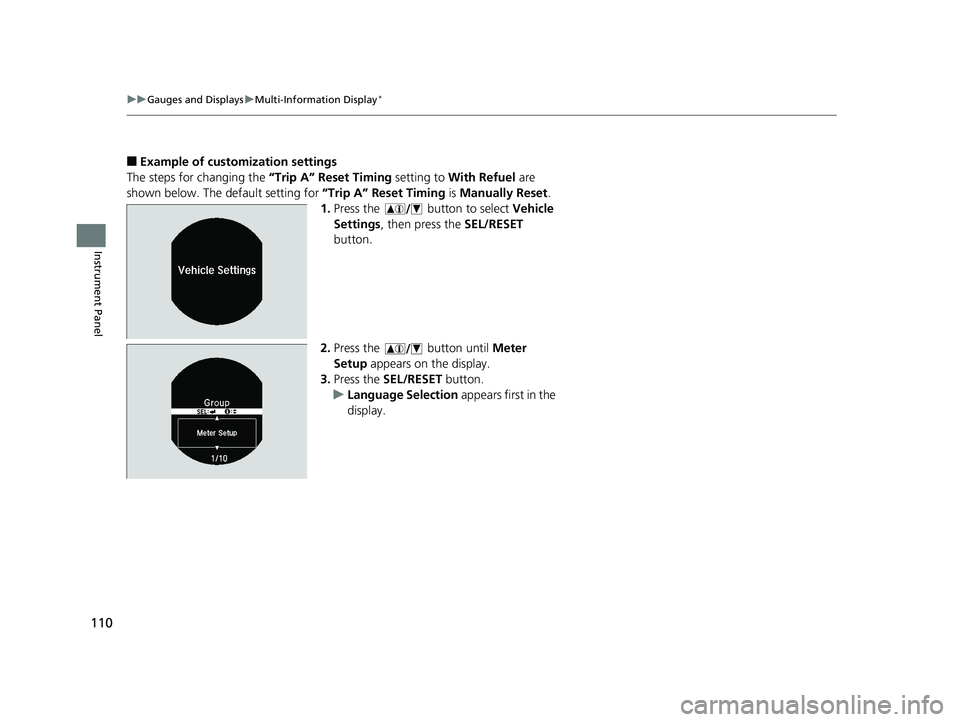
■Example of customization settings
The steps for changing the “Trip A” Reset Timing setting to With Refuel are
shown below. The default setting for “Trip A” Reset Timing is Manually Reset .
1. Press the button to select Vehicle
Settings , then press the SEL/RESET
button.
2. Press the button until Meter
Setup appears on the display.
3. Press the SEL/RESET button.
u Language Selection appears first in the
display.
16 US ACCORD 4D (KA KC KL)-31T2A6300.book 110 ページ 2015年9月25日 金曜日 午前10時38分
Page 112 of 609
111
uuGauges and Displays uMulti-Information Display*
Instrument Panel
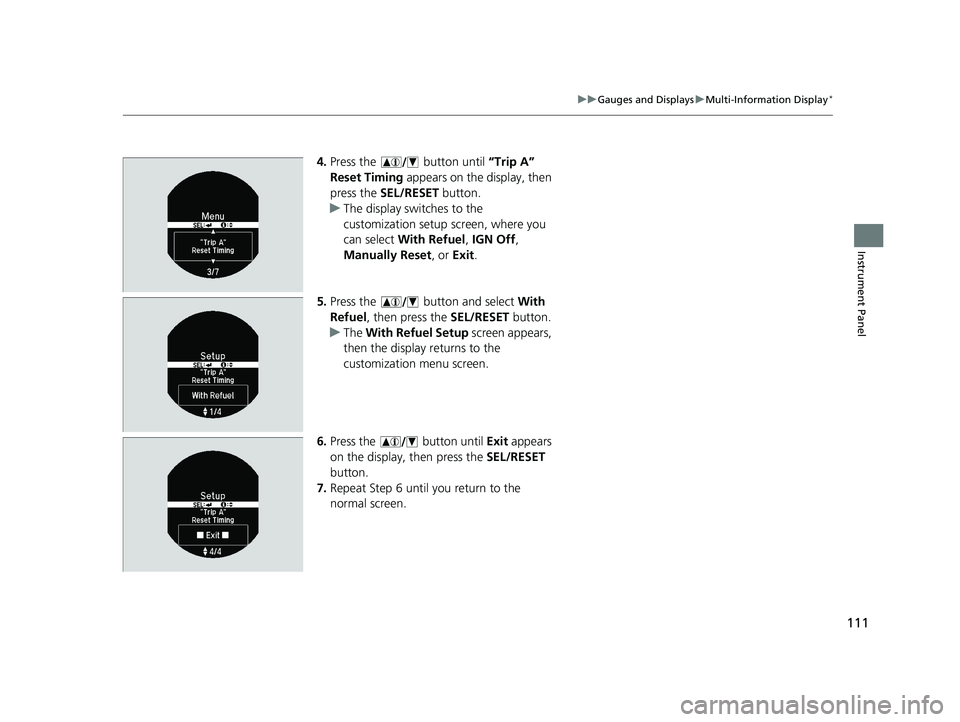
4. Press the button until “Trip A”
Reset Timing appears on the display, then
press the SEL/RESET button.
u The display swit ches to the
customization setup screen, where you
can select With Refuel , IGN Off,
Manually Reset , or Exit .
5. Press the button and select With
Refuel , then press the SEL/RESET button.
u The With Refuel Setup screen appears,
then the display returns to the
customization menu screen.
6. Press the button until Exit appears
on the display, then press the SEL/RESET
button.
7. Repeat Step 6 until you return to the
normal screen.
16 US ACCORD 4D (KA KC KL)-31T2A6300.book 111 ページ 2015年9月25日 金曜日 午前10時38分
Page 115 of 609
114
Controls
Clock
Adjusting the Clock
You can adjust the time in the clock display with the ignition switch is in ON (w *1.
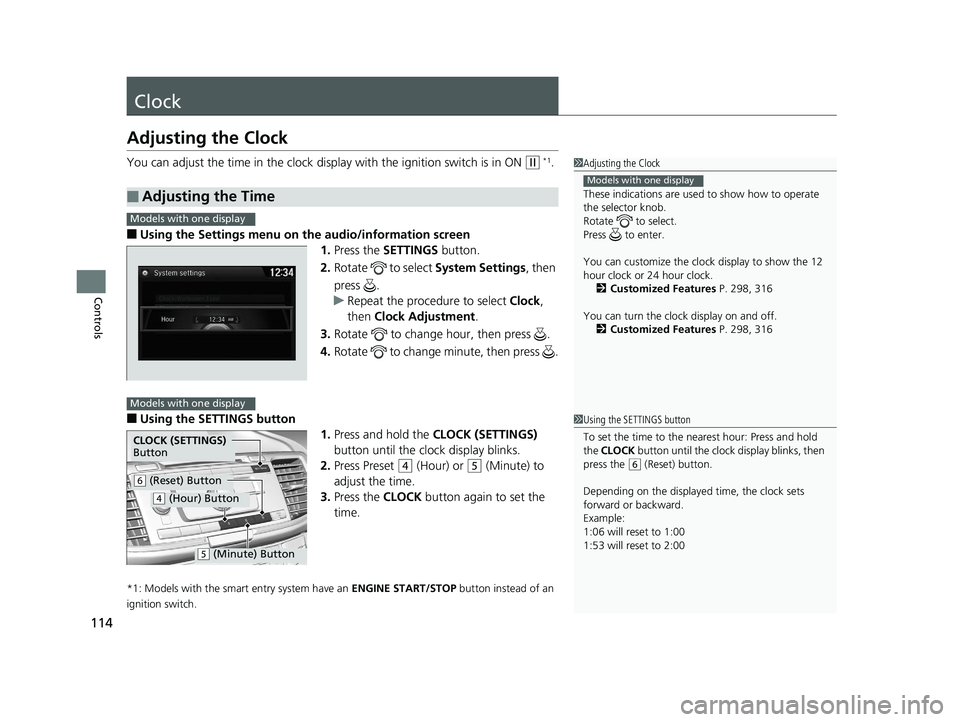
■Using the Settings menu on the audio/information screen1.Press the SETTINGS button.
2. Rotate to select System Settings, then
press .
u Repeat the procedure to select Clock,
then Clock Adjustment .
3. Rotate to change hour, then press .
4. Rotate to change minute, then press .
■Using the SETTINGS button
1.Press and hold the CLOCK (SETTINGS)
button until the clock display blinks.
2. Press Preset
(4 (Hour) or (5 (Minute) to
adjust the time.
3. Press the CLOCK button again to set the
time.
*1: Models with the smart entry system have an ENGINE START/STOP button instead of an
ignition switch.
■Adjusting the Time
1 Adjusting the Clock
These indications are used to show how to operate
the selector knob.
Rotate to select.
Press to enter.
You can customize the clock display to show the 12
hour clock or 24 hour clock. 2 Customized Features P. 298, 316
You can turn the clock display on and off. 2 Customized Features P. 298, 316
Models with one display
1Using the SETTINGS button
To set the time to the nearest hour: Press and hold
the CLOCK button until the clock display blinks, then
press the
( 6 (Reset) button.
Depending on the displayed time, the clock sets
forward or backward.
Example:
1:06 will reset to 1:00
1:53 will reset to 2:00
Models with one display
Models with one display
CLOCK (SETTINGS)
Button
( 6 (Reset) Button
(4 (Hour) Button
(5 (Minute) Button
16 US ACCORD 4D (KA KC KL)-31T2A6300.book 114 ページ 2015年9月25日 金曜日 午前10時38分
Page 154 of 609
153
uuOperating the Switches Around the Steering Wheel uBrightness Control
Controls
Brightness Control
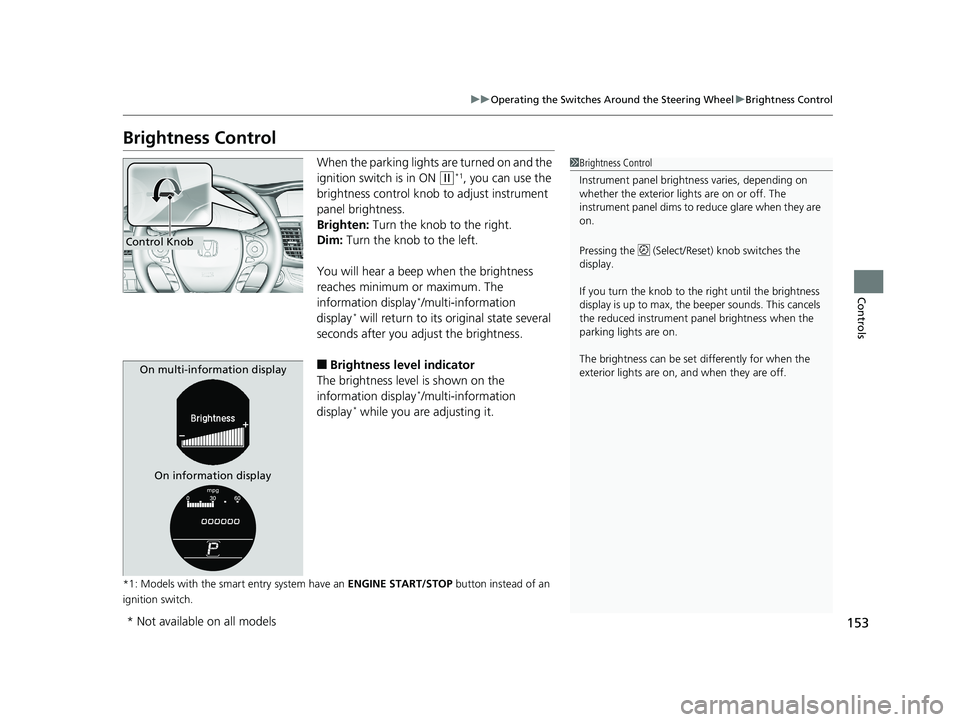
When the parking lights are turned on and the
ignition switch is in ON
(w*1, you can use the
brightness control knob to adjust instrument
panel brightness.
Brighten: Turn the knob to the right.
Dim: Turn the knob to the left.
You will hear a beep when the brightness
reaches minimum or maximum. The
information display
*/multi-information
display* will return to its original state several
seconds after you adjust the brightness.
■Brightness level indicator
The brightness level is shown on the
information display
*/multi-information
display* while you are adjusting it.
*1: Models with the smart entry system have an ENGINE START/STOP button instead of an
ignition switch.
1 Brightness Control
Instrument panel brightne ss varies, depending on
whether the exterior lights are on or off. The
instrument panel dims to reduce glare when they are
on.
Pressing the (Select/Reset) knob switches the
display.
If you turn the knob to the right until the brightness
display is up to max, the beeper sounds. This cancels
the reduced instrument panel brightness when the
parking lights are on.
The brightness can be set differently for when the
exterior lights are on, and when they are off.
Control Knob
On multi-information display
On information display
* Not available on all models
16 US ACCORD 4D (KA KC KL)-31T2A6300.book 153 ページ 2015年9月25日 金曜日 午前10時38分
Page 156 of 609
155
uuOperating the Switches Around the Steering Wheel uDriving Position Memory System*
Continued
Controls
Driving Position Memory System*
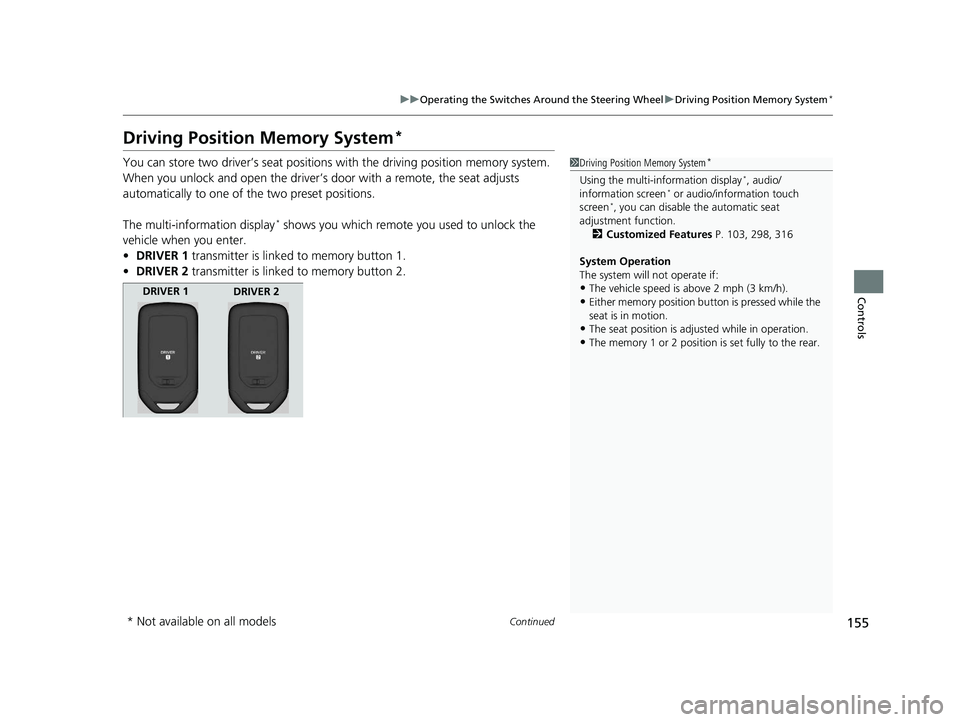
You can store two driver’s seat positions with the driving position memory system.
When you unlock and open the driver’s door with a remote, the seat adjusts
automatically to one of the two preset positions.
The multi-information display
* shows you which remote you used to unlock the
vehicle when you enter.
• DRIVER 1 transmitter is linked to memory button 1.
• DRIVER 2 transmitter is linked to memory button 2.
1Driving Position Memory System*
Using the multi-information display*, audio/
information screen* or audio/information touch
screen*, you can disable the automatic seat
adjustment function.
2 Customized Features P. 103, 298, 316
System Operation
The system will not operate if:
•The vehicle speed is above 2 mph (3 km/h).•Either memory position button is pressed while the
seat is in motion.
•The seat position is adjusted while in operation.•The memory 1 or 2 position is set fully to the rear.
DRIVER 1
DRIVER 2
* Not available on all models
16 US ACCORD 4D (KA KC KL)-31T2A6300.book 155 ページ 2015年9月25日 金曜日 午前10時38分
Page 191 of 609
190
uuAudio System uAudio Remote Controls
Features
Audio Remote Controls
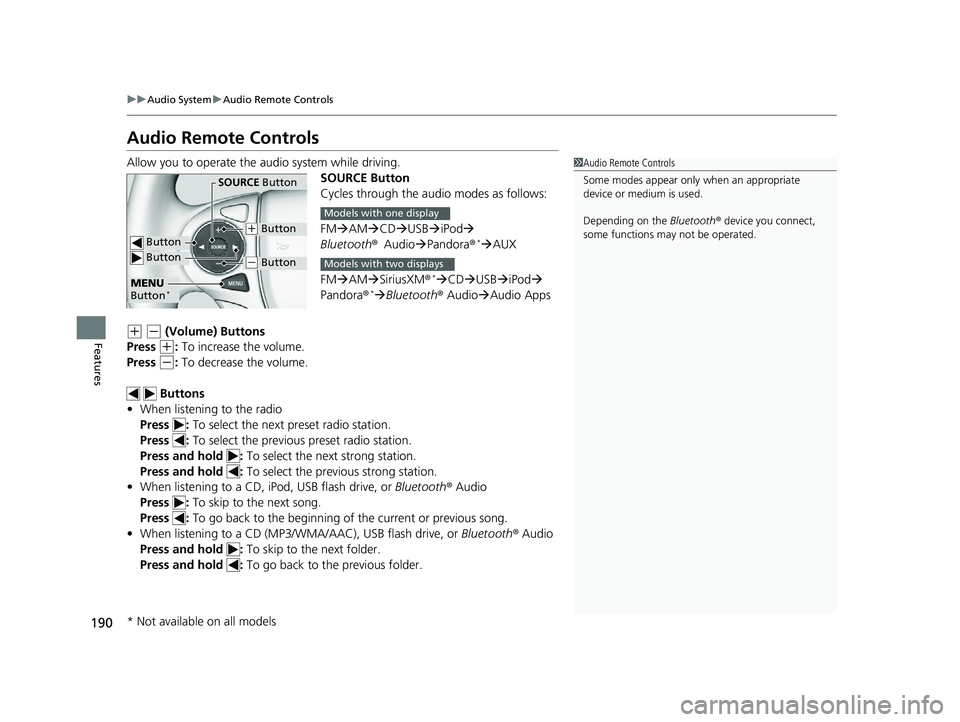
Allow you to operate the audio system while driving.
SOURCE Button
Cycles through the audio modes as follows:
FMAM CD USBiPod
Bluetooth ®Audio Pandora ®
*AUX
FM AM SiriusXM ®
*CD USBiPod
Pandora ®*Bluetooth ® Audio Audio Apps
(+ (- (Volume) Buttons
Press
(+: To increase the volume.
Press
(-: To decrease the volume.
Buttons
• When listening to the radio
Press : To select the next preset radio station.
Press : To select the previous preset radio station.
Press and hold : To select the next strong station.
Press and hold : To select the previous strong station.
• When listening to a CD, iPod, USB flash drive, or Bluetooth® Audio
Press : To skip to the next song.
Press : To go back to the beginning of the current or previous song.
• When listening to a CD (MP3/W MA/AAC), USB flash drive, or Bluetooth® Audio
Press and hold : To skip to the next folder.
Press and hold : To go back to the previous folder.
1Audio Remote Controls
Some modes appear only when an appropriate
device or medium is used.
Depending on the Bluetooth® device you connect,
some functions ma y not be operated.
Button
SOURCE Button
Button
(+ Button
(- Button
MENU
Button*
Models with one display
Models with two displays
* Not available on all models
16 US ACCORD 4D (KA KC KL)-31T2A6300.book 190 ページ 2015年9月25日 金曜日 午前10時38分