change time HONDA ACCORD SEDAN 2016 (in English) Owner's Guide
[x] Cancel search | Manufacturer: HONDA, Model Year: 2016, Model line: ACCORD SEDAN, Model: HONDA ACCORD SEDAN 2016Pages: 609, PDF Size: 36.38 MB
Page 193 of 609
192
Features
Audio System Basic Operation
To use the audio system function, the ignition switch must be in ACCESSORY (q or
ON
(w*1.
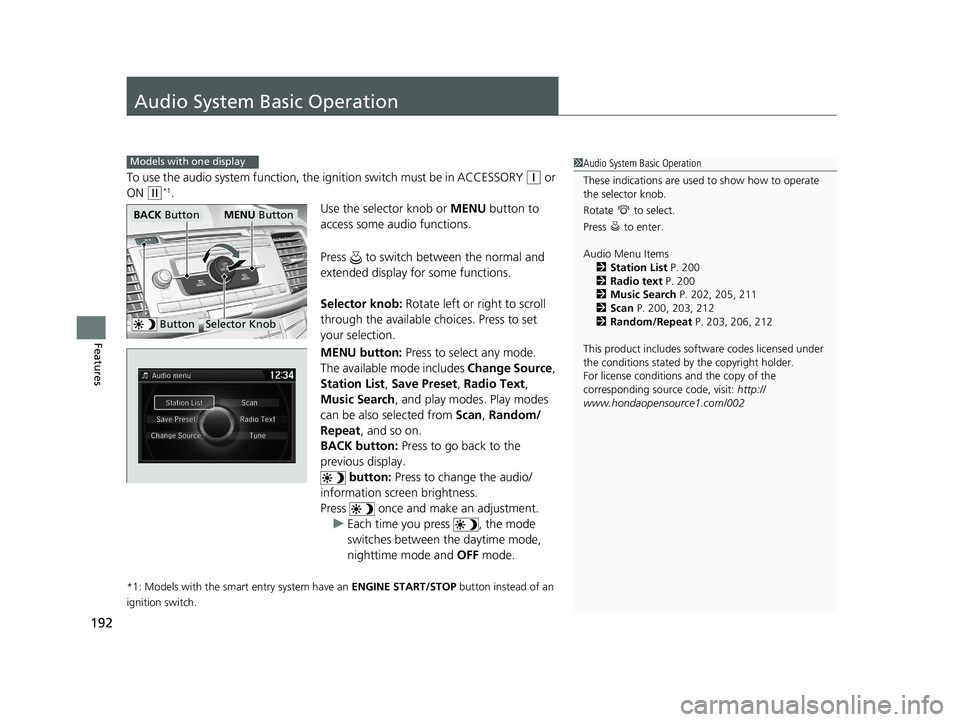
Use the selector knob or MENU button to
access some audio functions.
Press to switch between the normal and
extended display fo r some functions.
Selector knob: Rotate left or right to scroll
through the available choices. Press to set
your selection.
MENU button: Press to select any mode.
The available mode includes Change Source ,
Station List , Save Preset , Radio Text,
Music Search, and play modes. Play modes
can be also selected from Scan, Random/
Repeat , and so on.
BACK button: Press to go back to the
previous display. button: Press to change the audio/
information screen brightness.
Press once and make an adjustment. u Each time you press , the mode
switches between the daytime mode,
nighttime mode and OFF mode.
*1: Models with the smart entry system have an ENGINE START/STOP button instead of an
ignition switch.
Models with one display1 Audio System Basic Operation
These indications are used to show how to operate
the selector knob.
Rotate to select.
Press to enter.
Audio Menu Items
2 Station List P. 200
2 Radio text P. 200
2 Music Search P. 202, 205, 211
2 Scan P. 200, 203, 212
2 Random/Repeat P. 203, 206, 212
This product includes softw are codes licensed under
the conditions stated by the copyright holder.
For license conditions and the copy of the
corresponding source code, visit: http://
www.hondaopensource1.com/002
ButtonSelector Knob
MENU ButtonBACK Button
16 US ACCORD 4D (KA KC KL)-31T2A6300.book 192 ページ 2015年9月25日 金曜日 午前10時38分
Page 196 of 609
Continued195
uuAudio System Basic Operation uAudio/Information Screen
Features
You can change, store, and delete the wallpaper on the audio/ information screen.
■Import wallpaper
You can import up to three images, one at a time, for wallpaper from a USB flash
drive.
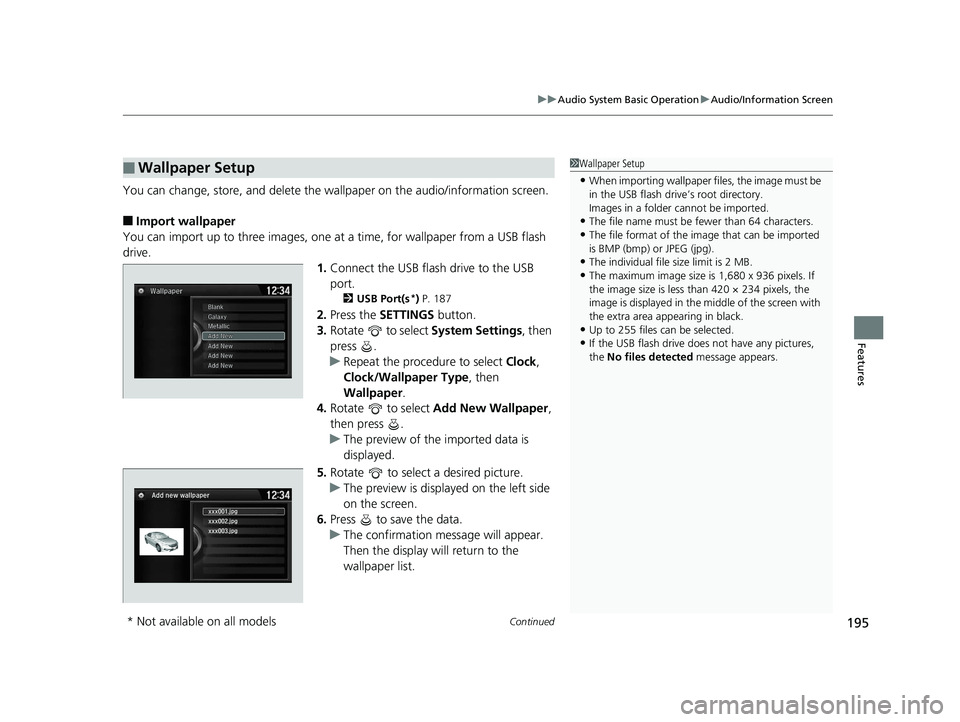
1.Connect the USB flash drive to the USB
port.
2 USB Port(s*) P. 187
2. Press the SETTINGS button.
3. Rotate to select System Settings, then
press .
u Repeat the procedure to select Clock,
Clock/Wallpaper Type , then
Wallpaper .
4. Rotate to select Add New Wallpaper ,
then press .
u The preview of the imported data is
displayed.
5. Rotate to select a desired picture.
u The preview is displayed on the left side
on the screen.
6. Press to save the data.
u The confirmation message will appear.
Then the display will return to the
wallpaper list.
■Wallpaper Setup1Wallpaper Setup
•When importing wallpaper files, the image must be
in the USB flash driv e’s root directory.
Images in a folder cannot be imported.
•The file name must be fewer than 64 characters.
•The file format of the im age that can be imported
is BMP (bmp) or JPEG (jpg).
•The individual file size limit is 2 MB.
•The maximum image size is 1,680 x 936 pixels. If
the image size is less than 420 × 234 pixels, the
image is displayed in the middle of the screen with
the extra area appearing in black.
•Up to 255 files can be selected.
•If the USB flash drive doe s not have any pictures,
the No files detected message appears.
xxx001.jpg
Add new wallpaper
xxx002.jpg
xxx003.jpg
* Not available on all models
16 US ACCORD 4D (KA KC KL)-31T2A6300.book 195 ページ 2015年9月25日 金曜日 午前10時38分
Page 201 of 609
uuAudio System Basic Operation uPlaying AM/FM Radio
200
Features
Provides text data information related to your selected RDS-capable FM station.
■To find an RDS station from Station List
1. Press while listening to an FM station.
2. Rotate to select the station, then press .
■Manual update
Updates your available station list at any time.
1. Press while listening to an FM station.
2. Rotate to select Refresh, then press .
■Radio text
Displays the radio text informat ion of the selected RDS station.
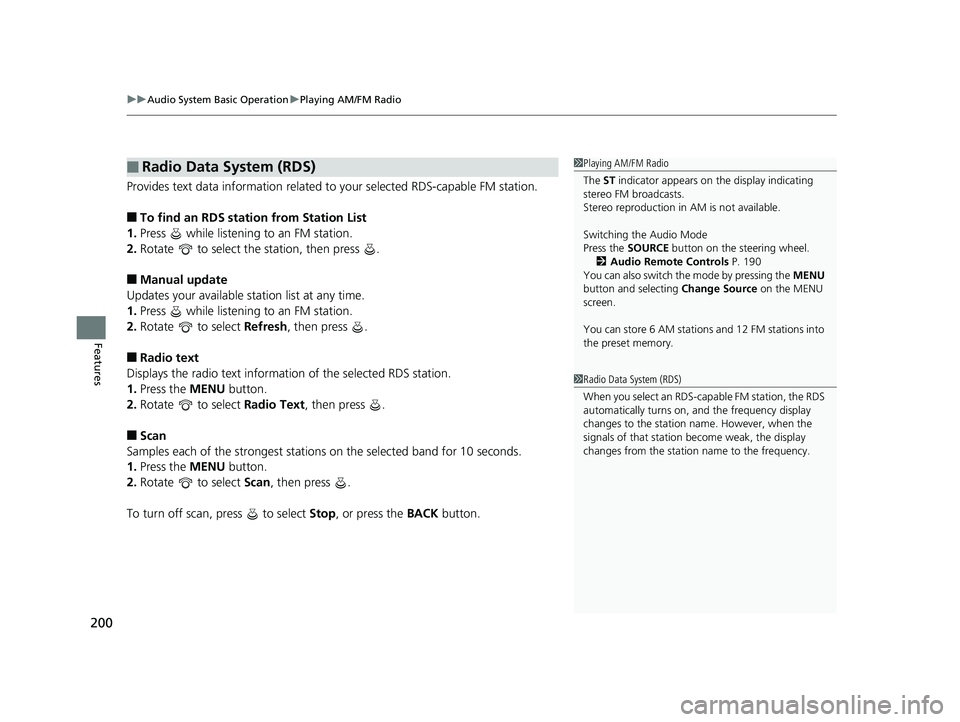
1. Press the MENU button.
2. Rotate to select Radio Text, then press .
■Scan
Samples each of the strongest stations on the selected band for 10 seconds.
1. Press the MENU button.
2. Rotate to select Scan, then press .
To turn off scan, press to select Stop, or press the BACK button.
■Radio Data System (RDS)1Playing AM/FM Radio
The ST indicator appears on the display indicating
stereo FM broadcasts.
Stereo reproduction in AM is not available.
Switching the Audio Mode
Press the SOURCE button on the steering wheel.
2 Audio Remote Controls P. 190
You can also switch the mode by pressing the MENU
button and selecting Change Source on the MENU
screen.
You can store 6 AM stations and 12 FM stations into
the preset memory.
1 Radio Data System (RDS)
When you select an RDS-capable FM station, the RDS
automatically turns on, and the frequency display
changes to the station name. However, when the
signals of that station become weak, the display
changes from the statio n name to the frequency.
16 US ACCORD 4D (KA KC KL)-31T2A6300.book 200 ページ 2015年9月25日 金曜日 午前10時38分
Page 216 of 609
215
Features
Audio System Basic Operation
To use the audio system function, the ignition swit ch must be in ACCESSORY (q or
ON
(w*1.
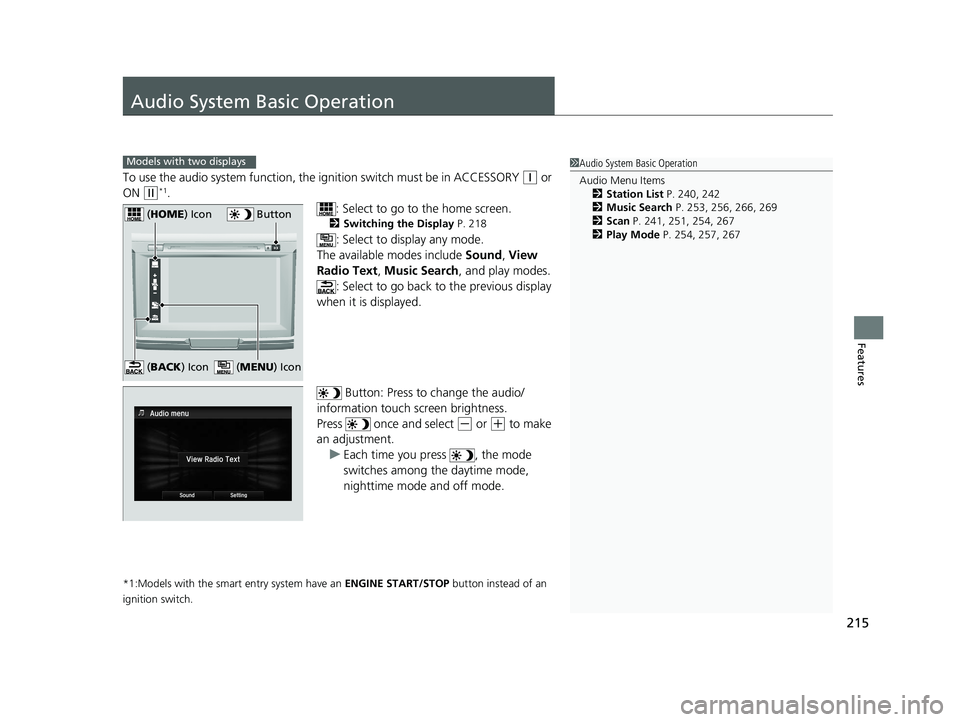
: Select to go to the home screen.
2Switching the Display P. 218
: Select to display any mode.
The available modes include Sound, View
Radio Text , Music Search, and play modes.
: Select to go back to the previous display
when it is displayed.
Button: Press to change the audio/
information touch screen brightness.
Press once and select
(- or (+ to make
an adjustment.
u Each time you press , the mode
switches among the daytime mode,
nighttime mode and off mode.
*1:Models with the smart entry system have an ENGINE START/STOP button instead of an
ignition switch.
Models with two displays1 Audio System Basic Operation
Audio Menu Items
2 Station List P. 240, 242
2 Music Search P. 253, 256, 266, 269
2 Scan P. 241, 251, 254, 267
2 Play Mode P. 254, 257, 267
Button (HOME ) Icon
(MENU ) Icon (BACK ) Icon
16 US ACCORD 4D (KA KC KL)-31T2A6300.book 215 ページ 2015年9月25日 金曜日 午前10時38分
Page 223 of 609
uuAudio System Basic Operation uAudio/Information Touch Screen
222
Features
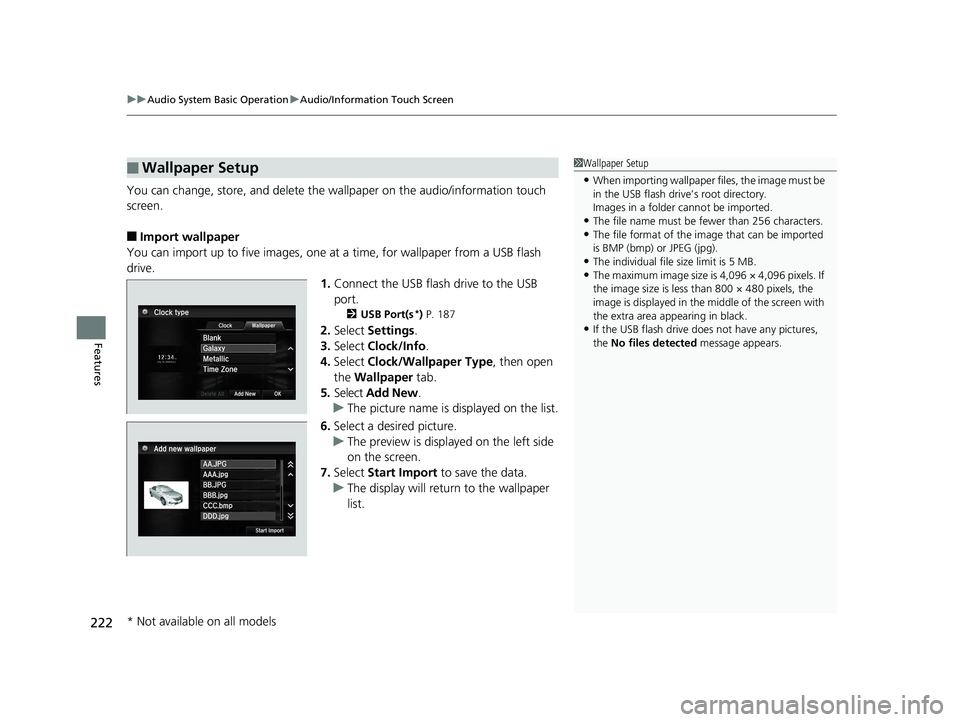
You can change, store, and delete the wallpaper on the audio/information touch
screen.
■Import wallpaper
You can import up to five images, one at a time, for wallpaper from a USB flash
drive. 1.Connect the USB flash drive to the USB
port.
2 USB Port(s*) P. 187
2. Select Settings .
3. Select Clock/Info .
4. Select Clock/Wallpaper Type , then open
the Wallpaper tab.
5. Select Add New .
u The picture name is displayed on the list.
6. Select a desired picture.
u The preview is displayed on the left side
on the screen.
7. Select Start Import to save the data.
u The display will return to the wallpaper
list.
■Wallpaper Setup1Wallpaper Setup
•When importing wallpaper files, the image must be
in the USB flash driv e’s root directory.
Images in a folder cannot be imported.
•The file name must be fewer than 256 characters.•The file format of the im age that can be imported
is BMP (bmp) or JPEG (jpg).
•The individual file size limit is 5 MB.•The maximum image size is 4,096 × 4,096 pixels. If
the image size is less than 800 × 480 pixels, the
image is displayed in the middle of the screen with
the extra area appearing in black.
•If the USB flash drive doe s not have any pictures,
the No files detected message appears.
* Not available on all models
16 US ACCORD 4D (KA KC KL)-31T2A6300.book 222 ページ 2015年9月25日 金曜日 午前10時38分
Page 243 of 609
uuAudio System Basic Operation uPlaying AM/FM Radio
242
Features
Displays the subchannel list when an HD RadioTM station is selected while listening to
an FM station.
1. Select .
2. Select HD Radio Subchannel .
3. Select the channel number.
Provides text data information related to your selected RDS-capable FM station.
■To find an RDS station from Station List
1. Select the open/close icon to display a list while listening to an FM station.
2. Select the Station List tab.
3. Select the station.
■Manual update
Updates your available station list at any time.
1. Select the open/close icon to display a list while listening to an FM station.
2. Select the Station List tab.
3. Select Refresh .
■HD Subchannel
■Radio Data System (RDS)
Models with HD RadioTM
1Radio Data System (RDS)
When you select an RDS-capable FM station, the RDS
automatically turns on, and the frequency display
changes to the station name. However, when the
signals of that station become weak, the display
changes from the statio n name to the frequency.
16 US ACCORD 4D (KA KC KL)-31T2A6300.book 242 ページ 2015年9月25日 金曜日 午前10時38分
Page 245 of 609
244
uuAudio System Basic Operation uPlaying SiriusXM ® Radio*
Features
Playing SiriusXM ® Radio*
*1:Some or all of the lists may not be displayed.
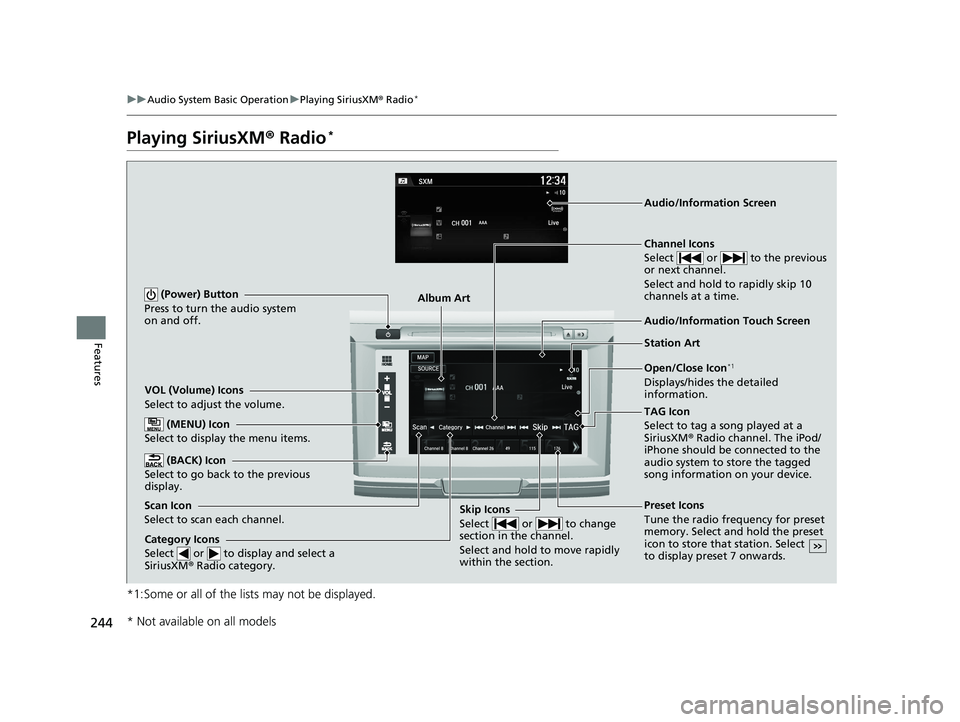
VOL (Volume) Icons
Select to adjust the volume.
(BACK) Icon
Select to go back to the previous
display.
Channel Icons
Select or to the previous
or next channel.
Select and hold to rapidly skip 10
channels at a time.
(Power) Button
Press to turn the audio system
on and off.
Open/Close Icon*1
Displays/hides the detailed
information.
(MENU) Icon
Select to display the menu items.
TAG Icon
Select to tag a song played at a
SiriusXM ® Radio channel. The iPod/
iPhone should be connected to the
audio system to store the tagged
song information on your device.
Category Icons
Select or to display and select a
SiriusXM ® Radio category.
Audio/Information Touch Screen
Scan Icon
Select to scan each channel. Preset Icons
Tune the radio frequency for preset
memory. Select and hold the preset
icon to store that station. Select
to display preset 7 onwards.Skip Icons
Select or to change
section in the channel.
Select and hold to move rapidly
within the section.
Audio/Information Screen
Album Art
Station Art
* Not available on all models
16 US ACCORD 4D (KA KC KL)-31T2A6300.book 244 ページ 2015年9月25日 金曜日 午前10時38分
Page 269 of 609
268
uuAudio System Basic Operation uPlaying Bluetooth ® Audio
Features
Playing Bluetooth® Audio
Your audio system allows you to listen to music from your Bluetooth-compatible
phone.
This function is available when the phone is paired and connected to the vehicle’s
Bluetooth ® HandsFreeLink ® (HFL) system.
2 Phone Setup P. 383
*1:Depending on the Bluetooth® device you connect, some or all of the lists may not
be displayed.
1 Playing Bluetooth ® Audio
Not all Bluetooth -enabled phones with streaming
audio capabilities are compatible.
To check if your phone is compatible, visit
http://www.handsfr eelink.com/Honda/.
It may be illegal to perform some data device
functions while driving.
Only one phone can be used with HFL at a time.
When there are more than two paired phones in the
vehicle, the first paired phone the system finds is
automatically connected.
The connected phone for Bluetooth® Audio can be
different.
If more than one phone is paired to the HFL system,
there may be a delay before the system begins to
play.
In some cases, the name of the artist, album, or track
may not appear correctly.
Some functions may not be available on some
devices.
If a phone is currently conne cted via Apple CarPlay or
Android Auto, Bluetooth® Audio from that phone is
unavailable. However, a se cond previously paired
phone can stream Bluetooth® Audio by selecting
Connect from Bluetooth Device List .
2 Phone Setup P. 383
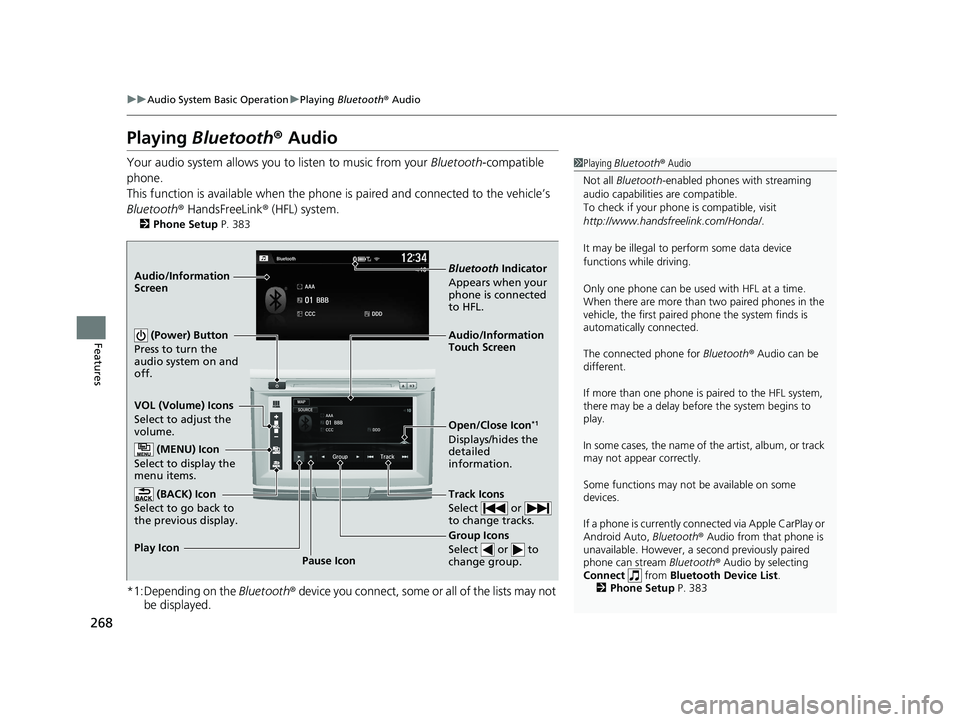
Audio/Information
Touch Screen
VOL (Volume) Icons
Select to adjust the
volume.
Group Icons
Select or to
change group.
Pause Icon
Play Icon
Bluetooth
Indicator
Appears when your
phone is connected
to HFL.
Track Icons
Select or
to change tracks.
Open/Close Icon*1
Displays/hides the
detailed
information.
Audio/Information
Screen
(Power) Button
Press to turn the
audio system on and
off.
(MENU) Icon
Select to display the
menu items.
(BACK) Icon
Select to go back to
the previous display.
16 US ACCORD 4D (KA KC KL)-31T2A6300.book 268 ページ 2015年9月25日 金曜日 午前10時38分
Page 272 of 609
271
uuAudio System Basic Operation uHondaLink ®
Continued
Features
■Messages from Honda
Displays helpful and important information from Honda.
■Weather
Displays a weekly five-day weather forecast for any location you wa nt. You can
change the ZIP Code at any time.
Use the following procedure to connect to HondaLink ® service.
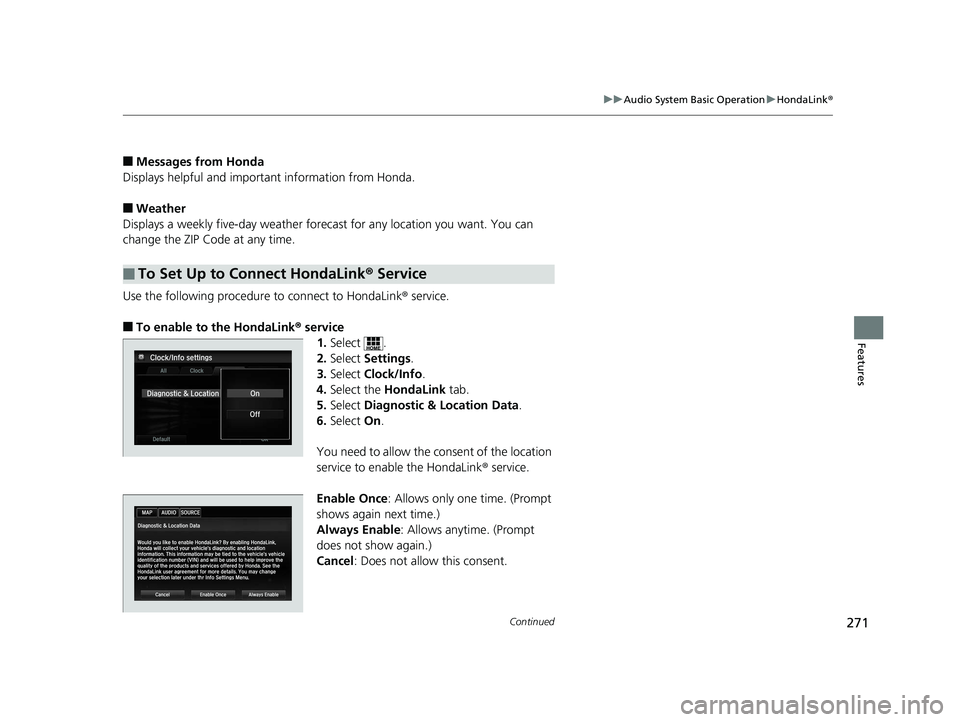
■To enable to the HondaLink® service
1.Select .
2. Select Settings .
3. Select Clock/Info .
4. Select the HondaLink tab.
5. Select Diagnostic & Location Data.
6. Select On.
You need to allow the co nsent of the location
service to enable the HondaLink ® service.
Enable Once : Allows only one time. (Prompt
shows again next time.)
Always Enable: Allows anytime. (Prompt
does not show again.)
Cancel: Does not allow this consent.
■To Set Up to Connect HondaLink ® Service
16 US ACCORD 4D (KA KC KL)-31T2A6300.book 271 ページ 2015年9月25日 金曜日 午前10時38分
Page 279 of 609
uuAudio System Basic Operation uApple CarPlay
278
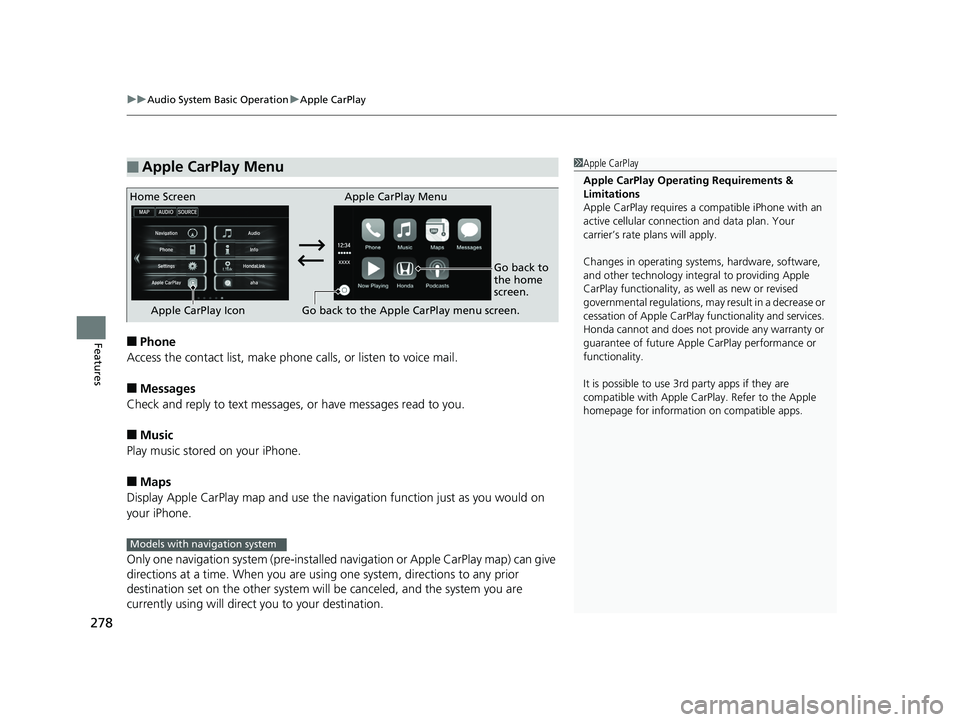
Features■Phone
Access the contact list, make phone calls, or listen to voice mail.
■Messages
Check and reply to text messages, or have messages read to you.
■Music
Play music stored on your iPhone.
■Maps
Display Apple CarPlay map and use the navigation function just as you would on
your iPhone.
Only one navigation system (pre-installed navigation or Apple CarPlay map) can give
directions at a time. When you are using one system, directions to any prior
destination set on the other system will be canceled, and the system you are
currently using will direct you to your destination.
■Apple CarPlay Menu1 Apple CarPlay
Apple CarPlay Operating Requirements &
Limitations
Apple CarPlay requi res a compatible iPhone with an
active cellular connecti on and data plan. Your
carrier’s rate plans will apply.
Changes in operating systems, hardware, software,
and other technology integral to providing Apple
CarPlay functionality, as well as new or revised
governmental regulations, may result in a decrease or
cessation of Apple CarPlay functionality and services.
Honda cannot and does not pr ovide any warranty or
guarantee of future Appl e CarPlay performance or
functionality.
It is possible to use 3r d party apps if they are
compatible with Apple CarPlay. Refer to the Apple
homepage for information on compatible apps.
Home Screen Apple CarPlay Menu
Go back to
the home
screen.
Apple CarPlay Icon Go back to the Apple CarPlay menu screen.
Models with navigation system
16 US ACCORD 4D (KA KC KL)-31T2A6300.book 278 ページ 2015年9月25日 金曜日 午前10時38分