glove box HONDA ACCORD SEDAN 2018 Owner's Manual (in English)
[x] Cancel search | Manufacturer: HONDA, Model Year: 2018, Model line: ACCORD SEDAN, Model: HONDA ACCORD SEDAN 2018Pages: 683, PDF Size: 45.77 MB
Page 8 of 683
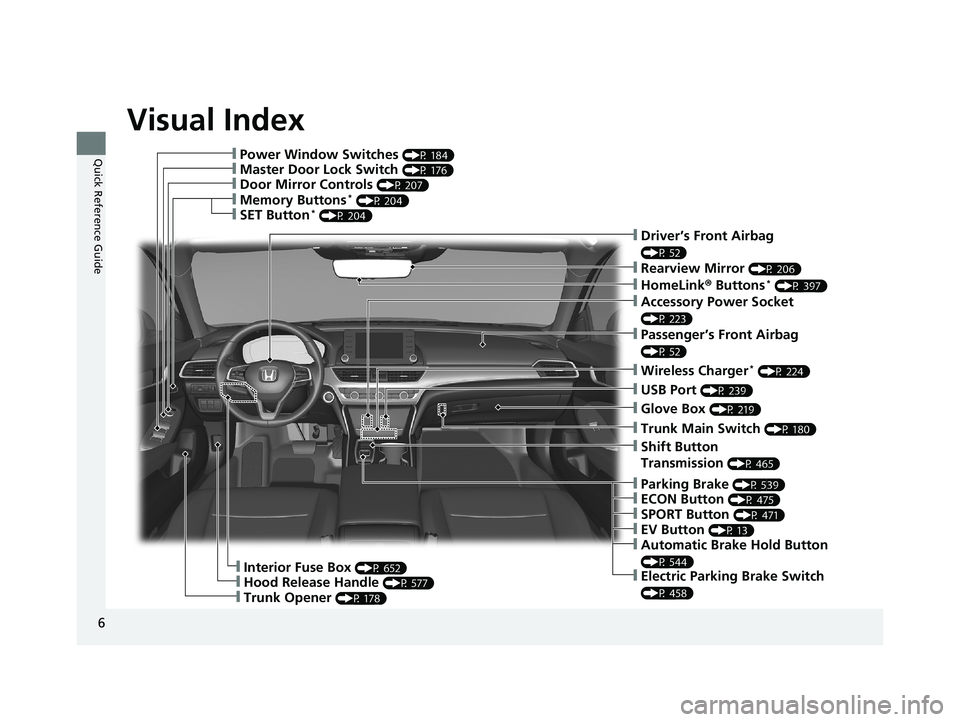
Visual Index
6
Quick Reference Guide❙Power Window Switches (P 184)
❙Master Door Lock Switch (P 176)
❙Door Mirror Controls (P 207)
❙Trunk Opener (P 178)
❙Interior Fuse Box (P 652)
❙Hood Release Handle (P 577)
❙Driver’s Front Airbag
(P 52)
❙Rearview Mirror (P 206)
❙HomeLink® Buttons* (P 397)
❙Accessory Power Socket
(P 223)
❙Passenger’s Front Airbag
(P 52)
❙Wireless Charger* (P 224)
❙USB Port (P 239)
❙Trunk Main Switch (P 180)
❙Glove Box (P 219)
❙Shift Button
Transmission
(P 465)
❙Memory Buttons* (P 204)
❙SET Button* (P 204)
❙Parking Brake (P 539)
❙ECON Button (P 475)
❙SPORT Button (P 471)
❙EV Button (P 13)
❙Automatic Brake Hold Button
(P 544)
❙Electric Parking Brake Switch
(P 458)
18 ACCORD HYBRID-31TWA6000.book 6 ページ 2018年1月30日 火曜日 午後7時38分
Page 52 of 683
50
uuAirbags uAirbag System Components
Safe Driving
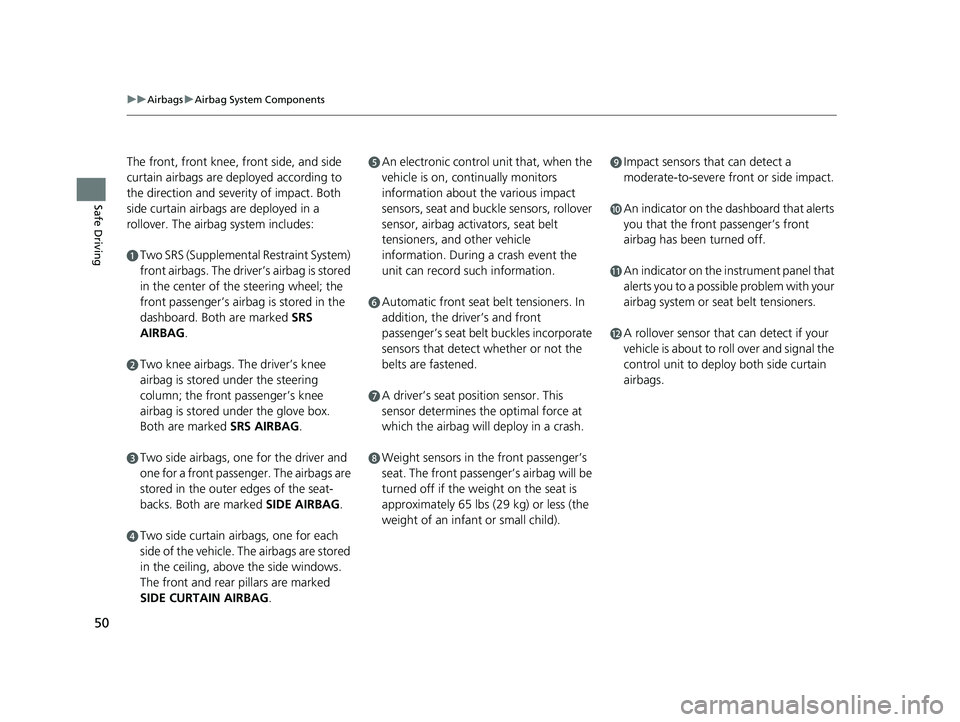
The front, front knee, front side, and side
curtain airbags are deployed according to
the direction and severity of impact. Both
side curtain airbags are deployed in a
rollover. The airbag system includes:
aTwo SRS (Supplemental Restraint System)
front airbags. The driver’s airbag is stored
in the center of the steering wheel; the
front passenger’s airbag is stored in the
dashboard. Both are marked SRS
AIRBAG.
bTwo knee airbags. Th e driver’s knee
airbag is stored under the steering
column; the front passenger’s knee
airbag is stored under the glove box.
Both are marked SRS AIRBAG.
cTwo side airbags, one for the driver and
one for a front passenger. The airbags are
stored in the outer edges of the seat-
backs. Both are marked SIDE AIRBAG .
dTwo side curtain airbags, one for each
side of the vehicle. The airbags are stored
in the ceiling, above the side windows.
The front and rear pillars are marked
SIDE CURTAIN AIRBAG.
eAn electronic control unit that, when the
vehicle is on, continually monitors
information about the various impact
sensors, seat and buckle sensors, rollover
sensor, airbag activators, seat belt
tensioners, and other vehicle
information. During a crash event the
unit can record such information.
fAutomatic front seat belt tensioners. In
addition, the driver’s and front
passenger’s seat belt buckles incorporate
sensors that detect whether or not the
belts are fastened.
gA driver’s seat position sensor. This
sensor determines the optimal force at
which the airbag will deploy in a crash.
hWeight sensors in the front passenger’s
seat. The front passenger’s airbag will be
turned off if the weight on the seat is
approximately 65 lbs (29 kg) or less (the
weight of an infant or small child).
iImpact sensors that can detect a
moderate-to-severe front or side impact.
jAn indicator on the dashboard that alerts
you that the front passenger’s front
airbag has been turned off.
kAn indicator on the instrument panel that
alerts you to a possibl e problem with your
airbag system or seat belt tensioners.
lA rollover sensor that can detect if your
vehicle is about to roll over and signal the
control unit to deploy both side curtain
airbags.
18 ACCORD HYBRID-31TWA6000.book 50 ページ 2018年1月30日 火曜日 午後7時38分
Page 54 of 683
52
uuAirbags uTypes of Airbags
Safe Driving
Types of Airbags
Your vehicle is equipped with four types of airbags:
• Front airbags: Airbags in front of the driver ’s and front passenger’s seats.
• Front knee airbags: Airbags under the steering column and under the glove
box.
• Side airbags: Airbags in the driver’s and front passenger’s seat-backs.
• Side curtain airbags: Airbags above the side windows.
Each is discussed in the following pages.
Front Airbags (SRS)
The front SRS airbags inflate in a moderate-to -severe frontal collision to help protect
the head and chest of the driver and/or front passenger.
SRS (Supplemental Restraint System) indica tes that the airbags are designed to
supplement seat belts, not replace them. Seat belts are the occupant’s primary
restraint system.
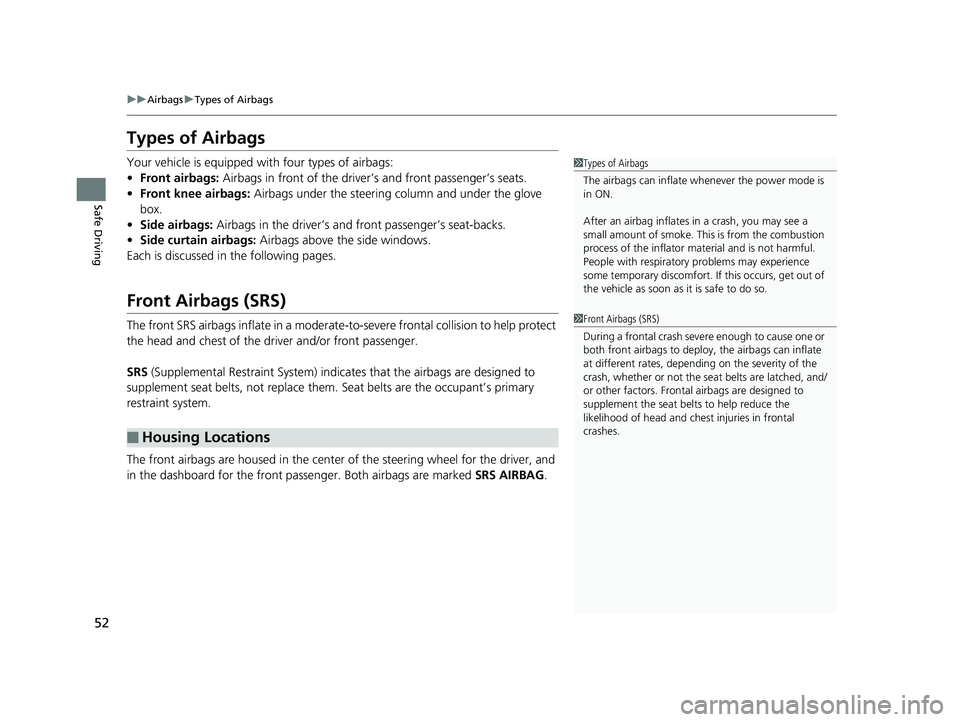
The front airbags are housed in the center of the steering wheel for the driver, and
in the dashboard for the front pass enger. Both airbags are marked SRS AIRBAG.
■Housing Locations
1Types of Airbags
The airbags can inflate whenever the power mode is
in ON.
After an airbag inflates in a crash, you may see a
small amount of smoke. This is from the combustion
process of the infl ator material and is not harmful.
People with respiratory problems may experience
some temporary discomfort. If this occurs, get out of
the vehicle as soon as it is safe to do so.
1 Front Airbags (SRS)
During a frontal crash severe enough to cause one or
both front airbags to deploy, the airbags can inflate
at different rates, dependi ng on the severity of the
crash, whether or not the se at belts are latched, and/
or other factors. Frontal airbags are designed to
supplement the seat belts to help reduce the
likelihood of head and chest injuries in frontal
crashes.
18 ACCORD HYBRID-31TWA6000.book 52 ページ 2018年1月30日 火曜日 午後7時38分
Page 58 of 683
56
uuAirbags uKnee Airbags
Safe Driving
Knee Airbags
The knee SRS airbags inflates in a moderate -to-severe frontal collision to help keep
the driver and/or front passenger in the proper position and to help maximize the
benefit provided by the vehicle’s other safety features.
SRS (Supplemental Restraint System) indica tes that the airbags are designed to
supplement seat belts, not replace them. Seat belts are the occupant’s primary
restraint system.
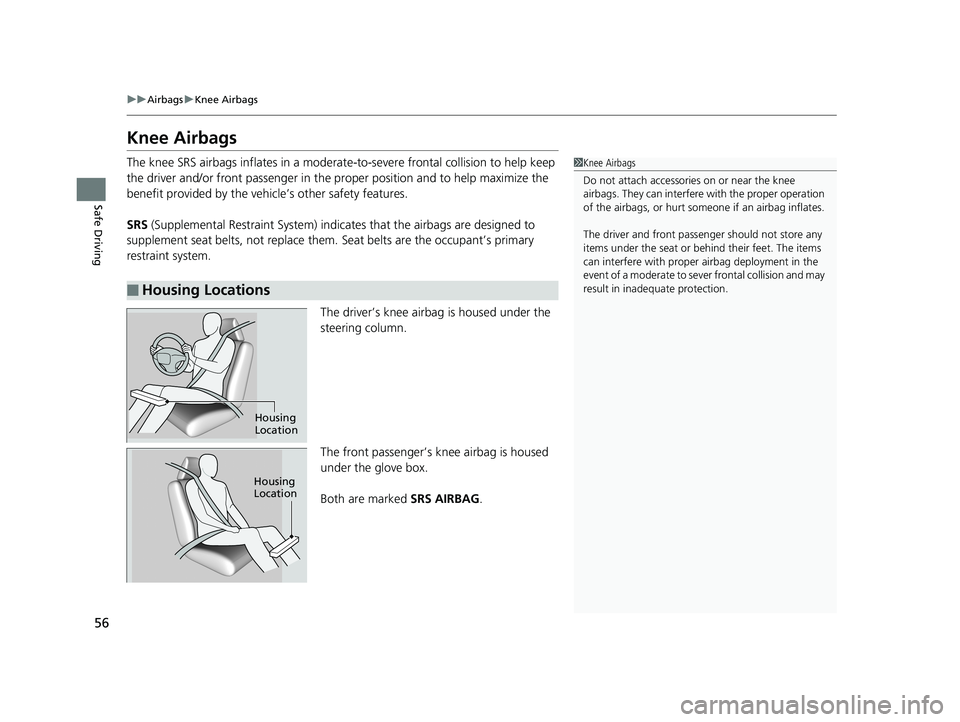
The driver’s knee airbag is housed under the
steering column.
The front passenger’s knee airbag is housed
under the glove box.
Both are marked SRS AIRBAG.
■Housing Locations
1Knee Airbags
Do not attach accessories on or near the knee
airbags. They can interfer e with the proper operation
of the airbags, or hurt someone if an airbag inflates.
The driver and front pass enger should not store any
items under the seat or be hind their feet. The items
can interfere with proper ai rbag deployment in the
event of a moderate to se ver frontal collision and may
result in inadequate protection.
Housing
Location
Housing
Location
18 ACCORD HYBRID-31TWA6000.book 56 ページ 2018年1月30日 火曜日 午後7時38分
Page 182 of 683
180
uuOpening and Closing the Trunk uTrunk Main Switch
Controls
Trunk Main Switch
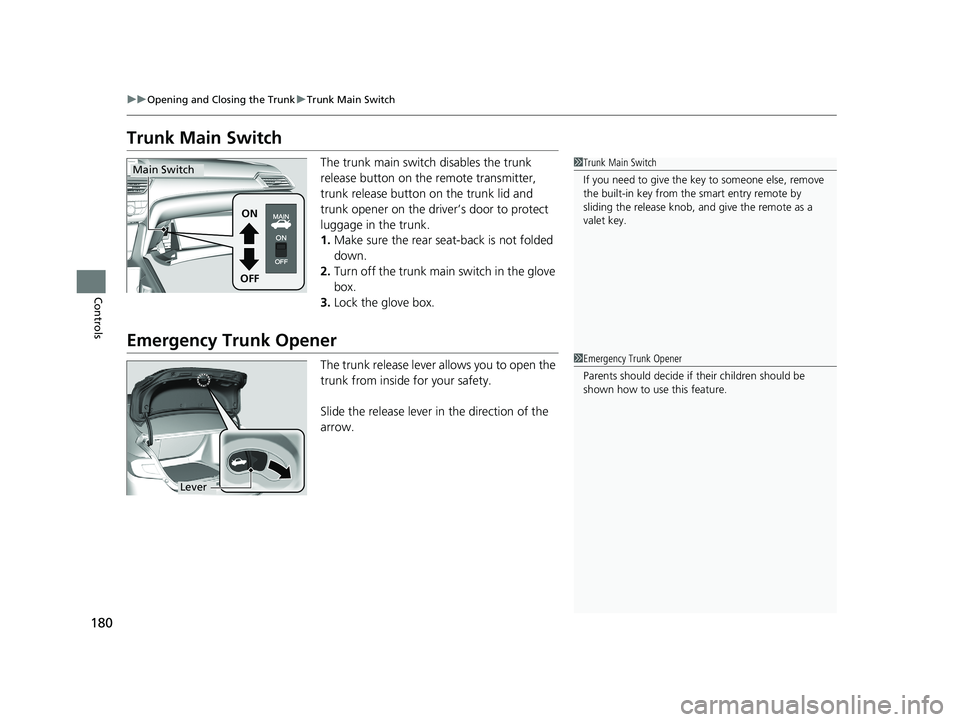
The trunk main switch disables the trunk
release button on the remote transmitter,
trunk release button on the trunk lid and
trunk opener on the driver’s door to protect
luggage in the trunk.
1. Make sure the rear seat-back is not folded
down.
2. Turn off the trunk main switch in the glove
box.
3. Lock the glove box.
Emergency Trunk Opener
The trunk release lever allows you to open the
trunk from inside for your safety.
Slide the release lever in the direction of the
arrow.
1Trunk Main Switch
If you need to give the ke y to someone else, remove
the built-in key from the smart entry remote by
sliding the release knob, and give the remote as a
valet key.
ON
OFF
Main Switch
1 Emergency Trunk Opener
Parents should decide if their children should be
shown how to use this feature.
Lever
18 ACCORD HYBRID-31TWA6000.book 180 ページ 2018年1月30日 火曜日 午後7時38分
Page 192 of 683
uuOperating the Switches Around the Steering Wheel uPOWER Button
190
Controls
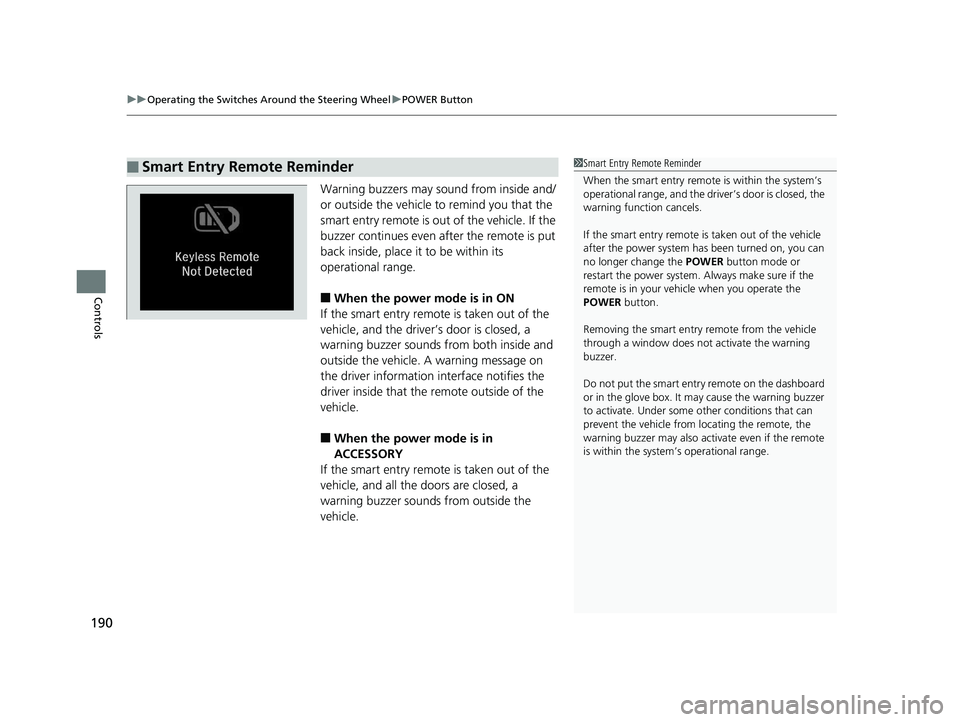
Warning buzzers may sound from inside and/
or outside the vehicle to remind you that the
smart entry remote is out of the vehicle. If the
buzzer continues even after the remote is put
back inside, place it to be within its
operational range.
■When the power mode is in ON
If the smart entry remote is taken out of the
vehicle, and the driver’s door is closed, a
warning buzzer sounds from both inside and
outside the vehicle. A warning message on
the driver information interface notifies the
driver inside that the remote outside of the
vehicle.
■When the power mode is in
ACCESSORY
If the smart entry remote is taken out of the
vehicle, and all the doors are closed, a
warning buzzer sounds from outside the
vehicle.
■Smart Entry Remote Reminder1 Smart Entry Remote Reminder
When the smart entry remote is within the system’s
operational range, and the driv er’s door is closed, the
warning function cancels.
If the smart entry remote is taken out of the vehicle
after the power system has been turned on, you can
no longer change the POWER button mode or
restart the power system. Always make sure if the
remote is in your vehi cle when you operate the
POWER button.
Removing the smart entry remote from the vehicle
through a window does not activate the warning
buzzer.
Do not put the smart entr y remote on the dashboard
or in the glove box. It may cause the warning buzzer
to activate. Under some other conditions that can
prevent the vehicle from locating the remote, the
warning buzzer may also activate even if the remote
is within the system’s operational range.
18 ACCORD HYBRID-31TWA6000.book 190 ページ 2018年1月30日 火曜日 午後7時38分
Page 221 of 683
219
uuInterior Lights/Interior Convenience Items uInterior Convenience Items
Continued
Controls
Interior Convenience Items
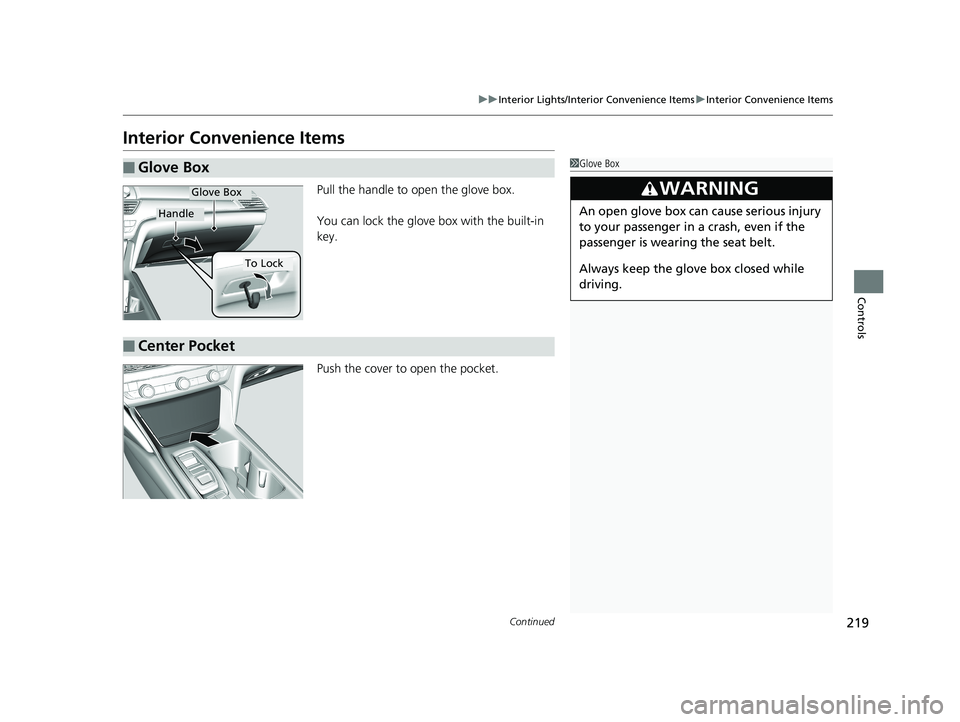
Pull the handle to open the glove box.
You can lock the glove box with the built-in
key.
Push the cover to open the pocket.
■Glove Box1Glove Box
3WARNING
An open glove box can cause serious injury
to your passenger in a crash, even if the
passenger is wearing the seat belt.
Always keep the glove box closed while
driving.
Glove Box
Handle
To Lock
■Center Pocket
18 ACCORD HYBRID-31TWA6000.book 219 ページ 2018年1月30日 火曜日 午後7時38分
Page 332 of 683
uuAudio System Basic Operation uNear Field Communication (NFC)*
330
Features
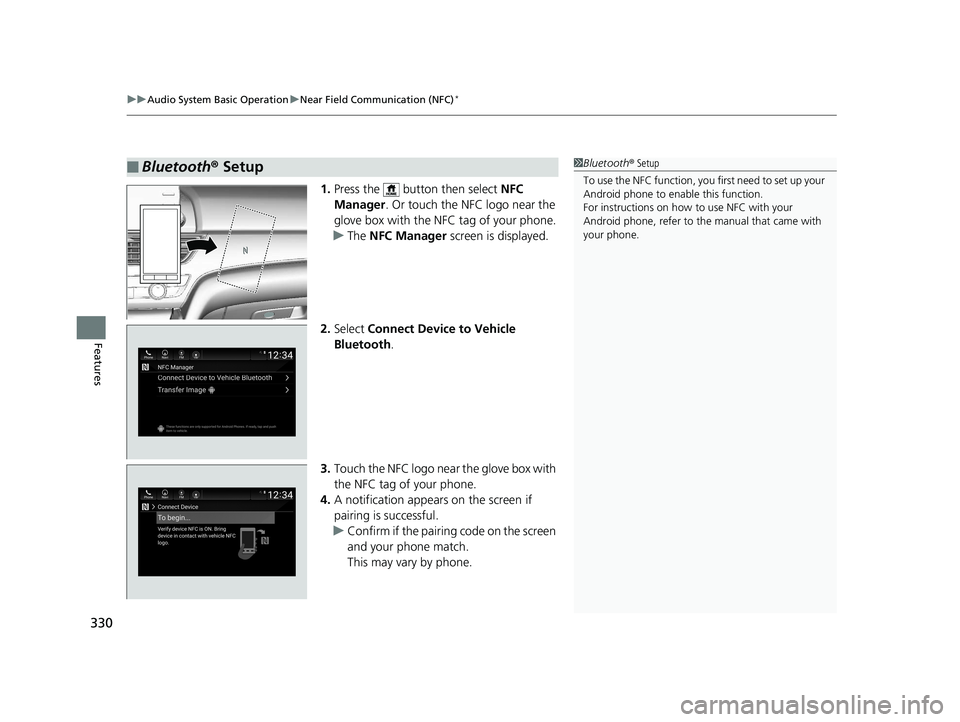
1. Press the button then select NFC
Manager . Or touch the NFC logo near the
glove box with the NFC tag of your phone.
u The NFC Manager screen is displayed.
2. Select Connect Device to Vehicle
Bluetooth .
3. Touch the NFC logo near the glove box with
the NFC tag of your phone.
4. A notification appears on the screen if
pairing is successful.
u Confirm if the pairing code on the screen
and your phone match.
This may vary by phone.
■Bluetooth® Setup1Bluetooth ® Setup
To use the NFC function, you first need to set up your
Android phone to enable this function.
For instructions on how to use NFC with your
Android phone, refer to the manual that came with
your phone.
18 ACCORD HYBRID-31TWA6000.book 330 ページ 2018年1月30日 火曜日 午後7時38分
Page 333 of 683
331
uuAudio System Basic Operation uNear Field Communication (NFC)*
Features
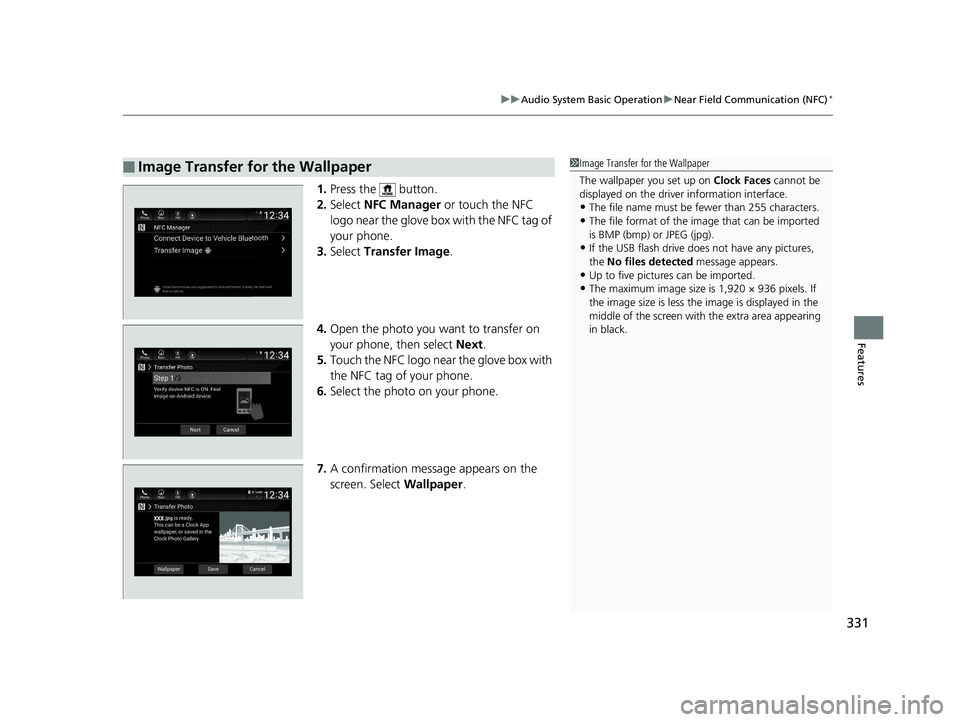
1. Press the button.
2. Select NFC Manager or touch the NFC
logo near the glove box with the NFC tag of
your phone.
3. Select Transfer Image .
4. Open the photo you want to transfer on
your phone, then select Next.
5. Touch the NFC logo near the glove box with
the NFC tag of your phone.
6. Select the photo on your phone.
7. A confirmation message appears on the
screen. Select Wallpaper.
■Image Transfer for the Wallpaper1Image Transfer for the Wallpaper
The wallpaper you set up on Clock Faces cannot be
displayed on the driver information interface.
•The file name must be fewer than 255 characters.
•The file format of the im age that can be imported
is BMP (bmp) or JPEG (jpg).
•If the USB flash drive doe s not have any pictures,
the No files detected message appears.
•Up to five pictur es can be imported.
•The maximum image size is 1,920 × 936 pixels. If
the image size is less the image is displayed in the
middle of the screen with the extra area appearing
in black.
18 ACCORD HYBRID-31TWA6000.book 331 ページ 2018年1月30日 火曜日 午後7時38分
Page 676 of 683
674
Index
F
Features..................................................... 237
Filters Dust and Pollen ....................................... 612
Oil ........................................................... 581
Flat Tire ..................................................... 623
Floor Mats ................................................. 614
Fluids
Brake ............................................... 587, 661
Engine Coolant ................................ 583, 661
Inverter Coolant............................... 585, 661
Transmission .................................... 586, 661
Windshield Washer .......................... 588, 660
FM/AM Radio .................................... 253, 295
Fog Lights .................................................. 193
Indicator .................................................... 97
Folding Down the Rear Seat .................... 212
Foot Brake ................................................. 543
Front Airbags (SRS) ..................................... 52
Front Seats Adjusting ................................................. 208
Front Sensor Camera ................................ 536
Fuel ...................................................... 30, 561
Economy ................................................. 564
Gauge ..................................................... 133
Instant Fuel Economy ............................... 140
Low Fuel Indicator ..................................... 92
Range ...................................................... 140
Recommendation .................................... 561
Refueling ......................................... 561, 658 Fuel Economy
........................................... 564
Fuel Fill Door .............................. 30, 562, 656
Fuses .......................................................... 651
Inspecting and Changing......................... 654
Locations......................................... 651, 652
G
Gasoline (Fuel) Economy ................................................. 564
Gauge ..................................................... 133
Information ..................................... 561, 660
Instant Fuel Economy .............................. 140
Low Fuel Indicator ..................................... 92
Refueling......................................... 561, 658
Gauges ...................................................... 133
Glass (care) ........................................ 613, 616
Glove Box .................................................. 219
H
Halogen Bulbs .......................................... 589
Handling of the Jack ................................ 635
Handling the Unexpected ........................ 621
HandsFreeLink ® (HFL) ....................... 400, 424
Automatic Import of Ce llular Phonebook and
Call History .................................... 414, 433
Automatic Transferring.................... 412, 432
Displaying Messages................................ 443
Favorite Contacts .................................... 434
HFL Buttons..................................... 400, 424 HFL Menus...................................... 402, 427
HFL Status Display ........................... 401, 426
In Case of Emergency ..................... 322, 447
Limitations for Manual Operation .... 401, 426
Making a Call ................................. 418, 436
Options During a Call...................... 423, 439
Phone Setup ................................... 406, 429
Receiving a Call............................... 422, 439
Receiving a Text Message........................ 441
Ring Tone ....................................... 412, 432
Selecting a Phone ................................... 442
Speed Dial .............................................. 415
To Clear the System ................................ 413
To Set Up a Text Message Options .......... 440
Hazard Warning Button .............................. 4
HD Radio
TM............................................... 298
Head Restraints ........................................ 214
Headlights ................................................ 191
Aiming.................................................... 589
Auto High-Beam ..................................... 195
Automatic Operation .............................. 192
Dimming......................................... 191, 194
Operating ............................................... 191
Head-Up Display ...................................... 157
Heated Steering Wheel ........................... 228
Heaters (Seat) ........................... 229, 230, 231
HFL (HandsFreeLink ®) ...................... 400, 424
High Beam Indicator .................................. 97
High Voltage Battery ............................... 489
Hill Start Assist System ............................. 463
HomeLink ® Universal Transceiver ........... 397
18 ACCORD HYBRID-31TWA6000.book 674 ページ 2018年1月30日 火曜日 午後7時38分