turn signal HONDA ACCORD SEDAN 2019 (in English) Owner's Guide
[x] Cancel search | Manufacturer: HONDA, Model Year: 2019, Model line: ACCORD SEDAN, Model: HONDA ACCORD SEDAN 2019Pages: 727, PDF Size: 34.1 MB
Page 508 of 727
uuWhen Driving uLaneWatchTM*
506
Driving
■Customizing the LaneWatch settings
You can customize the following items using the audio/information screen.
• Show with turn signal : Selects whether LaneWatc h monitor comes on when
you operate the turn signal light lever.
• Show Reference Line : Selects whether the reference lines appear on the
LaneWatch monitor.
• Display Time after Turn Signal Off: Changes the remaining LaneWatch
display time after you pull the turn signal lever back.
• Display : Adjusts display settings.
2Customized Features P. 381
2 Audio Remote Controls P. 248
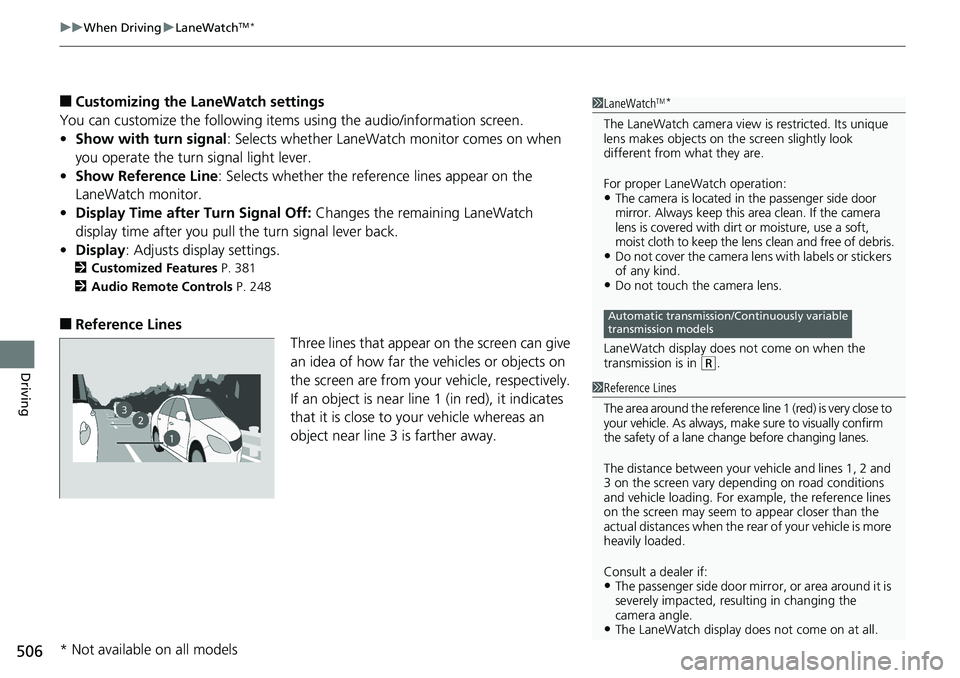
■Reference Lines
Three lines that appear on the screen can give
an idea of how far the vehicles or objects on
the screen are from your vehicle, respectively.
If an object is near line 1 (in red), it indicates
that it is close to your vehicle whereas an
object near line 3 is farther away.
1 LaneWatchTM*
The LaneWatch camera view is restricted. Its unique
lens makes objects on the screen slightly look
different from what they are.
For proper LaneWatch operation:
•The camera is located in the passenger side door
mirror. Always keep this area clean. If the camera
lens is covered with dirt or moisture, use a soft,
moist cloth to keep the lens clean and free of debris.
•Do not cover the camera lens with labels or stickers
of any kind.
•Do not touch the camera lens.
LaneWatch display does not come on when the
transmission is in
( R.
Automatic transmission/Continuously variable
transmission models
23
1
1 Reference Lines
The area around the reference line 1 (red) is very close to
your vehicle. As always, m ake sure to visually confirm
the safety of a lane chan ge before changing lanes.
The distance betwee n your vehicle and lines 1, 2 and
3 on the screen vary depending on road conditions
and vehicle loading. For ex ample, the reference lines
on the screen may seem to appear closer than the
actual distances when the rear of your vehicle is more
heavily loaded.
Consult a dealer if:
•The passenger side door mirr or, or area around it is
severely impacted, resulting in changing the
camera angle.
•The LaneWatch display doe s not come on at all.
* Not available on all models
Page 552 of 727
550
uuHonda Sensing ®u Lane Keeping Assist System (LKAS)
Driving
Lane Keeping Assist System (LKAS)
Provides steering input to help keep the vehicle in the middle of a detected lane and
provides tactile and visual alerts if the ve hicle is detected drifting out of its lane.1Lane Keeping Assist System (LKAS)
Important Safety Reminders
The LKAS is for your convenience only. It is not a
substitute for your vehicl e control. The system does
not work if you take y our hands off the steering
wheel or fail to steer the vehicle.
2 Driver Information Interface Warning and
Information Messages P. 105
Do not place objects on the instrument panel.
Objects may reflect on th e windshield and prevent
correct detection of the traffic lanes.
The LKAS only alerts you when lane drift is detected
without a turn signal in us e. The LKAS may not detect
all lane markings or lane departures; accuracy will
vary based on weather, speed, and lane marker
condition.
It is always your responsibility to safely operate the
vehicle and avoid collisions.
The LKAS is convenient when it is used on freeways.
The LKAS may not work properly or may work
improperly under the certain conditions:
2 LKAS Conditions and Limitations P. 555
You can read about handling information for the
camera equipped with this system. 2 Front Sensor Camera P. 568
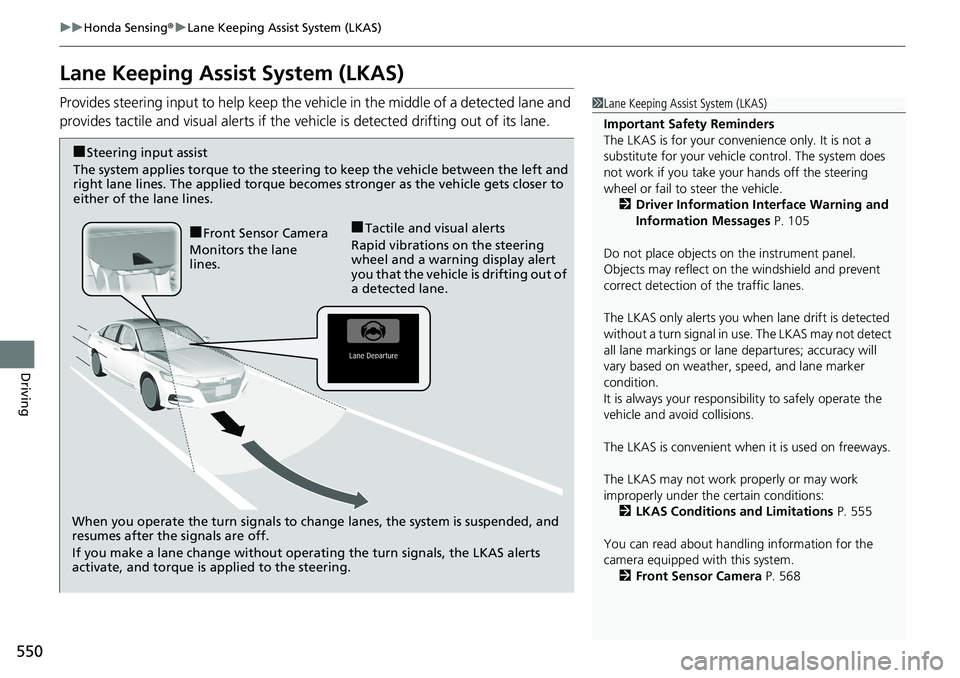
When you operate the turn signals to chan ge lanes, the system is suspended, and
resumes after the signals are off.
If you make a lane change without operating the turn signals, the LKAS alerts
activate, and torque is applied to the steering.
■Front Sensor Camera
Monitors the lane
lines.■Tactile and visual alerts
Rapid vibrations on the steering
wheel and a warning display alert
you that the vehicle is drifting out of
a detected lane.
■Steering input assist
The system applies torque to the steering to keep the vehicle between the left and
right lane lines. The applied torque become s stronger as the vehicle gets closer to
either of the lane lines.
Page 554 of 727
uuHonda Sensing ®u Lane Keeping Assist System (LKAS)
552
Driving
The system can be used when the following conditions are met.
• The lane in which you are driving has dete ctable lane markers on both sides, and
your vehicle is in the center of the lane.
• The vehicle speed is between 45 and 90 mph (72 and 145 km/h).
• You are driving on a straight or slightly curved road.
• The turn signals are off.
• The brake pedal is not depressed.
• The wipers are not in high speed operation.
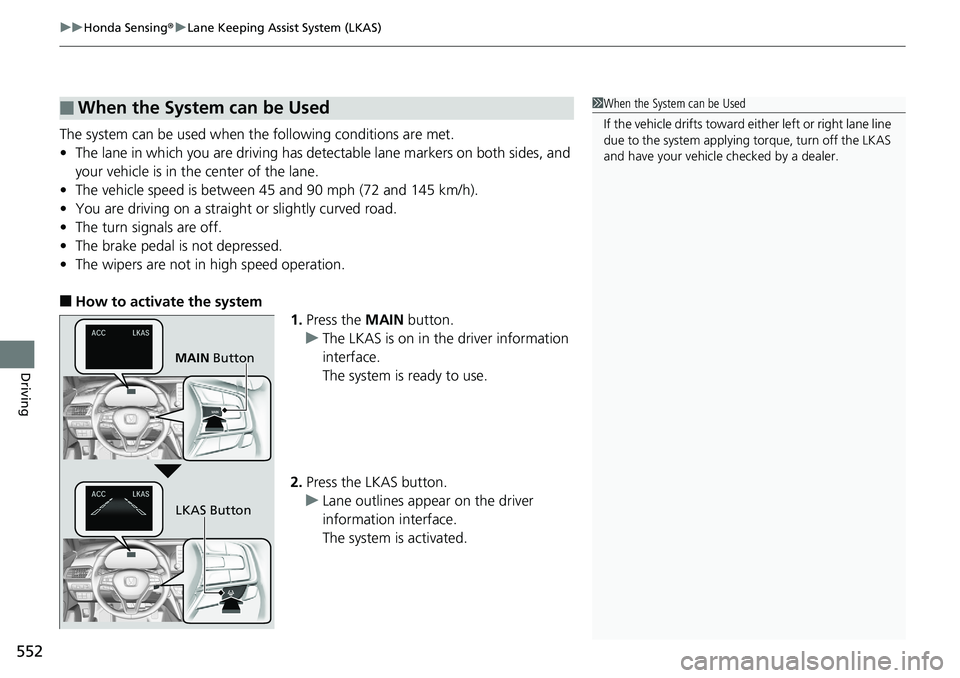
■How to activate the system
1.Press the MAIN button.
u The LKAS is on in the driver information
interface.
The system is ready to use.
2. Press the LKAS button.
u Lane outlines appear on the driver
information interface.
The system is activated.
■When the System can be Used1When the System can be Used
If the vehicle drifts toward ei ther left or right lane line
due to the system applying torque, turn off the LKAS
and have your vehicle checked by a dealer.
MAIN Button
LKAS Button
Page 560 of 727
558
uuHonda Sensing ®u Road Departure Mitigation (RDM) System
Driving
Road Departure Mitigation (RDM) System
Alerts and helps to assist you when the system determines a possibility of your
vehicle unintentionally crossing over dete cted lane markings and/or leaving the
roadway altogether.
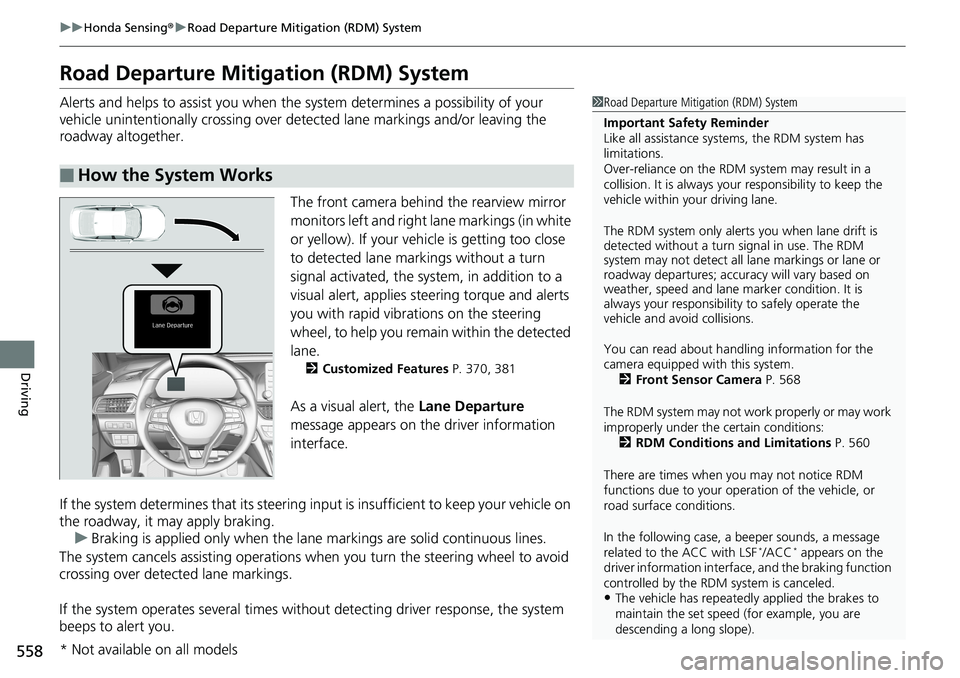
The front camera behind the rearview mirror
monitors left and right la ne markings (in white
or yellow). If your vehicle is getting too close
to detected lane markings without a turn
signal activated, the system, in addition to a
visual alert, applies st eering torque and alerts
you with rapid vibrations on the steering
wheel, to help you remain within the detected
lane.
2 Customized Features P. 370, 381
As a visual alert, the Lane Departure
message appears on the driver information
interface.
If the system determines that its steering i nput is insufficient to keep your vehicle on
the roadway, it may apply braking. u Braking is applied only when the lane markings are solid continuous lines.
The system cancels assistin g operations when you turn the steering wheel to avoid
crossing over detected lane markings.
If the system operates several times withou t detecting driver response, the system
beeps to alert you.
■How the System Works
1 Road Departure Mitigation (RDM) System
Important Safety Reminder
Like all assistance systems, the RDM system has
limitations.
Over-reliance on the RDM system may result in a
collision. It is always your responsibility to keep the
vehicle within your driving lane.
The RDM system only alerts you when lane drift is
detected without a turn signal in use. The RDM
system may not detect all la ne markings or lane or
roadway departures; accu racy will vary based on
weather, speed and lane marker condition. It is
always your responsibilit y to safely operate the
vehicle and avoid collisions.
You can read about handling information for the
camera equipped with this system.
2 Front Sensor Camera P. 568
The RDM system may not wo rk properly or may work
improperly under the certain conditions: 2 RDM Conditions and Limitations P. 560
There are times when you may not notice RDM
functions due to your opera tion of the vehicle, or
road surface conditions.
In the following case, a beeper sounds, a message
related to the ACC with LSF
*/ACC* appears on the
driver information interfac e, and the braking function
controlled by the RDM system is canceled.
•The vehicle has repeatedly applied the brakes to
maintain the set speed (for example, you are
descending a long slope).
* Not available on all models
Page 561 of 727
Continued559
uuHonda Sensing ®u Road Departure Mitigation (RDM) System
Driving
The system becomes ready to start sear ching for lane markings when all the
following conditions are met:
• The vehicle is traveling between about 45 and 90 mph (72 and 145 km/h).
• The vehicle is on a straight or slightly curved road.
• The turn signals are off.
• The brake pedal is not depressed.
• The wipers are not in high speed operation.
• The vehicle is not accelera ting or braking, and the steering wheel is not being
turned.
• The system makes a determination that th e driver is not actively accelerating,
braking or steering.
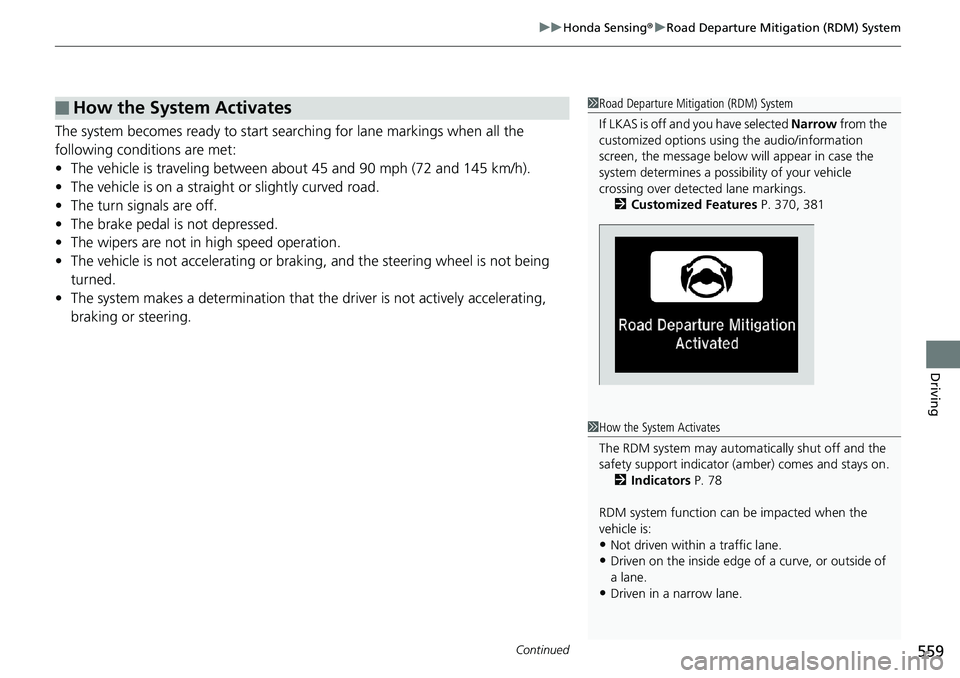
■How the System Activates1 Road Departure Mitigation (RDM) System
If LKAS is off and you have selected Narrow from the
customized options using the audio/information
screen, the message below will appear in case the
system determines a possibility of your vehicle
crossing over detect ed lane markings.
2 Customized Features P. 370, 381
1How the System Activates
The RDM system may automa tically shut off and the
safety support indicator (a mber) comes and stays on.
2 Indicators P. 78
RDM system function can be impacted when the
vehicle is:
•Not driven within a traffic lane.
•Driven on the inside edge of a curve, or outside of
a lane.
•Driven in a narrow lane.
Page 564 of 727
562
uuHonda Sensing ®u Traffic Sign Recognition System
Driving
Traffic Sign Recognition System
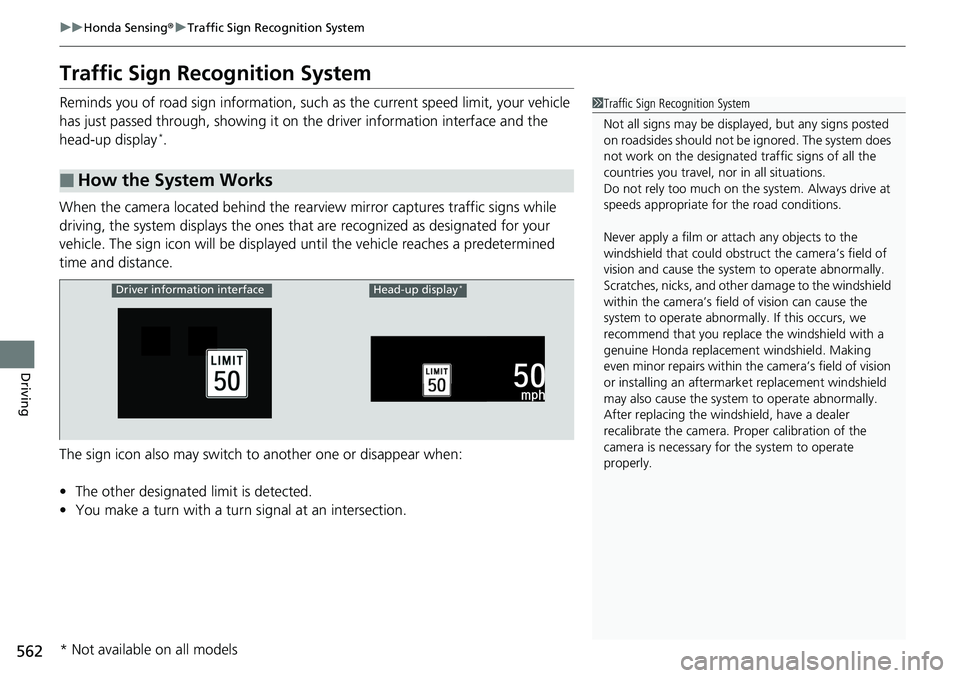
Reminds you of road sign information, such as the current speed limit, your vehicle
has just passed through, showing it on the driver information interface and the
head-up display
*.
When the camera located behind the rear view mirror captures traffic signs while
driving, the system displays the ones that are recognized as designated for your
vehicle. The sign icon will be displayed until the vehicle reaches a predetermined
time and distance.
The sign icon also may switch to another one or disappear when:
• The other designated limit is detected.
• You make a turn with a turn signal at an intersection.
■How the System Works
1Traffic Sign Recognition System
Not all signs may be displa yed, but any signs posted
on roadsides should not be ignored. The system does
not work on the designated traffic signs of all the
countries you travel, nor in all situations.
Do not rely too much on the system. Always drive at
speeds appropriate fo r the road conditions.
Never apply a film or attach any objects to the
windshield that could obstruc t the camera’s field of
vision and cause the system to operate abnormally.
Scratches, nicks, and othe r damage to the windshield
within the camera’s fiel d of vision can cause the
system to operate abnormall y. If this occurs, we
recommend that you replac e the windshield with a
genuine Honda replacem ent windshield. Making
even minor repairs within th e camera’s field of vision
or installing an aftermarket replacement windshield
may also cause the system to operate abnormally.
After replacing the winds hield, have a dealer
recalibrate the camera. Pr oper calibration of the
camera is necessary for the system to operate
properly.
Driver information interfaceHead-up display*
* Not available on all models
Page 635 of 727
633
uuReplacing Light Bulbs uFog Lights*
Maintenance
Fog Lights*
Fog lights are LED type. Have an authoriz ed Honda dealer inspect and replace the
light assembly.
Parking/Daytime Running Lights
Parking/daytime running lights are LED ty pe. Have an authorized Honda dealer
inspect and replace the light assembly.
Front Turn Signal Lights
Front turn signal lights are LED type. Have an authorized Honda dealer inspect and
replace the light assembly.
Front Side Marker Lights
Front side marker lights are LED type. Have an authorized Hond a dealer inspect and
replace the light assembly.
Side Turn Signal/Emer gency Indicator Lights*
Door mirror side turn lights are LED type. Have an authorized Honda dealer inspect
and replace the light assembly.
* Not available on all models
Page 636 of 727
634
uuReplacing Light Bulbs uBrake, Taillight, Rear Side Marker Li ghts and Rear Turn Signal Light Bulbs
Maintenance
Brake, Taillight, Rear Side Marker Lights and Rear
Turn Signal Light Bulbs
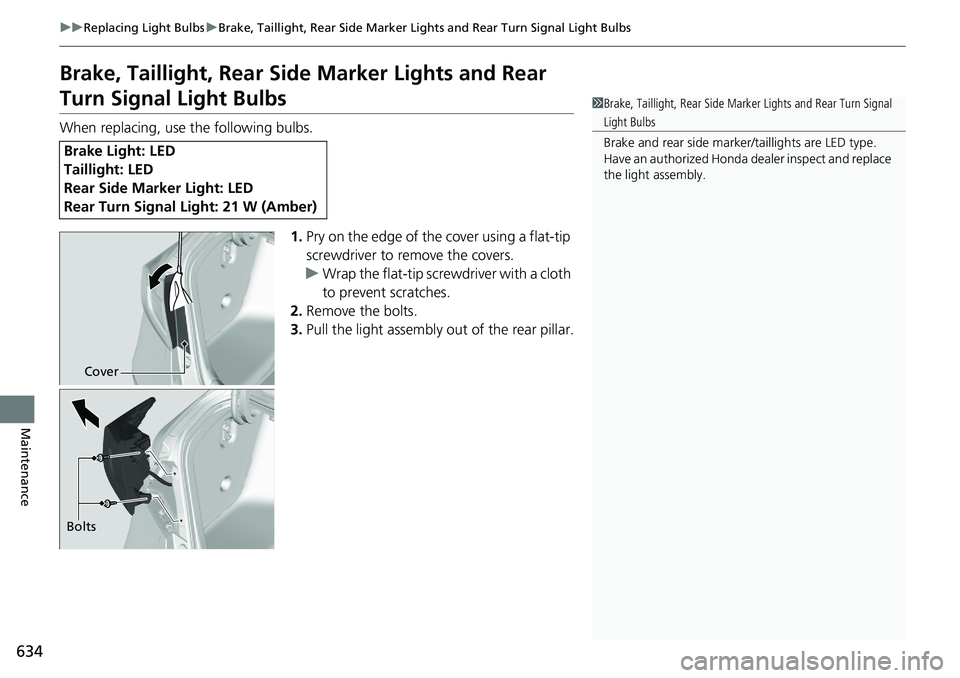
When replacing, use the following bulbs.
1.Pry on the edge of the cover using a flat-tip
screwdriver to remove the covers.
u Wrap the flat-tip screwdriver with a cloth
to prevent scratches.
2. Remove the bolts.
3. Pull the light assembly out of the rear pillar.
Brake Light: LED
Taillight: LED
Rear Side Marker Light: LED
Rear Turn Signal Light: 21 W (Amber)
1Brake, Taillight, Rear Side Marker Lights and Rear Turn Signal
Light Bulbs
Brake and rear side marker/taillights are LED type.
Have an authorized Honda dealer inspect and replace
the light assembly.
Cover
Bolts
Page 637 of 727
635
uuReplacing Light Bulbs uBrake, Taillight, Rear Side Marker Lights and Rear Turn Signal Light Bulbs
Maintenance
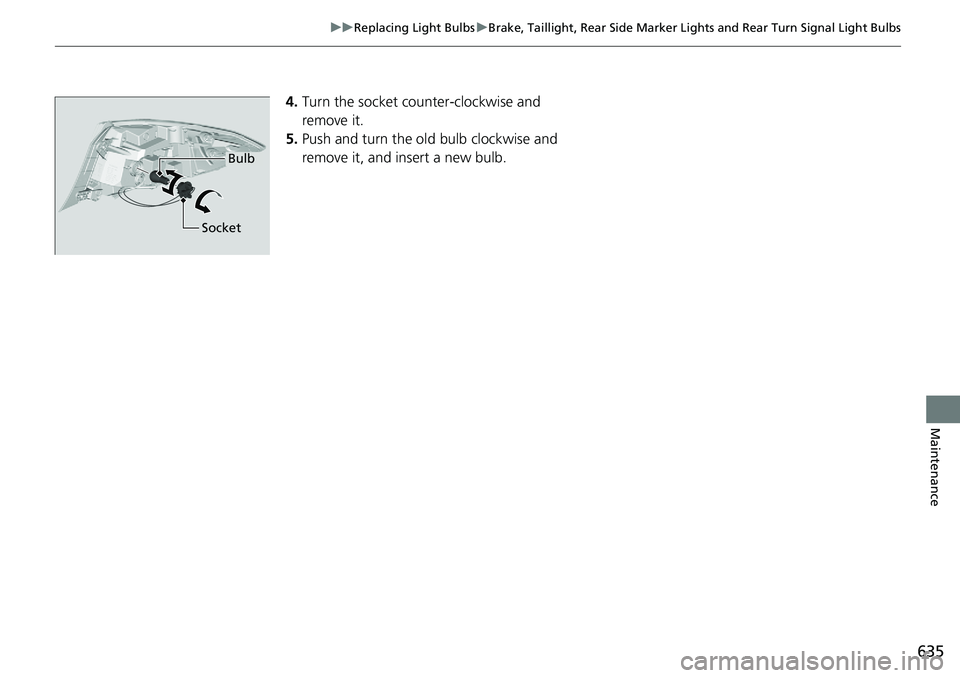
4. Turn the socket co unter-clockwise and
remove it.
5. Push and turn the ol d bulb clockwise and
remove it, and insert a new bulb.
Bulb
Socket
Page 702 of 727
700
Information
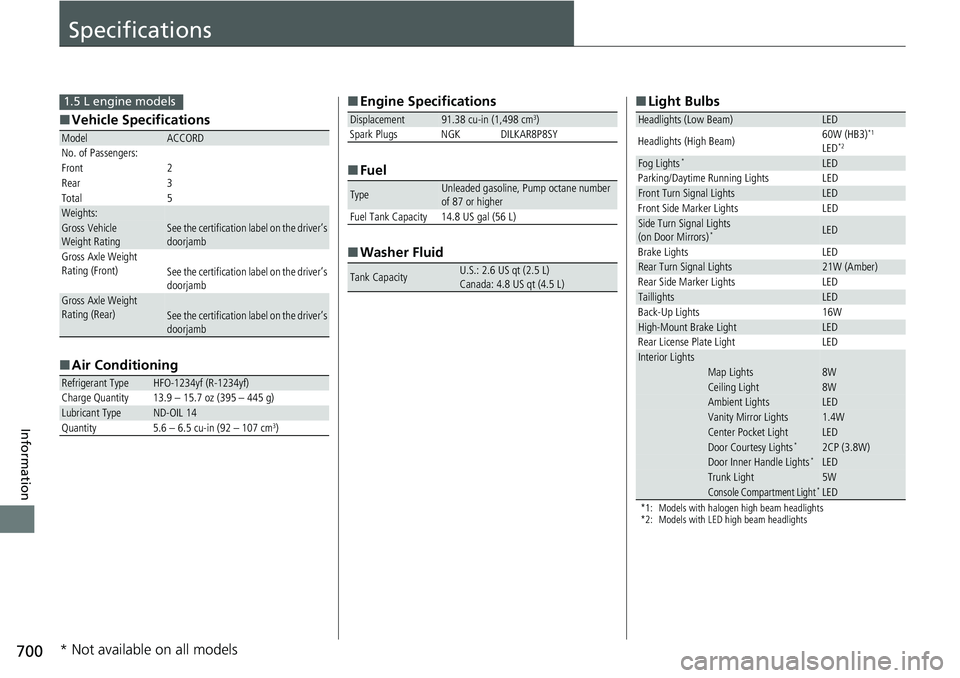
Specifications
■Vehicle Specifications
■ Air Conditioning
ModelACCORD
No. of Passengers:
Front 2
Rear 3
Total 5
Weights:Gross Vehicle
Weight Rating See the certification label on the driver’s
doorjamb
Gross Axle Weight
Rating (Front)See the certification label on the driver’s
doorjamb
Gross Axle Weight
Rating (Rear)See the certification label on the driver’s
doorjamb
Refrigerant TypeHFO-1234yf (R-1234yf)
Charge Quantity 13.9 – 15.7 oz (395 – 445 g)
Lubricant TypeND-OIL 14
Quantity 5.6 – 6.5 cu-in (92 – 107 cm3)
1.5 L engine models■ Engine Specifications
■ Fuel
■ Washer Fluid
Displacement91.38 cu-in (1,498 cm3)
Spark Plugs NGK DILKAR8P8SY
TypeUnleaded gasoline, Pump octane number
of 87 or higher
Fuel Tank Capacity 14.8 US gal (56 L)
Tank CapacityU.S.: 2.6 US qt (2.5 L)
Canada: 4.8 US qt (4.5 L)
■ Light Bulbs
*1: Models with halogen high beam headlights
*2: Models with LED high beam headlights
Headlights (Low Beam)LED
Headlights (High Beam) 60W (HB3)*1
LED*2
Fog Lights*LED
Parking/Daytime Running Lights LED
Front Turn Signal LightsLED
Front Side Marker Lights LED
Side Turn Signal Lights
(on Door Mirrors)*LED
Brake Lights LED
Rear Turn Signal Lights21W (Amber)
Rear Side Marker Lights LED
TaillightsLED
Back-Up Lights 16W
High-Mount Brake LightLED
Rear License Plate Light LED
Interior LightsMap Lights8WCeiling Light8WAmbient LightsLEDVanity Mirror Lights1.4WCenter Pocket LightLEDDoor Courtesy Lights*2CP (3.8W)Door Inner Handle Lights*LEDTrunk Light5WConsole Compartment Light*LED
* Not available on all models