flat tire HONDA ACCORD SEDAN 2020 (in English) Owner's Guide
[x] Cancel search | Manufacturer: HONDA, Model Year: 2020, Model line: ACCORD SEDAN, Model: HONDA ACCORD SEDAN 2020Pages: 728, PDF Size: 34.06 MB
Page 669 of 728
667
Handling the Unexpected
This chapter explains how to handle unexpected troubles.
ToolsTypes of Tools .................................. 668
If a Tire Goes Flat
Changing a Flat Tire ......................... 669
Engine Does Not Start Checking the Engine ........................ 675
If the Remote Battery is Weak ....... 676Emergency Engine Stop ................... 677
Jump Starting .................................... 678
Shift Lever Does Not Move .............. 681
Overheating How to Handle Overheating ............. 683 Indicator, Coming On/Blinking
If the Low Oil Pressure Warning Appears ... 685If the Charging System Indicator Comes
On ................................................. 685
If the Malfunction Indicator Lamp Comes On or Blinks ................................... 686
If the Brake System Indicator (Red) Comes
On or Blinks ................................... 687
If the Brake System Indicator (Red) Comes On
or Blinks at the Same Time When the Brake
System Indicator (Amber) Comes On.... 688
If the Electric Power Steering (EPS) System Indicator Comes On ....................... 689 If the Low Tire Pressure/TPMS Indicator
Comes On or Blinks ....................... 690
If the Transmission I ndicator Blinks along
with the Warning Message ............ 691
Fuses Fuse Locations ................................. 692
Inspecting and Changing Fuses ........ 696
Emergency Towing ........................... 697
When You Cannot Unlock the Fuel Fill Door ................................................. 698
When You Cannot Open the Trunk ... 699
Refueling ........................................... 701
Page 671 of 728
669Continued
Handling the Unexpected
If a Tire Goes Flat
Changing a Flat Tire
If a tire goes flat while driving, grasp the steering wheel firmly, and brake gradually
to reduce speed. Then, stop in a safe plac e. Replace the flat tire with a compact
spare tire. Go to a dealer as soon as possib le to have the full-size tire repaired or
replaced.
1. Park the vehicle on a firm, level, and n on-slippery surface, and apply the parking
brake.
2. Put the transmission into
(P.
2. Move the shift lever to
(R.
3. Turn on the hazard warning lights an d set the power mode to VEHICLE OFF.
1Changing a Flat Tire
Follow these compact spare precautions:
Periodically check the tire pressure of the compact
spare. It should be set to the specified pressure.
Specified Pressure: 60 psi (420 kPa, 4.2 kgf/cm
2)
When driving with the compact spare tire, keep the
vehicle speed under 50 mph (80 km/h). Replace with
a full-size tire as soon as possible.
The compact spare tire and wheel in your vehicle are
specifically for this model. Do not use them with
another vehicle. Do not us e another type of compact
spare tire or wheel with your vehicle.
Do not mount tire chains on a compact spare tire.
If a chain-mounted front tire goes flat, remove one of
the full-size rear tires and replace it with the compact
spare tire. Remove the flat front tire and replace it
with the full-size tire that was removed from the rear.
Mount the tire chains on the front tire.
NOTICE
Do not use the jack if it doesn’t work properly.
Call your dealer or a pr ofessional towing service.
Do not mount the compact spare on the front.
If either front tire goes flat, remove the rear tire on
the same side, and mount the compact spare on the
rear and the rear tire on the front.
Automatic transmission/Continuousl y variable transmission models
Manual transmission models
All models
Page 672 of 728
670
uuIf a Tire Goes Flat uChanging a Flat Tire
Handling the Unexpected
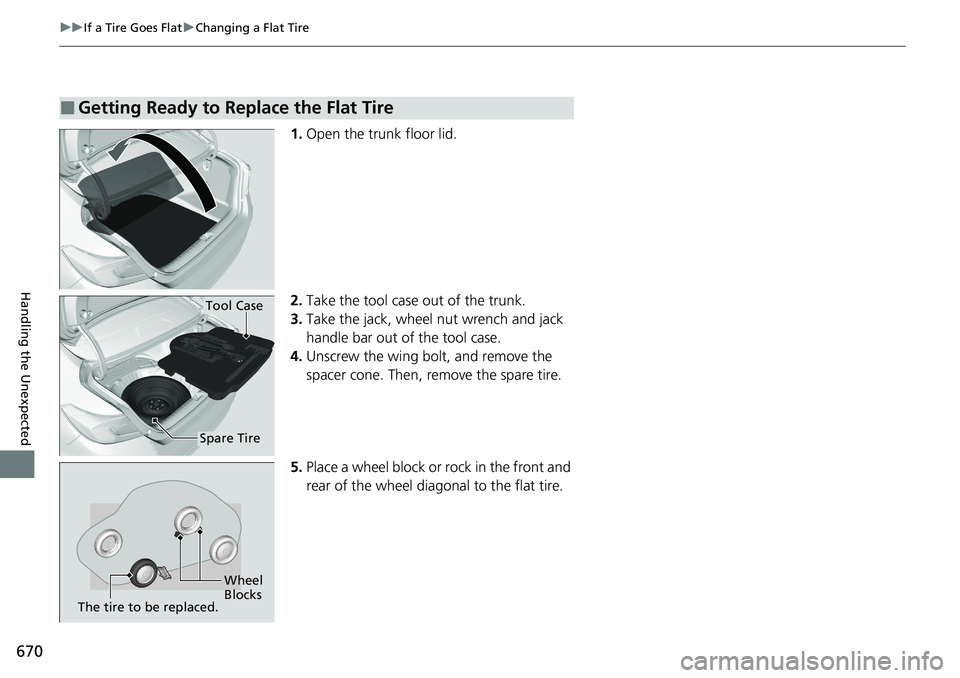
1. Open the trunk floor lid.
2. Take the tool case out of the trunk.
3. Take the jack, wheel nut wrench and jack
handle bar out of the tool case.
4. Unscrew the wing bolt, and remove the
spacer cone. Then, remove the spare tire.
5. Place a wheel block or rock in the front and
rear of the wheel diagonal to the flat tire.
■Getting Ready to Replace the Flat Tire
Tool Case
Spare Tire
Wheel
Blocks
The tire to be replaced.
Page 673 of 728
671
uuIf a Tire Goes Flat uChanging a Flat Tire
Continued
Handling the Unexpected
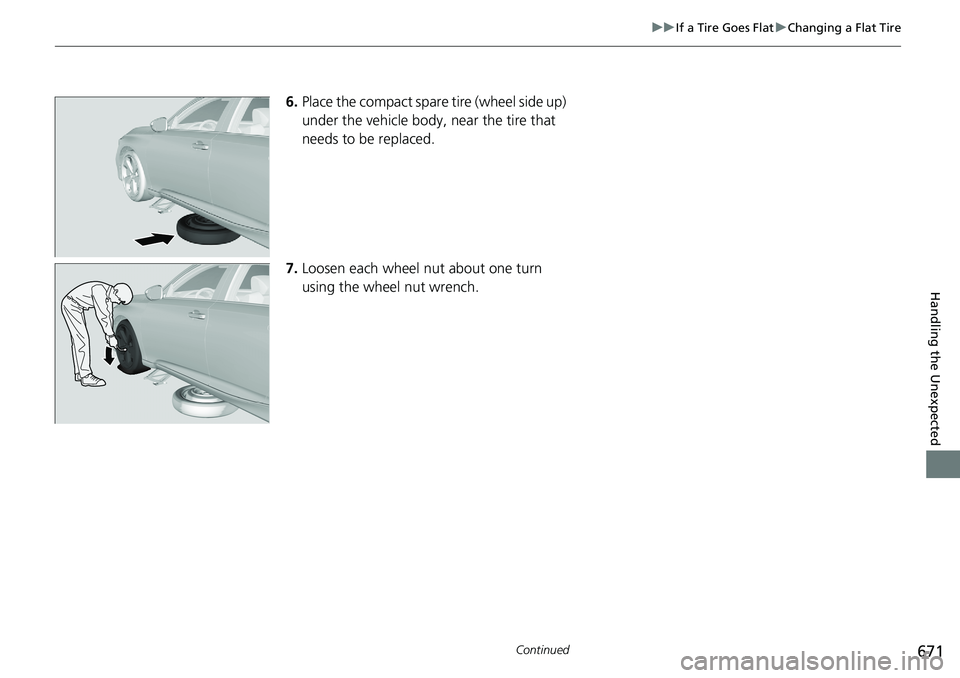
6. Place the compact spare tire (wheel side up)
under the vehicle body, near the tire that
needs to be replaced.
7. Loosen each wheel nut about one turn
using the wheel nut wrench.
Page 674 of 728
uuIf a Tire Goes Flat uChanging a Flat Tire
672
Handling the Unexpected
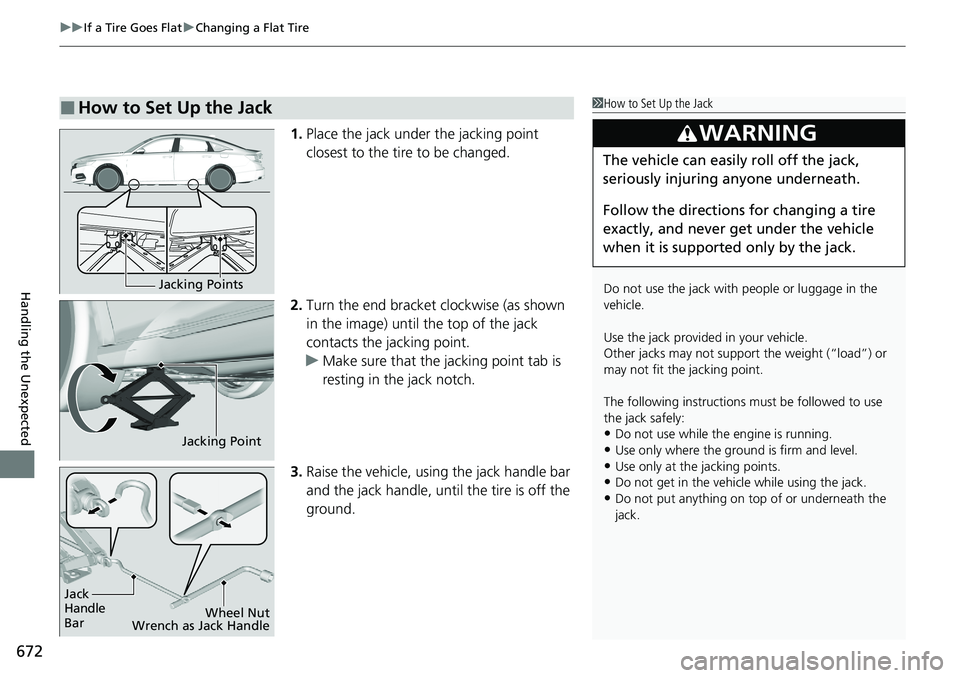
1. Place the jack under the jacking point
closest to the tire to be changed.
2. Turn the end bracket clockwise (as shown
in the image) until the top of the jack
contacts the jacking point.
u Make sure that the jacking point tab is
resting in the jack notch.
3. Raise the vehicle, using the jack handle bar
and the jack handle, until the tire is off the
ground.
■How to Set Up the Jack1How to Set Up the Jack
Do not use the jack with people or luggage in the
vehicle.
Use the jack provided in your vehicle.
Other jacks may not support the weight (“load”) or
may not fit the jacking point.
The following instructions must be followed to use
the jack safely:
•Do not use while the engine is running.
•Use only where the ground is firm and level.
•Use only at the jacking points.•Do not get in the vehicl e while using the jack.
•Do not put anything on top of or underneath the
jack.
3WARNING
The vehicle can easily roll off the jack,
seriously injuring anyone underneath.
Follow the directions for changing a tire
exactly, and never get under the vehicle
when it is supported only by the jack.
Jacking Points
Jacking Point
Jack
Handle
Bar Wheel Nut
Wrench as Jack Handle
Page 675 of 728
Continued673
uuIf a Tire Goes Flat uChanging a Flat Tire
Handling the Unexpected
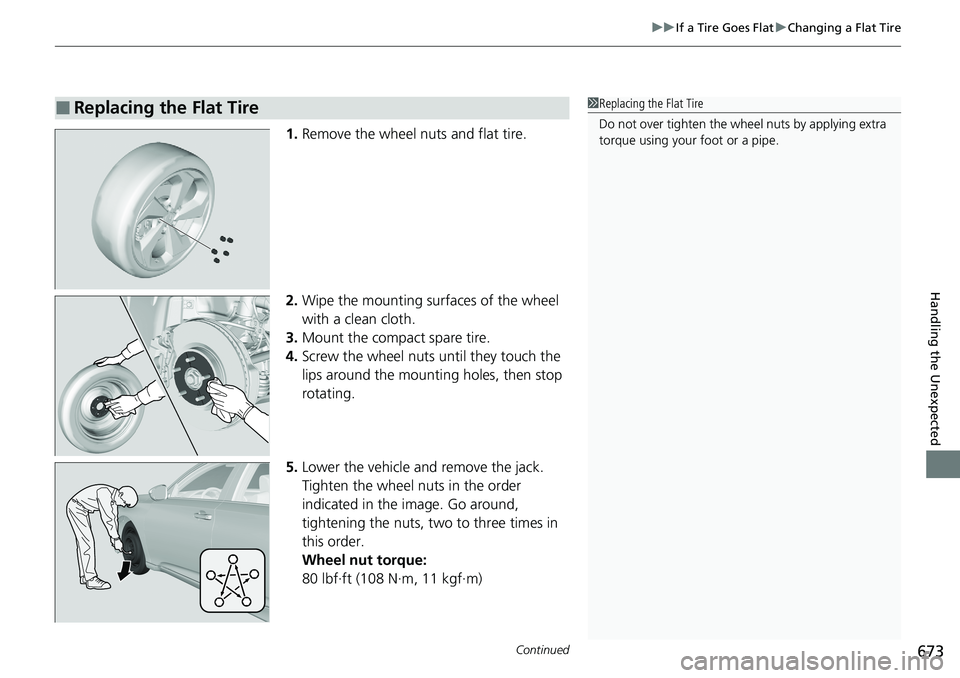
1. Remove the wheel nuts and flat tire.
2. Wipe the mounting surfaces of the wheel
with a clean cloth.
3. Mount the compact spare tire.
4. Screw the wheel nuts until they touch the
lips around the mounting holes, then stop
rotating.
5. Lower the vehicle and remove the jack.
Tighten the wheel nuts in the order
indicated in the image. Go around,
tightening the nuts, two to three times in
this order.
Wheel nut torque:
80 lbf∙ft (108 N∙m, 11 kgf∙m)
■Replacing the Flat Tire1Replacing the Flat Tire
Do not over tighten the wheel nuts by applying extra
torque using your foot or a pipe.
Page 676 of 728
uuIf a Tire Goes Flat uChanging a Flat Tire
674
Handling the Unexpected
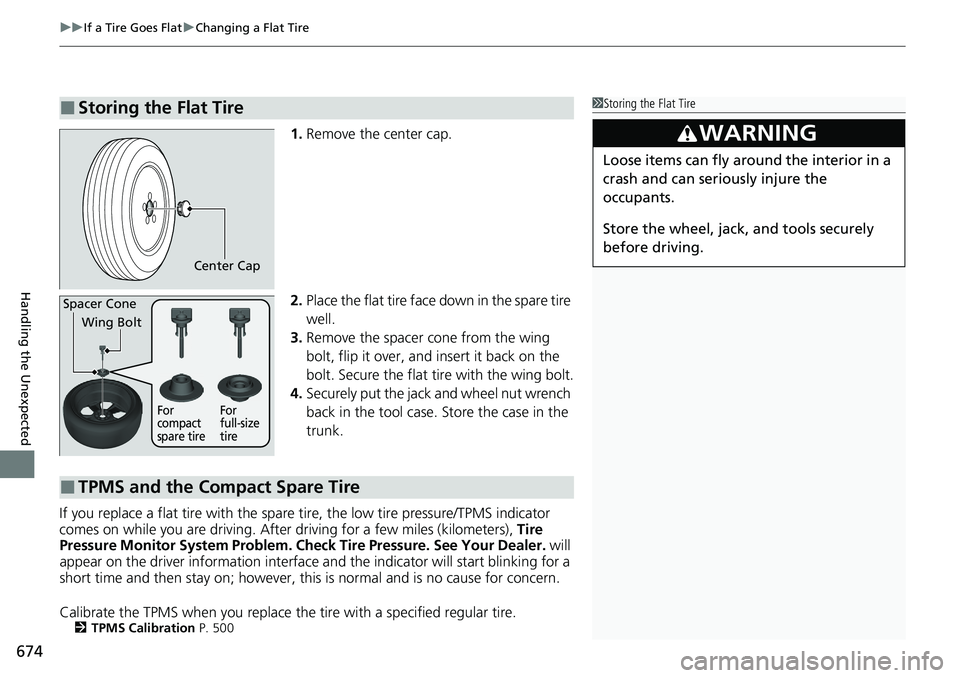
1. Remove the center cap.
2. Place the flat tire face down in the spare tire
well.
3. Remove the spacer cone from the wing
bolt, flip it over, and insert it back on the
bolt. Secure the flat tire with the wing bolt.
4. Securely put the jack and wheel nut wrench
back in the tool case. Store the case in the
trunk.
If you replace a flat tire with the spare tire, the low tire pressure/TPMS indicator
comes on while you are driving. Afte r driving for a few miles (kilometers), Tire
Pressure Monitor System Problem. Ch eck Tire Pressure. See Your Dealer. will
appear on the driver information interface and the indicator will start blinking for a
short time and then stay on; however, this is normal and is no cause for concern.
Calibrate the TPMS when you replace the tire with a specified regular tire.
2TPMS Calibration P. 500
■Storing the Flat Tire1Storing the Flat Tire
3WARNING
Loose items can fly around the interior in a
crash and can seriously injure the
occupants.
Store the wheel, jack, and tools securely
before driving.
Center Cap
Spacer Cone
Wing Bolt
For
compact
spare tire For
full-size
tire
■TPMS and the Compact Spare Tire
Page 692 of 728
690
uuIndicator, Coming On/BlinkinguIf the Low Tire Pressure/TPMS Indicator Comes On or Blinks
Handling the Unexpected
If the Low Tire Pressure/TPMS Indicator Comes On or
Blinks
■Reasons for the indicator to come on or blink
A tire pressure is signifi cantly low, or the TPMS has not been calibrated.
If there is a problem with the TPMS, the indicator blinks for about one
minute, and then stays on.
If the compact spare tire is installed, the indicator will either come on or
it will first blink for abou t one minute, then stay on.
■What to do when the indicator comes on
Drive carefully and avoid abrupt cornering and hard braking.
Stop your vehicle in a safe place. Ch eck the tire pressure and adjust the
pressure to the specified level. The sp ecified tire pressure is on a label on
the driver side doorjamb. u Calibrate the TPMS after the tire pressure is adjusted.
2 TPMS Calibration P. 500
If the compact spare tire causes the indicator to come on, change the
tire to a full-size tire . The indicator goes off af ter calibrating the TPMS.
■What to do when the indica tor blinks, then remains on
Have the tire inspected by a dealer as soon as possible. If the compact
spare tire causes the indicator to firs t blink, and then stay on, change the
tire to a full-size tire . The indicator goes off af ter calibrating the TPMS.
2TPMS Calibration P. 500
1If the Low Tire Pressure/TPMS Indicator Comes On or Blinks
NOTICE
Driving on an extremely underinflated tire can cause
it to overheat. An overheated tire can fail. Always
inflate your tires to the prescribed level.
Page 699 of 728
697
Handling the Unexpected
Emergency Towing
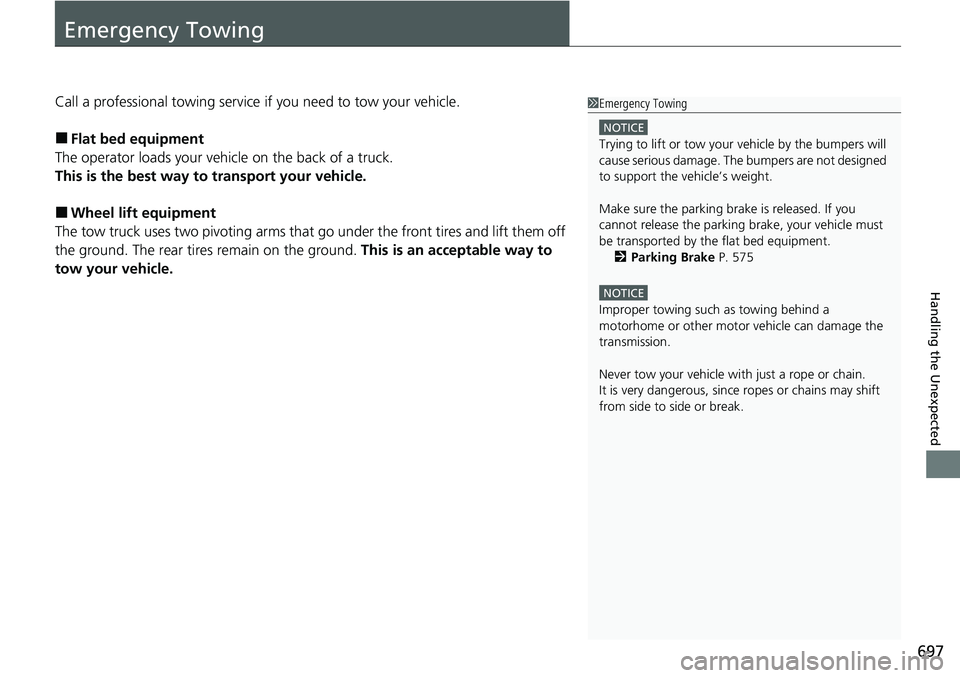
Call a professional towing service if you need to tow your vehicle.
■Flat bed equipment
The operator loads your vehicle on the back of a truck.
This is the best way to transport your vehicle.
■Wheel lift equipment
The tow truck uses two pivoti ng arms that go under the front tires and lift them off
the ground. The rear tires remain on the ground. This is an acceptable way to
tow your vehicle.
1 Emergency Towing
NOTICE
Trying to lift or tow your vehicle by the bumpers will
cause serious damage. The bumpers are not designed
to support the vehicle’s weight.
Make sure the parking brake is released. If you
cannot release the parking brake, your vehicle must
be transported by the flat bed equipment. 2 Parking Brake P. 575
NOTICE
Improper towing such as towing behind a
motorhome or other motor vehicle can damage the
transmission.
Never tow your vehicle with just a rope or chain.
It is very dangerous, since ropes or chains may shift
from side to side or break.
Page 722 of 728
720
Index
EPS (Electric Power Steering) System....... 689
Exhaust Gas Hazard
(Carbon Monoxide) ................................... 75
Exterior Care (Cleaning) ........................... 661
Exterior Mirrors ......................................... 210
F
Features..................................................... 245
Filters
Dust and Pollen ....................................... 658
Oil ........................................................... 625
Flat Tire ..................................................... 669
Floor Mats ................................................. 660
Fluids Automatic Transmission ........................... 632
Brake/Clutch ............................................ 633
Continuously Variable Transmission ......... 631
Engine Coolant ........................................ 629
Manual Transmission ............................... 631
Windshield Washer .................................. 634
FM/AM Radio .................................... 261, 300
Fog Lights .................................................. 196
Indicator .................................................... 94
Folding Down the Rear Seat .................... 215
Foot Brake ................................................. 580
Front Airbags (SRS) ..................................... 48
Front Seat Heaters .................................... 237
Front Seat Heaters and Seat Ventilation .............................................. 238 Front Seats
Adjusting ................................................ 211
Front Sensor Camera ................................ 572
Fuel ...................................................... 24, 601
Economy ................................................. 604
Gauge ..................................................... 137
Instant Fuel Economy .............................. 143
Low Fuel Indicator ..................................... 89
Range ..................................................... 143
Recommendation .................................... 601
Refueling................................................. 601
Fuel Economy and CO
2 Emissions ............ 604
Fuel Fill Door ...................................... 24, 602
Unable to Unlock .................................... 698
Fuses .......................................................... 692
Inspecting and Changing......................... 696
Locations......................................... 692, 694
G
Gasoline (Fuel)
Economy ................................................. 604
Gauge ..................................................... 137
Information ............................................. 601
Instant Fuel Economy .............................. 143
Low Fuel Indicator ..................................... 89
Refueling................................................. 601
Gauges ...................................................... 137
Gear Position Indicator .............................. 84 Gear Shift Lever Positions
Continuously Variable
Transmission ................................. 484, 486
Manual Transmission .............................. 490
Glass (care) ....................................... 659, 662
Glove Box ................................................. 224
H
Halogen Bulbs .......................................... 635
Handling the Unexpected ....................... 667
HandsFreeLink® (HFL)...................... 405, 429
Automatic Import of Cellular Phonebook and
Call History ................................... 419, 438
Automatic Transferring ................... 417, 437
Displaying Messages ............................... 448
Favorite Contacts .................................... 439
HFL Buttons .................................... 405, 429
HFL Menus...................................... 407, 432
HFL Status Display ........................... 406, 431
In Case of Emergency ..................... 327, 452
Limitations for Manual Operation .... 406, 431
Making a Call ................................. 423, 441
Options During a Call...................... 428, 444
Phone Setup ................................... 411, 434
Receiving a Call............................... 427, 444
Receiving a Text Message........................ 446
Ring Tone ....................................... 417, 437
Selecting a Phone ................................... 447
Speed Dial .............................................. 420
To Clear the System ................................ 418