lane assist HONDA ACCORD SEDAN 2020 (in English) Owner's Guide
[x] Cancel search | Manufacturer: HONDA, Model Year: 2020, Model line: ACCORD SEDAN, Model: HONDA ACCORD SEDAN 2020Pages: 728, PDF Size: 34.06 MB
Page 557 of 728
Continued555
uuHonda Sensing ®u Lane Keeping Assist System (LKAS)
Driving
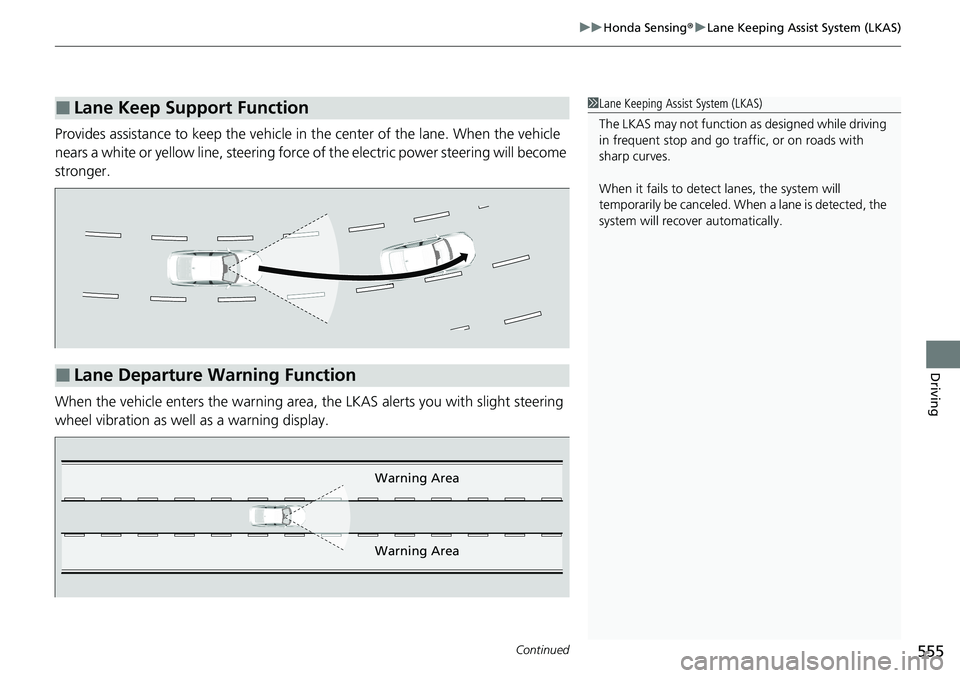
Provides assistance to keep the vehicle in the center of the lane. When the vehicle
nears a white or yellow line, steering force of the electric power steering will become
stronger.
When the vehicle enters the warning area, the LKAS alerts you with slight steering
wheel vibration as well as a warning display.
■Lane Keep Support Function1 Lane Keeping Assist System (LKAS)
The LKAS may not function as designed while driving
in frequent stop and go traf fic, or on roads with
sharp curves.
When it fails to detect lanes, the system will
temporarily be canceled. When a lane is detected, the
system will recover automatically.
■Lane Departure Warning Function
Warning Area
Warning Area
Page 558 of 728
uuHonda Sensing ®u Lane Keeping Assist System (LKAS)
556
Driving
The system can be used when the following conditions are met.
• The lane in which you are driving has dete ctable lane markers on both sides, and
your vehicle is in the center of the lane.
• The vehicle is traveling between about 45 and 90 mph (72 and 145 km/h).
• You are driving on a straight or slightly curved road.
• The turn signals are off.
• The brake pedal is not depressed.
• The wipers are not in high speed operation.
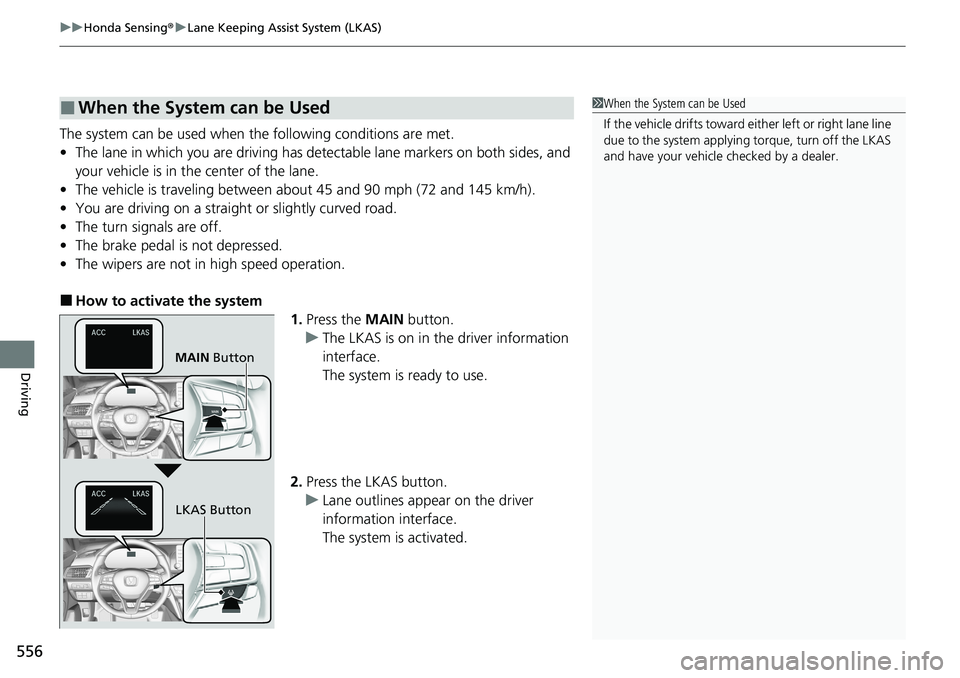
■How to activate the system
1.Press the MAIN button.
u The LKAS is on in the driver information
interface.
The system is ready to use.
2. Press the LKAS button.
u Lane outlines appear on the driver
information interface.
The system is activated.
■When the System can be Used1When the System can be Used
If the vehicle drifts toward ei ther left or right lane line
due to the system applying torque, turn off the LKAS
and have your vehicle checked by a dealer.
MAIN Button
LKAS Button
Page 559 of 728
Continued557
uuHonda Sensing ®u Lane Keeping Assist System (LKAS)
Driving
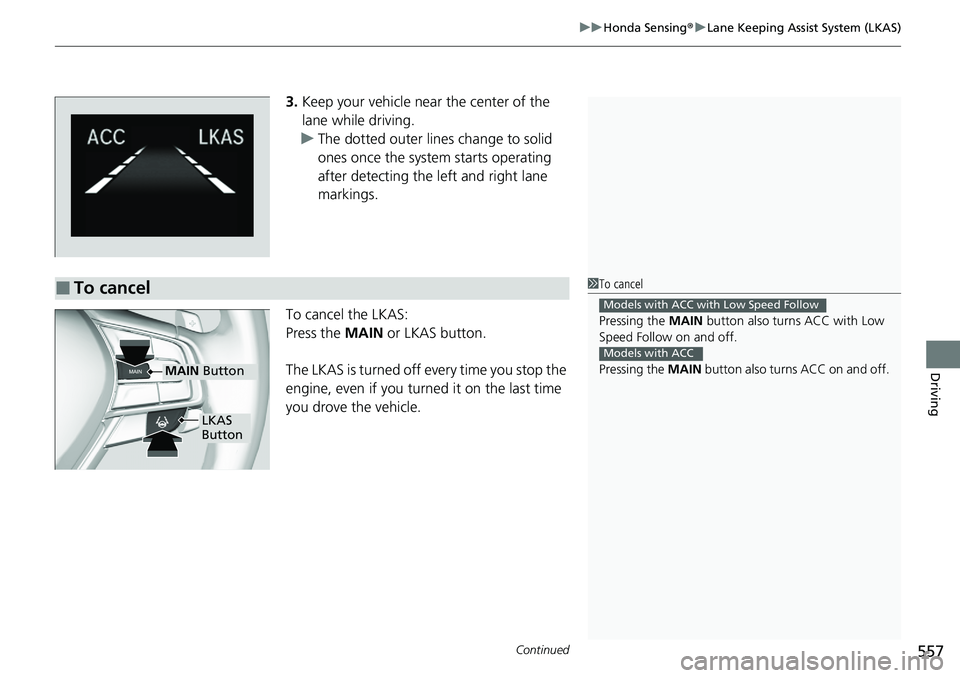
3. Keep your vehicle near the center of the
lane while driving.
u The dotted outer lines change to solid
ones once the system starts operating
after detecting the left and right lane
markings.
To cancel the LKAS:
Press the MAIN or LKAS button.
The LKAS is turned off every time you stop the
engine, even if you turned it on the last time
you drove the vehicle.
■To cancel1 To cancel
Pressing the MAIN button also turns ACC with Low
Speed Follow on and off.
Pressing the MAIN button also turns ACC on and off.
Models with ACC with Low Speed Follow
Models with ACC
MAIN Button
LKAS
Button
Page 560 of 728
558
uuHonda Sensing ®u Lane Keeping Assist System (LKAS)
Driving
■The system operation is suspended if
you:
• Set the wipers to HI.
u Turning the wipers off or setting it to LO
resumes the LKAS.
• Decrease the vehicle speed to about 40 mph
(64 km/h) or less.
u Increasing the vehicle speed to about
45 mph (72 km/h) or more resumes the
LKAS.
• Depress the brake pedal.
u The LKAS resumes and starts detecting
the lane lines again once you release the
brake pedal.
• Set the wiper switch to AUTO and the
wipers operate at high speed.
u The LKAS resumes when the wipers stop
or operate at low speed.
■The LKAS may automatically be suspended when:
• The system fails to detect lane lines.
• The steering wheel is quickly turned.
• You fail to steer the vehicle.
• Driving through a sharp curve.
• Driving at a speed in excess of approximately 90 mph (145 km/h).
Once these conditions no longer exis t, the LKAS automatically resumes.
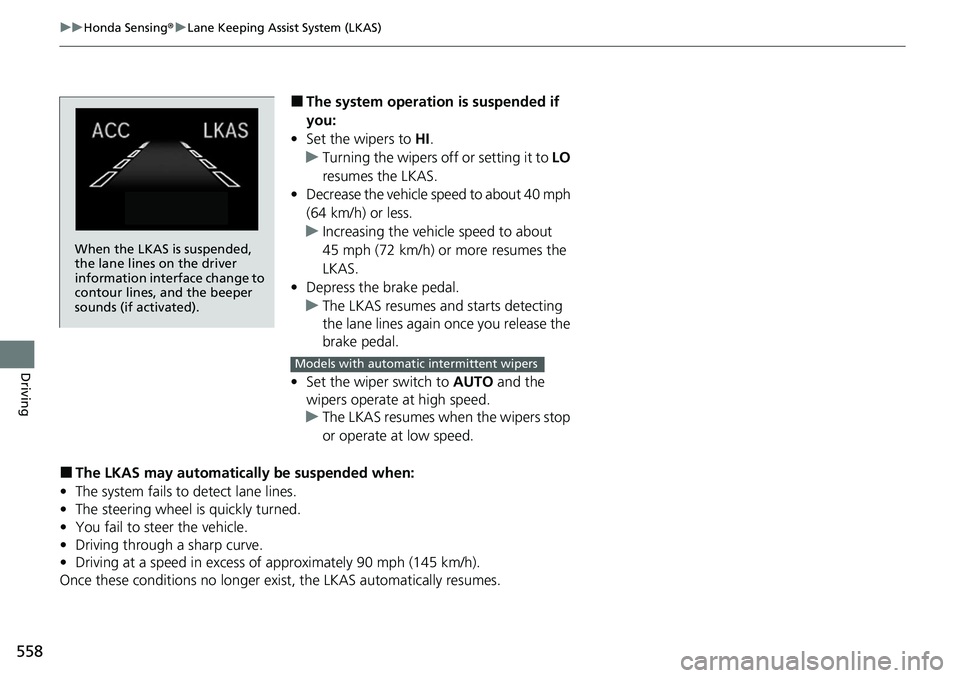
When the LKAS is suspended,
the lane lines on the driver
information interface change to
contour lines, and the beeper
sounds (if activated).
Models with automatic intermittent wipers
Page 561 of 728
559
uuHonda Sensing ®u Lane Keeping Assist System (LKAS)
Continued
Driving
■The LKAS may automatically be canceled when:
• The camera temperature gets extremely high or low.
• The camera behind the rearview mirror, or the area around the camera, including
the windshield, gets dirty.
• The ABS or VSA ® system engages.
The beeper sounds if the LKAS is automatically canceled.
The system may not detect lane markings and therefore may not keep the vehicle in
the middle of a lane under certain conditions, including the following:
■Environmental conditions
• Driving in bad weather (rain, fog, snow, etc.).
• Sudden changes between light and dark, such as an entrance or exit of a tunnel.
• There is little contrast between lane lines and the roadway surface.
• Driving into low sunlight (e.g., at dawn or dusk).
• Strong light is reflec ted onto the roadway.
• Driving in the shadows of trees, buildings, etc.
• Shadows of adjacent objects are parallel to lane markings.
• Roadway objects or structures are misinterpreted as lane markers.
• Reflections on the interi or of the windshield.
• Driving at night or in a dark condition such as a tunnel.
■LKAS Conditions and Limitations
Page 562 of 728
560
uuHonda Sensing ®u Lane Keeping Assist System (LKAS)
Driving
■Roadway conditions
• Driving on a snowy or wet roadway (obs cured lane marking, vehicle tracks,
reflected lights, road spray, high contrast).
• Driving on a road with temporary lane markings.
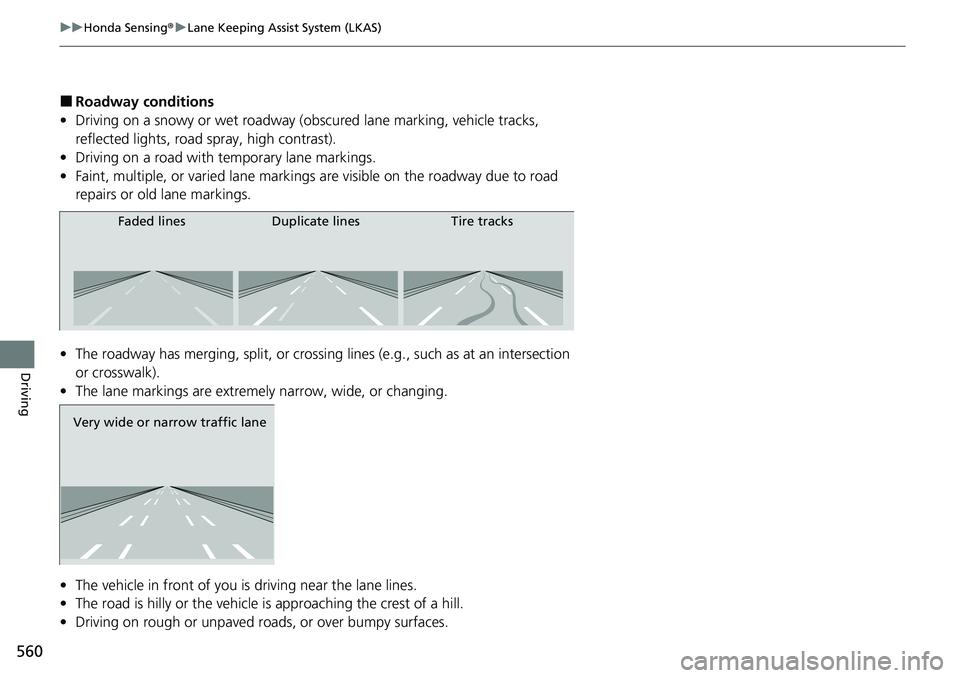
• Faint, multiple, or varied lane markings are visible on the roadway due to road
repairs or old lane markings.
• The roadway has merging, split, or crossing lines (e.g., such as at an intersection
or crosswalk).
• The lane markings are extremely narrow, wide, or changing.
• The vehicle in front of you is driving near the lane lines.
• The road is hilly or the vehicle is approaching the crest of a hill.
• Driving on rough or unpaved roads, or over bumpy surfaces.
Faded lines Duplicate lines Tire tracks
Very wide or narrow traffic lane
Page 563 of 728
561
uuHonda Sensing ®u Lane Keeping Assist System (LKAS)
Driving
• When objects on the road (curb, guard rail, pylons, etc.) are recognized as white
lines (or yellow lines).
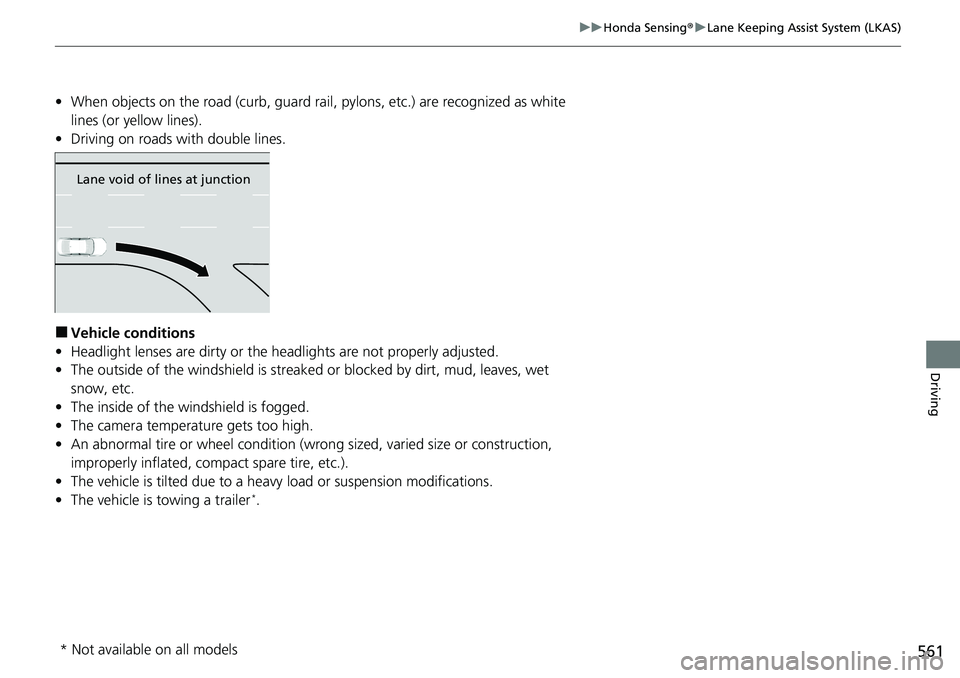
• Driving on roads with double lines.
■Vehicle conditions
• Headlight lenses are dirty or the h eadlights are not properly adjusted.
• The outside of the windshield is streaked or blocked by dirt, mud, leaves, wet
snow, etc.
• The inside of the windshield is fogged.
• The camera temperature gets too high.
• An abnormal tire or wheel condition (wrong sized, varied size or construction,
improperly inflated, co mpact spare tire, etc.).
• The vehicle is tilted due to a heavy load or suspension modifications.
• The vehicle is towing a trailer
*.
Lane void of lines at junction
* Not available on all models
Page 564 of 728
562
uuHonda Sensing ®u Road Departure Mitigation (RDM) System
Driving
Road Departure Mitigation (RDM) System
Alerts and helps to assist you when the system determines a possibility of your
vehicle unintentionally crossing over dete cted lane markings and/or leaving the
roadway altogether.
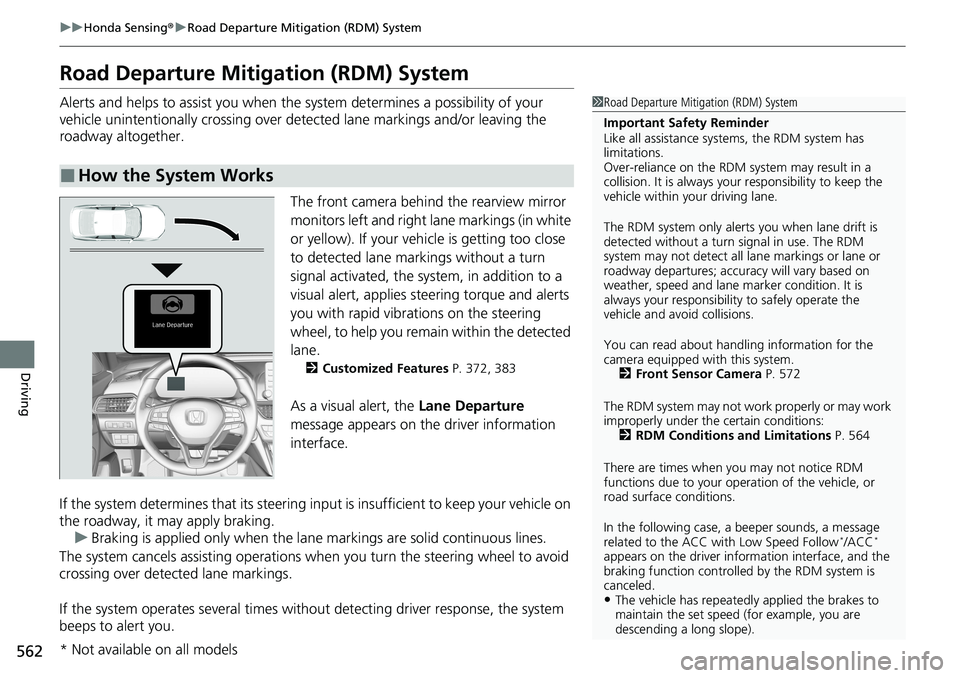
The front camera behind the rearview mirror
monitors left and right lane markings (in white
or yellow). If your vehicle is getting too close
to detected lane markings without a turn
signal activated, the system, in addition to a
visual alert, applies steering torque and alerts
you with rapid vibrations on the steering
wheel, to help you remain within the detected
lane.
2 Customized Features P. 372, 383
As a visual alert, the Lane Departure
message appears on the driver information
interface.
If the system determines that its steering i nput is insufficient to keep your vehicle on
the roadway, it may apply braking. u Braking is applied only when the lane markings are solid continuous lines.
The system cancels assisting operations wh en you turn the steering wheel to avoid
crossing over detected lane markings.
If the system operates several times without detecting driver response, the system
beeps to alert you.
■How the System Works
1 Road Departure Mitigation (RDM) System
Important Safety Reminder
Like all assistance systems, the RDM system has
limitations.
Over-reliance on the RDM system may result in a
collision. It is always your responsibility to keep the
vehicle within your driving lane.
The RDM system only alerts you when lane drift is
detected without a turn signal in use. The RDM
system may not detect all la ne markings or lane or
roadway departures; accu racy will vary based on
weather, speed and lane marker condition. It is
always your responsibilit y to safely operate the
vehicle and avoid collisions.
You can read about handling information for the
camera equipped with this system. 2 Front Sensor Camera P. 572
The RDM system may not wo rk properly or may work
improperly under the certain conditions: 2 RDM Conditions and Limitations P. 564
There are times when you may not notice RDM
functions due to your opera tion of the vehicle, or
road surface conditions.
In the following case, a beeper sounds, a message
related to the ACC with Low Speed Follow
*/ACC*
appears on the driver information interface, and the
braking function controlled by the RDM system is
canceled.
•The vehicle has repeatedly applied the brakes to
maintain the set speed (for example, you are
descending a long slope).
* Not available on all models
Page 566 of 728
uuHonda Sensing ®u Road Departure Mitigation (RDM) System
564
Driving
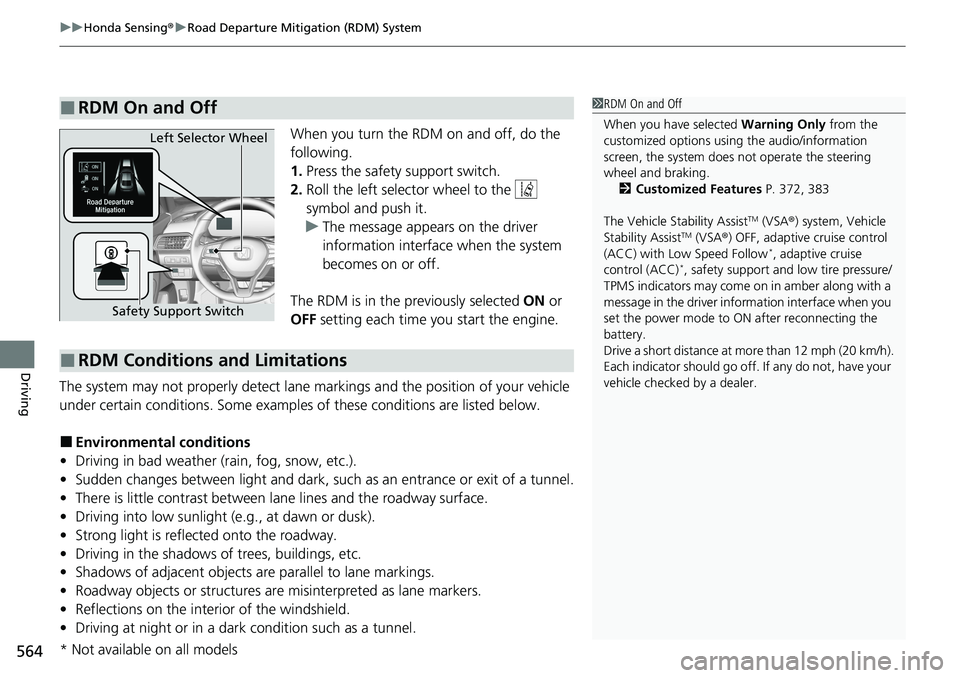
When you turn the RDM on and off, do the
following.
1. Press the safety support switch.
2. Roll the left selector wheel to the
symbol and push it.
u The message appears on the driver
information interface when the system
becomes on or off.
The RDM is in the previously selected ON or
OFF setting each time you start the engine.
The system may not properly detect lane markings and the position of your vehicle
under certain conditions. Some examples of these conditions are listed below.
■Environmental conditions
• Driving in bad weather (rain, fog, snow, etc.).
• Sudden changes between light and dark, such as an entrance or exit of a tunnel.
• There is little contrast between la ne lines and the roadway surface.
• Driving into low sunlight (e.g., at dawn or dusk).
• Strong light is reflected onto the roadway.
• Driving in the shadows of trees, buildings, etc.
• Shadows of adjacent objects are parallel to lane markings.
• Roadway objects or structures are misinterpreted as lane markers.
• Reflections on the interi or of the windshield.
• Driving at night or in a dark condition such as a tunnel.
■RDM On and Off1RDM On and Off
When you have selected Warning Only from the
customized options using the audio/information
screen, the system does not operate the steering
wheel and braking. 2 Customized Features P. 372, 383
The Vehicle Stability Assist
TM (VSA ®) system, Vehicle
Stability AssistTM (VSA ®) OFF, adaptive cruise control
(ACC) with Low Speed Follow*, adaptive cruise
control (ACC)*, safety support and low tire pressure/
TPMS indicators may come on in amber along with a
message in the driver info rmation interface when you
set the power mode to ON after reconnecting the
battery.
Drive a short distance at mo re than 12 mph (20 km/h).
Each indicator should go off. If any do not, have your
vehicle checked by a dealer.
Safety Support Switch Left Selector Wheel
■RDM Conditions and Limitations
* Not available on all models
Page 723 of 728
721
Index
To Set Up a Text Message Options .......... 445
Hazard Warning Button .............................. 4
HD Radio
TM............................................... 303
Head Restraints ........................................ 217
Headlights ................................................ 194
Aiming.................................................... 635
Auto High-Beam ..................................... 198
Automatic Operation .............................. 195
Dimming......................................... 194, 197
Operating ............................................... 194
Head-Up Display ...................................... 157
Heated Steering Wheel ........................... 236
Heated Windshield Button ...................... 203
Heaters (Seat) ........................... 237, 238, 239
HFL (HandsFreeLink ®) ...................... 405, 429
High Beam Indicator .................................. 94
Hill Start Assist System ............................. 474
HomeLink ® Universal Transceiver ........... 402
Honda App License Agreement .............. 352
Honda Sensing ®................................ 25, 510
HondaLink ®............................................ 323
I
Identification Numbers
Engine and Transmission ......................... 708
Vehicle Identification............................... 708
Illumination Control Dial ......................................................... 204
Immobilizer System .................................. 183
Indicator ................................................... 95 Indicators
.................................................... 78
Adaptive Cruise Control (ACC) with Low Speed
Follow (Amber) /Adaptive Cruise Control
(ACC) (Amber) ......................................... 99
Adaptive Cruise Control (ACC) with Low Speed
Follow (Green) /Adaptive Cruise Control
(ACC) (Green) ........................ 100, 523, 540
Anti-lock Brake System (ABS) ..................... 90
Auto High-Beam ........................................ 90
Automatic Brake Hold ............... 82, 581, 582
Automatic Brake Hold System .... 82, 581, 582
Charging System ............................... 84, 685
ECON Mode ...................................... 97, 494
Electric Power Steering (EPS)
System............................................. 92, 689
Fog Light ................................................... 94
Gear Position ............................................. 84
High Beam ................................................ 94
Immobilizer System .................................... 95
Lane Keeping Assist System (LKAS) (Amber) ................................................. 100
Lane Keeping Assist System (LKAS)
(Green) .......................................... 100, 556
Lights On ................................................... 94
Low Fuel .................................................... 89
Low Tire Pressure/TPMS ............. 93, 499, 503
M (sequential mode/ 7-speed manual shi ft mode) Indicator/
Gear Selection Indicator ........................... 84
Malfunction Indicator Lamp ............... 83, 686 Parking Brake and Brake System
(Amber) ........................................... 80, 688
Parking Brake and Brake System (Red) ....................................... 79, 687, 688
Safety Support (Amber) ........................... 101
Safety Support (Green) ............................ 104
Seat Belt Reminder .............................. 39, 89
Security System Alarm ............................... 96
Shift Down ................................................ 88
Shift Up..................................................... 88
SPORT Mode ..................................... 98, 493
Supplemental Restraint System ............ 58, 90
System Message ........................................ 96
Transmission System............................ 85, 87
Turn Signal and Hazard Warning ............... 94
Vehicle Stability Assist
TM (VSA ®)
OFF ................................................. 92, 497
Vehicle Stability Assist
TM (VSA ®)
System ............................................ 91, 496
Information .............................................. 703
Instant Fuel Economy ............................... 143
Instrument Panel ........................................ 77
Brightness Control................................... 204
Interior Lights ........................................... 222
Interior Rearview Mirror .......................... 209
iPad ........................................................... 351
iPhone ....................................................... 351
iPod ........................................... 263, 315, 351