mirror controls HONDA ACCORD SEDAN 2020 Owner's Manual (in English)
[x] Cancel search | Manufacturer: HONDA, Model Year: 2020, Model line: ACCORD SEDAN, Model: HONDA ACCORD SEDAN 2020Pages: 728, PDF Size: 34.06 MB
Page 5 of 728
Contents
Child Safety P. 61Exhaust Gas Hazard P. 75Safety Labels P. 76
Opening and Closing the Trunk P. 180 Security Sy stem P. 183 Opening and Closing the Windows P. 186
Operating the Switches Around the Steering Wheel P. 190 Adjusting the Mirrors P. 209
Interior Lights/Interior Convenience Items P. 222 Climate Control System P. 240
Audio Error Messages P. 345 General Information on the Audio System P. 350
Bluetooth ® HandsFreeLink ® P. 405, 429 Refuel Recommend P. 454
When Driving P. 467 Braking P. 575Parking Your Vehicle P. 587
Fuel Economy and CO
2 Emissions P. 604 Turbo Engine Vehicle P. 605
Maintenance Under the Hood P. 618 Replacing Light Bulbs P. 635
Checking and Maintaining Tires P. 646 Battery P. 655 Remote Transmitter Care P. 657
Cleaning P. 659 Accessories and Modifications P. 664
Engine Does Not Start P. 675 Jump Starting P. 678 Shift Lever Does Not Move P. 681
Fuses P. 692 Emergency Towing P. 697 When You Cannot Unlock the Fuel Fill Door P. 698
Refueling P. 701
Devices that Emit Radio Waves P. 709 Reporting Safety Defects P. 710
Authorized Manuals P. 715 Customer Service Information P. 716
Quick Reference GuideP. 4
Safe DrivingP. 33
Instrument PanelP. 77
ControlsP. 163
FeaturesP. 245
DrivingP. 455
MaintenanceP. 607
Handling the UnexpectedP. 667
InformationP. 703
IndexP. 717
Page 8 of 728
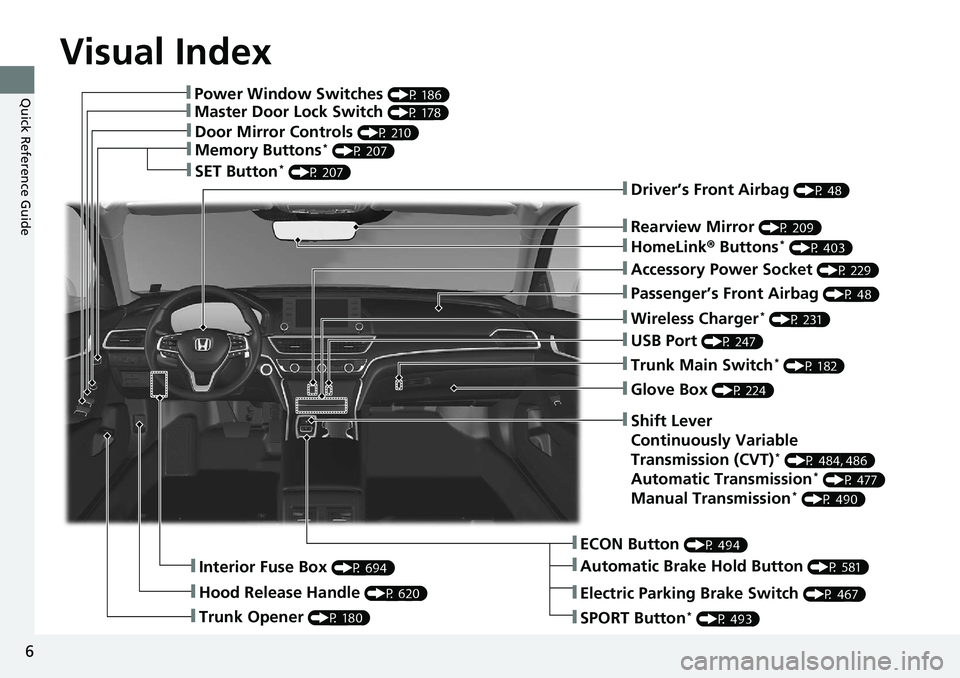
Visual Index
6
Quick Reference Guide❚Power Window Switches (P 186)
❚Master Door Lock Switch (P 178)
❚Door Mirror Controls (P 210)
❚Memory Buttons* (P 207)
❚SET Button* (P 207)
❚Trunk Opener (P 180)
❚Interior Fuse Box (P 694)
❚Hood Release Handle (P 620)
❚Driver’s Front Airbag (P 48)
❚Rearview Mirror (P 209)
❚HomeLink® Buttons* (P 403)
❚Accessory Power Socket (P 229)
❚Passenger’s Front Airbag (P 48)
❚Wireless Charger* (P 231)
❚USB Port (P 247)
❚Trunk Main Switch* (P 182)
❚Glove Box (P 224)
❚ECON Button (P 494)
❚Automatic Brake Hold Button (P 581)
❚Shift Lever
Continuously Variable
Transmission (CVT)
* (P 484, 486)
Automatic Transmission* (P 477)
Manual Transmission* (P 490)
❚Electric Parking Brake Switch (P 467)
❚SPORT Button* (P 493)
Page 165 of 728
163
Controls
This chapter explains how to operate the various controls necessary for driving.
Clock.................................................. 164
Locking and Unlocking the Doors
Key Types and Functions .................. 166
Low Remote Signal Strength ............ 168
Locking/Unlocking the Doors from the Outside .......................................... 169
Locking/Unlocking the Doors from the
Inside ............................................. 176
Childproof Door Locks ..................... 178
Auto Door Locking/Unlocking .......... 179
Opening and Closing the Trunk ....... 180
Security System
Immobilizer System .......................... 183
Security System Alarm ...................... 184
Opening and Closing the Windows ..... 186
Opening and Closing the Moonroof*..... 189Operating the Switches Around the
Steering Wheel ENGINE START/STOP Button............. 190
Turn Signals ..................................... 193
Light Switches.................................. 194
Fog Lights
*...................................... 196
Daytime Running Lights ................... 197
Auto High-Beam .............................. 198
Wipers and Washers ........................ 201
Rear Defogger/Heat ed Door Mirror
*
Button ........................................... 203 Heated Windshield Button ............... 203
Brightness Control ........................... 204
Driving Position Memory System
*.... 206
Adjusting the Steering Wheel .......... 208
Adjusting the Mirrors Interior Rearview Mirror ................... 209
Power Door Mirrors ......................... 210
Adjusting the Seats .......................... 211
Interior Lights/Interior Convenience
Items ................................................ 222
Climate Control System Using Automatic Climate Control .... 240
Automatic Climate Control Sensors ... 243
Canadian models
* Not available on all models
Page 201 of 728
Continued199
uuOperating the Switches Around the Steering Wheel uAuto High-Beam
Controls
■Automatic switching between high-beam and low-beam
When auto-high beam is active, the head lights switch between high beam and low
beam based on the following conditions.
■Manual switching between high-beam and low-beam
If you want to manually switch the h eadlights between high beam and low beam,
follow either of the procedur es below. Note that when you do this, the auto high-
beam indicator will turn off and the auto high-beam will be deactivated.
Using the lever:
Pull the lever toward you for flashing the hi gh beams then release it within about
one second while driving. u To reactivate the auto hi gh-beam, pull the lever toward you for flashing the
high beams then release it while driv ing. The auto high-beam indicator will
come on.
Using the light switch:
Turn the light switch to . u To reactivate the au to high-beam, turn the light switch to AUTO when the
lever is in the low beam position, the auto high-beam indicator will come on.
Switching to high beam:Switching to low beam:
All of the following conditions must
be met before the high beams turn
on.
●Your vehicle speed is 25 mph (40
km/h) or more.
●There are no preceding or
oncoming vehicle with headlights
or taillights turned on.
●There are few street lights on the
road ahead.
One of the following conditions
must be met before the low beams
turn on.
●Your vehicle speed is 15 mph (24
km/h) or less.
●There is a preceding or oncoming
vehicle with headlights or
taillights turned on.
●There are many street lights on
the road ahead.
1How to Use the Auto High-Beam
In the following cases, th e auto high-beam system
may not switch the head lights properly or the
switching timing may be ch anged. In case of the
automatic switching operati on does not fit for your
driving habits, please swit ch the headlights manually.
•The brightness of the lights from the preceding or
oncoming vehicle is intense or poor.
•Visibility is poor due to the weather (rain, snow,
fog, windshield frost, etc.).
•Surrounding light sources, such as street lights,
electric billboards and traf fic lights are illuminating
the road ahead.
•The brightness level of th e road ahead constantly
changes.
•The road is bumpy or has many curves.•A vehicle suddenly appears in front of you, or a
vehicle in front of you is not in the preceding or
oncoming direction.
•Your vehicle is tilted with a heavy load in the rear.•A traffic sign, mirror, or other reflective object
ahead is reflecting strong light toward the vehicle.
•The oncoming vehicle freq uently disappears under
roadside trees or be hind median barriers.
•The preceding or oncoming vehicle is a motorcycle,
bicycle, mobility scooter, or other small vehicle.
The auto high-beam system keeps the headlight low
beam when:
•Windshield wipers are op erating at a high speed.
•The camera has been detected a dense fog.
Page 205 of 728
203
uuOperating the Switches Around the Steering Wheel uRear Defogger/Heated Door Mirror* Button
Controls
Rear Defogger/Heated Door Mirror* Button
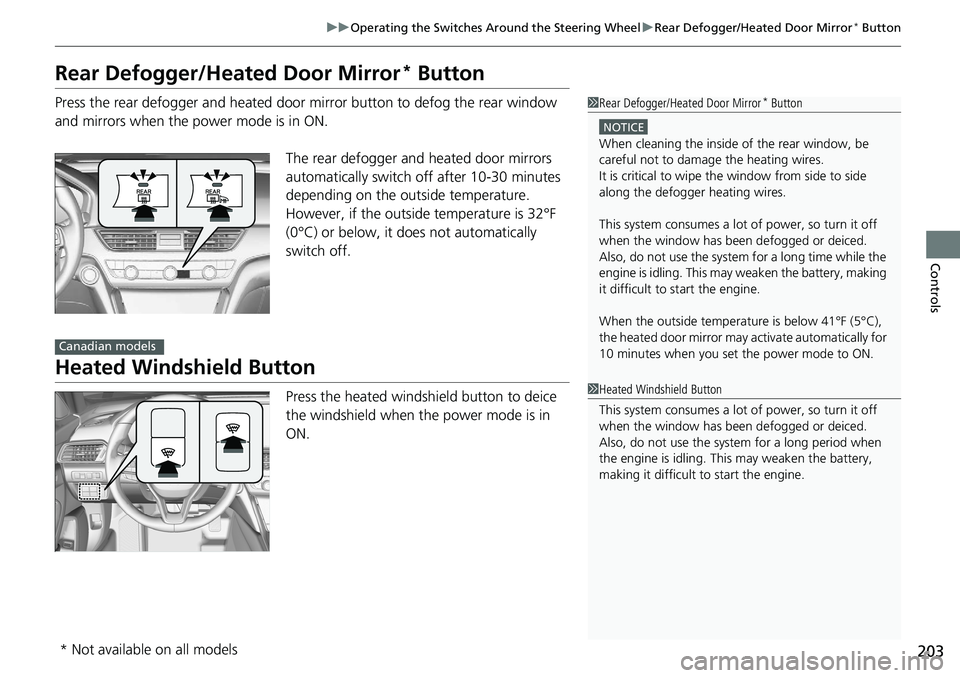
Press the rear defogger and heated door mirror button to defog the rear window
and mirrors when the power mode is in ON.
The rear defogger and heated door mirrors
automatically switch off after 10-30 minutes
depending on the outside temperature.
However, if the outsid e temperature is 32°F
(0°C) or below, it does not automatically
switch off.
Heated Windshield Button
Press the heated windshield button to deice
the windshield when the power mode is in
ON.
1 Rear Defogger/Heated Door Mirror* Button
NOTICE
When cleaning the inside of the rear window, be
careful not to damage the heating wires.
It is critical to wipe the window from side to side
along the defogger heating wires.
This system consumes a lot of power, so turn it off
when the window has been defogged or deiced.
Also, do not use the system for a long time while the
engine is idling. This may weaken the battery, making
it difficult to start the engine.
When the outside temperature is below 41
Page 211 of 728
209
Controls
Adjusting the Mirrors
Interior Rearview Mirror
Adjust the angle of the rearview mirror when you are sitting in the correct driving
position.
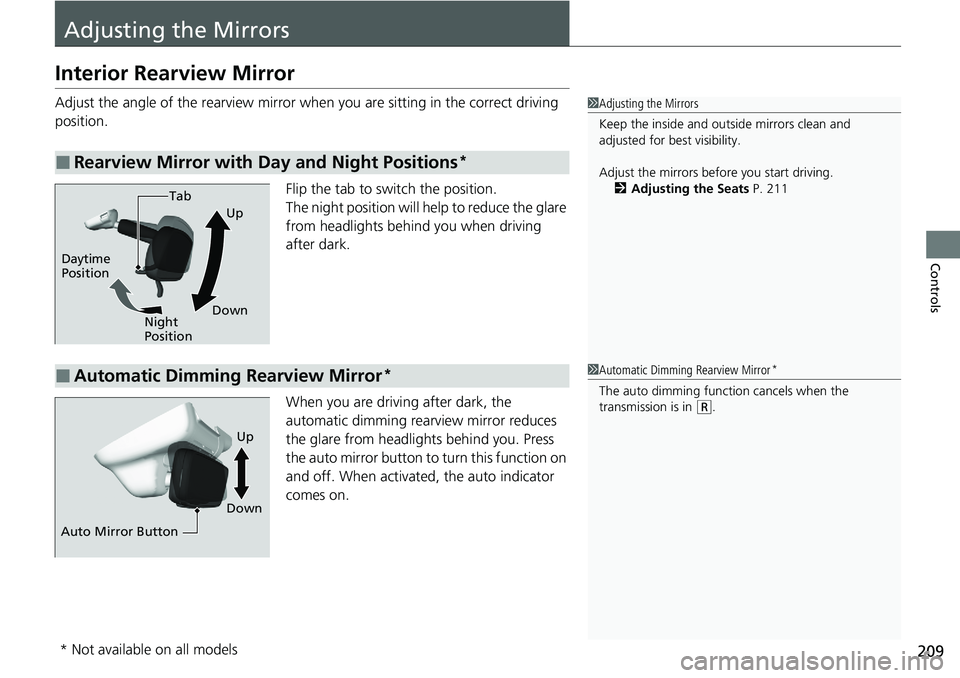
Flip the tab to switch the position.
The night position will help to reduce the glare
from headlights behind you when driving
after dark.
When you are driving after dark, the
automatic dimming rearview mirror reduces
the glare from headlights behind you. Press
the auto mirror button to turn this function on
and off. When activated, the auto indicator
comes on.
■Rearview Mirror with Day and Night Positions*
1 Adjusting the Mirrors
Keep the inside and out side mirrors clean and
adjusted for best visibility.
Adjust the mirrors before you start driving. 2 Adjusting the Seats P. 211
Tab
Daytime
Position Night
PositionUp
Down
■Automatic Dimming Rearview Mirror*1 Automatic Dimming Rearview Mirror*
The auto dimming function cancels when the
transmission is in (R.
Auto Mirror Button DownUp
* Not available on all models
Page 212 of 728
210
uuAdjusting the Mirrors uPower Door Mirrors
Controls
Power Door Mirrors
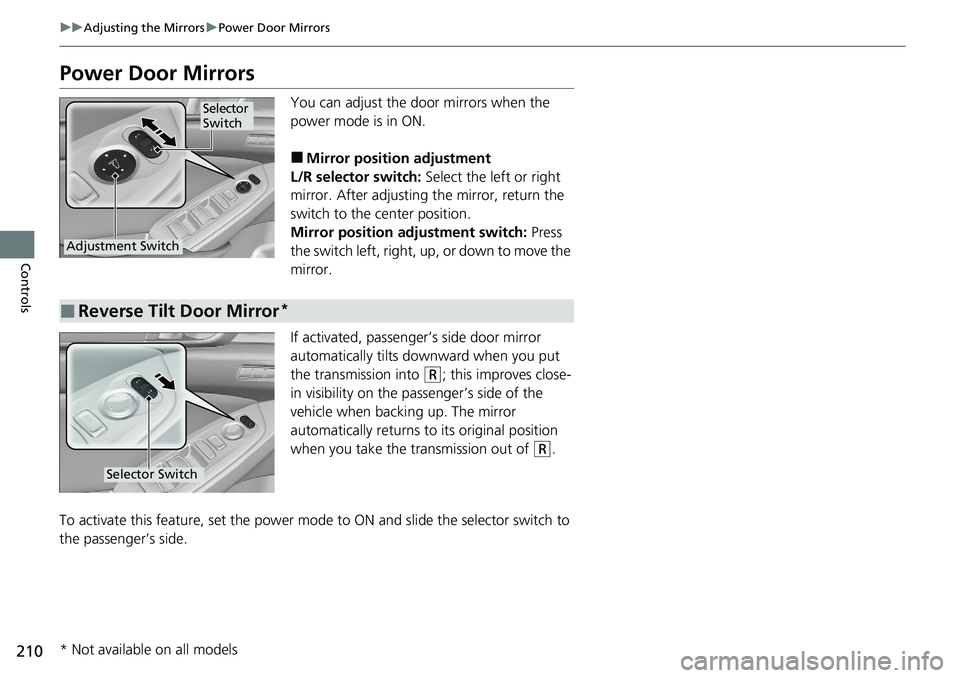
You can adjust the door mirrors when the
power mode is in ON.
■Mirror position adjustment
L/R selector switch: Select the left or right
mirror. After adjusting the mirror, return the
switch to the center position.
Mirror position adjustment switch: Press
the switch left, right, up, or down to move the
mirror.
If activated, passenger’s side door mirror
automatically tilts do wnward when you put
the transmission into
(R; this improves close-
in visibility on the passenger’s side of the
vehicle when backing up. The mirror
automatically returns to its original position
when you take the transmission out of
(R.
To activate this feature, set the power mode to ON and slide the selector switch to
the passenger’s side.
Selector
Switch
Adjustment Switch
■Reverse Tilt Door Mirror*
Selector Switch
* Not available on all models
Page 511 of 728
509
uuWhen Driving uLaneWatchTM*
Driving
■Customizing the La neWatch settings
You can customize the following items using the audio/information screen.
• Show with turn signal : Selects whether LaneWatch monitor comes on when
you operate the tu rn signal lever.
• Show Reference Line : Selects whether the reference lines appear on the
LaneWatch monitor.
• Display Time after Turn Signal Off: Changes the remaining LaneWatch
display time after you pull the turn signal lever back.
• Display : Adjusts display settings.
2Customized Features P. 383
2 Audio Remote Controls P. 250
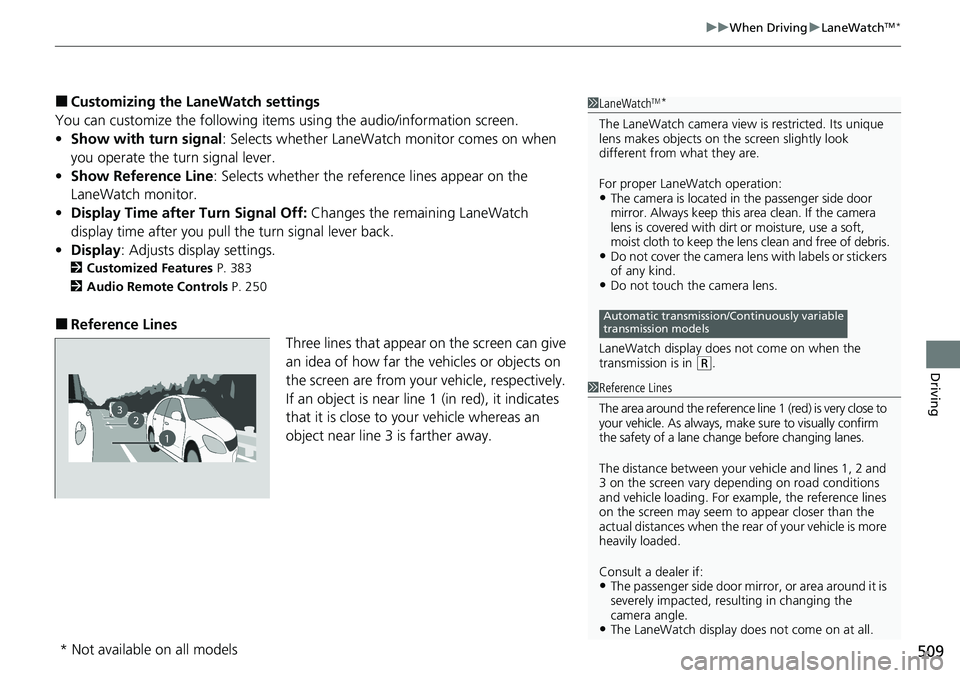
■Reference Lines
Three lines that appear on the screen can give
an idea of how far the vehicles or objects on
the screen are from your vehicle, respectively.
If an object is near line 1 (in red), it indicates
that it is close to your vehicle whereas an
object near line 3 is farther away.
1LaneWatchTM*
The LaneWatch camera view is restricted. Its unique
lens makes objects on the screen slightly look
different from what they are.
For proper LaneWatch operation:
•The camera is located in the passenger side door
mirror. Always keep this area clean. If the camera
lens is covered with dirt or moisture, use a soft,
moist cloth to keep the lens clean and free of debris.
•Do not cover the camera lens with labels or stickers
of any kind.
•Do not touch the camera lens.
LaneWatch display does not come on when the
transmission is in
( R.
Automatic transmission/Continuously variable
transmission models
23
1
1 Reference Lines
The area around the reference line 1 (red) is very close to
your vehicle. As always, m ake sure to visually confirm
the safety of a lane chan ge before changing lanes.
The distance betwee n your vehicle and lines 1, 2 and
3 on the screen vary depending on road conditions
and vehicle loading. For ex ample, the reference lines
on the screen may seem to appear closer than the
actual distances when the rear of your vehicle is more
heavily loaded.
Consult a dealer if:
•The passenger side door mirr or, or area around it is
severely impacted, resulting in changing the
camera angle.
•The LaneWatch display doe s not come on at all.
* Not available on all models
Page 719 of 728

Index
717
Index
Index
Numbers
7-Speed Manual Shift Mode................... 488
Operation ............................................... 489
A
ABS (Anti-lock Brake System) .................. 585
Accessories and Modifications ................ 664
Accessory Power Sockets ......................... 229
Adaptive Cruise Control
(ACC) ......................................... 99, 100, 539
Adaptive Cruise Control (ACC) with Low Speed Follow ............................ 99, 100, 522
Adaptive Damper System ........................ 495
Additives Coolant .................................................. 629
Engine Oil ............................................... 621
Washer ................................................... 634
Additives, Engine Oil ............................... 621
Adjusting Armrest .................................................. 220
Front Seats.............................................. 211
Head Restraints ....................................... 217
Mirrors.................................................... 209
Rear Seats ............................................... 215
Steering Wheel ....................................... 208
Agile Handling Assist ............................... 498
Air Conditioning System (Climate Control System) ....................... 240
Changing the Mode................................ 240 Defrosting the Windshield and
Windows ............................................... 241
Dust and Pollen Filter ............................... 658
Recirculation/Fresh Air Mode ................... 240
Sensors .................................................... 243
Synchronized Mode ................................. 242
Using Automatic Climate Control ............ 240
Air Pressure ............................... 647, 705, 707
Airbags ........................................................ 45
Advanced Airbags ..................................... 51
After a Collision ......................................... 48
Airbag Care ............................................... 60
Event Data Recorder .................................... 0
Front Airbags (SRS) .................................... 48
Indicator .............................................. 58, 90
Knee Airbags ............................................. 52
Passenger Front Airbag Off Indicator ......... 59
Sensors ...................................................... 45
Side Airbags .............................................. 55
Side Curtain Airbags .................................. 57
AM/FM Radio .................................... 261, 300
Ambient Lights ......................................... 223
Android Auto
TM........................................ 341
Anti-lock Brake System (ABS) .................. 585
Indicator .................................................... 90
Apple CarPlay ®........................................ 338
Armrest ..................................................... 220
Audio Remote Controls ............................ 250
Audio System ............................................ 246
Adjusting the Sound ........................ 259, 294
Audio/Information Screen ................ 255, 276 Display Setup .................................. 260, 295
Error Messages ........................................ 345
General Information ................................ 350
Home Screen........................................... 281
How to Update Wirelessly ....................... 288
How to Update with a USB Device........... 292
How to use Siri
® Eyes Free .............. 274, 337
iPod ................................................ 263, 315
Limitations for Manual Operation ............ 296
MP3/WMA/AAC .............................. 268, 318
Near Field Communication (NFC) ............. 334
Pandora ®............................................... 266
Reactivating ............................................ 249
Remote Controls ..................................... 250
Security Code .......................................... 249
Selecting an Audio Source ....................... 296
Status Area ............................................. 286
System Updates....................................... 288
Theft Protection ...................................... 249
USB Flash Drives ...................... 268, 318, 351
USB Ports ................................................ 247
Wallpaper Setup.............................. 257, 279
Audio/Information Screen ............... 255, 276
Authorized Manuals ................................ 715
Auto Door Locking/Unlocking ................. 179
Customize ....................................... 381, 399
Auto High-Beam ....................................... 198
Indicator.................................................... 90
Automatic Brake Hold ............................. 581
Indicator............................................ 82, 581
Page 721 of 728
719
Index
Continuously Variable TransmissionCreeping................................................. 476
Fluid ....................................................... 631
Kickdown ............................................... 476
Operating the Shift Lever .......... 23, 485, 487
Shift Lever Does Not Move ...................... 681
Shifting ........................................... 484, 486
Controls .................................................... 163
Coolant (Engine) ...................................... 629
Adding to the Engine Coolant Reserve Tank ..................................................... 629
Adding to the Radiator ........................... 630
Overheating ............................................ 683
Creeping (Automatic Transmission/
Continuously Variable Transmission) .... 476
Cross Traffic Monitor ............................... 594
Cup Holders .............................................. 227
Customer Service Information ................ 716
Customized Features ....................... 372, 383
D
Daytime Running Lights .......................... 197
Dead Battery ............................................ 678
Defaulting All the Settings ...................... 401
Defrosting the Windshield and Windows ................................................. 241
Devices that Emit Radio Waves ............... 709
Dimming Headlights .............................................. 194
Rearview Mirror ...................................... 209 Dipstick (Engine Oil)
................................. 622
Directional Signals (Turn Signal) ............. 193
Door Mirrors ............................................. 210
Doors ......................................................... 166
Auto Door Locking .................................. 179
Auto Door Unlocking ............................... 179
Door and Trunk Open Message ................. 37
Keys ........................................................ 166
Locking/Unlocking the Doors from the Inside ...................................... 176
Locking/Unlocking the Doors
from the Outside ................................... 169
Lockout Prevention System ...................... 175
DOT Tire Quality Grading ........................ 649
Driver Attention Monitor ........................ 152
Driver Information Interface ................... 138
Switching the Display .............................. 138
Warning and Information Messages ........ 105
Driving ....................................................... 455
Automatic Transmission/ Continuously Variable Transmission ....... 476
Braking .................................................... 575
Shifting Gear ................................... 477, 490
Shifting Position .............................. 484, 486
Starting the Engine .................................. 467
Driving Position Memory System ............. 206
Driving Support Information ................... 155
Dust and Pollen Filter ............................... 658
E
Eco Assist® System ........................................ 9
ECON Button ............................................ 494
Econ Mode Indicator.................................................... 97
Elapsed Time ............................................. 145
Electric Power Steering (EPS) System Indicator............................................ 92, 689
Electronic Stability Control (ESC) ............. 496
Emergency ................................................ 697
Emergency Engine Stop ........................... 677
Emergency Trunk Opener ........................ 182
Emissions Testing (Readiness Codes) ....... 711
Engine ....................................................... 708
Coolant ................................................... 629
Jump Starting .......................................... 678
Oil ........................................................... 621
Starting ................................................... 467
Engine Coolant ......................................... 629
Adding to the Engine Coolant Reserve Tank ...................................................... 629
Adding to the Radiator ............................ 630
Overheating ............................................ 683
Temperature Gauge ................................ 137
Engine Oil ................................................. 621
Adding .................................................... 624
Checking................................................. 622
Displaying Oil Life .................................... 612
Low Oil Pressure Warning........................ 685
Recommended Engine Oil ....................... 621
ENGINE START/STOP Button .................... 190