light HONDA ACCORD SEDAN 2021 (in English) Workshop Manual
[x] Cancel search | Manufacturer: HONDA, Model Year: 2021, Model line: ACCORD SEDAN, Model: HONDA ACCORD SEDAN 2021Pages: 659, PDF Size: 28.71 MB
Page 355 of 659
353
uuCustomized Features u
Continued
Features
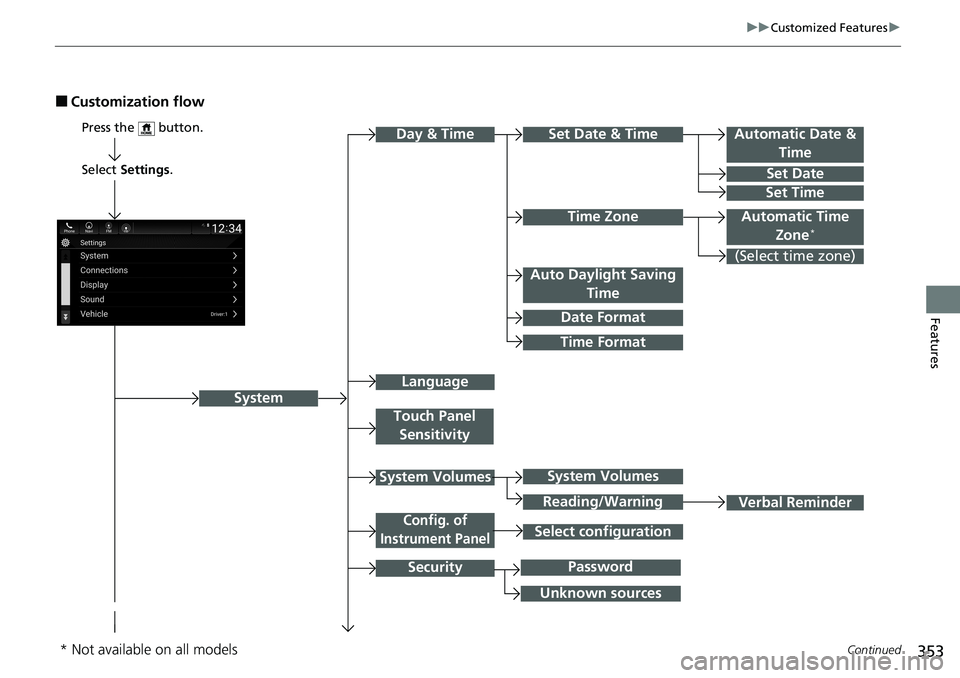
■Customization flow
Select Settings .
Automatic Date &
Time
Set Date
Set Time
System
Press the button.
Automatic Time Zone*
Time Format
Time Zone
Set Date & Time
Touch Panel Sensitivity
System Volumes
Config. of
Instrument Panel
Security
Day & Time
(Select time zone)
Language
Auto Daylight Saving Time
Date Format
Verbal Reminder
System Volumes
Reading/Warning
Unknown sources
Password
Select configuration
* Not available on all models
Page 358 of 659
356
uuCustomized Features u
Features
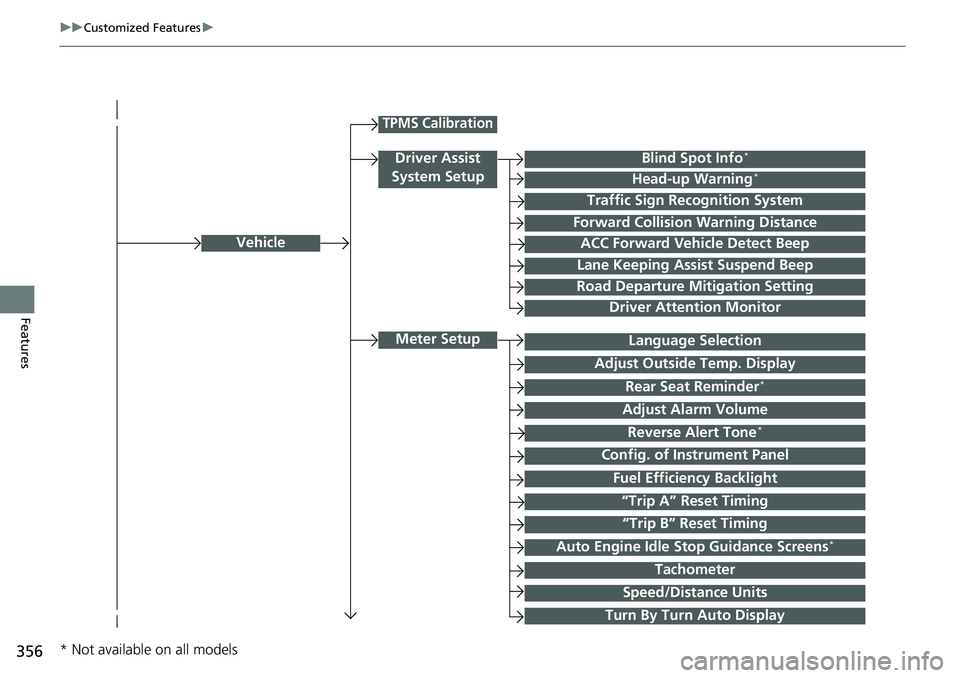
Vehicle
Meter Setup
Adjust Outside Temp. Display
“Trip A” Reset Timing
“Trip B” Reset Timing
Reverse Alert Tone*
Config. of Instrument Panel
Adjust Alarm Volume
Turn By Turn Auto Display
Fuel Efficiency Backlight
TPMS Calibration
Driver Assist
System SetupBlind Spot Info*
Head-up Warning*
Traffic Sign Recognition System
Forward Collision Warning Distance
ACC Forward Vehicle Detect Beep
Lane Keeping Assist Suspend Beep
Road Departure Mitigation Setting
Driver Attention Monitor
Speed/Distance Units
Tachometer
Language Selection
Auto Engine Idle Stop Guidance Screens*
Rear Seat Reminder*
* Not available on all models
Page 359 of 659
357
uuCustomized Features u
Continued
Features
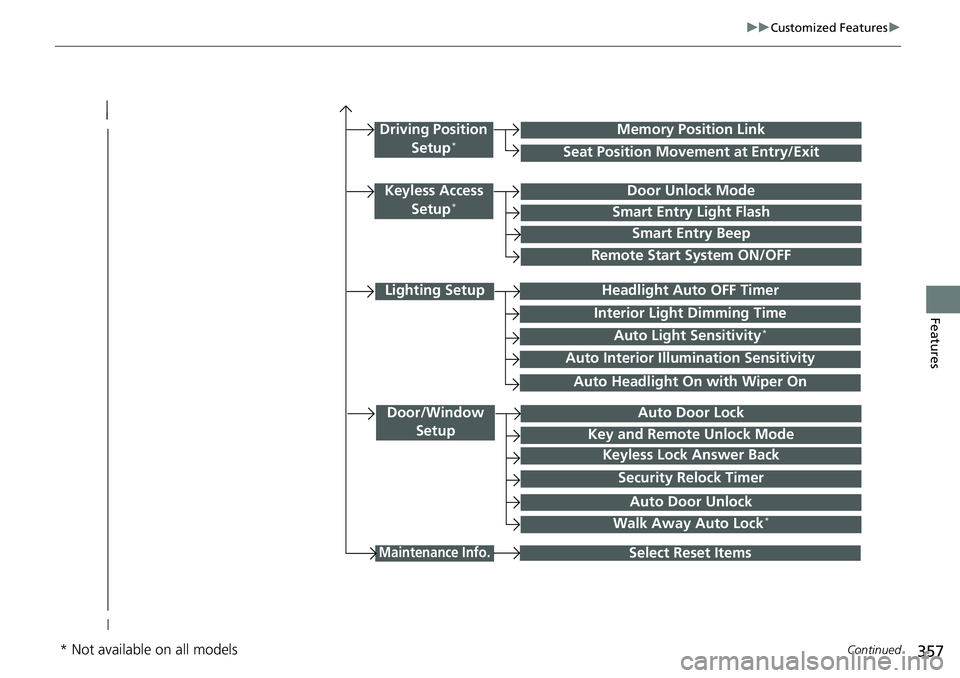
Lighting Setup
Interior Light Dimming Time
Headlight Auto OFF Timer
Auto Light Sensitivity*
Door/Window
SetupAuto Door Lock
Auto Door Unlock
Key and Remote Unlock Mode
Keyless Lock Answer Back
Security Relock Timer
Maintenance Info.Select Reset Items
Walk Away Auto Lock*
Driving Position
Setup*Seat Position Movement at Entry/Exit
Memory Position Link
Keyless Access Setup*Door Unlock Mode
Smart Entry Light Flash
Smart Entry Beep
Remote Start System ON/OFF
Auto Headlight On with Wiper On
Auto Interior Illu mination Sensitivity
* Not available on all models
Page 361 of 659
359
uuCustomized Features u
Continued
Features
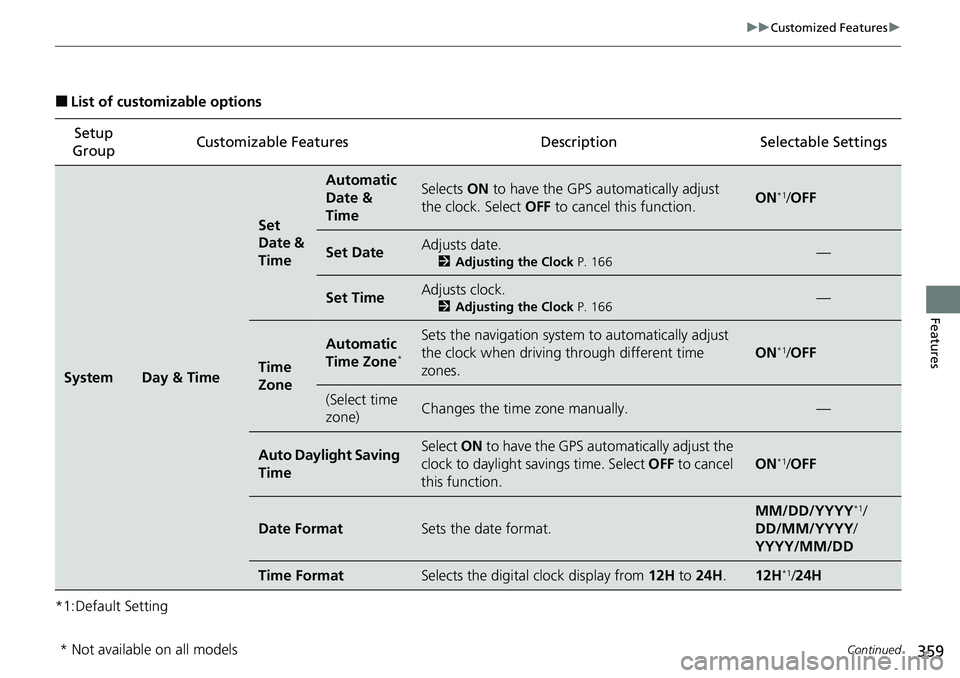
■List of customizable options
*1:Default Setting Setup
Group Customizable Features Description Selectable Settings
SystemDay & Time
Set
Date &
Time
Automatic
Date &
TimeSelects
ON to have the GPS automatically adjust
the clock. Select OFF to cancel this function.ON*1/OFF
Set DateAdjusts date.
2 Adjusting the Clock P. 166—
Set TimeAdjusts clock.
2Adjusting the Clock P. 166—
Time
Zone
Automatic
Time Zone*
Sets the navigation system to automatically adjust
the clock when driving through different time
zones.
ON*1/ OFF
(Select time
zone)Changes the time zone manually.—
Auto Daylight Saving
TimeSelect ON to have the GPS automatically adjust the
clock to daylight savings time. Select OFF to cancel
this function.
ON*1/ OFF
Date FormatSets the date format.
MM/DD/YYYY*1/
DD/MM/YYYY /
YYYY/MM/DD
Time FormatSelects the digital clock display from 12H to 24H .12H*1/24H
* Not available on all models
Page 368 of 659
366
uuCustomized Features u
Features
*1:Default SettingSetup
Group Customizable Features Description Selectable Settings
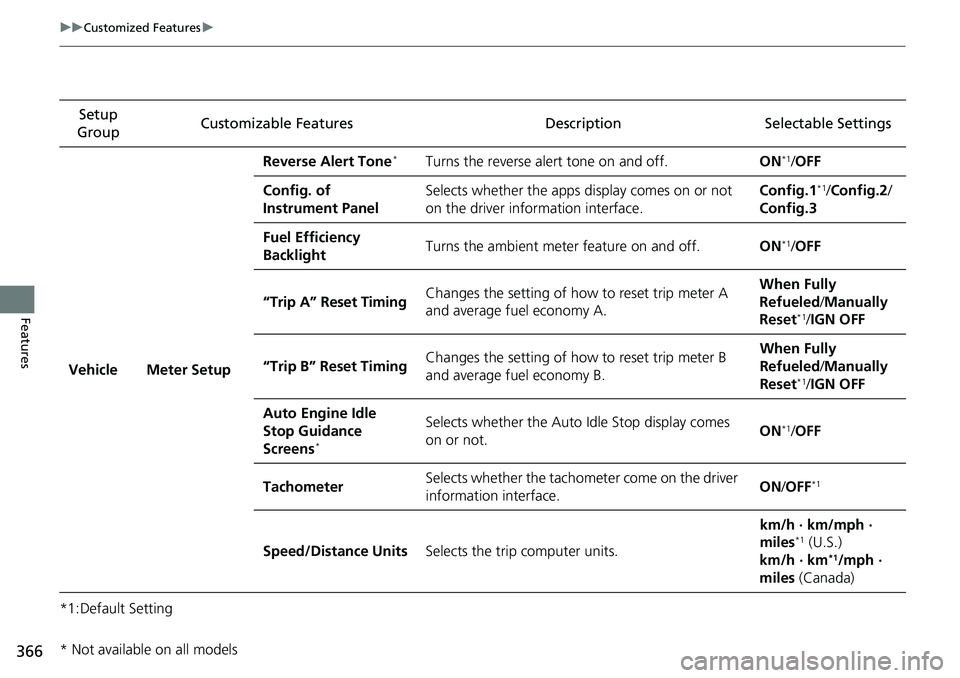
Vehicle Meter Setup Reverse Alert Tone
*Turns the reverse alert tone on and off.
ON*1/OFF
Config. of
Instrument Panel Selects whether the apps display comes on or not
on the driver information interface. Config.1
*1/
Config.2 /
Config.3
Fuel Efficiency
Backlight Turns the ambient meter feature on and off.
ON
*1/OFF
“Trip A” Reset Timing Changes the setting of how to reset trip meter A
and average fuel economy A. When Fully
Refueled
/Manually
Reset
*1/ IGN OFF
“Trip B” Reset Timing Changes the setting of how to reset trip meter B
and average fuel economy B. When Fully
Refueled
/Manually
Reset
*1/ IGN OFF
Auto Engine Idle
Stop Guidance
Screens
*
Selects whether the Auto Idle Stop display comes
on or not. ON*1/
OFF
Tachometer Selects whether the tachometer come on the driver
information interface. ON
/OFF
*1
Speed/Distance Units Selects the trip computer units. km/h · km/mph ·
miles*1 (U.S.)
km/h · km*1/mph ·
miles (Canada)
* Not available on all models
Page 369 of 659
367
uuCustomized Features u
Continued
Features
*1:Default SettingSetup
Group Customizable Features Description Selectable Settings
Vehicle Meter Setup
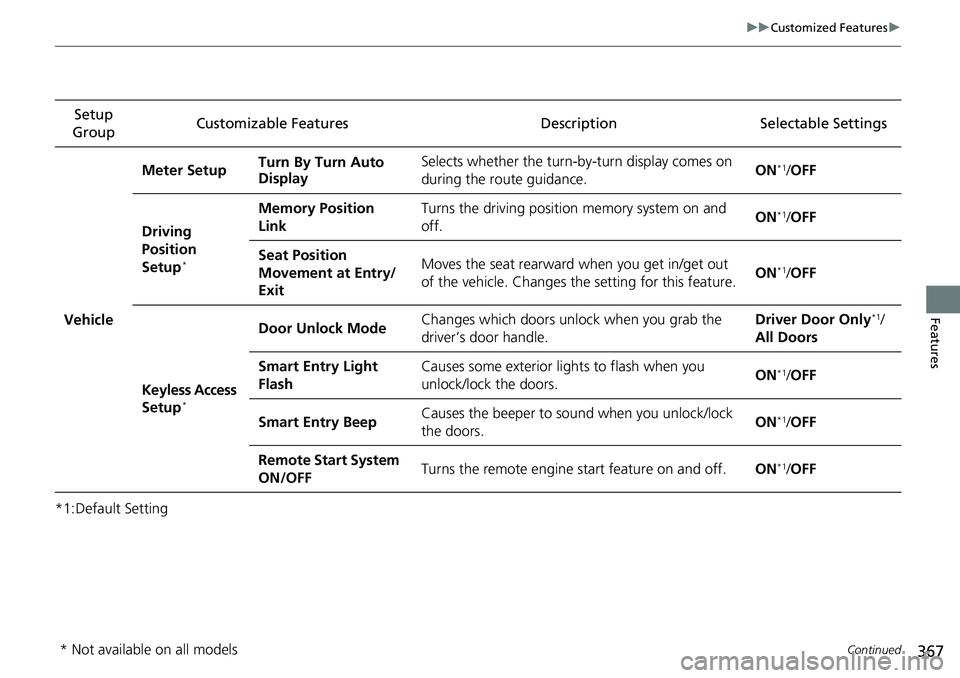
Turn By Turn Auto
Display Selects whether the turn-b
y-turn display comes on
during the route guidance. ON
*1/
OFF
Driving
Position
Setup
*
Memory Position
Link Turns the driving position memory system on and
off.
ON*1/
OFF
Seat Position
Movement at Entry/
Exit Moves the seat rearward when you get in/get out
of the vehicle. Changes th
e setting for this feature. ON
*1/
OFF
Keyless Access
Setup
*
Door Unlock Mode Changes which doors unlock when you grab the
driver’s door handle. Driver Door Only*1/
All Doors
Smart Entry Light
Flash Causes some exterior lights to flash when you
unlock/lock the doors.
ON
*1/
OFF
Smart Entry Beep Causes the beeper to so
und when you unlock/lock
the doors. ON
*1/
OFF
Remote Start System
ON/OFF Turns the remote engine start feature on and off.
ON
*1/OFF
* Not available on all models
Page 370 of 659
368
uuCustomized Features u
Features
*1:Default SettingSetup
Group Customizable Features Description Selectable Settings
Vehicle Lighting
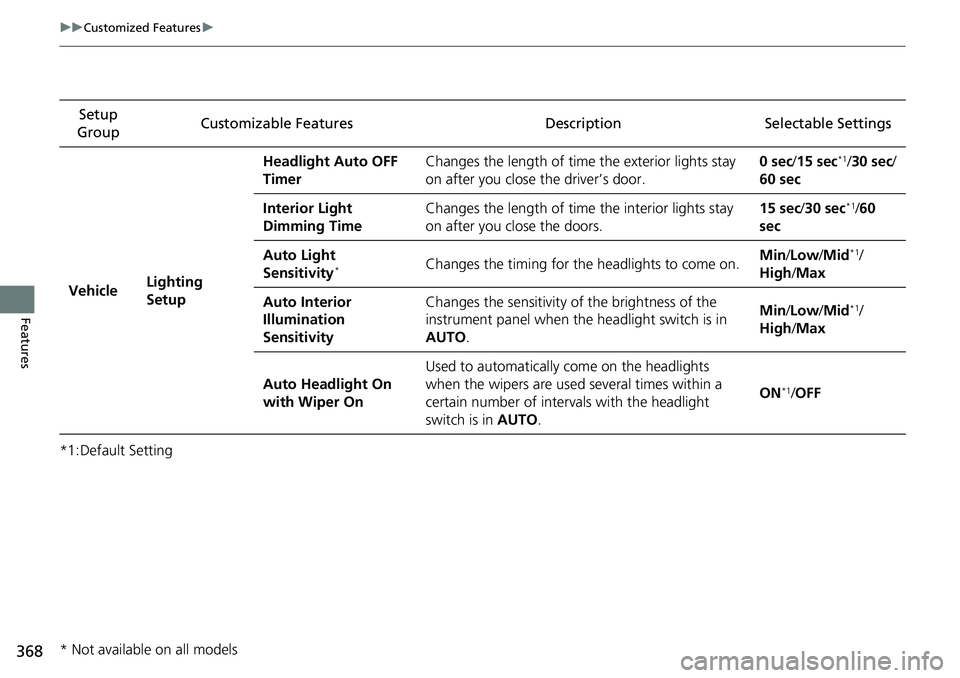
Setup Headlight Auto OFF
Timer
Changes the length of time the exterior lights stay
on after you close the driver’s door. 0 sec
/15 sec
*1/30 sec/
60 sec
Interior Light
Dimming Time Changes the length of time
the interior lights stay
on after you close the doors. 15 sec
/30 sec
*1/60
sec
Auto Light
Sensitivity
*Changes the timing for the headlights to come on.Min/
Low/Mid*1/
High /Max
Auto Interior
Illumination
Sensitivity Changes the sensitivity of the brightness of the
instrument panel when the headlight switch is in
AUTO
. Min/
Low/Mid
*1/
High /Max
Auto Headlight On
with Wiper On Used to automatically come on the headlights
when the wipers are used several times within a
certain number of interv
als with the headlight
switch is in AUTO. ON
*1/
OFF
* Not available on all models
Page 371 of 659
369
uuCustomized Features u
Continued
Features
*1:Default SettingSetup
Group Customizable Features Description Selectable Settings
Vehicle Door/Window
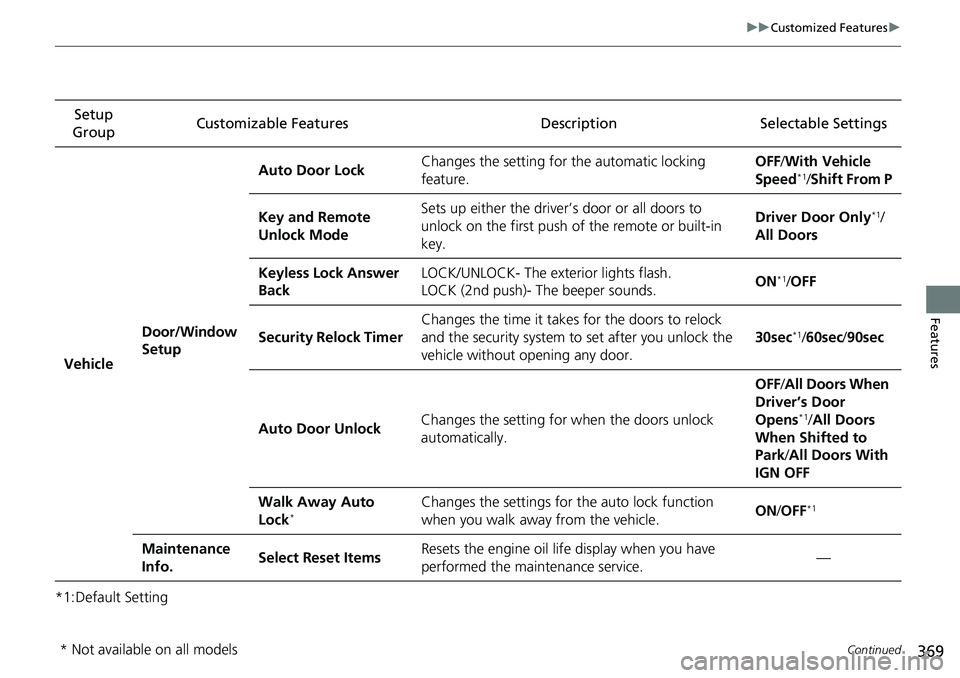
Setup Auto Door Lock
Changes the setting for
the automatic locking
feature. OFF
/With Ve hicle
Speed
*1/ Shift From P
Key and Remote
Unlock Mode Sets up either the driver’s door or all doors to
unlock on the first push
of the remote or built-in
key. Driver Door Only
*1/
All Doors
Keyless Lock Answer
Back LOCK/UNLOCK- The exterior lights flash.
LOCK (2nd push)- The beeper sounds.
ON
*1/
OFF
Security Relock Timer Changes the time it takes for the doors to relock
and the security system to
set after you unlock the
vehicle without opening any door. 30sec
*1/
60sec /90sec
Auto Door Unlock Changes the setting for
when the doors unlock
automatically. OFF
/All Doors When
Driver’s Door
Opens
*1/ All Doors
When Shifted to
Park/ All Doors With
IGN OFF
Walk Away Auto
Lock
*Changes the settings for the auto lock function
when you walk away from the vehicle. ON
/OFF*1
Maintenance
Info. Select Reset Items
Resets the engine oil life display when you have
performed the maintenance service. —
* Not available on all models
Page 374 of 659
372
Features
HomeLink® Universal Transceiver*
The HomeLink ® Universal Transceiver can be pr ogrammed to operate up to three
remote controlled devices around your home , such as garage doors, lighting, or
home security systems.
Refer to the safety information that came wi th your garage door opener to test that
the safety features are functioning properly. If you do not have the safety
information, contac t the manufacturer.
Before programming HomeLink, make sure th at people and objects are out of the
way of the garage or gate to prevent potential injury or damage.
When programming a garage door opener, park just outside the garage door’s path.
■Important Safety Precautions
1HomeLink ® Universal Transceiver*
Before programming HomeLi nk to operate a garage
door opener, confirm that the opener has an external
entrapment protection system , such as an “electronic
eye,” or other safety and reverse stop features. If it
does not, HomeLink may not be able to operate it.
* Not available on all models
Page 406 of 659
404
Driving
Before Driving
Driving Preparation
Check the following items before you start driving.
• Make sure there are no obstructions on the windows, door mirrors, exterior
lights, or other parts of the vehicle.
u Remove any frost, snow, or ice.
u Remove any snow on the roof, as this can slip down and obstruct your field of
vision while driving. If frozen solid , remove ice once it has softened.
u When removing ice from around the wheels, be sure not to damage the wheel
or wheel components.
• Make sure the hood is securely closed.
u If the hood opens while driving, your front view will be blocked.
• Make sure the tires are in good condition.
u Check air pressure, and check for damage and excessive wear.
2 Checking and Maintaining Tires P. 577
•Make sure there are no people or ob jects behind or around the vehicle.
u There are blind spots from the inside.
■Exterior Checks1Exterior Checks
NOTICE
When doors are frozen s hut, use warm water around
the door edges to melt any ice. Do not try to force
them open, as this can damage the rubber trim
around the doors. When done, wipe dry to avoid
further freezing.
Do not pour warm water into the key cylinder.
You will be unable to insert the key if the water
freezes in the hole.
Heat from the engine and exhaust can ignite
flammable material s left under the hood, causing a
fire. If you’ve parked y our vehicle for an extended
period, inspect and remove any debris that may have
collected, such as dried grass and leaves that have
fallen or have been carried in for use as a nest by a
small animal. Also check under the hood for leftover
flammable materials after you or someone else has
performed maintenance on your vehicle.