check oil HONDA ACCORD SEDAN 2021 Owner's Manual (in English)
[x] Cancel search | Manufacturer: HONDA, Model Year: 2021, Model line: ACCORD SEDAN, Model: HONDA ACCORD SEDAN 2021Pages: 659, PDF Size: 28.71 MB
Page 30 of 659
28
Quick Reference Guide
Maintenance (P 539)
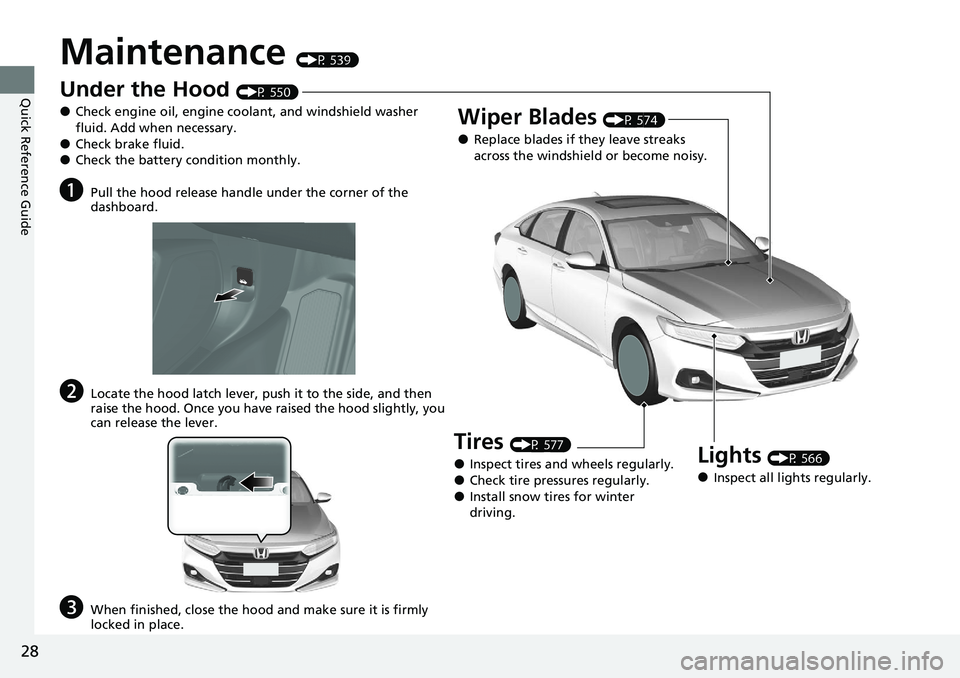
Under the Hood (P 550)
●Check engine oil, engine coolant, and windshield washer
fluid. Add when necessary.
●Check brake fluid.●Check the battery condition monthly.
aPull the hood release handle under the corner of the
dashboard.
bLocate the hood latch lever, push it to the side, and then
raise the hood. Once you have raised the hood slightly, you
can release the lever.
cWhen finished, close the hood and make sure it is firmly
locked in place.
Lights (P 566)
●Inspect all lights regularly.
Wiper Blades (P 574)
●Replace blades if they leave streaks
across the windshield or become noisy.
Tires (P 577)
●Inspect tires and wheels regularly.●Check tire pressures regularly.●Install snow tires for winter
driving.
Page 235 of 659
Continued233
uuInterior Convenience Items uOther Interior Convenience Items
Controls
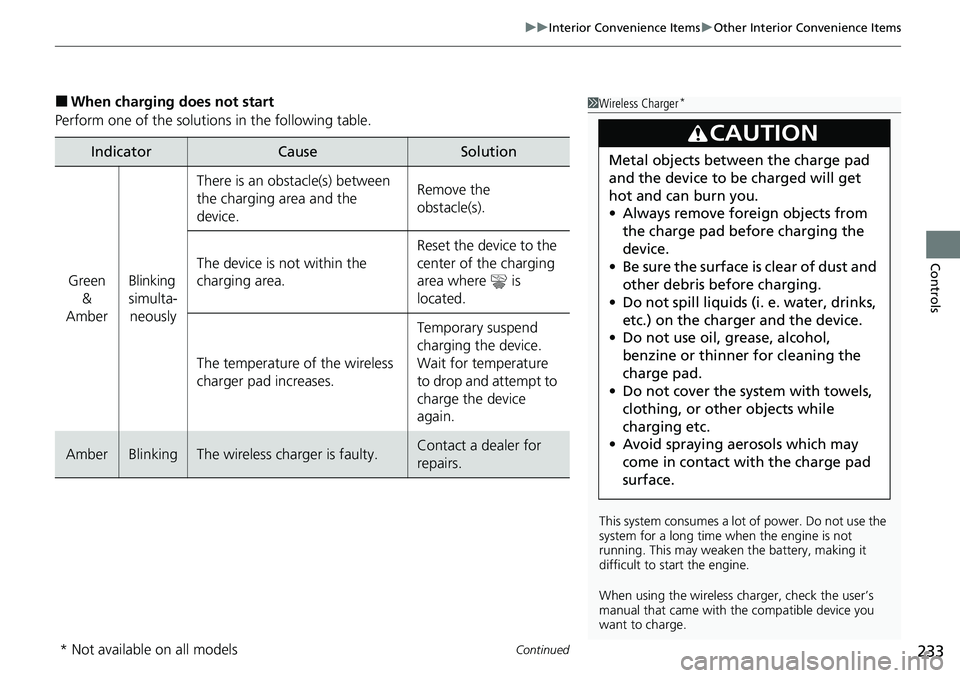
■When charging does not start
Perform one of the solutions in the following table.
IndicatorCauseSolution
Green &
AmberBlinking
simulta- neously
There is an obstacle(s) between
the charging area and the
device.Remove the
obstacle(s).
The device is not within the
charging area. Reset the device to the
center of the charging
area where is
located.
The temperature of the wireless
charger pad increases. Temporary suspend
charging the device.
Wait for temperature
to drop and attempt to
charge the device
again.
AmberBlinkingThe wireless charger is faulty.Contact a dealer for
repairs.
1
Wireless Charger*
This system consumes a lot of power. Do not use the
system for a long time when the engine is not
running. This may weaken the battery, making it
difficult to start the engine.
When using the wireless charger, check the user’s
manual that came with th e compatible device you
want to charge.
3CAUTION
Metal objects between the charge pad
and the device to be charged will get
hot and can burn you.
• Always remove foreign objects from
the charge pad before charging the
device.
• Be sure the surface is clear of dust and
other debris before charging.
• Do not spill liquids (i. e. water, drinks,
etc.) on the charger and the device.
• Do not use oil, grease, alcohol,
benzine or thinner for cleaning the
charge pad.
• Do not cover the system with towels,
clothing, or other objects while
charging etc.
• Avoid spraying aerosols which may
come in contact with the charge pad
surface.
* Not available on all models
Page 311 of 659
309
uuAudio System Basic Operation uHondaLink® Service*
Features
Your subscribed telematics service prov ider can check your vehicle’s condition.
■Virtual Dashboard
You can remotely check the mileage, fuel range, and oil life in your app.
■Remote Start and stop the engine
You can remotely start and stop engine using your app as same as the smart entry
key.
■Geofence Alert
You can receive a notification anytime your ve hicle enters or leaves a region set by
you.
■Speed Alert
You can receive a notification when your ve hicle has exceeded a speed limit set by
you.
■Personal Data Wipe
You can reset your audio and navigation system settings to factory defaults with the
app.
■Wi-Fi hotspot
Vehicle provides 4G LTE ne twork environment as Wi-Fi router to use tablet or
smartphone in your vehicle.
■Convenient Features1 Convenient Features
The contact information of your provider, your user
ID and PIN will be given when you subscribe to
HondaLink ®. If you forget any of the above, contact a
Honda dealer, or go to hondalink.honda.com.
You cannot use Wi-Fi hotspots when you are
connected wirelessly to Apple CarPlay or Android
Auto.
Page 541 of 659
539
Maintenance
This chapter discusses basic maintenance.
Before Performing MaintenanceInspection and Maintenance ............ 540
Safety When Performing Maintenance..... 541Parts and Fluids Used in Maintenance Service ........................................... 542
Maintenance Minder
TM..................... 543
Maintenance Under the Hood
Maintenance Items Under the Hood ..... 550Opening the Hood ........................... 552
Recommended Engine Oil ................ 553
Oil Check ......................................... 554
Adding Engine Oil ............................ 556
Changing the Engine Oil and Oil Filter ..... 557
Engine Coolant ................................ 561
Transmission Fluid ............................ 563
Brake Fluid ....................................... 564
Refilling Window Wa sher Fluid......... 565
Replacing Light Bulbs ....................... 566
Checking and Maintaining Wiper
Blades .......................................... 574
Checking and Maintaining Tires
Checking Tires ................................. 577
Tire and Loading Information Label ...... 578Tire Labeling .................................... 578DOT Tire Quality Grading (U.S. Vehicles)....... 580Wear Indicators................................ 582 Tire Service Life ................................ 582
Tire and Wheel Replacement ........... 583
Tire Rotation .................................... 584
Winter Tires ..................................... 585
Battery ............................................... 586
Remote Transmitter Care
Replacing the Button Battery ........... 588
Climate Control System Maintenance.... 589Cleaning
Interior Care .................................... 590
Exterior Care.................................... 592
Accessories and Modifications ........ 595
Page 542 of 659
540
Maintenance
Before Performing Maintenance
Inspection and Maintenance
For your safety, perform all listed inspections and maintenance to keep your vehicle
in good condition. If you become aware of an y abnormality (noise, smell, insufficient
brake fluid, oil residue on the ground, etc.), have your vehicle inspected by a dealer.
(Note, however, that service at a dealer is not mandatory to keep your warranties in
effect.)
■Daily inspections
Perform inspections before long distance tri ps, when washing the vehicle, or when
refueling.
2 Maintenance P. 28
■Periodic inspections
• Check the brake fluid level monthly.
2 Brake Fluid P. 564
•Check the tire pressure monthly. Examin e the tread for wear and foreign objects.
2Checking and Maintaining Tires P. 577
•Check the operation of the exterior lights monthly.
2 Replacing Light Bulbs P. 566
•Check the condition of the wiper bl ades at least every six months.
2Checking and Maintaining Wiper Blades P. 574
■Types of Inspection and Maintenance
1Inspection and Maintenance
Maintenance, replacement, or repair of
emissions control devices and systems may be
done by any automotive repair establishment or
individuals using parts that are “certified” to
EPA standards.
According to state and fede ral regulations, failure to
perform maintenance on the maintenance main
items marked with # will not void your emissions
warranties. However, all ma intenance services should
be performed in accordan ce with the intervals
indicated by the driver information interface.
2 Maintenance Service Items P. 547
If you want to perform complex maintenance tasks
that require more skills a nd tools, you can purchase a
subscription to the Service Express website at
www.techinfo.honda.com .
2 Authorized Manuals P. 646
If you want to perform ma intenance yourself, make
sure that you have the necessary tools and skills first.
After performing maintenanc e, update the records in
the separate maintenance booklet.
U.S. models
Page 556 of 659
554
uuMaintenance Under the Hood uOil Check
Maintenance
Oil Check
We recommend that you check the engi ne oil level every time you refuel.
Park the vehicle on level ground.
Wait approximately three minutes after turn ing the engine off before you check the
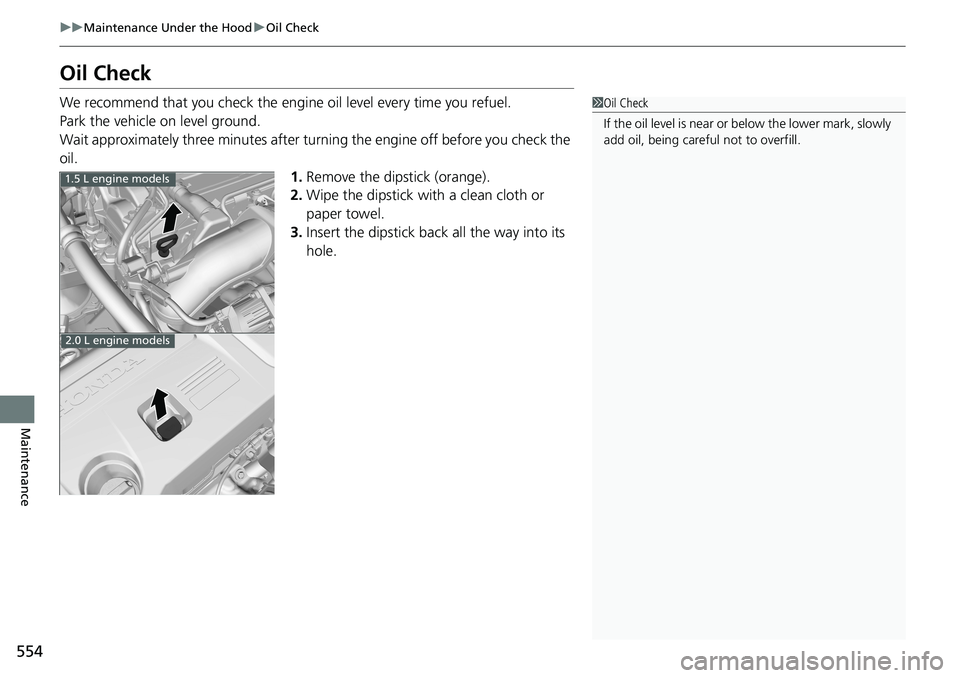
oil. 1.Remove the dipstick (orange).
2. Wipe the dipstick with a clean cloth or
paper towel.
3. Insert the dipstick back all the way into its
hole.1Oil Check
If the oil level is near or below the lower mark, slowly
add oil, being carefu l not to overfill.
1.5 L engine models
2.0 L engine models
Page 557 of 659
555
uuMaintenance Under the Hood uOil Check
Maintenance
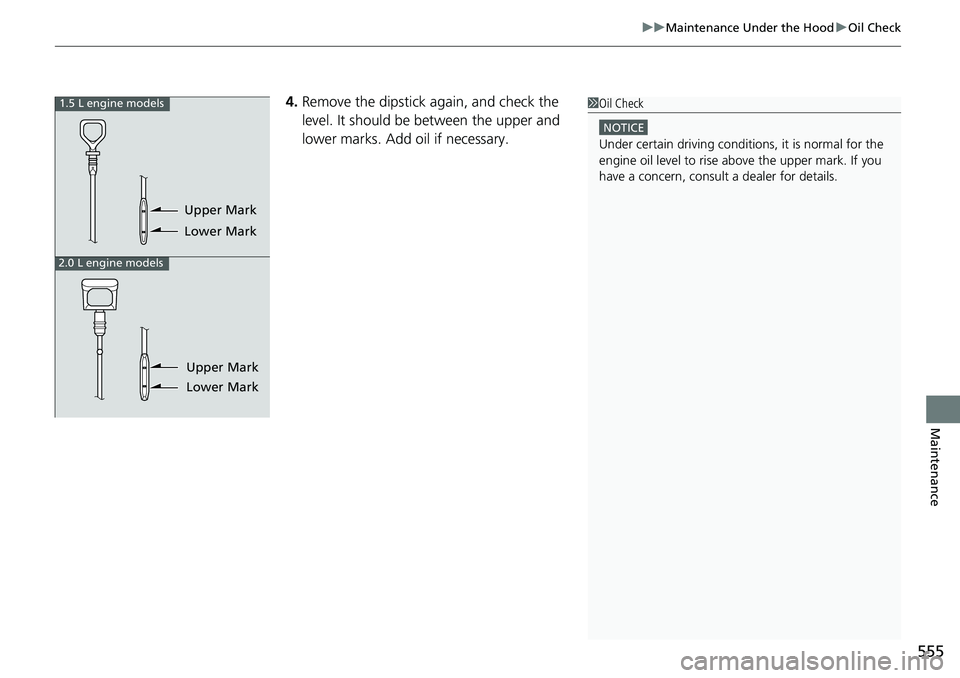
4. Remove the dipstick again, and check the
level. It should be between the upper and
lower marks. Add oil if necessary.1Oil Check
NOTICE
Under certain driving conditions, it is normal for the
engine oil level to rise above the upper mark. If you
have a concern, consul t a dealer for details.
1.5 L engine models
2.0 L engine models
Upper Mark
Lower Mark
Upper Mark
Lower Mark
Page 558 of 659
556
uuMaintenance Under the Hood uAdding Engine Oil
Maintenance
Adding Engine Oil
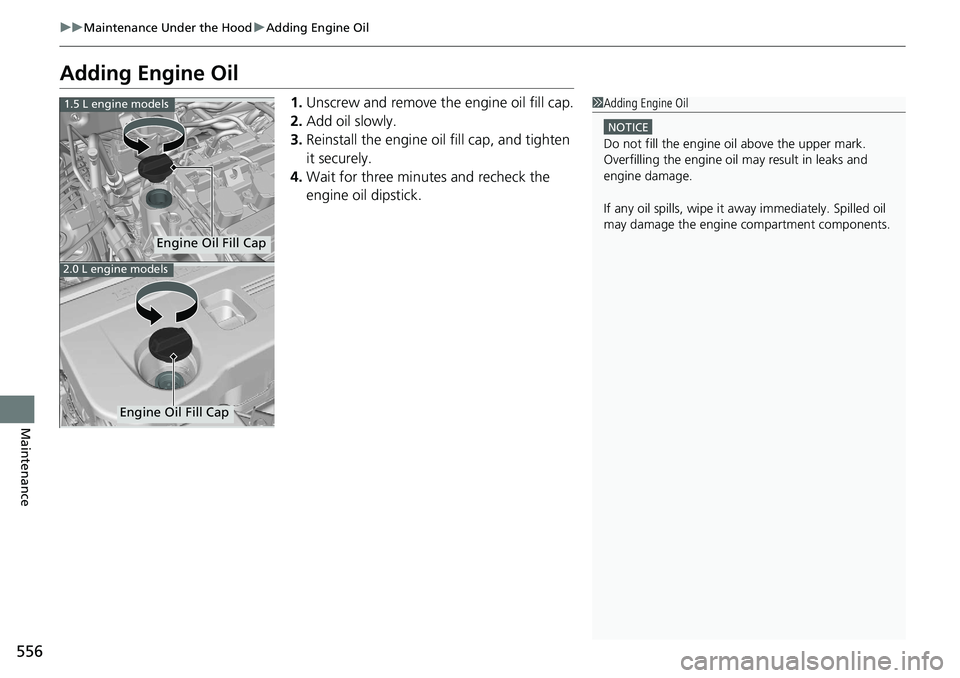
1. Unscrew and remove the engine oil fill cap.
2. Add oil slowly.
3. Reinstall the engine oil fill cap, and tighten
it securely.
4. Wait for three minutes and recheck the
engine oil dipstick.1Adding Engine Oil
NOTICE
Do not fill the engine oil above the upper mark.
Overfilling the engine oil may result in leaks and
engine damage.
If any oil spills, wipe it away immediately. Spilled oil
may damage the engine compartment components.
1.5 L engine models
2.0 L engine models
Engine Oil Fill Cap
Engine Oil Fill Cap
Page 562 of 659
uuMaintenance Under the Hood uChanging the Engine Oil and Oil Filter
560
Maintenance
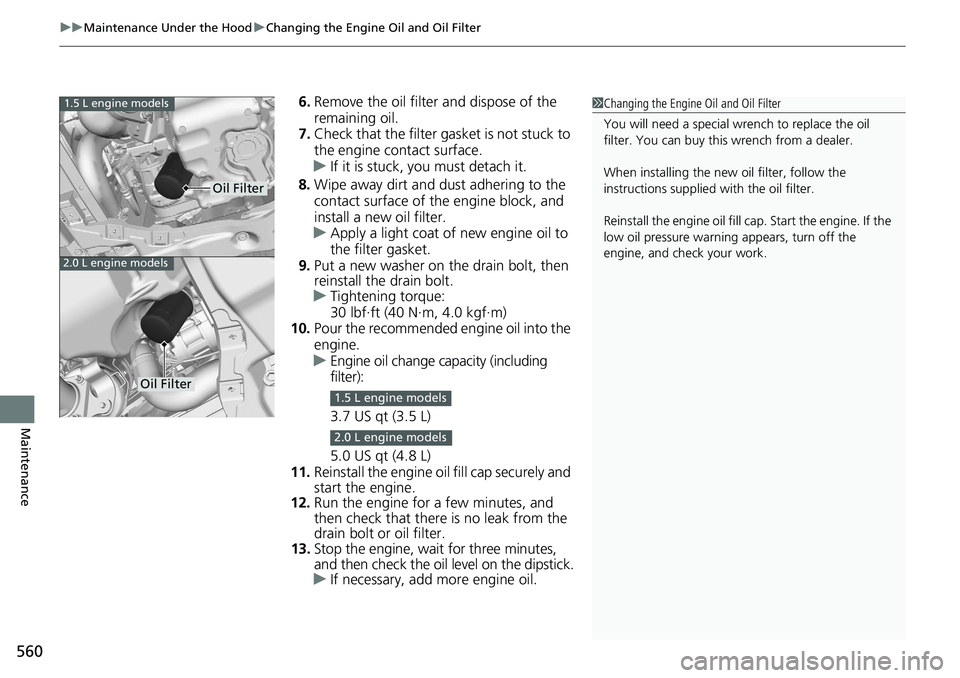
6. Remove the oil filter and dispose of the
remaining oil.
7. Check that the filter ga sket is not stuck to
the engine contact surface.
u If it is stuck, you must detach it.
8. Wipe away dirt and dust adhering to the
contact surface of the engine block, and
install a new oil filter.
u Apply a light coat of new engine oil to
the filter gasket.
9. Put a new washer on the drain bolt, then
reinstall the drain bolt.
u Tightening torque:
30 lbf∙ft (40 N∙m, 4.0 kgf∙m)
10. Pour the recommended engine oil into the
engine.
u Engine oil change capacity (including
filter):
3.7 US qt (3.5 L)
5.0 US qt (4.8 L)
11. Reinstall the engine oi l fill cap securely and
start the engine.
12. Run the engine for a few minutes, and
then check that there is no leak from the
drain bolt or oil filter.
13. Stop the engine, wait for three minutes,
and then check the oil level on the dipstick.
u If necessary, add more engine oil.1Changing the Engine Oil and Oil Filter
You will need a special wrench to replace the oil
filter. You can buy this wrench from a dealer.
When installing the new oil filter, follow the
instructions supplied with the oil filter.
Reinstall the engine oil fill cap. Start the engine. If the
low oil pressure warning appears, turn off the
engine, and check your work.1.5 L engine models
2.0 L engine models
Oil Filter
Oil Filter1.5 L engine models
2.0 L engine models
Page 599 of 659
597
Handling the Unexpected
This chapter explains how to handle unexpected troubles.
ToolsTypes of Tools .................................. 598
If a Tire Goes Flat
Changing a Flat Tire ......................... 599
Engine Does Not Start Checking the Engine ........................ 605
If the Remote Battery is Weak .......... 606
Emergency Engine Stop ................... 607
If the Battery Is Dead ....................... 608
Shift Lever Does Not Move .............. 611
Overheating How to Handle Overheating ............. 613 Indicator, Coming On/Blinking
If the Low Oil Pressure Warning Appears ... 615If the Charging System Indicator Comes
On ................................................. 615
If the Malfunction Indicator Lamp Comes On or Blinks ................................... 616
If the Brake System Indicator (Red) Comes
On or Blinks ................................... 617
If the Brake System Indicator (Red) Comes On
or Blinks at the Same Time When the Brake
System Indicator (Amber) Comes On.... 618
If the Electric Power Steering (EPS) System Indicator Comes On ....................... 619 If the Low Tire Pressure/TPMS Indicator
Comes On or Blinks ....................... 620
If the Transmission System Indicator Blinks along with the Warning Message... 621
Fuses Fuse Locations ................................. 622
Inspecting and Changing Fuses ........ 627
Emergency Towing ........................... 628
If You Cannot Unlock the Fuel Fill Door....629
If You Cannot Open the Trunk ........... 630
Refueling ........................................... 632