hood open HONDA ACCORD SEDAN 2021 Owner's Manual (in English)
[x] Cancel search | Manufacturer: HONDA, Model Year: 2021, Model line: ACCORD SEDAN, Model: HONDA ACCORD SEDAN 2021Pages: 659, PDF Size: 28.71 MB
Page 7 of 659
Contents
Child Safety P. 64Exhaust Gas Hazard P. 78Safety Labels P. 79
Opening and Closing the Trunk P. 181 Security System P. 184 Windows P. 187
Operating the Switches Around the Steering Wheel P. 191 Mirrors P. 210
Interior Convenience Items P. 223 Climate Control System P. 240
Audio Error Messages P. 328General Information on the Audio System P. 330
Bluetooth ® HandsFreeLink ® P. 375 Refuel Recommend P. 401
When Driving P. 414 Honda Sensing ® P. 455 Braking P. 510 Parki ng Your Vehicle P. 520
Fuel Economy and CO
2 Emissions P. 536 Turbo Engine Vehicle P. 537
Maintenance Under the Hood P. 550 Replacing Light Bulbs P. 566
Checking and Maintaining Tires P. 577 Battery P. 586 Remote Transmitter Care P. 588
Cleaning P. 590 Accessories and Modifications P. 595
Engine Does Not Start P. 605 If the Battery Is Dead P. 608 Shift Lever Does Not Move P. 611
Fuses P. 622 Emergency Towing P. 628 If You Cannot Unlock the Fuel Fill Door P. 629
Refueling P. 632
Devices that Emit Radio Waves P. 639 Reporting Safety Defects P. 640
Authorized Manuals P. 646 Customer Service Information P. 647
Quick Reference GuideP. 6
Safe DrivingP. 33
Instrument PanelP. 81
ControlsP. 165
FeaturesP. 245
DrivingP. 403
MaintenanceP. 539
Handling the UnexpectedP. 597
InformationP. 633
IndexP. 648
Page 10 of 659
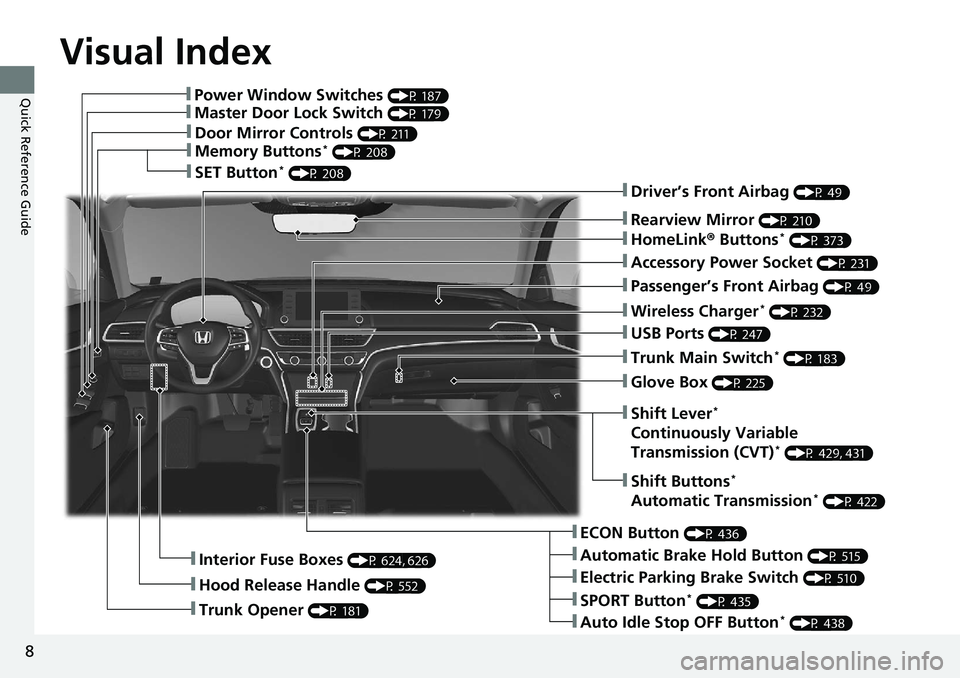
Visual Index
8
Quick Reference Guide❚Power Window Switches (P 187)
❚Master Door Lock Switch (P 179)
❚Door Mirror Controls (P 211)
❚Memory Buttons* (P 208)
❚SET Button* (P 208)
❚Trunk Opener (P 181)
❚Interior Fuse Boxes (P 624, 626)
❚Hood Release Handle (P 552)
❚Driver’s Front Airbag (P 49)
❚Rearview Mirror (P 210)
❚HomeLink® Buttons* (P 373)
❚Accessory Power Socket (P 231)
❚Passenger’s Front Airbag (P 49)
❚Wireless Charger* (P 232)
❚USB Ports (P 247)
❚Trunk Main Switch* (P 183)
❚Glove Box (P 225)
❚ECON Button (P 436)
❚Automatic Brake Hold Button (P 515)
❚Electric Parking Brake Switch (P 510)
❚Auto Idle Stop OFF Button* (P 438)
❚SPORT Button* (P 435)
❚Shift Buttons*
Automatic Transmission* (P 422)
❚Shift Lever*
Continuously Variable
Transmission (CVT)* (P 429, 431)
Page 12 of 659
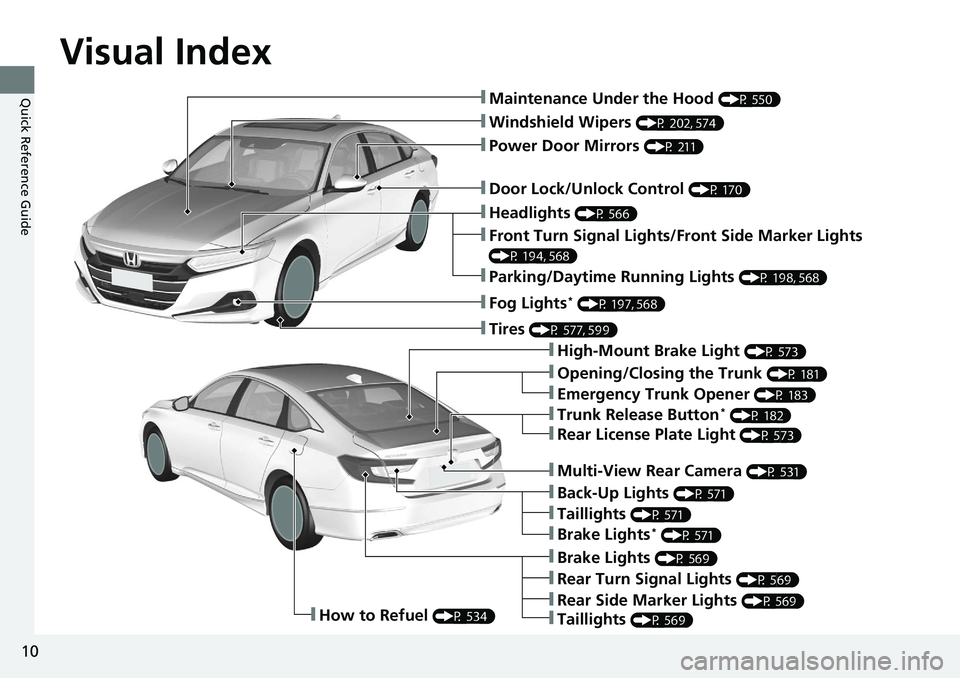
Visual Index
10
Quick Reference Guide❚Maintenance Under the Hood (P 550)
❚Windshield Wipers (P 202, 574)
❚Door Lock/Unlock Control (P 170)
❚Power Door Mirrors (P 211)
❚Headlights (P 566)
❚High-Mount Brake Light (P 573)
❚Emergency Trunk Opener (P 183)
❚Opening/Closing the Trunk (P 181)
❚Parking/Daytime Running Lights (P 198, 568)
❚Front Turn Signal Lights/Front Side Marker Lights
(P 194, 568)
❚Fog Lights* (P 197, 568)
❚Trunk Release Button* (P 182)
❚Brake Lights (P 569)
❚Rear Turn Signal Lights (P 569)
❚Back-Up Lights (P 571)
❚How to Refuel (P 534)
❚Tires (P 577, 599)
❚Brake Lights* (P 571)
❚Taillights (P 571)
❚Multi-View Rear Camera (P 531)
❚Rear License Plate Light (P 573)
❚Taillights (P 569)
❚Rear Side Marker Lights (P 569)
Page 31 of 659
Quick Reference Guide
29
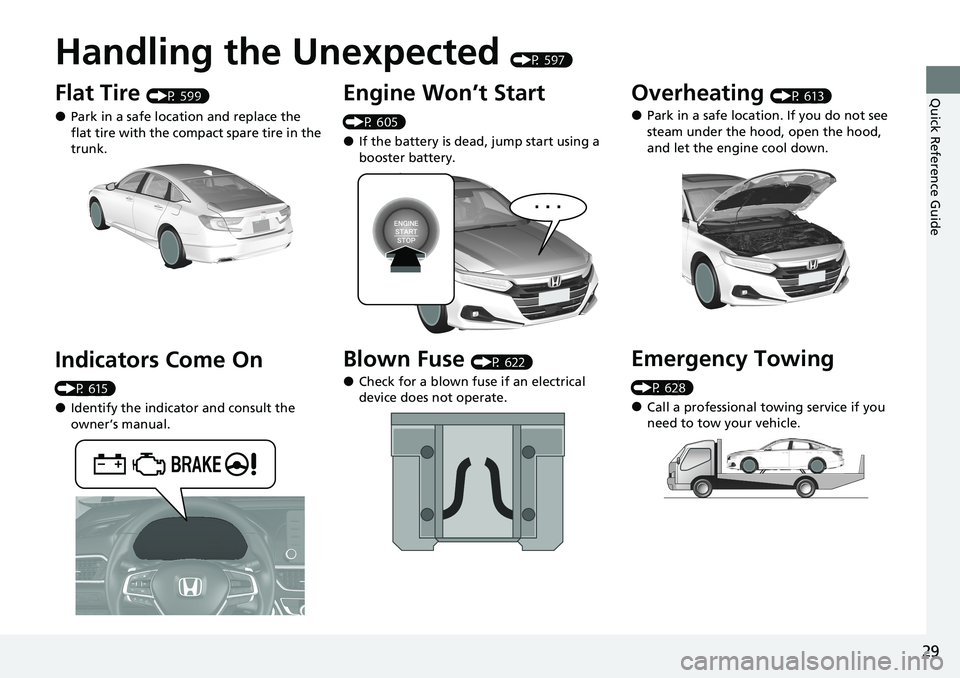
Handling the Unexpected (P 597)
Flat Tire (P 599)
●Park in a safe location and replace the
flat tire with the compact spare tire in the
trunk.
Indicators Come On
(P 615)
●Identify the indicator and consult the
owner’s manual.
Engine Won’t Start
(P 605)
●If the battery is dead, jump start using a
booster battery.
Blown Fuse (P 622)
●Check for a blown fuse if an electrical
device does not operate.
Overheating (P 613)
●Park in a safe location. If you do not see
steam under the hood, open the hood,
and let the engine cool down.
Emergency Towing
(P 628)
●Call a professional towing service if you
need to tow your vehicle.
Page 124 of 659
122
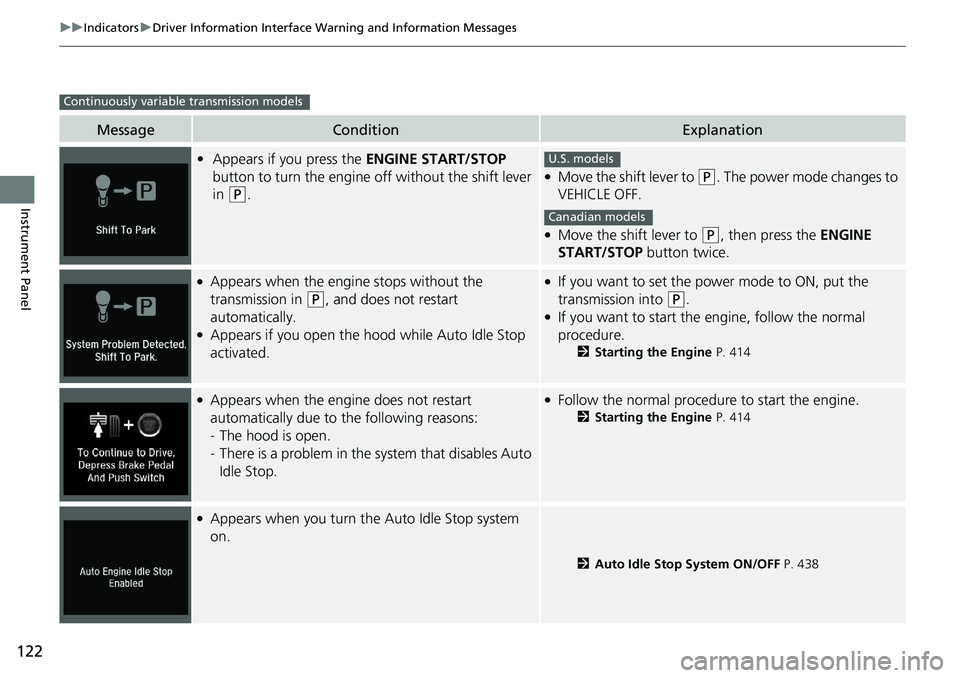
uuIndicators uDriver Information Interface Wa rning and Information Messages
Instrument Panel
MessageConditionExplanation
•Appears if you press the ENGINE START/STOP
button to turn the engine off without the shift lever
in
(P.
●Move the shift lever to (P. The power mode changes to
VEHICLE OFF.
●Move the shift lever to (P, then press the ENGINE
START/STOP button twice.
●Appears when the engine stops without the
transmission in
(P, and does not restart
automatically.
●Appears if you open the hood while Auto Idle Stop
activated.
●If you want to set the power mode to ON, put the
transmission into
(P.●If you want to start the engine, follow the normal
procedure.
2 Starting the Engine P. 414
●Appears when the engine does not restart
automatically due to the following reasons:
-The hood is open.
- There is a problem in the system that disables Auto
Idle Stop.●Follow the normal procedure to start the engine.
2 Starting the Engine P. 414
●Appears when you turn the Auto Idle Stop system
on.
2Auto Idle Stop System ON/OFF P. 438
Continuously variable transmission models
U.S. models
Canadian models
Page 126 of 659
124
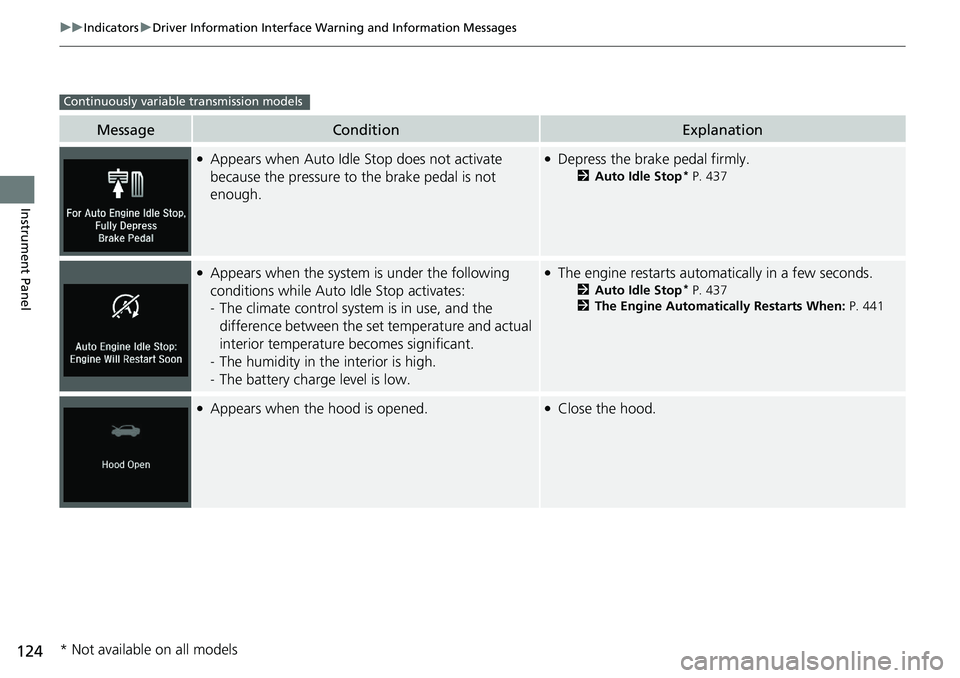
uuIndicators uDriver Information Interface Wa rning and Information Messages
Instrument Panel
MessageConditionExplanation
●Appears when Auto Idle Stop does not activate
because the pressure to the brake pedal is not
enough.●Depress the brake pedal firmly.
2 Auto Idle Stop* P. 437
●Appears when the system is under the following
conditions while Auto Idle Stop activates:
-The climate control system is in use, and the
difference between the set temperature and actual
interior temperature becomes significant.
- The humidity in the interior is high.
- The battery charge level is low.●The engine restarts automatically in a few seconds.
2 Auto Idle Stop* P. 437
2 The Engine Automatically Restarts When: P. 441
●Appears when the hood is opened.●Close the hood.
Continuously variable transmission models
* Not available on all models
Page 175 of 659
Continued173
uuLocking and Unlocking the Doors uLocking/Unlocking the Doors from the Outside
Controls
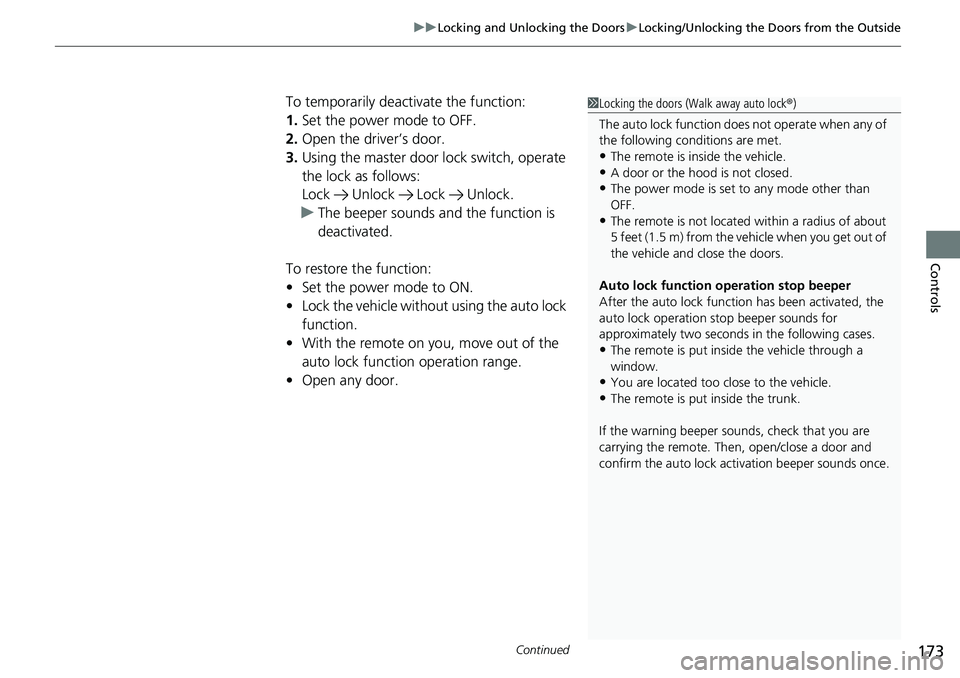
To temporarily deactivate the function:
1. Set the power mode to OFF.
2. Open the driv er’s door.
3. Using the master door lock switch, operate
the lock as follows:
Lock Unlock Lock Unlock.
u The beeper sounds an d the function is
deactivated.
To restore the function:
• Set the power mode to ON.
• Lock the vehicl e without using the auto lock
function.
• With the remote on yo u, move out of the
auto lock function operation range.
• Open any door.1Locking the doors (Walk away auto lock ®)
The auto lock function does not operate when any of
the following conditions are met.
•The remote is inside the vehicle.
•A door or the hood is not closed.•The power mode is set to any mode other than
OFF.
•The remote is not located within a radius of about
5 feet (1.5 m) from the vehicle when you get out of
the vehicle and close the doors.
Auto lock function operation stop beeper
After the auto lock function has been activated, the
auto lock operation stop beeper sounds for
approximately two seconds in the following cases.
•The remote is put inside the vehicle through a
window.
•You are located too close to the vehicle.
•The remote is put inside the trunk.
If the warning beeper sounds, check that you are
carrying the remote. Then, open/close a door and
confirm the auto lock ac tivation beeper sounds once.
Page 187 of 659
185
uuSecurity System uSecurity System Alarm
Continued
Controls
Security System Alarm
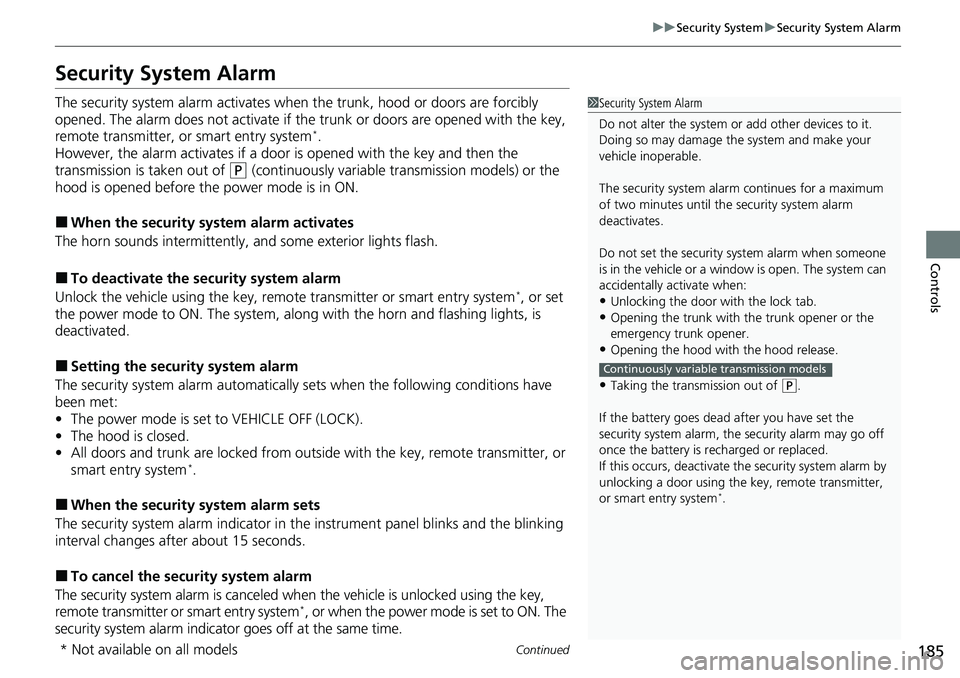
The security system alarm activates when the trunk, hood or doors are forcibly
opened. The alarm does not activate if the trunk or doors are opened with the key,
remote transmitter, or smart entry system
*.
However, the alarm activates if a door is opened with the key and then the
transmission is taken out of
(P (continuously variable transmission models) or the
hood is opened before the power mode is in ON.
■When the security system alarm activates
The horn sounds intermittently, and some exterior lights flash.
■To deactivate the security system alarm
Unlock the vehicle using the key, remo te transmitter or smart entry system*, or set
the power mode to ON. The system, along with the horn and flashing lights, is
deactivated.
■Setting the security system alarm
The security system alarm automatically sets when the following conditions have
been met:
• The power mode is set to VEHICLE OFF (LOCK).
• The hood is closed.
• All doors and trunk are locked from outsid e with the key, remote transmitter, or
smart entry system
*.
■When the security system alarm sets
The security system alarm in dicator in the instrument panel blinks and the blinking
interval changes after about 15 seconds.
■To cancel the security system alarm
The security system alarm is canceled wh en the vehicle is unlocked using the key,
remote transmitter or smart entry system
*, or when the power mode is set to ON. The
security system alarm indicato r goes off at the same time.
1Security System Alarm
Do not alter the system or add other devices to it.
Doing so may damage the system and make your
vehicle inoperable.
The security system alarm continues for a maximum
of two minutes until the security system alarm
deactivates.
Do not set the security system alarm when someone
is in the vehicle or a window is open. The system can
accidentally activate when:
•Unlocking the door with the lock tab.
•Opening the trunk with the trunk opener or the
emergency trunk opener.
•Opening the hood with the hood release.
•Taking the transmission out of ( P.
If the battery goes dead after you have set the
security system alarm, the security alarm may go off
once the battery is re charged or replaced.
If this occurs, deactivate the security system alarm by
unlocking a door using the ke y, remote transmitter,
or smart entry system
*.
Continuously variable transmission models
* Not available on all models
Page 406 of 659
404
Driving
Before Driving
Driving Preparation
Check the following items before you start driving.
• Make sure there are no obstructions on the windows, door mirrors, exterior
lights, or other parts of the vehicle.
u Remove any frost, snow, or ice.
u Remove any snow on the roof, as this can slip down and obstruct your field of
vision while driving. If frozen solid , remove ice once it has softened.
u When removing ice from around the wheels, be sure not to damage the wheel
or wheel components.
• Make sure the hood is securely closed.
u If the hood opens while driving, your front view will be blocked.
• Make sure the tires are in good condition.
u Check air pressure, and check for damage and excessive wear.
2 Checking and Maintaining Tires P. 577
•Make sure there are no people or ob jects behind or around the vehicle.
u There are blind spots from the inside.
■Exterior Checks1Exterior Checks
NOTICE
When doors are frozen s hut, use warm water around
the door edges to melt any ice. Do not try to force
them open, as this can damage the rubber trim
around the doors. When done, wipe dry to avoid
further freezing.
Do not pour warm water into the key cylinder.
You will be unable to insert the key if the water
freezes in the hole.
Heat from the engine and exhaust can ignite
flammable material s left under the hood, causing a
fire. If you’ve parked y our vehicle for an extended
period, inspect and remove any debris that may have
collected, such as dried grass and leaves that have
fallen or have been carried in for use as a nest by a
small animal. Also check under the hood for leftover
flammable materials after you or someone else has
performed maintenance on your vehicle.
Page 419 of 659
Continued417
uuWhen Driving uStarting the Engine
Driving
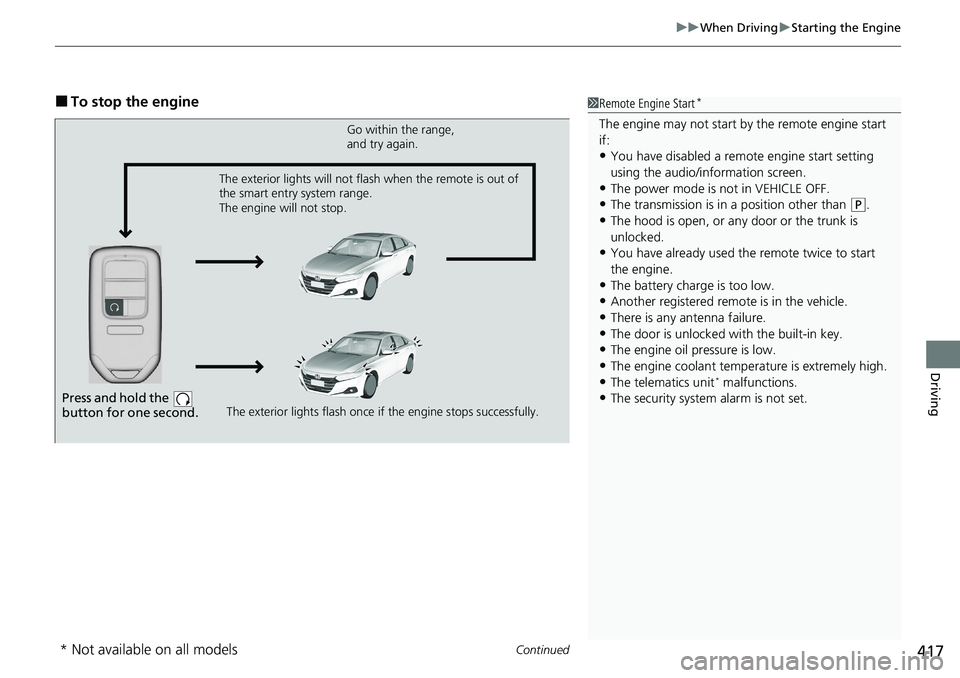
■To stop the engine1Remote Engine Start*
The engine may not start by the remote engine start
if:
•You have disabled a remo te engine start setting
using the audio/information screen.
•The power mode is not in VEHICLE OFF.
•The transmission is in a position other than ( P.
•The hood is open, or any door or the trunk is
unlocked.
•You have already used the remote twice to start
the engine.
•The battery charge is too low.
•Another registered remo te is in the vehicle.
•There is any antenna failure.•The door is unlocked with the built-in key.
•The engine oil pressure is low.
•The engine coolant temper ature is extremely high.•The telematics unit* malfunctions.
•The security system alarm is not set.Press and hold the
button for one second.
Go within the range,
and try again.
The exterior lights flash once if the engine stops successfully.
The exterior lights will not flash when the remote is out of
the smart entry system range.
The engine will not stop.
* Not available on all models