lock HONDA ACCORD SEDAN 2021 Owner's Manual (in English)
[x] Cancel search | Manufacturer: HONDA, Model Year: 2021, Model line: ACCORD SEDAN, Model: HONDA ACCORD SEDAN 2021Pages: 659, PDF Size: 28.71 MB
Page 6 of 659
Contents
This owner’s manual should be considered a permanent part of the
vehicle and should remain with the vehicle when it is sold.
This owner’s manual covers all models of your vehicle. You may find
descriptions of equipment and features that are not on your
particular model.
Images throughout this owner’s manual (including the front cover)
represent features and equipment that are available on some, but
not all, models. Your particular mo del may not have some of these
features.
This owner’s manual is for vehicles sold in the United States and
Canada.
The information and specifications in cluded in this publication were
in effect at the time of approval for printing. Honda Motor Co., Ltd.
reserves the right, however, to discontinue or change specifications
or design at any time without notice and without incurring any
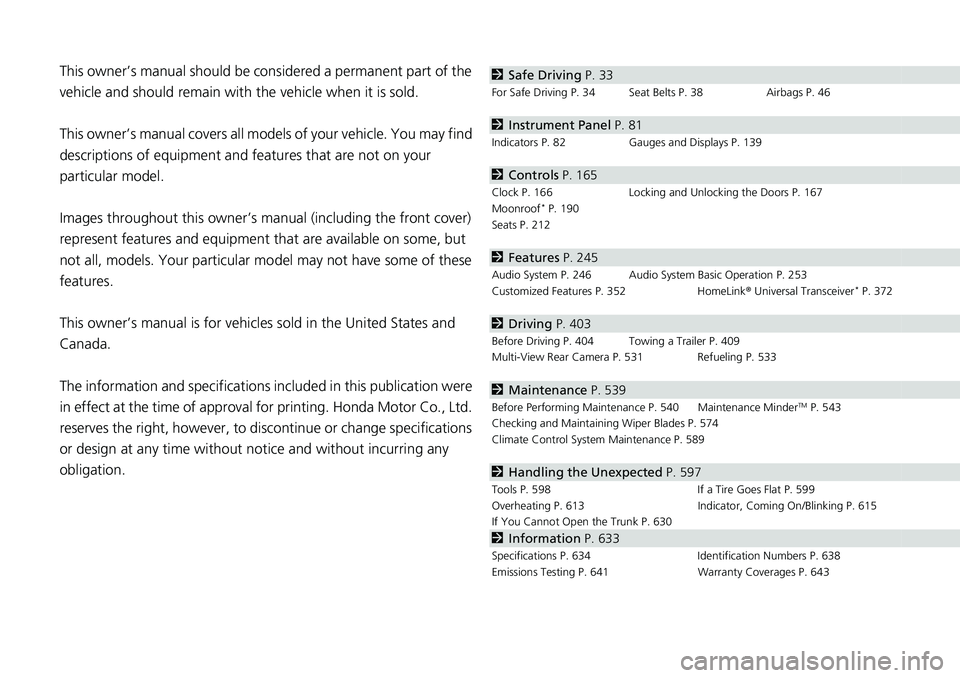
obligation.2 Safe Driving P. 33
For Safe Driving P. 34 Seat Belts P. 38 Airbags P. 46
2Instrument Panel P. 81
Indicators P. 82 Gauges and Displays P. 139
2Controls P. 165
Clock P. 166 Locking and Unlocking the Doors P. 167
Moonroof* P. 190
Seats P. 212
2 Features P. 245
Audio System P. 246 Audio System Basic Operation P. 253
Customized Features P. 352 HomeLink ® Universal Transceiver* P. 372
2 Driving P. 403
Before Driving P. 404 Towing a Trailer P. 409
Multi-View Rear Camera P. 531 Refueling P. 533
2Maintenance P. 539
Before Performing Maintenance P. 540 Maintenance MinderTM P. 543
Checking and Maintaining Wiper Blades P. 574
Climate Control System Maintenance P. 589
2Handling the Unexpected P. 597
Tools P. 598 If a Tire Goes Flat P. 599
Overheating P. 613 Indicator, Coming On/Blinking P. 615
If You Cannot Open the Trunk P. 630
2Information P. 633
Specifications P. 634 Identification Numbers P. 638
Emissions Testing P. 641 Warranty Coverages P. 643
Page 7 of 659
Contents
Child Safety P. 64Exhaust Gas Hazard P. 78Safety Labels P. 79
Opening and Closing the Trunk P. 181 Security System P. 184 Windows P. 187
Operating the Switches Around the Steering Wheel P. 191 Mirrors P. 210
Interior Convenience Items P. 223 Climate Control System P. 240
Audio Error Messages P. 328General Information on the Audio System P. 330
Bluetooth ® HandsFreeLink ® P. 375 Refuel Recommend P. 401
When Driving P. 414 Honda Sensing ® P. 455 Braking P. 510 Parki ng Your Vehicle P. 520
Fuel Economy and CO
2 Emissions P. 536 Turbo Engine Vehicle P. 537
Maintenance Under the Hood P. 550 Replacing Light Bulbs P. 566
Checking and Maintaining Tires P. 577 Battery P. 586 Remote Transmitter Care P. 588
Cleaning P. 590 Accessories and Modifications P. 595
Engine Does Not Start P. 605 If the Battery Is Dead P. 608 Shift Lever Does Not Move P. 611
Fuses P. 622 Emergency Towing P. 628 If You Cannot Unlock the Fuel Fill Door P. 629
Refueling P. 632
Devices that Emit Radio Waves P. 639 Reporting Safety Defects P. 640
Authorized Manuals P. 646 Customer Service Information P. 647
Quick Reference GuideP. 6
Safe DrivingP. 33
Instrument PanelP. 81
ControlsP. 165
FeaturesP. 245
DrivingP. 403
MaintenanceP. 539
Handling the UnexpectedP. 597
InformationP. 633
IndexP. 648
Page 10 of 659
Visual Index
8
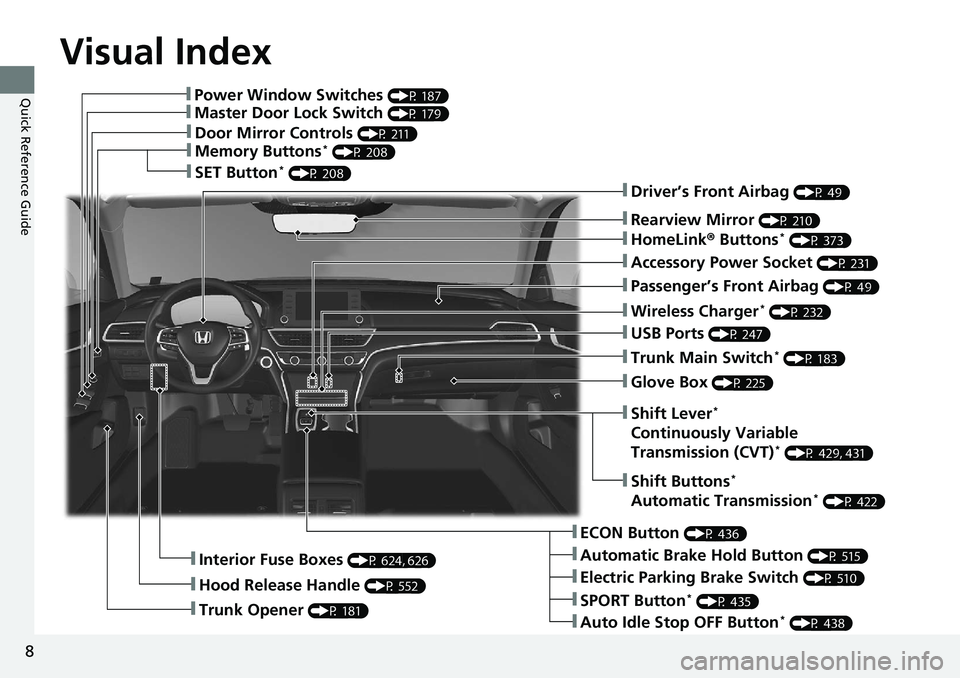
Quick Reference Guide❚Power Window Switches (P 187)
❚Master Door Lock Switch (P 179)
❚Door Mirror Controls (P 211)
❚Memory Buttons* (P 208)
❚SET Button* (P 208)
❚Trunk Opener (P 181)
❚Interior Fuse Boxes (P 624, 626)
❚Hood Release Handle (P 552)
❚Driver’s Front Airbag (P 49)
❚Rearview Mirror (P 210)
❚HomeLink® Buttons* (P 373)
❚Accessory Power Socket (P 231)
❚Passenger’s Front Airbag (P 49)
❚Wireless Charger* (P 232)
❚USB Ports (P 247)
❚Trunk Main Switch* (P 183)
❚Glove Box (P 225)
❚ECON Button (P 436)
❚Automatic Brake Hold Button (P 515)
❚Electric Parking Brake Switch (P 510)
❚Auto Idle Stop OFF Button* (P 438)
❚SPORT Button* (P 435)
❚Shift Buttons*
Automatic Transmission* (P 422)
❚Shift Lever*
Continuously Variable
Transmission (CVT)* (P 429, 431)
Page 12 of 659
Visual Index
10
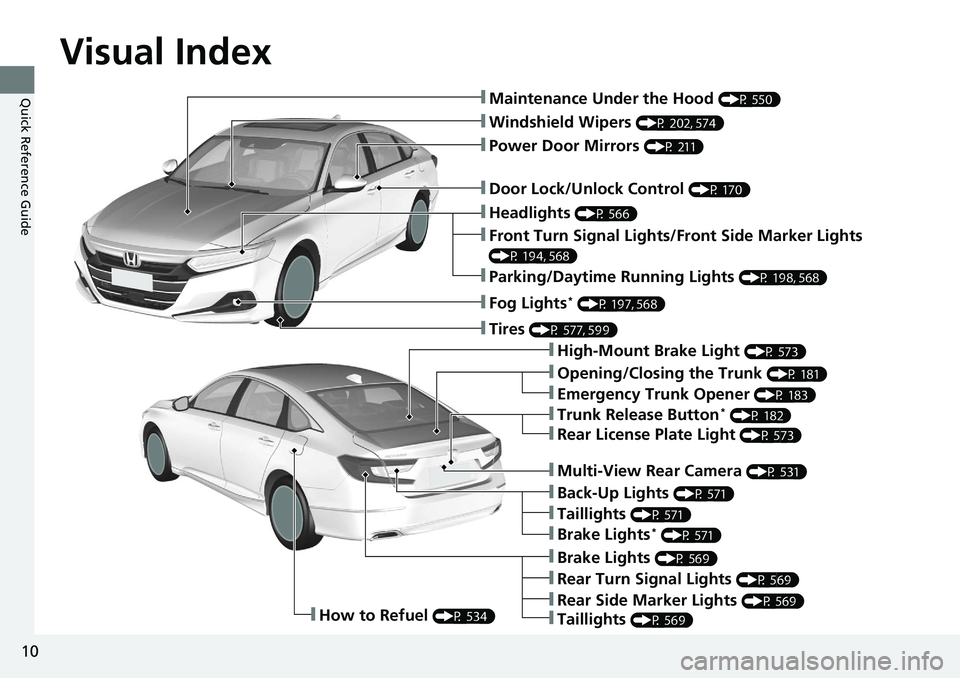
Quick Reference Guide❚Maintenance Under the Hood (P 550)
❚Windshield Wipers (P 202, 574)
❚Door Lock/Unlock Control (P 170)
❚Power Door Mirrors (P 211)
❚Headlights (P 566)
❚High-Mount Brake Light (P 573)
❚Emergency Trunk Opener (P 183)
❚Opening/Closing the Trunk (P 181)
❚Parking/Daytime Running Lights (P 198, 568)
❚Front Turn Signal Lights/Front Side Marker Lights
(P 194, 568)
❚Fog Lights* (P 197, 568)
❚Trunk Release Button* (P 182)
❚Brake Lights (P 569)
❚Rear Turn Signal Lights (P 569)
❚Back-Up Lights (P 571)
❚How to Refuel (P 534)
❚Tires (P 577, 599)
❚Brake Lights* (P 571)
❚Taillights (P 571)
❚Multi-View Rear Camera (P 531)
❚Rear License Plate Light (P 573)
❚Taillights (P 569)
❚Rear Side Marker Lights (P 569)
Page 17 of 659
15
Quick Reference Guide
Controls (P 165)
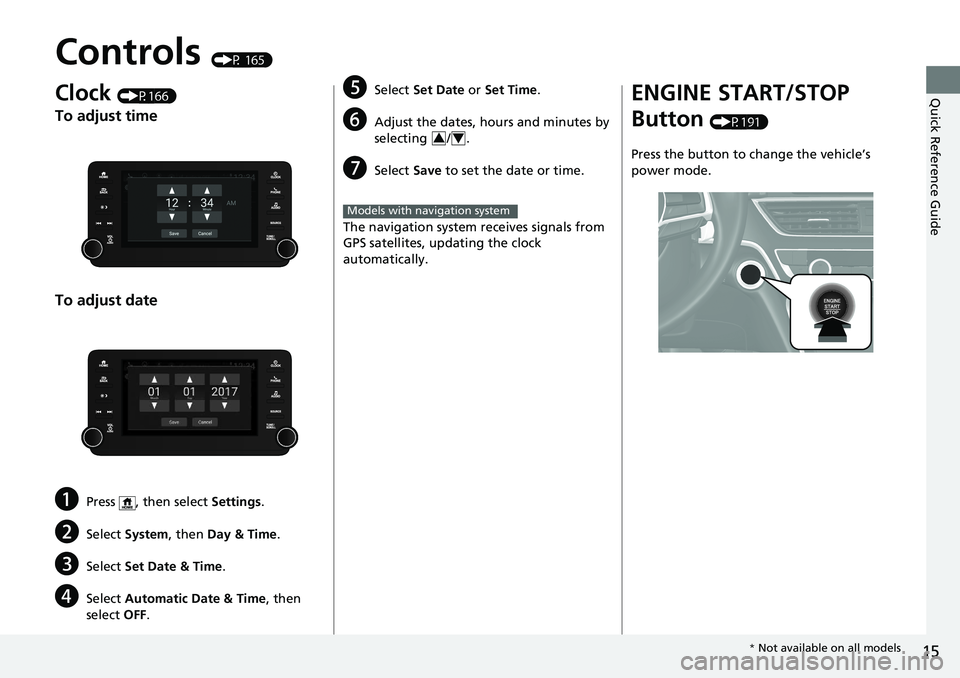
Clock (P166)
To adjust time
To adjust date
aPress , then select Settings.
bSelect System , then Day & Time.
cSelect Set Date & Time .
dSelect Automatic Date & Time , then
select OFF.
eSelect Set Date or Set Time .
fAdjust the dates, hours and minutes by
selecting / .
gSelect Save to set the date or time.
The navigation system receives signals from
GPS satellites, updating the clock
automatically.
34
Models with navigation system
ENGINE START/STOP
Button
(P191)
Press the button to change the vehicle’s
power mode.
* Not available on all models
Page 18 of 659
16
Quick Reference Guide
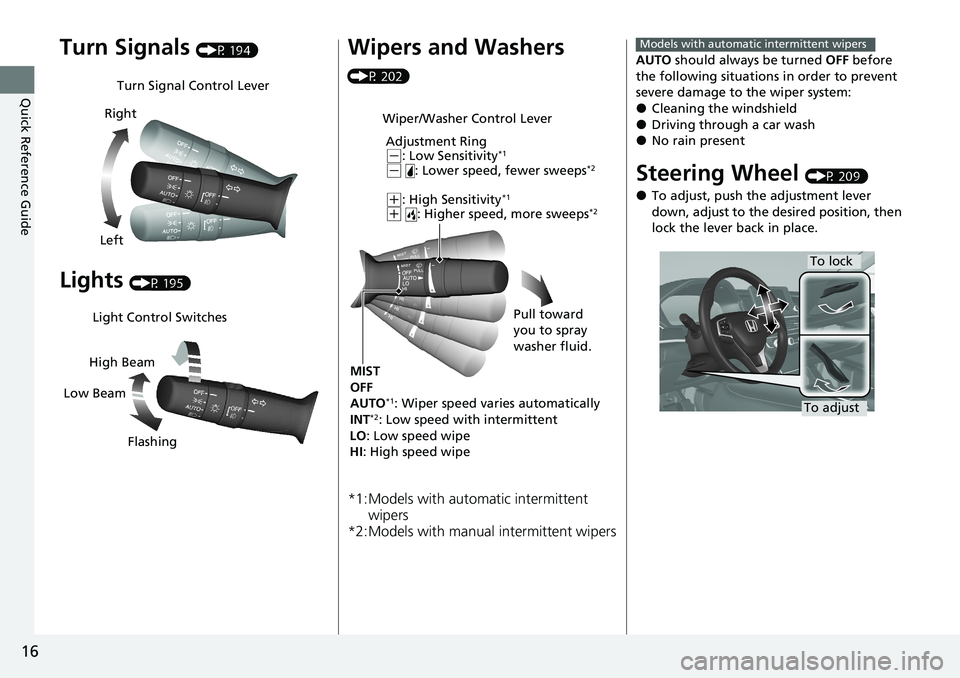
Turn Signals (P 194)
Lights (P 195)
Turn Signal Control Lever
Right
Left
Light Control Switches
Low Beam High Beam
Flashing
Wipers and Washers
(P 202)
*1:Models with automatic intermittent wipers
*2:Models with manual intermittent wipers
Wiper/Washer Control Lever
Adjustment Ring
(-: Low Sensitivity*1
(- : Lower speed, fewer sweeps*2
(+: High Sensitivity*1
(+ : Higher speed, more sweeps*2
MIST
OFF
AUTO
*1: Wiper speed varies automatically
INT*2: Low speed with intermittent
LO : Low speed wipe
HI : High speed wipe Pull toward
you to spray
washer fluid.
AUTO
should always be turned OFF before
the following situations in order to prevent
severe damage to the wiper system:
●Cleaning the windshield●Driving through a car wash●No rain present
Steering Wheel (P 209)
●To adjust, push the adjustment lever
down, adjust to the desired position, then
lock the lever back in place.
Models with automatic intermittent wipers
To lock
To adjust
Page 19 of 659
17
Quick Reference Guide
Unlocking the Front Doors
from the Inside
(P 178)
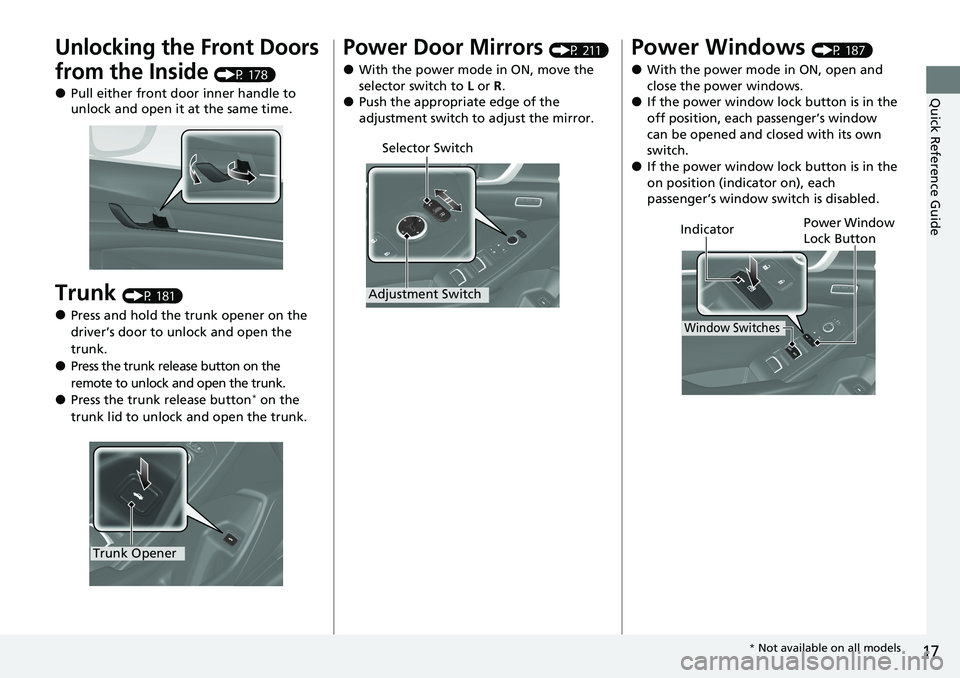
●Pull either front door inner handle to
unlock and open it at the same time.
Trunk (P 181)
●Press and hold the trunk opener on the
driver’s door to unlock and open the
trunk.
●Press the trunk release button on the
remote to unlock and open the trunk.
●Press the trunk release button* on the
trunk lid to unlock and open the trunk.
Trunk Opener
Power Door Mirrors (P 211)
●With the power mode in ON, move the
selector switch to L or R .
●Push the appropriate edge of the
adjustment switch to adjust the mirror.
Selector Switch
Adjustment Switch
Power Windows (P 187)
●With the power mode in ON, open and
close the power windows.
●If the power window lock button is in the
off position, each passenger’s window
can be opened and closed with its own
switch.
●If the power window lock button is in the
on position (indicator on), each
passenger’s window switch is disabled.
Power Window
Lock Button
Window Switches
Indicator
* Not available on all models
Page 22 of 659
20
Quick Reference Guide
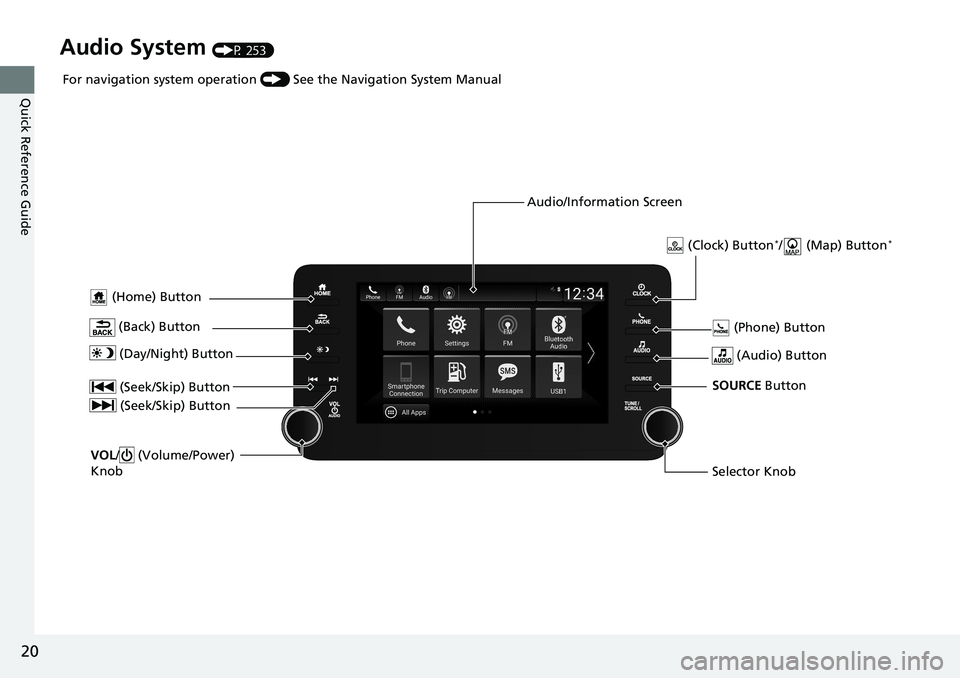
Audio System (P 253)
(Home) Button
(Audio) Button
(Back) Button
Audio/Information Screen
For navigation system operation
() See the Navigation System Manual
(Phone) Button
(Day/Night) Button
(Seek/Skip) Button
(Seek/Skip) Button
VOL/ (Volume/Power)
Knob
Selector Knob SOURCE Button
(Clock) Button*/ (Map) Button*
Page 24 of 659
22
Quick Reference Guide
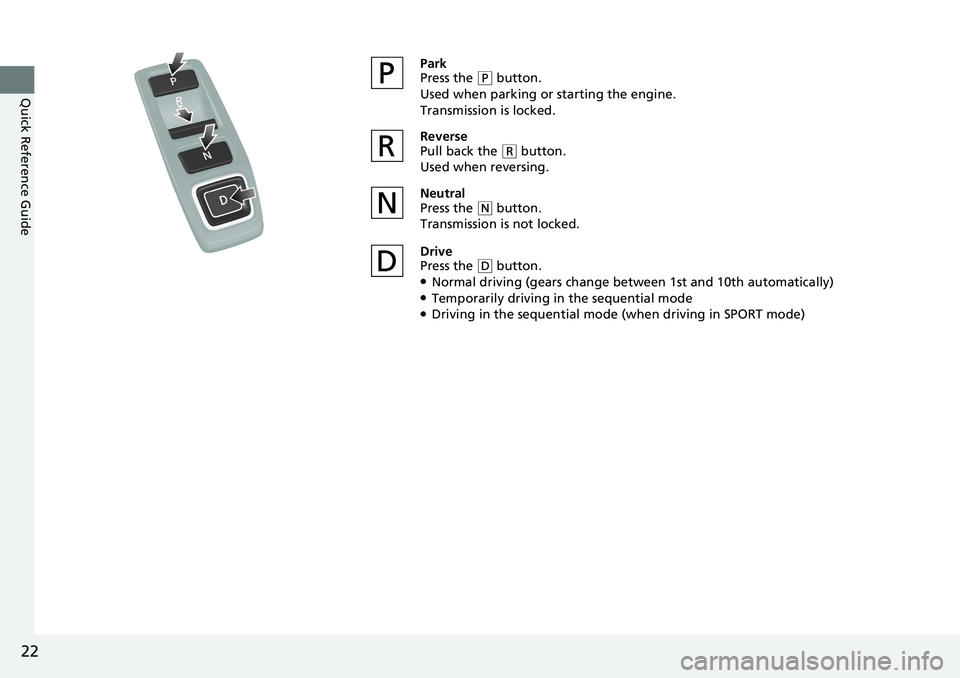
Park
Press the (P button.
Used when parking or starting the engine.
Transmission is locked.
Reverse
Pull back the
( R button.
Used when reversing.
Neutral
Press the
( N button.
Transmission is not locked.
Drive
Press the
( D button.●Normal driving (gears change between 1st and 10th automatically)●Temporarily driving in the sequential mode●Driving in the sequential mode (when driving in SPORT mode)
Page 26 of 659
24
Quick Reference Guide
M Indicator
Shift Position Indicator
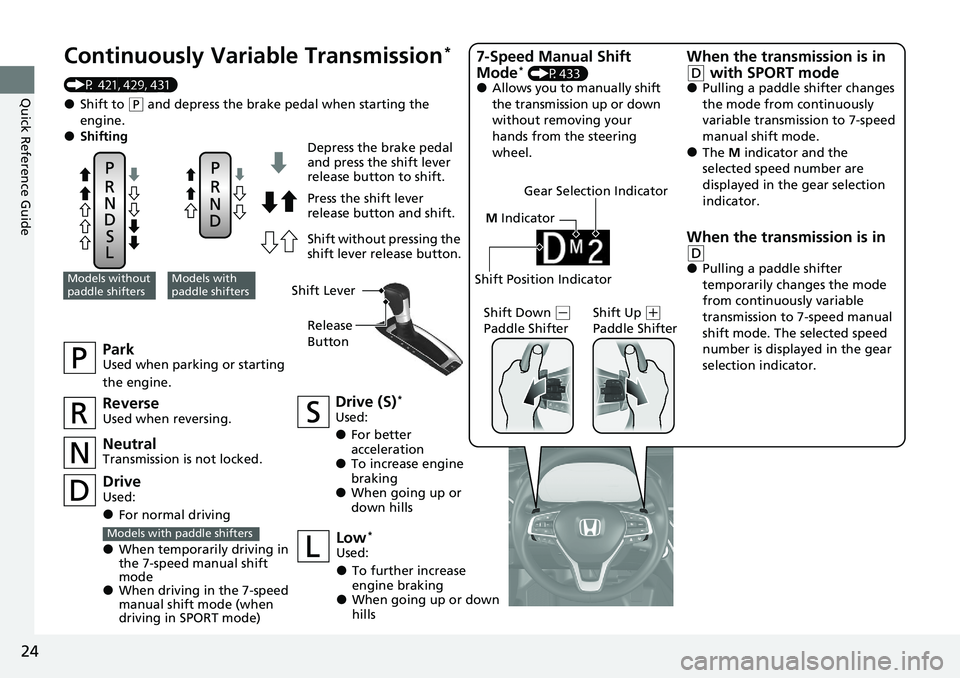
Continuously Vari able Transmission*
(P 421, 429, 431)
●Shift to (P and depress the brake pedal when starting the
engine.
●Shifting
ParkUsed when parking or starting
the engine.
NeutralTransmission is not locked.
Drive (S)*
Used:
●For better
acceleration
●To increase engine
braking
●When going up or
down hills
Models without
paddle shiftersModels with
paddle shifters
Depress the brake pedal
and press the shift lever
release button to shift.
Press the shift lever
release button and shift.
Shift without pressing the
shift lever release button.
ReverseUsed when reversing.
DriveUsed:
●For normal driving
●When temporarily driving in
the 7-speed manual shift
mode
●When driving in the 7-speed
manual shift mode (when
driving in SPORT mode)
Models with paddle shiftersLow*
Used:
●To further increase
engine braking
●When going up or down
hills Shift Down
(
-
Paddle Shifter Shift Up (
+
Paddle Shifter
7-Speed Manual Shift
Mode* (P433)●Allows you to manually shift
the transmission up or down
without removing your
hands from the steering
wheel.
When the transmission is in
(D with SPORT mode●Pulling a paddle shifter changes
the mode from continuously
variable transmission to 7-speed
manual shift mode.
●The M indicator and the
selected speed number are
displayed in the gear selection
indicator.
When the transmission is in
(D●Pulling a paddle shifter
temporarily changes the mode
from continuously variable
transmission to 7-speed manual
shift mode. The selected speed
number is displayed in the gear
selection indicator.
Shift Lever
Release
Button
Gear Selection Indicator