wheel HONDA CIVIC 2003 7.G Workshop Manual
[x] Cancel search | Manufacturer: HONDA, Model Year: 2003, Model line: CIVIC, Model: HONDA CIVIC 2003 7.GPages: 1139, PDF Size: 28.19 MB
Page 639 of 1139

1. Disconnect the ABS control unit 31P connector.
2. Sta rt the engine.
3. Measure the voltage between")
\
DTC Troubleshooting
DTC 11, 13, 15, 17: Wheel Sensor
(Open/Short to Body Ground/Short to Power)
1. Disconnect the ABS control unit 31P connector.
2. Sta rt the engine.
3. Measure the voltage between the appropriate
wheel sensor (*)circuitterminal of theABS
control unit 31P connector and body ground (see
table).
DTCADpropriate Terminal
11 (Rioht-front)No.5: FRS (t)
13 (Left-front)No, 7: FLS (*)
15 {Riqht-rear}No. 2: RRS (*)
17 (Left-rear)No.9 RtS (f )
ABS CONTROL UNIT 31P CONNECTOR
FRS {+IIGNR/BLK} FLS I+I (BLU
RRS {+)(GNR/YEL)
Wire side of female terminals
ls thete battery voltage?
YES Repair short to power in the (+) circuit wire
between the ABS modulator-control unit and the
appropriate wheel sensor. I
NO Go to step 4.
4. Turn the ignition switch OFF.
5. Check for continuity between the appropriate
wheel sensor (+ ) circuit terminal and body ground
{see table).
DTCAppropriate Terminal
11 (Riqht-front)No. 5: FRS (+)
13 (Left-front)No. 7: FLS (*)
15 (Rioht-rear)No.2: RRS (*)
17 (Left-rear)No.9 RLS (+l
ABS CONTROL UNIT 31P CONNECTOR
Wire side
ls there continuity?
YES Go to step 6.
NO-Go to step 7.
Disconnect the harness 2P connector from the
appropriate wheel sensor, then check for continuity
between the 1+)and ( )terminals ofthe harness
and body ground.
ls there continuity?
YES-Repair shortto body ground in the (+)or { )
circuit wire between the ABS modulator-control
unit and the wheel sensor.l
NO Repiace the wheel sensor.l
(cont'd)
Wire side of female terminals
19-45
Page 640 of 1139
ABS Components
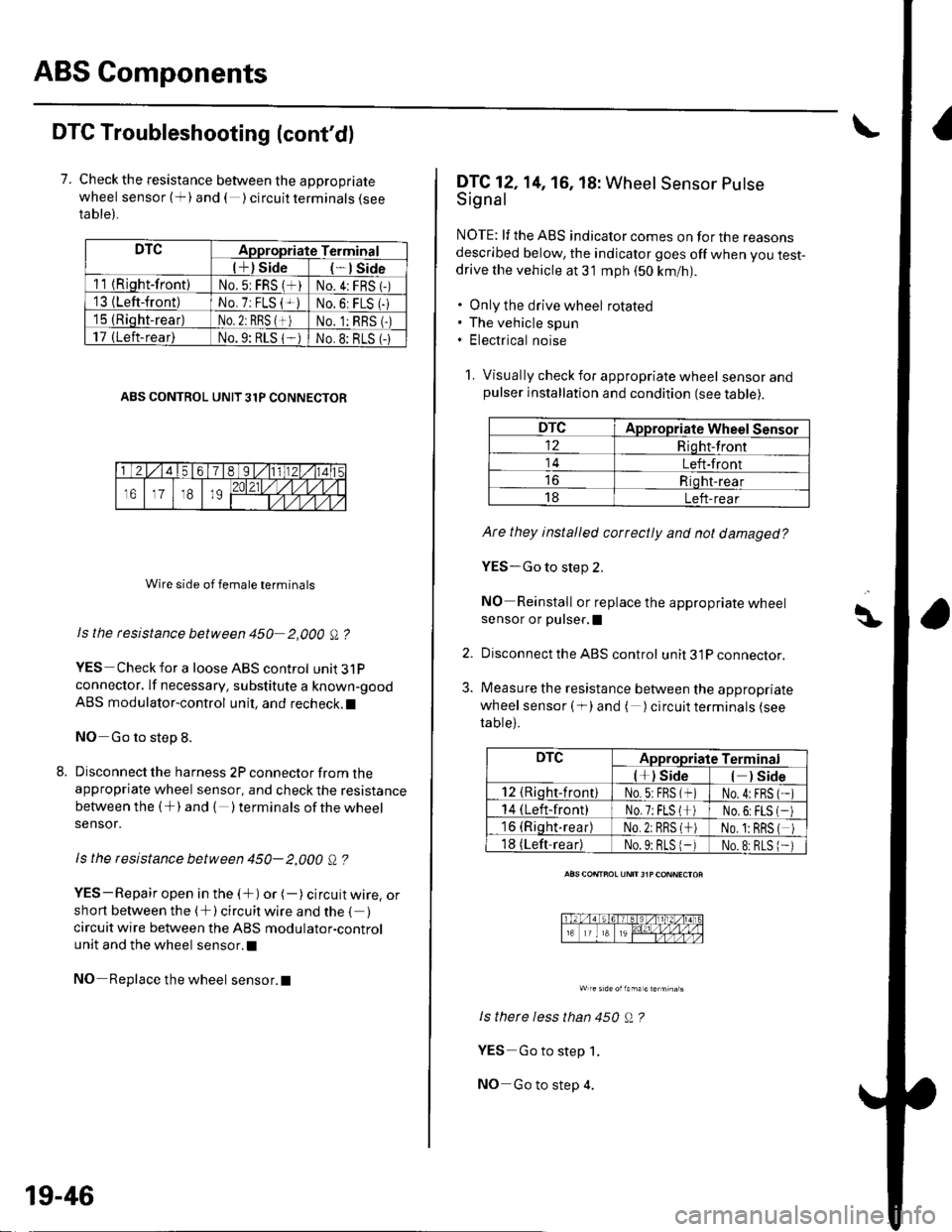
DTC Troubleshooting (cont'dl
7. Check the resistance between the appropriate
wheel sensor (+) and ( ) circuit terminals {seeta ble).
DTCAppropriate Terminal
l+) Side*lSide
11 {Riqht-front)No.5: FRS (*)No.4:FRS 1-)'13 {Left-front)No. 7: FLS {+iNo.6: FLS (-
15 (Rioht-rear)No. 2: RBS {+)No. 1:RBS (-)
17 (Left-rear)No.9: RLS 1-No.8: BLS (-
ABS CONTROL UNIT 31P CONNECTOR
Wire side of female terminals
Is the rcsistance between 450 2,000 A ?
YES Check for a loose ABS control unit3lP
connector. lf necessary. substitute a known-good
ABS modulator-control unit, and recheck.l
NO Go to step 8.
Disconnect the harness 2P connector from theappropriate wheel sensor, and check the resistance
between the (+) and { )terminalsof thewheel
sensor.
ls the resistance between 450- 2,000 Q ?
YES-Repair open in the (+) or (-) circuit wire, orshort between the (+) circuit wire and the { )circuit wire between the ABS modulator-control
unit and the wheel sensor.l
NO Replace the wheel sensor.l
19-46
DTC12,14, 16, 18: Wheel Sensor Putse
Signal
NOTE: lf the ABS indicator comes on for the reasonsdescribed below, the indicator goes off when you test-drive the vehicle at 31 mph (50 km/nl.
. Only the drive wheel rotated. The vehicle spun. Electrical noise
1. Visually check for appropriate wheel sensorandpulser installation and condition (see table).
DTCAppropriate Wheel Sensor
12Riqht-front
14Left-front
Riqht-rear
18Left-rear
Ate they installed correctly and not damaged?
YES-Go to step 2,
NO Reinstall or replace the appropriate wheelsensor or pulser,I
Disconnect the ABS control unit 31P connector.
Measure the resistance between the appropriate
wheel sensor ( f) and ( ) circuit terminals (see
table).
ls therc less than 450 Q ?
YES Go to step 1.
NO-Go to step 4.
\\|D
2.
3.
DTCAppropriate Terminal
l*) Side) Side
12 {Rioht-front)No.5:FBS (*No.4:FBS
14 (Left-front)No.7;FLS l*No,6:FLS
16 (Riqht.rear)No.2: RRS (*No. 1:BRS
18 (Left-readNo.9: BLS 1-No.8:RLS
Page 641 of 1139
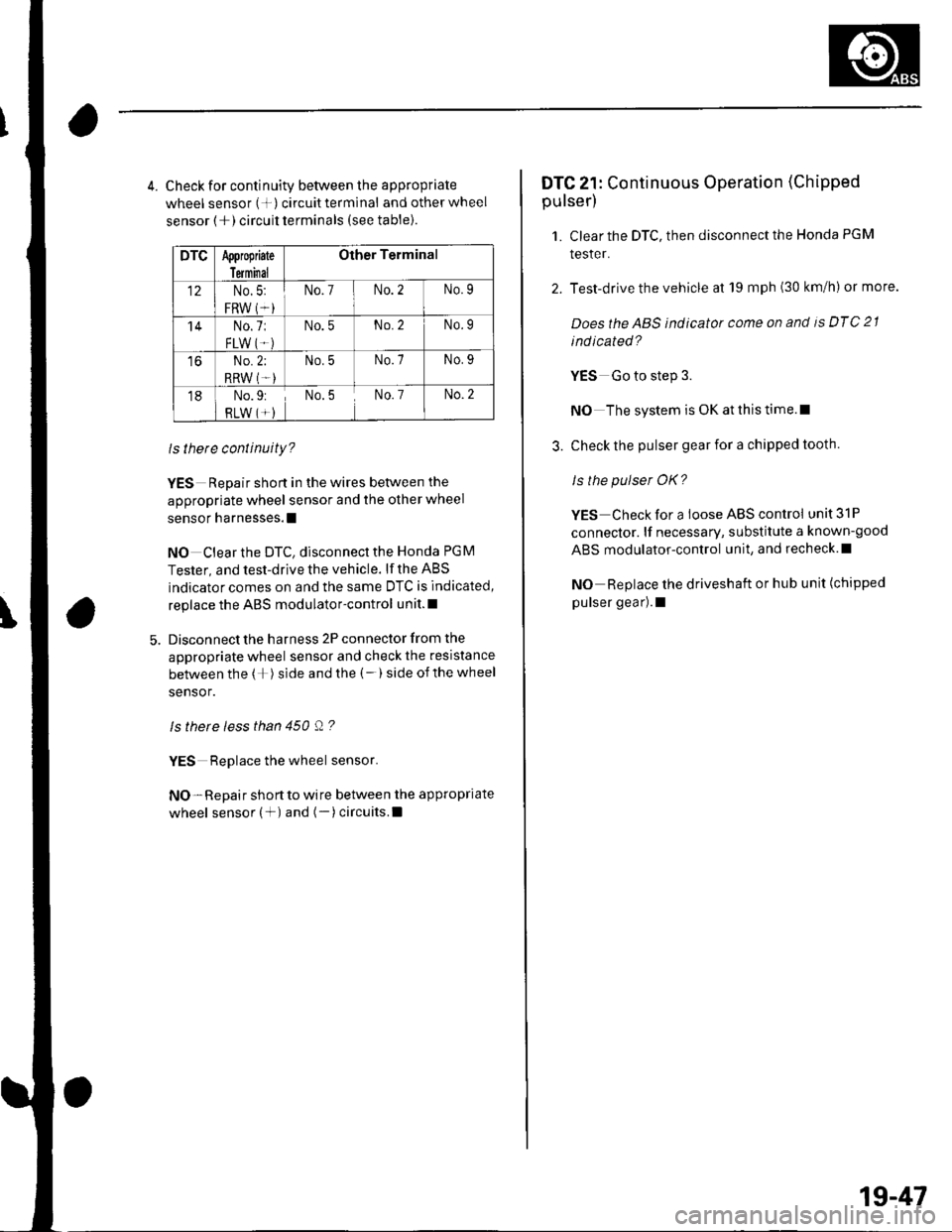
4. Check for continuity between the appropriate
wheel sensor (+) circuittermlnal and otherwheel
sensor (+) circuit terminals (see table).
DTCAppropiate
Terminal
Other Terminal
12No.5:
FRW (*i
No.7No.2No.9
'14No.7:
FLW IT.)
No.5No.2No.9
toNo.2;
RRW (T-)
No.5No.7No.9
18No.9:
RLW (*)No.5No. 7No.2
ls there continuity?
YES Repair short in the wires between the
appropriate wheel sensor and the other wheel
sensor harnesses.l
NO Clear the DTC, disconnect the Honda PGM
Tester, and test-drive the vehicle. lf the ABS
indicator comes on and the same DTC is indicated,
replace the ABS modulator-control unit.l
Disconnect the harness 2P connector from the
appropriate wheel sensor and check the resistance
between the (+) side and the (-) side ofthe wheel
sensor.
ls there less than 450 Q ?
YES Replace the wheel sensor.
NO- Repair short to wire between the appropriate
wheel sensor (+) and (-)circuits.l
DTC 21: Continuous Operation (Chipped
pulser)
1. Clear the DTC, then disconnect the Honda PGM
tesler.
2. Test-drive the vehicle at 19 mph (30 km/h) or more.
Doesthe ABS indicator come on and is DTC 21
ind icated?
YES Go to step 3.
NO The system is OK at this time.l
3. Check the pulser gear for a chipped tooth.
ls the pulser OK?
YES Check for a loose ABS control unit 31P
connector. lf necessary, substitute a known-good
ABS modulator-control unit, and recheck.l
NO Replace the driveshaft or hub unit (chipped
pulser gear).1
1g-47
Page 652 of 1139
ABS Gomponents
ABS Modulator-Control Unit Removal and Installation {cont'dl
3. Disconnectthe six brake lines.
4. Remove the two I mm nuts.
5. Remove the ABS modulator-control unit (C).
Installation
'1. InstalltheABS modulatorcontrol unit, then tighten the two 8 mm nuts.
2. Align the connecting surface ofthe ABS control unit 3'lP connector.
3. PushinthelockoftheABScontrol unit 31P connector until you hear it click into place. then connect the connector.
4. Connect the six brake Iines.
5. Bleed the brake system, starting with the front wheels.
6. Connect the PGM Tester, and do the solenoid function test for each wheel.
7. Bleed the brake system again, staning with the front wheels.
8. Start the engine, and check that the ABS indicator and brake system indicator go off.
9. Disconnect the Honda PGM Tester. Test-drive the vehicle, and check that the ABS indicator and brake qvqtem
indicator do not come on.
19-58
Page 653 of 1139
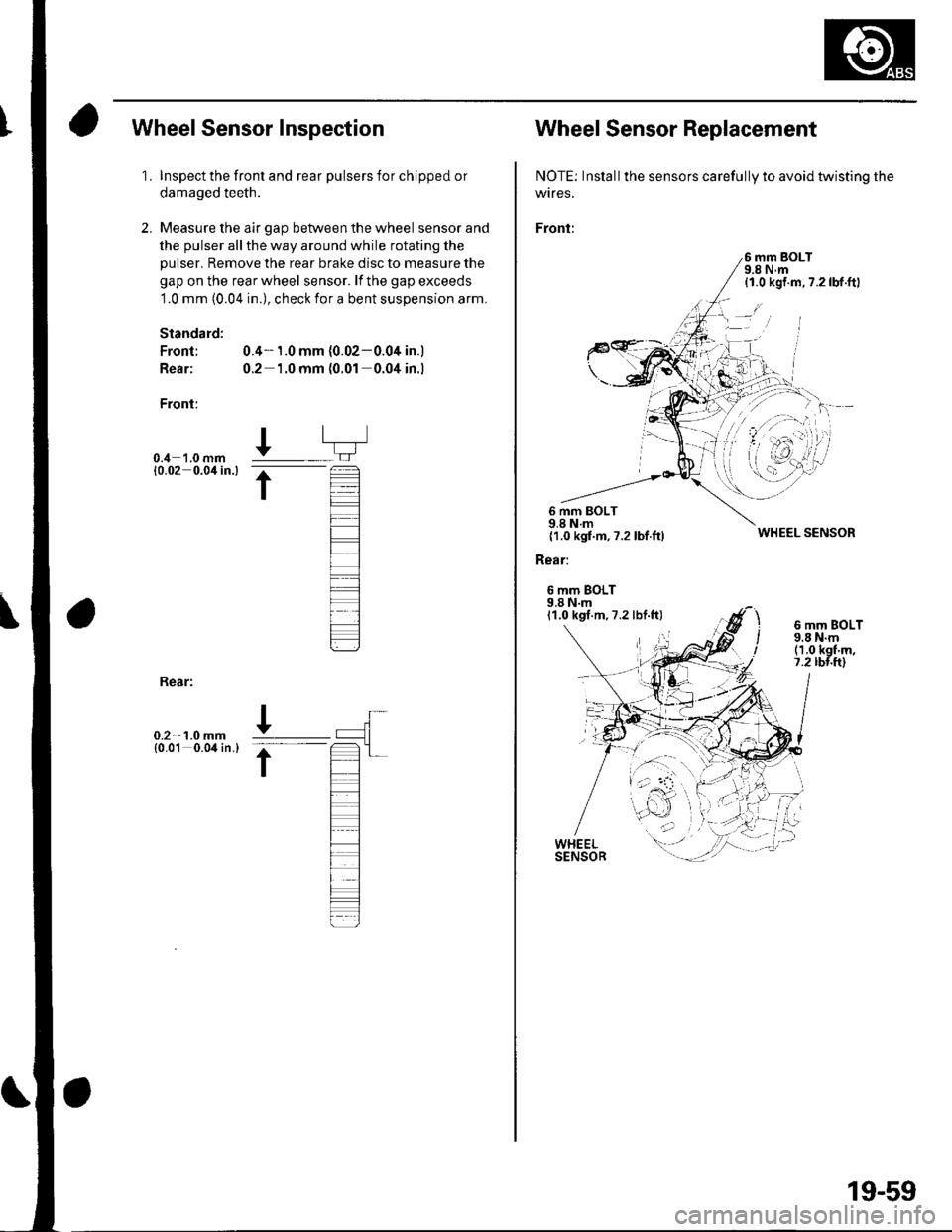
Wheel Sensor Inspection
1.
2.
Inspect the front and rear pulsers for chipped or
damaged teeth.
Measure the air gap between the wheel sensor and
the pulser all the way around while rotating the
pulser. Remove the rear brake disc to measure the
gap on the rear wheel sensor. lf the gap exceeds
1.0 mm (0.04 in.), check for a bent suspension arm.
Standard:
Front; 0.4- 1.0 mm (0.02-0.04 in.)
Rear: 0.2 1.0 mm (0.01 0.04 in.l
Front:
0.4 '1.0 mm10.02 0.0'l in.l
I
t
Bear:
0.2 1.0 mm{0.01 0.04 in.}
Wheel Sensor Replacement
NOTE: Inslall the sensors carefully to avoid twisting the
wtres.
Front:
6 mm BOLT9.8 N.m{1.0 kgf.m,7.2lbf.ftl
6 mm BOLT9.8 N.m{1.0 kgf.m,7.2 lbf.ftl
Rear:
6 mm BOLT9.8 N.m11.0 kgf.m,7.2 lbf.ft)
WHEEL SENSOR
6 mm BOLT9.8 N.m(1.0 kgf'm,7.2 rbr.ft)
19-59
Page 754 of 1139
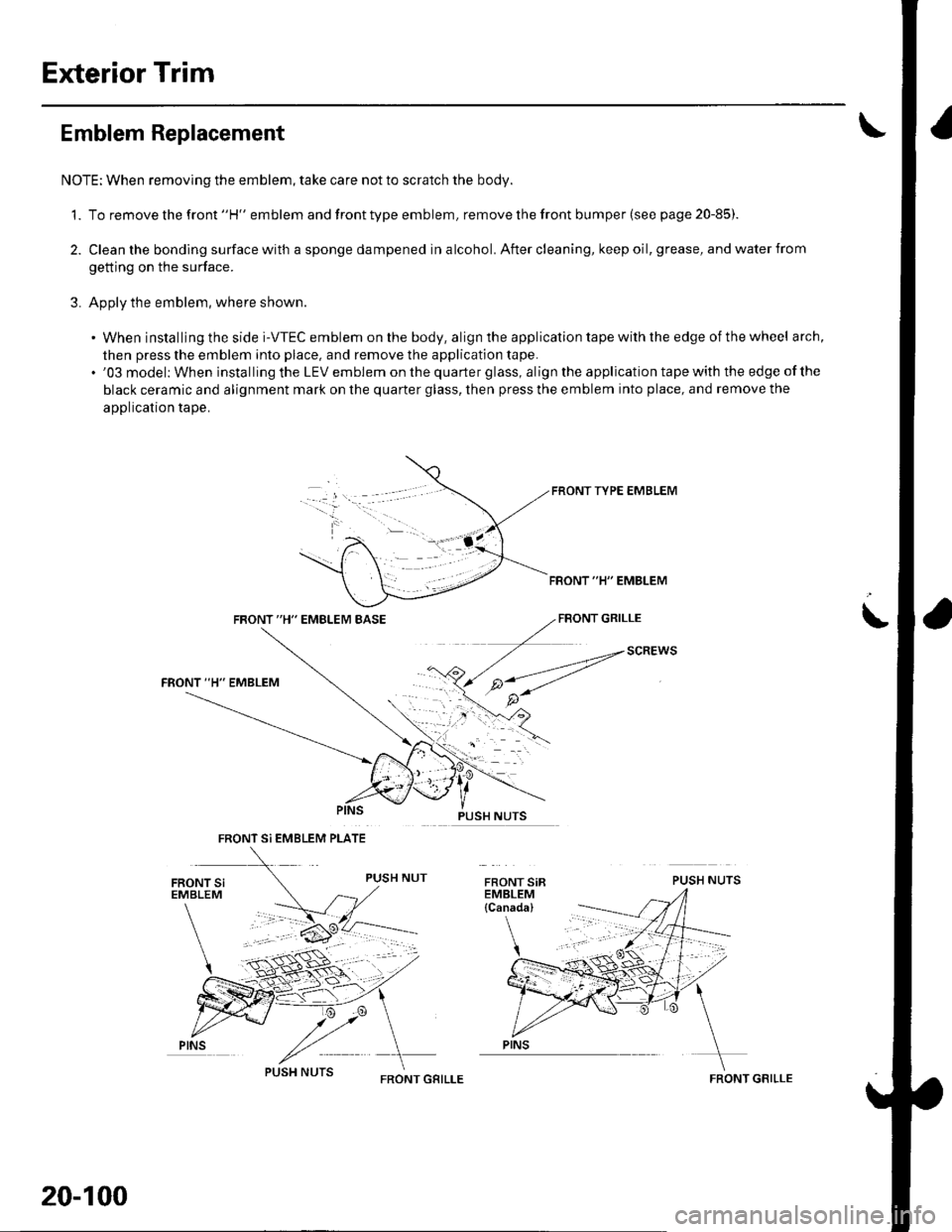
Exterior Trim
Emblem Replacement
NOTE: When removing the emblem, take care not to scratch the body.
1. To remove the front "H" emblem and front type emblem, remove the front bumper (see page 20-85)
2. Clean the bonding surface with a sponge dampened in alcohol. After cleaning, keep oil, grease, and water from
getting on the surface.
3. Apply the emblem, where shown.
. When installing the side i-VTEC emblem on the body, align the application tape with the edge of the wheel arch,
then press the emblem into place, and remove the application tape.. '03 model: When installing the LEV emblem on the quarter glass, align the application tape with the edge of the
black ceramic and alignment mark on the quarter glass, then press the emblem into place, and remove the
application tape.
FRONT TYPE EMBLEM
FBONT "H" EMBLEM
FRONT "H" EMBLEM BASEFBONT GRILLE
PUSH NUTS
i
SCREWS
FRONT Si EMBLEM PLATE
PINS
20-100
FRONT GRILLEFRONT GRILLE
Page 755 of 1139
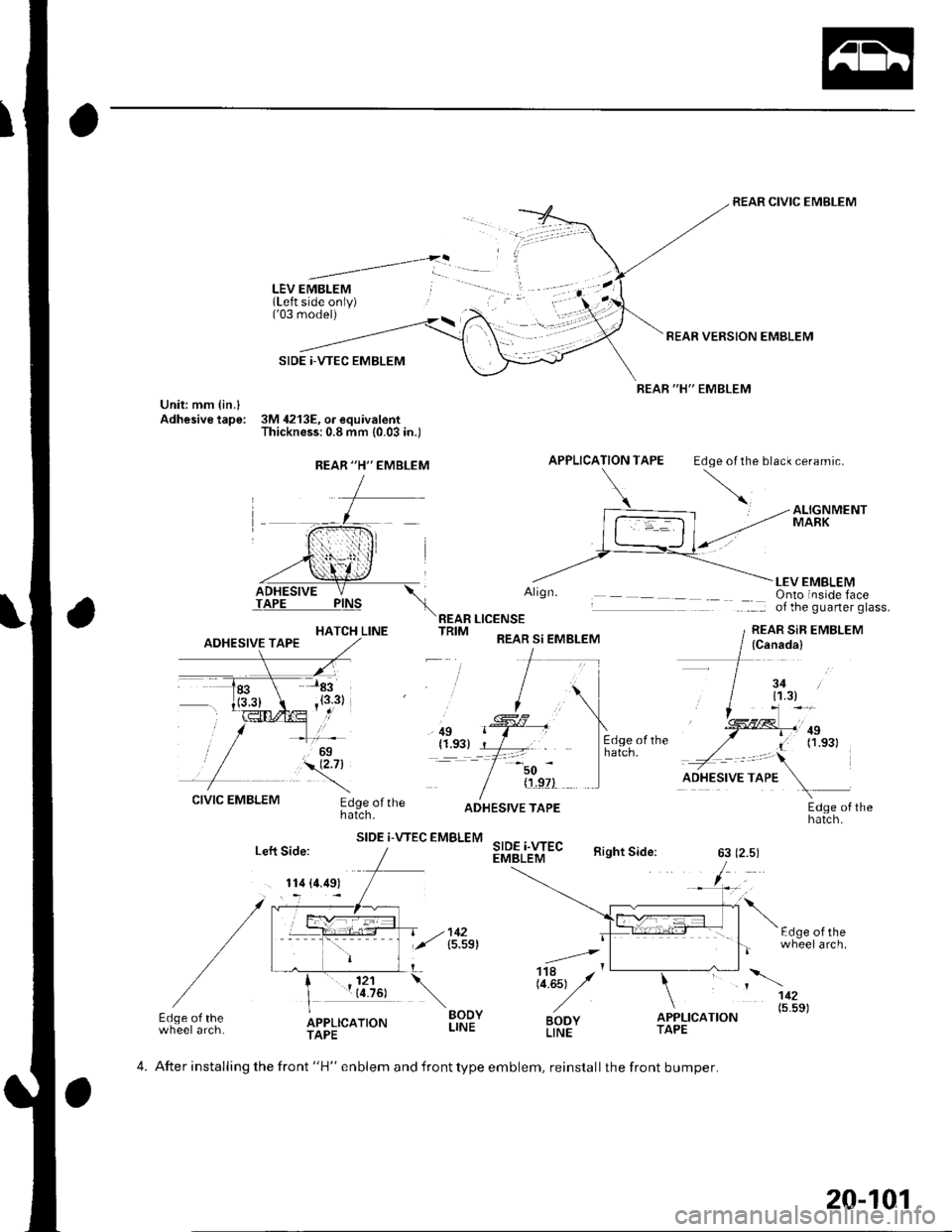
LEV EMBLEM(Left side only)('03 model)
SIDE |-VTEC EMBLEM
Unit: mm {in.lAdhesive tape: 3M 4213E, o. equivalentThickness:0.8 mm (0.03 in.)
REAR CIVIC EMBLEM
REAR VERSION EMBLEM
REAR "H" EMBLEM
APPLICATION TAPE Edoe ol the black ceramic.
HATCH LINE
Align.
REAR LICENSETRIM REAR si EMBLEM
LEV EMBLEMOnto inside faceof the guarter glass.
REAR SiR EMBLEM
, ilg(1.93)=-t
50
CIVIC EMBLEMEdge ofthehatch.
SIDE i-VTEC EMBLEM
{'!,9?)
SIDE i.WECEMBLEM
ADHESIVE TAPEEdge of thehatch.
Right Side:63 (2.5)
F.l^6 ^l rh-
.=4,
Li.Est y'
BODYLINE
wheelarch.
112
BODYLINEo"f,r,ao.o" (5'5s)Edge of thewheel arch.APPLICATIONTAPETAPE
REAR "H'' EMBLEM
(Canada)
3411.3)
.,!!ll,'ntI (1.s31
Left Side:
. 114 (4.49)
4. After installing the front "H" enblem and front type emblem, reinstall the front bumper.
20-101
Page 756 of 1139
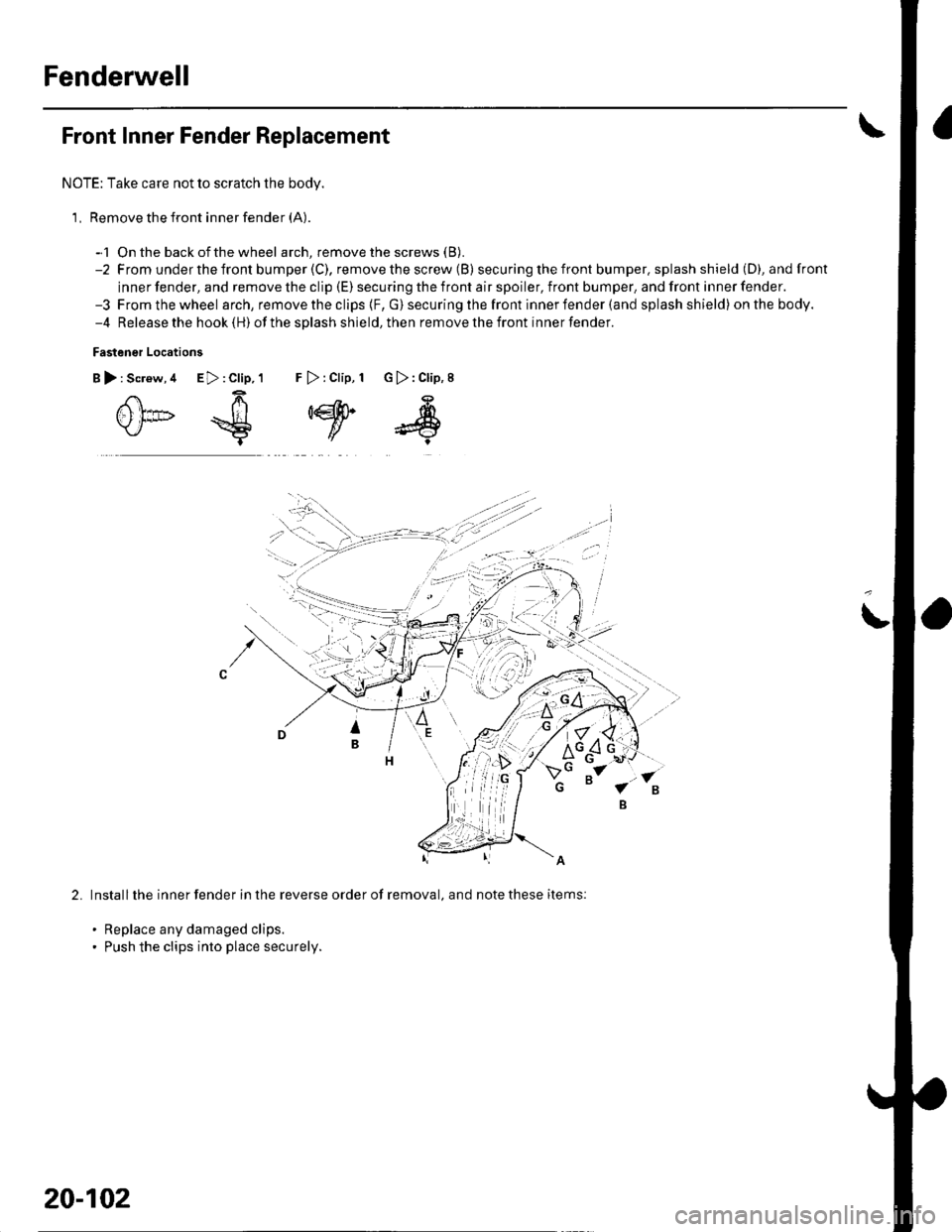
Fenderwell
Front Inner Fender Replacement
NOTE: Take care not to scratch the body.
1, Remove the front inner fender (A).
-1 On the back ofthe wheel arch, remove the screws (B).
-2 From underthefront bumper(C), removethescrew (B) secu ring the front bumper. splash shield (D), andfront
inner fender, and remove the clip (E) securing the front air spoiler, front bumper, and front inner fender.-3 Fromthewheel arch, remove the clips {F, G) securing the front inner fender (and splash shield) onthebody.-4 Release the hook (H) ofthe splash shield,then removethefront innerfender.
Fastener Locations
B):Screw,4 E>:Clip,1 F >:Clip, 1 G):Clip,8
0*€
,w
s
2.Install the inner fender in the reverse order of removal, and note these items:
. Replace any damaged clips.. Push the clips into place securely.
20-102
Page 757 of 1139
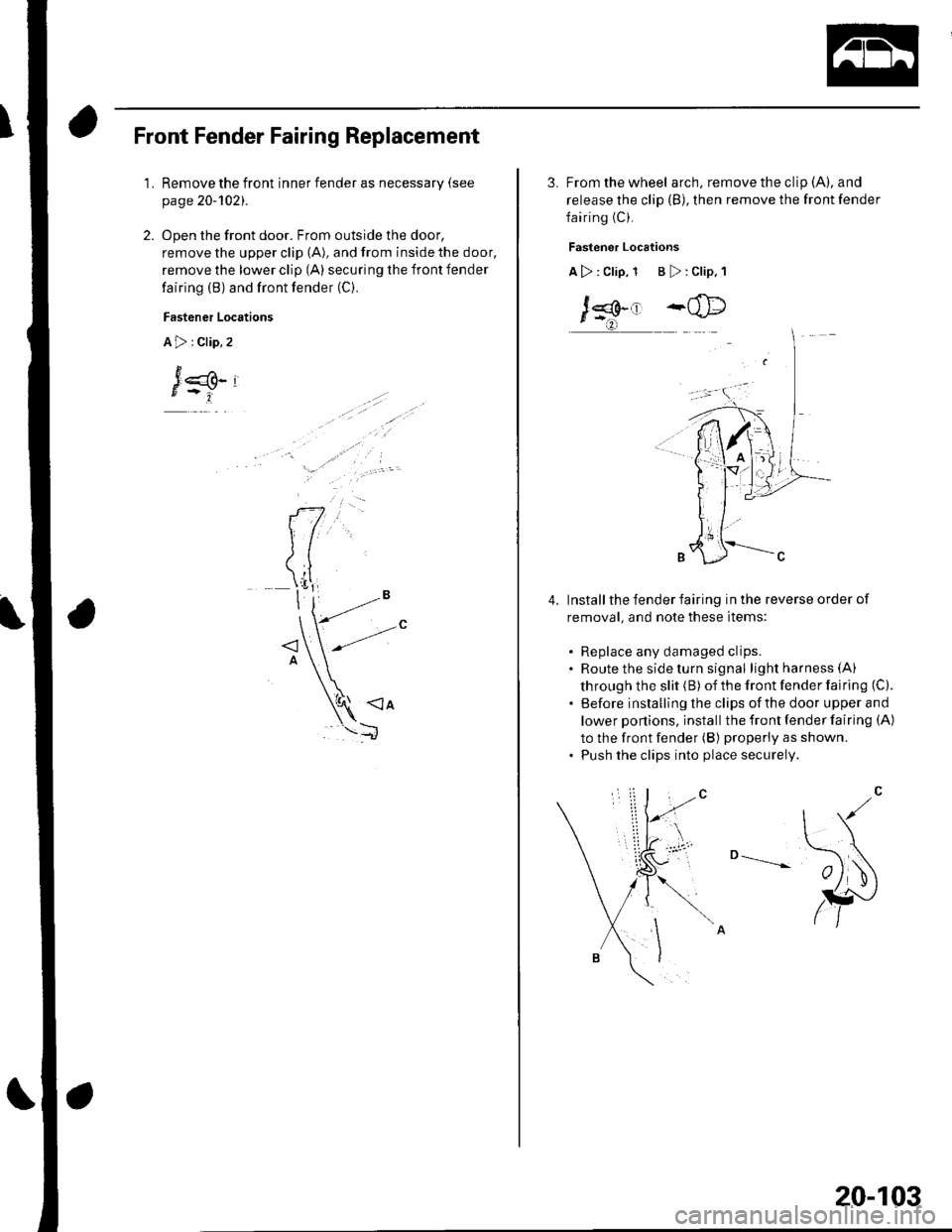
Front Fender Fairing Replacement
1.Remove the front inner fender as necessary (see
page 20-1O21.
Open the front door. From outside the door,
remove the upper clip (A), and from inside the door,
remove the lower clip (A) securing the front fender
fairing (B) and front fender (C).
Fastener Locations
A>:Clip,2
J
3. From the wheel arch, remove the clip (A), and
release the clip (B), then remove the front fender
fairing (C).
Fastener Locations
A>: Clip, 1 B >: Clip, 1
J*.' -@
Install the fender fairing in the reverse order of
removal, and note these items:
. Replace any damaged clips.. Route the side turn signal lightharness(A)
through the slit (B) of the front fender fairing (C).
. Before installing the clips ofthe door upper and
lower ponions, install the front fender fairing (A)
to the front fender (B) properly as shown.. Push the clips into place securely.
o --____--
4.
20-103
Page 849 of 1139

\
Connsctor or TerminalCavitissLocationConnects toNotesABS modulator-control unitBearwasher")
Connectors and Harnesses
Connector to Harness Index {cont'dl
Engine Compartment Wire Harness (Right branch)
\
Connsctor or TerminalCavitissLocationConnects toNotesABS modulator-control unitBearwasher motorRight front ABS wheel sensorRight front airbag s€nsorBightfront parking lightRight front side marker lightRight front turn signal lightRight headlightRight hornwash€rfluid level switchWindshield washer motor
812
110112
7
222222
I22
Bight side o{ engine compartmentBehind right side of {ront bumperRight side ot engine compartmentBehind right side of front bumperBehind right headlightBehind rightside of Jront bumperBehind right headlightBehind right headlightBehind front bumperBehind rightside of tront bumperBehind rioht side of front bumoerCanada
G202
G2016Behind rightside of tront bumper
Behind rightside of Jront bumper
Body ground via €nginecompartment wtre harnessBody ground via engine.omnerhent wire harness
22-18