Oil HONDA CIVIC 2003 7.G Workshop Manual
[x] Cancel search | Manufacturer: HONDA, Model Year: 2003, Model line: CIVIC, Model: HONDA CIVIC 2003 7.GPages: 1139, PDF Size: 28.19 MB
Page 754 of 1139
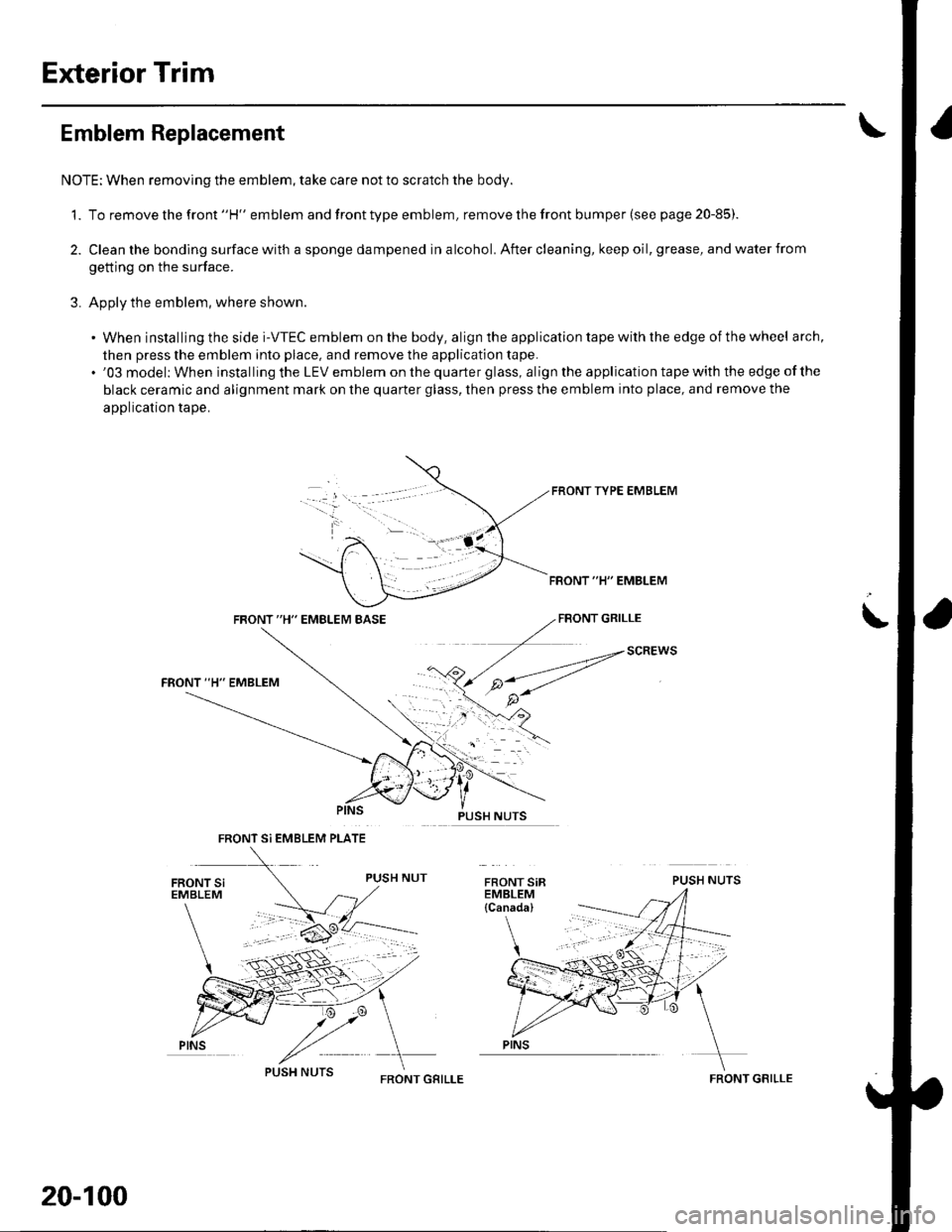
Exterior Trim
Emblem Replacement
NOTE: When removing the emblem, take care not to scratch the body.
1. To remove the front "H" emblem and front type emblem, remove the front bumper (see page 20-85)
2. Clean the bonding surface with a sponge dampened in alcohol. After cleaning, keep oil, grease, and water from
getting on the surface.
3. Apply the emblem, where shown.
. When installing the side i-VTEC emblem on the body, align the application tape with the edge of the wheel arch,
then press the emblem into place, and remove the application tape.. '03 model: When installing the LEV emblem on the quarter glass, align the application tape with the edge of the
black ceramic and alignment mark on the quarter glass, then press the emblem into place, and remove the
application tape.
FRONT TYPE EMBLEM
FBONT "H" EMBLEM
FRONT "H" EMBLEM BASEFBONT GRILLE
PUSH NUTS
i
SCREWS
FRONT Si EMBLEM PLATE
PINS
20-100
FRONT GRILLEFRONT GRILLE
Page 756 of 1139
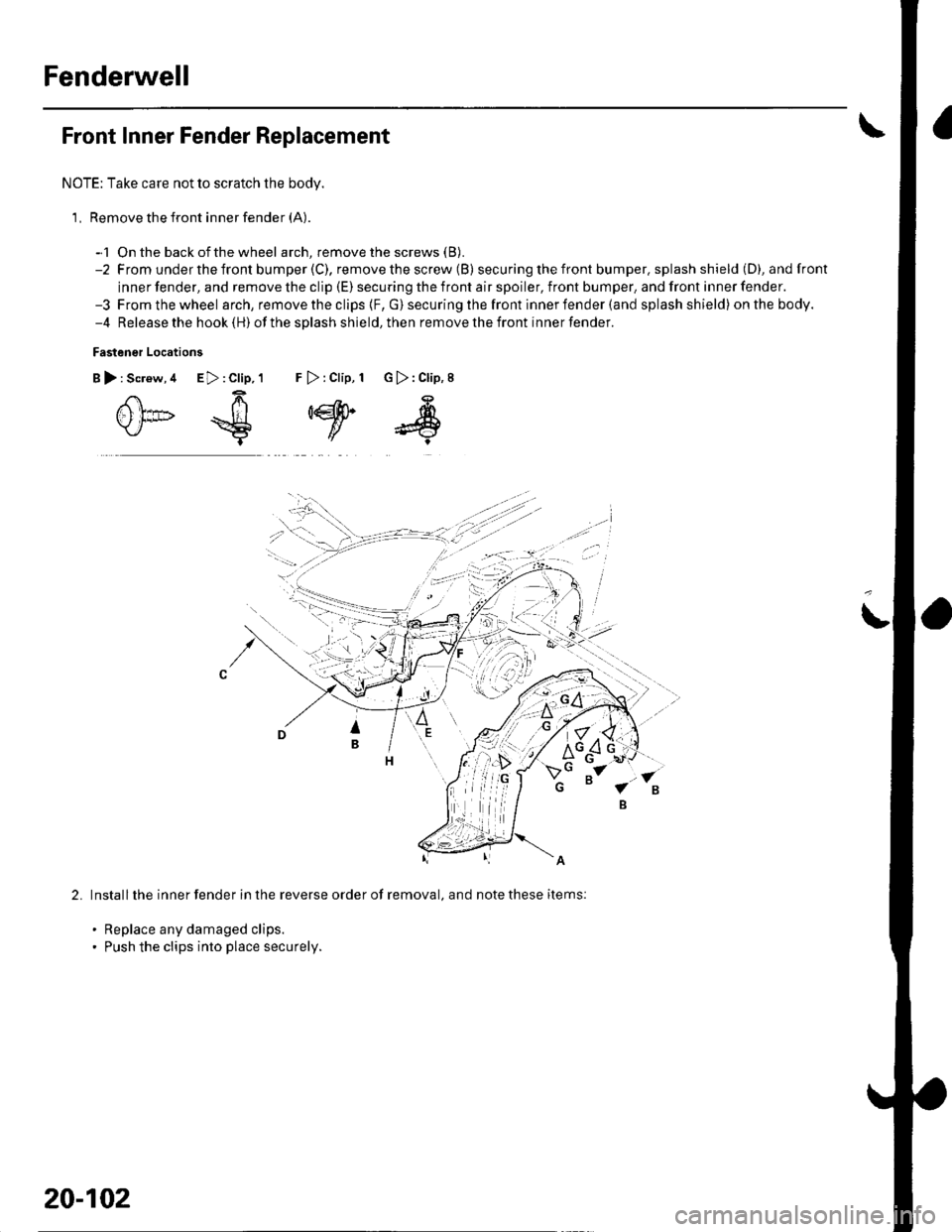
Fenderwell
Front Inner Fender Replacement
NOTE: Take care not to scratch the body.
1, Remove the front inner fender (A).
-1 On the back ofthe wheel arch, remove the screws (B).
-2 From underthefront bumper(C), removethescrew (B) secu ring the front bumper. splash shield (D), andfront
inner fender, and remove the clip (E) securing the front air spoiler, front bumper, and front inner fender.-3 Fromthewheel arch, remove the clips {F, G) securing the front inner fender (and splash shield) onthebody.-4 Release the hook (H) ofthe splash shield,then removethefront innerfender.
Fastener Locations
B):Screw,4 E>:Clip,1 F >:Clip, 1 G):Clip,8
0*€
,w
s
2.Install the inner fender in the reverse order of removal, and note these items:
. Replace any damaged clips.. Push the clips into place securely.
20-102
Page 773 of 1139
21-2
z t-'5
z t-o
z t-o
21-8
21-9
21-10
21-11
21-14
z t- to
HVAC (Heating, Ventilation, and Air Gonditioningl
Heating and Air Conditioning
SpecialTools
Comoonent Location lndex ........
A/C Service Tios and
Precautions
A,/C Refrigerant Oil
ReDlacement
General Troubleshooting
lnformation
DTC Troubleshooting Index .......
Symptom Troubleshooting
1ndex..............
System Description .....................
Circuit Diagram
DTC Troubleshooting ..................
Recirculation Control Motor
CircuitTroubleshooting .......... 21-25
Heater Control Power and Ground
Circuits Troubleshooting ........ 21-27
Condenser Fan Circuit
Troubleshooting ...................... 21-28
Radiator and Condenser Fans
Common Circuit
Troubfeshooting ...................... 21-29
Compressor Clutch Circuit
Troubleshooting ...................... 21-30
A,/C Pressure Switch Circuit
Troubleshooting ...................... 21-32
Air Mix Control Motor
Test and Reolacement ............. 21-34
Mode Control Motor
Test and Replacement ............. 21-35
Recirculation Control Motor
Test and Reolacement ............. 21-36
Evaporator Temperature Sensor
Reolacement and Test ............. 21-31
Power Transistor Test ................. 21 -38
Heater Control Panel and
Push Switch Assemblv
Removal and Installation ........ 21-38
Dust and Pollen Filter
Reolacement ..21-39
Blower Unit Removal and
lnstallation ...... 21-39
Blower Unit Comoonents
ReDlacement ............................ 21-41
Evaporator Core
Reolacement ..21-42*Heater Unit/Core
ReDlacement ..21-43
Heater Valve Cable
Adjustment .....21-46
CompressorReplacement .......... 21-47
Comoressor Clutch Check .......... 21-48
Comoressor Clutch Overhaul ..... 21-49
Compressor Thermal Protector
Reo1acement ............................ 21-51
Comoressor Relief Valve
Reolacement ............................ 21-51
Condenser Reolacement ............ 21-52
Refrigerant Recovery .................. 21-53
System Evacuation ...................... 21-54
System CharginS ......................... 21-55
Refrigerant LeakTest .................. 21-56
A,/C Svstem Tests ........................ 21-57
Page 778 of 1139
Heating and Air Conditioning
A/C Service Tips and Precautions
Compressed air mixed with R- 134a forms a
combustible vapor.
The vapor can burn or explode causing serious
injury.
Never use compressed air to pressure test
R-134a service equipment or vehicle air
conditioning systems.
Air conditioning refrigerant or lubricant vapor
can irritate your eyes, nose, or throat.
Be careful when connecting service equipment.
Do not breathe refrigerant or vapor.
The air conditioning system uses HFC-134a (R-134a)
ref rigerant and polyalkyleneglycol (PAG) ref rigerant oil,
which are not compatible with CFC'12 (R-12) refrigerant
and mineral oil. Do not use R-'12 refrigerant or mineral
oil in this system, and do not aftempt to use R 12
servicing equipment; damage to the air conditioning
system or your servicing equipment will result.
Use only service equipment that is U.L.-listed and is
certified to meet the requirements of SAE J2210 to
remove R-134a from the air conditioning system.
lf accidental system discharge occurs, ventilate the
work area before resuming service.
R-134a service equipment or vehicle air conditioning
systems should not be pressure tested or leak tested
with compressed air.
Additional health and safety information may be
obtained from the refrigerant and lubricant
manufacturers.
. Always disconnect the negative cable from the
battery whenever replacing air conditioning parts.
. Keep moisture and dirt out of the system. When
disconnecting any lines, plug or cap the fittings
immediately; don't remove the caps or plugs until
iust be{ore you reconnect each line.' Before connecting any hose or line, apply a few drops
of relrigerant oil to the O-ring.. When tightening or loosening a fitting, use a second
wrench to support the matching fitting.. When discharging the system, use a R-'134a
ref rigerant recovery/recycling/charging station; don't
release refrigerant into the atmosphere.
21-6
A: 130 m0 {4 l/3 tl.oz,4.6 lmp.oz)
],^
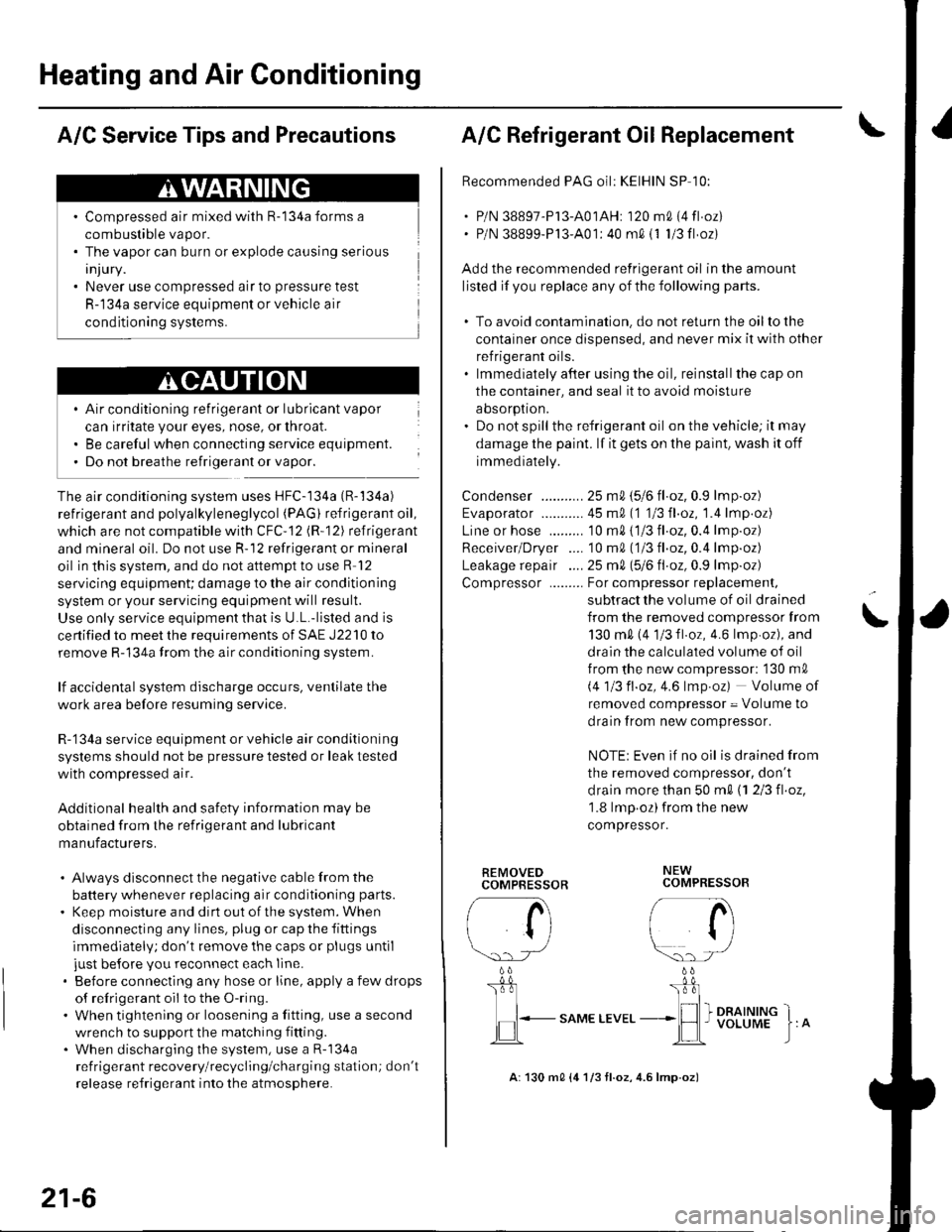
A/C Refrigerant Oll Replacement
Recommended PAG oil: KEIHIN SP 10:
. P/N 38897-P l3-A01AH: '120 m0 i4 fl oz). P/N 38899-P13'A01: 40 m0 i1 1/3 fl oz)
Add the recommended refrigerant oil in the amount
listed if you replace any of the following parts.
. To avoid contamination. do not return the oilto the
container once dispensed, and never mix it with other
refrigerant oils.. lmmediately af'ter using the oil, reinstallthe cap on
the container, and seal it to avoid moisture
aosorpron.. Donotspill the refrigerant oil on the vehicle; it may
damage the paint. lf it gets on the paint, wash it off
immediately.
Condenser ...........25 mA \516 tl.oz, 0.9 lmp.oz)
Evaporator ........... 45 m0 (1 113Il.oz, '1.4 lmp.oz)
Line or hose ......... '10 m0 {1/3 fl.oz,0.4 lmp.oz)
Receiver/Dryer .... '10 m0 ('113 fl.oz,0.4 lmp.oz)
Leakage repai r .... 25 m0, 1516 Il oz, 0.9 lmp.oz)
Compressor ......... For compressor replacemenl,
subtract the volume of oil drained
from the removed compressor from
130 m0 (4 1/3fl.oz, 4.6lmp.oz), and
drain the calculated volume of oil
f rom the new compressor: '130 m0
i.4113 fl.oz,4.6 lmp.oz) Volume of
removed compressor = Volume to
drain from new compressor.
NOTE: Even if no oil is drained from
the removed compressor, don't
d rain more than 50 m0 \1 2/3 fl.oz,'1.8 lmp oz)from the new
compressor.
\
REMOVEDCOMPBESSOR
rA
li
\.. rJ
b
I
,lEL.-
"o*t ttu"
NEWCOMPRESSOR
/- a\i tl
r/
\:)-) -/
_ 0L'r:l_
I I I DRAINING_*lH I voLUME
Page 784 of 1139
Heating and Air Gonditioning
System Description (cont'dl
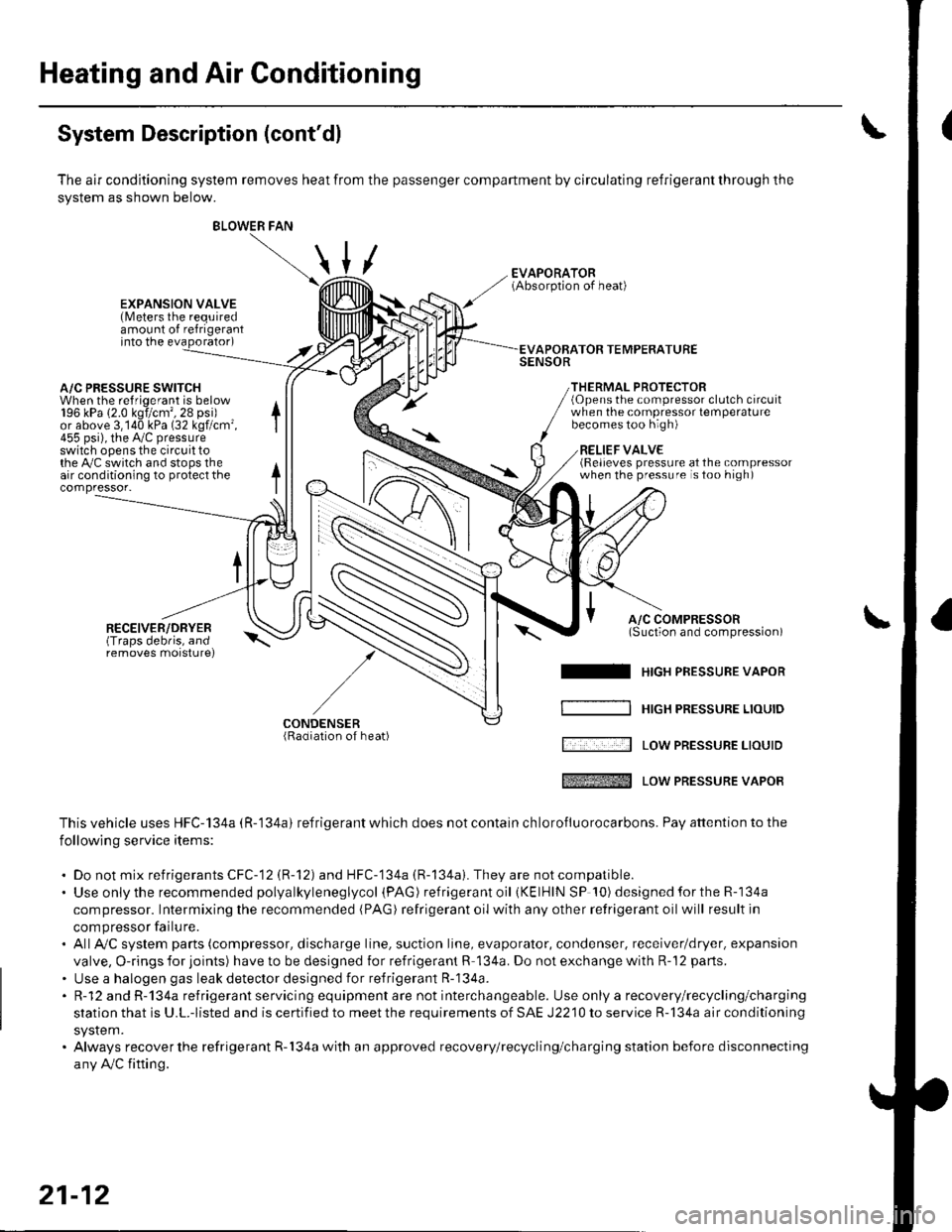
The air conditioning system removes heat from the passenger compartment by circulating refrigerant through the
system as shown below.
/
BLOWER FAN
\
\,u
EXPANSION VALVE(Meters the requiredamount of refrigerantinto the evaporator)
A/C PRESSURE SWITCHWhen the refriqerant is below196 kPa (2.0 kgi/cm',28 psi)or above 3,140 kPa (32 kgf/cm'455 psi), the Py'c pressureswitch opens the circuit tothe Py'C switch and stops theair conditioning to protect thecompressor-
RECEIVER/DRYER(Traps debris, andremoves morsturel
APOBATOR TEMPERATURESENSOR
THERMAL PROTECTOR(Opens the compressor clutch circuitwhen the compressot temperaturebecomes too high)
RELIEF VALVE(Relieves pressure at the compressorwhen the pressure is too high)
A/C COMPRESSOR(Suction and comoression)\-^
I HrcH PRESSURE vAPoR
[ '.... -:--l Low PREsSUBE LrourD
tffi Low PREssURE vAPoR
This vehicle uses HFC-134a (R-'134a) refrigerant which does not contain ch lorofluorocarbons. Pay attention to the
following service items:
. Do not mix refrigerants CFC-12 (R-12) and HFC-134a (R-134a). They are notcompatible.. Use onlythe recommended polyalkyleneglycol (PAG ) refrigera nt oil (KElHlN SP '!0) designedfortheR-134a
compressor. Intermixing the recommended (PAG) refrigerant oil with any other retrigerant oil will result in
compressor failu re.. AllAy'C system parts (compressor, discharge line, suction line, evaporator, condenser, receiver/dryer. expansion
valve, O-rings for joints) have to be designed for refrigerant R 134a. Do not exchange with R-'12 parts.
. Use a halogen gas leak detector designed for refrigerant R-134a.. R-12 and R-134a refrigerant servicing equipment are not interchangeable. Use only a recovery/recycling/charging
station that is U.L.-listed and is certified to meet the requirements of SAE J2210 to service R-134a air conditioning
system.. Always recover the refrigerant R-134a with an approved recovery/recycling/charging station before disconnecting
any Ay'C fifting.
/-
CONDENSER(Radiation of heat)
21-12
Page 787 of 1139
Heating and Air Conditioning
DTC Troubleshooting
DTC 7: An Open in the Air Mix Control Motor
Circuit
1. Test the air mix control motor {see page 2'l-341.
ls the air mix control motor OK?
YES-Go to step 2.
NO-Replace the air mix control motor.l
2. Disconnect the air mix control motor 5P connector.
3. Disconnect heater control panel connectors A {14P)
and B (22P).
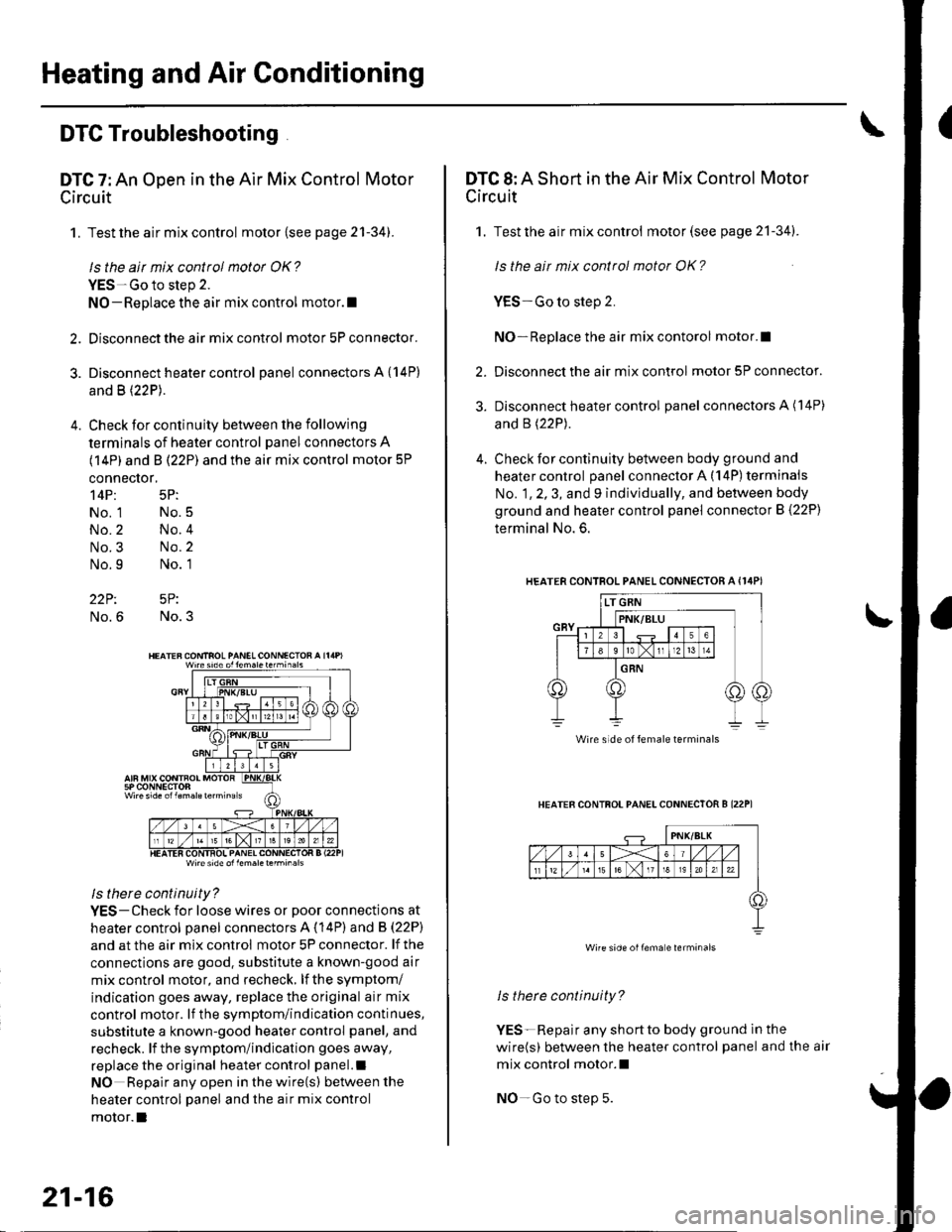
4. Check for continuity between the following
terminals of heater control panel connectors A
(14P) and B (22P) and the air mix control motor 5P
connector,
14P: 5P:
No. 1 No.5
No.2 No.4
No.3 No.2
No.9 No. 1
22P: 5P:
No.6 No.3
Wire side ol lem.letehi.6ls
ls there continuity?
YES-Check for loose wires or poor connections at
heater control oanel connectors A (14P) and B (22P)
and at the air mix control motor 5P connector. lf the
connections are good. substitute a known-good air
mix control motor, and recheck, lf the symptom/
indication goes away, replace the original air mix
control motor. lf the symptom/indication continues,
substitute a known-good heater control panel, and
recheck. lf the symptom/indication goes away,
replace the original heater control panel.l
NO Repair any open inthewire(s) ketweenthe
heater control panel and the air mix control
motor.l
21-16
DTC 8: A Short in the Air Mix Control Motor
Circuit
1. Test the air mix control motor(see page 21-341.
ls the ait mix control motor OK?
YES-Go to step 2.
NO-Replace the air mix contorol motor.I
2. Disconnect the air mix control motor 5P connector.
3. Disconnect heater control panel connectors A (14P)
and B (22P).
4. Check for continuity between body ground and
heater control panel connector A (14P) terminals
No. 1, 2, 3, and 9 individually, and between body
ground and heater control panel connector B (22P)
terminal No. 6.
HEATERCONTROL PANEL CONNECTOR A {I4PI
HEATER CONTFOL PANELCONNECTOR B I22P1
ls therc continuity?
YES-Repair any shortto body ground ln the
wire(s) between the heater control panel and the air
mix control motor.l
NO-Go to step 5.
Wire side of female terminals
Wire side oilema e lerminals
Page 803 of 1139
Heating and Air Conditioning
Compressor Clutch Circuit
Troubleshooting (cont'dl
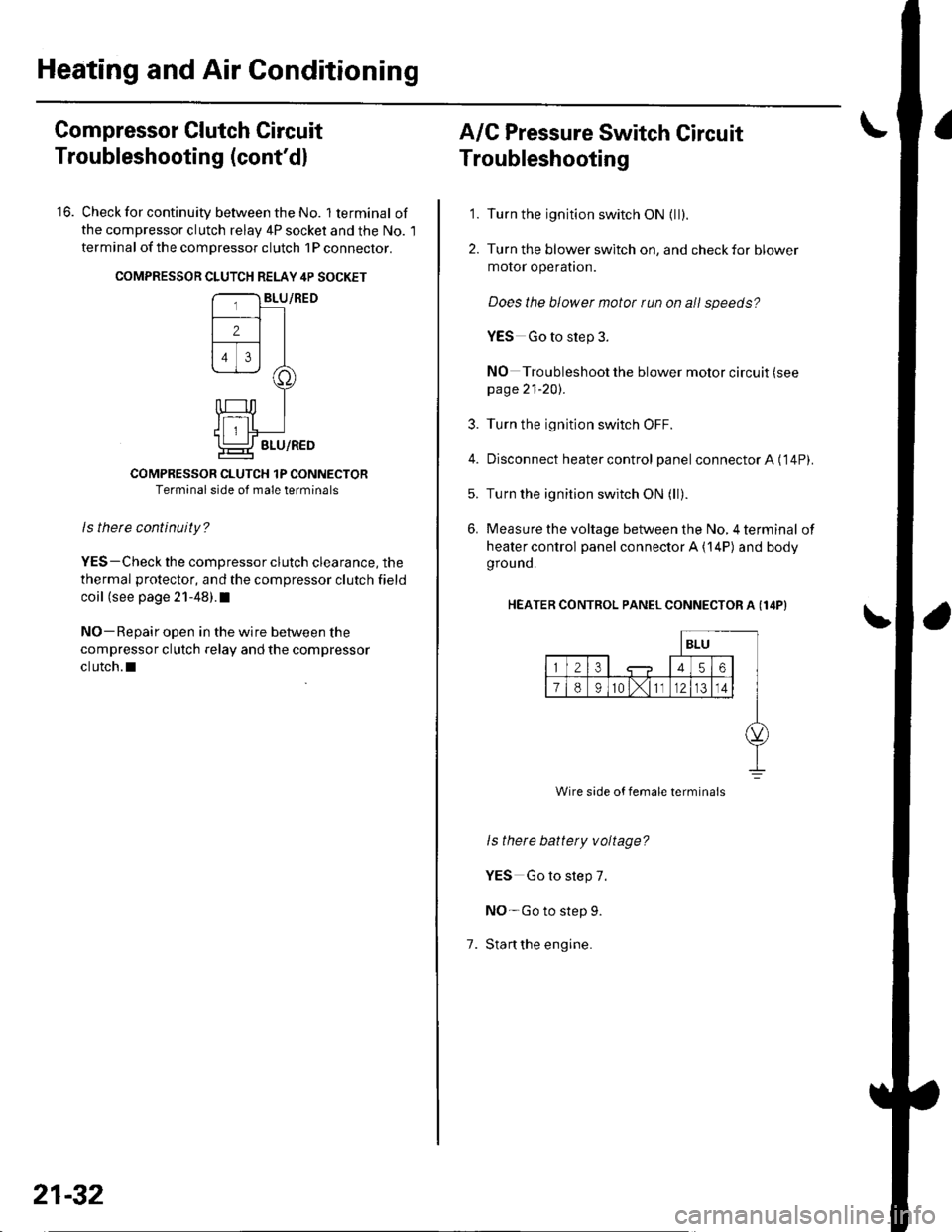
16. Check for continuity between the No. lterminal of
the compressor clutch relav 4P socket and the No. l
terminal of the compressor clutch 1P conneclor.
COMPRESSON CLUTCH RELAY 4P SOCKET
COMPRESSOR CLUTCH 1P CONNECTORTerminal side of male terminals
ls therc continuity?
YES-Check the compressor clutch clearance, the
thermal protector, and the compressor clutch field
coil (see page 21-48).I
NO-Repair open in the wire between the
compressor clutch relay and the compressor
clutch.l
21-32
A/C Pressure Switch Circuit
Troubleshooting
'1. Turn the ignition switch ON {ll).
2. Turn the blower switch on, and check for blower
motor operatron.
Does the blower motor run on all speeds?
YES Go to step 3.
NO Troubleshoot the blower motor circuit (see
page 21-20).
3. Turn the ignition switch OFF.
4. Disconnect heater control panel connectorA ('14P).
5. Turn the ignition switch ON (ll).
6. Measure the voltage between the No, 4 terminal of
heater control panel connector A {14P) and body
grou nd.
HEATER CONTROL PANEL CONNECTOR A (I4P}
1.
ls there battety voltage?
YES Go to step 7.
NO-Go to step 9.
Stan the engine.
Wire side of female termina's
Page 813 of 1139
Heating and Air Gonditioning
a
1.
Evaporator Core Replacement
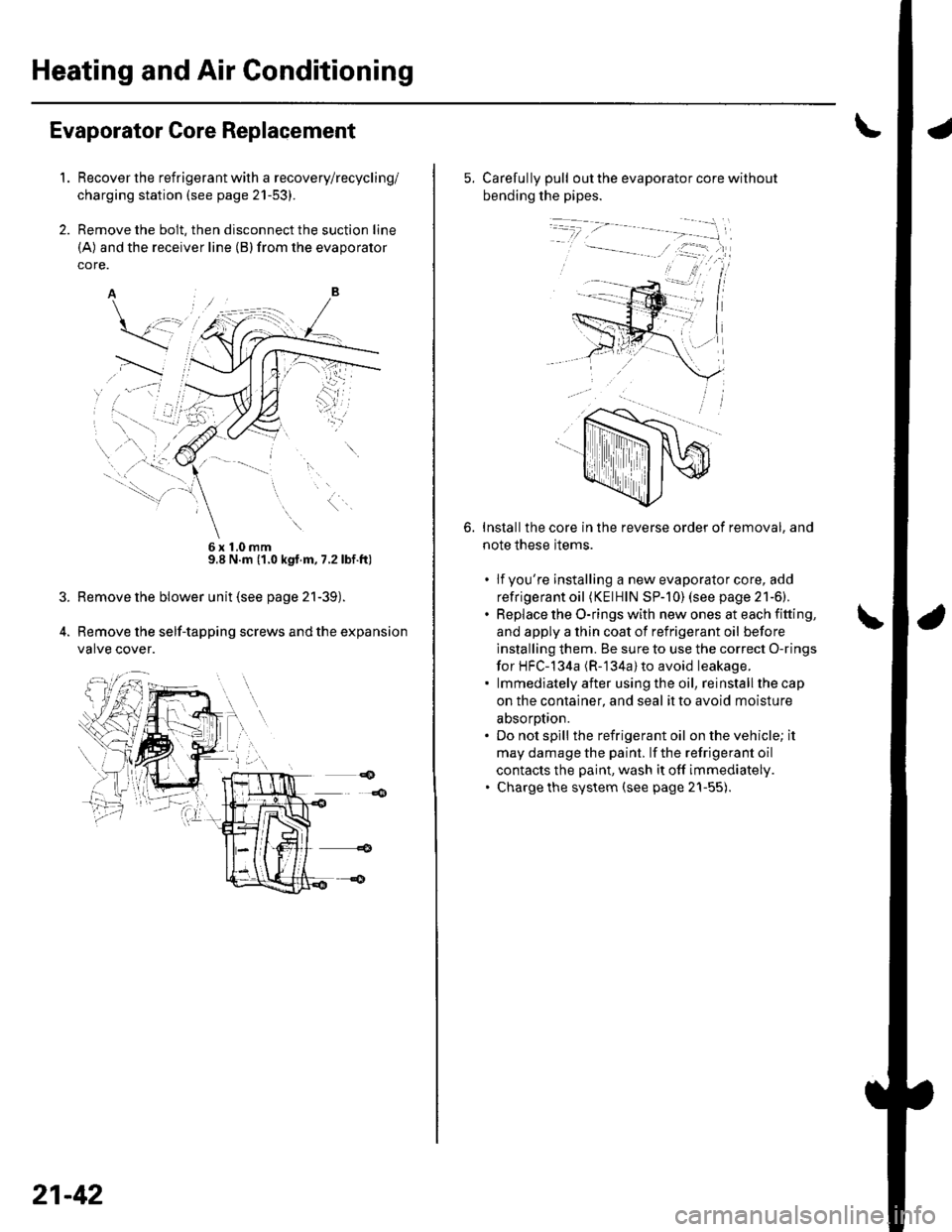
Recover the refrigerant with a recovery/recycling/
charging station (see page 21-53).
Remove the bolt, then disconnect the suction line
(A) and the receiver line (B)from the evaporator
core.
6x10mm9.8 N.m (1.0 kgt.m, 7.2lbf.ft)
Remove the blower unit (see page 21-39).
Remove the self-tapping screws and the expansion
valve cover.
21-42
5. Carefully pull out the evaporator core without
bending the pipes.
Installthe core in the reverse order of removal, and
note these items.
. lfyou're installing a new evaporator core, add
refrigerant oil (KElHlN SP-]0) (see page 21-6).. Replace the O-rings with new ones at each fitting,
and apply a thin coat of refrigerant oil before
installing them. Be sure to use the correct O-rings
for HFC-134a (R-'134a) to avoid leakage.. lmmediatelyafter usingthe oil, reinstallthecap
on the container, and seal it to avoid moisture
absorotion.. Do not spill the refrigerant oil on the vehicle; it
may damage the paint. lf the refrigerant oil
contacts the paint, wash it off immediately.. Charge the system (see page 21-55).
6.
Page 818 of 1139
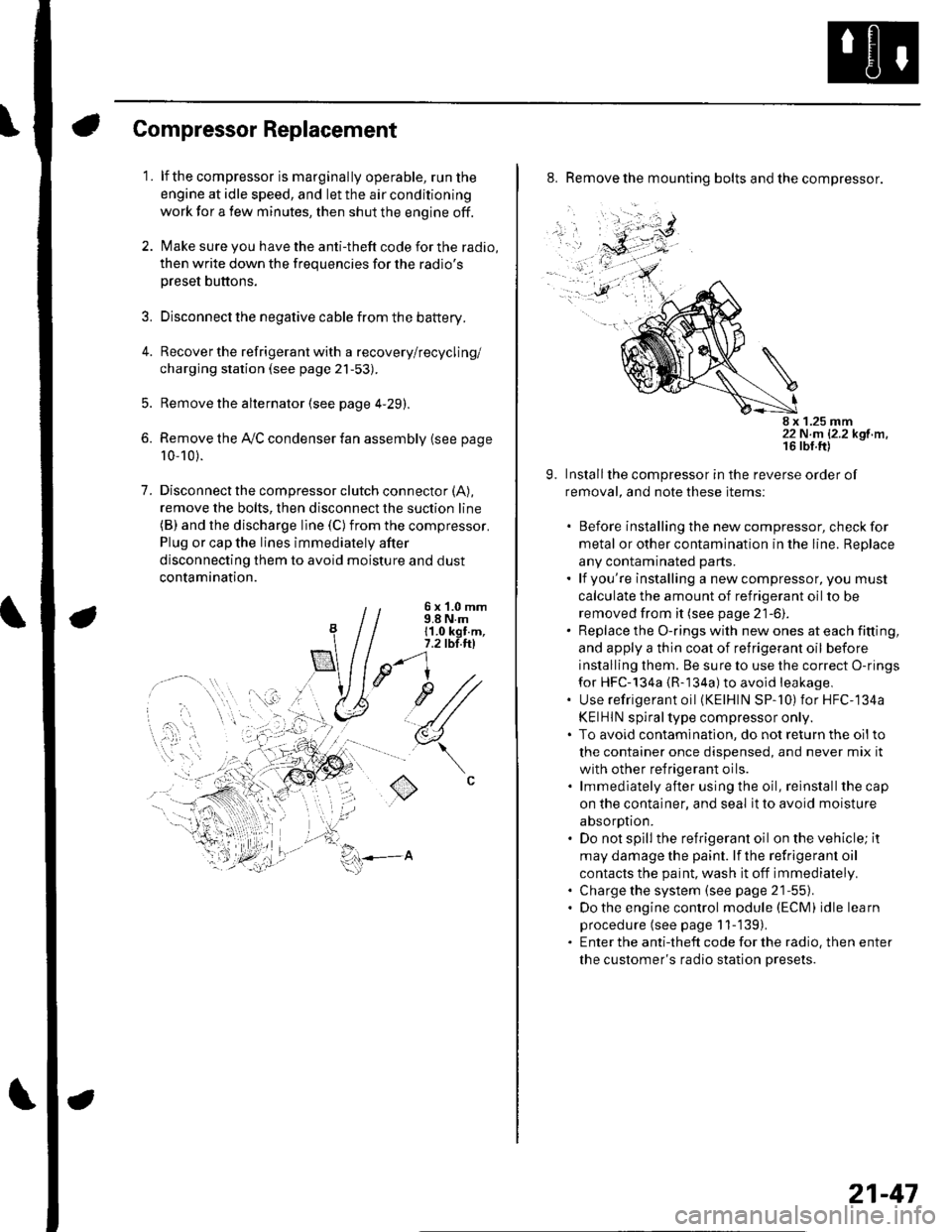
Compressor Replacement
1. lf the compressor is marginally operable, run the
engine at idle speed, and let the air conditioning
work for a few minutes, then shut the engine off.
2. Make sure you have the anti-theft code for the radio,
then write down the frequencies for the radio's
preset buttons.
3. Disconnect the negative cable from the battery.
4. Recover the refrigerant with a recovery/recycling/
charging station (see page 21-53).
5. Remove the alternator (see page 4-29).
6. Remove the Ay'C condenser fan assembly (see page
10-10).
7. Disconnectthe compressor clutch connector (A),
remove the bolts, then disconnect the suction line(B) and the discharge line (C)from the compressor.
Plug or cap the lines immediately after
disconnecting them to avoid moisture and dust
contamination.
6 x '1.0 mm9.8 N.m11.0 kgt.m,7.2 tbl.ttl
u1/
(
o
8. Remove the mounting bolts and the compressor.
8 x 1.25 mm22 N.m 12.2 kgf.m.
9. Installthe compressor in the reverse order of
removal, and note these items:
. Before installing the new compressor, check for
metal or other contamination in the line. Replace
any contaminated parts.. lf you're installing a newcompressor, you must
calculate the amount of refrigerant oil to be
removed from it (see page 21-6).. Replace the O-rings with new ones at each fitting,
and apply a thin coat of refrigerant oil before
installing them. Be sure to use the correct O-rings
for HFC-134a {R-134a) to avoid leakage,. Use refrigerant oil (KElHlN SP-'10) for HFC-134a
KEIHIN spiral type compressor only.. To avoid contaminatlon, do not return the oilto
the container once dispensed, and never mix it
with other refrigerant oils.. lmmediately after using the oil, reinstallthe cap
on the container, and seal it to avoid moisture
absorption.. Do not spill the refrigerant oil on the vehicle; it
may damage the paint. lf the refrlgerant oil
contacts the paint, wash it off immediately.. Charge the system (see page 21-55).. Do the engine control module (ECM) idle learn
procedure (see page 11-'139).. Enter the antitheft code for the radio, then enter
the customer's radio station presets.
21-47
Page 819 of 1139
Heating and Air Gonditioning
1.
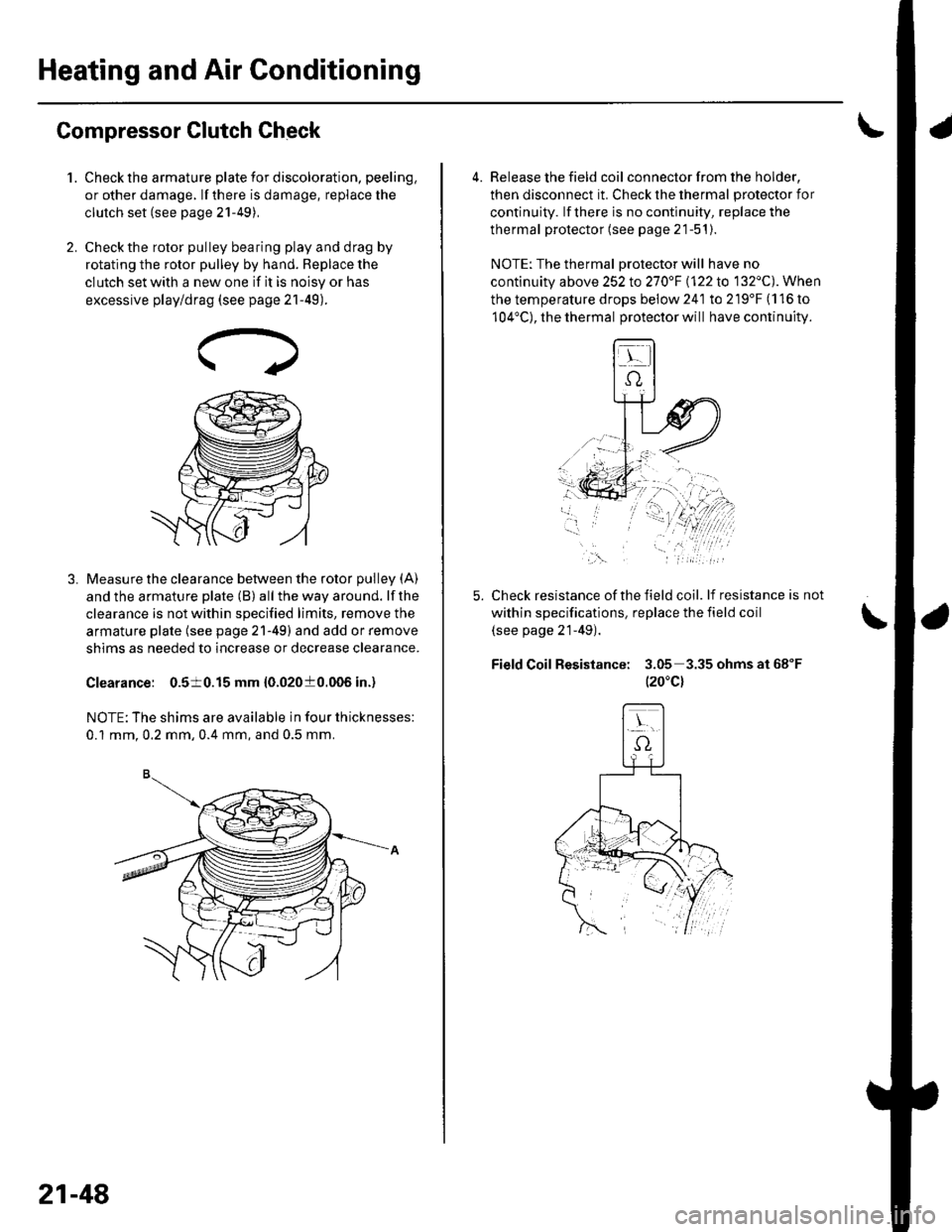
Compressor Clutch Check
Check the armature plate for discoloration, peeling,
or other damage. lf there is damage, replace the
clutch set (see page 21-49),
Check the rotor pulley bearing play and drag by
rotating the rotor pulley by hand. Beplace the
clutch set with a new one if it is noisy or has
excessive play/drag (see page 21-49).
Measure the clearance between the rotor pulley (A)
and the armature plate (B) all the way around. lf the
clearance is not within specified limits, remove the
armature plate (see page 21-49) and add or remove
shims as needed to increase or decrease clearance.
Clearance: 0.510.15 mm {0.02010.006 in.)
NOTE: The shims are available in four thicknesses:
0.1 mm.0.2 mm,0.4 mm, and 0.5 mm.
21-48
a
4. Release the field coil con nector f rom the holder,
then disconnect it. Check the thermal protector for
continuity. lf there is no continuity, replace the
thermal protector (see page 21-51).
NOTE: The thermal Drotector will have no
continuity above 252to270"F \122lo 132'C). When
the temperature drops below 241 to 219'F (116 to
104'C), the thermal protector will have continuity.
Check resistance of the field coil. lf resistance is not
within specifications, replace the field coil
(see page 21-49).
Field Coil Resistance: 3.05 3.35ohmsat68"F
t20"c)
,\.