Body HONDA CIVIC 2003 7.G Workshop Manual
[x] Cancel search | Manufacturer: HONDA, Model Year: 2003, Model line: CIVIC, Model: HONDA CIVIC 2003 7.GPages: 1139, PDF Size: 28.19 MB
Page 755 of 1139
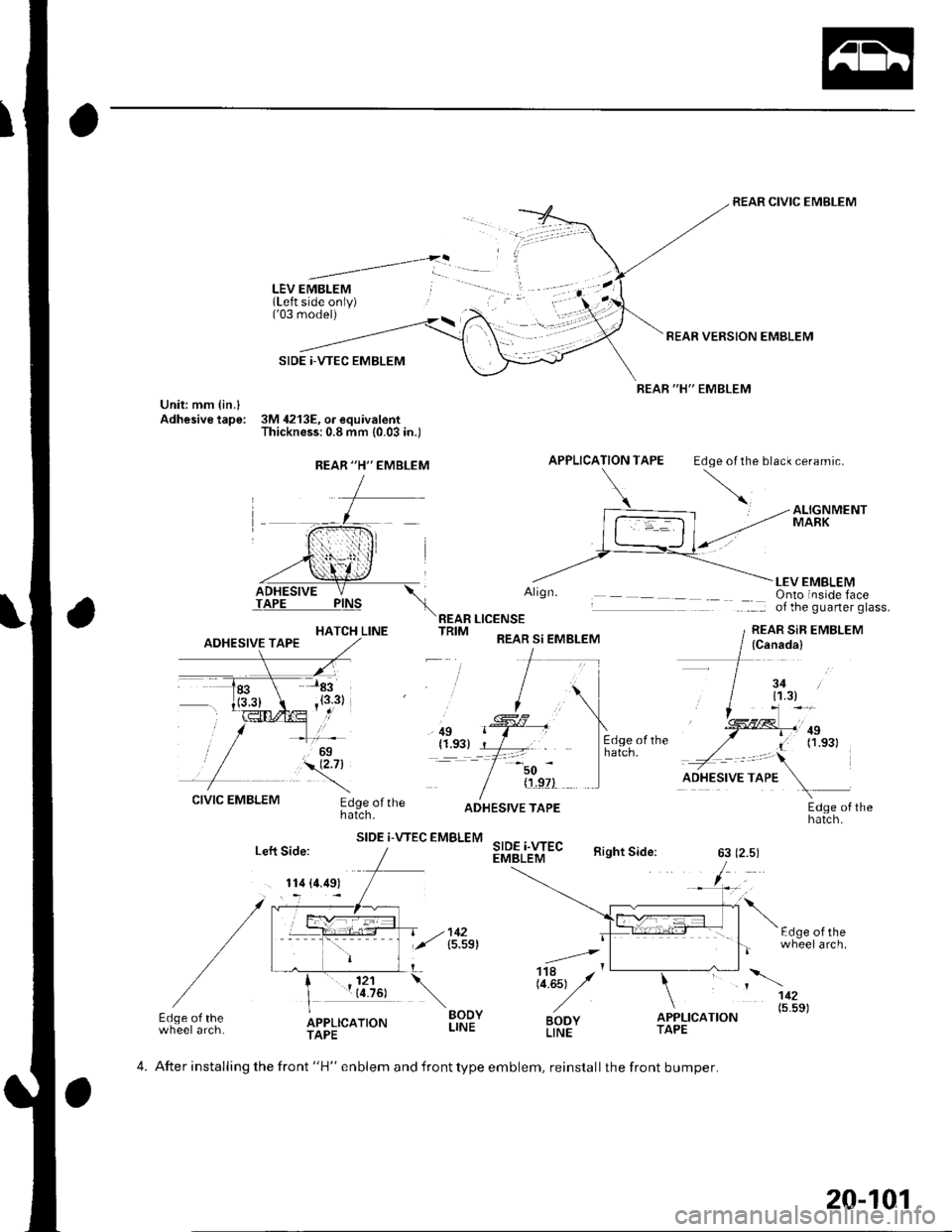
LEV EMBLEM(Left side only)('03 model)
SIDE |-VTEC EMBLEM
Unit: mm {in.lAdhesive tape: 3M 4213E, o. equivalentThickness:0.8 mm (0.03 in.)
REAR CIVIC EMBLEM
REAR VERSION EMBLEM
REAR "H" EMBLEM
APPLICATION TAPE Edoe ol the black ceramic.
HATCH LINE
Align.
REAR LICENSETRIM REAR si EMBLEM
LEV EMBLEMOnto inside faceof the guarter glass.
REAR SiR EMBLEM
, ilg(1.93)=-t
50
CIVIC EMBLEMEdge ofthehatch.
SIDE i-VTEC EMBLEM
{'!,9?)
SIDE i.WECEMBLEM
ADHESIVE TAPEEdge of thehatch.
Right Side:63 (2.5)
F.l^6 ^l rh-
.=4,
Li.Est y'
BODYLINE
wheelarch.
112
BODYLINEo"f,r,ao.o" (5'5s)Edge of thewheel arch.APPLICATIONTAPETAPE
REAR "H'' EMBLEM
(Canada)
3411.3)
.,!!ll,'ntI (1.s31
Left Side:
. 114 (4.49)
4. After installing the front "H" enblem and front type emblem, reinstall the front bumper.
20-101
Page 756 of 1139
Fenderwell
Front Inner Fender Replacement
NOTE: Take care not to scratch the body.
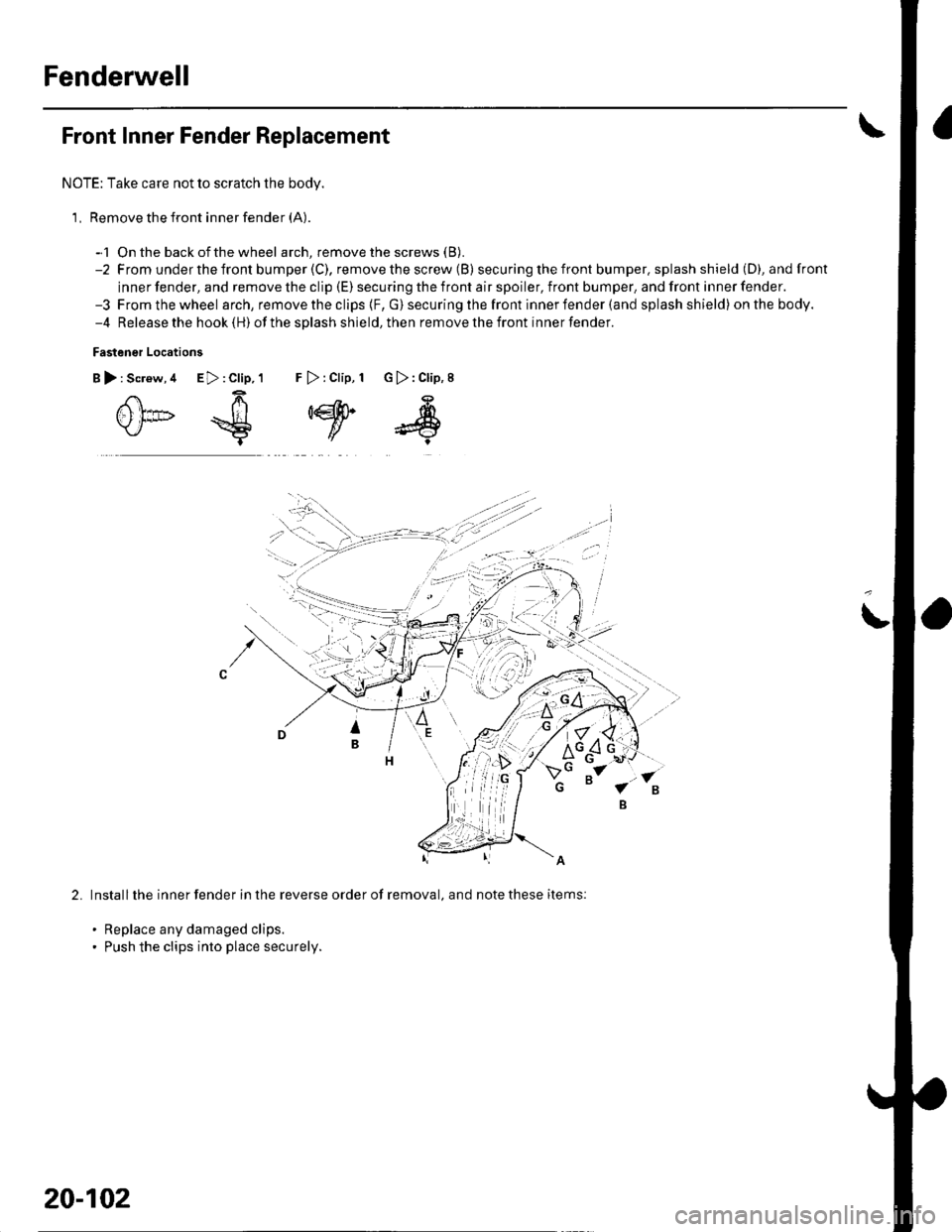
1, Remove the front inner fender (A).
-1 On the back ofthe wheel arch, remove the screws (B).
-2 From underthefront bumper(C), removethescrew (B) secu ring the front bumper. splash shield (D), andfront
inner fender, and remove the clip (E) securing the front air spoiler, front bumper, and front inner fender.-3 Fromthewheel arch, remove the clips {F, G) securing the front inner fender (and splash shield) onthebody.-4 Release the hook (H) ofthe splash shield,then removethefront innerfender.
Fastener Locations
B):Screw,4 E>:Clip,1 F >:Clip, 1 G):Clip,8
0*€
,w
s
2.Install the inner fender in the reverse order of removal, and note these items:
. Replace any damaged clips.. Push the clips into place securely.
20-102
Page 758 of 1139
Fenderwell
(Fuel Pipe Protector Replacement
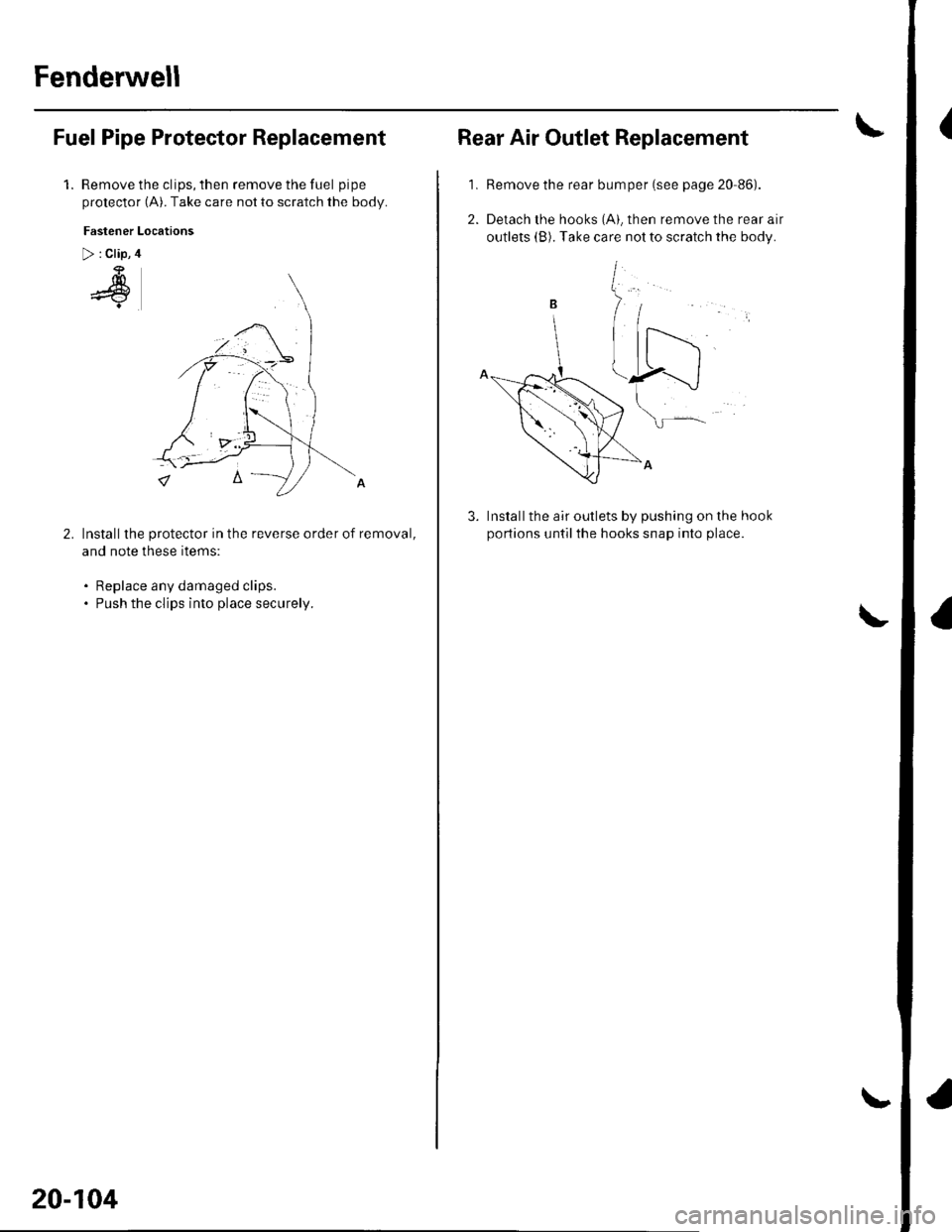
1.Remove the clips, then remove the fuel pipe
protector (A). Take care not to scratch the body.
Fastener Locations
> : Clip, 4
4
Installthe protector in the reverse order of removal,
and note these items:
. Replace any damaged clips.. Push the clips into place securelv.
20-104
Rear Air Outlet Replacement
1. Remove the rear bumper (see page 20-86).
Installthe air outlets by pushing on the hook
portions untilthe hooks snap into place.
rne rear atr
the body.
Page 760 of 1139
Openers
Hood Opener Cable Replacement
NOTE:. Put on gloves to protect your hands.. Take care not to scratch the body and related parts.
l. Remove these items:
. Front bumper (see page 20-85). Front inner fender, leftside(seepage20-102). Kick panel, left side (see page 20-50)
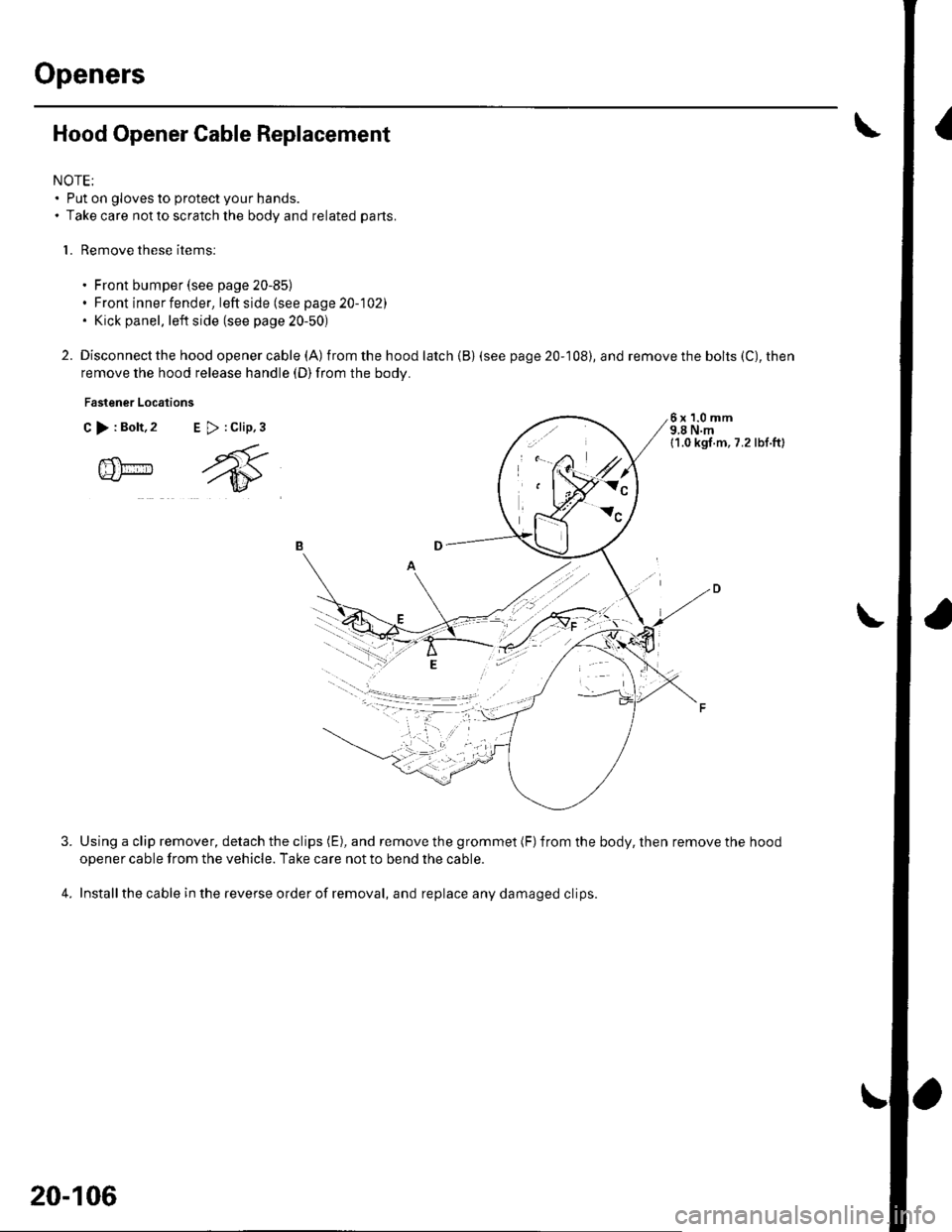
2. Disconnect the hood openercable (A) from the hood latch {B) (see
remove the hood release handle (D)from the body.
Fastener Locations
C >:Bolt,2 E >:Clip,3
page 20-108), and remove the bolts (C), then
6x1.0mm9,8 N.m11.0 kgl.m, 7.2 lbl.ft)
@m
4.
Using a clip remover, detach the clips (E), and remove the grommet (F)from the body, then remove the hood
opener cable from the vehicle. Take care not to bend the cable.
Installthe cable in the reverse order of removal, and replace any damaged clips.
l,.t'.
W:"
20-106
Page 761 of 1139
2.
5.
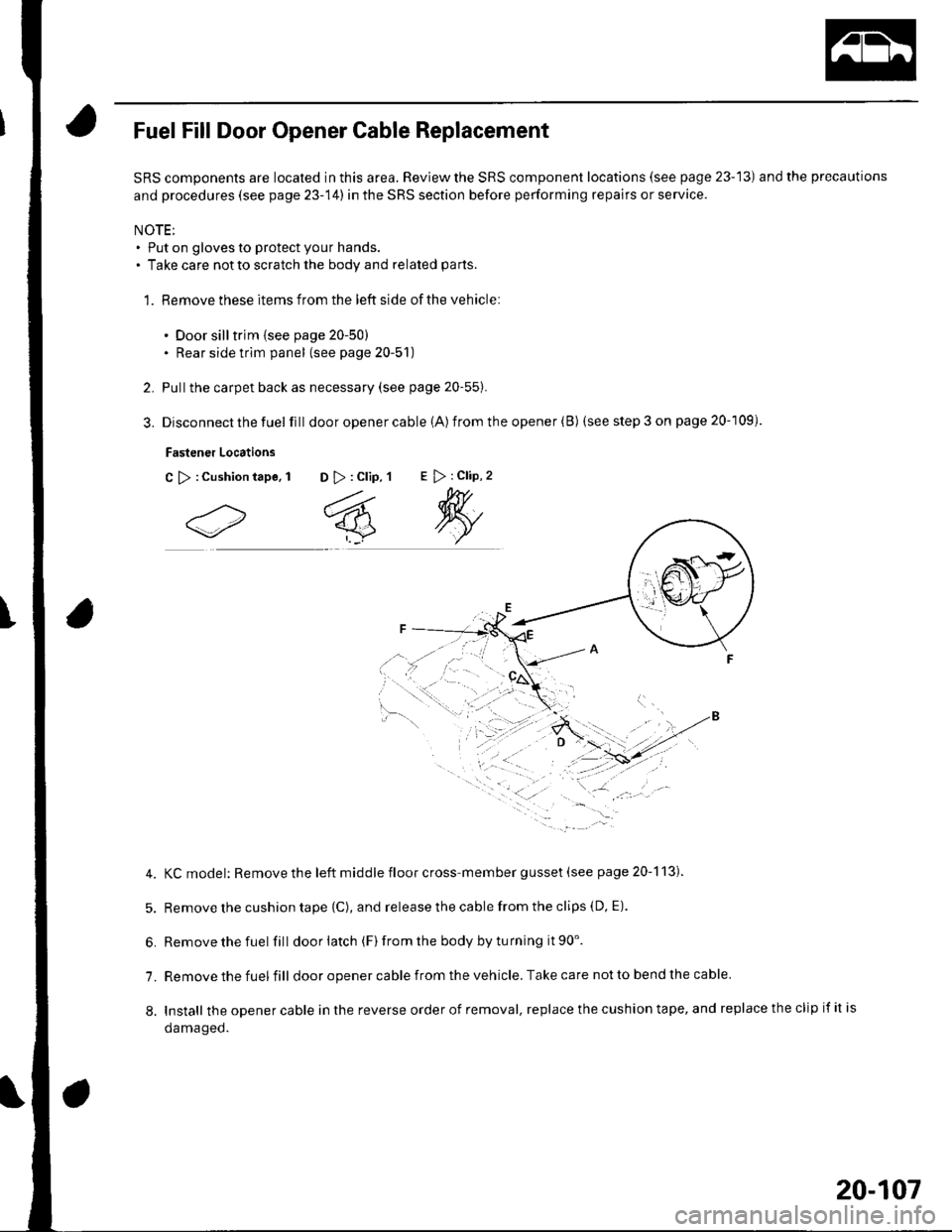
Fuel Fill Door Opener Cable Replacement
SRS components are located in this area. Review the SRS component locations (see page 23-13) and the precautions
and procedures (see page 23-14) in the SRS section before performing repairs or service.
NOTE;. Put on gloves to protect your hands.. Take care notto scratch the body and related parts.
1. Remove these items from the left side of the vehicle:
. Door silltrim {see page 20-50). Rear side trim panel (see page 20-51)
Pullthe carpet back as necessary (see page 20-55).
Disconnect the fuel fill door opener cable (A) from the opener (B) (see step 3 on page 20-109).
Fastener Locations
C >:Cushiontape, 1 D >: Clip, 1E > : Clip, 2
4. KCmodel: Removethe left middle floor cross-member gusset (see page 20-113).
5. Remove the cushion tape {C), and release the cable from the clips (D, E).
6. Removethefuel fill doorlatch (F)fromthe bodybyturning it90'.
7. Remove the fuel fill door opener cable from the vehicle. Take care not to bend the cable
8. Install theopenercableinthereverseorderofremoval,replacethecushiontape,andreplacetheclipifitis
oamageo.
20-107
Page 762 of 1139
Openers
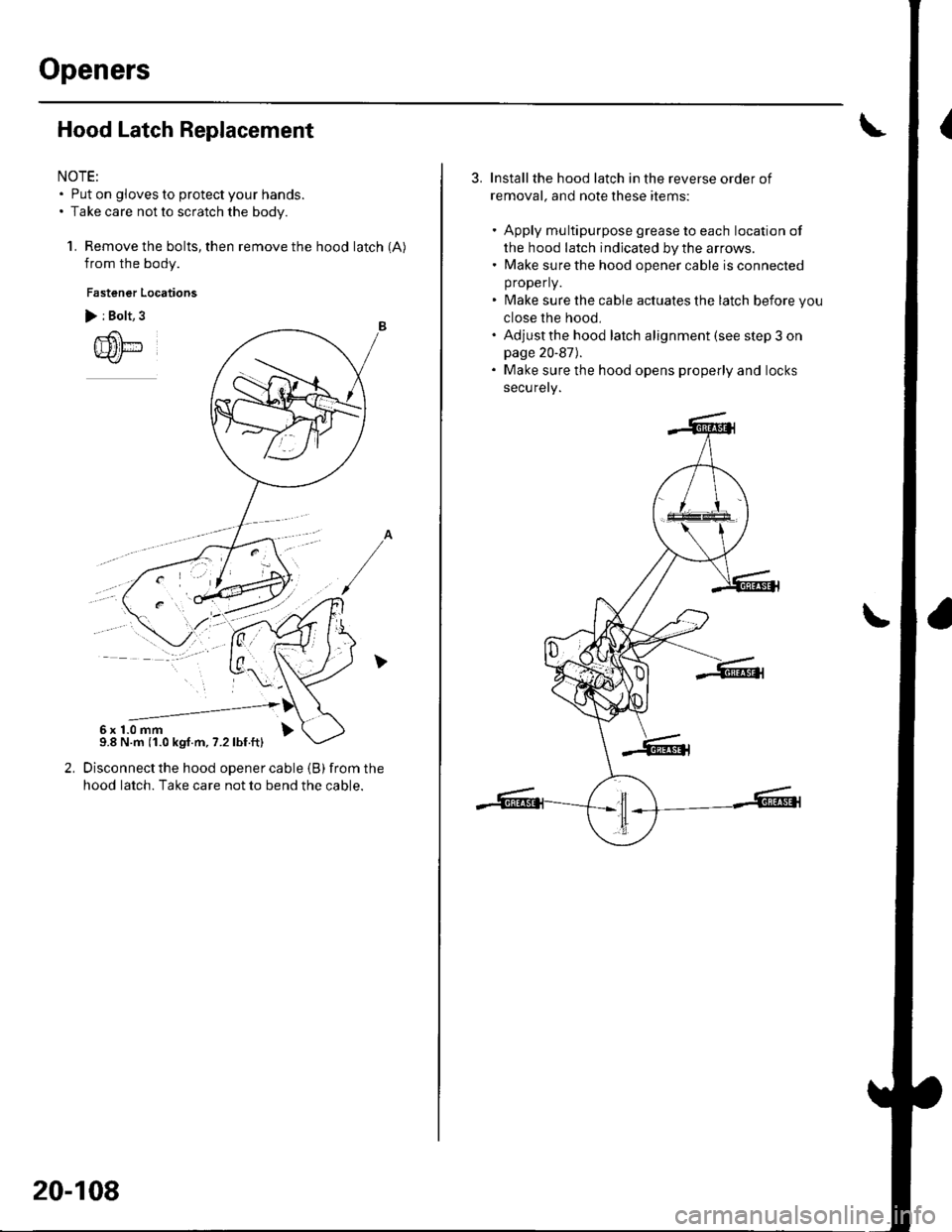
Hood Latch Replacement
NOTE:. Put on gloves to protect your hands.. Take care not to scratch the body.
1. Remove the bolts, then remove the hood latch (A)
from the body.
Fastener Locations
> i Bolt, 3
Disconnect the hood opener cable (B) from the
hood latch. Take care not to bend the cable.
--------------'6x1.0mm9.8 N.m (1.0 kgf.m, 7.2lbf.ft)
20-108
Installthe hood latch in the reverse order of
removal, and note these items:
. Apply multipurpose grease to each location of
the hood latch indicated by the arrows.. Make sure the hood opener cable is connected
properly.
. Make sure the cable actuates the latch before you
close the hood,. Adjustthe hood latch alignment (see step 3 onpage 20-87).. Make sure the hood opens properly and locks
securely.
Page 766 of 1139
Frame
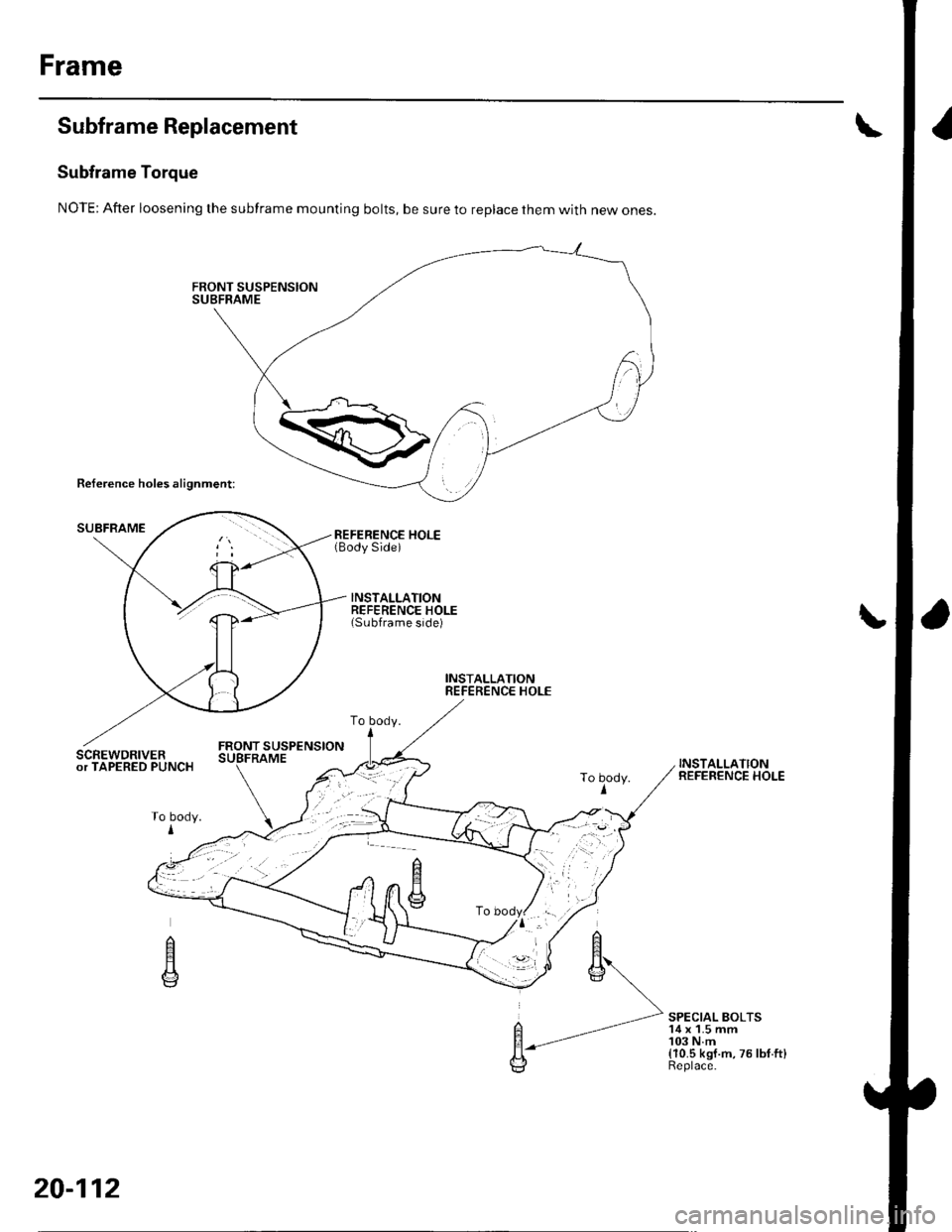
Subframe Replacement
Subframe Torque
NOTE: After loosening the subframe mounting bolts, be sure to replace them with new ones.
Reference holes alignment:
SUBFRAMEREFERENCE HOLE(Body Side)
INSTALLATIONREFERENCE HOLE(Subframe side)
INSTALLATIONREFERENCE HOLE
FRONT SUSPENSIONSCREWDRIVERor TAPERED PUNCHINSTALLATIONREFERENCE HOLE
SPECIAL BOLTS'14 x 1.5 mm103 N.m(10.5 kgf.m,75lbf.ft)Replace.
To body.
To body.I
n
E
20-112
Page 767 of 1139
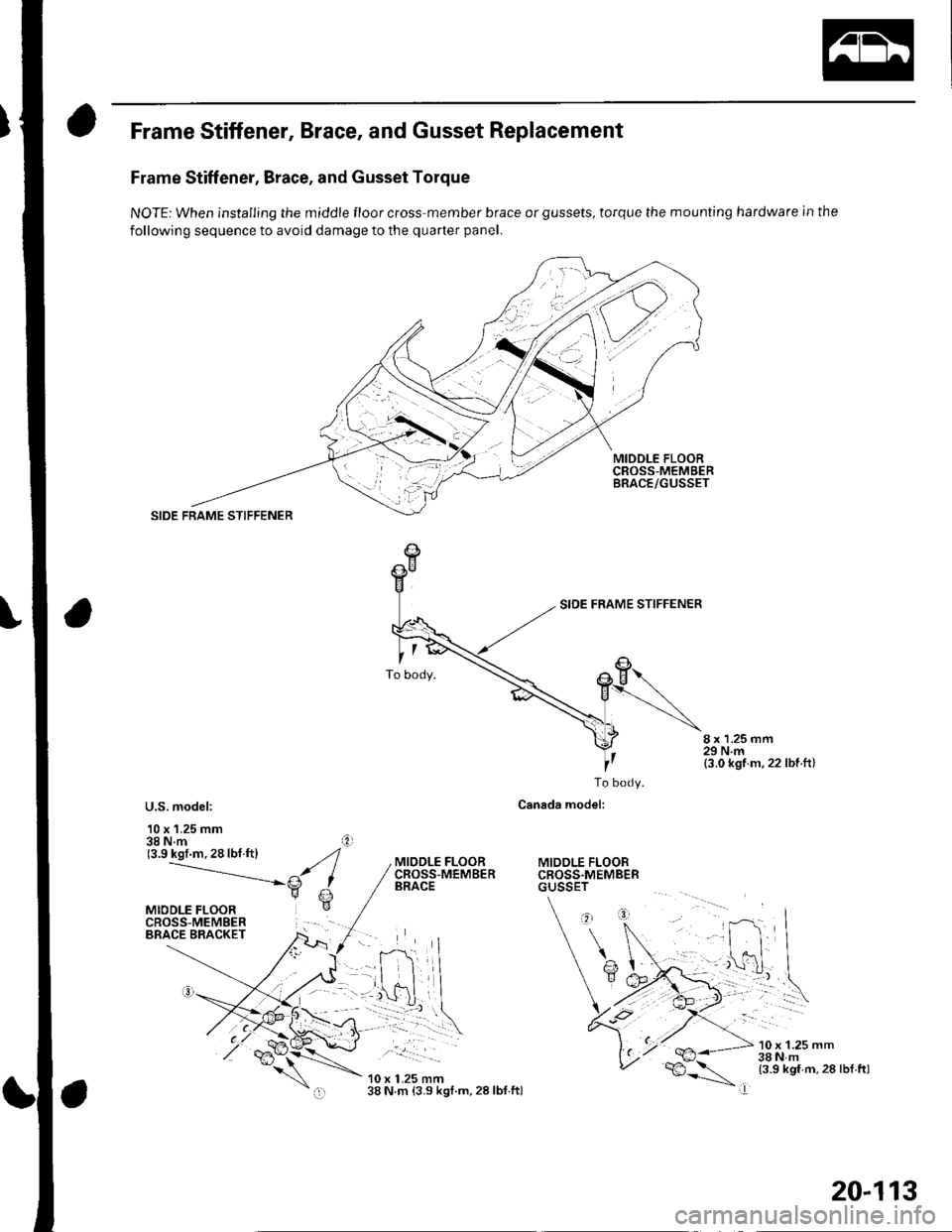
Frame Stiffener, Brace, and Gusset Replacement
Frame Stiffener, Brace, and Gusset Torque
NOTE: When installing the middle floor cross member brace or gussets, torque the mounting hardware in the
following sequence to avoid damage to the quarter panel.
MIDDLE FLOORCROSS-MEMgERBRACE/GUSSET
SIDE FRAME STIFFENER
8 x 1.25 mm29 N.m(3.0 kgf m,22 lbf ft)
U.S. model:
10 x 1.25 mm38 N.m(3.9 kgf.m.28lbf.ftl
To body.
Canada model:
MIDDLE FLOORCROSS.MEMBERGUSSET
MIODLE FLOORCROSS-MEMBERBRACE
.. __!:::-- | -
10 x 1.25 mm38 N m (3.9 kgt.m, 28 lbf.ftl
10 x 1.25 mm38Nm(3.9 kgf.m,28 lbl.ftl
I
20-113
Page 787 of 1139
Heating and Air Conditioning
DTC Troubleshooting
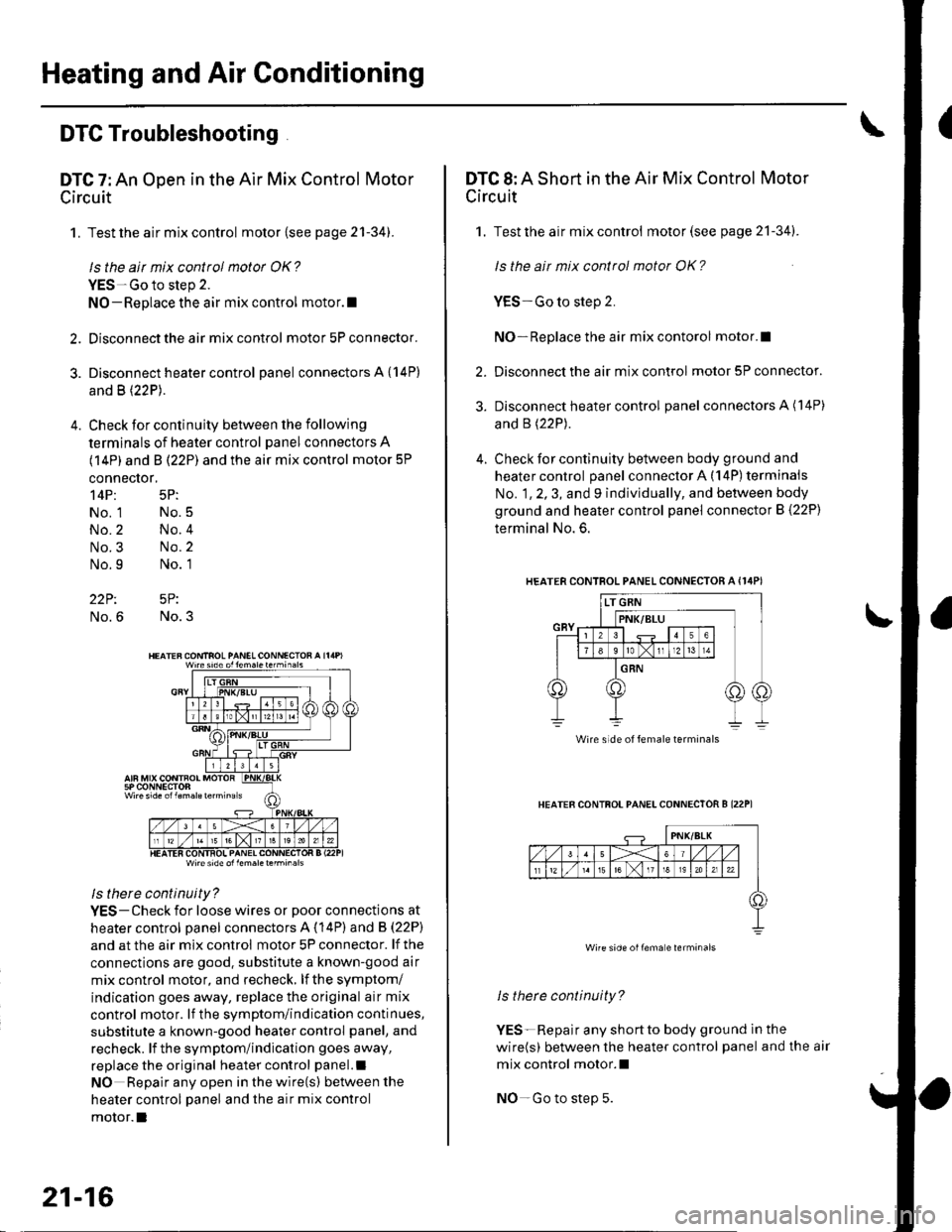
DTC 7: An Open in the Air Mix Control Motor
Circuit
1. Test the air mix control motor {see page 2'l-341.
ls the air mix control motor OK?
YES-Go to step 2.
NO-Replace the air mix control motor.l
2. Disconnect the air mix control motor 5P connector.
3. Disconnect heater control panel connectors A {14P)
and B (22P).
4. Check for continuity between the following
terminals of heater control panel connectors A
(14P) and B (22P) and the air mix control motor 5P
connector,
14P: 5P:
No. 1 No.5
No.2 No.4
No.3 No.2
No.9 No. 1
22P: 5P:
No.6 No.3
Wire side ol lem.letehi.6ls
ls there continuity?
YES-Check for loose wires or poor connections at
heater control oanel connectors A (14P) and B (22P)
and at the air mix control motor 5P connector. lf the
connections are good. substitute a known-good air
mix control motor, and recheck, lf the symptom/
indication goes away, replace the original air mix
control motor. lf the symptom/indication continues,
substitute a known-good heater control panel, and
recheck. lf the symptom/indication goes away,
replace the original heater control panel.l
NO Repair any open inthewire(s) ketweenthe
heater control panel and the air mix control
motor.l
21-16
DTC 8: A Short in the Air Mix Control Motor
Circuit
1. Test the air mix control motor(see page 21-341.
ls the ait mix control motor OK?
YES-Go to step 2.
NO-Replace the air mix contorol motor.I
2. Disconnect the air mix control motor 5P connector.
3. Disconnect heater control panel connectors A (14P)
and B (22P).
4. Check for continuity between body ground and
heater control panel connector A (14P) terminals
No. 1, 2, 3, and 9 individually, and between body
ground and heater control panel connector B (22P)
terminal No. 6.
HEATERCONTROL PANEL CONNECTOR A {I4PI
HEATER CONTFOL PANELCONNECTOR B I22P1
ls therc continuity?
YES-Repair any shortto body ground ln the
wire(s) between the heater control panel and the air
mix control motor.l
NO-Go to step 5.
Wire side of female terminals
Wire side oilema e lerminals
Page 789 of 1139
Heating and Air Conditioning
DTC Troubleshooting.(cont'd)
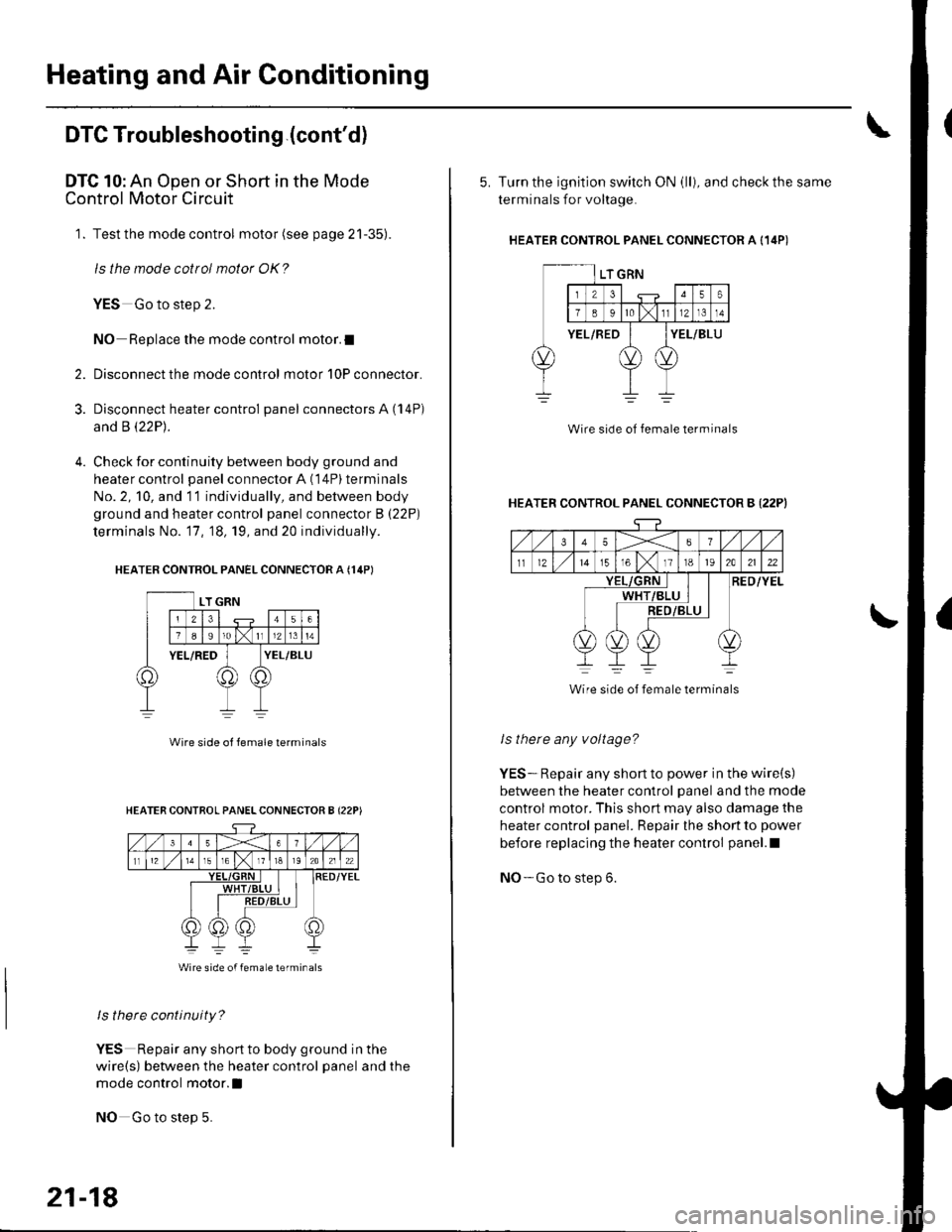
DTC 10: An Open or Short in the Mode
Control Motor Circuit
1. Test the mode control motor (see page 21-35).
ls the mode cottol motor OK?
YES Go to step 2.
NO Replace the mode control motor.I
Disconnect the mode control motor 10P connector.
Disconnect heater control panel connectors A (14P)
and B \22P1.
Check for continuity between body ground and
heater control panel connector A (14P) terminals
No. 2, 10, and 11 individually, and between body
ground and heater control panel connector B (22P)
terminals No. '17, 18, 19, and 20 individually.
HEATER CONTROL PANEL CONNECTOR A {14PI
2.
3.
Wire side ol lemale terminals
ls there continuity?
YES Repair any shortto body ground in the
wire(s) between the heater control panel and the
mode control motor.l
NO Go to step 5.
HEATER CONTROL PANELCONNECTOR B {22P)
Wire side of femaLe lerminals
21-18
5. Turn the ignition switch ON (ll), and check the same
terminals for voltage.
HEATEB CONTROL PANEL CONNECTOR A {14P)
Wire side of female terminal
HEATER CONTROL PANEL CONNECTOR B {22PI
35X6
tl1215T61118t92A2122
RED/YELWHT
Wire side of female terminals
ls there any voltage?
YES-. Repair any short to power in the wire(s)
between the heater control panel and the mode
control motor. This short may also damage the
heater control panel. Repair the short to power
before replacing the heater control panel.l
NO- Go to step 6.