roof HONDA CIVIC 2003 7.G User Guide
[x] Cancel search | Manufacturer: HONDA, Model Year: 2003, Model line: CIVIC, Model: HONDA CIVIC 2003 7.GPages: 1139, PDF Size: 28.19 MB
Page 698 of 1139
Moonroof
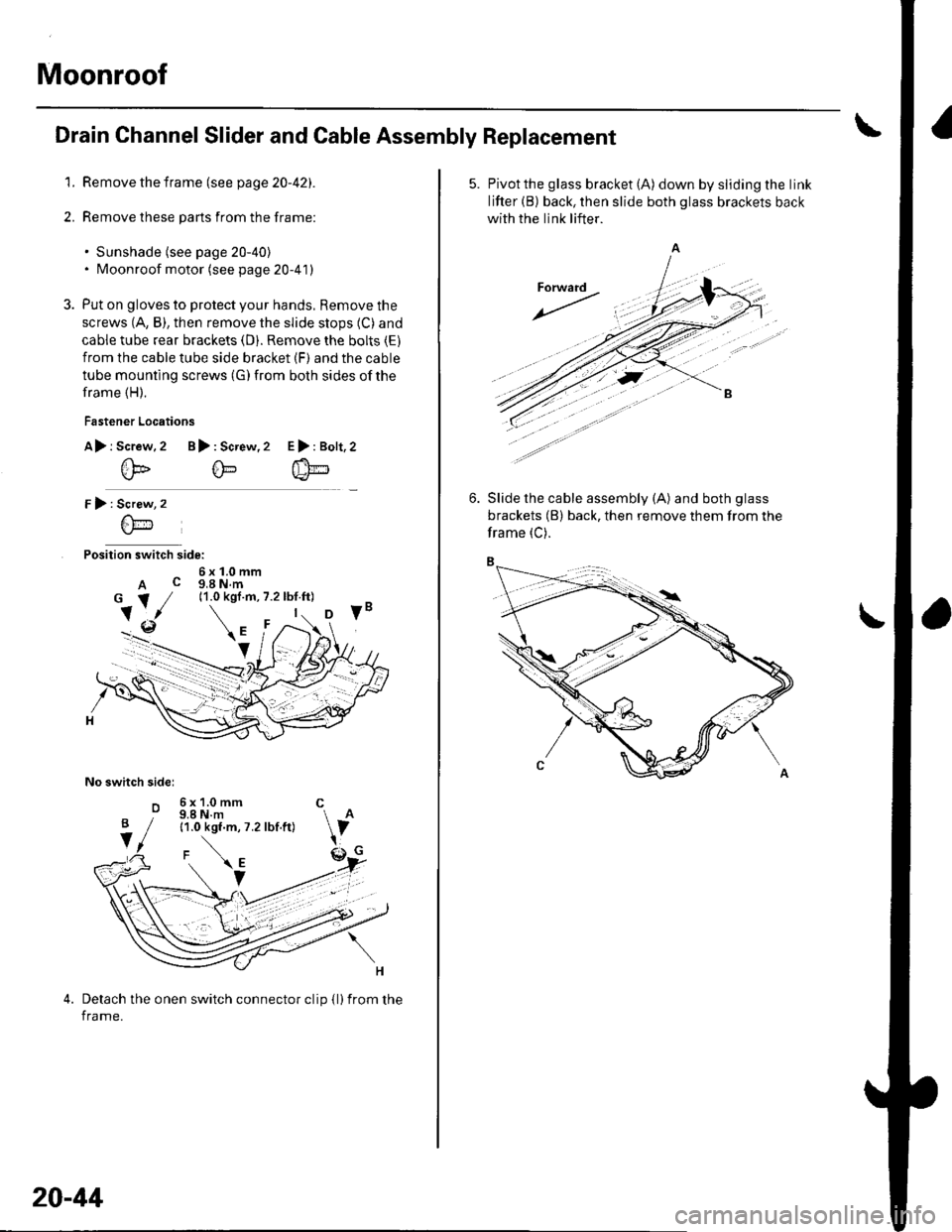
Drain Channel Slider and Cable Assembly Replacement
1. Remove the frame (see page 20-42).
2. Remove these parts from the frame:
. Sunshade (see page 20-40). Moonroof motor (see page 20-41)
3. Put on gloves to protect your hands, Remove the
screws (A, B), then remove the slide stops (C) and
cable tube rear brackets (D). Remove the bolts (E)
from the cable tube side bracket (F) and the cable
tube mounting screws (G) from both sides of the
frame (H).
Fastener Locations
A> r Screw.2 B): Screw,2
@@
r):
Position switch side:
6x1.0mmA c g,a N.m
No switch sidel
o
E>:Bolt,2
Screw
6\-'1
6x1.0mm C9.8 N.m11.0 kgf.m, 7.2 lbf.ft)
Detach the onen switch connector clip {l)from the
frame.
B
V
20-44
5. Pivotthe glass bracket (A) down by sliding the link
lifter (B) back, then slide both glass brackets back
with the link lifter.
Slide the cable assembly (A) and both glass
brackets (B) back, then remove them from the
frame (C).
Page 700 of 1139
Moonroof
Limit Switch Adjustment
1. Remove the headliner (see page 20-54).
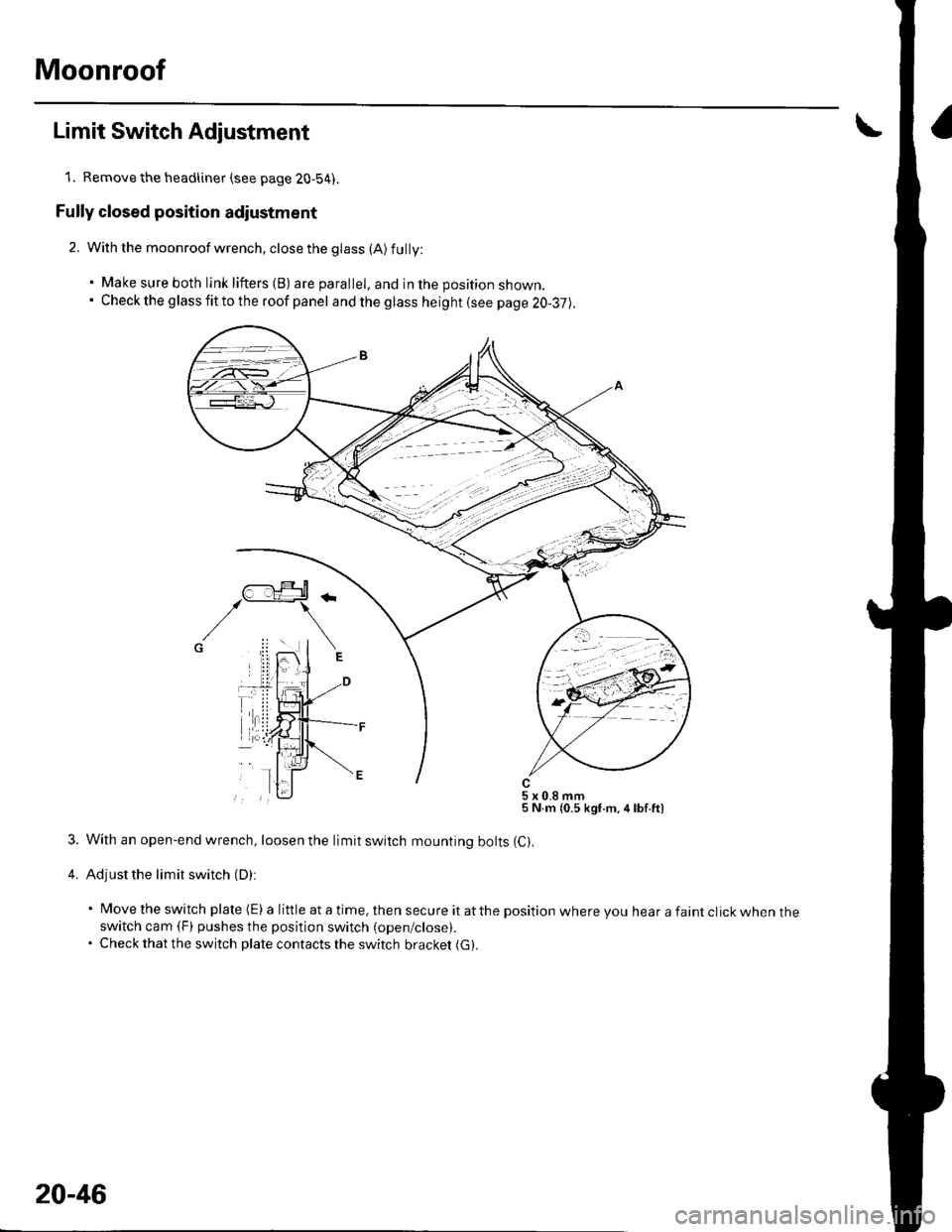
Fully closed position adiustment
2. With the moonroof wrench, close the glass (A) fully:
. Make sure both link lifters (B) are parallel, and in the position shown.. Check the g lass fit to the roof panel and the glass height (see page 20-37).
5x0.8mm5 N.m {0.5 kgf.m,4lbf.ft)
3. With an open-end wrench, loosen the limit switch mounting bolts (C).
4. Adjust the limit switch (D):
' Move the switch plate (E) a little at a time, then secure it atthe position where you hear a faint click when theswitch cam (F) pushes the position switch (open/close).. Check that the switch plate contacts the switch bracket (G).
20-46
Page 701 of 1139
Auto-stop position adiustment
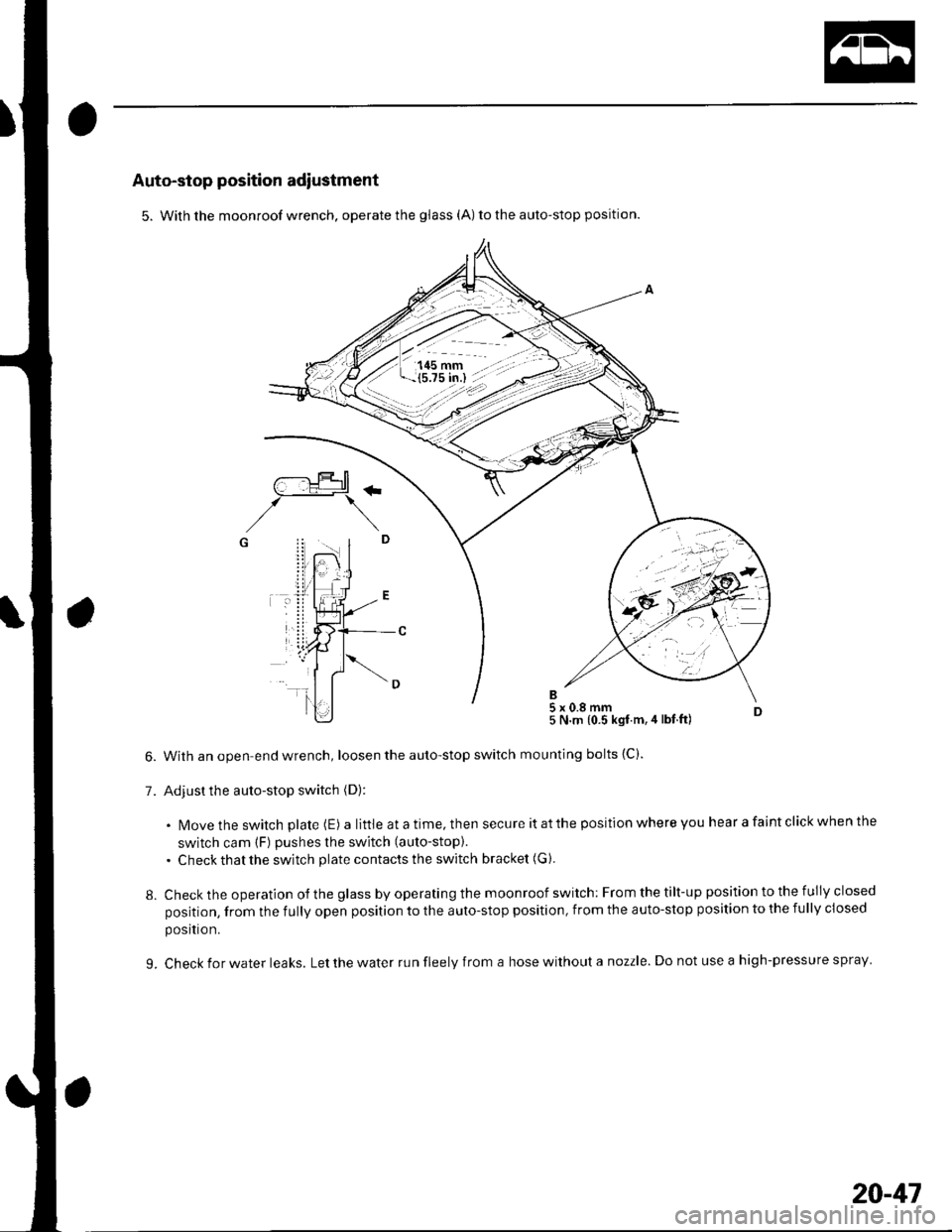
5. With the moonroof wrench. operate the glass (A) to the auto-stop position.
With an open-end wrench, loosen the auto-stop switch
Adjust the auto-stop switch (D):
5 N.m {0.5 kgt.m,4 lbt ft)
mounting bolts (C).
. N4ovethe switch plate (E) alittleatatime,thensecureitatthepositionwhereyouhearafaintclickwhenthe
switch cam (F) pushes the switch (auto-stop).
. Check that the switch plate contacts the switch bracket (G ).
Check the operation of the glass by operating the moonroof switch: From the tilt-up position to the fully closed
position, from the fully open position to the auto-stop position, from the auto-stop position to the fully closed
posltron.
Check for water leaks. Let the water run fleely from a hose without a nozzle. Do not use a high-pressure spray
/--:.!Jtr+rtl\_-_:_t+#1
,/\G i! .. I
7.
8.
L
20-41
Page 702 of 1139
.
2. Closing force check:
. With a shop towel {A) on the leading edge of theglass (B), aftach a spring scale (C)")
Moonroof
\
Closing Force and Opening Drag Check
1. Remove the headliner (see page 20-54).
2. Closing force check:
. With a shop towel {A) on the leading edge of theglass (B), aftach a spring scale (C) as shown.. Have an assistant hold the switch to close theglass while you measure the force required to
stop it.. Read the force as soon as the glass stops moving,
then immediately release the switch and spring
scale.
Closing Force; 200 290 N (20 30 kgf,44 66 tbl)
lf the force in not within specification, remove themoonroof motor (see page 20-41), then check:
. The gear portion and the inner cable for breakageand damage. lf the gear portion is broken,
replace the motor. lf the inner cable is damaged,
remove the frame (see page 20-42), and replace
the cable assembly (see page 20-44).' The moonroof motor (see page 22-112). Ifthe
motor fails to run or doesn't tu rn smoothlv.
replace it (see page 20-41),. The opening drag. Go to step 4.
20-48
4. Opening drag check: Protect the leading edge of theglass with a shop towel (A). Measure the effortrequired to open the glass using a spring scale (B)
as shown.
5.lf the load is over 40 N (4 kgf, 9 lbf), check;
. The side clearance and glass height adjustment(see page 20'37),. For broken or damaged sliding parts. lf any
sliding parts are damaged, replace them.
Page 708 of 1139
Interior Trim
Headliner RemovaUlnstallation
NOTE:. When prying with a flat-tip screwdriver, wrap itwith
protective tape to prevent damage.. Take care not to bend and scratch the headliner.. Be careful not to damage the dashboard and other
interior trim.
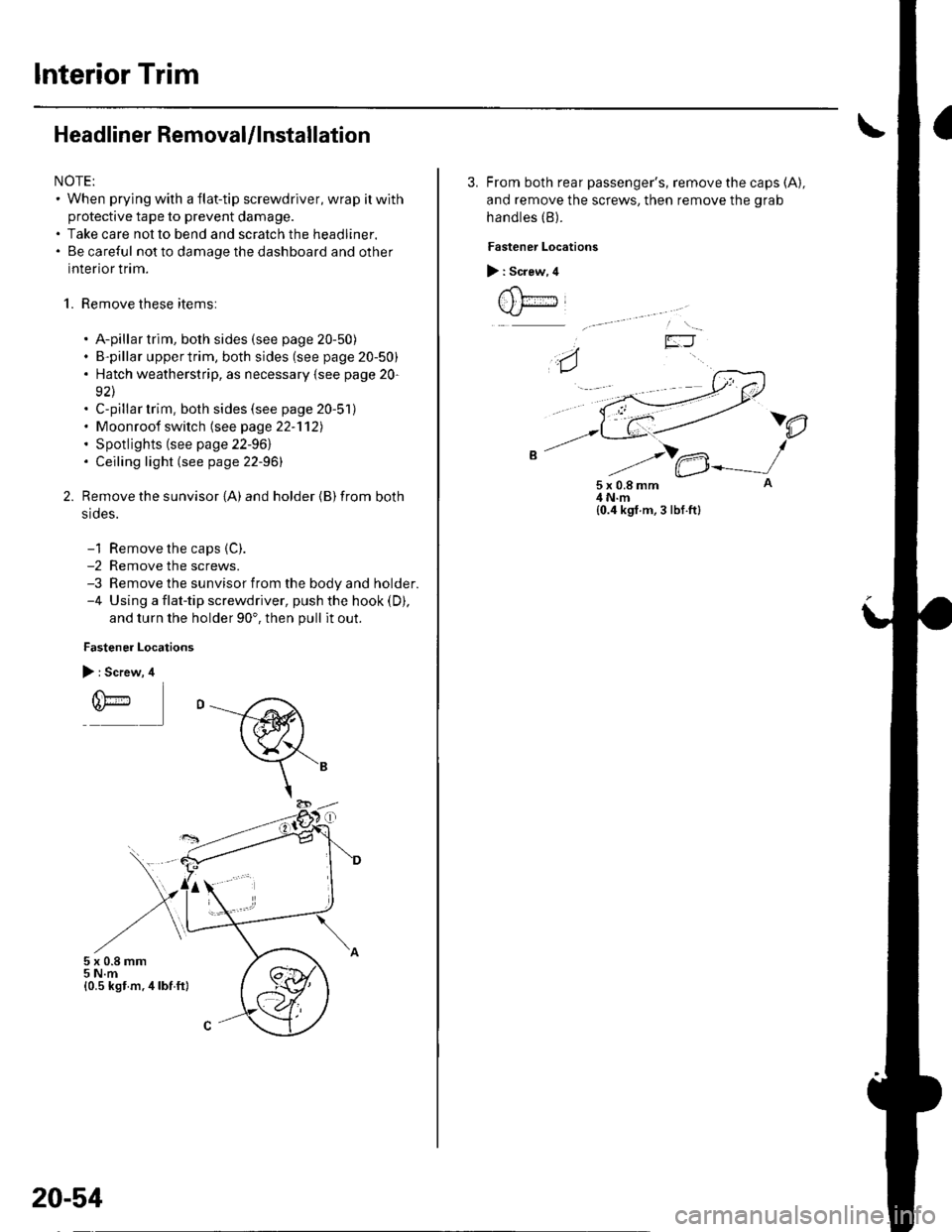
1. Remove these items:
. A-pillar trim, both sides (see page 20-50). B-pillar uppertrim, both sides (see page 20-50). Hatch weatherstrip, as necessary {see page 20-
92\. C-pillar trim, both sides (see page 20-51). Moonroof switch (see page 22-'112). Spotlights (see page 22-961. Ceiling light (see page 22-96)
Remove the sunvisor {A) and holder {B) from both
srdes.
-1 Remove the caps {C).-2 Remove the screws.-3 Remove the sunvisor from the body and holder.-4 Using a flat-tip screwdriver, push the hook (D),
and turn the holder 90'. then pull it out.
Fastener Locations
> : Screw, 4
r(\'-r)*
5x0.8mm5 N.m{0.5 kst m.4lbf ft}
20-54
3. From both rear passenger's, remove the caps (A),
and remove the screws, then remove the grab
handles (B).
Fastener Locations
> : Screw, 4
t , t;---iJ
)e
5x0.8mm4 N.m{0.4 kgf.m, 3 lbf.ft}
Page 709 of 1139
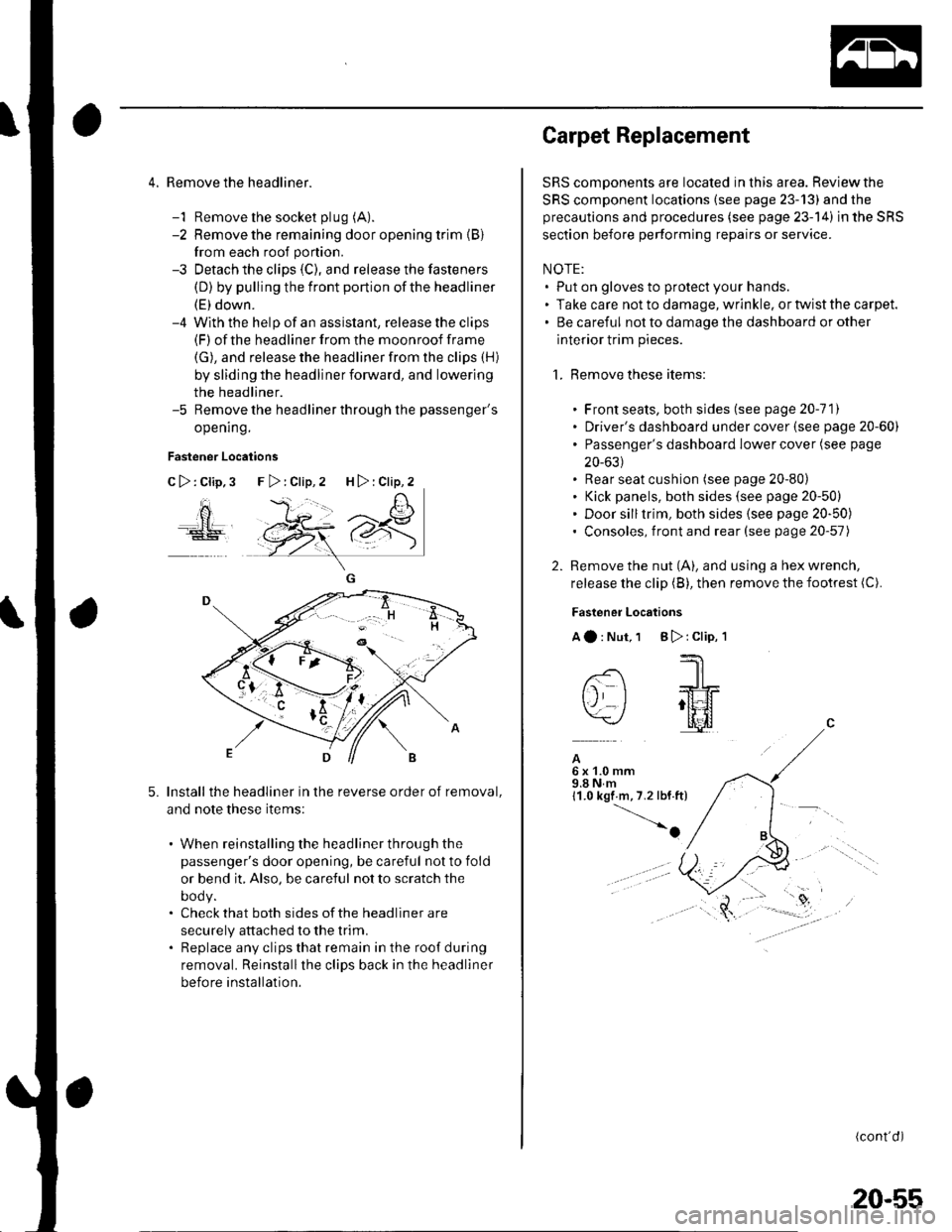
4. Remove the headliner.
-1 Remove the socket plug (A).
-2 Remove the remaining door opening trim {B}
from each roof portion.
-3 Detach the clips (C), and release the fasteners
(D) by pulling the front portion ofthe headliner
(E) down.-4 With the help of an assislant, release the clips(F) of the headliner from the moonroof frame
(G), and release the headliner from the clips (H)
by sliding the headliner forward, and lowering
the headliner.-5 Remove the headliner through the passenger's
opening.
Fastener Locations
C>:Clip,3
ao
5.Install the headliner in the reverse order of removal,
and note these items:
. When reinstalling the headliner through the
passenger's door opening, be careful not to fold
or bend it, Also, be careful not to scratch the
DOOy.. Check that both sides of the headliner are
securely attached to the trim.. Replace any clips that remain in the roof during
removal. Reinstallthe clips back in the headliner
before installation.
F>:Clip,2 H>:Clip,2
Carpet Replacement
SRS components are located in this area. Reviewthe
SRS component locations (see page 23-13) and the
precautions and procedures (see page 23-14) in the SRS
section before performing repairs or service.
NOTE:. Put on gloves to protect your hands.. Take care not to damage, wrinkle. or twist the carpet.. Be careful not to damage the dashboard or other
interior trim pieces.
1. Remove these items:
. Front seats, both sides (see page 20-111. Driver's dashboard under cover (see page 20-60). Passenger's dashboard Iower cover (see page
20-631. Rear seat cushion (see page 20-80). Kick panels, both sides (see page 20-50). Door silltrim, both sides (see page 20-50). Consoles, front and rear (see page 20-57)
2. Remove the nut (A), and using a hex wrench,
release the clip (B), then remove the footrest (C).
Fastener Locations
Aa:Nut,1 B):Clip,'l
--'1 I
-- -JrL
tj I ;tt4f=\-/ l[il
A6x1.0mm9.8Nm11.0 kgf m,7.2 lbf.ft)
-o
(cont'd)
20-55
Page 721 of 1139
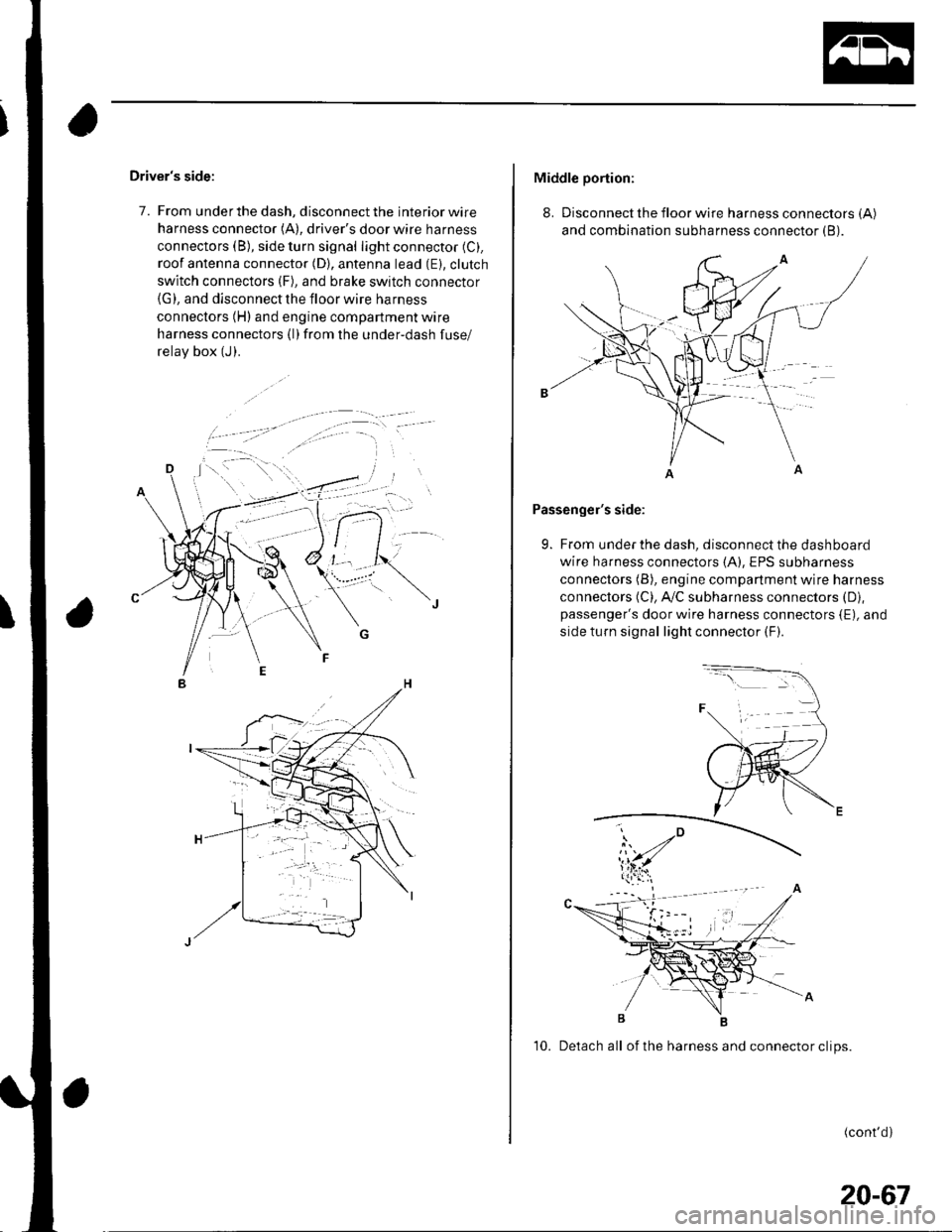
Driver's side:
7. From under the dash, disconnect the interior wire
harness connector (A), driver's door wire harness
connectors (B), side turn signal light connector (C).
roof antenna connector (D), antenna lead (E). clutch
switch connectors (F), and brake switch connector(G), and disconnect the floor wire harness
connectors (H) and engine compartment wire
harness connectors (l)from the under-dash fuse/
relav box (J).
Middle portion:
8. Disconnect the floor wire harness connectors (A)
and combination subharness connector (B).
Passenger's side:
9. From under the dash, disconnect the dashboard
wire harness connectors (A), EPS subharness
connectors (B), engine compartment wire harness
connectors (C), A,/C subharness connectors (D),
passenger's door wire harness connectors {E), and
side turn signal light connector (F).
10. Detach all of the harness and connector clips.
(cont'd)
20-67
Page 751 of 1139
1.
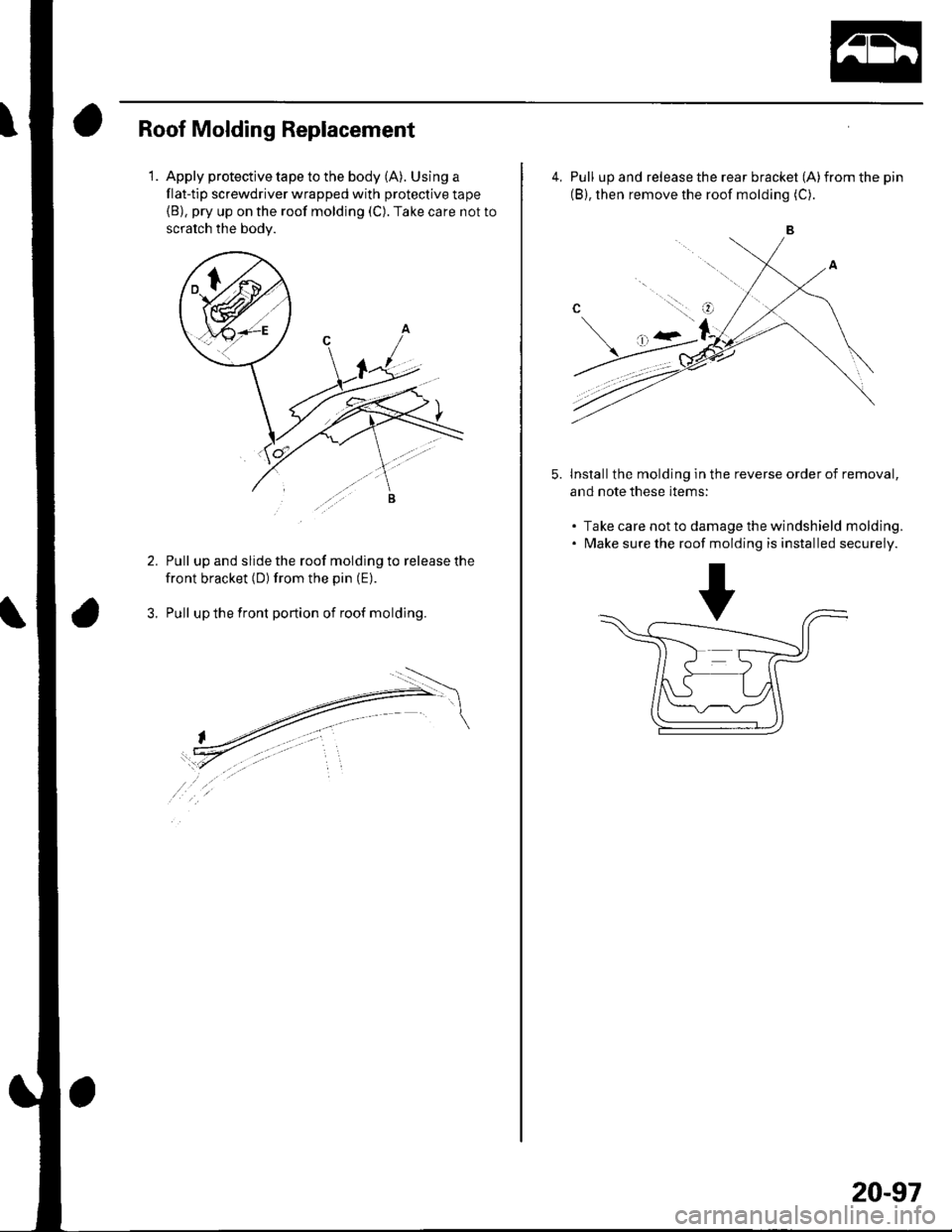
Roof Molding Replacement
Apply protective tape to the body (A). Using a
flat-tip screwdriver wrapped with protective tape(B), pry up on the roof molding (C). Take care not to
scratch the bodv.
Pull up and slide the roof molding to release the
front bracket (D) from the pin (E).
Pull up the front portion of roof molding.
4, Pull up and release the rear bracket (A)from the pin
(B), then remove the roof molding (C).
Install the molding in the reverse order of removal,
and note these items:
. Take care not to damage the windshield molding.. Make sure the roof molding is installed securely.
5.
..:.::.l. g
20-97
Page 831 of 1139
\Body Electrical
Body ElectricalSpecialToolsGeneral Troubleshooting tntorrnaiion.'......
Relay and Control Unit Locations .....
Connectors and Harnesses
Fuse/Relay Boxes ...............................
Power Distribution .............................
Ground Distribution ...........................
Under-dash Fuse/Relay Box ..............
Battery ..............
Relays ................
*lgnition Switch ..............
*Gauges
Component Location Index .......................Self-diagnostic Procedure ..........................Circuit DiagramGauge Bulb Replacement ..........................Gauge Assembly ReplacementCoolant Temperature
Gauge Troubleshooting .... ....................Vehicle Speed Signal CircuitTroubleshootingVSS Replacement
Exterior LightsComponent Location Index .......................Circuit DiagramDaytime Running Lights ControiUnit Input Test (Canada) ........................Headlight Ad,ustment .................. .. .....Headlighr Replacement ..............................Combination Light SwitchTest/ReplacementBulb ReplacementTaillight Replacement ..........................High Mount Brake Light Replacement ......License Plate Light Replacement ..............Side Marker Light Replacement ................Brake Pedal Position Switch Test ..............Side Turn Signal Light Replacement ........
Turn Signal/HazardFlasher SystemComponent Location Index .......................Circuit DiagramTurn Signal/Hazard Relay lnputTest ........Hazard Warning Switch Test
22,3
22-7
22-13
22-44
22-46
22-4A
22-49
22-50
22-51
22-53
22-5422-5622-5422 6322-64
22-64
22-6522 61
22-6822--71
22-7 622-7422-79
22-AO22-4122-8222-4222-4322-4322-4422-84
22-8522 A622-8722-88
22-10422-105
22-10622-107
Entry Lights control systemComponent Location Index ....................... 22-89Circuit Diagram ......... 22 90lgnition Key Switch Test .....................,...... 22-9'llgnition Key Light Test ............................... 22-91Control Unit Input Test ..........,.................... 22 92
Interior LightsComponent Location Index ....................... 22-94Circuit Diagram ......... 22-95Ceiling LighVSpotlightsTesVReplacement ................................... 22-96Rear Ceiling Light TesVReplacem ent ........ 22-96Cargo Area Light Test/Replacem ent ......... 22-97Hatch Latch Switch Test ..,..,....................... 22-97
*Audio SystemComponent Location Index ....................... 22-98Circuit Diagram ......... 22,99Audio Unit Removal/lnstallation ............... 22-1OOAudio Unit Connector Replacement ......... 22-101Speaker Replacement ................................ 22-102Roof Antenna Rep1acement ....................-.. 22-103
Rear Window DefoggerComponent Location Index ...........Circuit Diasram .. ....... .. ..... ....... ...:::::.::.::.Function TestDefogger Wire Repair .................................Noise Condenser CapacityTest ................
MoonroofComponent Location Index ....................... 22-1OBCircuit Diagram ......... 22-109Moonroof Control Unit Input Test ............. 22-'l10Switch TesVReplacement ........,.....,........... 22-1 12Motor Test ................. 22-112Limit Swilch Test ...... 22-'l'13Auto-stop Switch Test ................................ 22-1 13
Power MirrorsComponent Location Index ....................... 22-114Circuit Diagram ......... 22-115Function Test ............. 22-116Power Mirror Switch Test .......................... 22-ll7Power Mirror Actuator Test ....................... 22-117Power Mirror Actuator Replacement ........ 22-11A
* HornsComponent Location Index ....................... 22-120Circuit Diagram ......... 22-121Horn TesVReplacement ...........................-. 22-122Horn Switch Test .,.... 22-122
\
Page 836 of 1139
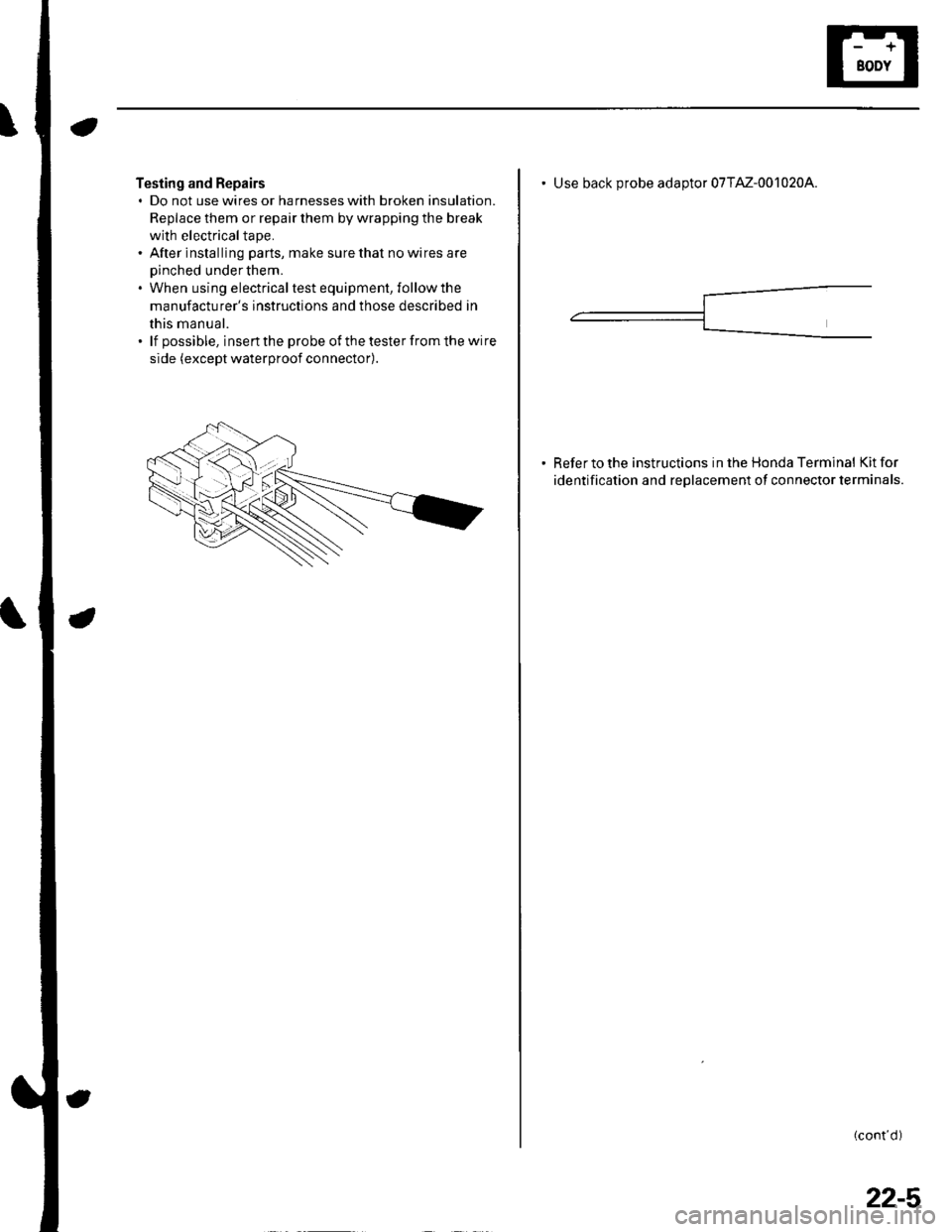
Testing and Repairs. Do not use wires or harnesses with broken insulation.
Replace them or repair them by wrapping the break
with electricaltape.. After installing parts, make sure that no wires are
oinched under them.. When using electricaltest equipment, followthe
manufacturer's instructions and those described in
this manual.. lf possible, insertthe probe of thetesterfromthe wire
side (except waterproof connector).
Use back Drobe adaotor 07TM-0010204.
Refer to the instructions in the Honda Terminal Kit for
identification and reolacement of connector terminals.
(cont d)
22-5