limit HONDA CIVIC 2003 7.G Owner's Guide
[x] Cancel search | Manufacturer: HONDA, Model Year: 2003, Model line: CIVIC, Model: HONDA CIVIC 2003 7.GPages: 1139, PDF Size: 28.19 MB
Page 160 of 1139
Engine Block
Piston Ring Replacement (cont'd)
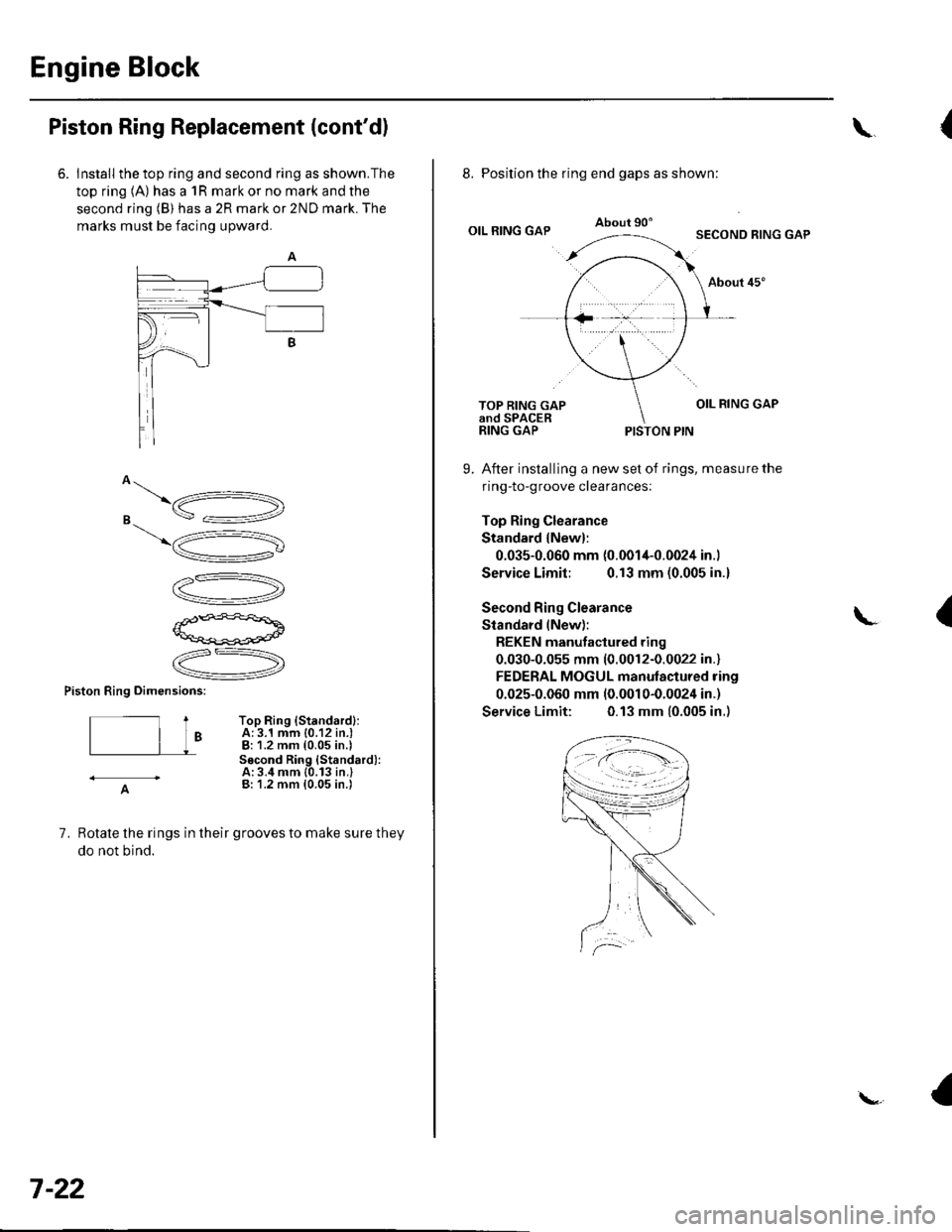
6. Install the top ring and second ring as shown.The
top ring (A) has a 1R mark or no mark and the
second ring (B) has a 2R mark or 2ND mark. The
marks must be facing upward.
o\,"16.
s =:-=2
\5
V"
12-)V
P'ffi+a\aq*-pogd
.ZR,
V
Piston Ring oimensions:
t ToP Ring {Standardl:| | o A: 3.1 mm {0.12 in.l
| | J - B:1.2 mm {0.05 in.)Socond Ring {Standard):A:3.4 mm {0.13 in.}- A- B:'1.2 mm (0.05 in.i
7, Rotate the rings in their grooves to make sure they
do not bind.
7-22
\{
8. Position the ring end gaps as shown:
OIL RING GAPAbout 90'SECOND RING GAP
About 45"
OIL RING GAPTOP RING GAPand SPACERRING GAPPISTON PIN
9. After installing a new set of rings, measure the
ring-to-groove clearances:
Top Ring Clearance
Standard {New}:
0.035-0.060 mm {0.0014-0.0024 in.)
Service Limit: 0.13 mm (0.005 in.)
Second Ring Clearance
Standard lNew):
REKEN manutactured ring
0.030-0.055 mm (0.0012-0.0022 in.)
FEDERAL MOGUL manulactured ring
0.025-0.060 mm (0.001 0-0.0024 in.)
Service Limit: 0.13 mm (0.005 in.)
{
Page 176 of 1139
Engine Lubrication
Oil Pump Overhaul {cont'dl
Oil Pump Inspection
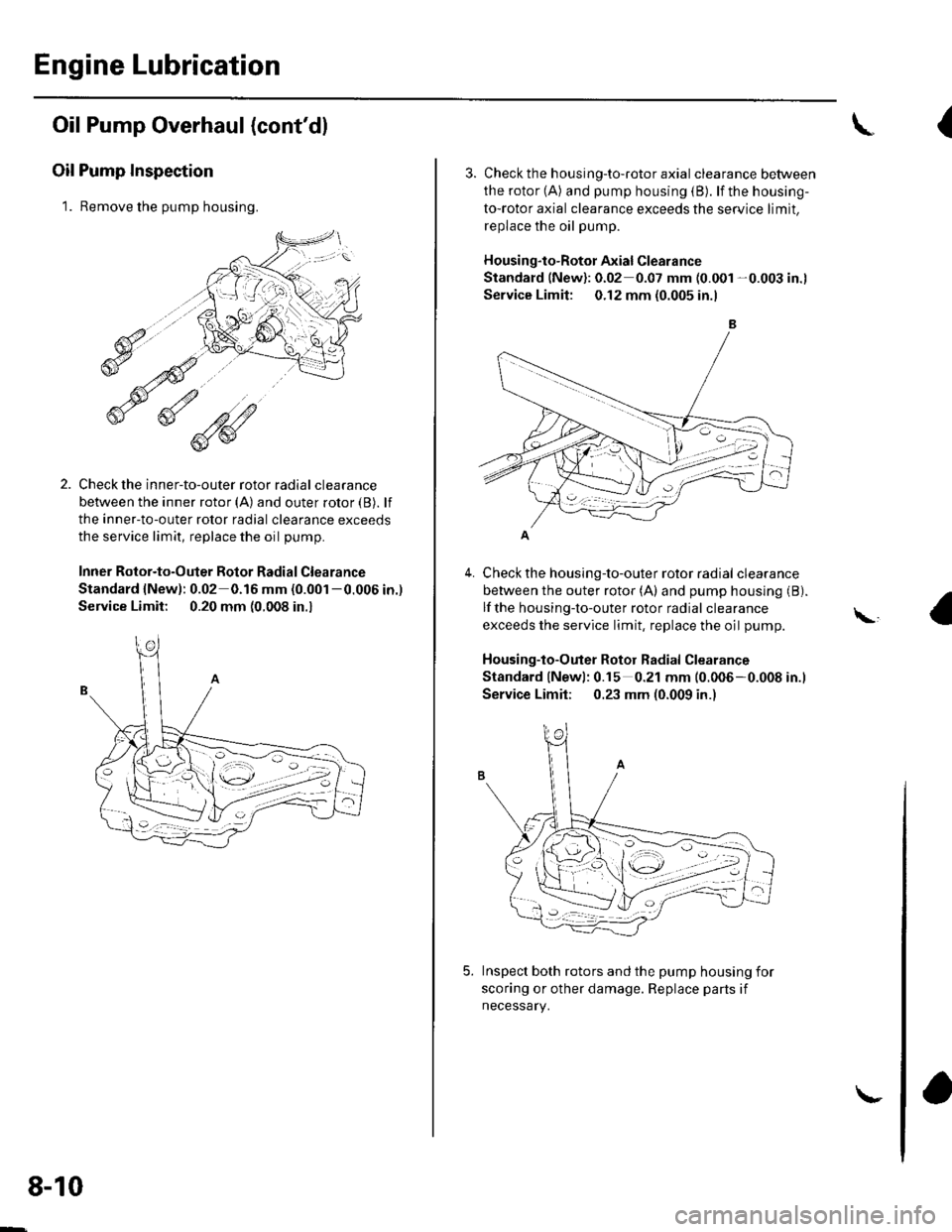
1. Remove the pump housing.
Check the inner-to-outer rotor radial clearance
between the inner rotor (A) and outer rotor {B). lf
the inner-to-outer rotor radial clearance exceeds
the service limit, replace the oil pump.
Inner Rotor-to-Outer Botor Radial Clearance
Standard {New): 0.02 0.16 mm (0.001 -0.006 in.)
Service Limit: 0.20 mm (0.008 in.,
1'[1e-\1.-,-2
1 'a - :.: ,-'r'
8-10
\-
{
4.
3. Check th e h ousing-to-roto r axia I clearance between
the rotor (A) and pump housing (B). lf the housing-
to-rotor axial clearance exceeds the service limit.
replace the oil pump.
Housing"to-Rotor Axial Clearance
Standard (New): 0.02 0.07 mm (0.001 -0.003 in.l
Service Limit: 0.12 mm (0.005 in.l
Check the housing-to-outer rotor radial clearance
between the outer rotor (A) and pump housing (B).
lf the housing-to-outer rotor radial clearance
exceeds the service limit, replace the oil pump.
Housing-to-Outer Rotor Radial Clearance
Standard lNewl: 0.15 0.21 mm (0.006-0.008 in.l
Service Limit; 0.23 mm (0.009 in.)
Inspect both rotors and the pump housing for
scoring or other damage. Replace parts if
necessary.
\,
Page 177 of 1139
1.
Balancer Shaft Inspection
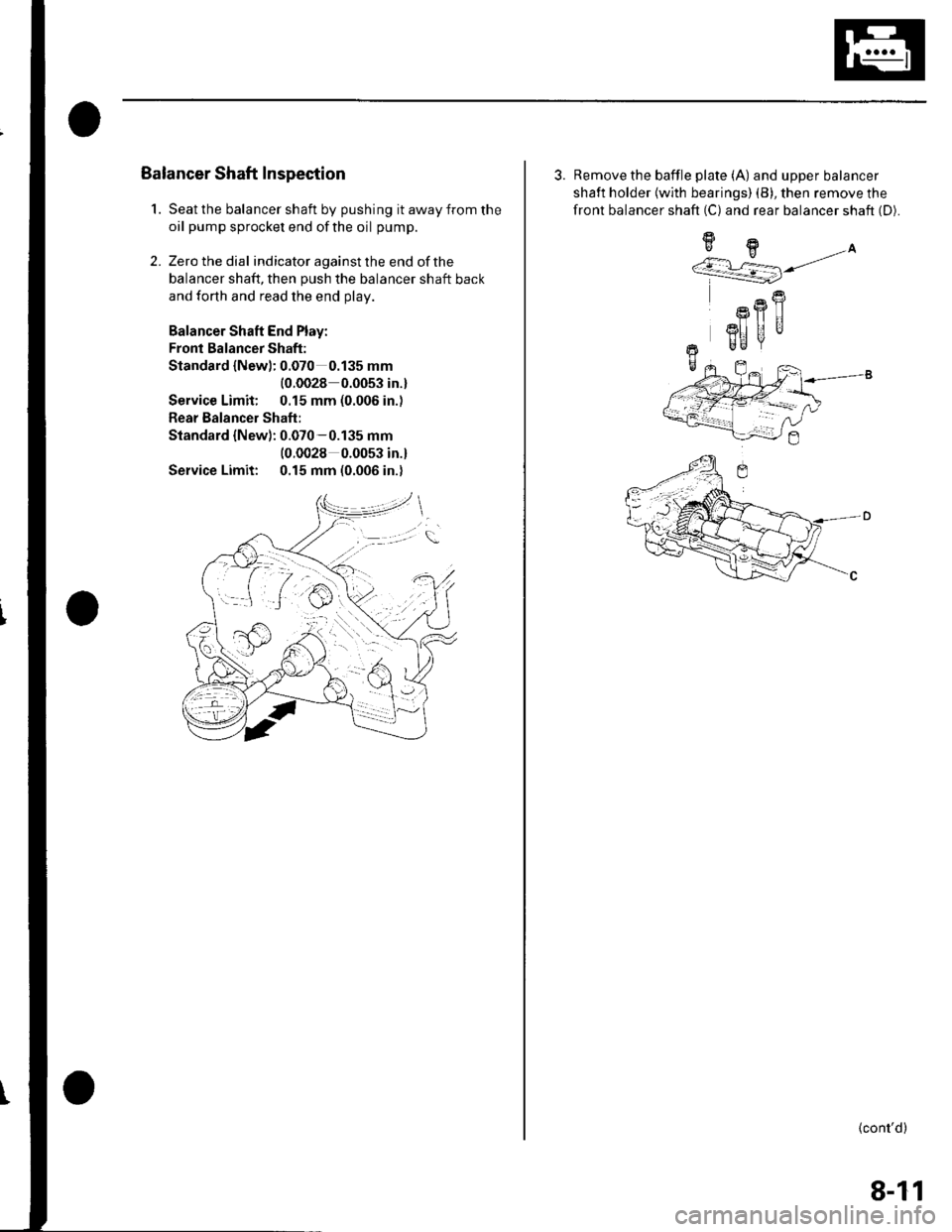
Seat the balancer shaft by pushing it away from the
oil pump sprocket end ofthe oil pump.
Zero the dial indicator against the end of the
balancer shaft, then push the balancer shaft back
and forth and read the end olav.
Balancer Shaft End Play:
Fronl Balancer Shaft:
Standard {Newl: 0.070 0.135 mm
{0.0028 0.0053 in.}
Service Limit: 0.15 mm (0.006 in.)
Rear Balancer Shaft:
Standard {New): 0.070-0.135 mm(0.0028 0.0053 in.l
Service Limit: 0.15 mm (0.006 in.)
2.
3. Remove the baffle plate (A) and upper balancer
shaft holder {with bearings) (B), then remove the
front balancer shaft (C) and rear balancer shaft (D).
9H.A''/.r L=] j/
R
Rfl|]
3I] UUr Be
+-
(cont'd)
8-11
Page 178 of 1139
Engine Lubrication
Oil Pump Overhaul (cont'dl
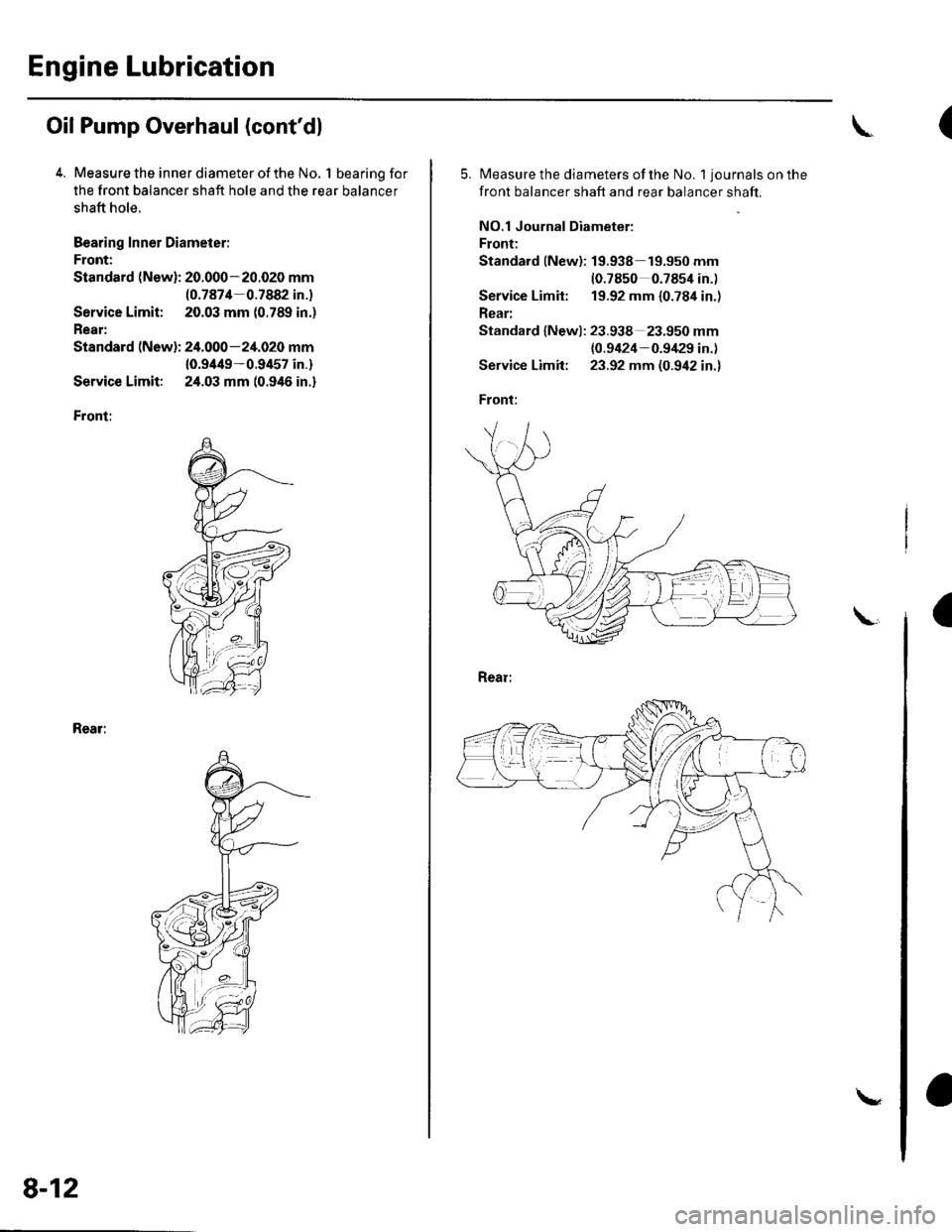
4. Measure the inner diameter of the No. 1 bearing for
the front balancer shaft hole and the rear balancer
shaft hole.
Bearing Inner Diameier:
Front:
Standard (New): 20.000-20.020 mm(0.7874 0.7882 in.)
Service Limit; 20.03 mm (0.789 in.)
Rear:
Standard (New): 24.000-24.020 mm
10.9/t49-0.9457 in.)
Service Limit: 24.03 mm (0.946 in.)
Front:
Rear:
8-12
\
(
5.Measure the diameters of the No. 1 journals on the
front balancer shaft and rear balancer shaft.
NO.1 Journal Diameter:
Front:
Standard lNew): 19.938 19.950 mm(0.7850 0.7854 in.)
Service Limit: 19.92 mm {0.784 in.)
Rear:
Standard lNewl: 23.938 23.950 mm
{0.9424-0.9/129 in.)
Service Limit: 23.92 mm (0.942 in.)
Front:
a
Page 179 of 1139
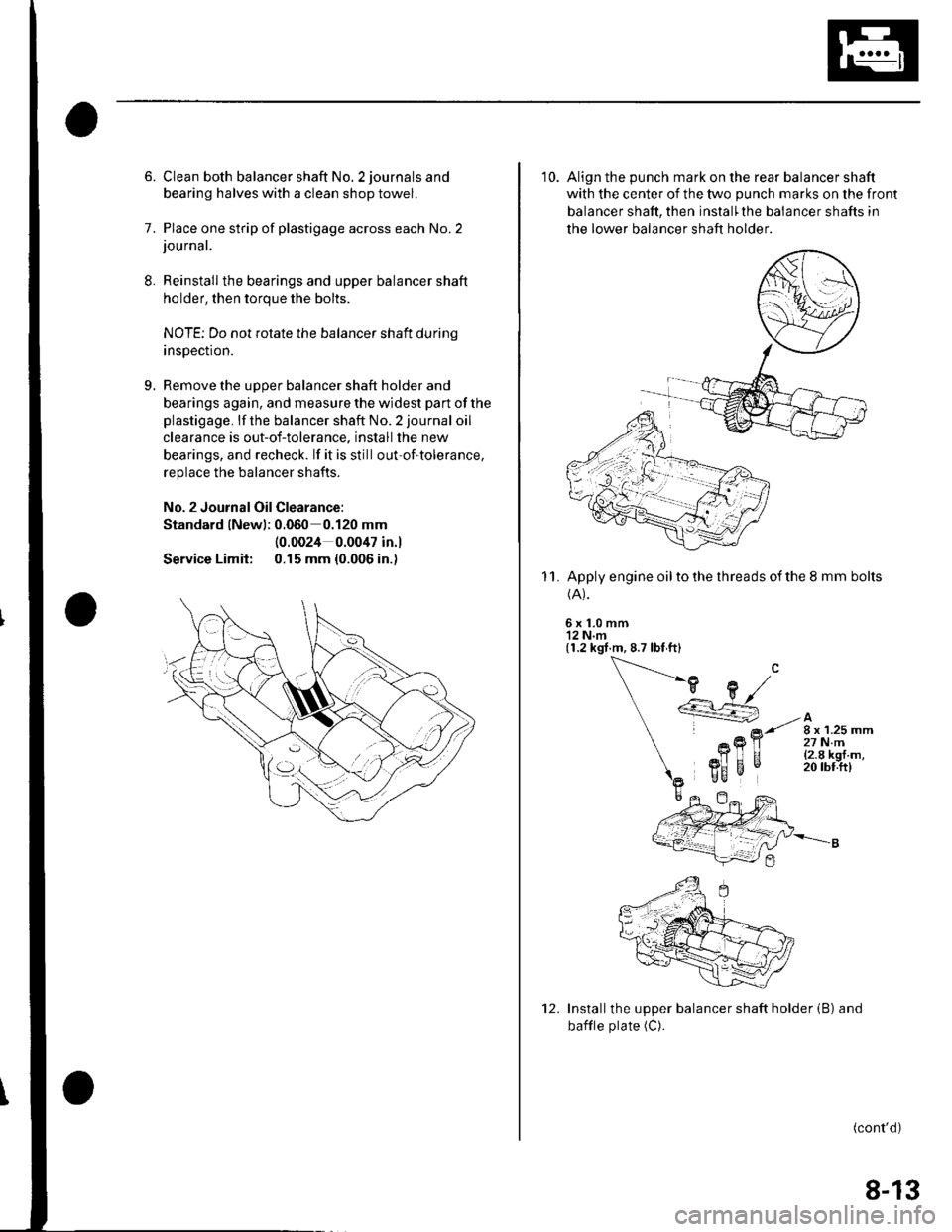
8.
9.
6. Clean both balancer shaft No. 2 journals and
bearing halves with a clean shop towel.
7. Place one strip of plastigage across each No.2journal.
Reinstall the bearings and upper balancer shaft
holder, then torque the bolts.
NOTE; Do not rotate the balancer shaft durinq
insDection.
Remove the uooer balancer shaft holder and
bearings again, and measure the widest part of the
plastigage. lf the balancer shaft No. 2 journal oil
clearance is out-of-tolerance. install the new
bearings, and recheck. lf it is still out-of-tolerance,
replace the balancer shafts.
No. 2 Journal Oil Clearance:
Standard lNewl; 0.060 0.120 mm
Service Limit:
(0.0024 0.0047 in.l
0.15 mm {0.006 in.)
10. Align the punch mark on the rear balancer shaft
with the center of the two punch marks on the front
balancer shaft, then install'the balancer shafts in
the lower balancer shaft holder
Apply engine oil to the threads of the 8 mm bolts(A).
6x1.0mm'12 N.m(1.2 kgt.m, 8.7 lbt ft)
11.
Installthe upper balancer shaft holder (B) and
bafile plate (C).
(cont'd)
12.
8-13
Page 262 of 1139
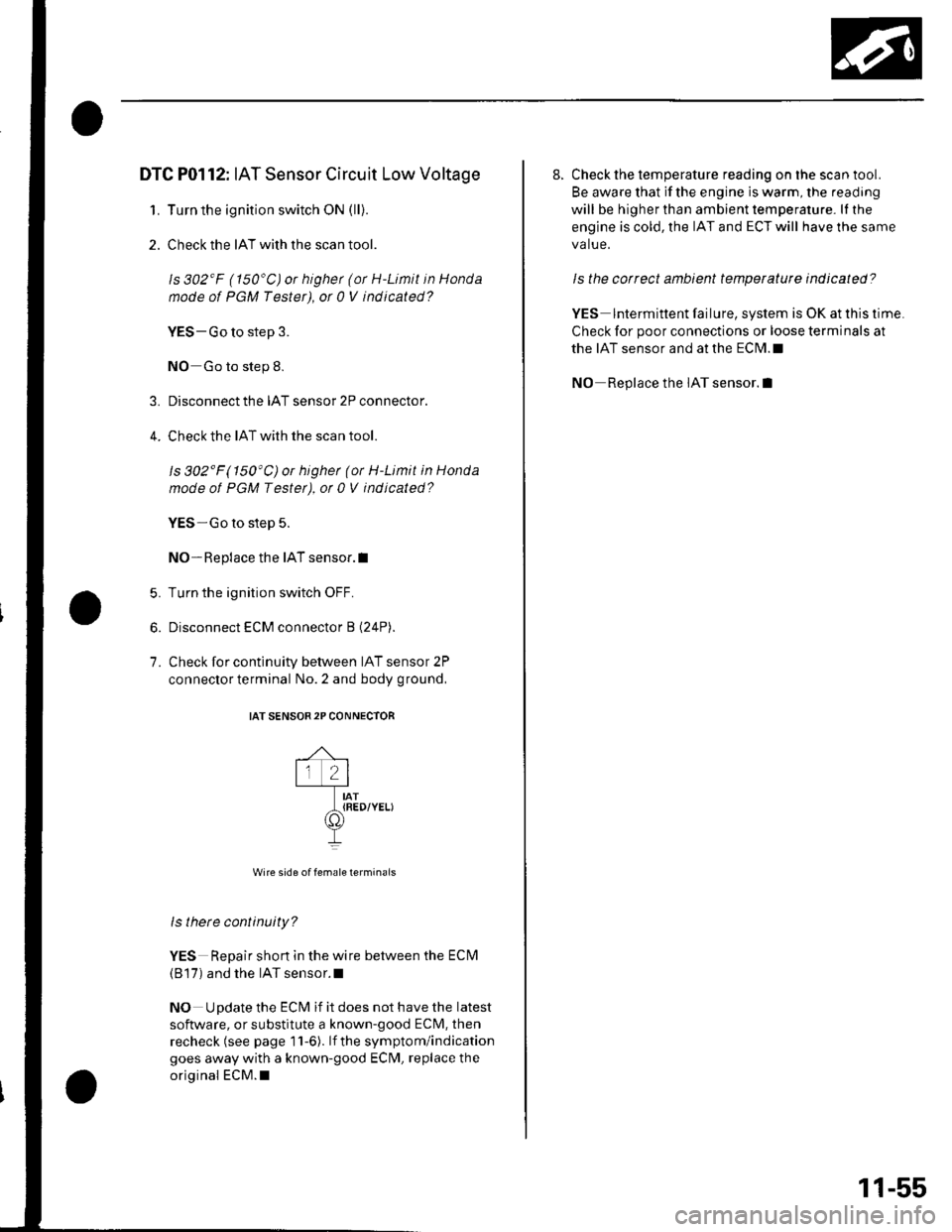
4.
DTC P0112: IAT Sensor Circuit Low Voltage
1. Turn the ignition switch ON (ll).
2. Check the IAT with the scan tool.
ls 302'F (150'C) or highet (or H-Limit in Honda
node of PGM Tester), ot 0 V indicated?
VES-Go to step 3.
NO Go to step 8.
Disconnect the IAT sensor 2P connector.
Check the IAT with the scan tool.
ls 302'F(150'C)or higher (or H-Limit in Honda
mode of PGM Testet), ot 0 V indicated?
YES-Go to step 5.
NO- Replace the IAT sensor.I
Turn the ignition switch OFF.
Disconnect ECM connector B (24P).
Check for continuity between IAT sensor 2P
connector terminal No. 2 and body ground,
IAT SENSOR2P CONNECTOR
,^ ,lr 2lt-l-----Tr---IAT_t{RED/YELI
II
Wire side of female terminais
ls there continuity?
YES Repair shon in the wire between the ECM
(B'17) and the IAT sensor.l
NO Update the ECM if it does not have the latest
software, or substitute a known-good ECM, then
recheck (see page 11-6). lf the symptom/indication
goes away with a known-good ECM, replace the
original ECM.I
5.
6.
7.
8. Check the temperature reading on the scan tool.
Be aware that if the engine is warm, the reading
will be higher than ambient temperature. lI the
engine is cold, the IAT and ECT will have the same
va lue.
ls the correct ambient temperature indicated?
YES lntermittent failure, system is OK at this time
Check for poor connections or loose terminals at
the IAT sensor and at the ECM.I
NO Replace the IAT sensor.l
11-55
Page 263 of 1139
PGM-FI System
I
{
(
DTC Troubleshooting (cont'dl
DTC P0113: IAT Sensor Circuit High Voltage
1. Turn the ignition switch ON (ll).
2. Check the IAT with the scan tool.
ls 4'F (-20'C) or less (or L-Limit in Honda
mode ot PGM Tester) or 5 V indicated?
3.
4.
YES-Go to step 3.
NO Intermitent failure, system is OK at this time.
Check for poor connections or loose terminals at
the IAT sensor and at the ECM.I
Turn the ignition switch OFF.
Disconnect the IAT sensor 2P connector.
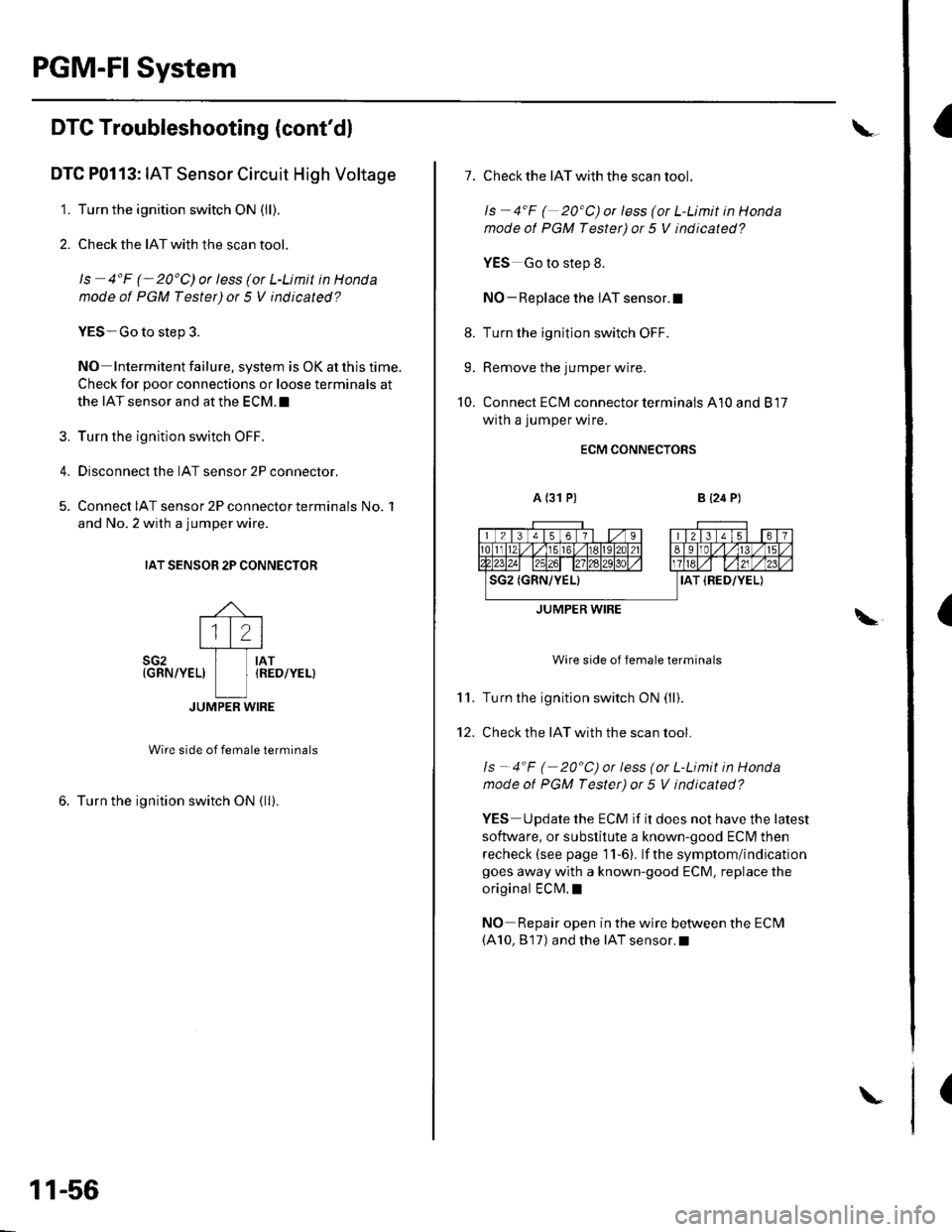
Connect IAT sensor 2P connector terminals No. 1
and No. 2 with a jumper wire.
IAT SENSOR 2P CONNECTOR
rJ-- :---
l'lLl-'_-l--_----r--_
sG2 I rAT{GRN/YEL) I IRED/YEL)
L]JUMPER WIRE
Wire side of female terminals
6. Turn the ignition switch ON {ll).
11-56
\
\
7. Check the IAT with the scan tool.
ls - 4"F ( 20'C) or less (or L-Limit in Honda
mode ot PGM Tester) or 5 V indicated?
YES Go to step 8.
NO - Replace the IAT sensor.l
8. Turn the ignition switch OFF.
9. Remove the jumper wire.
10. Connect ECM connector terminals A10 and 817
with a jumper wire.
ECM CONNECTORS
A (31 P)B {24 P)
Wire side of female terminals
Turn the ignition switch ON (ll).
Check the IAT with the scan tool.
ls - 4"F ( 20"C) or less (or L-Limit in Honda
mode of PGM Tester) or 5 V indicated?
YES Update the ECM if it does not have the latest
software, or substitute a known-good ECI\4 then
recheck (see page 11-6). lf the symptom/indicationgoes away with a known-good ECM. replace the
original ECM. !
NO Repair open in the wire between the ECM(A10, 817) and the IAT sensor.I
\"
11.
12.
JUMPER WIRE
Page 265 of 1139
PGM-FISystem
(
(
(
DTC Troubleshooting (cont'dl
DTC P0117: ECT Sensor Circuit Low Voltage
1. Turn the ignition switch ON (ll).
2. Check the ECT with the scan tool.
ls 150'C (302'F)or higher (ot H-Limit in Honda
mode of PGM Tester) or 0 V indicated?
YES Go to step 3.
NO Intermittent failure, system is OK at this time.
Check for poor connections or loose terminals at
the ECT sensor and at the ECM. t
3. Disconnect the ECT sensor 2P connector.
4. Check the ECT with the scan tool.
ls 150'C (302"F)or higher (ot H-Limit in Honda
mode ot PGM Tester) or 0 V indicated?
YES-Go to step 5.
NO Replace the ECT sensor. !
5. Turn the ignition switch OFF.
6. Disconnect ECM connector B (24P).
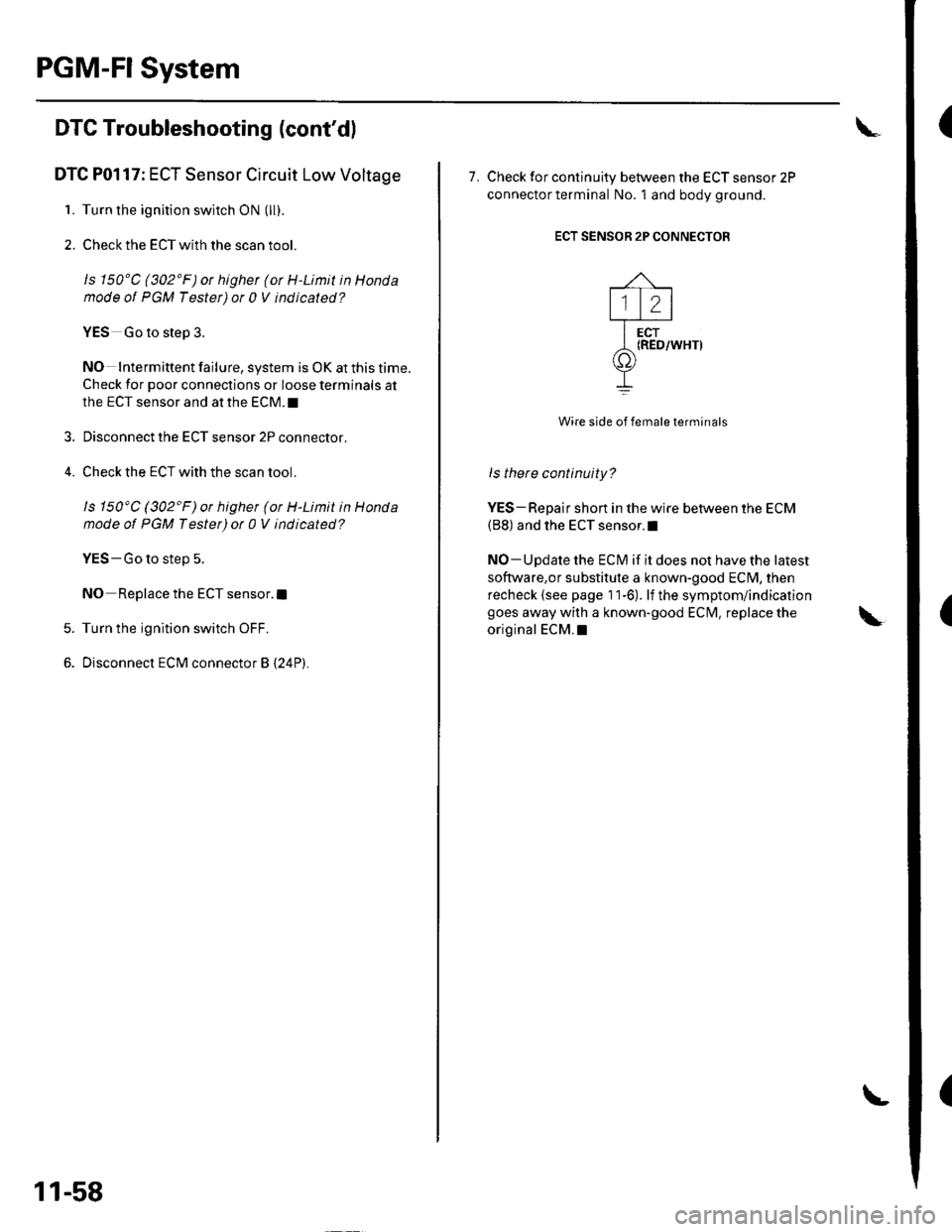
11-58
\
7. Check for continuity between the ECT sensor 2P
connector terminal No. 1 and bodv oround.
ECT SENSOR 2P CONNECTOR
Wire side of female terminals
ls there continuity?
YES-Repair short in the wire between the ECM(B8) and the ECT sensor.l
NO-Update the ECM if it does not have the latest
software,or substitute a known-good ECM, then
recheck {see page 11-6). lf the symptom/indication
goes away with a known-good EClvl, replace the
original ECM.I
Page 266 of 1139
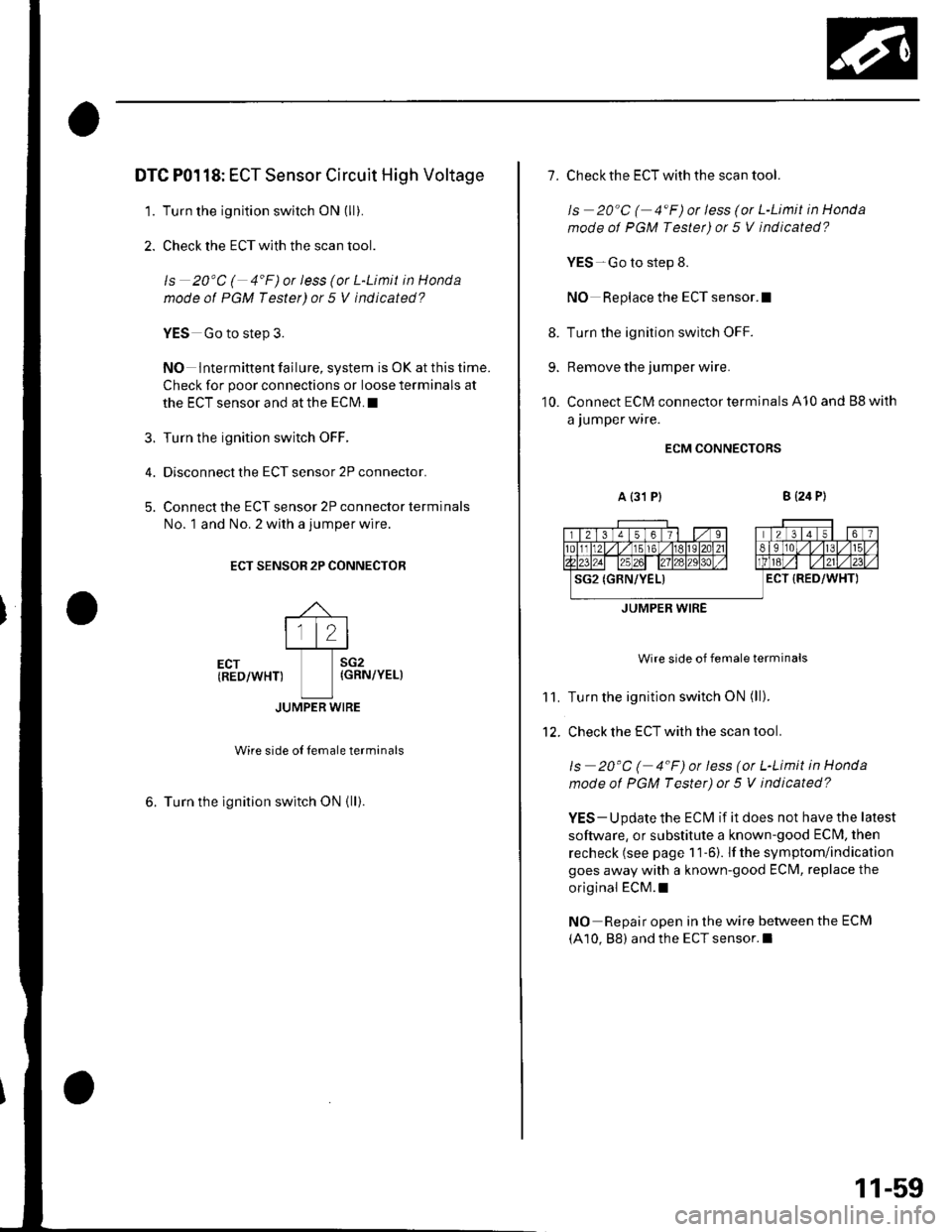
DTC P0118: ECT Sensor Circuit High Voltage
1. Turn the ignition switch ON (ll).
2. Check the ECT with the scan tool.
ls 20'C ( 4'F)or less (or L-Limit in Honda
mode of PGM Tester) or 5 V indicated?
?
5.
YES Go to step 3.
NO lntermittent failure, system is OK at this time.
Check for poor connections or loose terminals at
the ECT sensor and at the ECM. I
Turn the ignition switch OFF.
Disconnect the ECT sensor 2P connector.
Connect the ECT sensor 2P connector terminals
No. 1 and No. 2 with a jumper wire.
ECT SENSOR 2P CONNECTOR
\
ltltltt.l
Ecr
-I-l*,
(RED/WHT) {GRN/YEL)
tlJUMPER WIRE
wire side oI Iemale terminals
6. Turn the lgnition switch ON (ll).
1.
8.
9.
10.
Check the ECT with the scan tool.
ls 20"C ( 4"F)or less (or L-Limit in Honda
mode ot PGM Tester) or 5 V indicated?
YES-Go to step 8.
NO Replace the ECT sensor.I
Turn the ignition switch OFF.
Remove the jumper wire.
Connect ECM connector terminals A10 and Bg with
a jumper wire.
ECM CONNECTORS
a {31 P}B {24 P)
Wire side of female terminals
Turn the ignition switch ON (ll).
Check the ECT with the scan tool.
ls 20"C ( 4"F) or less (or L-Limit in Honda
mode of PGM Tester) ot 5 V indicated?
YES - Update the ECM if it does not have the latest
software, or substitute a known-good ECI\4, then
recheck (see page 1 1-6). If the symptom/indication
goes away with a known-good ECM, replace the
original ECM.I
NO Repair open in the wire between the ECM
(A10, 88) and the ECT sensor.l
11.
12.
JUMPER WIRE
11-59
Page 406 of 1139
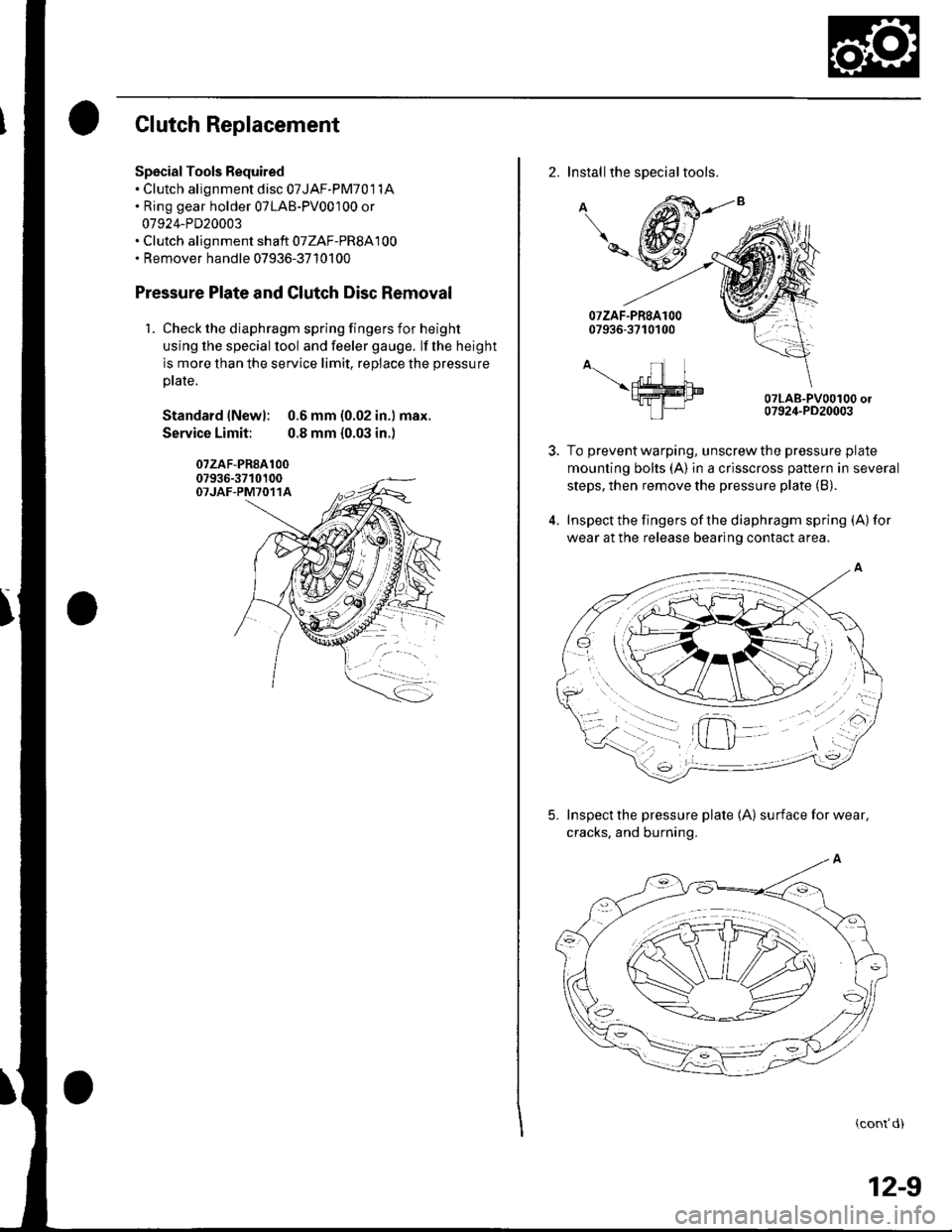
Clutch Replacement
Spscial Tools Required. Clutch alignment disc 07JAF-PM701 1A. Ring gear holder 07LAB-PV00100 or
07924-PD20003. Clutch alignment shaft 07ZAF-PR8A100. Remover handle 07936-3710100
Pressure Plate and Glutch Disc Removal
1. Check the diaphragm spring fingers for height
using lhe special lool and feeler gauge. lf the height
is more than the service limit, replace the pressure
ptate.
Standard lNewl: 0.6 mm (0.02 in.) max.
Service Limit: 0.8 mm {0.03 in.)
07zAF-PR8A10007936-3710100OTJAF-PM7O11A
2. Installthe special tools.
A
\-
A-.- nl I\ffim9fra-I tP|-
07LAB-PV00100 or07924-PD20003
To prevent warping, unscrew the pressure plate
mounting bolts (A) in a crisscross pattern in several
steps, then remove the pressure plate (B).
Inspect the fingers of the diaphragm spring (A) for
wear at the release bearing contact area.
5. Inspect the pressure plate 1A) surfaceforwear,
cracks. and burning.
(cont'd)
12-9