ABS HONDA CIVIC 2003 7.G Repair Manual
[x] Cancel search | Manufacturer: HONDA, Model Year: 2003, Model line: CIVIC, Model: HONDA CIVIC 2003 7.GPages: 1139, PDF Size: 28.19 MB
Page 651 of 1139
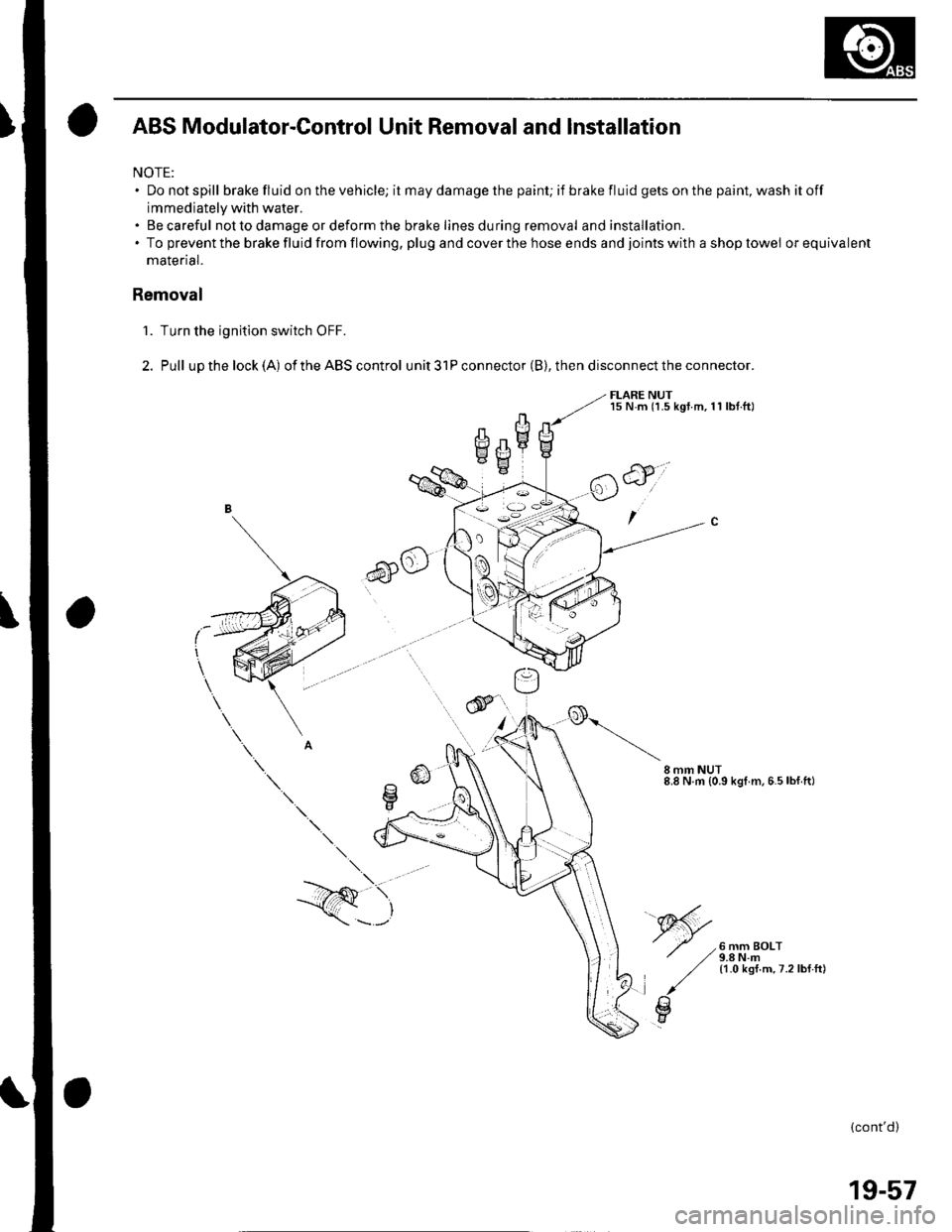
ABS Modulator-Control Unit Removal and lnstallation
NOTE:. Donotspill brake fluid on the vehicle; it may damage the painU if brakefluidgetsonthepaint,washitoff
immediately with water.. Becareful not to damage or deform the brake lines during removal and installation.. To prevent the brake fluid from flowing, plug and cover the hose ends and joints with a shop towel orequivalent
malenal.
Removal
'1. Turn the ignition switch OFF.
2. Pull upthelock(A) oftheABScontrol unit3lPconnector(B),thendisconnecttheconnector.
FLARE NUTl5 N.m (1.5 kgt.m,11 lbt.ftl
6)o
CII mm NUT8.8 N.m {0.9 kgl m.6.5lbf ft)
6 mm BOLT9.8 N.m11.0 ksf.m,7.2lbf.ft)
\.
--/Q \,
\---'
(cont'd)
19-57
Page 652 of 1139
ABS Gomponents
ABS Modulator-Control Unit Removal and Installation {cont'dl
3. Disconnectthe six brake lines.
4. Remove the two I mm nuts.
5. Remove the ABS modulator-control unit (C).
Installation
'1. InstalltheABS modulatorcontrol unit, then tighten the two 8 mm nuts.
2. Align the connecting surface ofthe ABS control unit 3'lP connector.
3. PushinthelockoftheABScontrol unit 31P connector until you hear it click into place. then connect the connector.
4. Connect the six brake Iines.
5. Bleed the brake system, starting with the front wheels.
6. Connect the PGM Tester, and do the solenoid function test for each wheel.
7. Bleed the brake system again, staning with the front wheels.
8. Start the engine, and check that the ABS indicator and brake system indicator go off.
9. Disconnect the Honda PGM Tester. Test-drive the vehicle, and check that the ABS indicator and brake qvqtem
indicator do not come on.
19-58
Page 658 of 1139
Doors
Door Panel Removal/lnstallation
SpecialTools Required
Trim pad remover, Snap-on A 177A or equivalent,
commercially available.
NOTE: When prying with a flat-tip screwdriver, wrap it
with protective tape, and apply protective tape around
the related parts. to prevent damage.
1 . Remove the mirror mount cover (see page 20-15).
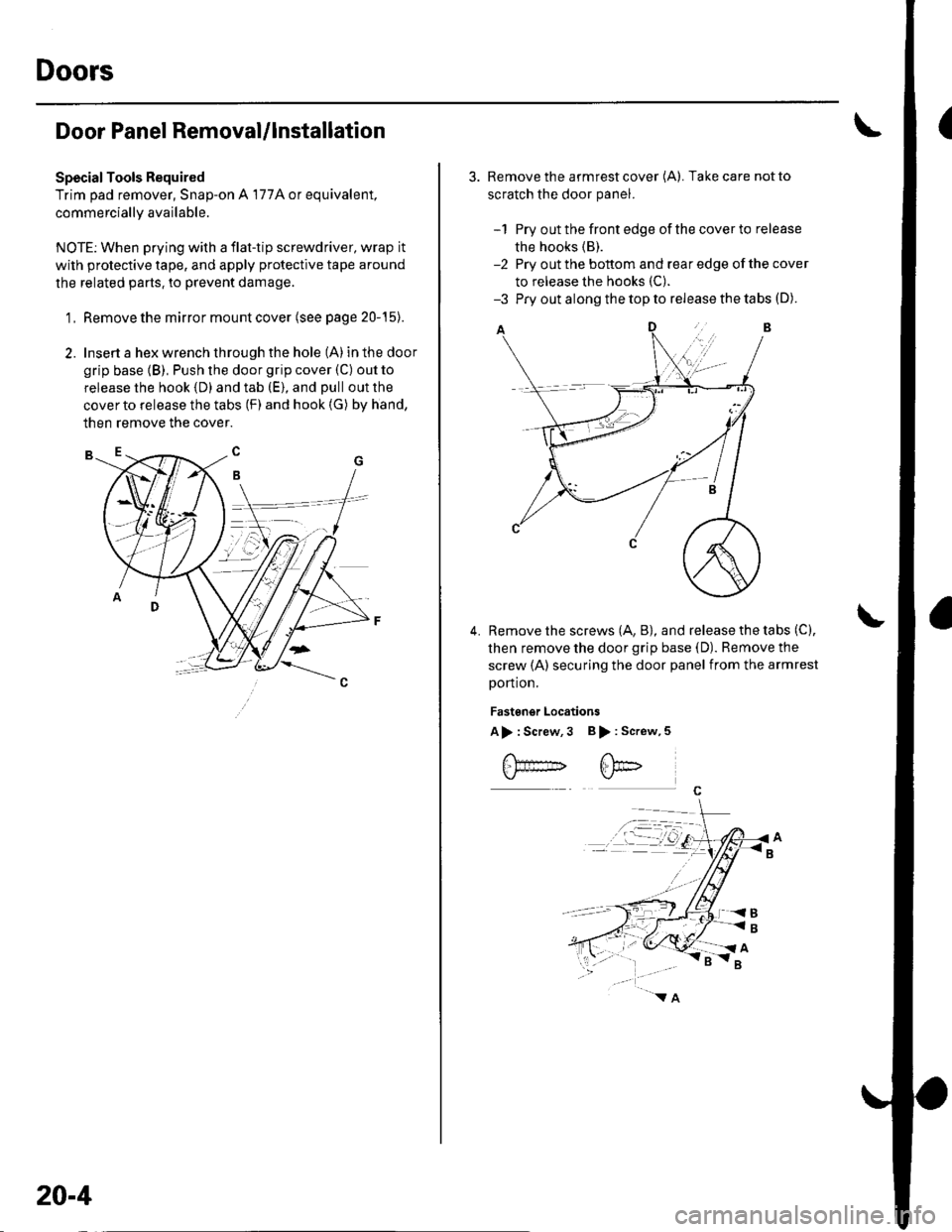
2. Insert a hex wrench through the hole (A) in the door
grip base (B), Push the door grip cover (C) out to
release the hook (D) and tab (E), and pull out the
cover to release the tabs (F) and hook (G) by hand,
then remove the cover.
20-4
3. Remove the armrest cover (A). Take care not to
scratch the door panel.
-1 Pry out the front edge of the cover to release
the hooks (B).
-2 Pry out the bottom and rear edge of the cover
to release the hooks (C).
-3 Pry out along the top to release the tabs (D).
Remove the screws (A, B), and release the tabs (C),
then remove the door grip base (D). Remove the
screw (A) securing the door panel from the armrest
portion.
Fastgngr Locations
A> : Screw,3 B > : Screw,5
4.
Page 731 of 1139
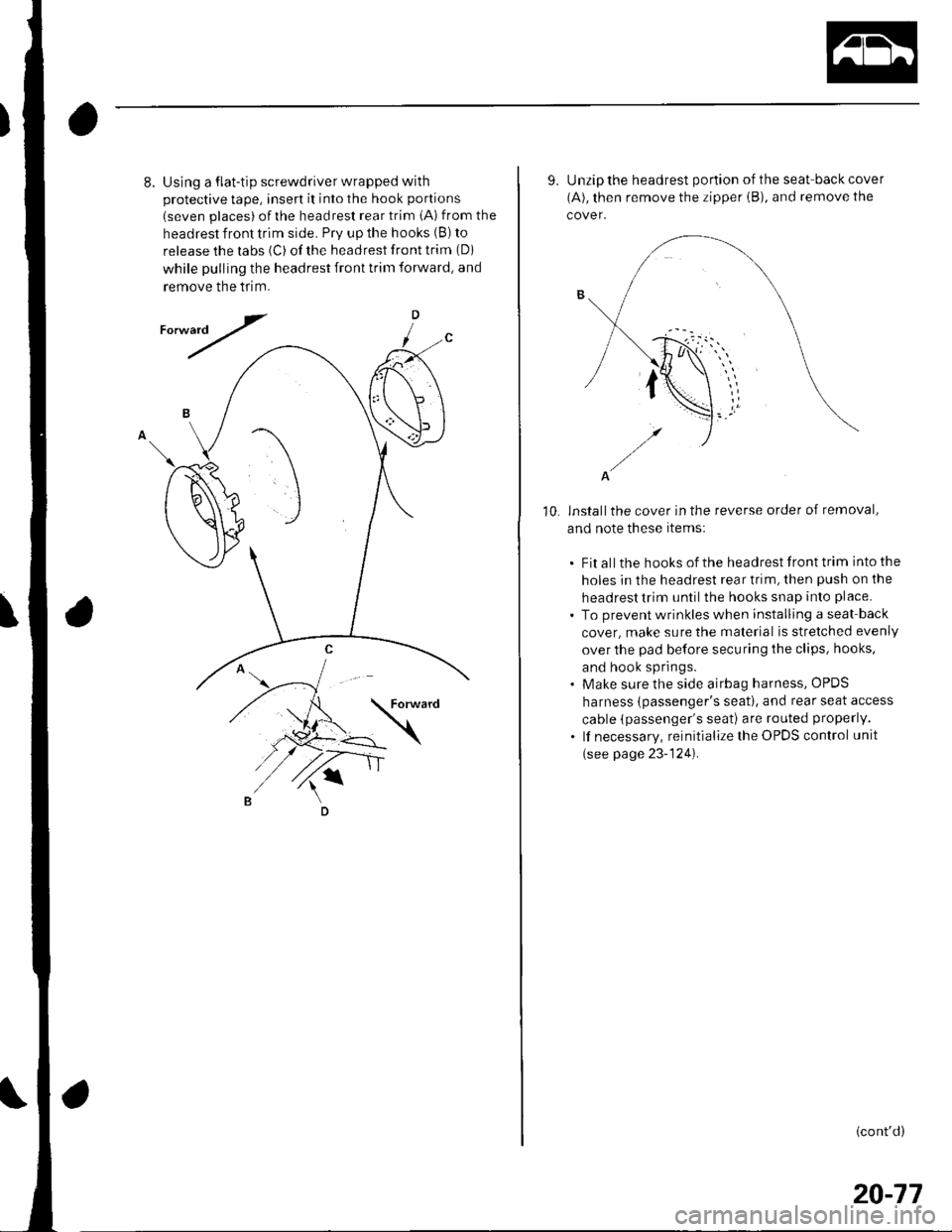
8.Using a flat-tip screwdriver wrapped with
protective tape, insert it into the hook portions
(seven places) ofthe headrest rear trim iA) from the
headrest front trim side. Prv up the hooks (B) to
release the labs (C) of the headrest front trim (Di
while pulling the headrest front trim forward, and
remove the tflm.
D
/
10.
9. Unzip the headrest portion of the seat-back cover
(A), then remove the zipper iB), and remove the
cover.
A
installthe cover in the reverse order of removal,
and note these items:
. Fit all the hooks of the headrest front trim into the
holes in the headrest rear trim, then push on the
headrest trim until the hooks snap into place.
. To prevent wrinkles when installing a seat back
cover, make sure the material is stretched evenly
over the pad before securing the clips, hooks,
and hook springs.. Make sure the side airbag harness, OPDS
harness {passenger's seat). and rear seat access
cable (passenger's seati are routed properly.
. lf necessary, reinitialize the OPDS control unit
(see page 23-124).
(cont'd)
20-77
Page 739 of 1139
Bumpers
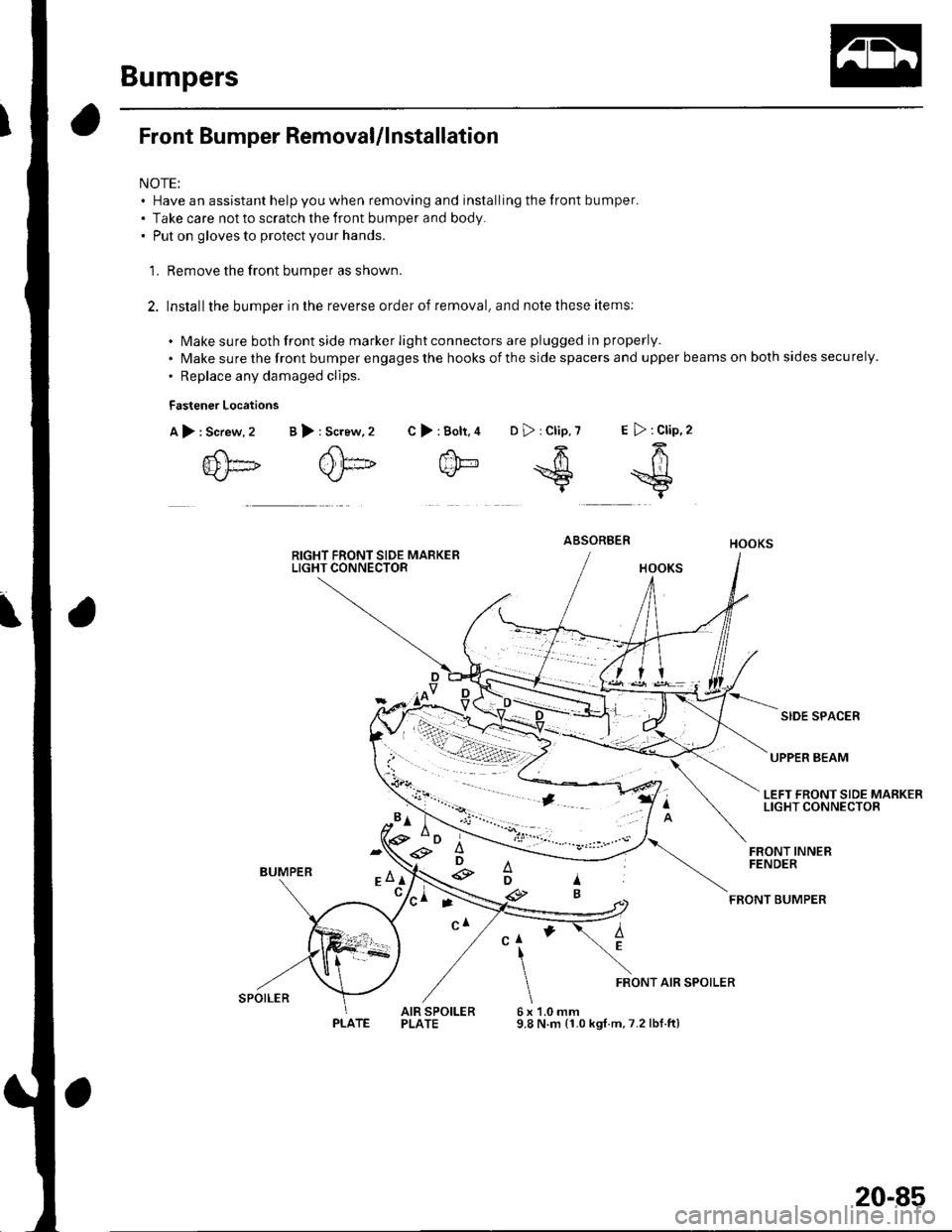
Front Bumper RemovaUlnstallation
NOTE:. Have an assistant help you when removing and installing the front bumper.. Take care not to scratch the front bumper and body.. Put on gloves to protect your hands.
'L Remove the front bumper as shown.
2. Installthe bumper in the reverse order of removal, and note these items:
. Make sure both front side marker light connectors are plugged in properly.
. Make sure the front bumper engages the hooks of the side spacers and upper beams on both sides securely.
. Replace any damaged clips.
Fastener Locations
A),Screw, 2
{D[]
>:Bolt.4 D>:Clip,7 E >:Clip,2
f'h-64k/- *S =$t
B >: Screw,2 C
ABSORBER
SIDE SPACER
UPPER BEAM
LEFT FRONT SIDE MARKERLIGHT CONNECTOR
BUMPER
FRONT INNERFENDER
FEONT BUMPER
AEClI
6x9.8
FRONT AIR SPOILER
AIR SPOILERPLATE1.0 mmN.m (1.0 kgt.m,7.2 lbf.ft)
'*D ;e3
e
ti-\
SPOILER
PLATE
20-85
Page 813 of 1139
Heating and Air Gonditioning
a
1.
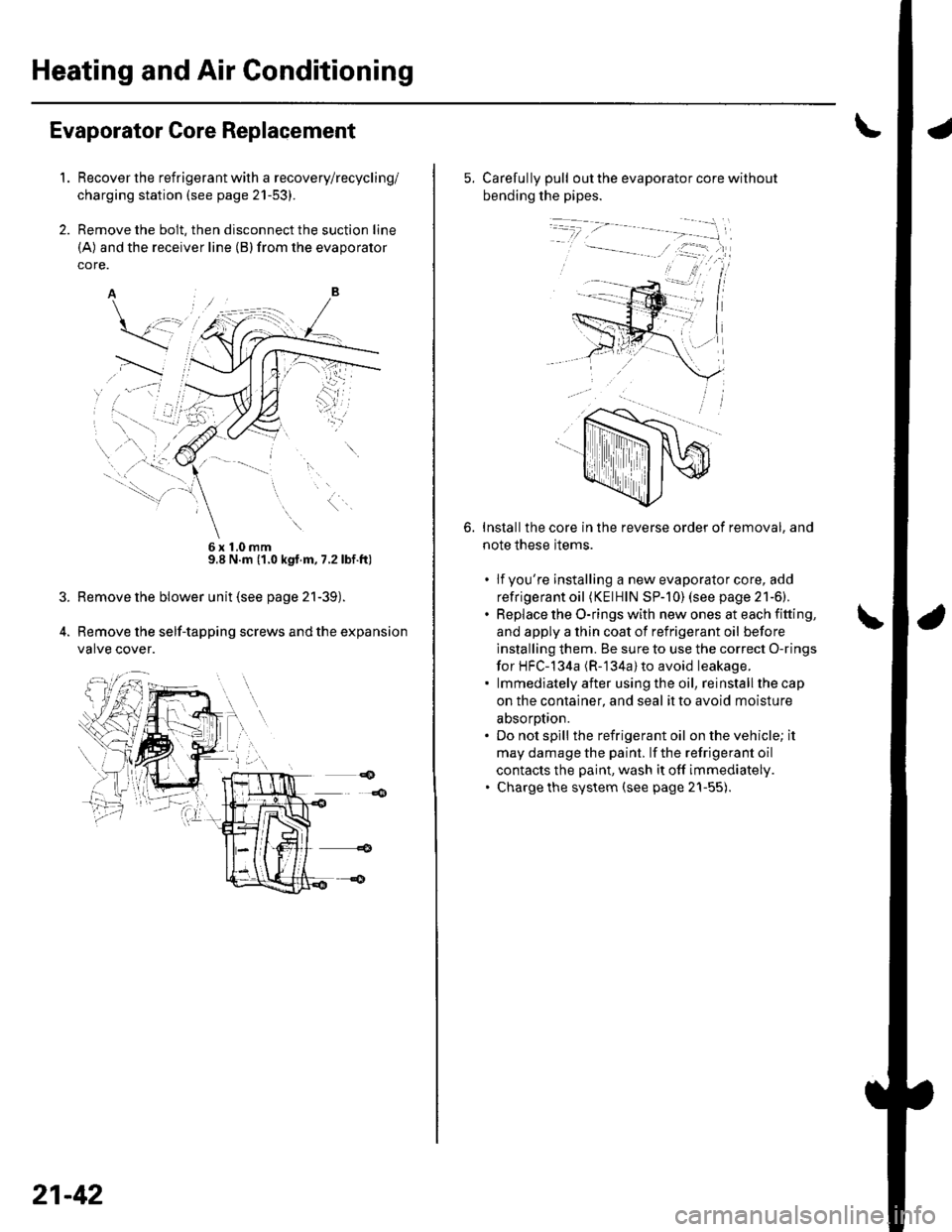
Evaporator Core Replacement
Recover the refrigerant with a recovery/recycling/
charging station (see page 21-53).
Remove the bolt, then disconnect the suction line
(A) and the receiver line (B)from the evaporator
core.
6x10mm9.8 N.m (1.0 kgt.m, 7.2lbf.ft)
Remove the blower unit (see page 21-39).
Remove the self-tapping screws and the expansion
valve cover.
21-42
5. Carefully pull out the evaporator core without
bending the pipes.
Installthe core in the reverse order of removal, and
note these items.
. lfyou're installing a new evaporator core, add
refrigerant oil (KElHlN SP-]0) (see page 21-6).. Replace the O-rings with new ones at each fitting,
and apply a thin coat of refrigerant oil before
installing them. Be sure to use the correct O-rings
for HFC-134a (R-'134a) to avoid leakage.. lmmediatelyafter usingthe oil, reinstallthecap
on the container, and seal it to avoid moisture
absorotion.. Do not spill the refrigerant oil on the vehicle; it
may damage the paint. lf the refrigerant oil
contacts the paint, wash it off immediately.. Charge the system (see page 21-55).
6.
Page 818 of 1139
Compressor Replacement
1. lf the compressor is marginally operable, run the
engine at idle speed, and let the air conditioning
work for a few minutes, then shut the engine off.
2. Make sure you have the anti-theft code for the radio,
then write down the frequencies for the radio's
preset buttons.
3. Disconnect the negative cable from the battery.
4. Recover the refrigerant with a recovery/recycling/
charging station (see page 21-53).
5. Remove the alternator (see page 4-29).
6. Remove the Ay'C condenser fan assembly (see page
10-10).
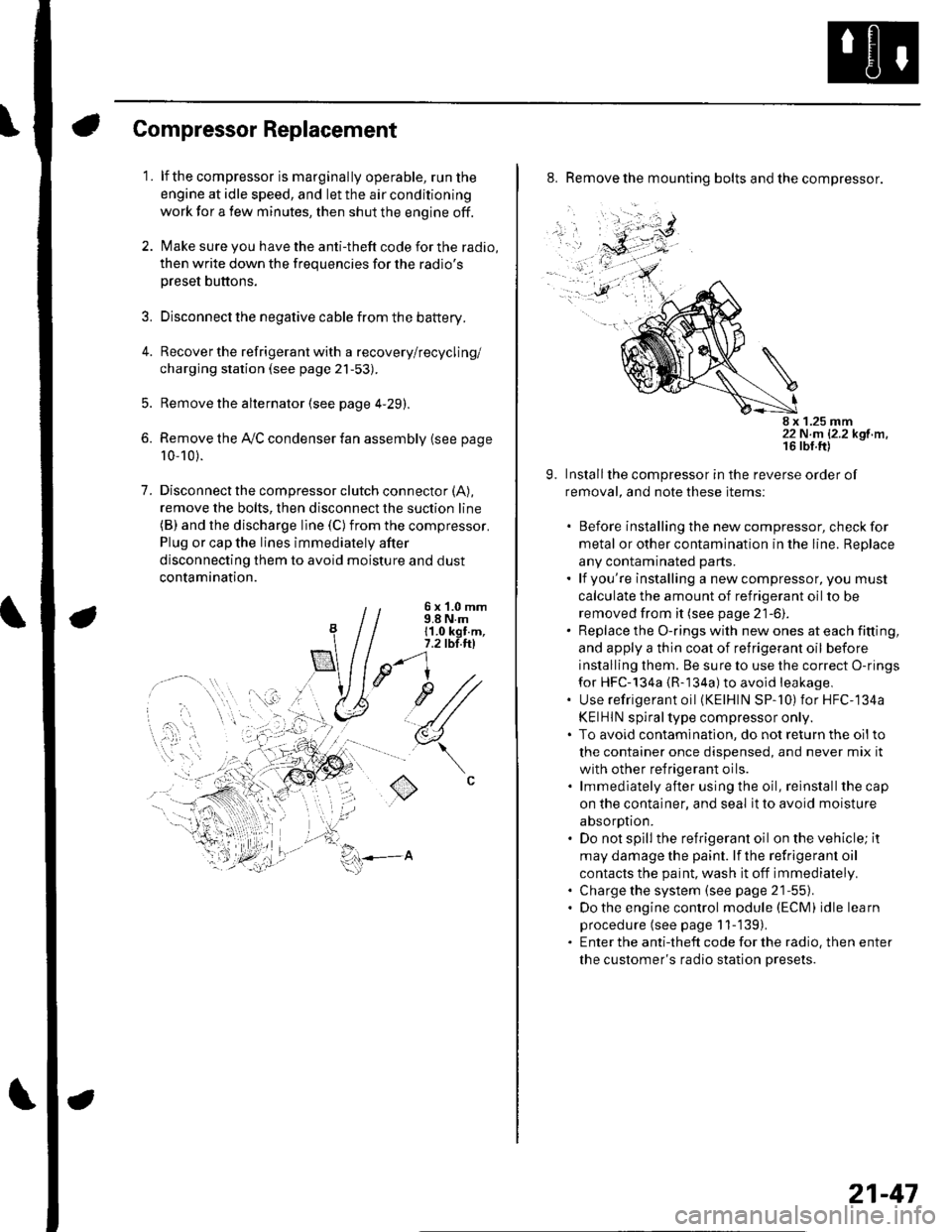
7. Disconnectthe compressor clutch connector (A),
remove the bolts, then disconnect the suction line(B) and the discharge line (C)from the compressor.
Plug or cap the lines immediately after
disconnecting them to avoid moisture and dust
contamination.
6 x '1.0 mm9.8 N.m11.0 kgt.m,7.2 tbl.ttl
u1/
(
o
8. Remove the mounting bolts and the compressor.
8 x 1.25 mm22 N.m 12.2 kgf.m.
9. Installthe compressor in the reverse order of
removal, and note these items:
. Before installing the new compressor, check for
metal or other contamination in the line. Replace
any contaminated parts.. lf you're installing a newcompressor, you must
calculate the amount of refrigerant oil to be
removed from it (see page 21-6).. Replace the O-rings with new ones at each fitting,
and apply a thin coat of refrigerant oil before
installing them. Be sure to use the correct O-rings
for HFC-134a {R-134a) to avoid leakage,. Use refrigerant oil (KElHlN SP-'10) for HFC-134a
KEIHIN spiral type compressor only.. To avoid contaminatlon, do not return the oilto
the container once dispensed, and never mix it
with other refrigerant oils.. lmmediately after using the oil, reinstallthe cap
on the container, and seal it to avoid moisture
absorption.. Do not spill the refrigerant oil on the vehicle; it
may damage the paint. lf the refrlgerant oil
contacts the paint, wash it off immediately.. Charge the system (see page 21-55).. Do the engine control module (ECM) idle learn
procedure (see page 11-'139).. Enter the antitheft code for the radio, then enter
the customer's radio station presets.
21-47
Page 823 of 1139
Heating and Air Conditioning
Gondenser Replacement
1.
6x1.0mm9.8 N.m ('1.0 kgf.m,7.2lbf.ft)
Recover the refrigerant with a recovery/recycling/
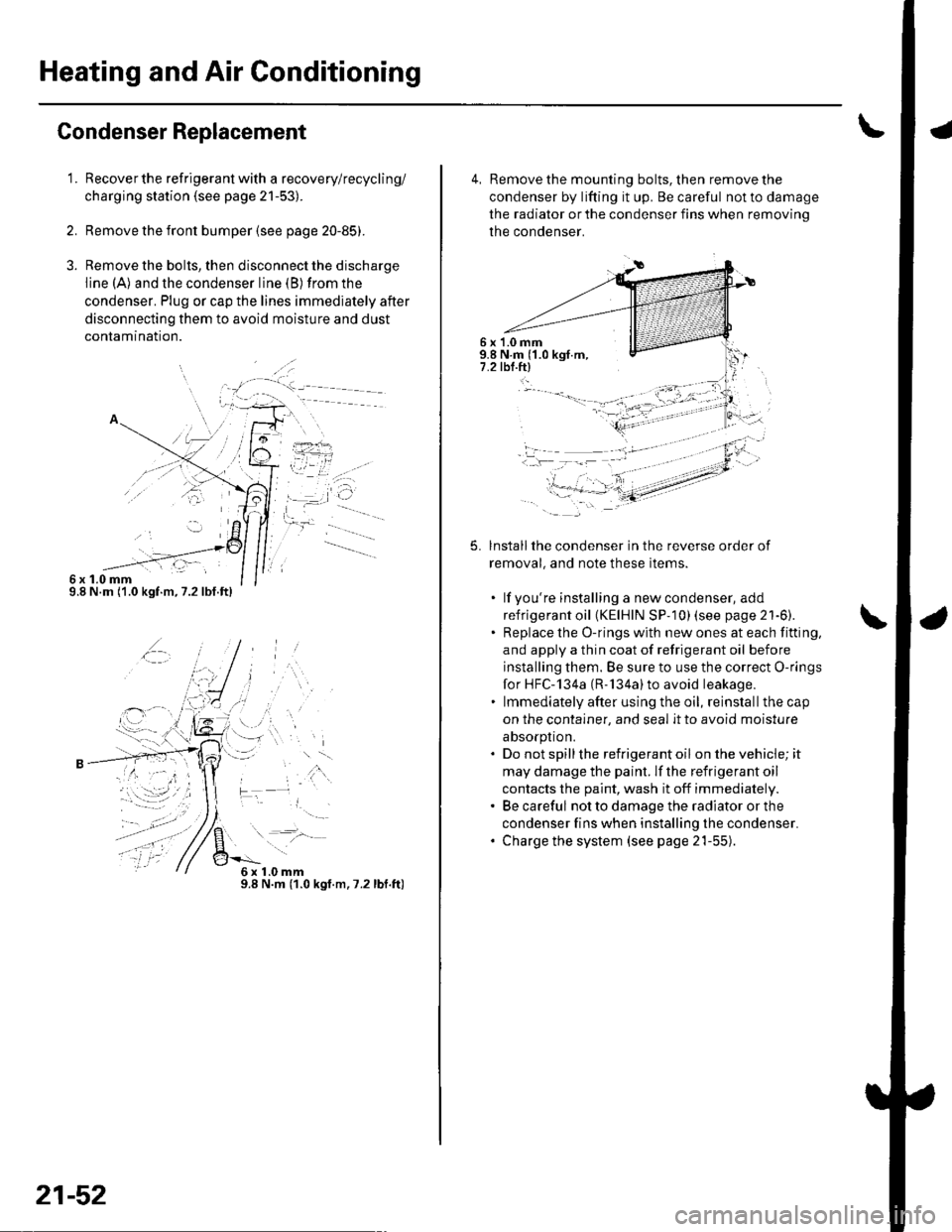
charging station (see page 21-53).
Remove the front bumper {see page 20-85).
Remove the bolts, then disconnect the discharge
line (A) and the condenser line (B) from the
condenser. Plug or cap the lines immediately after
disconnecting them to avoid moisture and dust
conlamtnaflon.
,t\
6x1.0mm9.8 N.m (1.0 kgt.m.7.2lbf.ft)
21-52
4, Remove the mounting bolts, then remove the
condenser by lifting it up. Be careful not to damage
the radiator or the condenser fins when removino
the condenser.
6 x '1.0 mm9.8 N.m ('1.0 kgf.m,7.2 tbl.ftl
5.lnstallthe condenser in the reverse order of
removal, and note these items.
. lf you're installing a newcondenser, add
refrigerant oil (KElHlN SP- 10) lsee page 21'6).. Replace the O-rings with new ones at each fitting,
and apply a thin coat of refrigerant oil before
installing them. Be sure to use the correct O-rings
for HFC-134a (R-'134a)to avoid leakage.. lmmediately after using the oil, reinstallthe cap
on the container, and seal it to avoid moisture
absorption.. Do not spillthe refrigerant oil onthevehicle;it
may damage the paint. lf the refrigerant oil
contacts the paint, wash it off immediately.. Be careful not to damage the radiator or the
condenser fins when installing the condenser.. Charge the system (see page 21-55).
t -"'.
f,
t-
-li .:)-:.-- ---- - -'
Page 835 of 1139
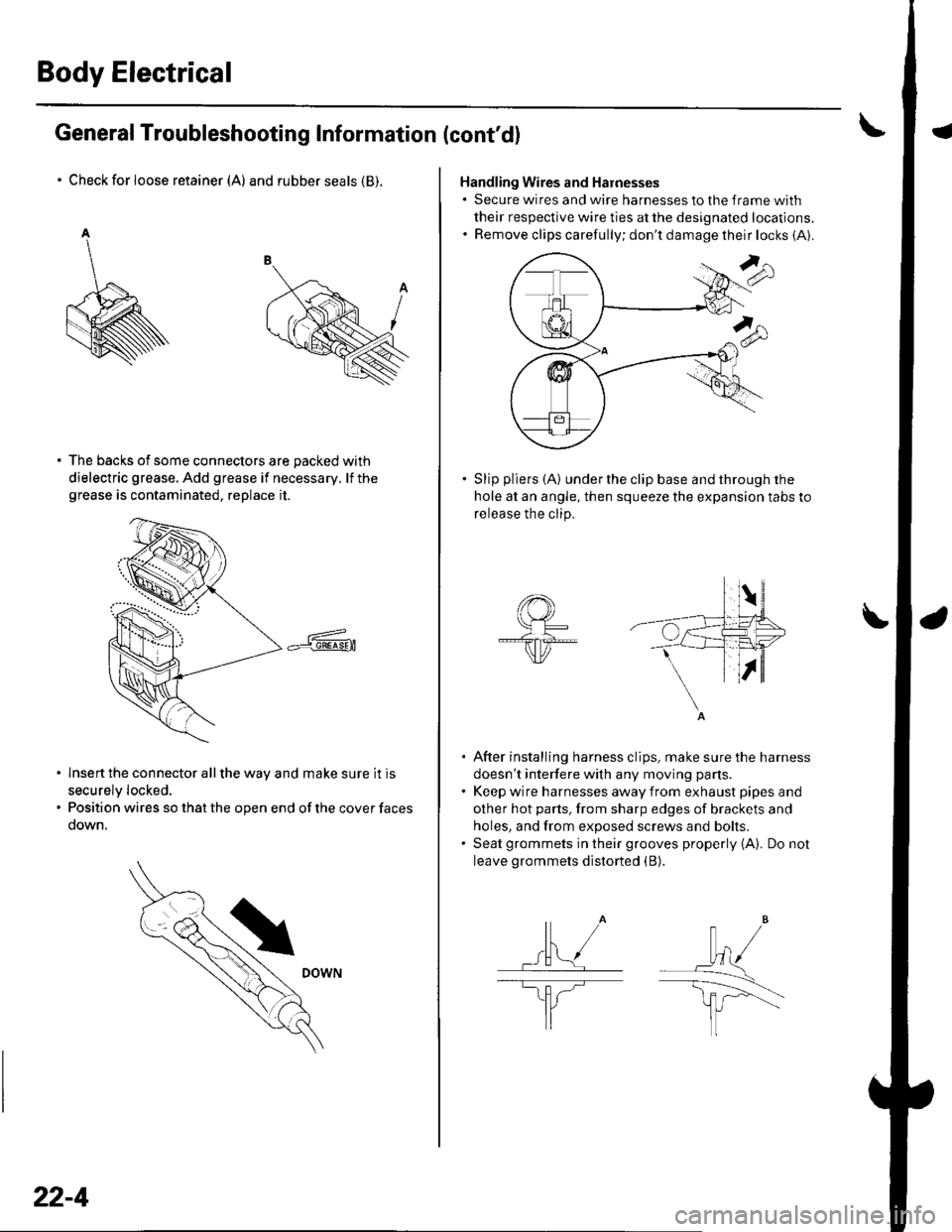
Body Electrical
General Troubleshooting Information (cont'd)
Check for loose retainer (A) and rubber seals (B).
The backs of some connectors are packed with
dielectric grease. Add grease if necessary. lf thegrease is contaminated, replace it.
lnsert the connector all the way and make sure it is
securelv locked.
Position wires so that the open end of the cover faces
oown.
22-4
Handling Wires and Harnesses. Secure wires and wire harnesses to lhe frame with
their respective wire ties at the designated locations.. Remove clips carefully; don't damage their locks (A).
Slip pliers (A) under the clip base and through the
hole at an angle, then squeeze the expansion tabs to
release the clip.
After installing harness clips, make sure the harness
doesn't interfere with any moving pans.
Keep wire harnesses away from exhaust pipes and
other hot parts, from sharp edges of brackets and
holes, and from exposed screws and bolts.
Seat grommets in their grooves properly {A). Do not
leave grommets distorted (B).
lt" /wl/
\--------\tfl r'---'..-
It
J
|,f . ./.ll t/
----E; F.'l/
I
Page 849 of 1139

\
Connsctor or TerminalCavitissLocationConnects toNotesABS modulator-control unitBearwasher")
Connectors and Harnesses
Connector to Harness Index {cont'dl
Engine Compartment Wire Harness (Right branch)
\
Connsctor or TerminalCavitissLocationConnects toNotesABS modulator-control unitBearwasher motorRight front ABS wheel sensorRight front airbag s€nsorBightfront parking lightRight front side marker lightRight front turn signal lightRight headlightRight hornwash€rfluid level switchWindshield washer motor
812
110112
7
222222
I22
Bight side o{ engine compartmentBehind right side of {ront bumperRight side ot engine compartmentBehind right side of front bumperBehind right headlightBehind rightside of Jront bumperBehind right headlightBehind right headlightBehind front bumperBehind rightside of tront bumperBehind rioht side of front bumoerCanada
G202
G2016Behind rightside of tront bumper
Behind rightside of Jront bumper
Body ground via €nginecompartment wtre harnessBody ground via engine.omnerhent wire harness
22-18