Maintenance info HONDA CIVIC 2012 9.G User Guide
[x] Cancel search | Manufacturer: HONDA, Model Year: 2012, Model line: CIVIC, Model: HONDA CIVIC 2012 9.GPages: 345, PDF Size: 9.02 MB
Page 238 of 345
237
Driving
Fuel Economy
Improving Fuel Economy
Fuel economy depends on several conditions, including driving conditions, your
driving habits, the condition of your vehicle, and loading. Depending on these and
other conditions, you may or may not achieve the rated fuel economy of this vehicle.
You can optimize your fuel economy with proper maintenance of your vehicle.
Always maintain your vehicle in accordance with the messages displayed on the information display *
/multi-information display *
.
• Use the recommended viscosity engine oil, displaying the API Certification Seal.
• Maintain the specified tire pressure.
• Do not load the vehicle with excess cargo.
• Keep your vehicle clean. A buildup of snow or mud on your vehicle's underside
adds weight and increases wind resistance.
■Maintenance and Fuel Economy
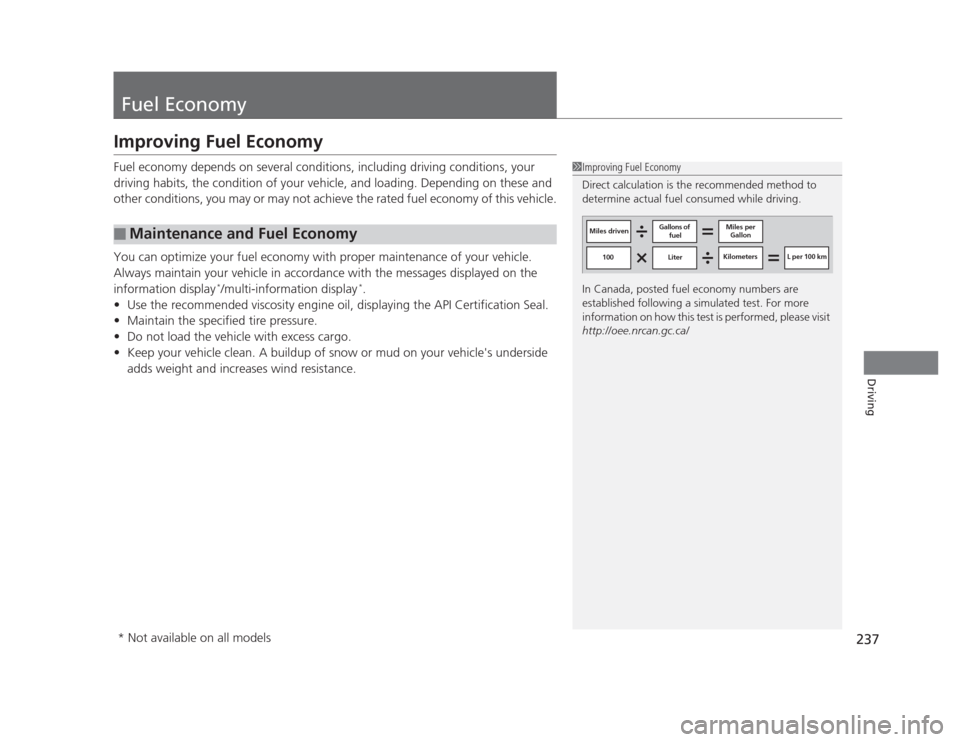
1Improving Fuel Economy
Direct calculation is the recommended method to
determine actual fuel consumed while driving.
In Canada, posted fuel economy numbers are
established following a simulated test. For more
information on how this test is performed, please visit
http://oee.nrcan.gc.ca/
Miles driven Gallons of
fuel Miles per
Gallon
100 Liter Kilometers L per 100 km
* Not available on all models
Page 240 of 345
239
Maintenance
This chapter discusses basic maintenance.
Before Performing Maintenance Inspection and Maintenance ............ 240
Safety When Performing Maintenance..... 241
Parts and Fluids Used in Maintenance Service ........................................... 242
Maintenance Minder™ .................... 243
Maintenance Under the Hood Maintenance Items Under the Hood ..... 251
Opening the Hood ........................... 253
Recommended Engine Oil ...... .......... 254
Oil Check ......................................... 255
Adding Engine Oil ............................ 257
Changing the Engine Oil and Oil Filter ..... 258
Engine Coolant ................................ 261
Transmission Fluid ............................ 263
Brake/Clutch Fluid ............................ 266
Refilling Window Washer Fluid......... 267
Replacing Light Bulbs ....................... 268
Checking and Maintaining Wiper
Blades .......................................... 278
Checking and Maintaining Tires Checking Tires ................................. 280
Tire and Loading Information Label ...... 281
Tire Labeling .................................... 281
DOT Tire Quality Grading (U.S. Vehicles)....... 283
Wear Indicators................................ 285 Tire Service Life ................................ 285
Tire and Wheel Replacement ........... 286
Tire Rotation .................................... 287
Winter Tires ..................................... 288
Battery ............................................... 289
Remote Transmitter Care *
Replacing the Battery ....................... 290
Heating and Cooling *
System
Maintenance ................................... 291
Cleaning
Interior Care .................................... 292
Exterior Care.................................... 294
* Not available on all models
Page 241 of 345
240
Maintenance
Before Performing Maintenance
Inspection and Maintenance
For your safety, perform all listed inspections and maintenance to keep your vehicle
in good condition. If you become aware of any abnormality (noise, smell, insufficient
brake fluid, oil residue on the ground, etc.), have your vehicle inspected by a dealer.
(Note, however, that service at a dealer is not mandatory to keep your warranties in
effect.) Refer to the separate maintenance booklet for detailed maintenance and inspection information. ■Daily inspections
Perform inspections before long distance trips, when washing the vehicle, or when refueling. ■ Periodic inspections
• Check the automatic transmission fluid level monthly.
2 Automatic Transmission Fluid P. 263
• Check the brake fluid level monthly.
2 Brake/Clutch Fluid P. 266
• Check the tire pressure monthly. Examine the tread for wear and foreign objects.
2 Checking and Maintaining Tires P. 280
• Check the operation of the exterior lights monthly.
2 Replacing Light Bulbs P. 268
• Check the condition of the wiper blades at least every six months.
2 Checking and Maintaining Wiper Blades P. 278
■Types of Inspection and Maintenance
1Inspection and Maintenance
Maintenance, replacement, or repair of
emissions control devices and systems may be
done by any automotive repair establishment or
individuals using parts that are "certified" to EPA standards.
According to state and federal regulations, failure to
perform maintenance on the maintenance main
items marked with # will not void your emissions
warranties. However, all maintenance services should
be performed in accordance with the intervals
indicated by the information display *
/multi-
information display *
.
2 Maintenance Service Items P. 245, 249
If you want to perform complex maintenance tasks
that require more skills and tools, you can purchase a
subscription to the Service Express website at
www.techinfo.honda.com .
2 Authorized Manuals P. 335
If you want to perform maintenance yourself, make
sure that you have the necessary tools and skills first.
After performing maintenance, update the records in
the separate maintenance booklet.
U.S. models
* Not available on all models
Page 244 of 345
243
Continued
Maintenance
Maintenance Minder™
If the engine oil life is less than 15%, you will see the Maintenance Minder messages
appear on the information display *
or the multi-information display *
every time you
turn the ignition switch to ON
(w . The messages notify you when to change the
engine oil, or when to bring your vehicle to a dealer for indicated maintenance
services.
To Use Maintenance Minder TM
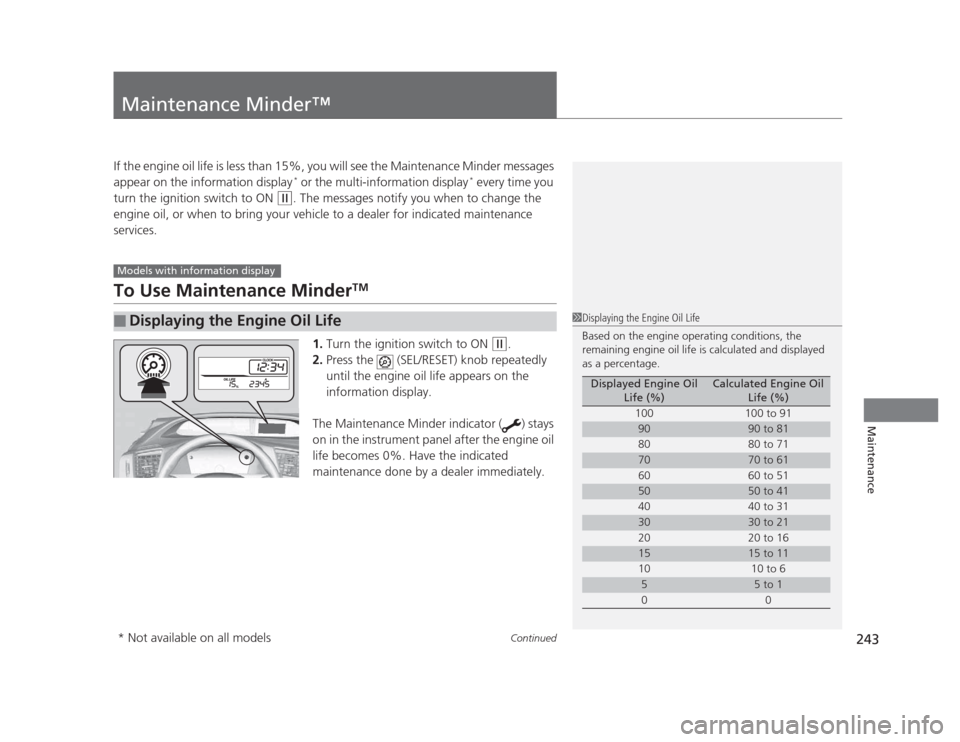
1. Turn the ignition switch to ON
(w .
2. Press the (SEL/RESET) knob repeatedly
until the engine oil life appears on the
information display.
The Maintenance Minder indicator ( ) stays
on in the instrument panel after the engine oil
life becomes 0%. Have the indicated
maintenance done by a dealer immediately.
■Displaying the Engine Oil Life
Models with information display
1Displaying the Engine Oil Life
Based on the engine operating conditions, the
remaining engine oil life is calculated and displayed
as a percentage.
Displayed Engine Oil Life (%)Calculated Engine Oil Life (%)
100 100 to 91
9090 to 81
80 80 to 71
7070 to 61
60 60 to 51
5050 to 41
40 40 to 31
3030 to 21
20 20 to 16
1515 to 11
10 10 to 6
55 to 1
00
* Not available on all models
Page 245 of 345
244
uuMaintenance Minder™uTo Use Maintenance MinderTM
Maintenance
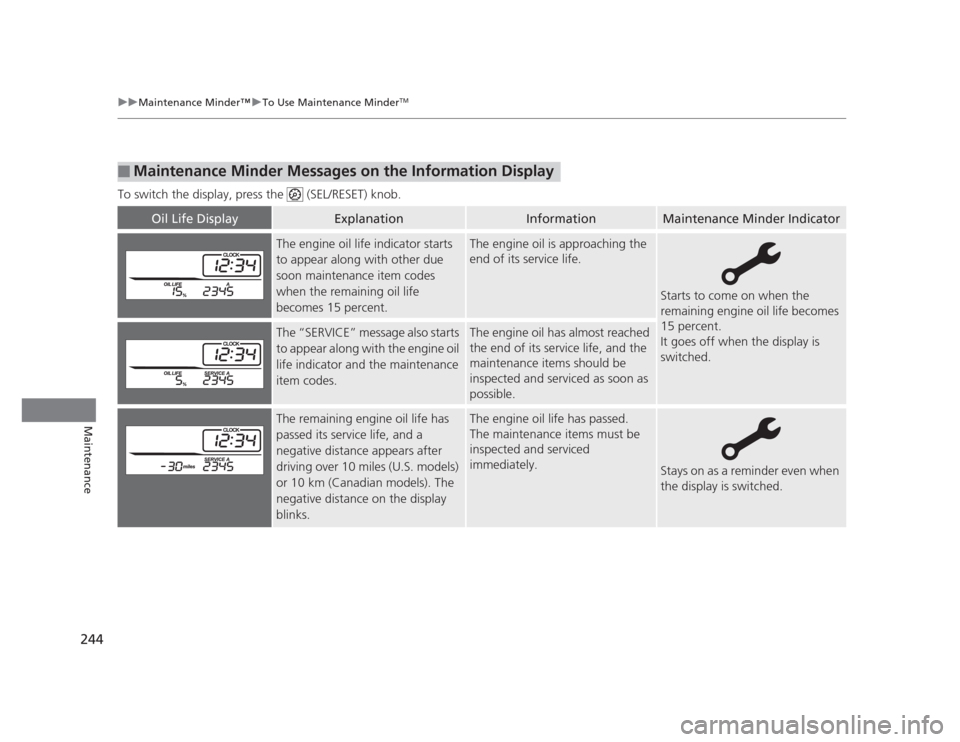
To switch the display, press the (SEL/RESET) knob.
■Maintenance Minder Messages on the Information Display
Oil Life DisplayExplanationInformationMaintenance Minder Indicator
The engine oil life indicator starts
to appear along with other due
soon maintenance item codes
when the remaining oil life
becomes 15 percent.The engine oil is approaching the
end of its service life.
Starts to come on when the
remaining engine oil life becomes
15 percent.
It goes off when the display is switched.
The “SERVICE” message also starts
to appear along with the engine oil
life indicator and the maintenance
item codes.The engine oil has almost reached
the end of its service life, and the
maintenance items should be
inspected and serviced as soon as
possible.
The remaining engine oil life has
passed its service life, and a negative distance appears after
driving over 10 miles (U.S. models)
or 10 km (Canadian models). The
negative distance on the display
blinks.The engine oil life has passed.
The maintenance items must be
inspected and serviced immediately.
Stays on as a reminder even when
the display is switched.
Page 246 of 345
245
uuMaintenance Minder™uTo Use Maintenance MinderTM
Continued
Maintenance
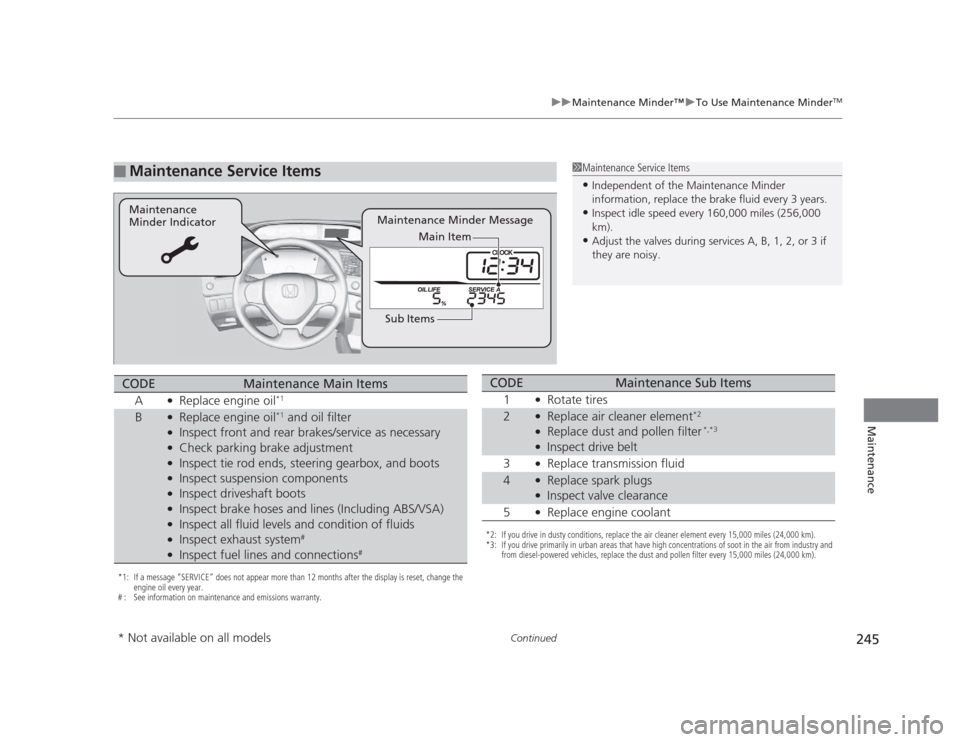
■Maintenance Service Items1Maintenance Service Items •
Independent of the Maintenance Minder
information, replace the brake fluid every 3 years.
• Inspect idle speed every 160,000 miles (256,000
km).
• Adjust the valves during services A, B, 1, 2, or 3 if
they are noisy.
Maintenance Minder Message
Maintenance
Minder Indicator
Sub ItemsMain Item
*1: If a message
Page 248 of 345
247
uuMaintenance Minder™uTo Use Maintenance MinderTM
Continued
Maintenance
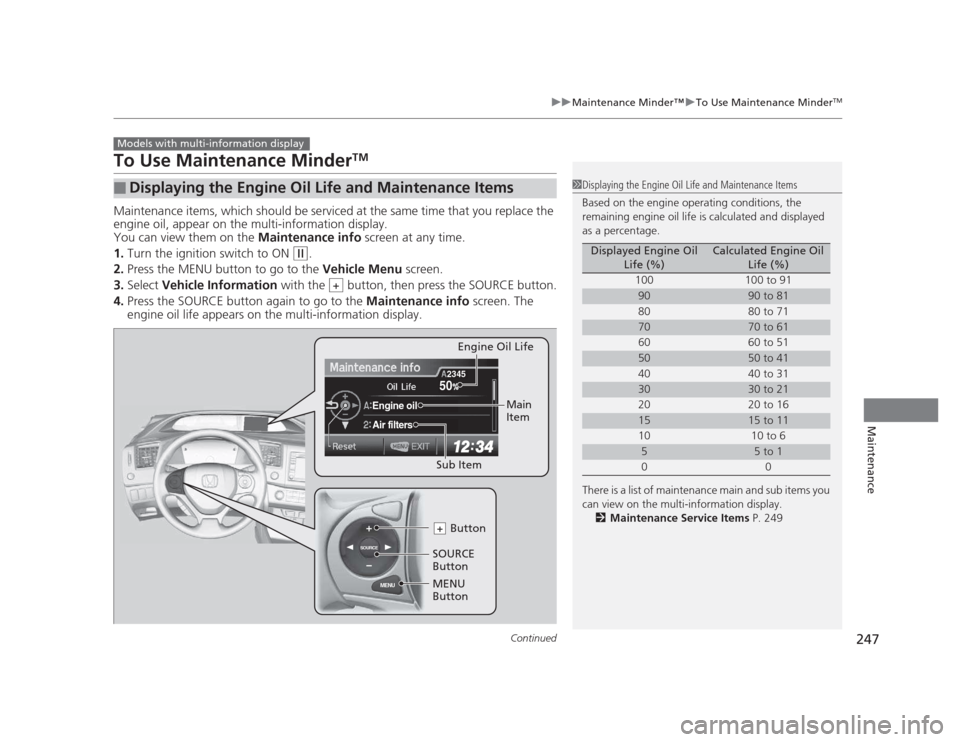
To Use Maintenance Minder TM
Maintenance items, which should be serviced at the same time that you replace the
engine oil, appear on the multi-information display.
You can view them on the Maintenance info screen at any time.
1. Turn the ignition switch to ON
(w .
2. Press the MENU button to go to the Vehicle Menu screen.
3. Select Vehicle Information with the button, then press the SOURCE button.
4. Press the SOURCE button again to go to the Maintenance info screen. The
engine oil life appears on the multi-information display.
■Displaying the Engine Oil Life and Maintenance Items
Models with multi-information display
1Displaying the Engine Oil Life and Maintenance Items
Based on the engine operating conditions, the
remaining engine oil life is calculated and displayed
as a percentage.
There is a list of maintenance main and sub items you
can view on the multi-information display.
2 Maintenance Service Items P. 249
Displayed Engine Oil
Life (%)Calculated Engine Oil Life (%)
100 100 to 91
9090 to 81
80 80 to 71
7070 to 61
60 60 to 51
5050 to 41
40 40 to 31
3030 to 21
20 20 to 16
1515 to 11
10 10 to 6
55 to 1
00
+
MENU
SOURCE
50
Engine oil
Air filters
2345
SOURCE
Button MENU
Button Button
+
Sub Item Engine Oil Life
Main
Item
Page 249 of 345
248
uuMaintenance Minder™uTo Use Maintenance MinderTM
Maintenance
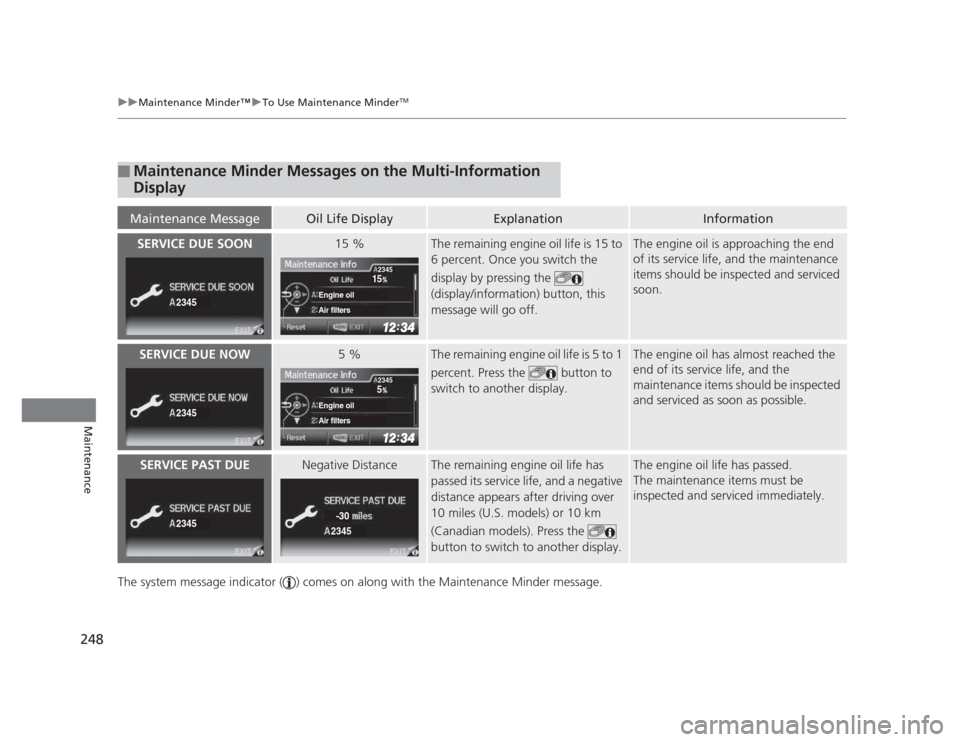
The system message indicator ( ) comes on along with the Maintenance Minder message.
■Maintenance Minder Messages on the Multi-Information
Display
Maintenance MessageOil Life DisplayExplanationInformation
SERVICE DUE SOON15 %The remaining engine oil life is 15 to
6 percent. Once you switch the
display by pressing the
(display/information) button, this
message will go off.The engine oil is approaching the end
of its service life, and the maintenance
items should be inspected and serviced
soon.
SERVICE DUE NOW5 %The remaining engine oil life is 5 to 1
percent. Press the button to
switch to another display.The engine oil has almost reached the
end of its service life, and the
maintenance items should be inspected
and serviced as soon as possible.
SERVICE PAST DUENegative DistanceThe remaining engine oil life has
passed its service life, and a negative
distance appears after driving over
10 miles (U.S. models) or 10 km
(Canadian models). Press the
button to switch to another display.The engine oil life has passed.
The maintenance items must be
inspected and serviced immediately.
2345
15
Engine oil
Air filters
2345
2345
5
Engine oil
Air filters
2345
23452345
-30
Page 250 of 345
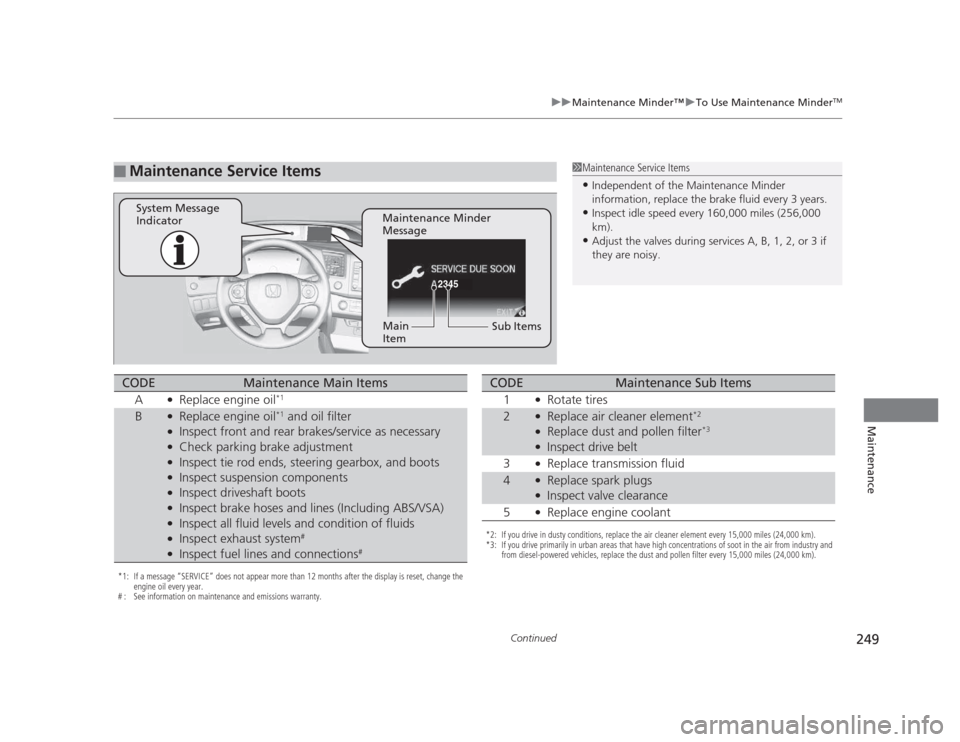
249
uuMaintenance Minder™uTo Use Maintenance MinderTM
Continued
Maintenance
■Maintenance Service Items1Maintenance Service Items •
Independent of the Maintenance Minder
information, replace the brake fluid every 3 years.
• Inspect idle speed every 160,000 miles (256,000
km).
• Adjust the valves during services A, B, 1, 2, or 3 if
they are noisy.
2345
Maintenance Minder
Message
System Message
Indicator
Sub Items
Main
Item
*1: If a message
Page 251 of 345
uuMaintenance Minder™uTo Use Maintenance MinderTM
250
Maintenance
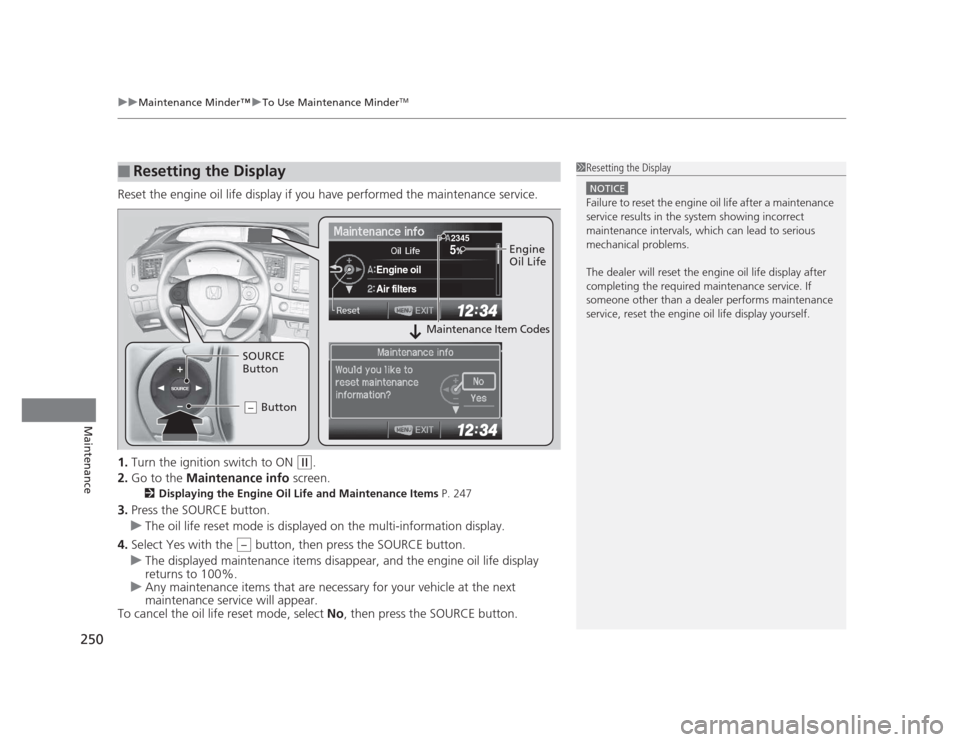
Reset the engine oil life display if you have performed the maintenance service. 1. Turn the ignition switch to ON
(w .
2. Go to the Maintenance info screen.
2 Displaying the Engine Oil Life and Maintenance Items P. 247
3. Press the SOURCE button.
uThe oil life reset mode is displayed on the multi-information display.
4. Select Yes with the button, then press the SOURCE button.
uThe displayed maintenance items disappear, and the engine oil life display returns to 100%.
uAny maintenance items that are necessary for your vehicle at the next
maintenance service will appear.
To cancel the oil life reset mode, select No, then press the SOURCE button.
■Resetting the Display1Resetting the Display
NOTICE
Failure to reset the engine oil life after a maintenance
service results in the system showing incorrect
maintenance intervals, which can lead to serious
mechanical problems.
The dealer will reset the engine oil life display after
completing the required maintenance service. If
someone other than a dealer performs maintenance
service, reset the engine oil life display yourself.
SOURCE
5
Engine oil
Air filters
2345Engine
Oil Life
SOURCE
Button Button
–
Maintenance Item Codes
–