Rear light HONDA CIVIC 2012 9.G User Guide
[x] Cancel search | Manufacturer: HONDA, Model Year: 2012, Model line: CIVIC, Model: HONDA CIVIC 2012 9.GPages: 345, PDF Size: 9.02 MB
Page 212 of 345
211
Continued
Driving
When Driving
Starting the Engine
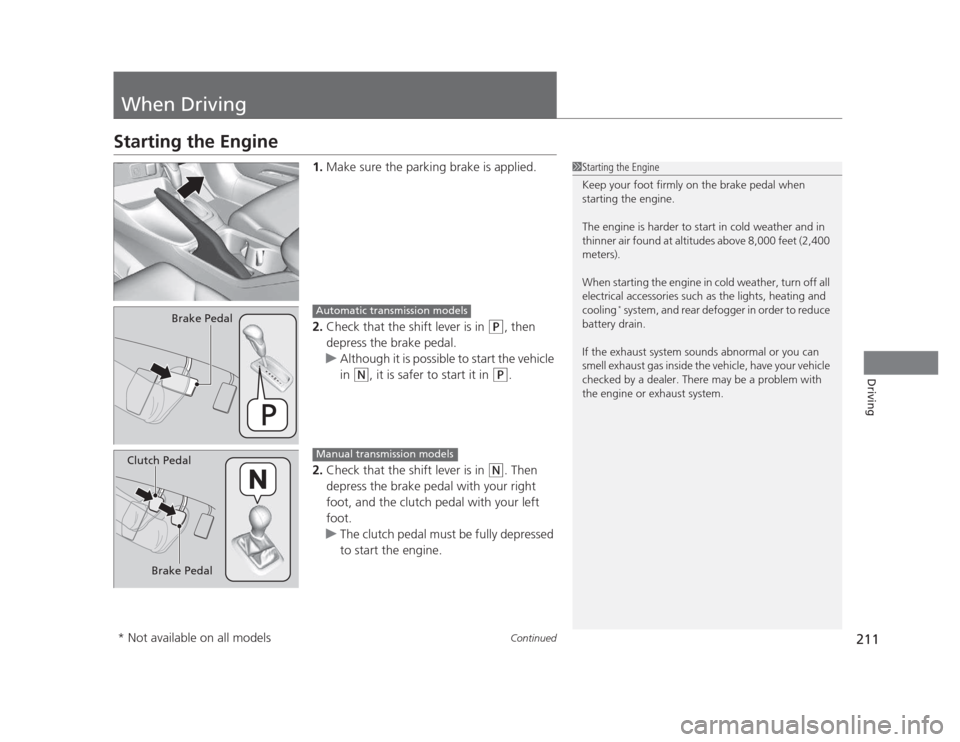
1.Make sure the parking brake is applied.
2. Check that the shift lever is in
(P , then
depress the brake pedal.
uAlthough it is possible to start the vehicle
in
(N , it is safer to start it in (P.
2. Check that the shift lever is in
(N . Then
depress the brake pedal with your right
foot, and the clutch pedal with your left foot.
uThe clutch pedal must be fully depressed
to start the engine.
1Starting the Engine
Keep your foot firmly on the brake pedal when
starting the engine.
The engine is harder to start in cold weather and in
thinner air found at altitudes above 8,000 feet (2,400 meters).
When starting the engine in cold weather, turn off all
electrical accessories such as the lights, heating and cooling *
system, and rear defogger in order to reduce
battery drain.
If the exhaust system sounds abnormal or you can
smell exhaust gas inside the vehicle, have your vehicle
checked by a dealer. There may be a problem with
the engine or exhaust system.
Brake PedalAutomatic transmission models
Brake Pedal
Clutch Pedal
Manual transmission models
* Not available on all models
Page 230 of 345
229
Continued
Driving
Braking
Brake System
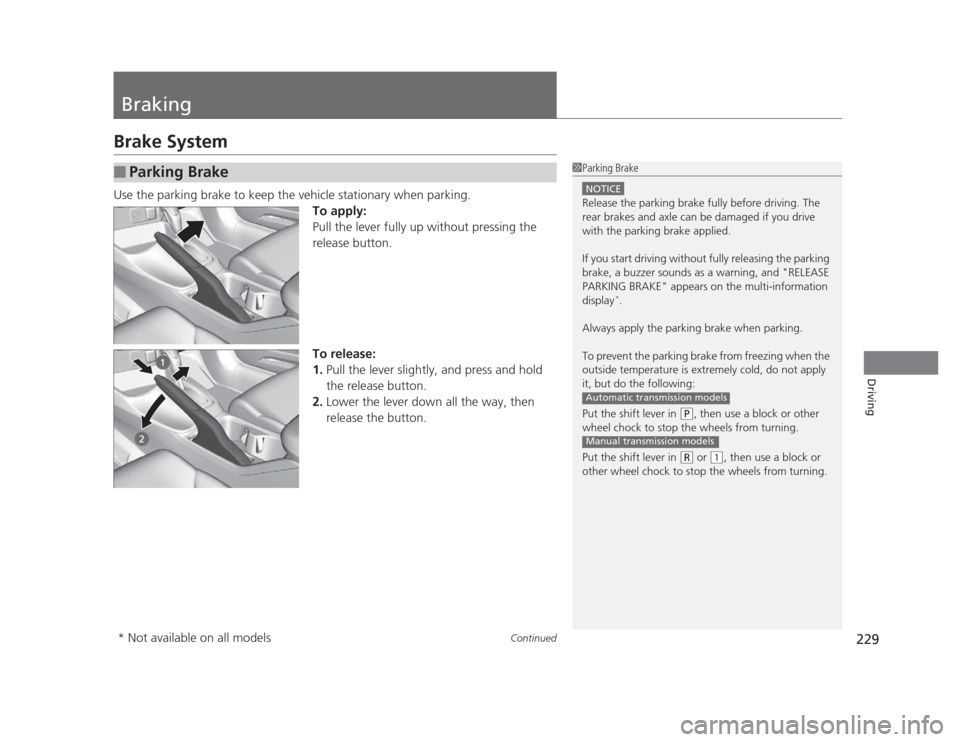
Use the parking brake to keep the vehicle stationary when parking.
To apply:
Pull the lever fully up without pressing the
release button.
To release: 1.Pull the lever slightly, and press and hold
the release button.
2. Lower the lever down all the way, then
release the button.
■Parking Brake1Parking Brake
NOTICE
Release the parking brake fully before driving. The
rear brakes and axle can be damaged if you drive
with the parking brake applied.
If you start driving without fully releasing the parking
brake, a buzzer sounds as a warning, and "RELEASE
PARKING BRAKE" appears on the multi-information display *
.
Always apply the parking brake when parking.
To prevent the parking brake from freezing when the
outside temperature is extremely cold, do not apply
it, but do the following:
Put the shift lever in
(P , then use a block or other
wheel chock to stop the wheels from turning.
Put the shift lever in
(R or (1, then use a block or
other wheel chock to stop the wheels from turning.
Automatic transmission models
Manual transmission models
* Not available on all models
Page 231 of 345
uuBrakinguBrake System
230
Driving
Your vehicle is equipped with front disc brakes. The brakes on the rear wheels may
be disc or drum, depending on the model. A power assist helps reduce the effort
needed on the brake pedal. The brake assist system increases the stopping force
when you depress the brake pedal hard in an emergency situation. The anti-lock
brake system (ABS) helps you retain steering control when braking very hard. 2 Brake Assist System P. 232
2 ABS (Anti-lock Brake System) P. 231
■Foot Brake1Foot Brake
Check the brakes after driving through deep water,
or if there is a buildup of road surface water. If
necessary, dry the brakes by lightly depressing the
pedal several times.
If you hear a continuous metallic friction sound when
applying the brakes, the brake pads need to be
replaced. Have the vehicle checked by a dealer.
Constantly using the brake pedal while going down a
long hill builds up heat, which reduces the brake
effectiveness. Apply engine braking by taking your
foot off the accelerator pedal and downshifting to a
lower gear. With manual transmission use a lower
gear for greater engine braking.
Do not rest your foot on the brake pedal while
driving, as it will lightly apply the brakes and cause
them to lose effectiveness over time and reduce pad
life. It will also confuse drivers behind you.
Page 232 of 345
231
uuBrakinguABS (Anti-lock Brake System)
Driving
ABS (Anti-lock Brake System)
Helps prevent the wheels from locking up, and helps you retain steering control by
pumping the brakes rapidly, much faster than you.
The electronic brake distribution (EBD) system, which is part of the ABS, also
balances the front-to-rear braking distribution according to vehicle loading.
You should never pump the brake pedal. Let the ABS work for you by always
keeping firm, steady pressure on the brake pedal. This is sometimes referred to as
"stomp and steer." ■ABS operation
The brake pedal may pulsate slightly when the ABS is working. Keep holding the
pedal firmly down. On dry pavement, you will need to press on the brake pedal very
hard before the ABS activates. However, you may feel the ABS activate immediately
if you are trying to stop on snow or ice.
When the vehicle speed goes under 6 mph (10 km/h), the ABS stops.
■ABS1ABS (Anti-lock Brake System)
NOTICE
The ABS may not function correctly if you use an
incorrect tire type and size.
When the ABS indicator comes on while driving,
there may be a problem with the system.
While normal braking is not affected, there is a
possibility of the ABS not operating. Have the vehicle checked by a dealer immediately.
The ABS does not reduce the time or distance it takes
to stop the vehicle. It only helps with steering control
during hard braking.
In the following cases, your vehicle may need more
stopping distance than a vehicle without the ABS: • When driving on rough road surfaces, including
when driving on uneven surfaces, such as gravel or
snow.
• When tire chains are installed.
You may hear a motor sound coming from the
engine compartment while system checks are being
performed immediately after starting the engine or
while driving. This is normal.
Page 276 of 345
275
uuReplacing Light BulbsuBrake Light, Taillight, Back-Up Light, Rear Turn Signal Light and Rear Side Marker Light Bulbs
Maintenance
Brake Light, Taillight, Back-Up Light, Rear Turn
Signal Light and Rear Side Marker Light Bulbs
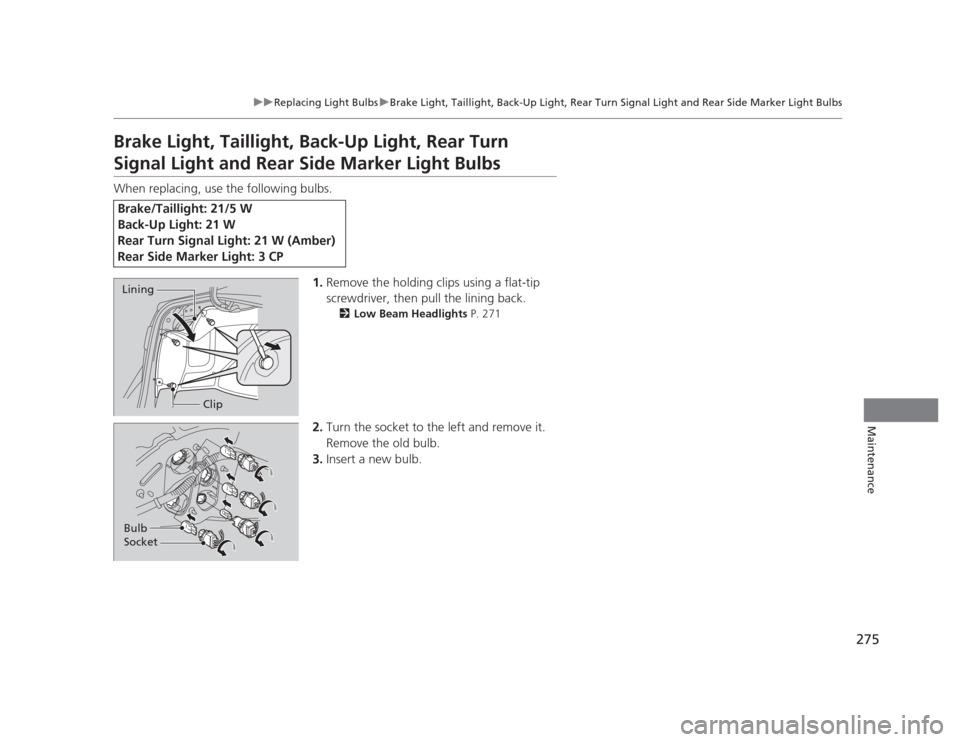
When replacing, use the following bulbs.1.Remove the holding clips using a flat-tip
screwdriver, then pull the lining back.
2 Low Beam Headlights P. 271
2. Turn the socket to the left and remove it.
Remove the old bulb.
3. Insert a new bulb.
Brake/Taillight: 21/5 W
Back-Up Light: 21 W
Rear Turn Signal Light: 21 W (Amber)
Rear Side Marker Light: 3 CP
Lining
Clip
Bulb Socket
Page 277 of 345
276
uuReplacing Light BulbsuRear License Plate Light Bulb
Maintenance
Rear License Plate Light Bulb
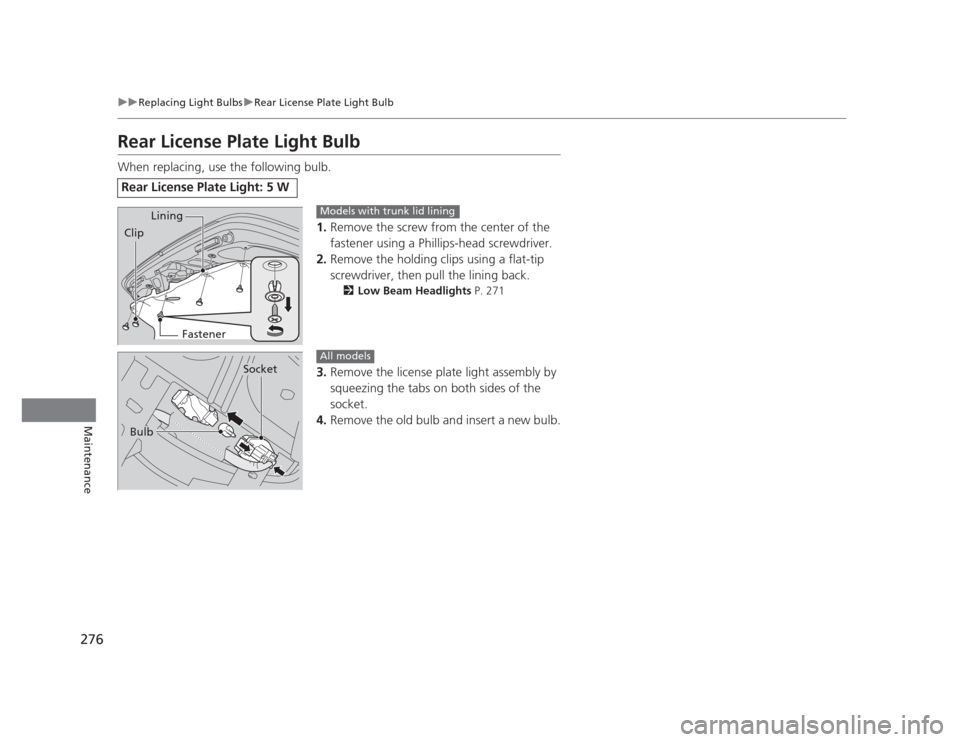
When replacing, use the following bulb.1.Remove the screw from the center of the
fastener using a Phillips-head screwdriver.
2. Remove the holding clips using a flat-tip
screwdriver, then pull the lining back.
2 Low Beam Headlights P. 271
3. Remove the license plate light assembly by
squeezing the tabs on both sides of the
socket.
4. Remove the old bulb and insert a new bulb.
Rear License Plate Light: 5 W
Lining
Clip
FastenerModels with trunk lid lining
Bulb
Socket
All models
Page 300 of 345
299
Continued
Handling the Unexpected
If a Tire Goes Flat
Changing a Flat Tire
If a tire goes flat while driving, grasp the steering wheel firmly, and brake gradually
to reduce speed. Then, stop in a safe place. Replace the flat tire with a compact
spare tire. Go to a dealer as soon as possible to have the full size tire repaired or
replaced. 1.
Park the vehicle on firm, level, and non-slippery ground.
2. Put the shift lever in
(P .
2. Put the shift lever in
(R .
3. Set the parking brake.
4. Turn on the hazard warning lights and turn the ignition switch to LOCK
(0.
1Changing a Flat Tire
Periodically check the tire pressure of the compact
spare. It should be set to the specified pressure.
Specified Pressure: 60 psi (420 kPa, 4.2 kgf/cm 2
)
When driving with the compact spare tire, keep the
vehicle speed under 50 mph (80 km/h). Replace with
a full size tire as soon as possible.
The compact spare tire and wheel in your vehicle are
specifically for this model.
Do not use them with another vehicle.
Do not use another type of compact spare tire or
wheel with your vehicle.
Do not mount tire chains on a compact spare tire.
If a chain-mounted front tire goes flat, remove one of
the full-size rear tires and replace it with the compact
spare tire. Remove the flat front tire and replace it
with the full size tire that was removed from the rear.
Mount the tire chains on the front tire.
Do not use a puncture-repairing agent on a flat tire,
as it can damage the tire pressure sensor.
U.S. models only
Automatic transmission models
Manual transmission models
All models
Page 314 of 345
313
Handling the Unexpected
Indicator, Coming On/Blinking
If the Low Oil Pressure Indicator Comes On■Reasons for the indicator to come on
Comes on when the engine oil pressure is low. ■ What to do as soon as the indicator comes on
1. Immediately park the vehicle in a safe place.
2. If necessary, turn the hazard warning lights on.
■ What to do after parking the vehicle
1. Stop the engine and let it sit for about one minute.
2. Open the hood and check the oil level.
uAdd oil as necessary.
3. Start the engine and check the low oil pressure indicator.
uThe light goes out: Start driving again.
uThe light does not go out within 10 seconds: Stop the engine and
contact a dealer for repairs immediately.
If the Charging System Indicator Comes On
■Reasons for the indicator to come on
Comes on when the battery is not being charged. ■ What to do when the indicator comes on
Turn off the heating and cooling *
system, rear defogger, and other
electrical systems, and immediately contact a dealer for repairs.
1If the Low Oil Pressure Indicator Comes On
NOTICE
Running the engine with low oil pressure can cause
serious mechanical damage almost immediately.
1If the Charging System Indicator Comes On
If you need to stop temporarily, do not turn off the
engine. Restarting the engine may rapidly discharge the battery.
* Not available on all models
Page 319 of 345
318
Handling the Unexpected
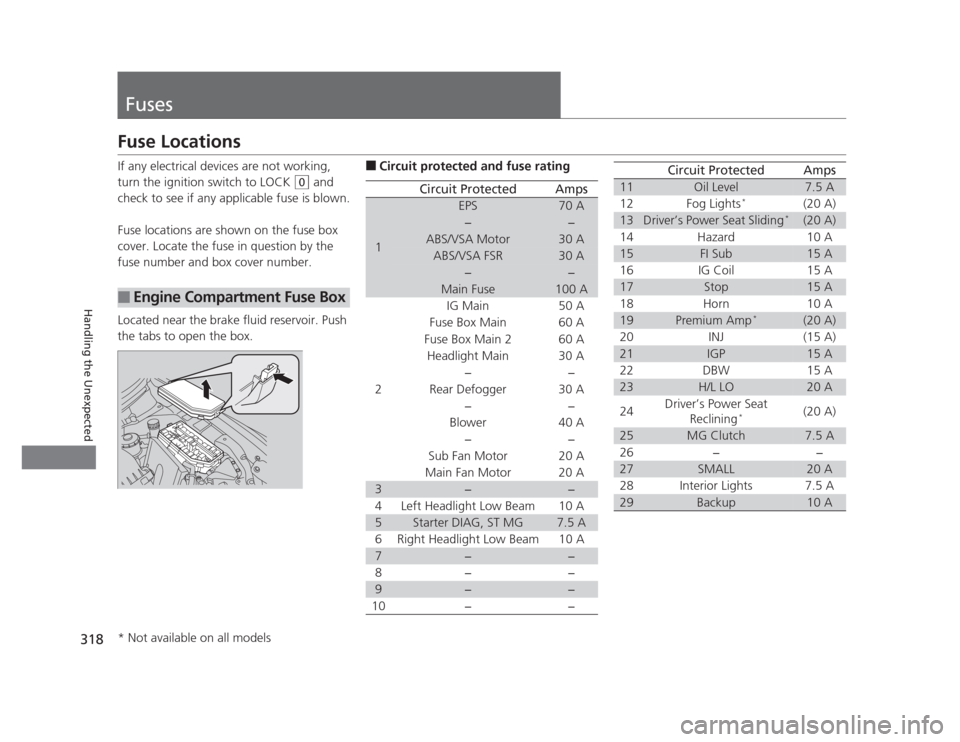
Fuses
Fuse Locations
If any electrical devices are not working,
turn the ignition switch to LOCK
(0 and
check to see if any applicable fuse is blown.
Fuse locations are shown on the fuse box
cover. Locate the fuse in question by the
fuse number and box cover number.
Located near the brake fluid reservoir. Push
the tabs to open the box.
■Engine Compartment Fuse Box
■ Circuit protected and fuse rating
Circuit ProtectedAmps
1
EPS70 A
−−
ABS/VSA Motor30 A
ABS/VSA FSR30 A
−−
Main Fuse100 A
2
IG Main50 A
Fuse Box Main 60 A
Fuse Box Main 260 A
Headlight Main 30 A
−−
Rear Defogger 30 A −−
Blower 40 A −−
Sub Fan Motor 20 A
Main Fan Motor 20 A
3−−
4 Left Headlight Low Beam 10 A
5Starter DIAG, ST MG7.5 A
6 Right Headlight Low Beam 10 A
7−−
8− −
9−−
10 − −
11Oil Level7.5 A
12 Fog Lights *
(20 A)
13Driver’s Power Seat Sliding *(20 A)
14 Hazard 10 A
15FI Sub15 A
16 IG Coil 15 A
17Stop15 A
18 Horn 10 A
19Premium Amp *(20 A)
20 INJ (15 A)
21IGP15 A
22 DBW 15 A
23H/L LO20 A
24 Driver’s Power Seat
Reclining * (20 A)
25MG Clutch7.5 A
26 − −
27SMALL20 A
28 Interior Lights 7.5 A
29Backup10 A
Circuit ProtectedAmps
* Not available on all models
Page 320 of 345
319
uuFusesuFuse Locations
Handling the Unexpected
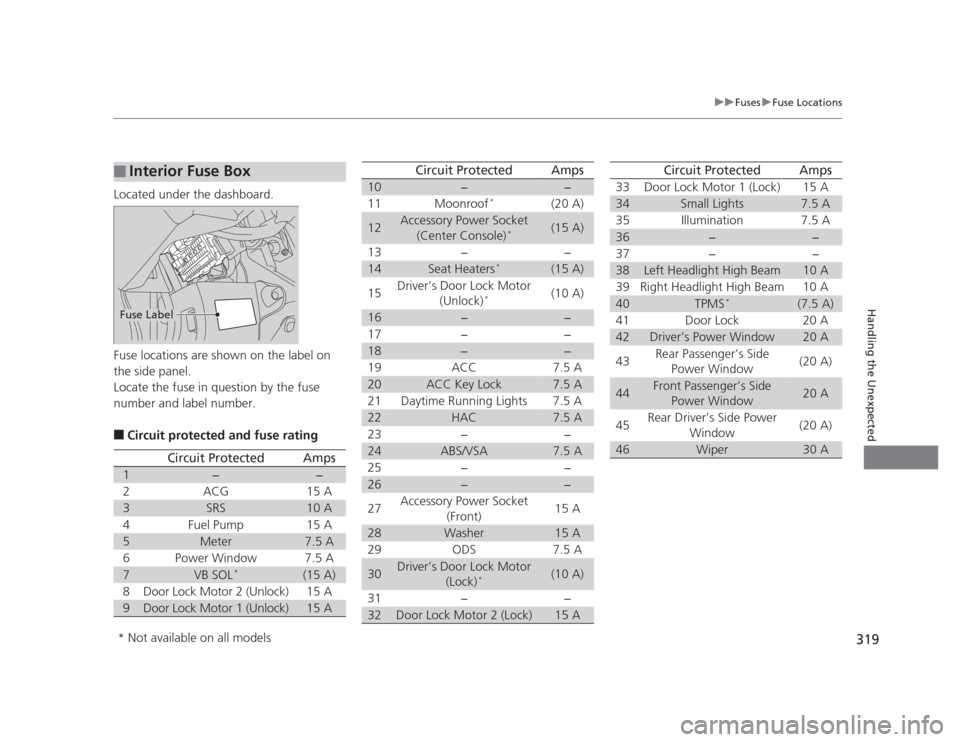
Located under the dashboard.
Fuse locations are shown on the label on
the side panel.
Locate the fuse in question by the fuse
number and label number. ■Circuit protected and fuse rating
■Interior Fuse Box
Fuse Label
Circuit ProtectedAmps
1−−
2ACG15 A
3SRS10 A
4Fuel Pump15 A
5Meter7.5 A
6Power Window7.5 A
7VB SOL *(15 A)
8Door Lock Motor 2 (Unlock)15 A
9Door Lock Motor 1 (Unlock)15 A
10−−
11 Moonroof *
(20 A)
12Accessory Power Socket
(Center Console) *(15 A)
13 − −
14Seat Heaters *(15 A)
15 Driver’s Door Lock Motor
(Unlock) * (10 A)
16−−
17 − −
18−−
19 ACC 7.5 A
20ACC Key Lock7.5 A
21 Daytime Running Lights 7.5 A
22HAC7.5 A
23 − −
24ABS/VSA7.5 A
25 − −
26−−
27 Accessory Power Socket
(Front) 15 A
28Washer15 A
29 ODS 7.5 A
30Driver’s Door Lock Motor (Lock)*(10 A)
31 − −
32Door Lock Motor 2 (Lock)15 A
Circuit ProtectedAmps
33 Door Lock Motor 1 (Lock) 15 A
34Small Lights7.5 A
35 Illumination 7.5 A
36−−
37 − −
38Left Headlight High Beam10 A
39 Right Headlight High Beam 10 A
40TPMS *(7.5 A)
41 Door Lock 20 A
42Driver’s Power Window20 A
43 Rear Passenger’s Side
Power Window (20 A)
44Front Passenger’s Side
Power Window20 A
45 Rear Driver’s Side Power
Window (20 A)
46Wiper30 A
Circuit ProtectedAmps
* Not available on all models