ari HONDA CIVIC 2012 9.G User Guide
[x] Cancel search | Manufacturer: HONDA, Model Year: 2012, Model line: CIVIC, Model: HONDA CIVIC 2012 9.GPages: 345, PDF Size: 9.02 MB
Page 73 of 345
72
uuIndicatorsu
Instrument Panel
IndicatorNameOn/BlinkingExplanationMessage*
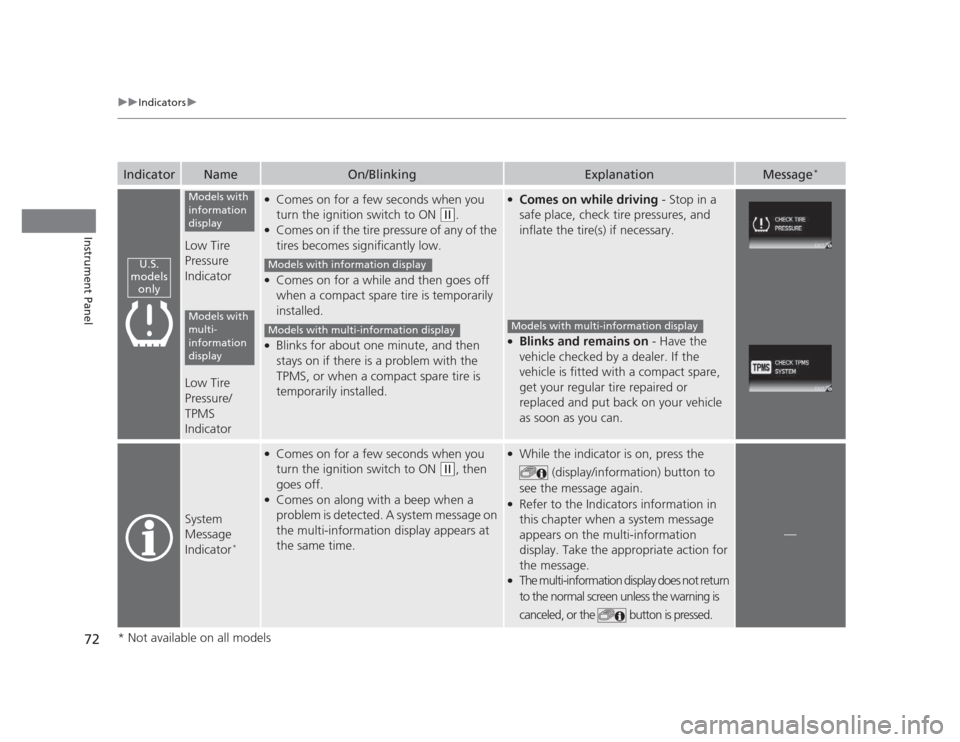
Low Tire Pressure
Indicator
Low Tire Pressure/ TPMS
Indicator
●
Comes on for a few seconds when you
turn the ignition switch to ON
(w .
● Comes on if the tire pressure of any of the
tires becomes significantly low.
● Comes on for a while and then goes off
when a compact spare tire is temporarily
installed.
● Blinks for about one minute, and then
stays on if there is a problem with the
TPMS, or when a compact spare tire is
temporarily installed.
●
Comes on while driving - Stop in a
safe place, check tire pressures, and
inflate the tire(s) if necessary.
● Blinks and remains on - Have the
vehicle checked by a dealer. If the
vehicle is fitted with a compact spare,
get your regular tire repaired or
replaced and put back on your vehicle
as soon as you can.
System
Message
Indicator *
●
Comes on for a few seconds when you
turn the ignition switch to ON
(w , then
goes off.
● Comes on along with a beep when a
problem is detected. A system message on
the multi-information display appears at
the same time.
● While the indicator is on, press the
(display/information) button to
see the message again.
● Refer to the Indicators information in
this chapter when a system message
appears on the multi-information
display. Take the appropriate action for the message.
● The multi-information display does not return
to the normal screen unless the warning is
canceled, or the button is pressed.
—
U.S.
models only
Models with
information
display
Models with
multi-
information
display
Models with information display
Models with multi-information displayModels with multi-information display
* Not available on all models
Page 86 of 345
Continued85
uuGauges and DisplaysuMulti-Information Display*
Instrument Panel
Shows the outside temperature in Fahrenheit (U.S.) or Celsius (Canada). ■
Adjusting the outside temperature display
Adjust the temperature reading up to ±5°F or ±3°C if the temperature reading seems incorrect.
Use the multi-information display's customized features to correct the temperature. 2 Customized Features P. 86
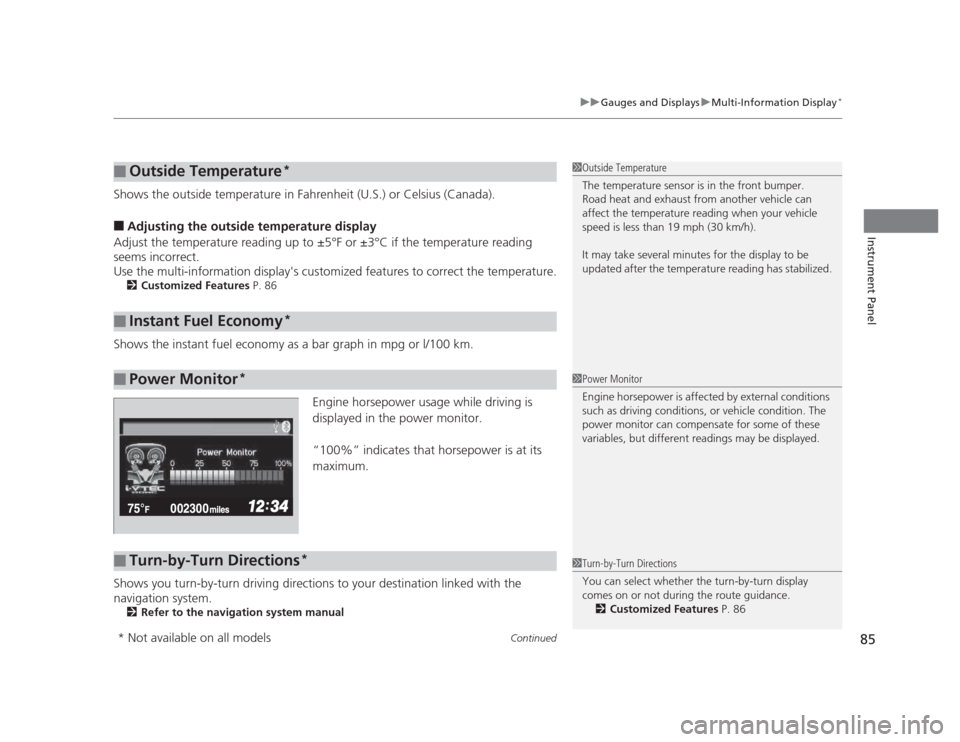
Shows the instant fuel economy as a bar graph in mpg or l/100 km. Engine horsepower usage while driving is
displayed in the power monitor.
“100%” indicates that horsepower is at its maximum.
Shows you turn-by-turn driving directions to your destination linked with the
navigation system. 2 Refer to the navigation system manual
■Outside Temperature *
■Instant Fuel Economy *
■Power Monitor*
1Outside Temperature
The temperature sensor is in the front bumper.
Road heat and exhaust from another vehicle can
affect the temperature reading when your vehicle
speed is less than 19 mph (30 km/h).
It may take several minutes for the display to be
updated after the temperature reading has stabilized.
1Power Monitor
Engine horsepower is affected by external conditions
such as driving conditions, or vehicle condition. The
power monitor can compensate for some of these
variables, but different readings may be displayed.
■Turn-by-Turn Directions
*1Turn-by-Turn Directions
You can select whether the turn-by-turn display
comes on or not during the route guidance.
2 Customized Features P. 86
* Not available on all models
Page 94 of 345
Continued93
uuGauges and DisplaysuMulti-Information Display*
Instrument Panel
■
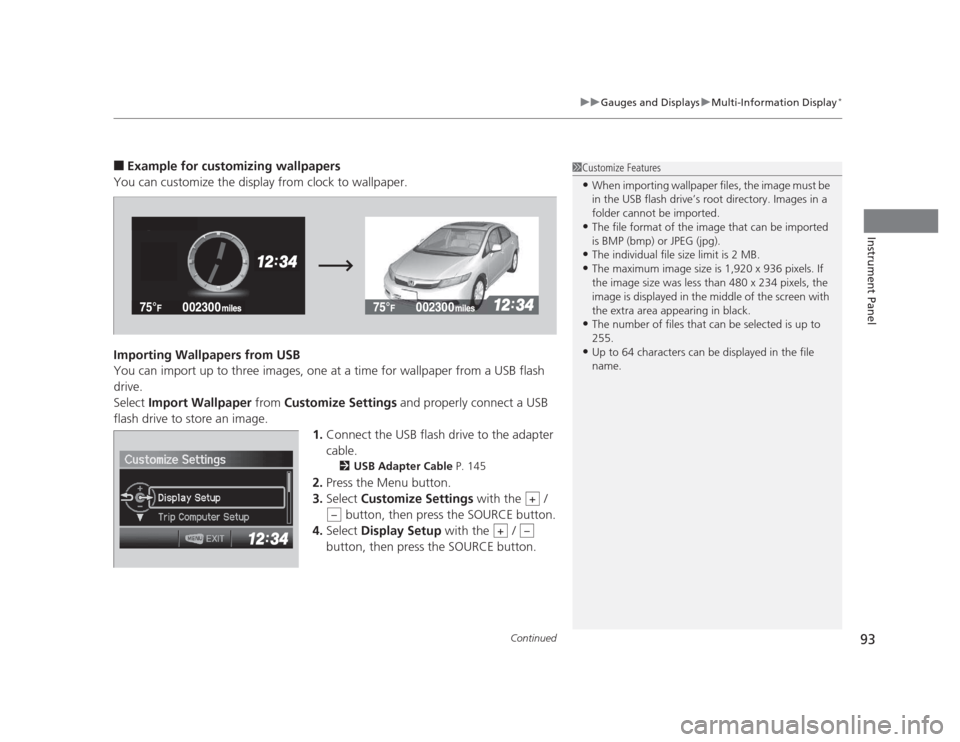
Example for customizing wallpapers
You can customize the display from clock to wallpaper.
Importing Wallpapers from USB
You can import up to three images, one at a time for wallpaper from a USB flash drive.Select Import Wallpaper from Customize Settings and properly connect a USB
flash drive to store an image.
1.Connect the USB flash drive to the adapter
cable.
2 USB Adapter Cable P. 145
2. Press the Menu button.
3. Select Customize Settings with the /
button, then press the SOURCE button.
4. Select Display Setup with the /
button, then press the SOURCE button.1Customize Features • When importing wallpaper files, the image must be
in the USB flash drive’s root directory. Images in a
folder cannot be imported.
• The file format of the image that can be imported
is BMP (bmp) or JPEG (jpg).
• The individual file size limit is 2 MB.
• The maximum image size is 1,920 x 936 pixels. If
the image size was less than 480 x 234 pixels, the
image is displayed in the middle of the screen with
the extra area appearing in black.
• The number of files that can be selected is up to 255.
• Up to 64 characters can be displayed in the file name.
+
–
+–
Page 98 of 345
97
Controls
This chapter explains how to operate the various controls necessary for driving.
Setting the Clock ................................ 98
Locking and Unlocking the Doors
Key Types and Functions ... ................. 99
Locking/Unlocking the Doors from the Outside .......................................... 101
Locking/Unlocking the Doors from the
Inside ............................................. 103
Childproof Door Locks ..................... 104
Auto Door Locking/Unlocking *
........ 105
Opening and Closing the Trunk ....... 109
Security System ................................ 112
Immobilizer System .......................... 112
Security System Alarm *
.................... 112
Opening and Closing the Windows ..... 114Opening and Closing the Moonroof*...... 116Operating the Switches Around the
Steering WheelIgnition Switch ................................. 117
Turn Signals ..................................... 118
Light Switches.................................. 118Fog Lights *
...................................... 120
Daytime Running Lights ................... 120
Wipers and Washers ........................ 121
Brightness Control ........................... 122 Rear Defogger/Heated Door Mirror *
Button ........................................... 123
ECON Button *
................................. 123
Adjusting the Steering Wheel........... 124 Adjusting the Mirrors
....................... 125
Interior Rearview Mirror ................... 125
Power Door Mirrors *
....................... 125
Adjusting the Seats .......................... 126
Adjusting the Seat Positions ............. 126
Interior Lights/Interior Convenience Items ................................................ 134
Interior Lights .................................. 134
Interior Convenience Items .............. 135
Heating and Cooling *
....................... 140
Using Vents, Heating and A/C *
........ 140
* Not available on all models
Page 102 of 345
101
uuLocking and Unlocking the DoorsuLocking/Unlocking the Doors from the Outside
Continued
Controls
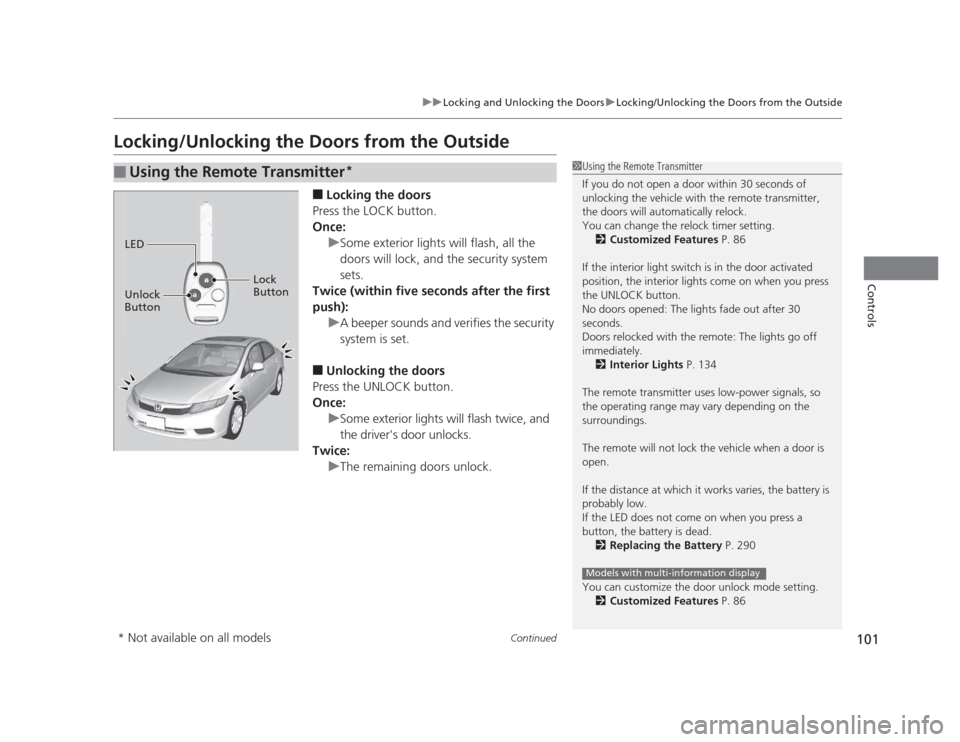
Locking/Unlocking the Doors from the Outside■Locking the doors
Press the LOCK button.
Once:
uSome exterior lights will flash, all the
doors will lock, and the security system sets.
Twice (within five seconds after the first
push):
uA beeper sounds and verifies the security
system is set.
■ Unlocking the doors
Press the UNLOCK button.
Once:
uSome exterior lights will flash twice, and
the driver's door unlocks.
Twice:
uThe remaining doors unlock.
■Using the Remote Transmitter *1Using the Remote Transmitter
If you do not open a door within 30 seconds of
unlocking the vehicle with the remote transmitter,
the doors will automatically relock.
You can change the relock timer setting.
2 Customized Features P. 86
If the interior light switch is in the door activated
position, the interior lights come on when you press
the UNLOCK button.
No doors opened: The lights fade out after 30
seconds.
Doors relocked with the remote: The lights go off immediately. 2 Interior Lights P. 134
The remote transmitter uses low-power signals, so
the operating range may vary depending on the
surroundings.
The remote will not lock the vehicle when a door is open.
If the distance at which it works varies, the battery is probably low.
If the LED does not come on when you press a
button, the battery is dead. 2 Replacing the Battery P. 290
You can customize the door unlock mode setting. 2 Customized Features P. 86
Models with multi-information display
LED
Unlock
Button Lock
Button
* Not available on all models
Page 123 of 345
122
uuOperating the Switches Around the Steering WheeluBrightness Control
Controls
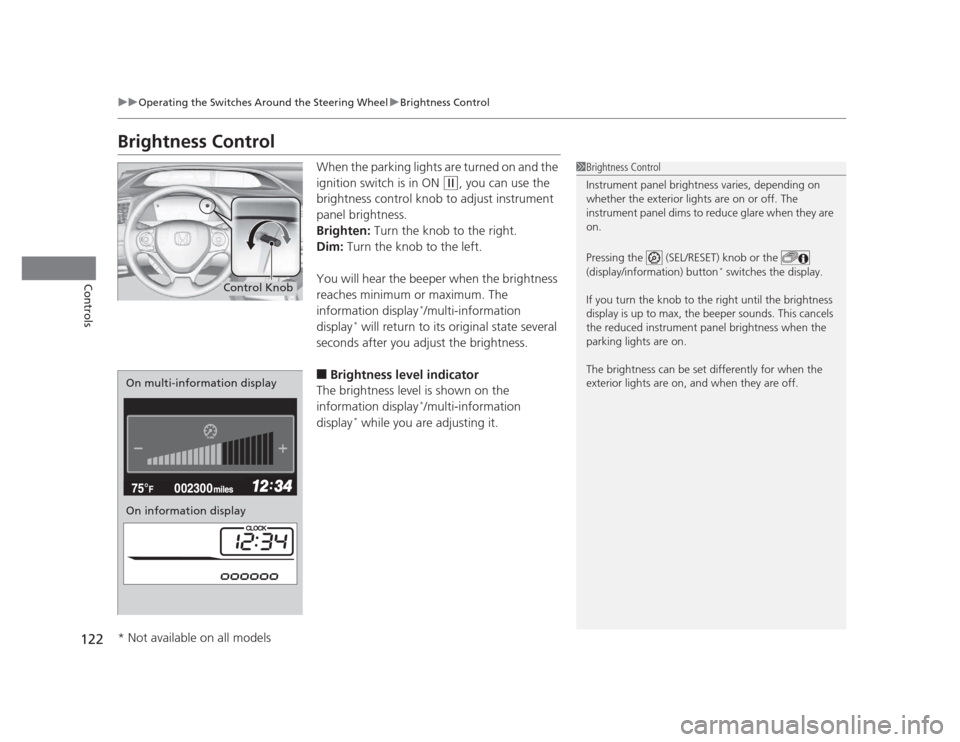
Brightness ControlWhen the parking lights are turned on and the
ignition switch is in ON
(w, you can use the
brightness control knob to adjust instrument
panel brightness.
Brighten: Turn the knob to the right.
Dim: Turn the knob to the left.
You will hear the beeper when the brightness
reaches minimum or maximum. The
information display *
/multi-information
display *
will return to its original state several
seconds after you adjust the brightness. ■ Brightness level indicator
The brightness level is shown on the
information display *
/multi-information
display *
while you are adjusting it.
1Brightness Control
Instrument panel brightness varies, depending on
whether the exterior lights are on or off. The
instrument panel dims to reduce glare when they are on.
Pressing the (SEL/RESET) knob or the
(display/information) button *
switches the display.
If you turn the knob to the right until the brightness
display is up to max, the beeper sounds. This cancels
the reduced instrument panel brightness when the
parking lights are on.
The brightness can be set differently for when the
exterior lights are on, and when they are off.
Control Knob
On multi-information display
On information display
* Not available on all models
Page 136 of 345
135
uuInterior Lights/Interior Convenience ItemsuInterior Convenience Items
Continued
Controls
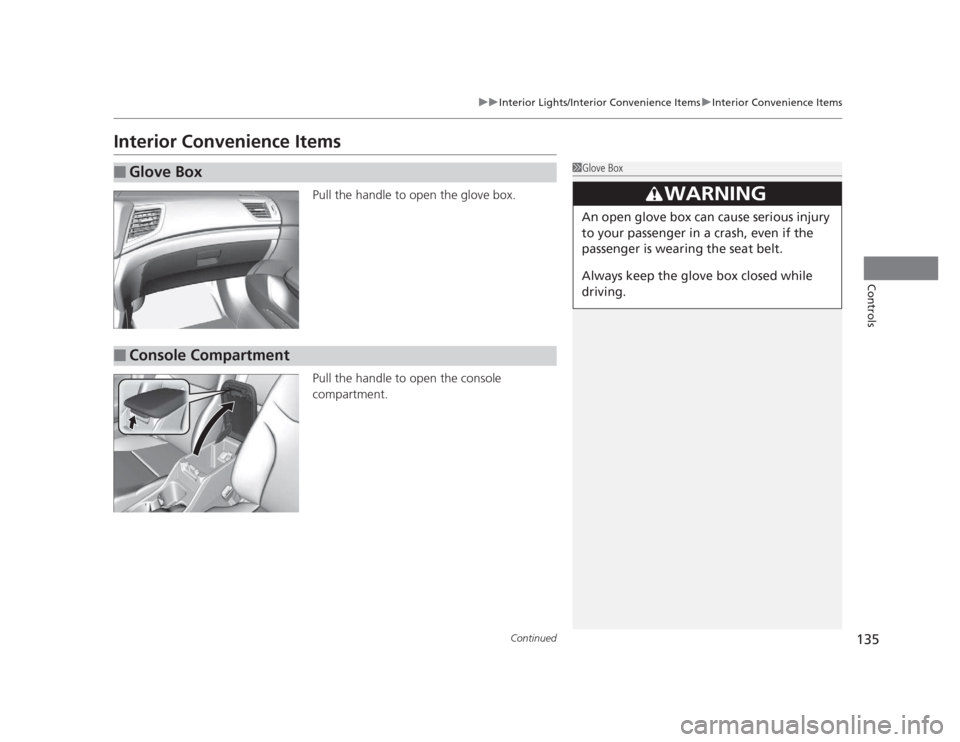
Interior Convenience ItemsPull the handle to open the glove box.
Pull the handle to open the console compartment.
■Glove Box1Glove Box
3WARNING
An open glove box can cause serious injury
to your passenger in a crash, even if the
passenger is wearing the seat belt.
Always keep the glove box closed while
driving.
■Console Compartment
Page 179 of 345
uuBluetooth®
HandsFreeLink ®*uUsing HFL
178
Features
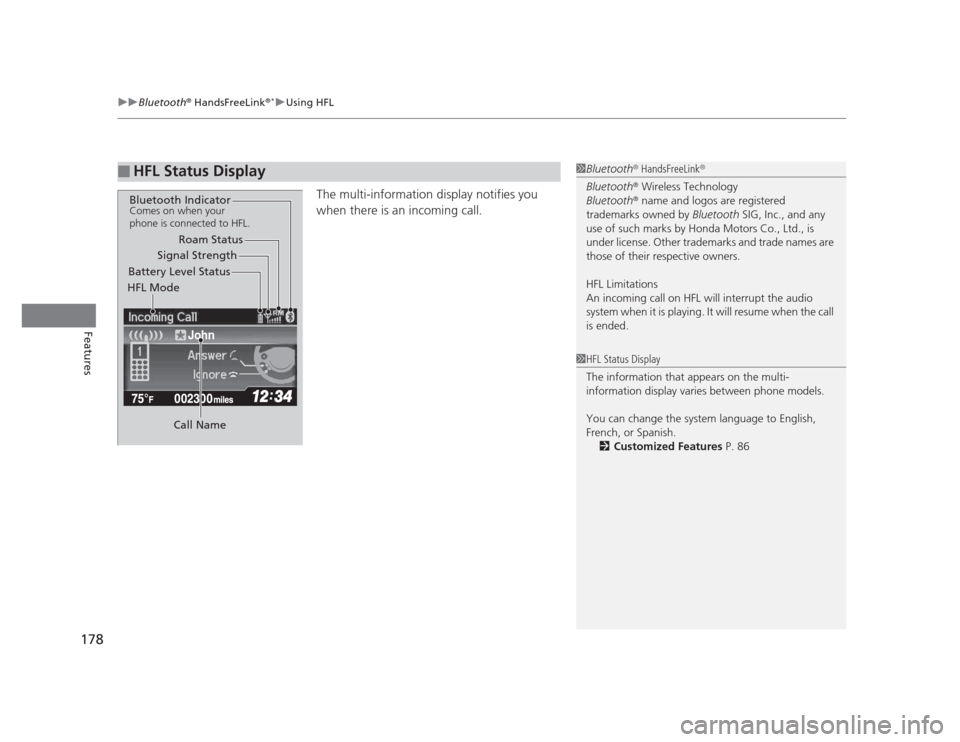
The multi-information display notifies you
when there is an incoming call.
■HFL Status Display1Bluetooth ®
HandsFreeLink ®
Bluetooth ®
Wireless Technology
Bluetooth ®
name and logos are registered
trademarks owned by Bluetooth SIG, Inc., and any
use of such marks by Honda Motors Co., Ltd., is
under license. Other trademarks and trade names are
those of their respective owners.
HFL Limitations
An incoming call on HFL will interrupt the audio
system when it is playing. It will resume when the call is ended.
John
Signal Strength
HFL Mode Battery Level Status Roam Status
Call Name
Bluetooth IndicatorComes on when your
phone is connected to HFL.
1HFL Status Display
The information that appears on the multi-
information display varies between phone models.
You can change the system language to English,
French, or Spanish. 2 Customized Features P. 86
Page 189 of 345
uuBluetooth®
HandsFreeLink ®*uHFL Menus
188
Features
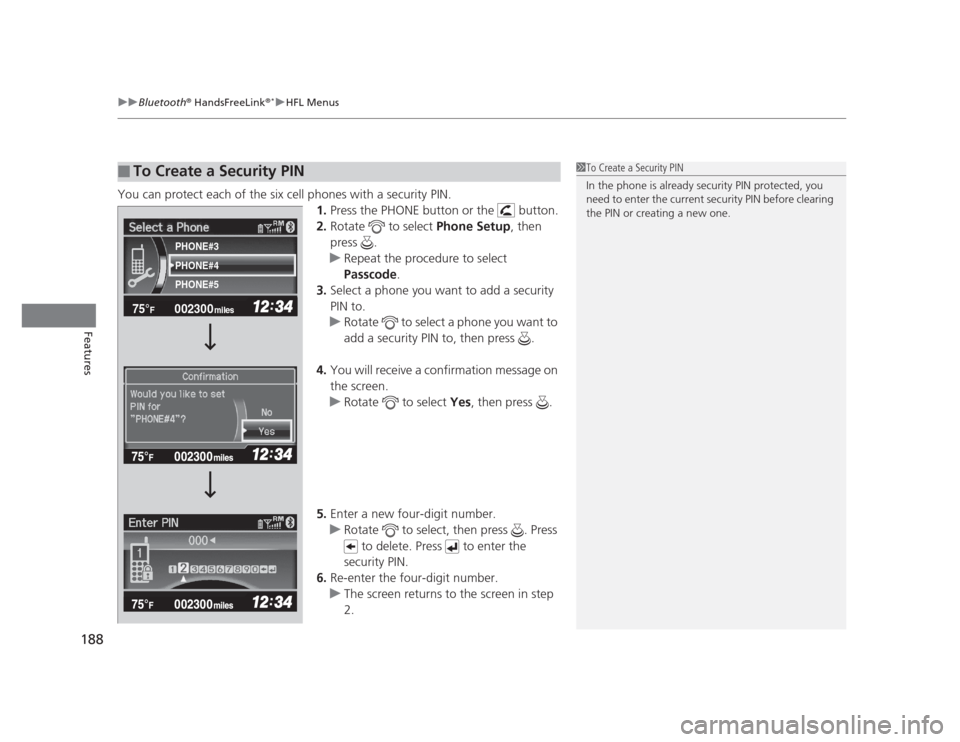
You can protect each of the six cell phones with a security PIN. 1.Press the PHONE button or the button.
2. Rotate to select Phone Setup, then
press .
uRepeat the procedure to select
Passcode .
3. Select a phone you want to add a security
PIN to.
uRotate to select a phone you want to
add a security PIN to, then press .
4. You will receive a confirmation message on the screen.
uRotate to select Yes, then press .
5. Enter a new four-digit number.
uRotate to select, then press . Press
to delete. Press to enter the
security PIN.
6. Re-enter the four-digit number.
uThe screen returns to the screen in step 2.
■To Create a Security PIN1To Create a Security PIN
In the phone is already security PIN protected, you
need to enter the current security PIN before clearing
the PIN or creating a new one.
002300
75°F miles
PHONE#4
PHONE#3 PHONE#5
Page 209 of 345
uuTowing a TraileruTowing Preparation
208
Driving
Towing equipment varies by the size of your trailer, how much load you are towing,
and where you are towing. ■ Hitches
The hitch must be of an approved type and properly bolted to the underbody. ■ Safety chains
Always use safety chains when you tow a trailer. Leave enough slack to allow the
trailer to turn corners easily, but do not allow the chains to drag on the ground. ■ Trailer brakes
There are two common types of trailer brakes: surge and electric. Surge brakes are
common for boat trailers, since the brakes will get wet. If you choose electric brakes,
be sure they are electronically actuated. Do not attempt to attach trailer brakes to
your vehicle's hydraulic system, as it will lower braking effectiveness and create a
potential hazard. ■ Additional towing equipment
Many states and provinces/territories require special outside mirrors when towing a trailer. Even if mirrors are not required in your locale, you should install special
mirrors if visibility is restricted in any way.
■ Trailer light
Trailer lights and equipment must comply with federal, state, province/territory, and
local regulations. Check with your local trailer sales or rental agency for the
requirements in the area where you plan to tow.
■Towing Equipment and Accessories1Towing Equipment and Accessories
Make sure that all equipment is properly installed and
maintained, and that it meets federal, state, province/
territory, and local regulations.
Consult your trailer sales or rental agency if any other
items are recommended or required for your towing
situation.
The lighting and wiring of trailers can vary by type
and brand. If a connector is required, it should only
be installed by a qualified technician.