remote control HONDA CIVIC 2012 9.G User Guide
[x] Cancel search | Manufacturer: HONDA, Model Year: 2012, Model line: CIVIC, Model: HONDA CIVIC 2012 9.GPages: 345, PDF Size: 9.02 MB
Page 145 of 345
144
Features
Audio System*
About Your Audio System
On models with navigation system, see the Navigation System Manual for operation
of the audio system,
Bluetooth®
HandsFreeLink ®
, and voice commands for these
features.
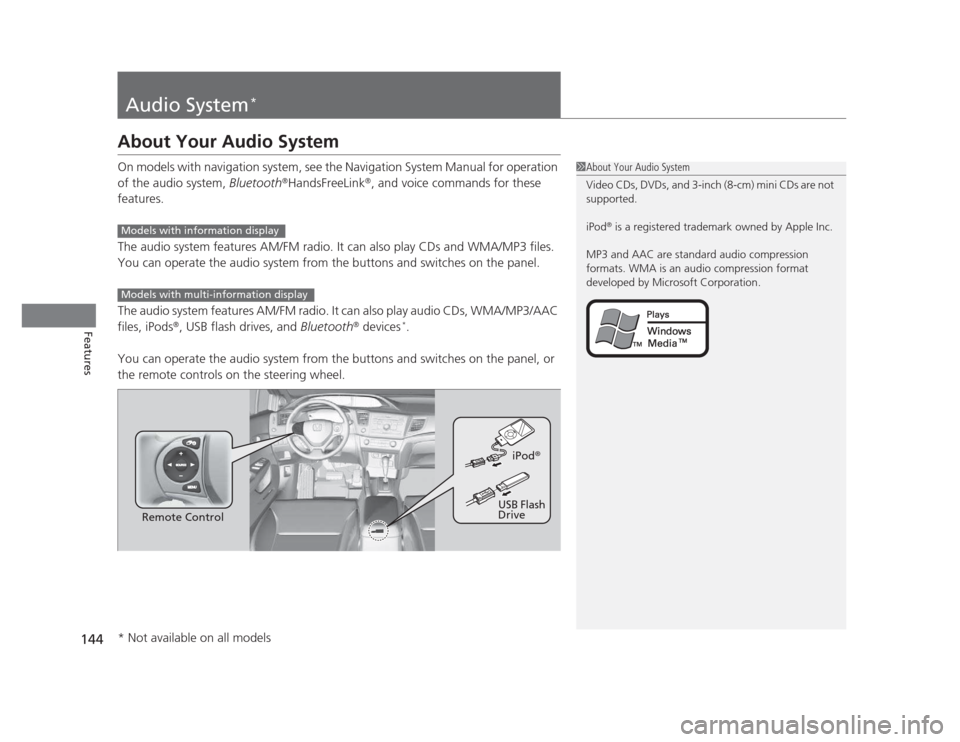
The audio system features AM/FM radio. It can also play CDs and WMA/MP3 files.
You can operate the audio system from the buttons and switches on the panel.
The audio system features AM/FM radio. It can also play audio CDs, WMA/MP3/AAC files, iPods ®
, USB flash drives, and Bluetooth®
devices *
.
You can operate the audio system from the buttons and switches on the panel, or
the remote controls on the steering wheel.
1About Your Audio System
Video CDs, DVDs, and 3-inch (8-cm) mini CDs are not
supported.
iPod ®
is a registered trademark owned by Apple Inc.
MP3 and AAC are standard audio compression
formats. WMA is an audio compression format
developed by Microsoft Corporation.
Models with information display
Models with multi-information display
Remote Control iPod
®
USB Flash
Drive
* Not available on all models
Page 156 of 345
155
Features
Audio System Basic Operation*
To use the audio system function, the ignition switch must be in ACCESSORY (q
or
ON
(w .
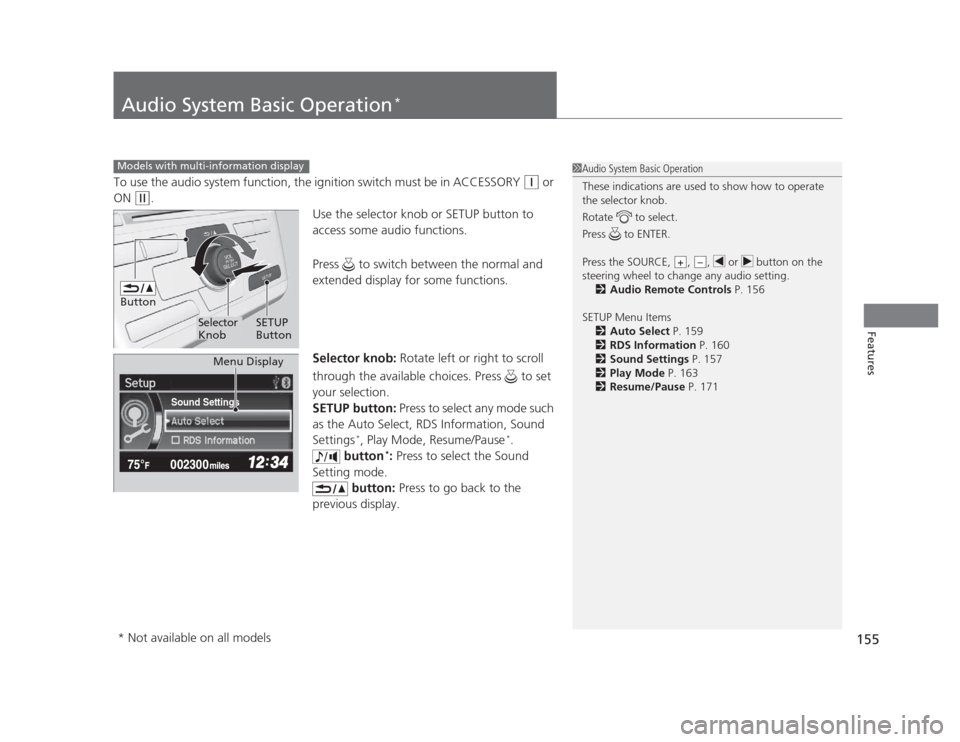
Use the selector knob or SETUP button to
access some audio functions.
Press to switch between the normal and
extended display for some functions.
Selector knob: Rotate left or right to scroll
through the available choices. Press to set
your selection.
SETUP button: Press to select any mode such
as the Auto Select, RDS Information, Sound Settings *
, Play Mode, Resume/Pause *
.
button *
: Press to select the Sound
Setting mode. button: Press to go back to the
previous display.
Models with multi-information display1Audio System Basic Operation
These indications are used to show how to operate
the selector knob.
Rotate to select.
Press to ENTER.
Press the SOURCE, , , or button on the
steering wheel to change any audio setting. 2 Audio Remote Controls P. 156
SETUP Menu Items 2 Auto Select P. 159
2 RDS Information P. 160
2 Sound Settings P. 157
2 Play Mode P. 163
2 Resume/Pause P. 171
+–
Button
Selector Knob SETUP
Button
Sound Settings
Menu Display
* Not available on all models
Page 157 of 345
156
uuAudio System Basic Operation*uAudio Remote Controls
*
Features
Audio Remote Controls *
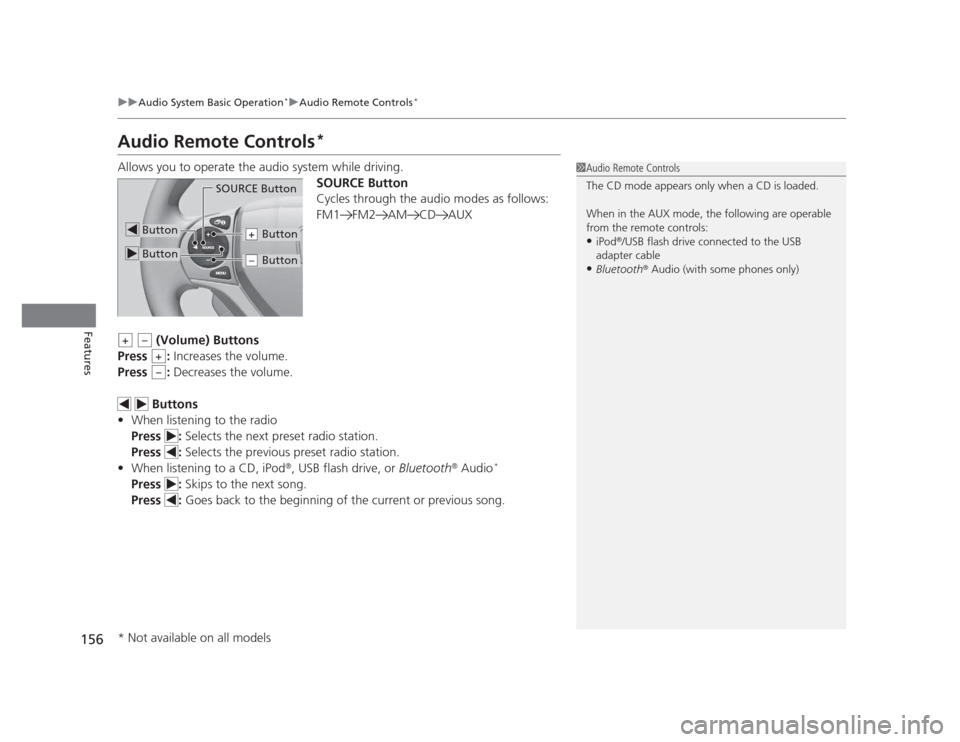
Allows you to operate the audio system while driving. SOURCE Button
Cycles through the audio modes as follows:
FM1 FM2 AM CD AUX
(Volume) Buttons
Press : Increases the volume.
Press : Decreases the volume.
Buttons
• When listening to the radio
Press : Selects the next preset radio station.
Press : Selects the previous preset radio station.
• When listening to a CD, iPod ®
, USB flash drive, or Bluetooth®
Audio *
Press : Skips to the next song.
Press : Goes back to the beginning of the current or previous song.
1Audio Remote Controls
The CD mode appears only when a CD is loaded.
When in the AUX mode, the following are operable
from the remote controls: •iPod ®
/USB flash drive connected to the USB
adapter cable
• Bluetooth ®
Audio (with some phones only)
Button
SOURCE Button
Button
Button+
Button–
+–
+
–
* Not available on all models
Page 160 of 345
Continued159
uuAudio System Basic Operation*uPlaying the AM/FM Radio
Features
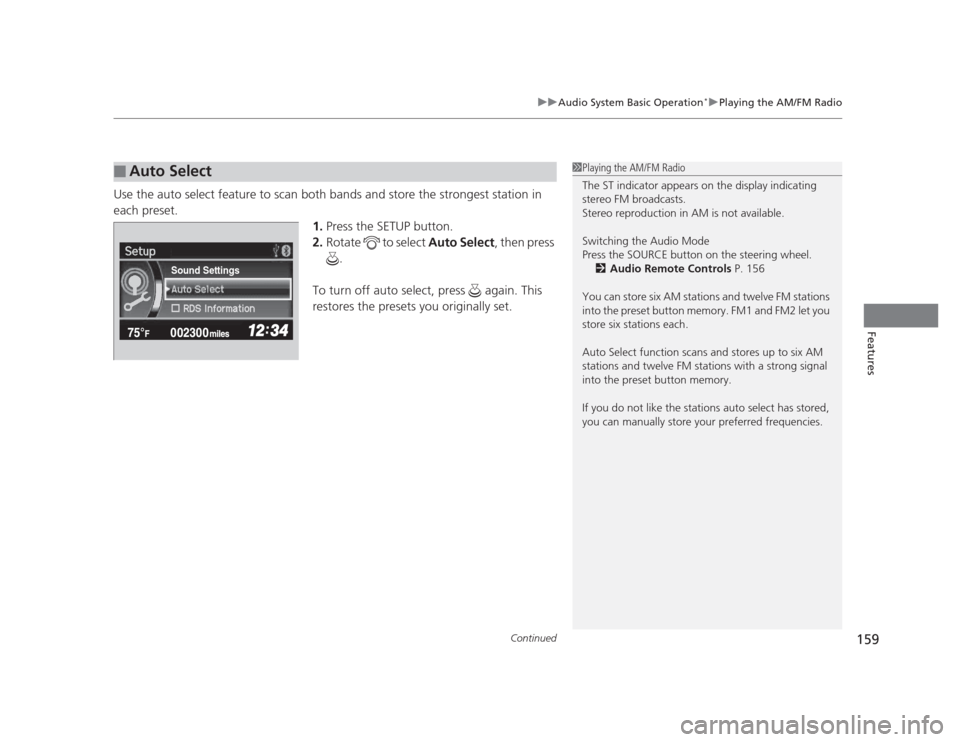
Use the auto select feature to scan both bands and store the strongest station in each preset.
1.Press the SETUP button.
2. Rotate to select Auto Select, then press
.
To turn off auto select, press again. This
restores the presets you originally set.
■Auto Select1Playing the AM/FM Radio
The ST indicator appears on the display indicating
stereo FM broadcasts.
Stereo reproduction in AM is not available.
Switching the Audio Mode
Press the SOURCE button on the steering wheel. 2 Audio Remote Controls P. 156
You can store six AM stations and twelve FM stations
into the preset button memory. FM1 and FM2 let you
store six stations each.
Auto Select function scans and stores up to six AM
stations and twelve FM stations with a strong signal
into the preset button memory.
If you do not like the stations auto select has stored,
you can manually store your preferred frequencies.
Sound Settings
Page 178 of 345
177
Continued
Features
Bluetooth ®
HandsFreeLink ®*
For models with the navigation system, see Navigation System Manual for how to operate the
Bluetooth®
HandsFreeLink ®
.
Bluetooth ®
HandsFreeLink ®
(HFL) allows you to place and receive phone calls using
your vehicle's audio system, without handling your cell phone.
Using HFL
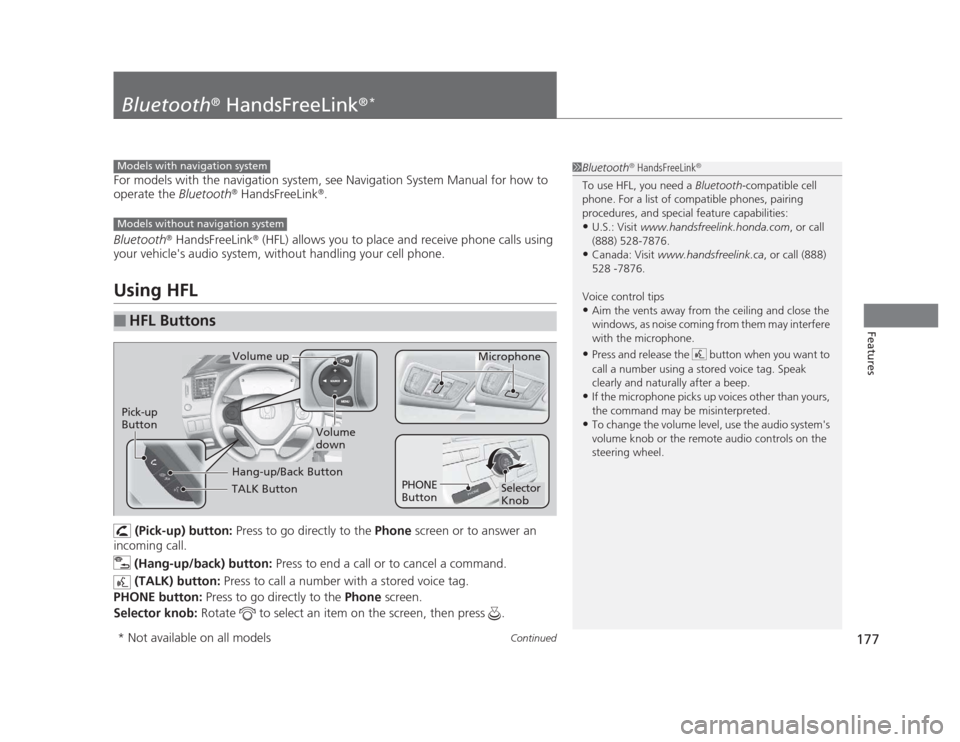
(Pick-up) button: Press to go directly to the Phone screen or to answer an
incoming call.
(Hang-up/back) button: Press to end a call or to cancel a command.
(TALK) button: Press to call a number with a stored voice tag.
PHONE button: Press to go directly to the Phone screen.
Selector knob: Rotate to select an item on the screen, then press .
■HFL Buttons
1Bluetooth®
HandsFreeLink ®
To use HFL, you need a Bluetooth-compatible cell
phone. For a list of compatible phones, pairing
procedures, and special feature capabilities:
• U.S.: Visit www.handsfreelink.honda.com , or call
(888) 528-7876.
• Canada: Visit www.handsfreelink.ca , or call (888)
528 -7876.
Voice control tips • Aim the vents away from the ceiling and close the
windows, as noise coming from them may interfere
with the microphone.
• Press and release the button when you want to
call a number using a stored voice tag. Speak
clearly and naturally after a beep.
• If the microphone picks up voices other than yours,
the command may be misinterpreted.
• To change the volume level, use the audio system's
volume knob or the remote audio controls on the
steering wheel.Models with navigation system
Models without navigation system
TALK Button
Volume up
Microphone
Hang-up/Back Button
Pick-up
Button
Volume
down
Selector Knob
PHONE
Button
* Not available on all models
Page 338 of 345
INDEX
337
INDEX
INDEX
A
ABS (Anti-lock Brake System).................. 231
Accessories and Modifications ................ 238
Accessory Power Sockets ......................... 137
Additives Coolant .................................................. 261
Engine Oil ............................................... 254
Washer ................................................... 267
Additives, Engine Oil ............................... 254
Adjusting
Armrest .................................................. 133
Front Seats.............................................. 126
Head Restraints ....................................... 129
Mirrors.................................................... 125
Rear Seats ............................................... 132
Steering Wheel ....................................... 124
Temperature ............................................. 85
Air Conditioning System (Heating and Cooling System) ...................................... 140
Cooling................................................... 142
Defrosting the Windshield and Windows .............................................. 142
Dust and Pollen Filter .............................. 291
Heating................................................... 141
Air Pressure .............................. 281, 325, 327
Airbags ....................................................... 35
Advanced Airbags ..................................... 41
After a Collision ........................................ 39
Airbag Care .............................................. 49
Event Data Recorder ................................. 21
Front Airbags (SRS) ................................... 38 Indicator ........................................ 46, 69, 73
Passenger Airbag Off Indicator .................. 47
Sensors...................................................... 35
Side Airbag Cutoff System ......................... 44
Side Airbag Off Indicator ........................... 48
Side Airbags .............................................. 42
Side Curtain Airbags .................................. 45
AM/FM Radio .................................... 149, 158
Anti-lock Brake System (ABS) .................. 231
Indicator .................................................... 69
Armrest ..................................................... 133
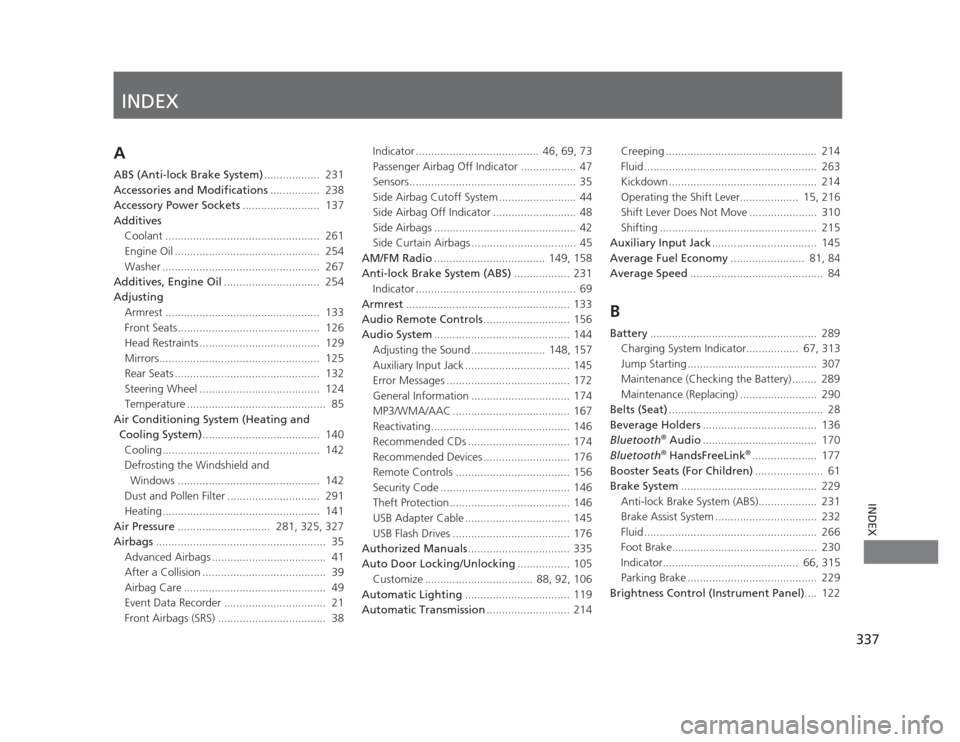
Audio Remote Controls ............................ 156
Audio System ............................................ 144
Adjusting the Sound ........................ 148, 157
Auxiliary Input Jack .................................. 145
Error Messages ........................................ 172
General Information ................................ 174
MP3/WMA/AAC ...................................... 167
Reactivating............................................. 146
Recommended CDs ................................. 174
Recommended Devices ............................ 176
Remote Controls ..................................... 156
Security Code .......................................... 146
Theft Protection....................................... 146
USB Adapter Cable .................................. 145
USB Flash Drives ...................................... 176
Authorized Manuals ................................. 335
Auto Door Locking/Unlocking ................. 105
Customize ................................... 88, 92, 106
Automatic Lighting .................................. 119
Automatic Transmission ........................... 214 Creeping ................................................. 214
Fluid ........................................................ 263
Kickdown ................................................ 214
Operating the Shift Lever................... 15, 216
Shift Lever Does Not Move ...................... 310
Shifting ................................................... 215
Auxiliary Input Jack .................................. 145
Average Fuel Economy ........................ 81, 84
Average Speed ........................................... 84
B
Battery ...................................................... 289
Charging System Indicator................. 67, 313
Jump Starting .......................................... 307
Maintenance (Checking the Battery) ........ 289
Maintenance (Replacing) ......................... 290
Belts (Seat) .................................................. 28
Beverage Holders ..................................... 136
Bluetooth ®
Audio ..................................... 170
Bluetooth ®
HandsFreeLink ®
..................... 177
Booster Seats (For Children) ...................... 61
Brake System ............................................ 229
Anti-lock Brake System (ABS)................... 231
Brake Assist System ................................. 232
Fluid ........................................................ 266
Foot Brake............................................... 230
Indicator............................................ 66, 315
Parking Brake .......................................... 229
Brightness Control (Instrument Panel) .... 122