reset HONDA CIVIC 2012 9.G Owner's Manual
[x] Cancel search | Manufacturer: HONDA, Model Year: 2012, Model line: CIVIC, Model: HONDA CIVIC 2012 9.GPages: 345, PDF Size: 9.02 MB
Page 193 of 345
uuBluetooth®
HandsFreeLink ®*uHFL Menus
192
Features
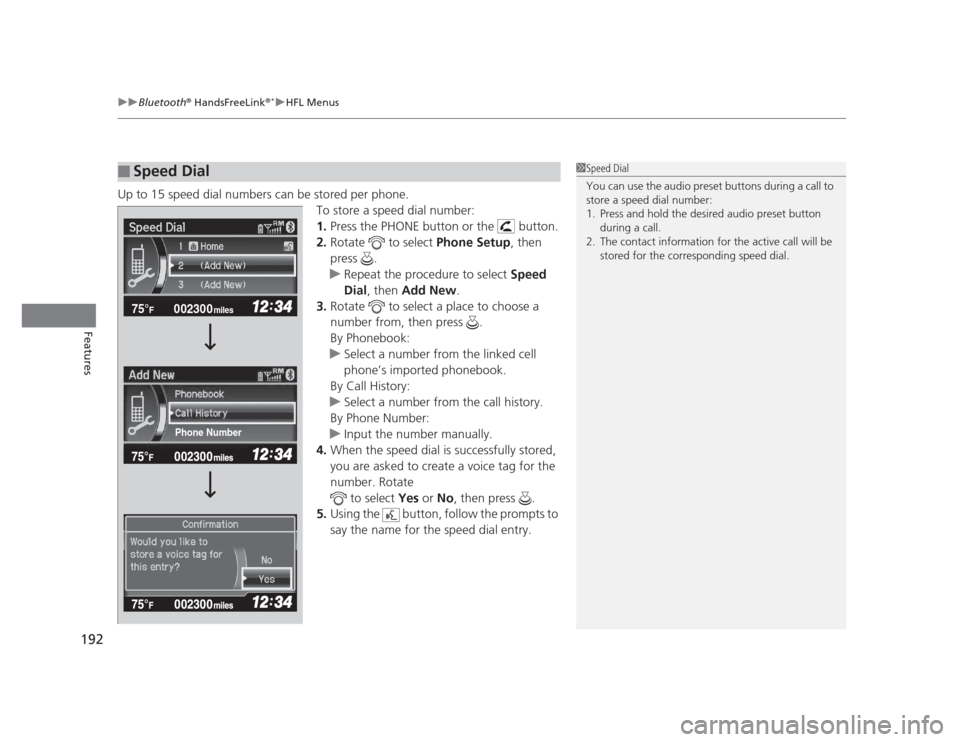
Up to 15 speed dial numbers can be stored per phone. To store a speed dial number: 1.Press the PHONE button or the button.
2. Rotate to select Phone Setup, then
press .
uRepeat the procedure to select Speed
Dial , then Add New .
3. Rotate to select a place to choose a
number from, then press .
By Phonebook:
uSelect a number from the linked cell
phone’s imported phonebook.
By Call History:
uSelect a number from the call history.
By Phone Number:
uInput the number manually.
4. When the speed dial is successfully stored,
you are asked to create a voice tag for the number. Rotate
to select Yes or No, then press .
5. Using the button, follow the prompts to
say the name for the speed dial entry.
■Speed Dial1Speed Dial
You can use the audio preset buttons during a call to
store a speed dial number:
1. Press and hold the desired audio preset button
during a call.
2. The contact information for the active call will be stored for the corresponding speed dial.
002300
75°F miles
Phone Number
Page 199 of 345
uuBluetooth®
HandsFreeLink ®*uHFL Menus
198
Features
■ To make a call using the call history
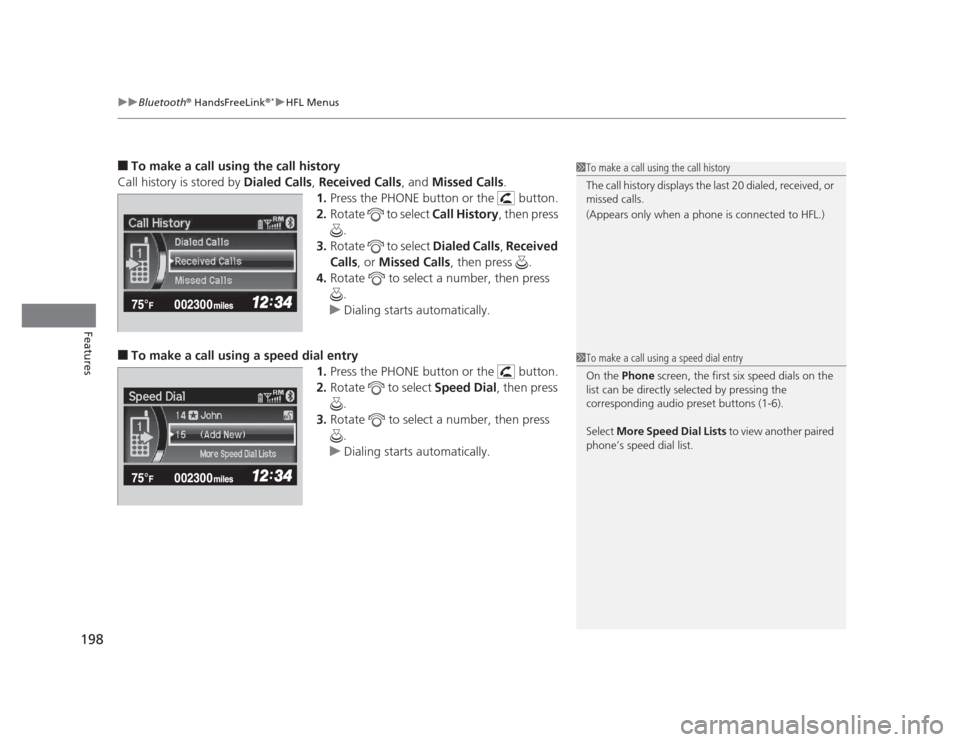
Call history is stored by Dialed Calls, Received Calls , and Missed Calls .
1. Press the PHONE button or the button.
2. Rotate to select Call History, then press
.
3. Rotate to select Dialed Calls, Received
Calls , or Missed Calls , then press .
4. Rotate to select a number, then press
.
uDialing starts automatically.
■ To make a call using a speed dial entry
1.Press the PHONE button or the button.
2. Rotate to select Speed Dial, then press
.
3. Rotate to select a number, then press
.
uDialing starts automatically.
1To make a call using the call history
The call history displays the last 20 dialed, received, or
missed calls.
(Appears only when a phone is connected to HFL.)
1To make a call using a speed dial entry
On the Phone screen, the first six speed dials on the
list can be directly selected by pressing the
corresponding audio preset buttons (1-6).
Select More Speed Dial Lists to view another paired
phone’s speed dial list.
Page 244 of 345
243
Continued
Maintenance
Maintenance Minder™
If the engine oil life is less than 15%, you will see the Maintenance Minder messages
appear on the information display *
or the multi-information display *
every time you
turn the ignition switch to ON
(w . The messages notify you when to change the
engine oil, or when to bring your vehicle to a dealer for indicated maintenance
services.
To Use Maintenance Minder TM
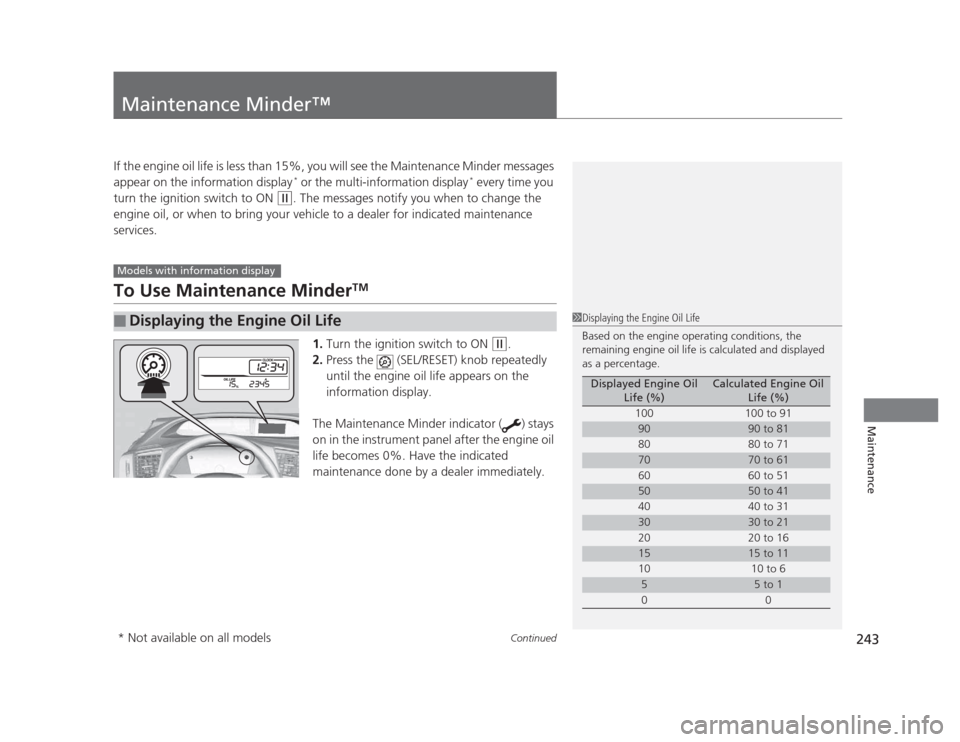
1. Turn the ignition switch to ON
(w .
2. Press the (SEL/RESET) knob repeatedly
until the engine oil life appears on the
information display.
The Maintenance Minder indicator ( ) stays
on in the instrument panel after the engine oil
life becomes 0%. Have the indicated
maintenance done by a dealer immediately.
■Displaying the Engine Oil Life
Models with information display
1Displaying the Engine Oil Life
Based on the engine operating conditions, the
remaining engine oil life is calculated and displayed
as a percentage.
Displayed Engine Oil Life (%)Calculated Engine Oil Life (%)
100 100 to 91
9090 to 81
80 80 to 71
7070 to 61
60 60 to 51
5050 to 41
40 40 to 31
3030 to 21
20 20 to 16
1515 to 11
10 10 to 6
55 to 1
00
* Not available on all models
Page 245 of 345
244
uuMaintenance Minder™uTo Use Maintenance MinderTM
Maintenance
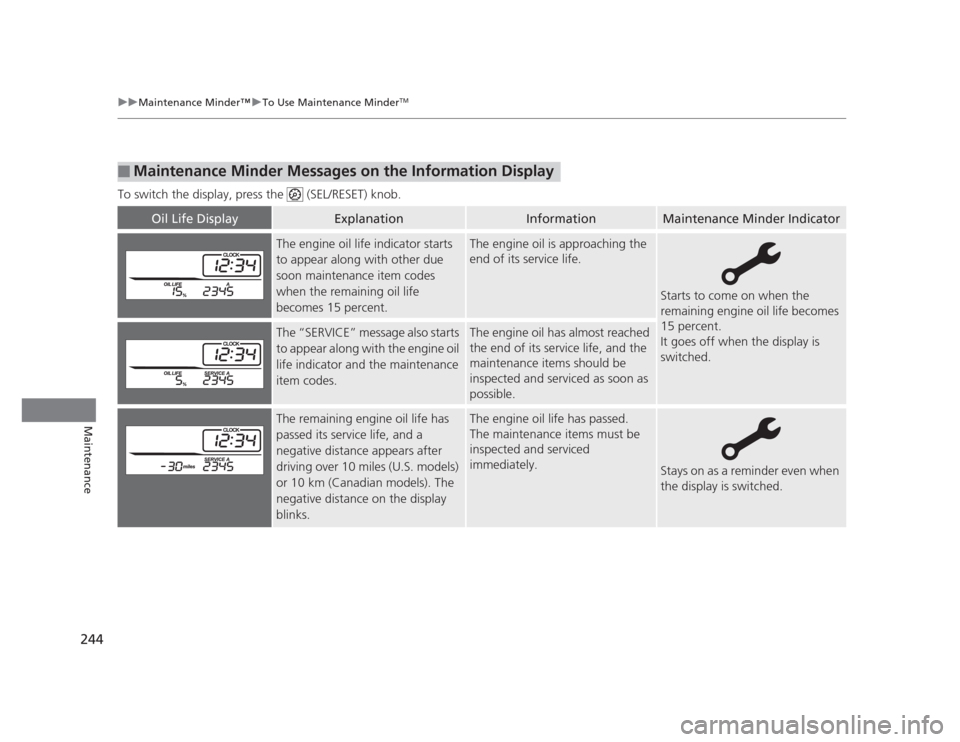
To switch the display, press the (SEL/RESET) knob.
■Maintenance Minder Messages on the Information Display
Oil Life DisplayExplanationInformationMaintenance Minder Indicator
The engine oil life indicator starts
to appear along with other due
soon maintenance item codes
when the remaining oil life
becomes 15 percent.The engine oil is approaching the
end of its service life.
Starts to come on when the
remaining engine oil life becomes
15 percent.
It goes off when the display is switched.
The “SERVICE” message also starts
to appear along with the engine oil
life indicator and the maintenance
item codes.The engine oil has almost reached
the end of its service life, and the
maintenance items should be
inspected and serviced as soon as
possible.
The remaining engine oil life has
passed its service life, and a negative distance appears after
driving over 10 miles (U.S. models)
or 10 km (Canadian models). The
negative distance on the display
blinks.The engine oil life has passed.
The maintenance items must be
inspected and serviced immediately.
Stays on as a reminder even when
the display is switched.
Page 247 of 345
uuMaintenance Minder™uTo Use Maintenance MinderTM
246
Maintenance
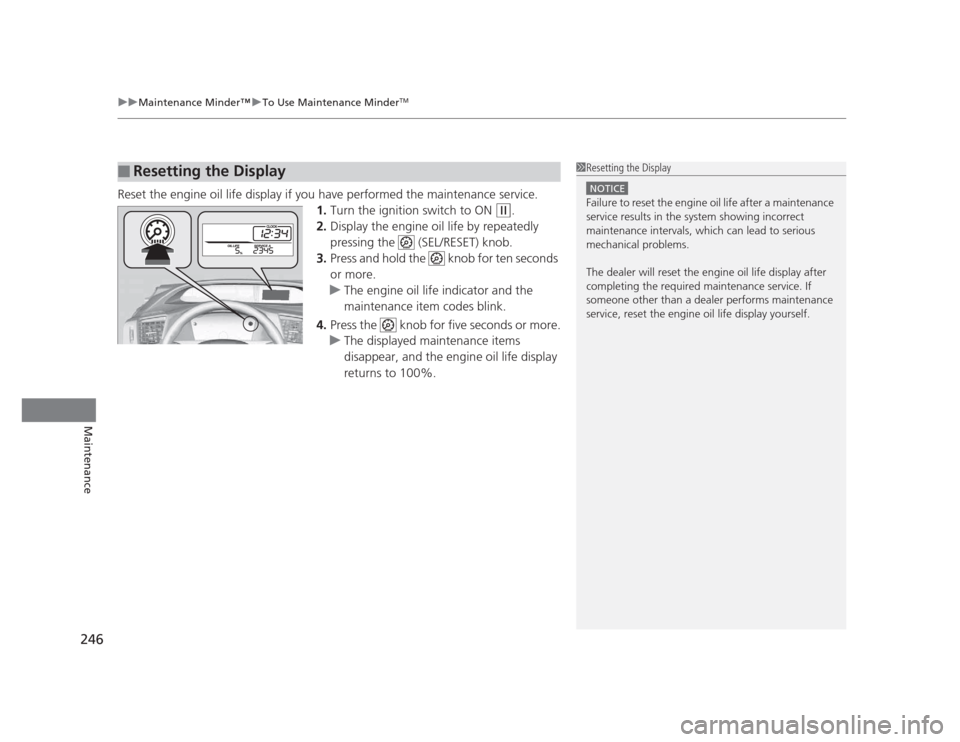
Reset the engine oil life display if you have performed the maintenance service. 1.Turn the ignition switch to ON
(w .
2. Display the engine oil life by repeatedly
pressing the (SEL/RESET) knob.
3. Press and hold the knob for ten seconds or more.
uThe engine oil life indicator and the
maintenance item codes blink.
4. Press the knob for five seconds or more.
uThe displayed maintenance items
disappear, and the engine oil life display returns to 100%.
■Resetting the Display1Resetting the Display
NOTICE
Failure to reset the engine oil life after a maintenance
service results in the system showing incorrect
maintenance intervals, which can lead to serious
mechanical problems.
The dealer will reset the engine oil life display after
completing the required maintenance service. If
someone other than a dealer performs maintenance
service, reset the engine oil life display yourself.
Page 251 of 345
uuMaintenance Minder™uTo Use Maintenance MinderTM
250
Maintenance
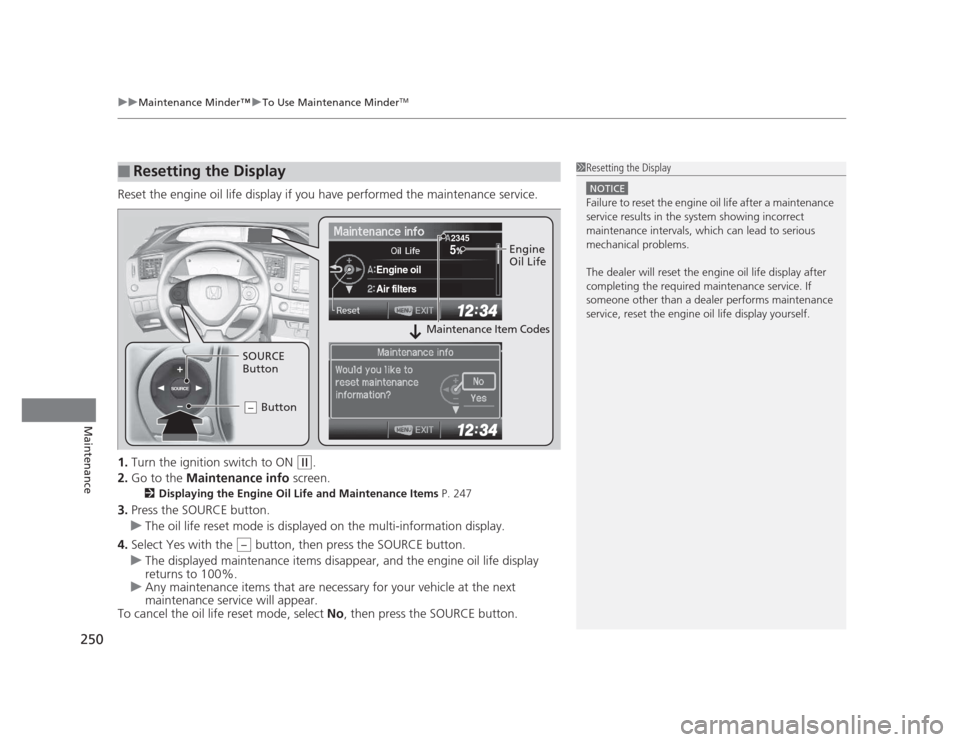
Reset the engine oil life display if you have performed the maintenance service. 1. Turn the ignition switch to ON
(w .
2. Go to the Maintenance info screen.
2 Displaying the Engine Oil Life and Maintenance Items P. 247
3. Press the SOURCE button.
uThe oil life reset mode is displayed on the multi-information display.
4. Select Yes with the button, then press the SOURCE button.
uThe displayed maintenance items disappear, and the engine oil life display returns to 100%.
uAny maintenance items that are necessary for your vehicle at the next
maintenance service will appear.
To cancel the oil life reset mode, select No, then press the SOURCE button.
■Resetting the Display1Resetting the Display
NOTICE
Failure to reset the engine oil life after a maintenance
service results in the system showing incorrect
maintenance intervals, which can lead to serious
mechanical problems.
The dealer will reset the engine oil life display after
completing the required maintenance service. If
someone other than a dealer performs maintenance
service, reset the engine oil life display yourself.
SOURCE
5
Engine oil
Air filters
2345Engine
Oil Life
SOURCE
Button Button
–
Maintenance Item Codes
–
Page 290 of 345
289
Maintenance
Battery
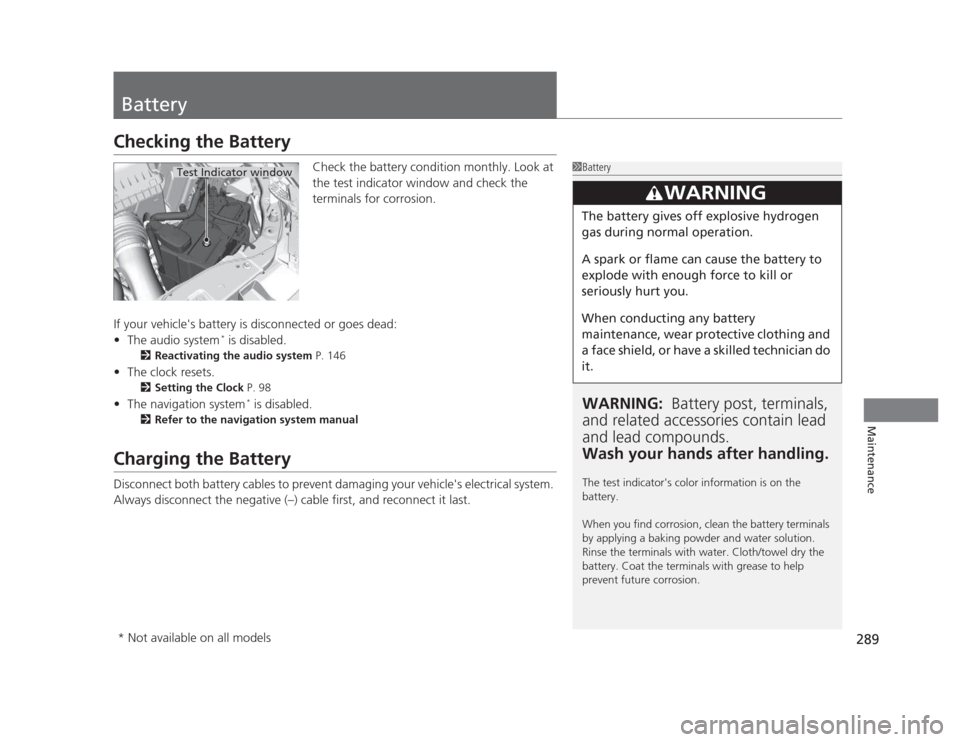
Checking the BatteryCheck the battery condition monthly. Look at
the test indicator window and check the
terminals for corrosion.
If your vehicle's battery is disconnected or goes dead: • The audio system *
is disabled.
2 Reactivating the audio system P. 146
• The clock resets.
2 Setting the Clock P. 98
• The navigation system *
is disabled.
2 Refer to the navigation system manual
Charging the Battery
Disconnect both battery cables to prevent damaging your vehicle's electrical system.
Always disconnect the negative (–) cable first, and reconnect it last.
1Battery
WARNING: Battery post, terminals,
and related accessories contain lead and lead compounds.
Wash your hands after handling.
The test indicator's color information is on the battery.
When you find corrosion, clean the battery terminals
by applying a baking powder and water solution.
Rinse the terminals with water. Cloth/towel dry the
battery. Coat the terminals with grease to help
prevent future corrosion.
3WARNING
The battery gives off explosive hydrogen
gas during normal operation.
A spark or flame can cause the battery to
explode with enough force to kill or
seriously hurt you.
When conducting any battery
maintenance, wear protective clothing and
a face shield, or have a skilled technician do it.
Test Indicator window
* Not available on all models
Page 343 of 345
342
INDEX
Trunk....................................................... 109
Outside Temperature Display .................... 85
Overheating .............................................. 311
P
Panic Mode ............................................... 113
Parking ...................................................... 233
Parking Brake ............................................ 229
Parking Brake and Brake System Indicator ............................................ 66, 315
Passenger Airbag Off Indicator ................. 47
Passing Indicators ..................................... 118
Power Windows ........................................ 114
Precautions While Driving ........................ 213
Rain ......................................................... 213
Pregnant Women ....................................... 33
Puncture (Tire) .......................................... 299
R
Radiator ..................................................... 262
Radio (AM/FM) .................................. 149, 158
Radio Data System (RDS) .................. 150, 160
Range .................................................... 81, 84
RDS (Radio Data System) .................. 150, 160
Readiness Codes (Emissions Testing) ....... 331
Rear Defogger/Heated Door Mirror
Button ...................................................... 123
Rear Seats (Folding Down) ....................... 132
Rearview Mirror ........................................ 125 Refueling
.................................................. 234
Fuel Gauge................................................ 78
Gasoline .................................. 234, 324, 326
Low Fuel Indicator ..................................... 68
Regulations ............................... 226, 283, 329
Remote Transmitter ................................. 101
Replacement
Battery .................................................... 290
Bulbs ....................................................... 268
Fuses ............................................... 318, 319
Tires ........................................................ 286
Wiper Blade Rubber ................................ 278
Reporting Safety Defects ......................... 330
Resetting a Trip Meter ......................... 80, 83
S
Safe Driving ................................................ 23
Safety Check ............................................... 27
Safety Labels ............................................... 63
Safety Message ........................................... 22
Seat Belts .................................................... 28
Adjusting the Shoulder Anchor.................. 32
Automatic Seat Belt Tensioners ................. 30
Checking................................................... 34
Fastening .................................................. 31
Installing a Child Seat with a Lap/
Shoulder Seat Belt ................................... 57
Pregnant Women ...................................... 33
Reminder .................................................. 29
Warning Indicator ............................... 29, 68 Seat Heaters
............................................. 139
Seats .......................................................... 126
Adjusting ................................................ 126
Front Seats.............................................. 126
Rear Seats ............................................... 132
Seat Heaters ........................................... 139
Security System ........................................ 112
Immobilizer System Indicator..................... 74
Security System Alarm Indicator ................ 74
SEL/RESET Knob .................................... 80, 82
Select Lever ................................ 15, 215, 217
Operation ................................. 15, 216, 217
Releasing ................................................ 310
Won’t Move ........................................... 310
Selecting a Child Seat ................................ 54
Selector Knob (Audio) ..................... 147, 155
Setting the Clock ........................................ 98
Shift Lever .................................. 15, 215, 217
Shift Position Indicator ...................... 67, 216
Shifting (Transmission) .................... 215, 217
Shoulder Anchor ........................................ 32
Side Airbags ............................................... 42
Cutoff System ........................................... 44
Off Indicator ............................................. 44
Side Curtain Airbags .................................. 45
Snow Tires ................................................ 288
Spare Tire ................................. 299, 325, 327
Spark Plugs ....................................... 324, 326
Specifications ........................................... 324
Specified Fuel ........................... 234, 324, 326
Speedometer .............................................. 78