vin HONDA CIVIC 2012 9.G Workshop Manual
[x] Cancel search | Manufacturer: HONDA, Model Year: 2012, Model line: CIVIC, Model: HONDA CIVIC 2012 9.GPages: 345, PDF Size: 9.02 MB
Page 66 of 345
65
Instrument Panel
This chapter describes the buttons, indicators, and gauges that are used while driving.
Indicators ............................................ 66
Multi-Information Display Warning and
Information Messages *
.................... 76
Gauges and Displays
Gauges .............................................. 78
Information Display *
.......................... 80
Multi-Information Display *
................. 82
* Not available on all models
Page 67 of 345
66
Instrument Panel
Indicators
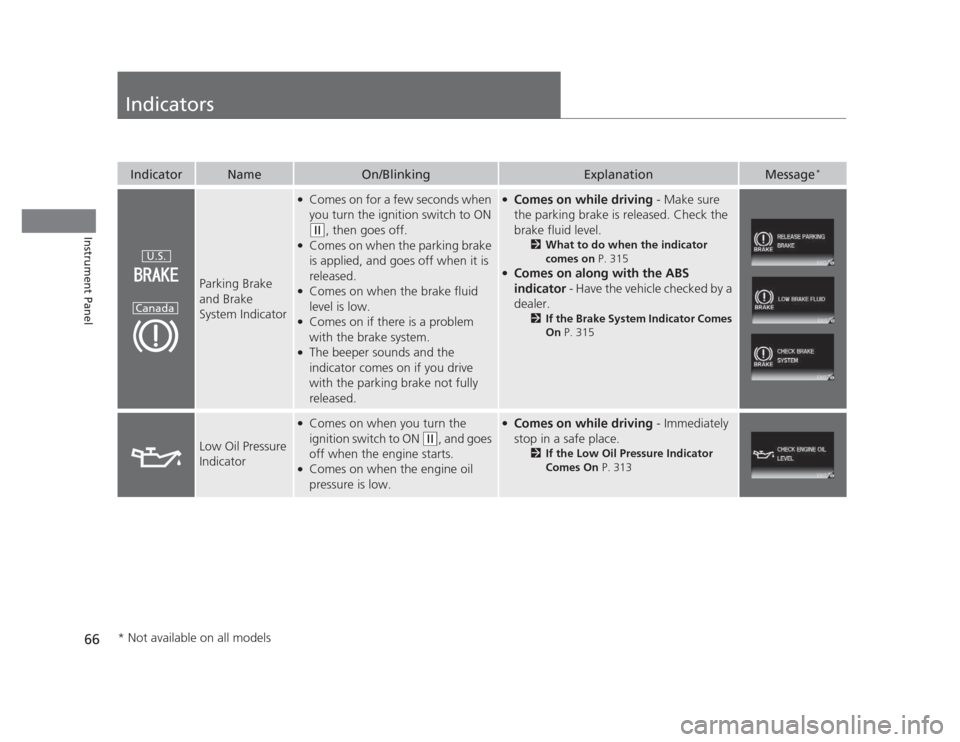
IndicatorNameOn/BlinkingExplanationMessage*
Parking Brake and Brake
System Indicator
●
Comes on for a few seconds when
you turn the ignition switch to ON
(w , then goes off.
● Comes on when the parking brake
is applied, and goes off when it is released.
● Comes on when the brake fluid
level is low.
● Comes on if there is a problem
with the brake system.
● The beeper sounds and the
indicator comes on if you drive
with the parking brake not fully released.
●
Comes on while driving - Make sure
the parking brake is released. Check the
brake fluid level. 2What to do when the indicator
comes on P. 315
● Comes on along with the ABS
indicator - Have the vehicle checked by a
dealer. 2If the Brake System Indicator Comes On P. 315
Low Oil Pressure
Indicator
●
Comes on when you turn the
ignition switch to ON
(w , and goes
off when the engine starts.
● Comes on when the engine oil
pressure is low.
● Comes on while driving - Immediately
stop in a safe place. 2If the Low Oil Pressure Indicator
Comes On P. 313
U.S.
Canada
* Not available on all models
Page 68 of 345
67
uuIndicatorsu
Continued
Instrument Panel
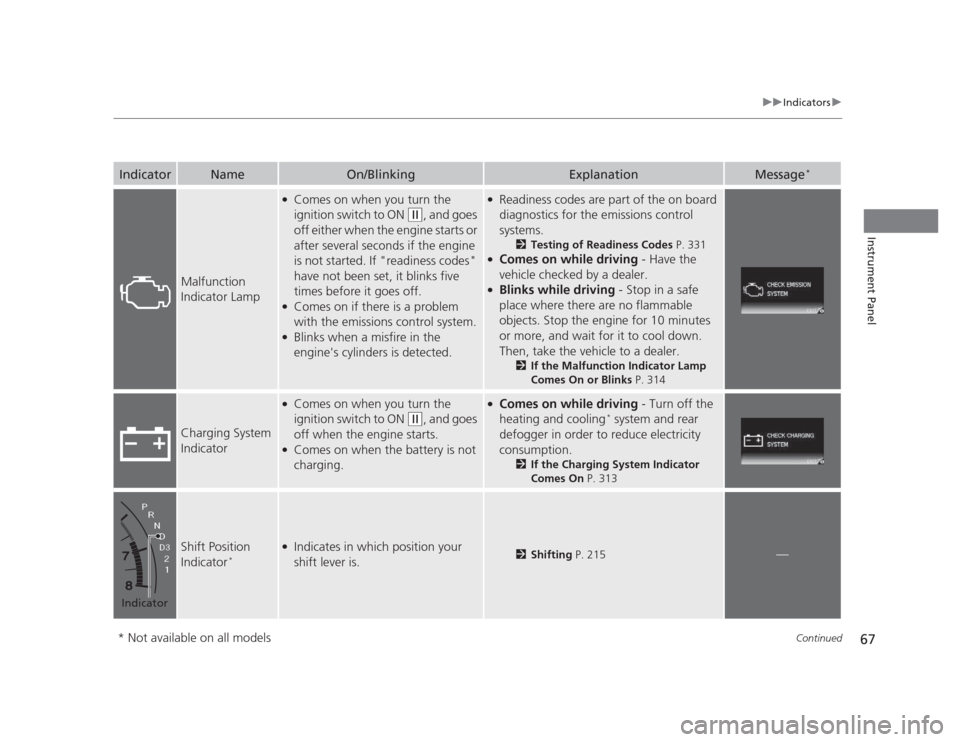
IndicatorNameOn/BlinkingExplanationMessage*
Malfunction
Indicator Lamp
●
Comes on when you turn the
ignition switch to ON
(w , and goes
off either when the engine starts or
after several seconds if the engine
is not started. If "readiness codes"
have not been set, it blinks five
times before it goes off.
● Comes on if there is a problem
with the emissions control system.
● Blinks when a misfire in the
engine's cylinders is detected.
● Readiness codes are part of the on board
diagnostics for the emissions control
systems.
2Testing of Readiness Codes P. 331
● Comes on while driving - Have the
vehicle checked by a dealer.
● Blinks while driving - Stop in a safe
place where there are no flammable
objects. Stop the engine for 10 minutes
or more, and wait for it to cool down.
Then, take the vehicle to a dealer. 2If the Malfunction Indicator Lamp
Comes On or Blinks P. 314
Charging System
Indicator
●
Comes on when you turn the
ignition switch to ON
(w , and goes
off when the engine starts.
● Comes on when the battery is not charging.
● Comes on while driving - Turn off the
heating and cooling *
system and rear
defogger in order to reduce electricity
consumption. 2If the Charging System Indicator
Comes On P. 313
Shift Position
Indicator*●
Indicates in which position your shift lever is.2 Shifting P. 215—
Indicator
* Not available on all models
Page 69 of 345
68
uuIndicatorsu
Instrument Panel
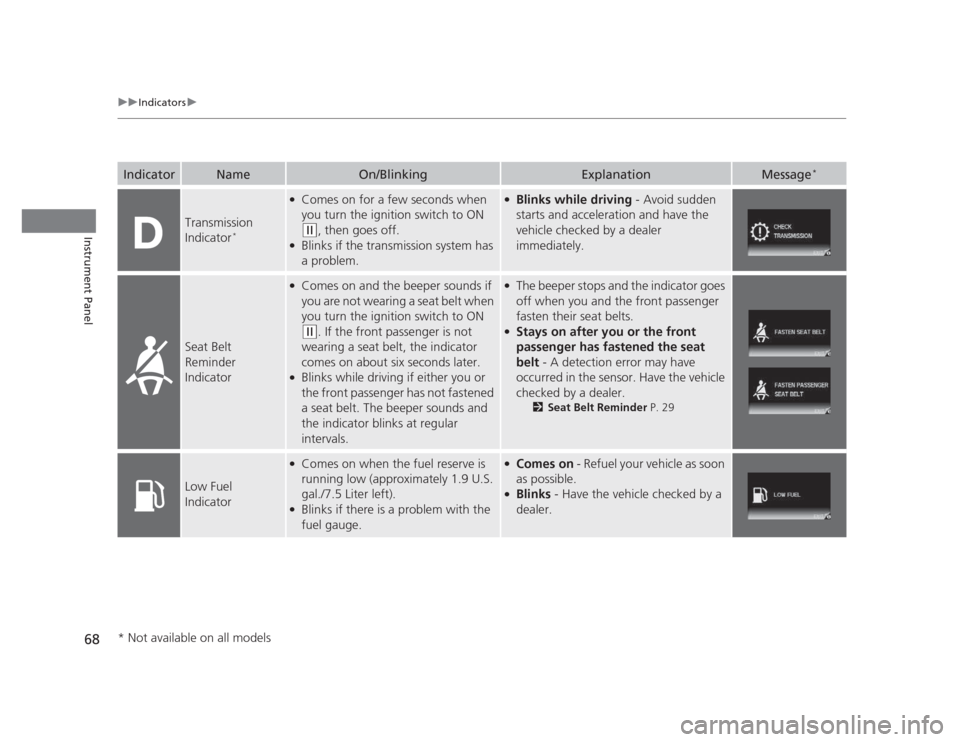
IndicatorNameOn/BlinkingExplanationMessage*
Transmission
Indicator
*
●
Comes on for a few seconds when
you turn the ignition switch to ON
(w , then goes off.
● Blinks if the transmission system has a problem.
●Blinks while driving - Avoid sudden
starts and acceleration and have the vehicle checked by a dealer
immediately.
Seat Belt
Reminder
Indicator
● Comes on and the beeper sounds if
you are not wearing a seat belt when
you turn the ignition switch to ON
(w . If the front passenger is not
wearing a seat belt, the indicator
comes on about six seconds later.
● Blinks while driving if either you or the front passenger has not fastened
a seat belt. The beeper sounds and
the indicator blinks at regular intervals.
●
The beeper stops and the indicator goes
off when you and the front passenger fasten their seat belts.
● Stays on after you or the front
passenger has fastened the seat
belt - A detection error may have
occurred in the sens or. Have the vehicle
checked by a dealer. 2Seat Belt Reminder P. 29
Low Fuel
Indicator
●
Comes on when the fuel reserve is
running low (approximately 1.9 U.S. gal./7.5 Liter left).
● Blinks if there is a problem with the
fuel gauge.●Comes on - Refuel your vehicle as soon
as possible.
● Blinks - Have the vehicle checked by a
dealer.
* Not available on all models
Page 70 of 345
69
uuIndicatorsu
Continued
Instrument Panel
IndicatorNameOn/BlinkingExplanationMessage*
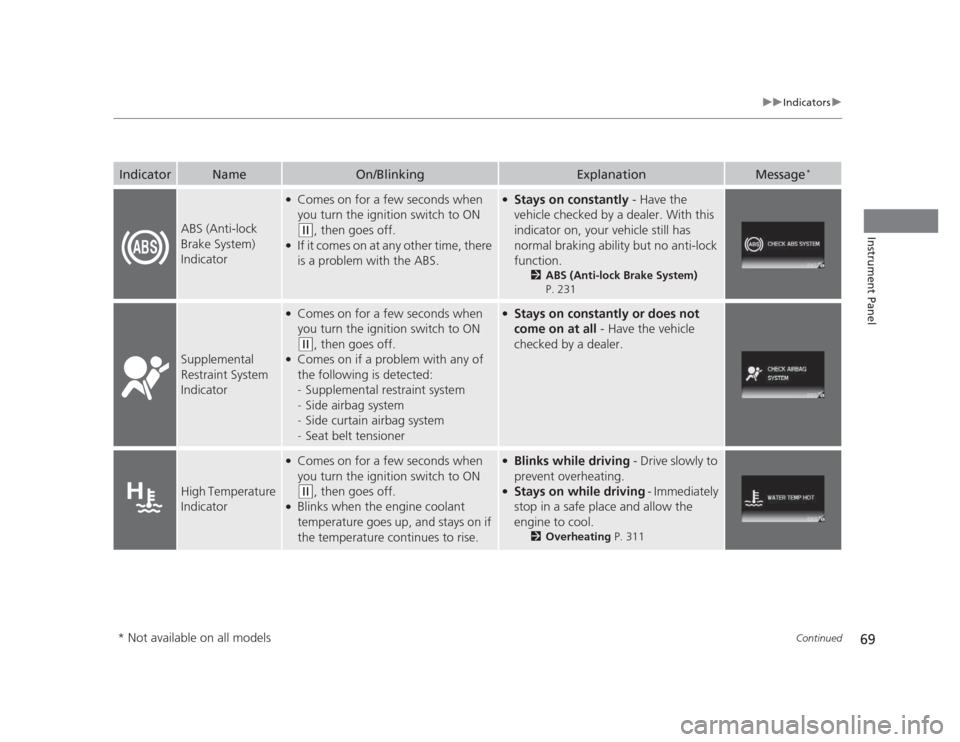
ABS (Anti-lock
Brake System)
Indicator
●
Comes on for a few seconds when
you turn the ignition switch to ON
(w , then goes off.
● If it comes on at any other time, there
is a problem with the ABS.
● Stays on constantly - Have the
vehicle checked by a dealer. With this
indicator on, your vehicle still has
normal braking ability but no anti-lock
function. 2ABS (Anti-lock Brake System)
P. 231
Supplemental
Restraint System
Indicator
● Comes on for a few seconds when
you turn the ignition switch to ON
(w , then goes off.
● Comes on if a problem with any of
the following is detected:-Supplemental restraint system
- Side airbag system
- Side curtain airbag system
- Seat belt tensioner
●
Stays on constantly or does not
come on at all - Have the vehicle
checked by a dealer.
High Temperature
Indicator
● Comes on for a few seconds when
you turn the ignition switch to ON
(w , then goes off.
● Blinks when the engine coolant
temperature goes up, and stays on if
the temperature continues to rise.
● Blinks while driving - Drive slowly to
prevent overheating.
● Stays on while driving - Immediately
stop in a safe place and allow the
engine to cool. 2Overheating P. 311
* Not available on all models
Page 71 of 345
70
uuIndicatorsu
Instrument Panel
IndicatorNameOn/BlinkingExplanationMessage*
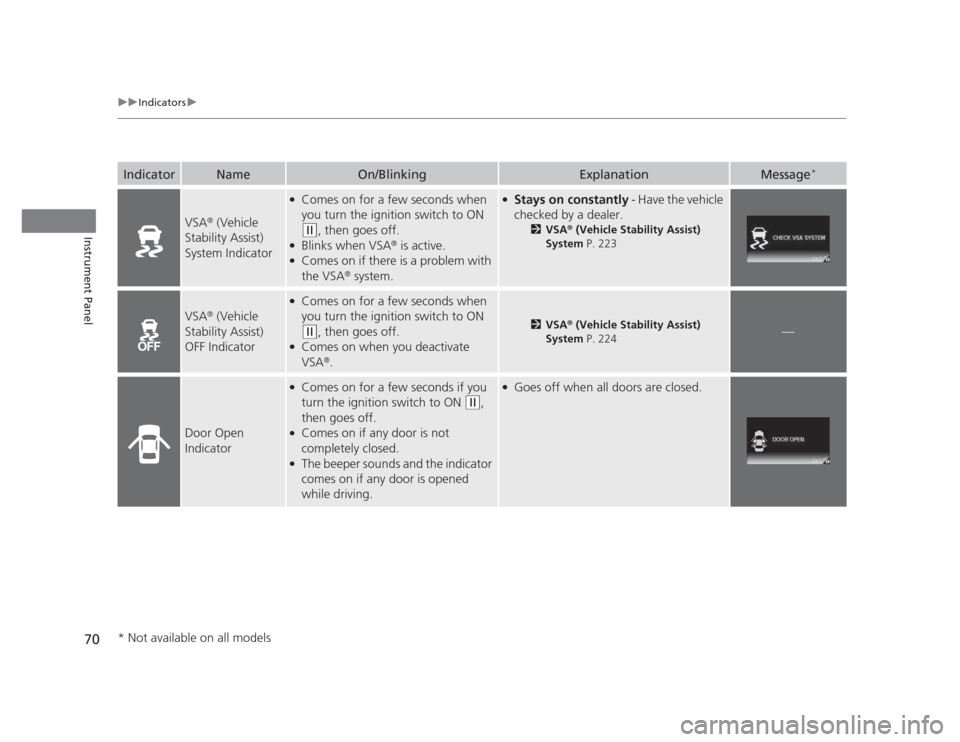
VSA®
(Vehicle
Stability Assist)
System Indicator
● Comes on for a few seconds when
you turn the ignition switch to ON
(w , then goes off.
● Blinks when VSA ®
is active.
● Comes on if there is a problem with the VSA ®
system.
● Stays on constantly - Have the vehicle
checked by a dealer. 2VSA ®
(Vehicle Stability Assist)
System P. 223
VSA®
(Vehicle
Stability Assist)
OFF Indicator
● Comes on for a few seconds when
you turn the ignition switch to ON
(w , then goes off.
● Comes on when you deactivate VSA ®
.2 VSA ®
(Vehicle Stability Assist)
System P. 224—
Door Open
Indicator
●
Comes on for a few seconds if you
turn the ignition switch to ON
(w ,
then goes off.
● Comes on if any door is not completely closed.
● The beeper sounds and the indicator
comes on if any door is opened
while driving.
●Goes off when all doors are closed.
* Not available on all models
Page 73 of 345
72
uuIndicatorsu
Instrument Panel
IndicatorNameOn/BlinkingExplanationMessage*
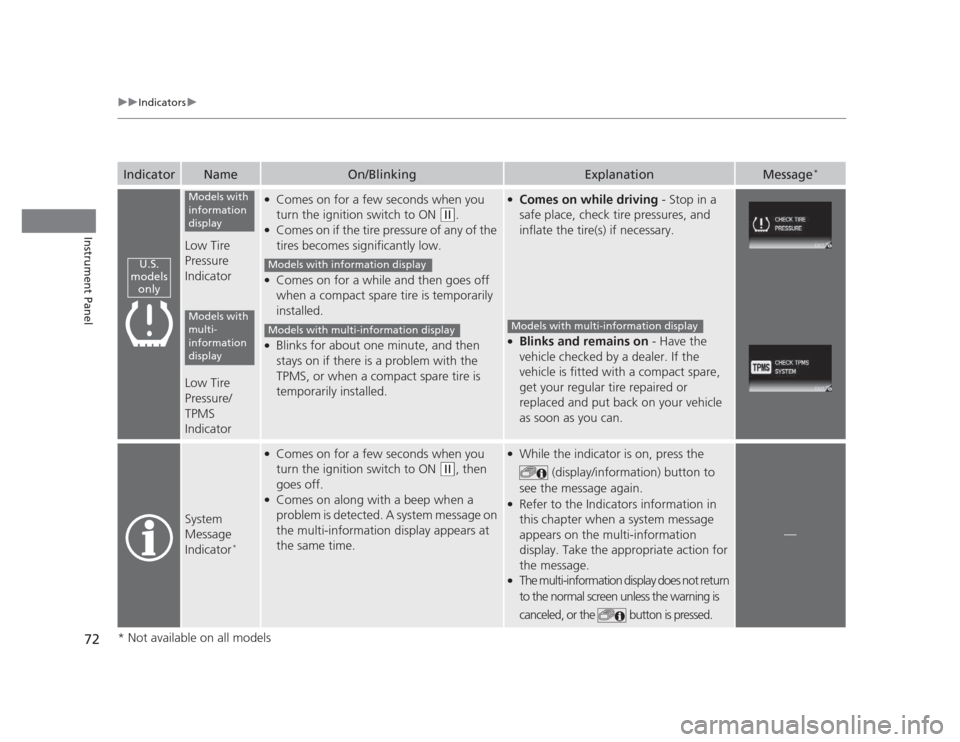
Low Tire Pressure
Indicator
Low Tire Pressure/ TPMS
Indicator
●
Comes on for a few seconds when you
turn the ignition switch to ON
(w .
● Comes on if the tire pressure of any of the
tires becomes significantly low.
● Comes on for a while and then goes off
when a compact spare tire is temporarily
installed.
● Blinks for about one minute, and then
stays on if there is a problem with the
TPMS, or when a compact spare tire is
temporarily installed.
●
Comes on while driving - Stop in a
safe place, check tire pressures, and
inflate the tire(s) if necessary.
● Blinks and remains on - Have the
vehicle checked by a dealer. If the
vehicle is fitted with a compact spare,
get your regular tire repaired or
replaced and put back on your vehicle
as soon as you can.
System
Message
Indicator *
●
Comes on for a few seconds when you
turn the ignition switch to ON
(w , then
goes off.
● Comes on along with a beep when a
problem is detected. A system message on
the multi-information display appears at
the same time.
● While the indicator is on, press the
(display/information) button to
see the message again.
● Refer to the Indicators information in
this chapter when a system message
appears on the multi-information
display. Take the appropriate action for the message.
● The multi-information display does not return
to the normal screen unless the warning is
canceled, or the button is pressed.
—
U.S.
models only
Models with
information
display
Models with
multi-
information
display
Models with information display
Models with multi-information displayModels with multi-information display
* Not available on all models
Page 79 of 345
78
Instrument Panel
Gauges and Displays
Gauges
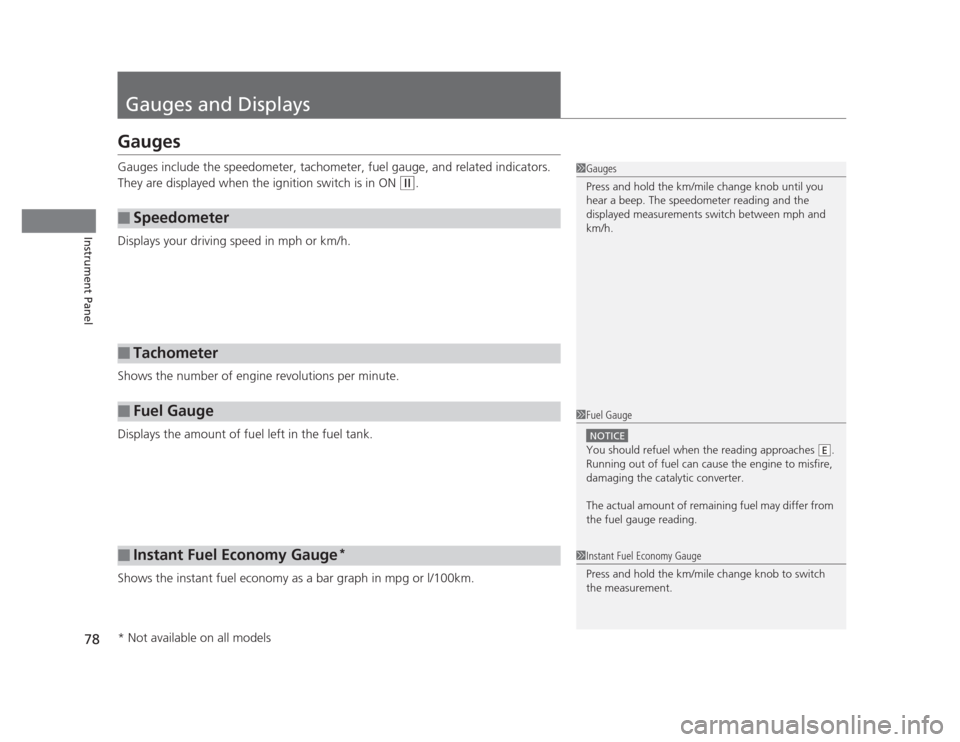
Gauges include the speedometer, tachometer, fuel gauge, and related indicators.
They are displayed when the ignition switch is in ON
(w.
Displays your driving speed in mph or km/h.
Shows the number of engine revolutions per minute.
Displays the amount of fuel left in the fuel tank.
Shows the instant fuel economy as a bar graph in mpg or l/100km.
■Speedometer
■Tachometer
■Fuel Gauge
■Instant Fuel Economy Gauge *
1Gauges
Press and hold the km/mile change knob until you
hear a beep. The speedometer reading and the
displayed measurements switch between mph and
km/h.
1Fuel Gauge
NOTICE
You should refuel when the reading approaches .
Running out of fuel can cause the engine to misfire,
damaging the catalytic converter.
The actual amount of remaining fuel may differ from
the fuel gauge reading.E
1Instant Fuel Economy Gauge
Press and hold the km/mile change knob to switch
the measurement.
* Not available on all models
Page 86 of 345
Continued85
uuGauges and DisplaysuMulti-Information Display*
Instrument Panel
Shows the outside temperature in Fahrenheit (U.S.) or Celsius (Canada). ■
Adjusting the outside temperature display
Adjust the temperature reading up to ±5°F or ±3°C if the temperature reading seems incorrect.
Use the multi-information display's customized features to correct the temperature. 2 Customized Features P. 86
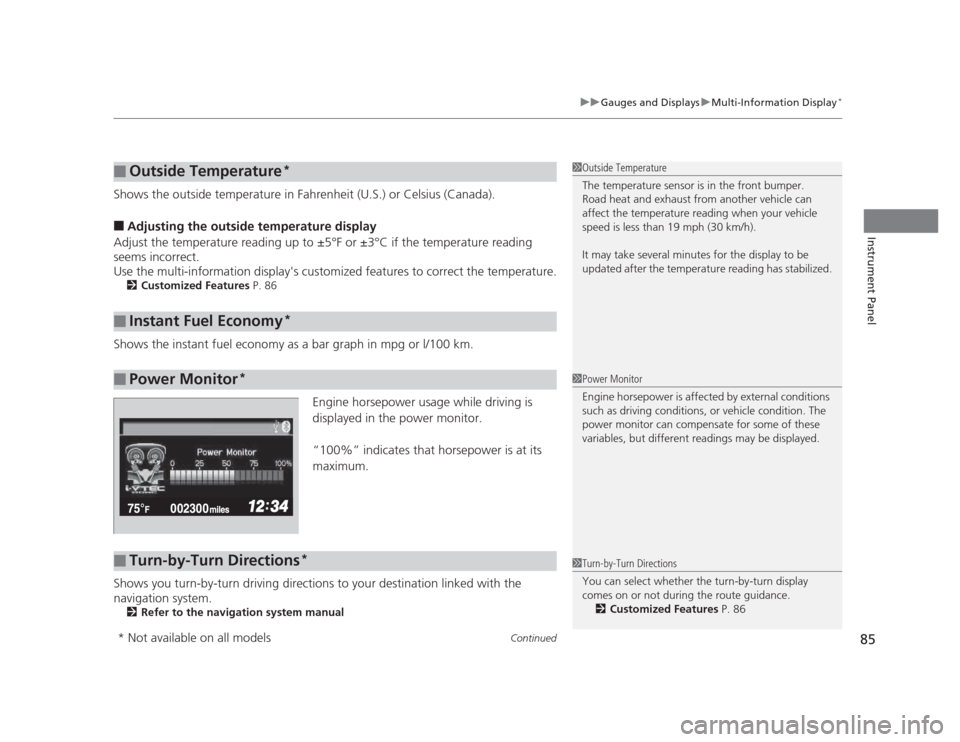
Shows the instant fuel economy as a bar graph in mpg or l/100 km. Engine horsepower usage while driving is
displayed in the power monitor.
“100%” indicates that horsepower is at its maximum.
Shows you turn-by-turn driving directions to your destination linked with the
navigation system. 2 Refer to the navigation system manual
■Outside Temperature *
■Instant Fuel Economy *
■Power Monitor*
1Outside Temperature
The temperature sensor is in the front bumper.
Road heat and exhaust from another vehicle can
affect the temperature reading when your vehicle
speed is less than 19 mph (30 km/h).
It may take several minutes for the display to be
updated after the temperature reading has stabilized.
1Power Monitor
Engine horsepower is affected by external conditions
such as driving conditions, or vehicle condition. The
power monitor can compensate for some of these
variables, but different readings may be displayed.
■Turn-by-Turn Directions
*1Turn-by-Turn Directions
You can select whether the turn-by-turn display
comes on or not during the route guidance.
2 Customized Features P. 86
* Not available on all models
Page 98 of 345
97
Controls
This chapter explains how to operate the various controls necessary for driving.
Setting the Clock ................................ 98
Locking and Unlocking the Doors
Key Types and Functions ... ................. 99
Locking/Unlocking the Doors from the Outside .......................................... 101
Locking/Unlocking the Doors from the
Inside ............................................. 103
Childproof Door Locks ..................... 104
Auto Door Locking/Unlocking *
........ 105
Opening and Closing the Trunk ....... 109
Security System ................................ 112
Immobilizer System .......................... 112
Security System Alarm *
.................... 112
Opening and Closing the Windows ..... 114Opening and Closing the Moonroof*...... 116Operating the Switches Around the
Steering WheelIgnition Switch ................................. 117
Turn Signals ..................................... 118
Light Switches.................................. 118Fog Lights *
...................................... 120
Daytime Running Lights ................... 120
Wipers and Washers ........................ 121
Brightness Control ........................... 122 Rear Defogger/Heated Door Mirror *
Button ........................................... 123
ECON Button *
................................. 123
Adjusting the Steering Wheel........... 124 Adjusting the Mirrors
....................... 125
Interior Rearview Mirror ................... 125
Power Door Mirrors *
....................... 125
Adjusting the Seats .......................... 126
Adjusting the Seat Positions ............. 126
Interior Lights/Interior Convenience Items ................................................ 134
Interior Lights .................................. 134
Interior Convenience Items .............. 135
Heating and Cooling *
....................... 140
Using Vents, Heating and A/C *
........ 140
* Not available on all models