Gear HONDA CIVIC 2012 9.G Owners Manual
[x] Cancel search | Manufacturer: HONDA, Model Year: 2012, Model line: CIVIC, Model: HONDA CIVIC 2012 9.GPages: 345, PDF Size: 9.02 MB
Page 16 of 345
15
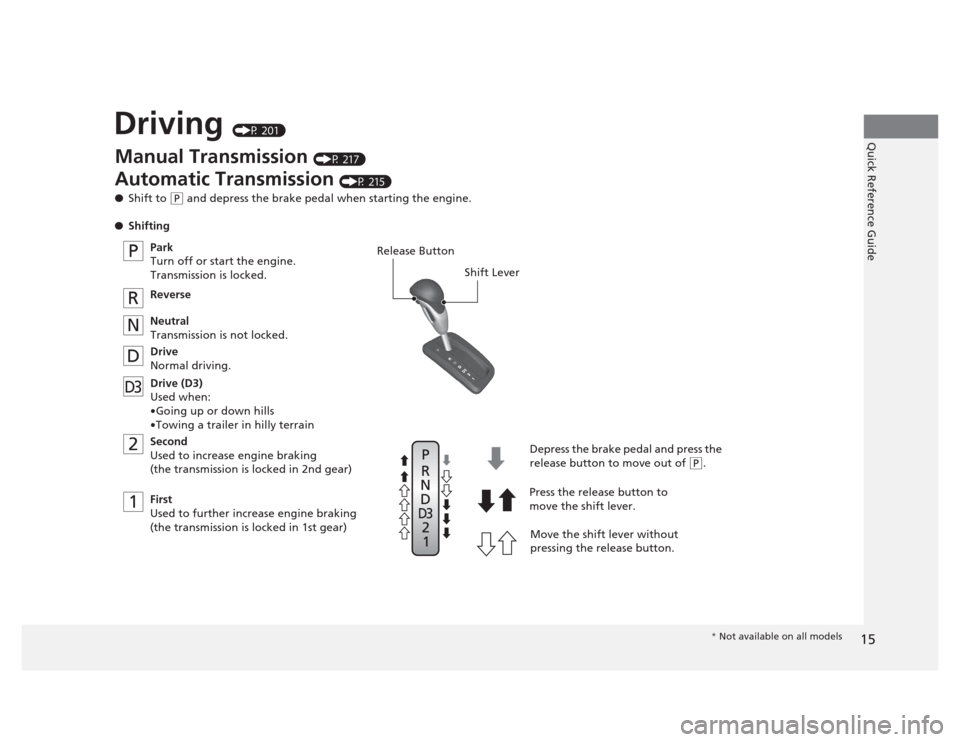
Quick Reference GuideDriving (P 201)
2 1
D3
P
R
N DRelease Button Shift Lever
Depress the brake pedal and press the
release button to move out of
(P.
Move the shift lever without
pressing the release button.
Press the release button to
move the shift lever.
Manual Transmission
(P 217)
Automatic Transmission (P 215)
● Shift to
(P and depress the brake pedal when starting the engine.
● Shifting
Park
Turn off or start the engine. Transmission is locked.
Reverse
Neutral
Transmission is not locked.
Drive
Normal driving.
Drive (D3) Used when:
•Going up or down hills
•Towing a trailer in hilly terrain
Second
Used to increase engine braking
(the transmission is locked in 2nd gear)
First
Used to further increase engine braking
(the transmission is locked in 1st gear)
* Not available on all models
Page 210 of 345
209
uuTowing a TraileruDriving Safely with a Trailer
Continued
Driving
Driving Safely with a Trailer •Have the trailer properly serviced and keep it in good condition.
• Make sure that all the weights and load in the vehicle and trailer are within limits.
2 Towing Load Limits P. 207
• Securely attach the hitch, safety chains, and other necessary parts to the trailer.
• Securely store all the items in and on the trailer so that they do not shift while
driving.
• Check if the lights and brakes on the trailer are working properly.
• Check the pressures of the trailer tires, including the spare.
• Drive slower than normal.
• Obey posted speed limits for vehicles with trailers.
• Use the
(D position when towing a trailer on level roads.
• Turn more slowly and with a wider turning arc than normal.
• Allow more time and distance for braking.
• Do not brake or turn suddenly.
■Things You Need To Kn ow Before Towing a Trailer
■Towing Speeds and Gears
■Turning and Braking
1Driving Safely with a Trailer
Parking
In addition to the normal precautions, place wheel
chocks at each of the trailer's tires.
Automatic transmission models
Page 215 of 345
214
uuWhen DrivinguAutomatic Transmission
Driving
Automatic Transmission
The following conditions cause the engine to run at high revolutions, and increase creeping: •Immediately after the engine starts.
• When the heating and cooling *
system is in use.
Keep the brake pedal firmly depressed when stopped.
Quickly depressing the accelerator pedal while driving uphill may cause the
transmission to drop to a lower gear, unexpectedly increasing vehicle speed. Depress
the accelerator pedal carefully, especially on slippery roads and curves.
■Creeping
■Kickdown
* Not available on all models
Page 216 of 345
215
uuWhen DrivinguShifting
Continued
Driving
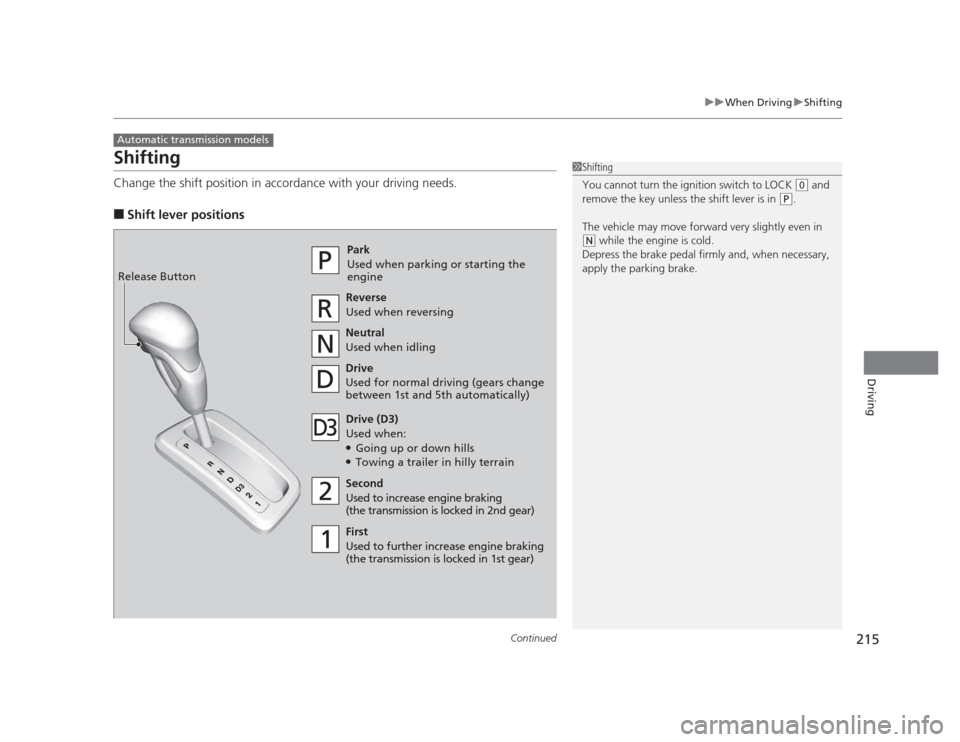
Shifting
Change the shift position in accordance with your driving needs. ■Shift lever positions
Automatic transmission models
1Shifting
You cannot turn the ignition switch to LOCK
(0 and
remove the key unless the shift lever is in
(P .
The vehicle may move forward very slightly even in
(N while the engine is cold.
Depress the brake pedal firmly and, when necessary,
apply the parking brake.Park
Used when parking or st arting the
engine
ReverseUsed when reversing
Neutral
Used when idling
Drive
Used for normal driving (gears change
between 1st and 5th automatically)
Drive (D3)
Used when:● Going up or down hills
● Towing a trailer in hilly terrain
Second
Used to increase engine braking
(the transmission is locked in 2nd gear)
First
Used to further increase engine braking
(the transmission is locked in 1st gear)
Release Button
Page 218 of 345
217
uuWhen DrivinguShifting
Continued
Driving
Shifting
Fully depress the clutch pedal to operate the shift lever and change gears, then
slowly release the pedal.
Depress the clutch pedal, and pause for a few seconds before shifting into
(R, or
shift into one of the forward gears for a moment. This stops the gears so they do not
“grind.”
■Shift Lever Operation
Manual transmission models
1Shifting
NOTICE
Do not shift to (R before the vehicle comes to a
complete stop.
Shifting to
(R before stopping can damage the
transmission.
NOTICE
Before downshifting, make sure the engine will not
go into the tachometer's red zone. Should this occur,
it can severely damage your engine.
There is a metallic part on the shift lever. If you leave
the vehicle parked outside for a long time on a hot
day, be careful before moving the shift lever. Because
of heat, the shift lever may be extremely hot. If the
outside temperature is low, the shift lever may feel cold.
Page 219 of 345
uuWhen DrivinguShifting
218
Driving
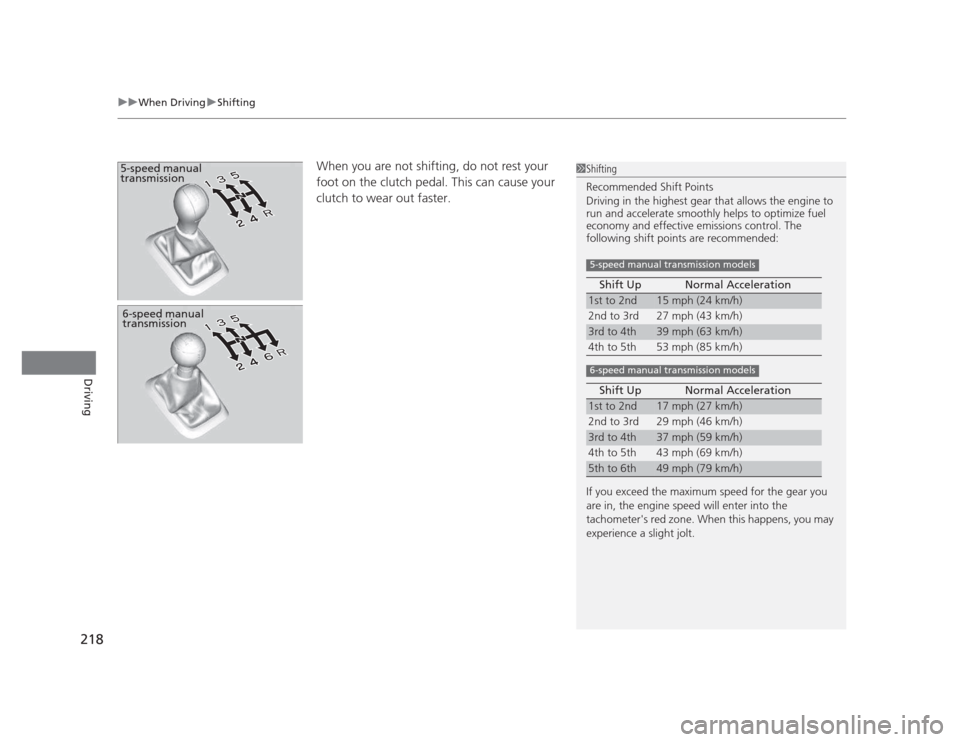
When you are not shifting, do not rest your
foot on the clutch pedal. This can cause your clutch to wear out faster. 5-speed manual
transmission1Shifting
Recommended Shift Points
Driving in the highest gear that allows the engine to
run and accelerate smoothly helps to optimize fuel
economy and effective emissions control. The
following shift points are recommended:
If you exceed the maximum speed for the gear you
are in, the engine speed will enter into the
tachometer's red zone. When this happens, you may
experience a slight jolt. Shift Up Normal Acceleration
1st to 2nd15 mph (24 km/h)
2nd to 3rd 27 mph (43 km/h)
3rd to 4th39 mph (63 km/h)
4th to 5th 53 mph (85 km/h)
Shift Up Normal Acceleration
1st to 2nd17 mph (27 km/h)
2nd to 3rd 29 mph (46 km/h)
3rd to 4th37 mph (59 km/h)
4th to 5th 43 mph (69 km/h)
5th to 6th49 mph (79 km/h)
5-speed manual transmission models
6-speed manual transmission models
6-speed manual
transmission
Page 220 of 345
219
uuWhen DrivinguShifting
Driving
The manual transmission has a lockout mechanism that stops you from accidentally
shifting into
(R from a forward gear while the vehicle is moving above a certain
speed.
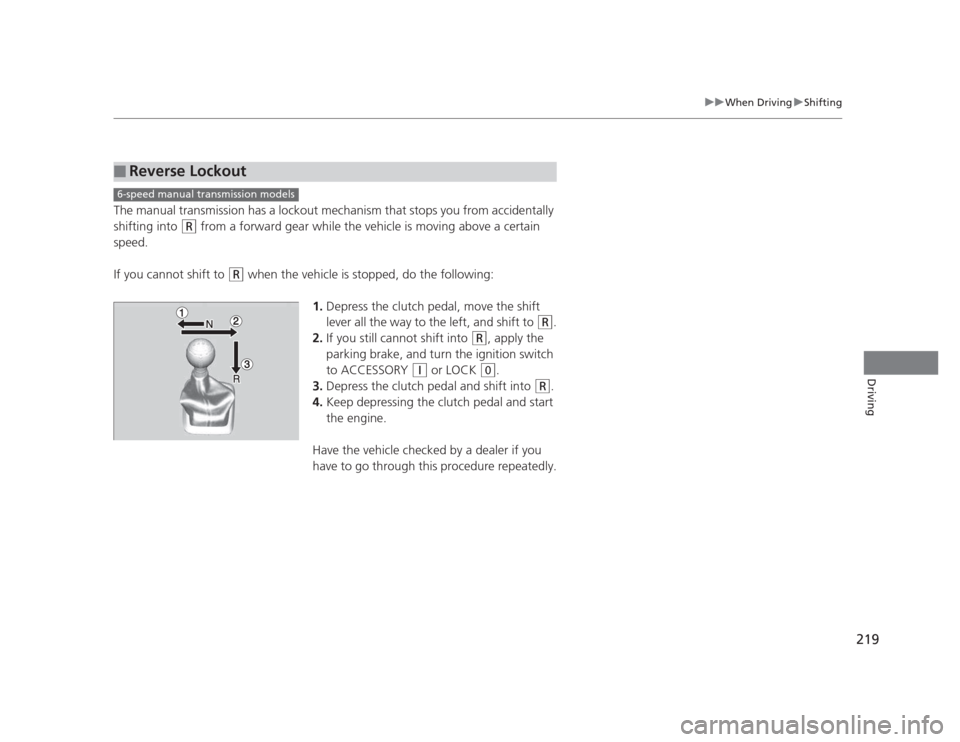
If you cannot shift to
(R when the vehicle is stopped, do the following:
1.Depress the clutch pedal, move the shift
lever all the way to the left, and shift to
(R .
2. If you still cannot shift into
(R , apply the
parking brake, and turn the ignition switch
to ACCESSORY
(q or LOCK (0 .
3. Depress the clutch pedal and shift into
(R .
4. Keep depressing the clutch pedal and start the engine.
Have the vehicle checked by a dealer if you
have to go through this procedure repeatedly.
■Reverse Lockout
6-speed manual transmission models
Page 231 of 345
uuBrakinguBrake System
230
Driving
Your vehicle is equipped with front disc brakes. The brakes on the rear wheels may
be disc or drum, depending on the model. A power assist helps reduce the effort
needed on the brake pedal. The brake assist system increases the stopping force
when you depress the brake pedal hard in an emergency situation. The anti-lock
brake system (ABS) helps you retain steering control when braking very hard. 2 Brake Assist System P. 232
2 ABS (Anti-lock Brake System) P. 231
■Foot Brake1Foot Brake
Check the brakes after driving through deep water,
or if there is a buildup of road surface water. If
necessary, dry the brakes by lightly depressing the
pedal several times.
If you hear a continuous metallic friction sound when
applying the brakes, the brake pads need to be
replaced. Have the vehicle checked by a dealer.
Constantly using the brake pedal while going down a
long hill builds up heat, which reduces the brake
effectiveness. Apply engine braking by taking your
foot off the accelerator pedal and downshifting to a
lower gear. With manual transmission use a lower
gear for greater engine braking.
Do not rest your foot on the brake pedal while
driving, as it will lightly apply the brakes and cause
them to lose effectiveness over time and reduce pad
life. It will also confuse drivers behind you.
Page 316 of 345
315
uuIndicator, Coming On/BlinkinguIf the Brake System Indicator Comes On
Handling the Unexpected
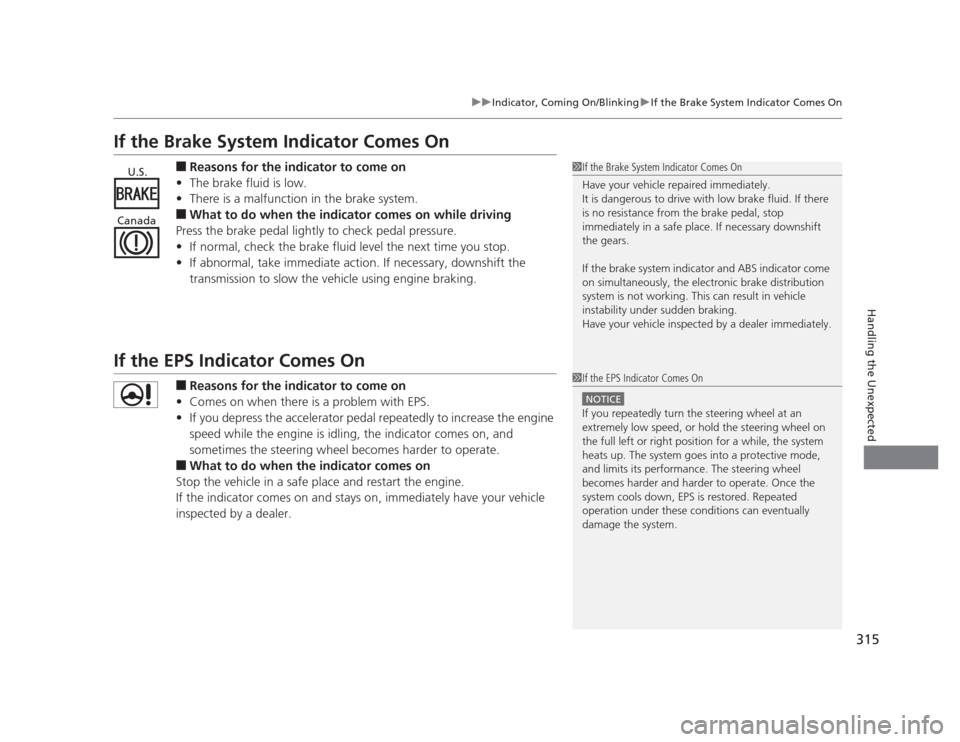
If the Brake System Indicator Comes On■Reasons for the indicator to come on
• The brake fluid is low.
• There is a malfunction in the brake system.
■ What to do when the indicator comes on while driving
Press the brake pedal lightly to check pedal pressure. • If normal, check the brake fluid level the next time you stop.
• If abnormal, take immediate action. If necessary, downshift the
transmission to slow the vehicle using engine braking.
If the EPS Indicator Comes On
■Reasons for the indicator to come on
• Comes on when there is a problem with EPS.
• If you depress the accelerator pedal repeatedly to increase the engine
speed while the engine is idling, the indicator comes on, and
sometimes the steering wheel becomes harder to operate.
■ What to do when the indicator comes on
Stop the vehicle in a safe place and restart the engine.
If the indicator comes on and stays on, immediately have your vehicle
inspected by a dealer.
1If the Brake System Indicator Comes On
Have your vehicle repaired immediately.
It is dangerous to drive with low brake fluid. If there
is no resistance from the brake pedal, stop
immediately in a safe place. If necessary downshift
the gears.
If the brake system indicator and ABS indicator come
on simultaneously, the electronic brake distribution
system is not working. This can result in vehicle
instability under sudden braking.
Have your vehicle inspected by a dealer immediately.U.S.
Canada
1If the EPS Indicator Comes On
NOTICE
If you repeatedly turn the steering wheel at an
extremely low speed, or hold the steering wheel on
the full left or right position for a while, the system
heats up. The system goes into a protective mode,
and limits its performance. The steering wheel
becomes harder and harder to operate. Once the
system cools down, EPS is restored. Repeated
operation under these conditions can eventually
damage the system.
Page 339 of 345
338
INDEX
Bulb Replacement..................................... 268
Brake Light, Taillight, Back-Up Light, Rear Turn Signal Light and Rear Side Marker
Lights..................................................... 275
Fog Lights ................................................ 272
Front Turn Signal/Parking/Side Marker Lights..................................................... 273
Headlights ............................................... 268
High-Mount Brake Light .......................... 277
Rear License Plate Light............................ 276
Bulb Specifications ............................ 324, 326
C
Carbon Monoxide Gas ................................ 62
Carrying Cargo .................................. 203, 205
CD Player ........................................... 151, 161
Certification Label .................................... 328
Changing Bulbs ......................................... 268
Charging System Indicator ................. 67, 313
Child Safety ................................................. 50
Childproof Door Locks ............................. 104
Emergency Trunk Opener ........................ 111
Child Seat .................................................... 50
Booster Seats ............................................. 61
Child Seat for Infants ................................. 52
Child Seat for Small Children ..................... 53
Installing a Child Seat with a Lap/
Shoulder Seat Belt.................................... 57
Larger Children .......................................... 60
Rear-facing Child Seat ............................... 52 Selecting a Child Seat ................................ 54
Using a Tether ........................................... 59
Childproof Door Locks ............................. 104
Cleaning the Exterior ............................... 294
Cleaning the Interior ................................ 292
Clock ............................................................ 98
Clutch Fluid ............................................... 266
Coat Hook ................................................. 138
Compact Spare Tire .................. 299, 325, 327
Console Compartment ............................. 135
Controls ....................................................... 97
Coolant (Engine) ...................................... 261
Adding to the Radiator ......... ............... .... 262
Adding to the Reserve Tank..................... 261
High Temperature Indicator ....................... 69
Low Temperature Indicator........................ 74
Overheating ............................................ 311
Creeping (Automatic Transmission) ........ 214
Cruise Control ........................................... 220
Indicator.................................................... 75
Cup Holders .............................................. 136
Customer Service Information ................. 336
Customized Features .................................. 86
D
Daytime Running Lights .......................... 120
Dead Battery ............................................. 307
Defrosting the Windshield and
Windows ................................................. 142
Devices that Emit Radio Waves ............... 329Dimming
Headlights .............................................. 118
Rearview Mirror ...................................... 125
Dipstick (Engine Oil) ................................ 255
Directional Signals (Turn Signal) ............. 118
Display/Information Button ...................... 82
Door Mirrors ............................................. 125
Doors .......................................................... 99
Auto Door Locking.................................. 105
Auto Door Unlocking .............................. 105
Door Open Indicator ........................... 27, 70
Keys.......................................................... 99
Locking/Unlocking the Doors
from the Inside...................................... 103
Locking/Unlocking the Doors from the Outside................................... 101
Lockout Prevention System ..................... 102
DOT Tire Quality Grading ........................ 283
Driving ...................................................... 201
Automatic Transmission .......................... 214
Braking ................................................... 229
Cruise Control ........................................ 220
Shifting Gear ...... ............................ 215, 217
Starting the Engine ................................. 211
Dust and Pollen Filter .............................. 291
E
Eco Assist System .......................................... 7
ECON Button ............................................ 123
Elapsed Time .............................................. 84