Rear HONDA CIVIC 2012 9.G Owners Manual
[x] Cancel search | Manufacturer: HONDA, Model Year: 2012, Model line: CIVIC, Model: HONDA CIVIC 2012 9.GPages: 345, PDF Size: 9.02 MB
Page 3 of 345
2
Quick Reference Guide
Quick Reference Guide
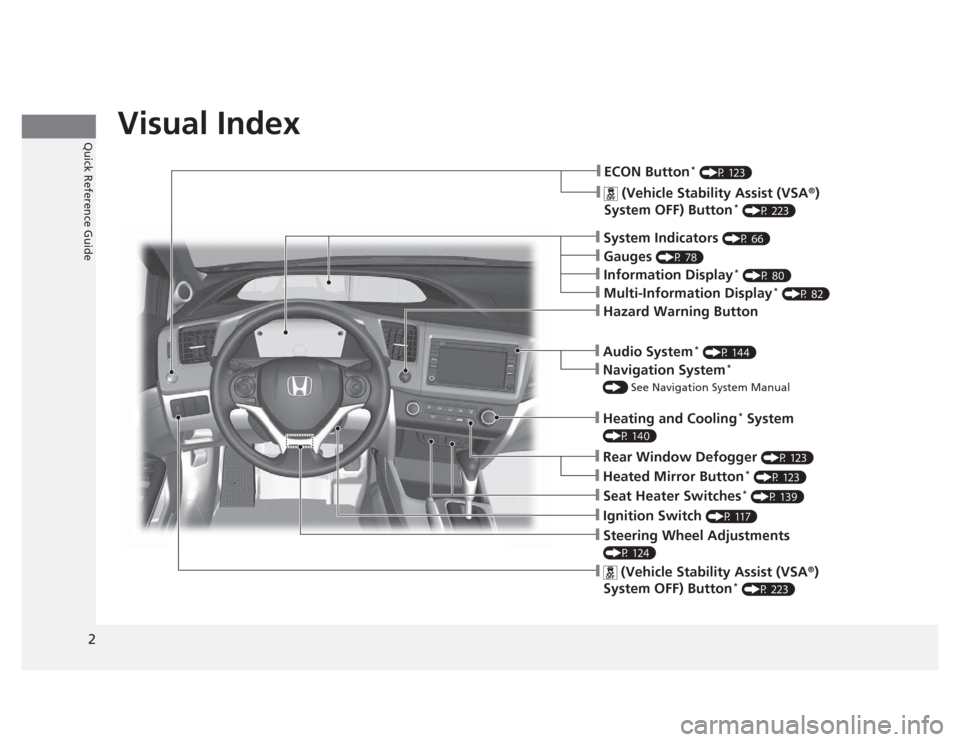
Visual Index
❙System Indicators (P 66)
❙Gauges (P 78)
❙Information Display *
(P 80)
❙Navigation System *
() See Navigation System Manual
❙Audio System *
(P 144)
❙Hazard Warning Button
❙Heating and Cooling *
System
(P 140)
❙Rear Window Defogger (P 123)
❙Seat Heater Switches *
(P 139)
❙Ignition Switch (P 117)
❙Steering Wheel Adjustments
(P 124)
❙ (Vehicle Stability Assist (VSA ®
)
System OFF) Button *
(P 223)
❙ECON Button *
(P 123)
❙Multi-Information Display *
(P 82)
❙Heated Mirror Button *
(P 123)
❙ (Vehicle Stability Assist (VSA ®
)
System OFF) Button *
(P 223)
Page 5 of 345
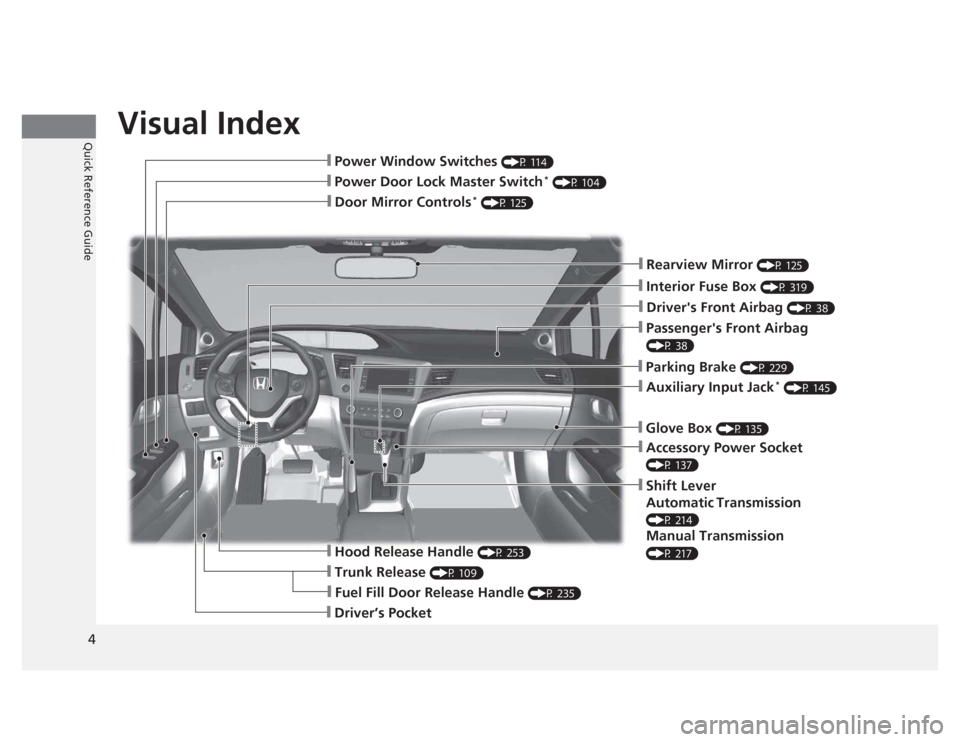
Visual Index
4Quick Reference Guide
❙Door Mirror Controls *
(P 125)
❙Passenger's Front Airbag
(P 38)
❙Parking Brake (P 229)
❙Glove Box (P 135)
❙Rearview Mirror (P 125)
❙Accessory Power Socket
(P 137)
❙Shift Lever
Automatic Transmission
(P 214)
Manual Transmission
(P 217)
❙Hood Release Handle (P 253)
❙Fuel Fill Door Release Handle (P 235)
❙Driver’s Pocket
❙Trunk Release (P 109)
❙Power Door Lock Master Switch *
(P 104)
❙Power Window Switches (P 114)
❙Auxiliary Input Jack*
(P 145)
❙Interior Fuse Box (P 319)
❙Driver's Front Airbag (P 38)
Page 6 of 345
5
Quick Reference Guide
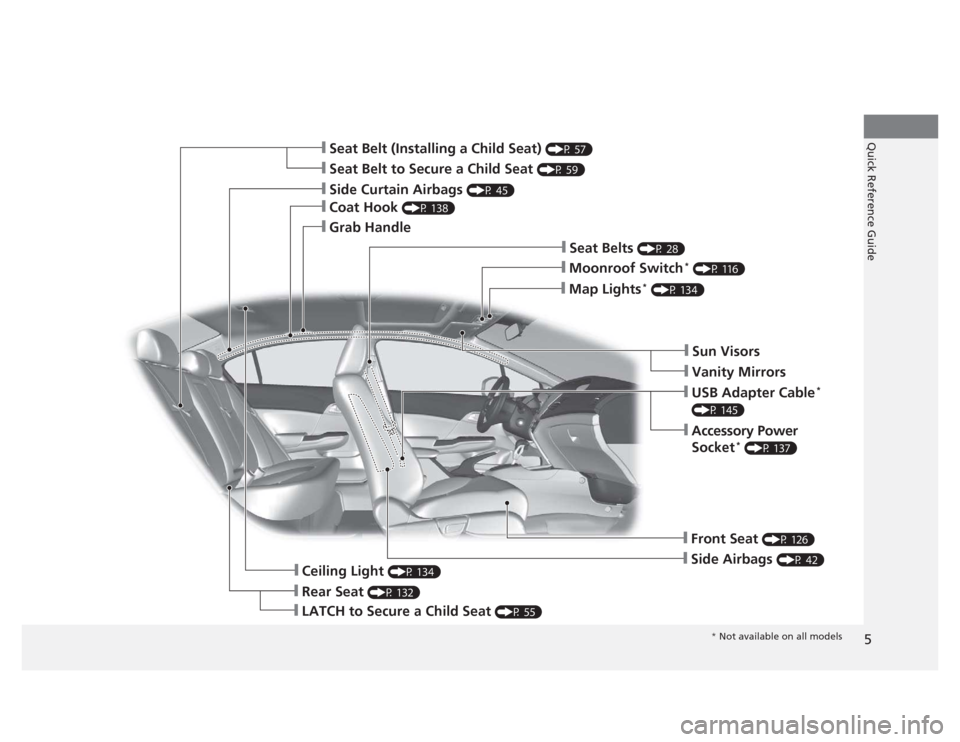
❙Seat Belt to Secure a Child Seat (P 59)
❙Seat Belt (Installing a Child Seat) (P 57)
❙Sun Visors
❙Vanity Mirrors
❙Moonroof Switch*
(P 116)
❙Map Lights *
(P 134)
❙USB Adapter Cable *
(P 145)
❙Accessory Power
Socket *
(P 137)
❙Front Seat (P 126)
❙Seat Belts (P 28)
❙Side Airbags (P 42)
❙Rear Seat (P 132)
❙LATCH to Secure a Child Seat (P 55)
❙Ceiling Light (P 134)
❙Side Curtain Airbags (P 45)
❙Coat Hook (P 138)
❙Grab Handle
* Not available on all models
Page 7 of 345
Visual Index
6Quick Reference Guide
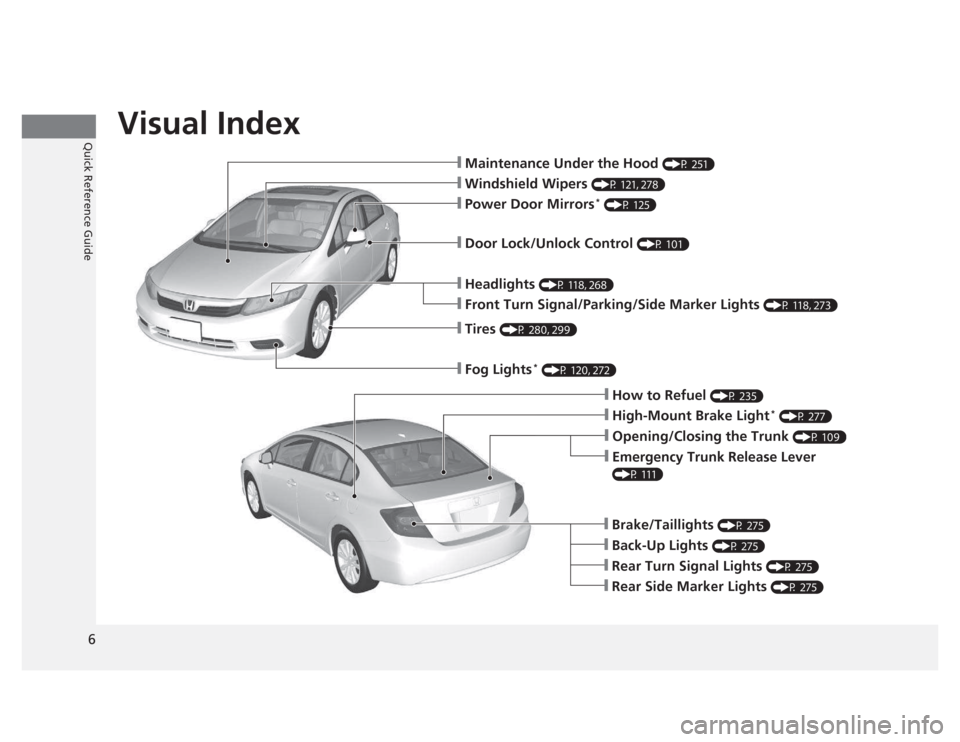
❙Maintenance Under the Hood (P 251)
❙Windshield Wipers (P 121, 278)
❙Tires (P 280, 299)
❙Fog Lights *
(P 120, 272)
❙Door Lock/Unlock Control (P 101)
❙Power Door Mirrors*
(P 125)
❙Headlights (P 118, 268)
❙Front Turn Signal/Parking/Side Marker Lights (P 118, 273)
❙How to Refuel (P 235)
❙High-Mount Brake Light *
(P 277)
❙Emergency Trunk Release Lever
(P 111)
❙Opening/Closing the Trunk (P 109)
❙Back-Up Lights (P 275)
❙Brake/Taillights (P 275)
❙Rear Turn Signal Lights (P 275)
❙Rear Side Marker Lights (P 275)
Page 9 of 345
8
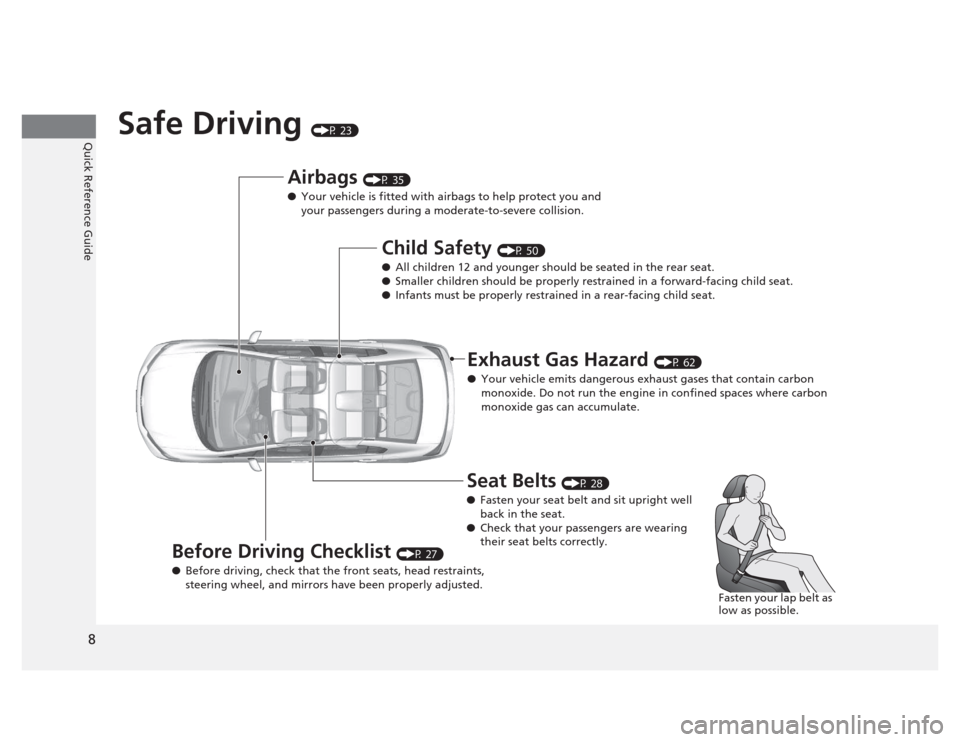
Quick Reference GuideSafe Driving (P 23)
Airbags (P 35)
● Your vehicle is fitted with airbags to help protect you and
your passengers during a moderate-to-severe collision.
Child Safety (P 50)
● All children 12 and younger should be seated in the rear seat.
● Smaller children should be properly restrained in a forward-facing child seat.
● Infants must be properly restrained in a rear-facing child seat.
Exhaust Gas Hazard (P 62)
● Your vehicle emits dangerous exhaust gases that contain carbon
monoxide. Do not run the engine in confined spaces where carbon
monoxide gas can accumulate.
Before Driving Checklist (P 27)
● Before driving, check that the front seats, head restraints,
steering wheel, and mirrors have been properly adjusted. Seat Belts
(P 28)
● Fasten your seat belt and sit upright well
back in the seat.
● Check that your passengers are wearing
their seat belts correctly.
Fasten your lap belt as
low as possible.
Page 13 of 345
12
Quick Reference Guide
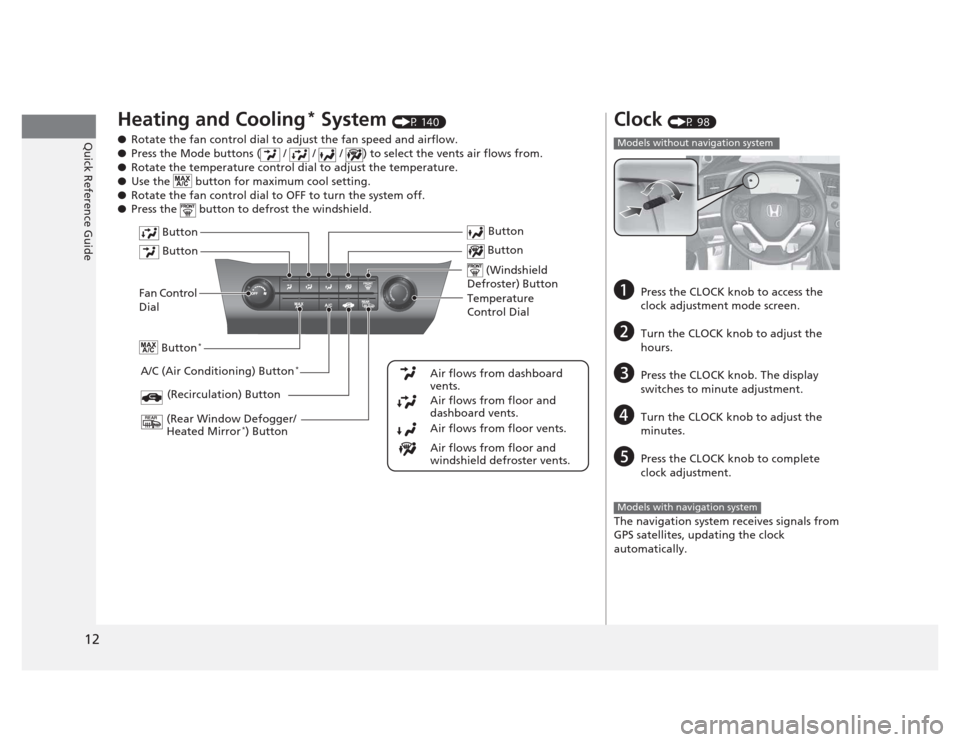
Heating and Cooling*
System (P 140)
● Rotate the fan control dial to adjust the fan speed and airflow.
● Press the Mode buttons ( / / / ) to select the vents air flows from.
● Rotate the temperature control dial to adjust the temperature.
● Use the button for maximum cool setting.
● Rotate the fan control dial to OFF to turn the system off.
● Press the button to defrost the windshield.
Fan Control Dial
(Rear Window Defogger/ Heated Mirror *
) Button
(Windshield
Defroster) Button
A/C (Air Conditioning) Button *
Air flows from floor and
windshield defroster vents.
Air flows from floor vents.
Air flows from floor and
dashboard vents.
Air flows from dashboard
vents.
Button
Button
Button
*
(Recirculation) Button
Temperature
Control Dial Button
Button
Clock
(P 98)
a Press the CLOCK knob to access the
clock adjustment mode screen.
b Turn the CLOCK knob to adjust the
hours.
c Press the CLOCK knob. The display
switches to minute adjustment.
d Turn the CLOCK knob to adjust the
minutes.
e Press the CLOCK knob to complete clock adjustment.
The navigation system receives signals from
GPS satellites, updating the clock
automatically.
Models without navigation system
Models with navigation system
Page 20 of 345
19
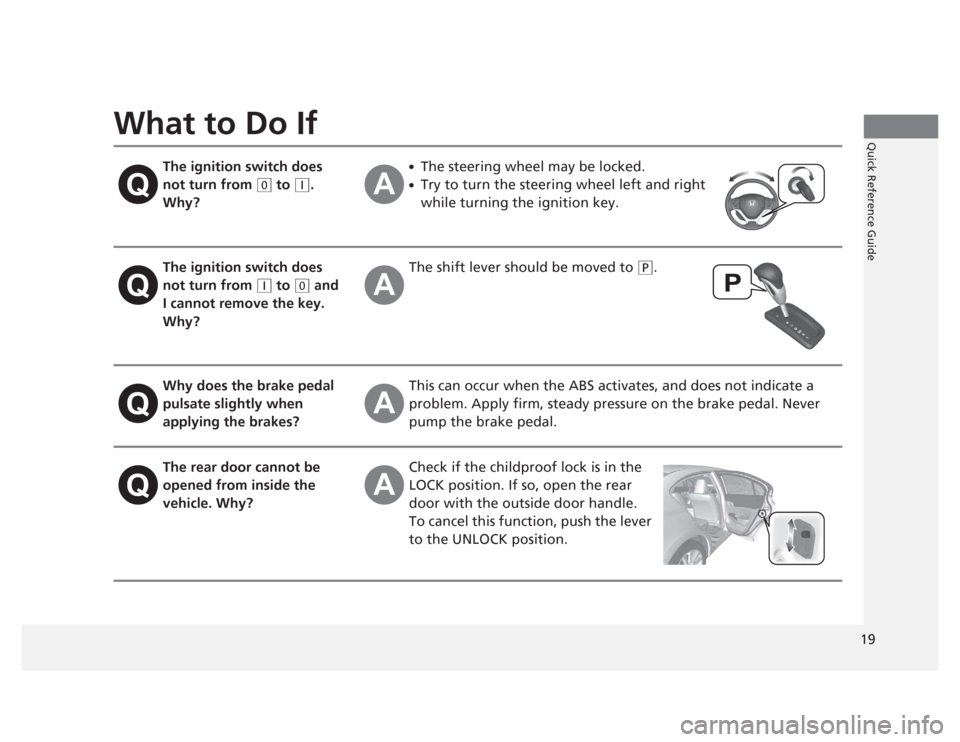
Quick Reference GuideWhat to Do IfThe ignition switch does not turn from
(0 to (q .
Why? ●
The steering wheel may be locked.
● Try to turn the steering wheel left and right
while turning the ignition key.
The ignition switch does not turn from
(q to (0 and
I cannot remove the key.
Why? The shift lever should be moved to
(P
.
Why does the brake pedal pulsate slightly when
applying the brakes? This can occur when the ABS activates, and does not indicate a
problem. Apply firm, steady pressure on the brake pedal. Never
pump the brake pedal.
The rear door cannot be
opened from inside the
vehicle. Why? Check if the childproof lock is in the
LOCK position. If so, open the rear door with the outside door handle.
To cancel this function, push the lever
to the UNLOCK position.
Page 27 of 345
26
uuFor Safe DrivinguYour Vehicle's Safety Features
Safe Driving
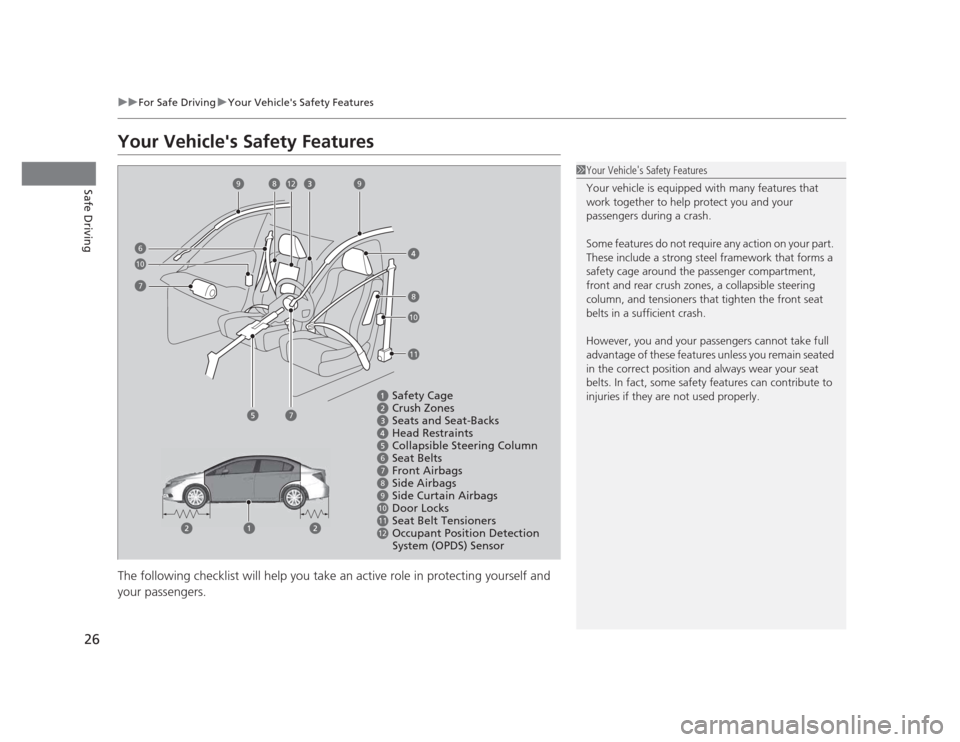
Your Vehicle's Safety Features
The following checklist will help you take an active role in protecting yourself and
your passengers.
1Your Vehicle's Safety Features
Your vehicle is equipped with many features that
work together to help protect you and your
passengers during a crash.
Some features do not require any action on your part.
These include a strong steel framework that forms a
safety cage around the passenger compartment,
front and rear crush zones, a collapsible steering
column, and tensioners that tighten the front seat belts in a sufficient crash.
However, you and your passengers cannot take full
advantage of these features unless you remain seated
in the correct position and always wear your seat
belts. In fact, some safety features can contribute to
injuries if they are not used properly.
Safety Cage
Crush Zones
Seats and Seat-Backs
Head Restraints
Collapsible Steering Column
Seat Belts
Front Airbags
Side Airbags
Side Curtain Airbags
Door Locks
Seat Belt Tensioners
Occupant Position Detection
System (OPDS) Sensor
6
7
8
9
10
11
12
6
912
10
11
7
8
7
10
8
9
Page 28 of 345
27
uuFor Safe DrivinguYour Vehicle's Safety Features
Safe DrivingFor the safety of you and your passengers, make a habit of checking these items
each time before you drive. •After everyone has entered the vehicle, be sure all doors are closed and locked.
Locking the doors helps prevent an occupant from being ejected and an outsider
from unexpectedly opening a door.
2 Locking/Unlocking the Doors from the Inside P. 103
• Adjust your seat to a position suitable for driving. Be sure the front seats are
adjusted as far to the rear as possible while allowing the driver to control the
vehicle. Sitting too close to a front airbag can result in serious or fatal injury in a crash.
2 Adjusting the Seats P. 126
• Adjust head restraints to the proper position. Head restraints are most effective
when the center of the head restraint aligns with the center of your head. Taller
persons should adjust their head restraint to the highest position.
2 Adjusting the Head Restraints P. 129
• Always wear your seat belt, and make sure you wear it properly. Confirm that any
passengers are properly belted as well.
2 Fastening a Seat Belt P. 31
• Protect children by using seat belts or child seats according to a child's age, height
and weight.
2 Child Safety P. 50
■Safety CheckList1Safety CheckList
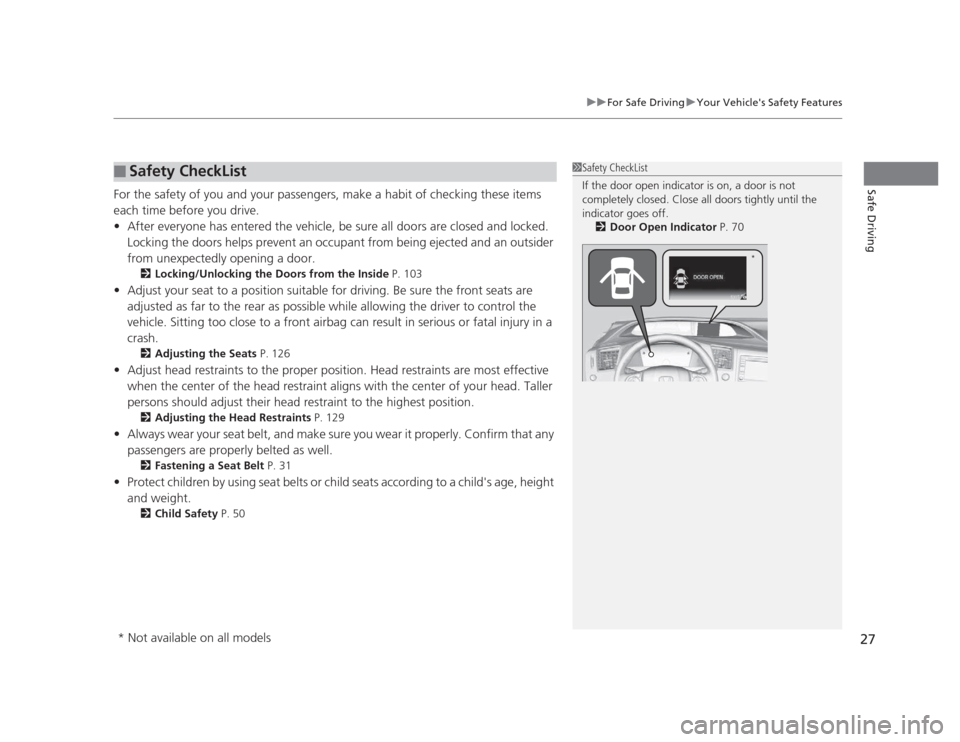
If the door open indicator is on, a door is not
completely closed. Close all doors tightly until the indicator goes off.
2 Door Open Indicator P. 70
*
* Not available on all models
Page 29 of 345
28
Safe Driving
Seat Belts
About Your Seat Belts
Seat belts are the single most effective safety device because they keep you
connected to the vehicle so that you can take advantage of many built-in safety
features. They also help keep you from being thrown against the inside of the
vehicle, against other passengers, or out of the vehicle. When worn properly, seat
belts also keep your body properly positioned in a crash so that you can take full
advantage of the additional protection provided by the airbags.
In addition, seat belts help protect you in almost every type of crash, including:
- frontal impacts
- side impacts
- rear impacts
- rollovers
■ Lap/shoulder seat belts
All five seating positions are equipped with lap/shoulder seat belts with emergency
locking retractors. In normal driving the retractor lets you move freely while keeping
some tension on the belt. During a collision or sudden stop the retractor locks to
restrain your body. The rear seat belts also have a lockable retractor for use with
child seats. 2 Installing a Child Seat with a Lap/Shoulder Seat Belt P. 57
1About Your Seat Belts
Seat belts cannot completely protect you in every
crash. But in most cases, seat belts can reduce your risk of serious injury.
Most states and all Canadian provinces and territories
require you to wear seat belts.
3WARNING
Not wearing a seat belt properly increases
the chance of serious injury or death in a
crash, even though your vehicle has
airbags.
Be sure you and your passengers always
wear seat belts and wear them properly.