roof HONDA CIVIC 2012 9.G Owners Manual
[x] Cancel search | Manufacturer: HONDA, Model Year: 2012, Model line: CIVIC, Model: HONDA CIVIC 2012 9.GPages: 345, PDF Size: 9.02 MB
Page 1 of 345
Contents
This owner’s manual should be considered a permanent part of the
vehicle and should remain with the vehicle when it is sold.
This owner’s manual covers all models of the Civic 4-Door. You may
find descriptions of equipment and features that are not on your
particular model.
Images throughout this owner’s manual (including the front cover)
represent features and equipment that are available on some, but
not all, models. Your particular model may not have some of these features.
This owner’s manual is for vehicles sold in the United States and Canada.
The information and specifications included in this publication were
in effect at the time of approval for printing. Honda Motor Co., Ltd.
reserves the right, however, to discontinue or change specifications
or design at any time without notice and without incurring any
obligation.2 Safe Driving P. 23
For Safe Driving P. 24 Seat Belts P. 28 Airbags P. 35
2Instrument Panel P. 65
Indicators P. 66 Gauges and Displays P. 78
2Controls P. 97
Setting the Clock P. 98 Locking and Unlocking the Doors P. 99
Opening and Closing the Moonroof *
P. 116
Adjusting the Seats P. 126
2 Features P. 143
Audio System *
P. 144 Audio System Basic Operation *
P. 147
Bluetooth ®
HandsFreeLink ®*
P. 177
2 Driving P. 201
Before Driving P. 202 Towing a Trailer P. 207
Refueling P. 234 Fuel Economy P. 237
2Maintenance P. 239
Before Performing Maintenance P. 240 Maintenance Minder™ P. 243
Checking and Maintaining Wiper Blades P. 278
Heating and Cooling *
System Maintenance P. 291
2 Handling the Unexpected P. 297
Tools P. 298 If a Tire Goes Flat P. 299
Overheating P. 311 Indicator, Coming On/Blinking P. 313
2Information P. 323
Specifications P. 324 Identification Numbers P. 328
Emissions Testing P. 331 Warranty Coverages P. 333
Main Menu2012 Civic 4D Online Reference Owner's Manual
Page 6 of 345
5
Quick Reference Guide
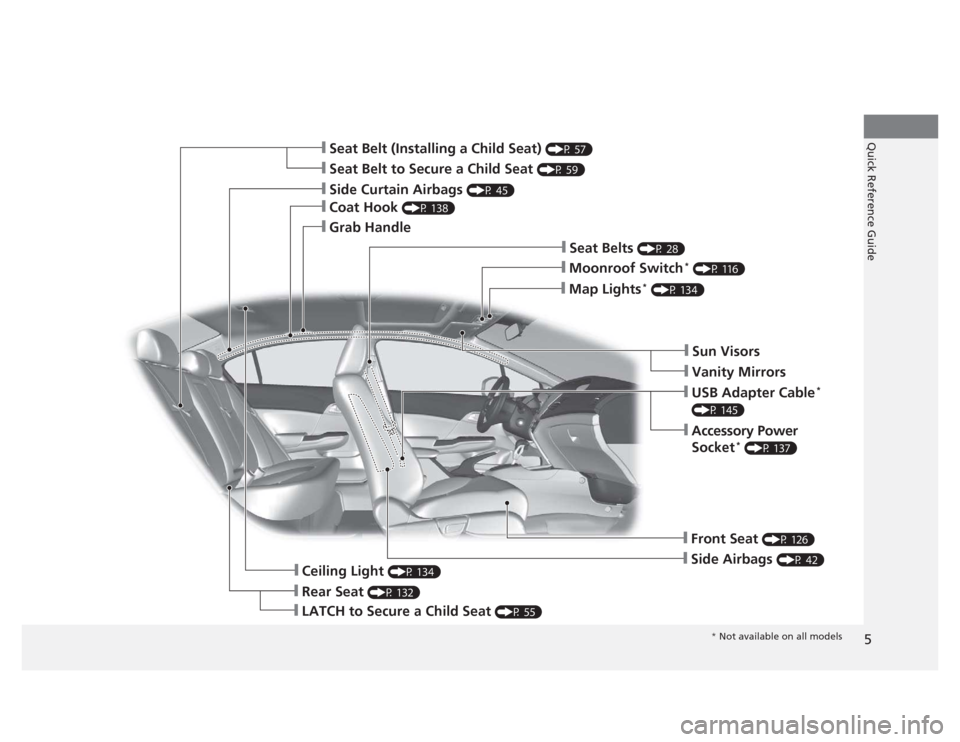
❙Seat Belt to Secure a Child Seat (P 59)
❙Seat Belt (Installing a Child Seat) (P 57)
❙Sun Visors
❙Vanity Mirrors
❙Moonroof Switch*
(P 116)
❙Map Lights *
(P 134)
❙USB Adapter Cable *
(P 145)
❙Accessory Power
Socket *
(P 137)
❙Front Seat (P 126)
❙Seat Belts (P 28)
❙Side Airbags (P 42)
❙Rear Seat (P 132)
❙LATCH to Secure a Child Seat (P 55)
❙Ceiling Light (P 134)
❙Side Curtain Airbags (P 45)
❙Coat Hook (P 138)
❙Grab Handle
* Not available on all models
Page 20 of 345
19
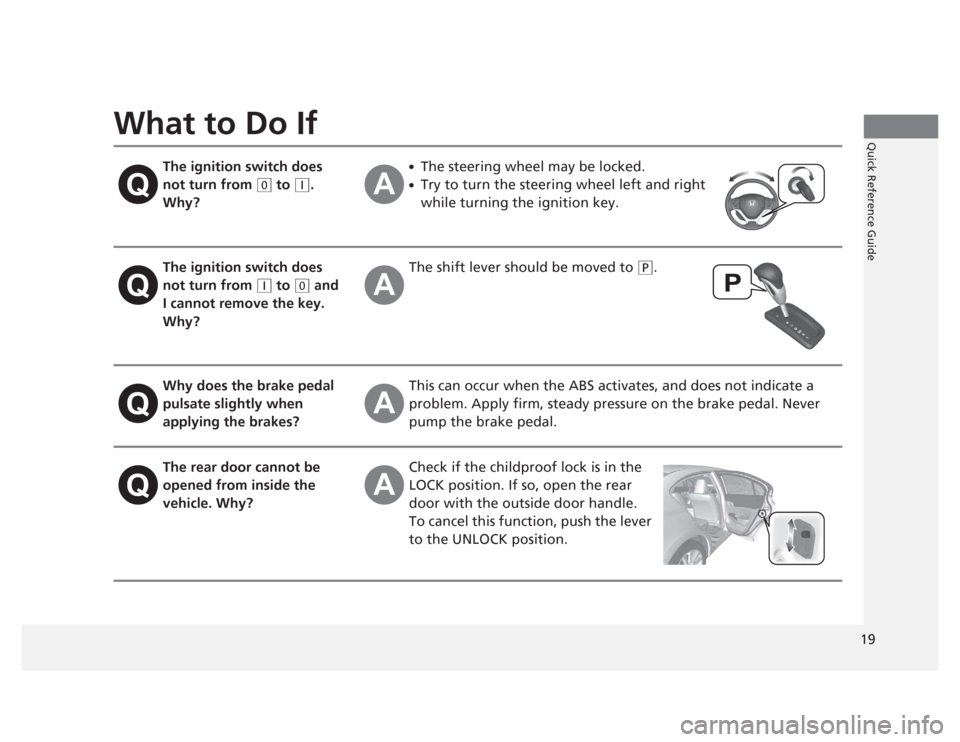
Quick Reference GuideWhat to Do IfThe ignition switch does not turn from
(0 to (q .
Why? ●
The steering wheel may be locked.
● Try to turn the steering wheel left and right
while turning the ignition key.
The ignition switch does not turn from
(q to (0 and
I cannot remove the key.
Why? The shift lever should be moved to
(P
.
Why does the brake pedal pulsate slightly when
applying the brakes? This can occur when the ABS activates, and does not indicate a
problem. Apply firm, steady pressure on the brake pedal. Never
pump the brake pedal.
The rear door cannot be
opened from inside the
vehicle. Why? Check if the childproof lock is in the
LOCK position. If so, open the rear door with the outside door handle.
To cancel this function, push the lever
to the UNLOCK position.
Page 46 of 345
45
uuAirbagsuSide Curtain Airbags
Safe Driving
Side Curtain Airbags
The side curtain airbags help protect the heads of the driver and passengers in outer
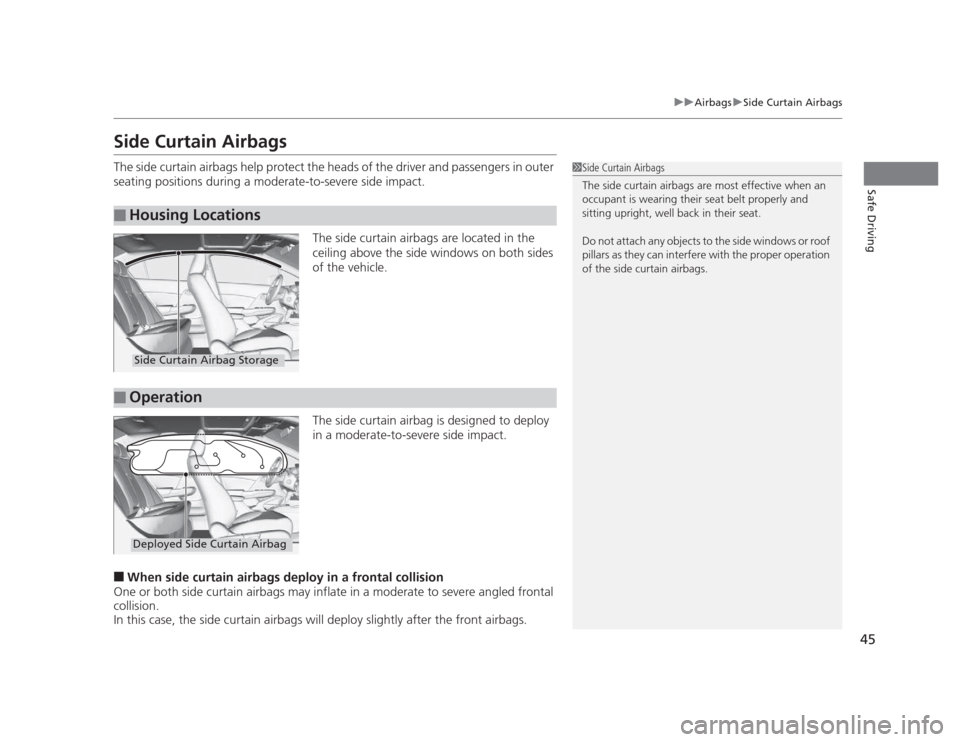
seating positions during a moderate-to-severe side impact.The side curtain airbags are located in the
ceiling above the side windows on both sides
of the vehicle.
The side curtain airbag is designed to deploy
in a moderate-to-severe side impact.
■ When side curtain airbags deploy in a frontal collision
One or both side curtain airbags may inflate in a moderate to severe angled frontal
collision.
In this case, the side curtain airbags will deploy slightly after the front airbags.
■Housing Locations
1Side Curtain Airbags
The side curtain airbags are most effective when an
occupant is wearing their seat belt properly and
sitting upright, well back in their seat.
Do not attach any objects to the side windows or roof
pillars as they can interfere with the proper operation
of the side curtain airbags.
Side Curtain Airbag Storage
■Operation
Deployed Side Curtain Airbag
Page 98 of 345
97
Controls
This chapter explains how to operate the various controls necessary for driving.
Setting the Clock ................................ 98
Locking and Unlocking the Doors
Key Types and Functions ... ................. 99
Locking/Unlocking the Doors from the Outside .......................................... 101
Locking/Unlocking the Doors from the
Inside ............................................. 103
Childproof Door Locks ..................... 104
Auto Door Locking/Unlocking *
........ 105
Opening and Closing the Trunk ....... 109
Security System ................................ 112
Immobilizer System .......................... 112
Security System Alarm *
.................... 112
Opening and Closing the Windows ..... 114Opening and Closing the Moonroof*...... 116Operating the Switches Around the
Steering WheelIgnition Switch ................................. 117
Turn Signals ..................................... 118
Light Switches.................................. 118Fog Lights *
...................................... 120
Daytime Running Lights ................... 120
Wipers and Washers ........................ 121
Brightness Control ........................... 122 Rear Defogger/Heated Door Mirror *
Button ........................................... 123
ECON Button *
................................. 123
Adjusting the Steering Wheel........... 124 Adjusting the Mirrors
....................... 125
Interior Rearview Mirror ................... 125
Power Door Mirrors *
....................... 125
Adjusting the Seats .......................... 126
Adjusting the Seat Positions ............. 126
Interior Lights/Interior Convenience Items ................................................ 134
Interior Lights .................................. 134
Interior Convenience Items .............. 135
Heating and Cooling *
....................... 140
Using Vents, Heating and A/C *
........ 140
* Not available on all models
Page 104 of 345
103
uuLocking and Unlocking the DoorsuLocking/Unlocking the Doors from the Inside
Continued
Controls
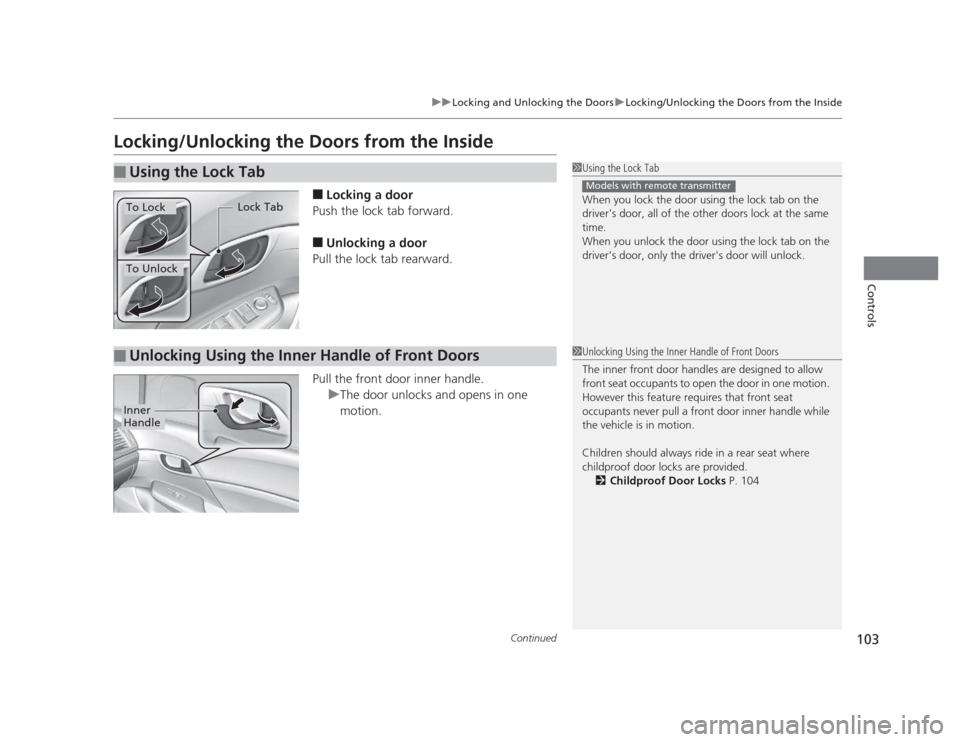
Locking/Unlocking the Doors from the Inside■Locking a door
Push the lock tab forward. ■ Unlocking a door
Pull the lock tab rearward.
Pull the front door inner handle.
uThe door unlocks and opens in one
motion.
■Using the Lock Tab1Using the Lock Tab
When you lock the door using the lock tab on the
driver's door, all of the other doors lock at the same time.
When you unlock the door using the lock tab on the
driver's door, only the driver's door will unlock.
Models with remote transmitter
To Unlock Lock Tab
To Lock
■Unlocking Using the Inne
r Handle of Front Doors1Unlocking Using the Inner Handle of Front Doors
The inner front door handles are designed to allow
front seat occupants to open the door in one motion.
However this feature requires that front seat
occupants never pull a front door inner handle while
the vehicle is in motion.
Children should always ride in a rear seat where
childproof door locks are provided.
2 Childproof Door Locks P. 104
Inner
Handle
Page 105 of 345
uuLocking and Unlocking the DoorsuChildproof Door Locks
104
Controls
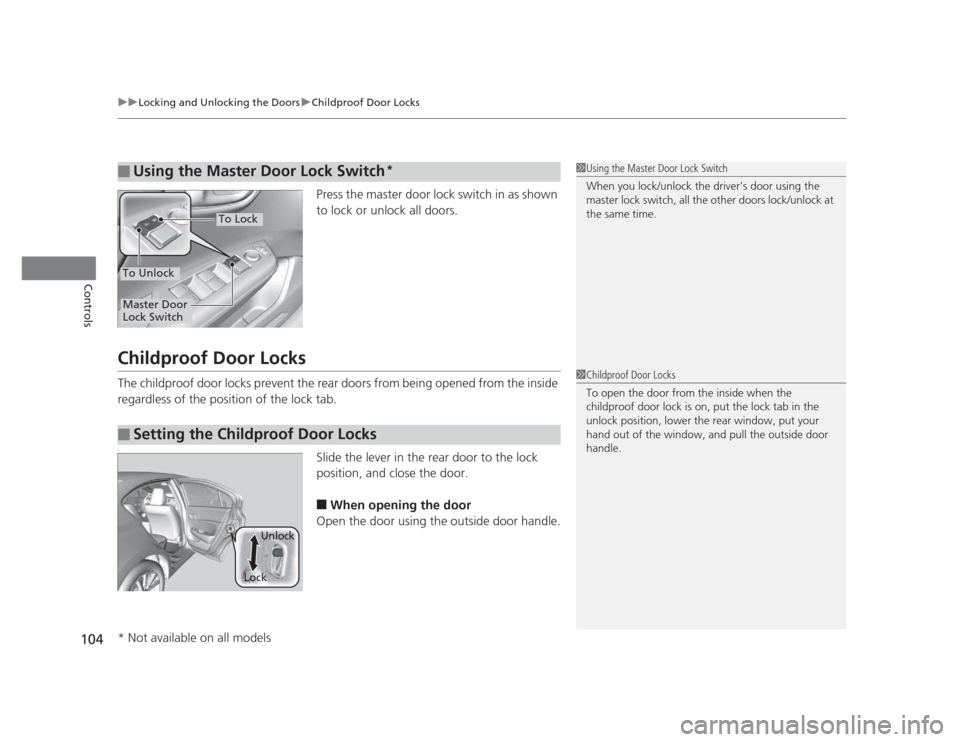
Press the master door lock switch in as shown
to lock or unlock all doors.
Childproof Door Locks
The childproof door locks prevent the rear doors from being opened from the inside
regardless of the position of the lock tab. Slide the lever in the rear door to the lock
position, and close the door.■ When opening the door
Open the door using the outside door handle.
■Using the Master Door Lock Switch*1Using the Master Door Lock Switch
When you lock/unlock the driver's door using the
master lock switch, all the other doors lock/unlock at the same time.
To Unlock
Master Door
Lock Switch
To Lock
■Setting the Childproof Door Locks
1Childproof Door Locks
To open the door from the inside when the
childproof door lock is on, put the lock tab in the
unlock position, lower the rear window, put your
hand out of the window, and pull the outside door handle.
LockUnlock
* Not available on all models
Page 117 of 345
116
Controls
Opening and Closing the Moonroof*
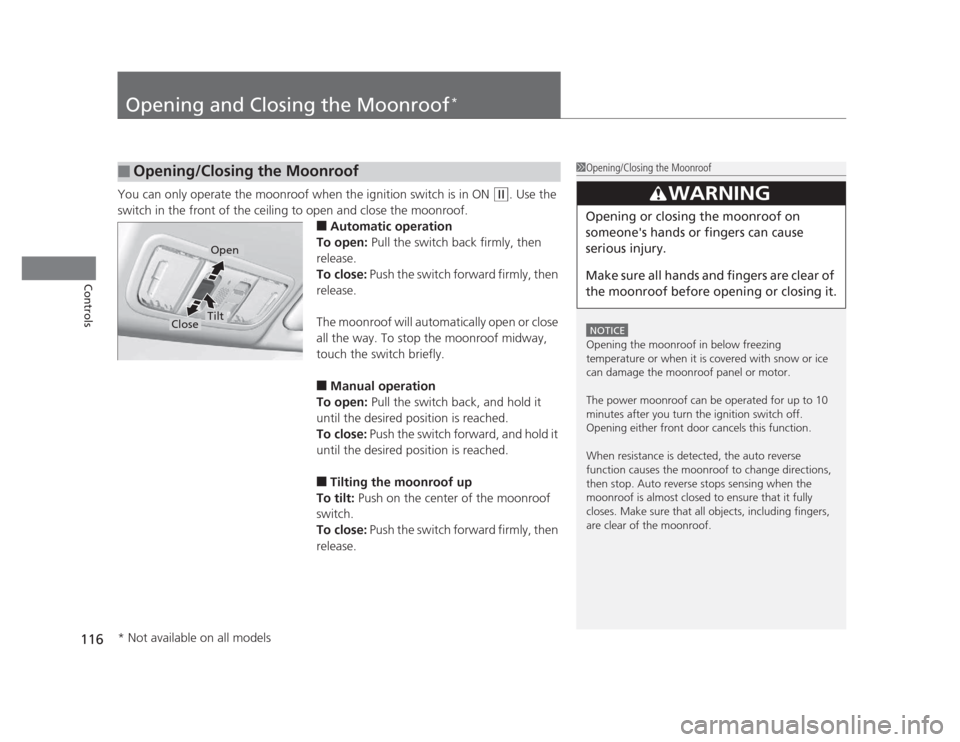
You can only operate the moonroof when the ignition switch is in ON (w
. Use the
switch in the front of the ceiling to open and close the moonroof. ■Automatic operation
To open: Pull the switch back firmly, then
release.
To close: Push the switch forward firmly, then
release.
The moonroof will automatically open or close
all the way. To stop the moonroof midway,
touch the switch briefly. ■ Manual operation
To open: Pull the switch back, and hold it
until the desired position is reached.
To close: Push the switch forward, and hold it
until the desired position is reached. ■ Tilting the moonroof up
To tilt: Push on the center of the moonroof
switch.
To close: Push the switch forward firmly, then
release.
■Opening/Closing the Moonroof1Opening/Closing the Moonroof
NOTICE
Opening the moonroof in below freezing
temperature or when it is covered with snow or ice
can damage the moonroof panel or motor.
The power moonroof can be operated for up to 10
minutes after you turn the ignition switch off.
Opening either front door cancels this function.
When resistance is detected, the auto reverse
function causes the moonroof to change directions,
then stop. Auto reverse stops sensing when the
moonroof is almost closed to ensure that it fully
closes. Make sure that all objects, including fingers,
are clear of the moonroof.
3WARNING
Opening or closing the moonroof on
someone's hands or fingers can cause
serious injury.
Make sure all hands and fingers are clear of
the moonroof before opening or closing it.
Open
CloseTilt
* Not available on all models
Page 203 of 345
202
Driving
Before Driving
Driving Preparation
Check the following items before you start driving. •Make sure there are no obstructions on the windows, door mirrors, exterior
lights, or other parts of the vehicle.
uRemove any frost, snow, or ice.
uRemove any snow on the roof, as this can slip down and obstruct your field of
vision while driving. If frozen solid, remove ice once it has softened.
uWhen removing ice from around the wheels, be sure not to damage the wheel
or wheel components.
• Make sure the hood is securely closed.
uIf the hood opens while driving, your front view will be blocked.
• Make sure the tires are in good condition.
uCheck air pressure, check for damage and excessive wear.
2 Checking and Maintaining Tires P. 280
• Make sure there are no people or objects behind or around the vehicle.
uThere are blind spots from the inside.
■Exterior Checks1Exterior Checks
NOTICE
When doors are frozen shut, use warm water around
the door edges to melt any ice. Do not try to force
them open, as this can damage the rubber trim
around the doors. When done, wipe dry to avoid further freezing.
Do not pour warm water into the key cylinder.
You will be unable to insert key if the water freezes in
the hole.
Page 320 of 345
319
uuFusesuFuse Locations
Handling the Unexpected
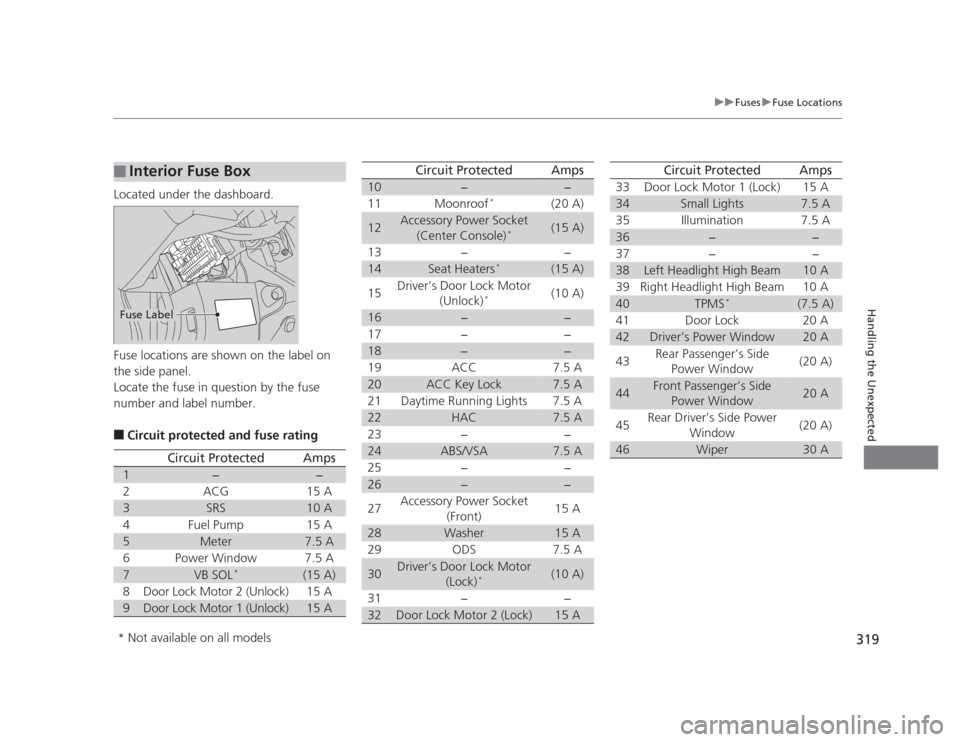
Located under the dashboard.
Fuse locations are shown on the label on
the side panel.
Locate the fuse in question by the fuse
number and label number. ■Circuit protected and fuse rating
■Interior Fuse Box
Fuse Label
Circuit ProtectedAmps
1−−
2ACG15 A
3SRS10 A
4Fuel Pump15 A
5Meter7.5 A
6Power Window7.5 A
7VB SOL *(15 A)
8Door Lock Motor 2 (Unlock)15 A
9Door Lock Motor 1 (Unlock)15 A
10−−
11 Moonroof *
(20 A)
12Accessory Power Socket
(Center Console) *(15 A)
13 − −
14Seat Heaters *(15 A)
15 Driver’s Door Lock Motor
(Unlock) * (10 A)
16−−
17 − −
18−−
19 ACC 7.5 A
20ACC Key Lock7.5 A
21 Daytime Running Lights 7.5 A
22HAC7.5 A
23 − −
24ABS/VSA7.5 A
25 − −
26−−
27 Accessory Power Socket
(Front) 15 A
28Washer15 A
29 ODS 7.5 A
30Driver’s Door Lock Motor (Lock)*(10 A)
31 − −
32Door Lock Motor 2 (Lock)15 A
Circuit ProtectedAmps
33 Door Lock Motor 1 (Lock) 15 A
34Small Lights7.5 A
35 Illumination 7.5 A
36−−
37 − −
38Left Headlight High Beam10 A
39 Right Headlight High Beam 10 A
40TPMS *(7.5 A)
41 Door Lock 20 A
42Driver’s Power Window20 A
43 Rear Passenger’s Side
Power Window (20 A)
44Front Passenger’s Side
Power Window20 A
45 Rear Driver’s Side Power
Window (20 A)
46Wiper30 A
Circuit ProtectedAmps
* Not available on all models