System message HONDA CIVIC 2013 9.G User Guide
[x] Cancel search | Manufacturer: HONDA, Model Year: 2013, Model line: CIVIC, Model: HONDA CIVIC 2013 9.GPages: 367, PDF Size: 8.43 MB
Page 73 of 367
72
uuIndicators u
Instrument Panel
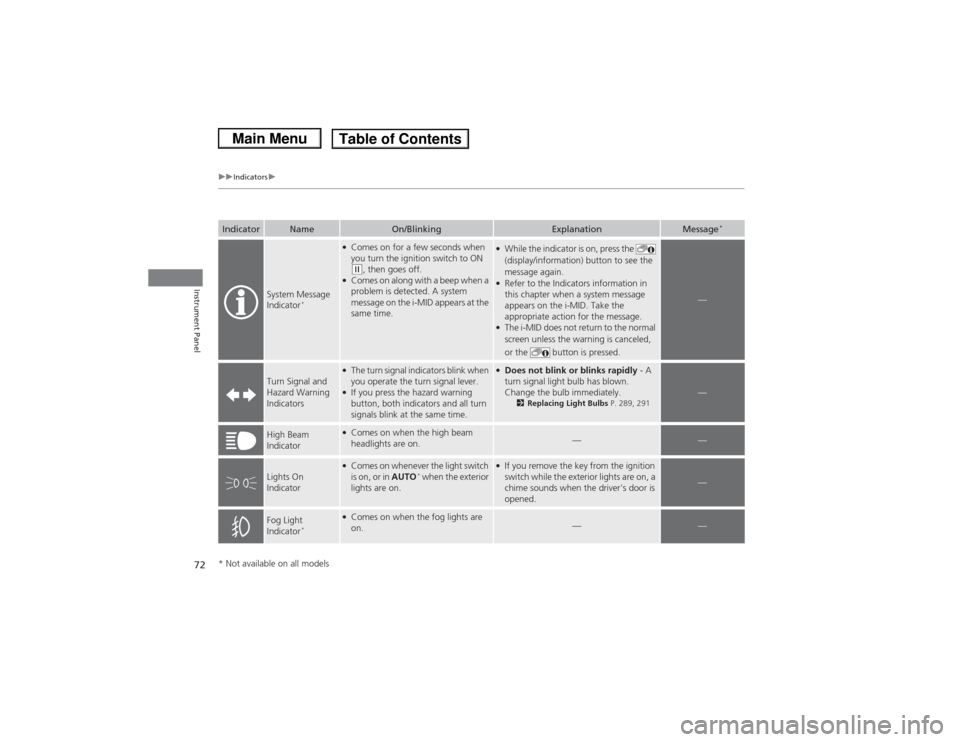
Indicator
Name
On/Blinking
Explanation
Message
*
System Message
Indicator
*
●Comes on for a few seconds when
you turn the ignition switch to ON (w, then goes off.
●Comes on along with a beep when a
problem is detected. A system
message on the i-MID appears at the
same time.
●While the indicator is on, press the
(display/information) button to see the
message again.●Refer to the Indicators information in
this chapter when a system message
appears on the i-MID. Take the
appropriate action for the message.●The i-MID does not return to the normal
screen unless the warning is canceled,
or the button is pressed.
—
Turn Signal and
Hazard Warning
Indicators
●The turn signal indicators blink when
you operate the turn signal lever.●If you press the hazard warning
button, both indicators and all turn
signals blink at the same time.
●Does not blink or blinks rapidly - A
turn signal light bulb has blown.
Change the bulb immediately.
2 Replacing Light Bulbs P. 289, 291
—
High Beam
Indicator
●Comes on when the high beam
headlights are on.
—
—
Lights On
Indicator
●Comes on whenever the light switch
is on, or in AUTO
* when the exterior
lights are on.
●If you remove the key from the ignition
switch while the exterior lights are on, a
chime sounds when the driver's door is
opened.
—
Fog Light
Indicator
*
●Comes on when the fog lights are
on.
—
—
* Not available on all models
Page 74 of 367
73
uuIndicators u
Continued
Instrument Panel
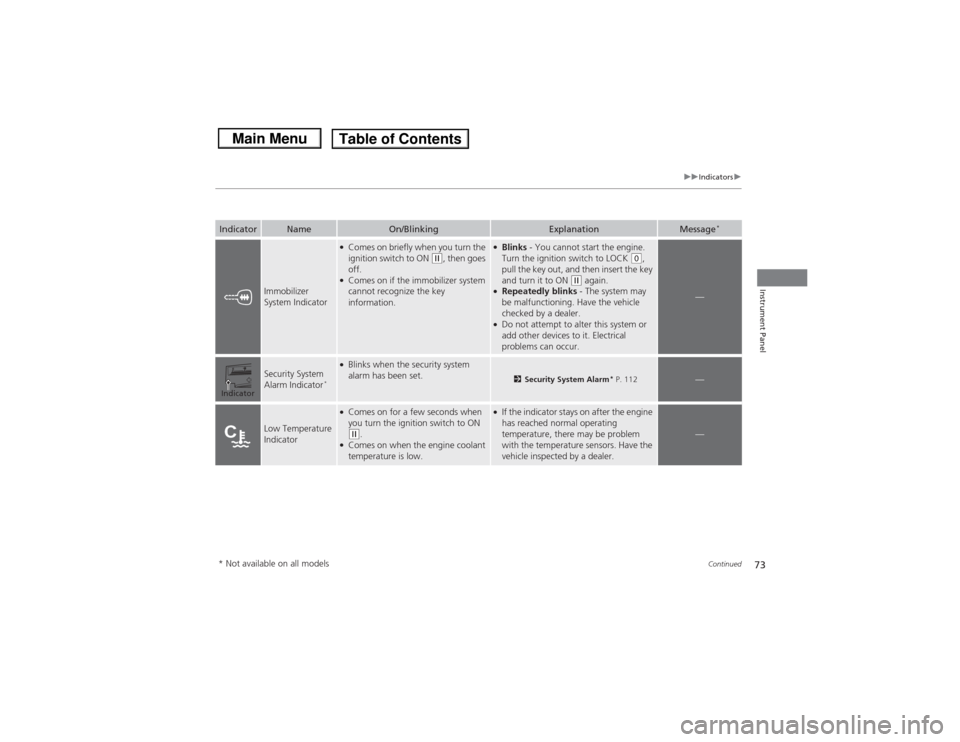
Indicator
Name
On/Blinking
Explanation
Message
*
Immobilizer
System Indicator
●Comes on briefly when you turn the
ignition switch to ON
(w, then goes
off.
●Comes on if the immobilizer system
cannot recognize the key
information.
●Blinks - You cannot start the engine.
Turn the ignition switch to LOCK
(0,
pull the key out, and then insert the key
and turn it to ON
(w again.
●Repeatedly blinks - The system may
be malfunctioning. Have the vehicle
checked by a dealer.●Do not attempt to alter this system or
add other devices to it. Electrical
problems can occur.
—
Security System
Alarm Indicator
*
●Blinks when the security system
alarm has been set.
2 Security System Alarm
* P. 112
—
Low Temperature
Indicator
●Comes on for a few seconds when
you turn the ignition switch to ON (w.
●Comes on when the engine coolant
temperature is low.
●If the indicator stays on after the engine
has reached normal operating
temperature, there may be problem
with the temperature sensors. Have the
vehicle inspected by a dealer.
—
Indicator* Not available on all models
Page 75 of 367
74
uuIndicators u
Instrument Panel
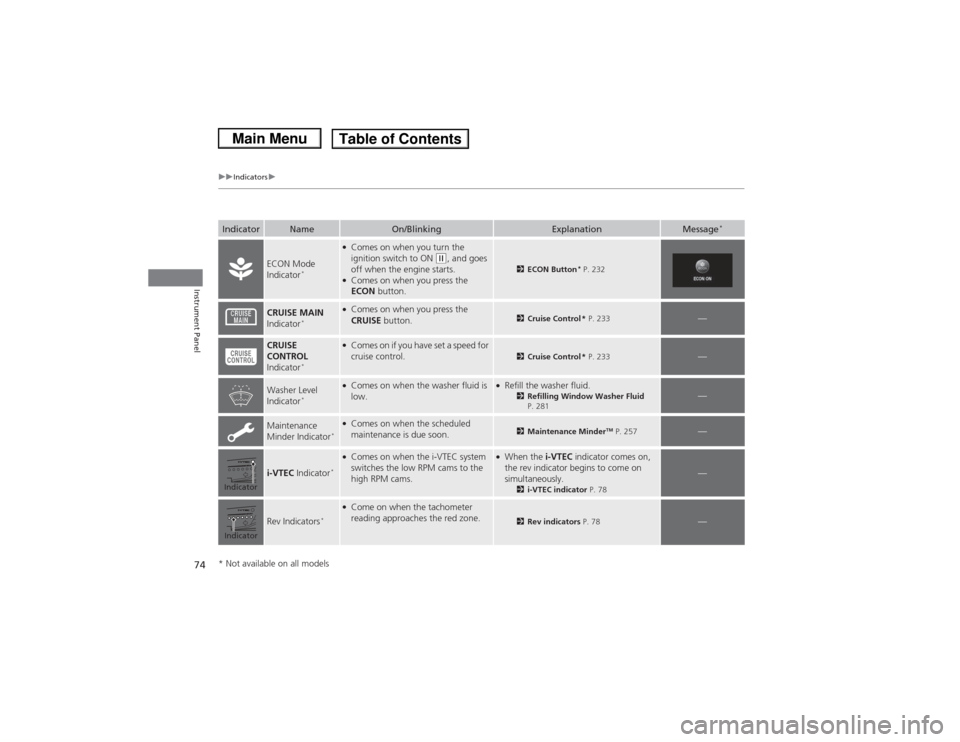
Indicator
Name
On/Blinking
Explanation
Message
*
ECON Mode
Indicator
*
●Comes on when you turn the
ignition switch to ON
(w, and goes
off when the engine starts.
●Comes on when you press the
ECON button.
2ECON Button
* P. 232
CRUISE MAIN
Indicator
*
●Comes on when you press the
CRUISE button.
2Cruise Control * P. 233
—
CRUISE
CONTROL
Indicator
*
●Comes on if you have set a speed for
cruise control.
2 Cruise Control * P. 233
—
Washer Level
Indicator
*
●Comes on when the washer fluid is
low.
●Refill the washer fluid.
2Refilling Window Washer Fluid
P. 281
—
Maintenance
Minder Indicator
*●Comes on when the scheduled
maintenance is due soon.
2 Maintenance Minder
TM P. 257
—
i-VTEC Indicator
*●Comes on when the i-VTEC system
switches the low RPM cams to the
high RPM cams.
●When the i-VTEC indicator comes on,
the rev indicator begins to come on
simultaneously.
2 i-VTEC indicator P. 78
—
Rev Indicators
*
●Come on when the tachometer
reading approaches the red zone.
2Rev indicators P. 78
—
IndicatorIndicator* Not available on all models
Page 76 of 367
 Warning and Information Messages
*
Continued
Instrument Panel
intelligent Multi-Information Display (i-MID) Warning and Information \
Mes")
75
uuIndicators uintelligent Multi-Information Display (i-MID) Warning and Information Messages
*
Continued
Instrument Panel
intelligent Multi-Information Display (i-MID) Warning and Information \
Messages
*
The following messages appear only on the i-MID. Press the (display/information) button to see the message again with the syst em
message indicator on.
Message
Condition
Explanation
●Appears when the fuel fill cap is loose or is not
installed.
2 Check/Tighten Fuel Cap Message P. 338
●Appears if there is a problem with the DRL system.
●Have your vehicle checked by a dealer.
2Daytime Running Lights P. 121
●Appears when the washer fluid is low.
●Refill the washer fluid.
2Refilling Window Washer Fluid P. 281
Canadian models* Not available on all models
Page 118 of 367
117Controls
Operating the Switches Around the Steering WheelIgnition Switch
1Ignition Switch
You cannot take the key out unless the shift lever is
in
(P.
If you open the driver's door when the key is in LOCK
(0 or ACCESSORY
(q, a warning buzzer will sound
to remind you to take the key out.
When this happens, the following messages appear
on the i-MID
*:
•In LOCK
(0: REMOVE KEY.
•In ACCESSORY
(q: RETURN IGNITION SWITCH
TO LOCK (0) POSITION The buzzer will stop when
you take the key out.
If the key won't turn from LOCK
(0 to ACCESSORY
(q, turn the key while moving the steering wheel left
and right. The steering wheel will unlock, allowing
the key to turn.
3
WARNING
Removing the key from the ignition switch
while driving locks the steering. This can
cause you to lose control of the vehicle.
Remove the key from the ignition switch
only when parked.Manual transmission modelsAutomatic transmission modelsAll models
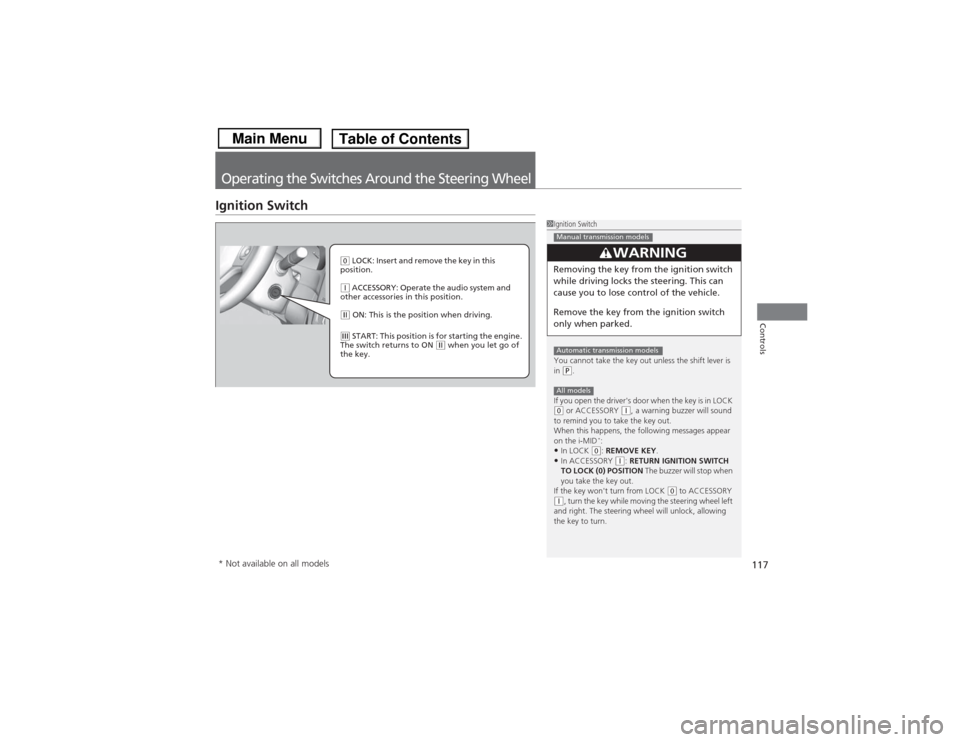
( 0 LOCK: Insert and remove the key in this
position.(q ACCESSORY: Operate the audio system and
other accessories in this position.(w ON: This is the position when driving.(e START: This position is for starting the engine.
The switch returns to ON
(w when you let go of
the key.
* Not available on all models
Page 150 of 367
149
Features
This chapter describes how to operate technology features.
Audio SystemAbout Your Audio System ................ 150
USB Adapter Cable
*........................ 151
Auxiliary Input Jack .......................... 151
Audio System Theft Protection
*....... 152
Audio System Basic Operation ...... 153
Adjusting the Sound ........................ 153
Playing AM/FM Radio ....................... 154
Playing a CD .................................... 155
Models with information display
Audio System Basic Operation ...... 156
Audio Remote Controls.................... 157
Adjusting the Sound ........................ 158
Playing AM/FM Radio ....................... 159
Playing a CD .................................... 162
Playing an iPod ®............................... 165
Playing Internet Radio ...................... 168
Playing a USB Flash Drive ................. 170
Playing Bluetooth ® Audio................. 173Models with i-MID
Audio Error Messages
CD Player......................................... 175
iPod® /USB Flash Drive ...................... 176
Pandora ®......................................... 177
General Information on the Audio System
Recommended CDs ......................... 178Compatible iPod
® and USB Flash Drives.... 180
Bluetooth® HandsFreeLink ®
*
Using HFL ........................................ 181
HFL Menus ...................................... 183
* Not available on all models
Page 152 of 367
151
uuAudio System uUSB Adapter Cable
*
Features
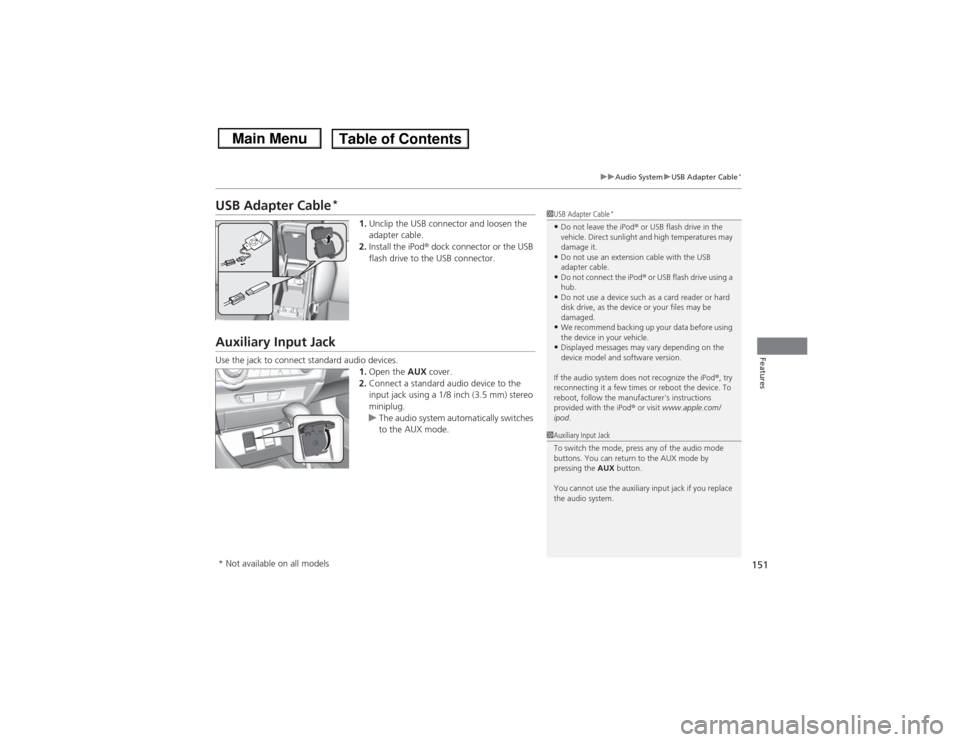
USB Adapter Cable
*
1. Unclip the USB connector and loosen the
adapter cable.
2. Install the iPod ® dock connector or the USB
flash drive to the USB connector.
Auxiliary Input JackUse the jack to connect standard audio devices. 1.Open the AUX cover.
2. Connect a standard audio device to the
input jack using a 1/8 inch (3.5 mm) stereo
miniplug.
u The audio system automatically switches
to the AUX mode.
1USB Adapter Cable
*
•Do not leave the iPod ® or USB flash drive in the
vehicle. Direct sunlight and high temperatures may
damage it.•Do not use an extension cable with the USB
adapter cable.•Do not connect the iPod ® or USB flash drive using a
hub.•Do not use a device such as a card reader or hard
disk drive, as the device or your files may be
damaged.•We recommend backing up your data before using
the device in your vehicle.•Displayed messages may vary depending on the
device model and software version.
If the audio system does not recognize the iPod® , try
reconnecting it a few times or reboot the device. To
reboot, follow the manufacturer's instructions
provided with the iPod® or visit www.apple.com/
ipod .
1Auxiliary Input Jack
To switch the mode, press any of the audio mode
buttons. You can return to the AUX mode by
pressing the AUX button.
You cannot use the auxiliary input jack if you replace
the audio system.
* Not available on all models
Page 167 of 367
uuAudio System Basic Operation uPlaying an iPod ®
166Features
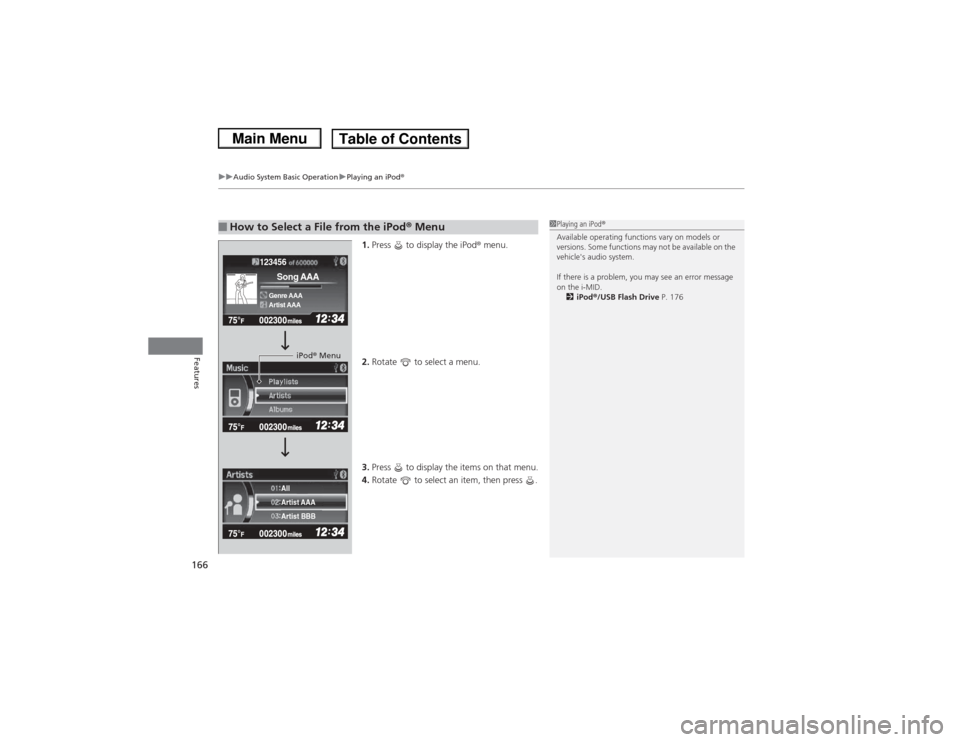
1.Press to display the iPod ® menu.
2. Rotate to select a menu.
3. Press to display the items on that menu.
4. Rotate to select an item, then press .
■How to Select a File from the iPod® Menu
1Playing an iPod ®
Available operating functions vary on models or
versions. Some functions may not be available on the
vehicle's audio system.
If there is a problem, you may see an error message
on the i-MID. 2 iPod ®/USB Flash Drive P. 176
123456Genre AAASong AAAArtist AAA
Artist AAA
Artist BBB All
iPod® Menu
Page 170 of 367
169
uuAudio System Basic Operation uPlaying Internet Radio
Features
You can operate some of the Pandora ® menu items from your vehicle’s audio
system. The available items are:
• Station List (QuickMix is also available)
• Like
• Dislike
• Resume/Pause
• Skip
• Bookmark this song
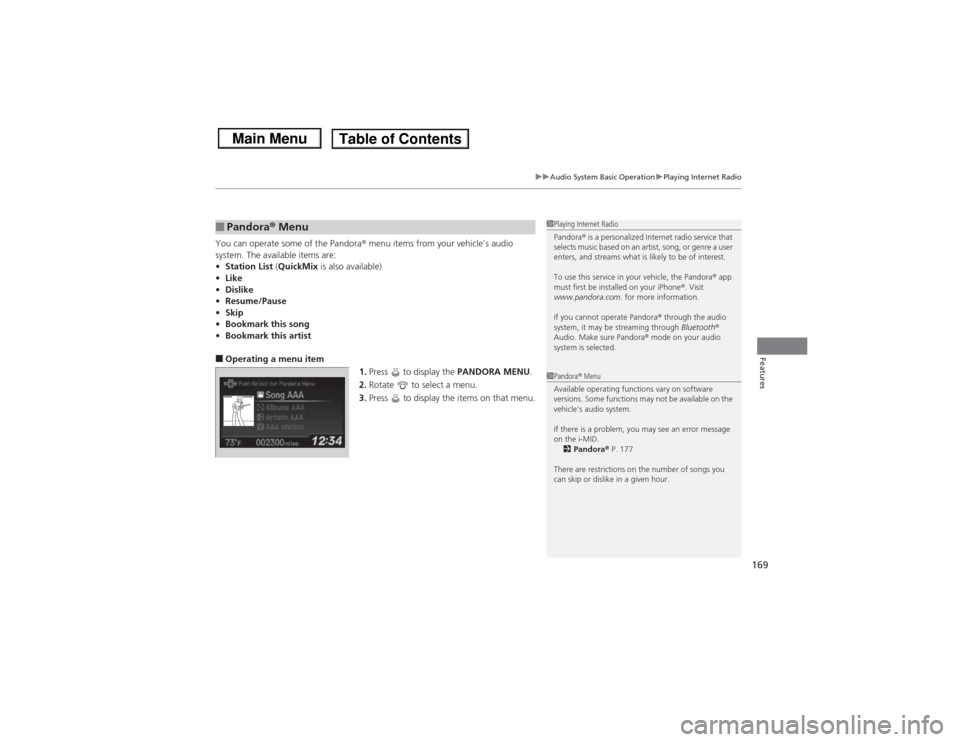
• Bookmark this artist■Operating a menu item
1.Press to display the PANDORA MENU.
2. Rotate to select a menu.
3. Press to display the items on that menu.■Pandora® Menu
1Playing Internet Radio
Pandora ® is a personalized Internet radio service that
selects music based on an artist, song, or genre a user
enters, and streams what is likely to be of interest.
To use this service in your vehicle, the Pandora ® app
must first be installed on your iPhone ®. Visit
www.pandora.com. for more information.
If you cannot operate Pandora ® through the audio
system, it may be streaming through Bluetooth®
Audio. Make sure Pandora ® mode on your audio
system is selected.1 Pandora ® Menu
Available operating functions vary on software
versions. Some functions may not be available on the
vehicle's audio system.
If there is a problem, you may see an error message
on the i-MID. 2 Pandora ® P. 177
There are restrictions on the number of songs you
can skip or dislike in a given hour.
Page 172 of 367
Continued
171
uuAudio System Basic Operation uPlaying a USB Flash Drive
Features
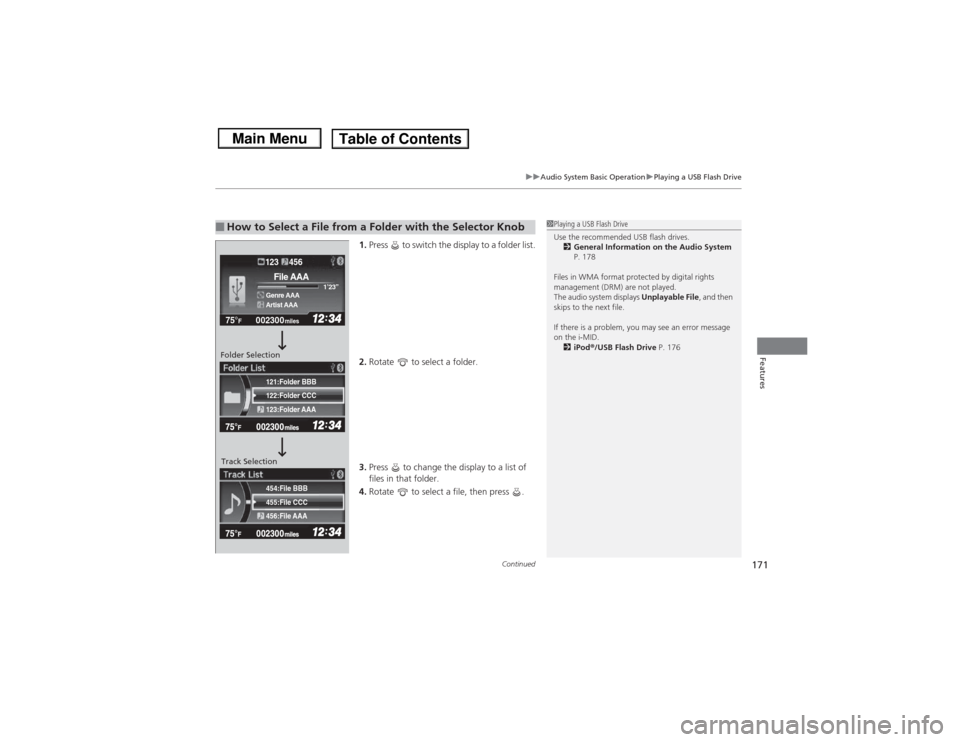
1. Press to switch the display to a folder list.
2. Rotate to select a folder.
3. Press to change the display to a list of
files in that folder.
4. Rotate to select a file, then press .
■How to Select a File from a Folder with the Selector Knob
1Playing a USB Flash Drive
Use the recommended USB flash drives.
2 General Information on the Audio System
P. 178
Files in WMA format protected by digital rights
management (DRM) are not played.
The audio system displays Unplayable File, and then
skips to the next file.
If there is a problem, you may see an error message
on the i-MID.
2 iPod ®/USB Flash Drive P. 176
455:File CCC
456:File AAA 454:File BBB122:Folder CCC
123:Folder AAA 121:Folder BBB002300
75°
F miles
Genre AAA 1’23’’File AAAArtist AAA123 456
Folder Selection
Track Selection