fuel HONDA CIVIC 2013 9.G User Guide
[x] Cancel search | Manufacturer: HONDA, Model Year: 2013, Model line: CIVIC, Model: HONDA CIVIC 2013 9.GPages: 367, PDF Size: 8.43 MB
Page 81 of 367
80
uuGauges and Displays uInformation Display
*
Instrument Panel
Shows the estimated average fuel economy of each trip meter in mpg or l/100 km.
The display is updated at set intervals. When a trip meter is reset, the average fuel
economy is also reset.
Shows the remaining oil life and Maintenance Minder
TM.
2 Maintenance Minder
TM P. 257
Shows the estimated distance you can travel on the remaining fuel. This distance is
estimated from the fuel economy of your trips in the past.
Appears when the fuel fill cap is loose or is not installed.2Check/Tighten Fuel Cap Message P. 338■Average Fuel Economy■Engine Oil Life■Range■Check Fuel Cap
Page 82 of 367
81
uuGauges and Displays uintelligent Multi-Info rmation Display (i-MID)
*
Continued
Instrument Panel
intelligent Multi-Information Display (i-MID)
*
The i-MID shows the odometer, trip meter, outside temperature indicator, and other
gauges.
It also displays important messages such as warnings and other helpful information.
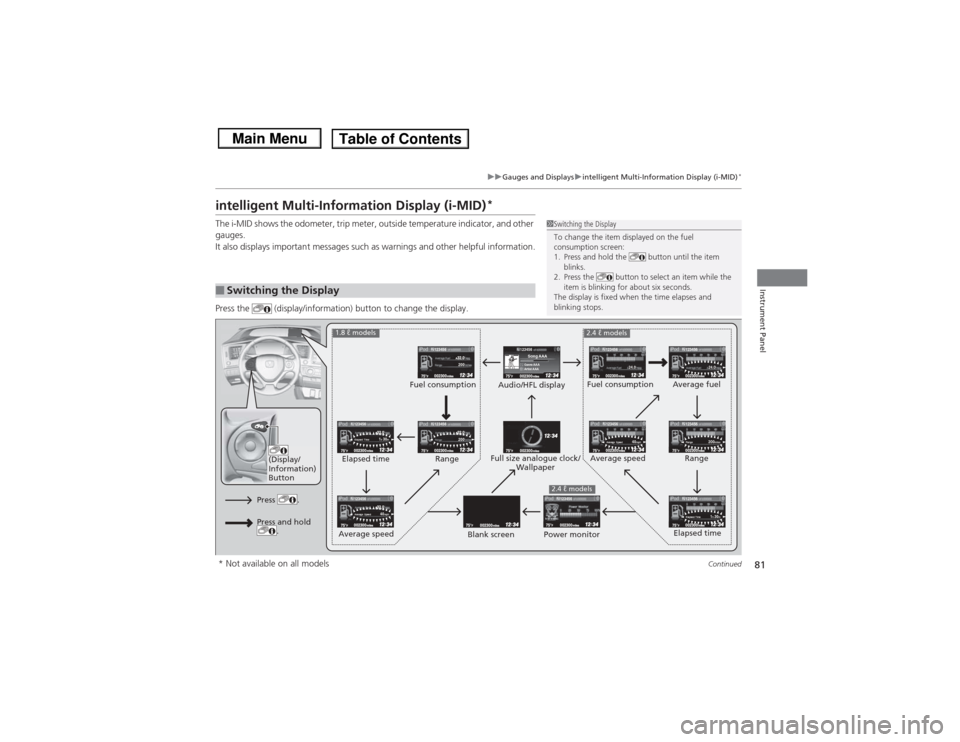
Press the (display/information) button to change the display.■Switching the Display
1Switching the Display
To change the item displayed on the fuel
consumption screen:
1. Press and hold the button until the item
blinks.
2. Press the button to select an item while the
item is blinking for about six seconds.
The display is fixed when the time elapses and
blinking stops.
123456Genre AAASong AAAArtist AAA
200200
1h 30m
Elapsed Time
1h 30m
Elapsed Time
24.0
24.0
40mph
Average Speed
40mph
Average Speed
200miles
Range
123456
123456123456
123456123456
123456
123456
123456
123456123456
(Display/
Information)
Button
Audio/HFL display Fuel consumption
Blank screen Full size analogue clock/
Wallpaper
2.4 ℓ models
Power monitor
1.8 ℓ models
2.4 ℓ models
Fuel consumption
Range
Elapsed time
Average speed Elapsed time
Average speed
Average fuel
Range
Press .Press and hold .
* Not available on all models
Page 84 of 367
Continued
83
uuGauges and Displays uintelligent Multi-Info rmation Display (i-MID)
*
Instrument Panel
Shows the estimated average fuel economy of each trip meter in mpg or l/100 km.
The display is updated at set intervals. When a trip meter is reset, the average fuel
economy is also reset.
Shows the estimated distance you can travel on the remaining fuel. This distance is
estimated from the fuel economy of your trips in the past.
Shows the time elapsed since the last time Trip A or Trip B was reset.
Shows the average speed in mph or km/h since the last time Trip A or Trip B was
reset.
Shows the remaining oil life and Maintenance Minder
TM.
2Maintenance Minder
TM P. 257
■Average Fuel Economy■Range■Elapsed Time■Average Speed■Engine Oil Life
1Average Fuel Economy
You can change when to reset the average fuel
economy.
2 Customized Features P. 85
You can choose an item to be displayed in the fuel
consumption screen. Average fuel economy, range,
elapsed time, or average speed can be selected. 2 Customized Features P. 85
2 Switching the Display P. 812.4 ℓ engine models1Range
You can choose an item to be displayed in the fuel
consumption screen. Range, elapsed time, or average
speed can be selected.
2 Customized Features P. 85
2 Switching the Display P. 811.8 ℓ engine models
Page 85 of 367
uuGauges and Displays uintelligent Multi-Information Display (i-MID)
*
84Instrument Panel
Shows the outside temperature in Fahrenheit (U.S.) or Celsius (Canada).■Adjusting the outside temperature display
Adjust the temperature reading up to ±5°F or ±3°C if the temperature reading
seems incorrect.
Use the i-MID’s customized features to correct the temperature.2 Customized Features P. 85Shows the instant fuel economy as a bar graph in mpg or l/100 km.
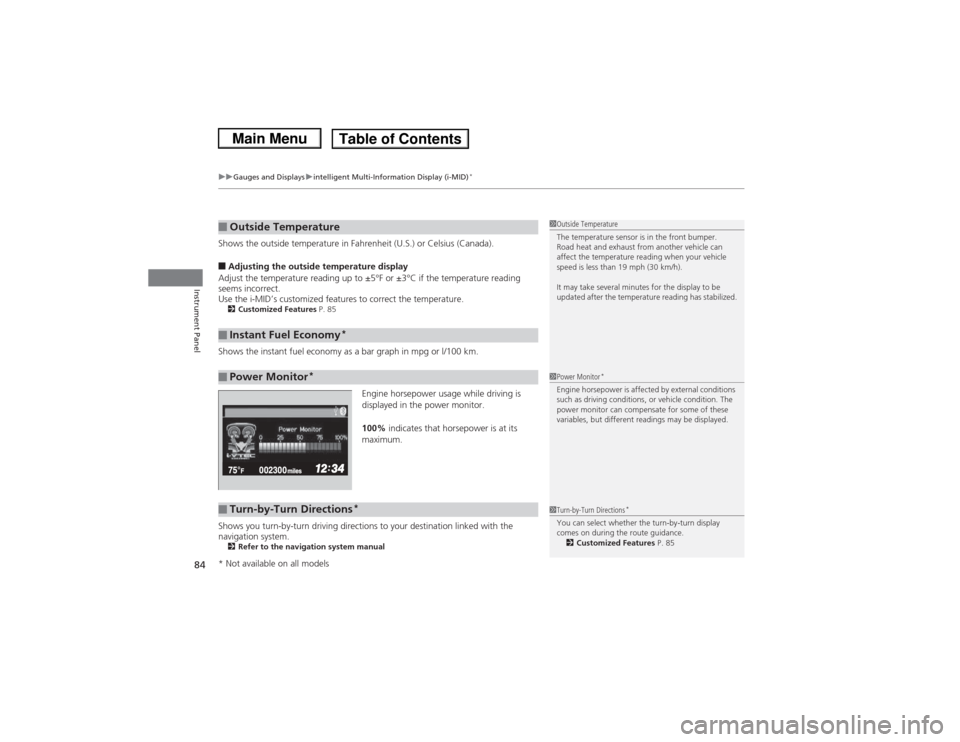
Engine horsepower usage while driving is
displayed in the power monitor.
100% indicates that horsepower is at its
maximum.
Shows you turn-by-turn driving directions to your destination linked with the
navigation system.2 Refer to the navigation system manual■Outside Temperature■Instant Fuel Economy
*
■Power Monitor
*
1Outside Temperature
The temperature sensor is in the front bumper.
Road heat and exhaust from another vehicle can
affect the temperature reading when your vehicle
speed is less than 19 mph (30 km/h).
It may take several minutes for the display to be
updated after the temperature reading has stabilized.1Power Monitor
*
Engine horsepower is affected by external conditions
such as driving conditions, or vehicle condition. The
power monitor can compensate for some of these
variables, but different readings may be displayed.
■Turn-by-Turn Directions
*
1Turn-by-Turn Directions
*
You can select whether the turn-by-turn display
comes on during the route guidance.
2 Customized Features P. 85
* Not available on all models
Page 88 of 367
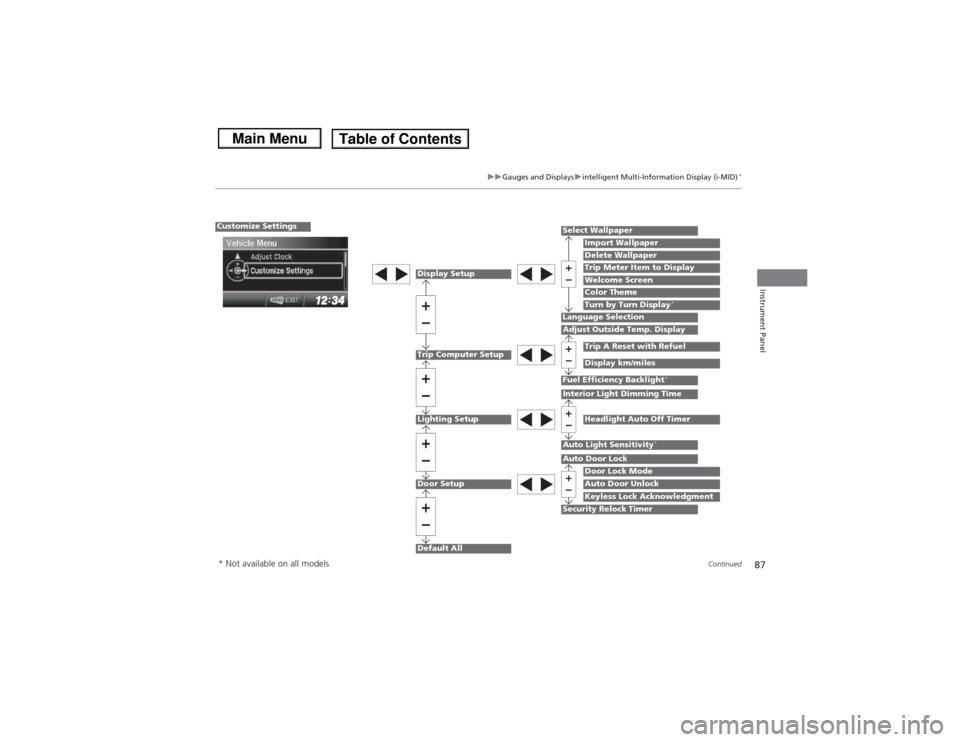
87
uuGauges and Displays uintelligent Multi-Info rmation Display (i-MID)
*
Continued
Instrument Panel
Display SetupLighting SetupTrip Computer SetupDoor SetupDefault All
Select Wallpaper
Import WallpaperDelete Wallpaper
Language SelectionAdjust Outside Temp. Display
Trip A Reset with RefuelDisplay km/miles
Auto Light Sensitivity
*
Door Lock ModeAuto Door UnlockKeyless Lock Acknowledgment
Auto Door LockSecurity Relock Timer
Trip Meter Item to DisplayWelcome ScreenColor Theme
Fuel Efficiency Backlight
*
Interior Light Dimming Time
Headlight Auto Off Timer
Customize Settings
Turn by Turn Display
*
* Not available on all models
Page 90 of 367
89
uuGauges and Displays uintelligent Multi-Info rmation Display (i-MID)
*
Continued
Instrument Panel
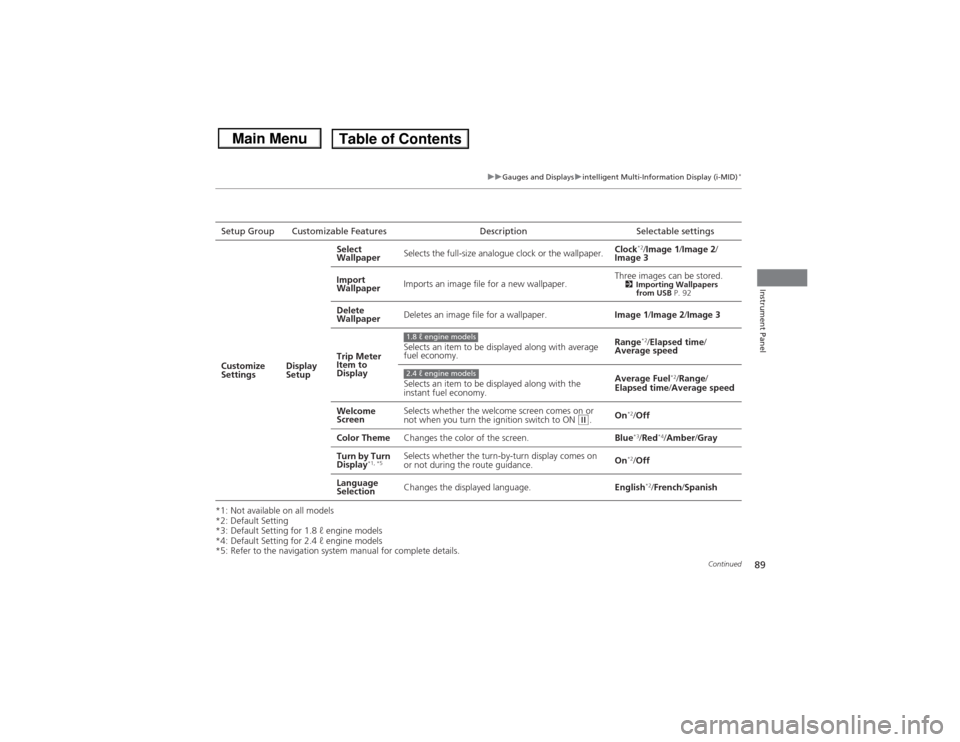
*1: Not available on all models
*2: Default Setting
*3: Default Setting for 1.8 ℓ engine models
*4: Default Setting for 2.4 ℓ engine models
*5: Refer to the navigation system manual for complete details.Setup Group Customizable Features Description Selectable settings
Customize
Settings Display
SetupSelect
Wallpaper
Selects the full-size analogue clock or the wallpaper. Clock
*2/
Image 1 /Image 2/
Image 3
Import
Wallpaper Imports an image file for a new wallpaper. Three images can be stored.
2
Importing Wallpapers
from USB P. 92
Delete
Wallpaper Deletes an image file for a wallpaper.
Image 1/Image 2/ Image 3
Trip Meter
Item to
Display Selects an item to be displayed along with average
fuel economy.
Range
*2/
Elapsed time /
Average speed
Selects an item to be displayed along with the
instant fuel economy. Average Fuel
*2/
Range /
Elapsed time/ Average speed
Welcome
Screen Selects whether the welcome screen comes on or
not when you turn the ignition switch to ON
(w.
On
*2/
Off
Color Theme Changes the color of the screen. Blue*3/Red
*4/Amber /Gray
Turn by Turn
Display
*1, *5
Selects whether the turn-by-turn display comes on
or not during the route guidance. On
*2/
Off
Language
Selection Changes the displayed language.
English*2/French /Spanish
1.8 ℓ engine models2.4 ℓ engine models
Page 91 of 367
90
uuGauges and Displays uintelligent Multi-Information Display (i-MID)
*
Instrument Panel
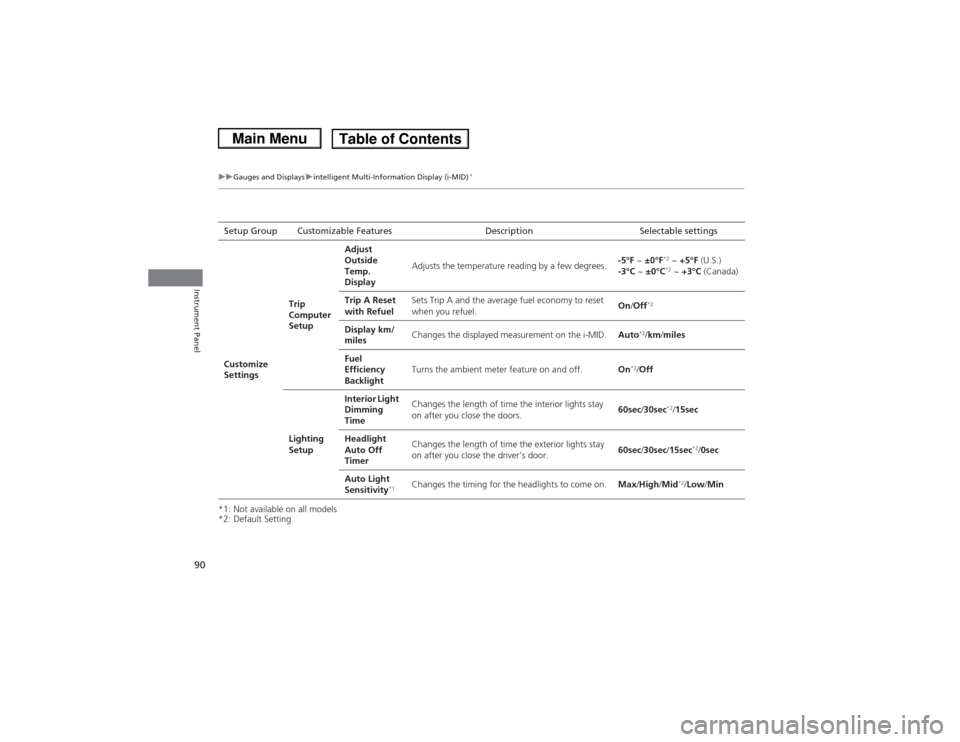
*1: Not available on all models
*2: Default SettingSetup Group Customizable Features Description Selectable settings
Customize
Settings Trip
Computer
SetupAdjust
Outside
Temp.
Display
Adjusts the temperature reading by a few degrees.
-5°F
~ ±0°F
*2 ~ +5°F (U.S.)
-3°C ~ ±0°C*2 ~ +3°C (Canada)
Trip A Reset
with Refuel Sets Trip A and the average fuel economy to reset
when you refuel.
On
/Off
*2
Display km/
miles Changes the displayed measurement on the i-MID.
Auto
*2/km/ miles
Fuel
Efficiency
Backlight Turns the ambient meter feature on and off.
On
*2/Off
Lighting
Setup Interior Light
Dimming
Time
Changes the length of time the interior lights stay
on after you close the doors.
60sec
/30sec
*2/ 15sec
Headlight
Auto Off
Timer Changes the length of time the exterior lights stay
on after you close the driver’s door.
60sec
/30sec /15sec
*2/0sec
Auto Light
Sensitivity
*1
Changes the timing for the headlights to come on. Max/High/ Mid
*2/Low /Min
Page 214 of 367
213
Driving
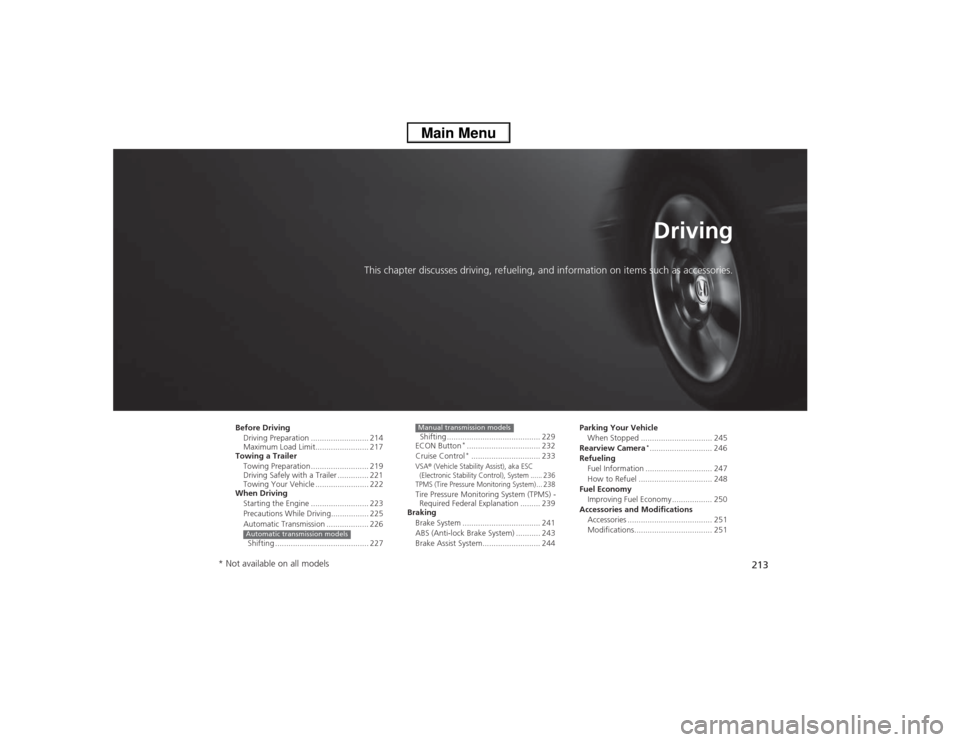
This chapter discusses driving, refueling, and information on items such as accessories.
Before DrivingDriving Preparation .......................... 214
Maximum Load Limit........................ 217
Towing a Trailer
Towing Preparation .......................... 219
Driving Safely with a Trailer .............. 221
Towing Your Vehicle ........................ 222
When Driving
Starting the Engine .......................... 223
Precautions While Driving................. 225
Automatic Transmission ................... 226
Shifting .......................................... 227Automatic transmission models
Shifting .......................................... 229
ECON Button
*................................. 232
Cruise Control*............................... 233
VSA
® (Vehicle Stability Assist), aka ESC
(Electronic Stability Control), System ...... 236
TPMS (Tire Pressure Monitoring System) ... 238
Tire Pressure Monitoring System (TPMS) - Required Federal Explanation ......... 239
Braking
Brake System ................................... 241
ABS (Anti-lock Brake System) ........... 243
Brake Assist System.......................... 244Manual transmission models
Parking Your VehicleWhen Stopped ................................ 245
Rearview Camera
*............................ 246
Refueling
Fuel Information .............................. 247
How to Refuel ................................. 248
Fuel Economy
Improving Fuel Economy .................. 250
Accessories and Modifications Accessories ...................................... 251
Modifications................................... 251
* Not available on all models
Page 225 of 367
uuWhen Driving uStarting the Engine
224Driving
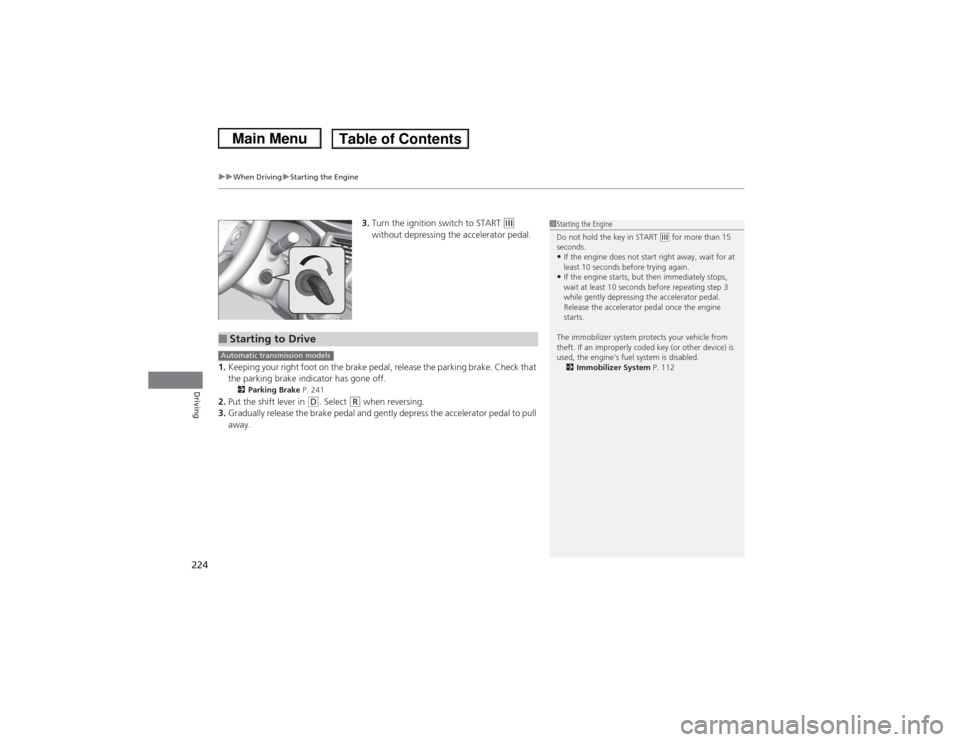
3. Turn the ignition switch to START
(e
without depressing the accelerator pedal.
1. Keeping your right foot on the brake pedal, release the parking brake. Check that
the parking brake indicator has gone off.
2 Parking Brake P. 241
2.Put the shift lever in
(D. Select
(R when reversing.
3. Gradually release the brake pedal and gently depress the accelerator pedal to pull
away.
1Starting the Engine
Do not hold the key in START
(e for more than 15
seconds.
•If the engine does not start right away, wait for at
least 10 seconds before trying again.•If the engine starts, but then immediately stops,
wait at least 10 seconds before repeating step 3
while gently depressing the accelerator pedal.
Release the accelerator pedal once the engine
starts.
The immobilizer system protects your vehicle from
theft. If an improperly coded key (or other device) is
used, the engine's fuel system is disabled. 2 Immobilizer System P. 112
■Starting to DriveAutomatic transmission models
Page 229 of 367
uuWhen Driving uShifting
228Driving
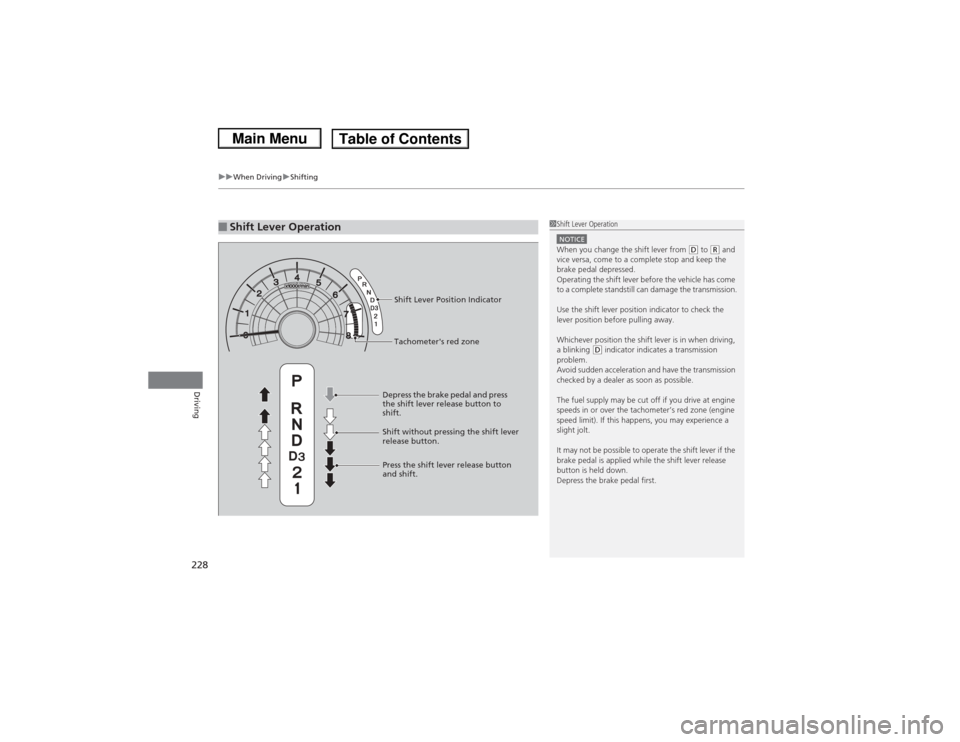
■Shift Lever Operation
1Shift Lever OperationNOTICEWhen you change the shift lever from
(D to (R and
vice versa, come to a complete stop and keep the
brake pedal depressed.
Operating the shift lever before the vehicle has come
to a complete standstill can damage the transmission.
Use the shift lever position indicator to check the
lever position before pulling away.
Whichever position the shift lever is in when driving,
a blinking
(D indicator indicates a transmission
problem.
Avoid sudden acceleration and have the transmission
checked by a dealer as soon as possible.
The fuel supply may be cut off if you drive at engine
speeds in or over the tachometer’s red zone (engine
speed limit). If this happens, you may experience a
slight jolt.
It may not be possible to operate the shift lever if the
brake pedal is applied while the shift lever release
button is held down.
Depress the brake pedal first.
Tachometer's red zone Shift Lever Position Indicator
Depress the brake pedal and press
the shift lever release button to
shift.
Shift without pressing the shift lever
release button.
Press the shift lever release button
and shift.