pairing phone HONDA CIVIC 2013 9.G Owners Manual
[x] Cancel search | Manufacturer: HONDA, Model Year: 2013, Model line: CIVIC, Model: HONDA CIVIC 2013 9.GPages: 367, PDF Size: 8.43 MB
Page 182 of 367
181
Continued
Features
Bluetooth® HandsFreeLink®
*
For models with the navigation system, see Navigation System Manual for how to
operate the Bluetooth® HandsFreeLink ®.
Bluetooth ® HandsFreeLink ® (HFL) allows you to place and receive phone calls using
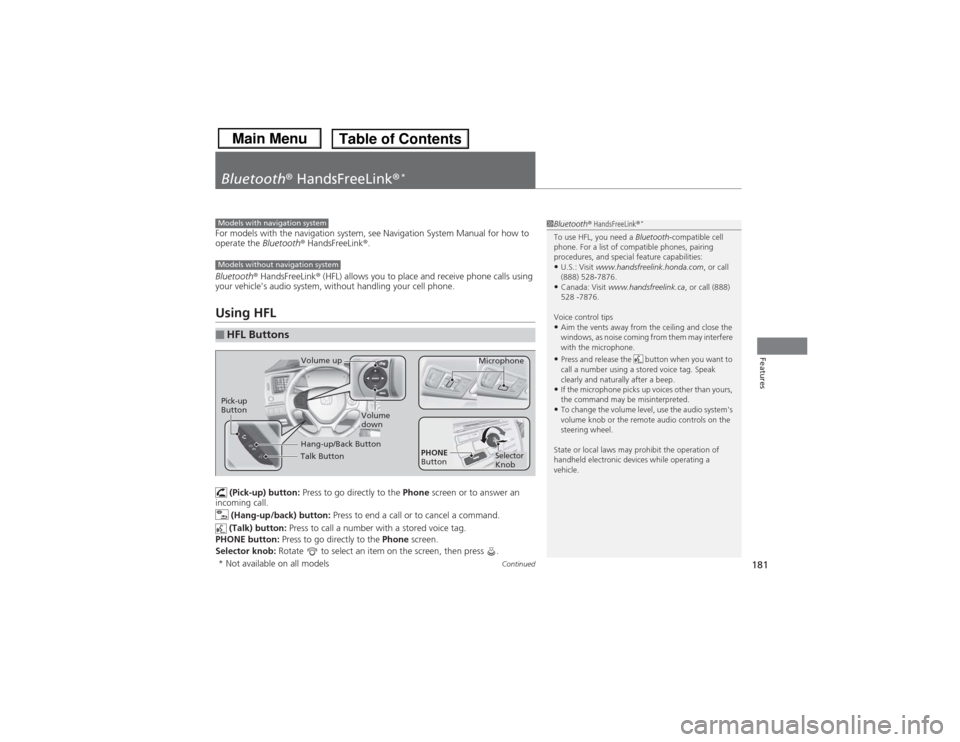
your vehicle's audio system, without handling your cell phone.Using HFL (Pick-up) button: Press to go directly to the Phone screen or to answer an
incoming call.
(Hang-up/back) button: Press to end a call or to cancel a command.
(Talk) button: Press to call a number with a stored voice tag.
PHONE button: Press to go directly to the Phone screen.
Selector knob: Rotate to select an item on the screen, then press .■HFL Buttons
1Bluetooth ® HandsFreeLink ®
*
To use HFL, you need a Bluetooth-compatible cell
phone. For a list of compatible phones, pairing
procedures, and special feature capabilities:•U.S.: Visit www.handsfreelink.honda.com , or call
(888) 528-7876.•Canada: Visit www.handsfreelink.ca , or call (888)
528 -7876.
Voice control tips•Aim the vents away from the ceiling and close the
windows, as noise coming from them may interfere
with the microphone.•Press and release the button when you want to
call a number using a stored voice tag. Speak
clearly and naturally after a beep.•If the microphone picks up voices other than yours,
the command may be misinterpreted.•To change the volume level, use the audio system's
volume knob or the remote audio controls on the
steering wheel.
State or local laws may prohibit the operation of
handheld electronic devices while operating a
vehicle.
Models with navigation systemModels without navigation system
Talk ButtonVolume up Microphone
Hang-up/Back Button
Pick-up
Button
Volume
down
Selector
Knob
PHONE
Button
* Not available on all models
Page 186 of 367
185
uuBluetooth® HandsFreeLink ®
*uHFL Menus
Continued
Features
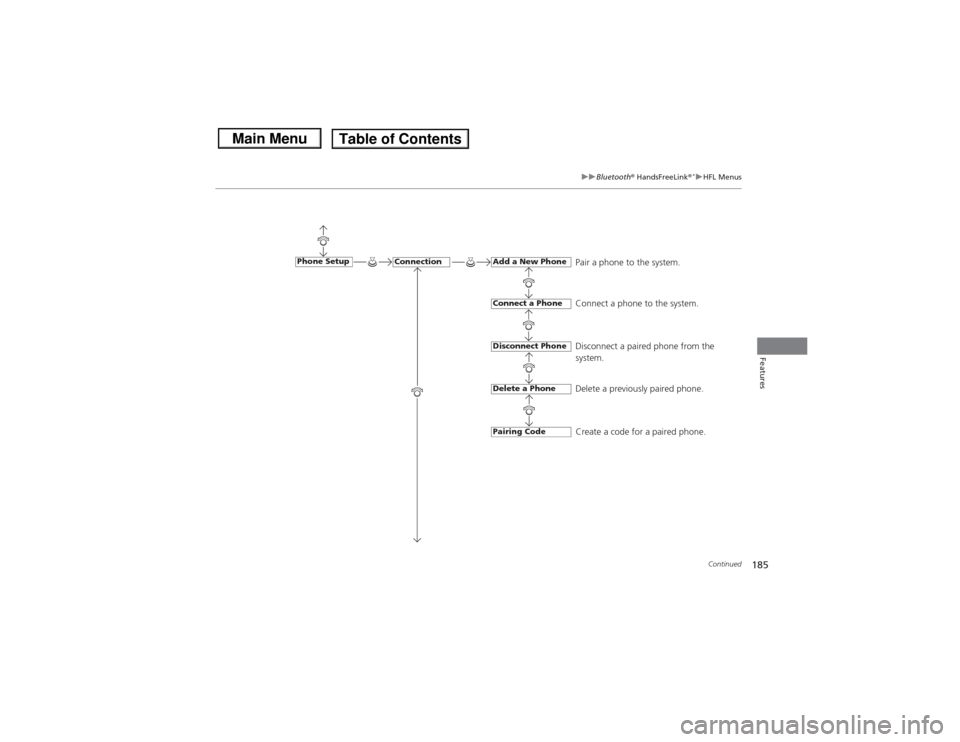
Pair a phone to the system.
Connect a phone to the system.
Disconnect a paired phone from the
system.
Delete a previously paired phone.
Create a code for a paired phone.
Connection
Phone Setup
Add a New PhoneConnect a PhoneDisconnect PhoneDelete a PhonePairing Code
Page 189 of 367
uuBluetooth® HandsFreeLink ®
*uHFL Menus
188Features
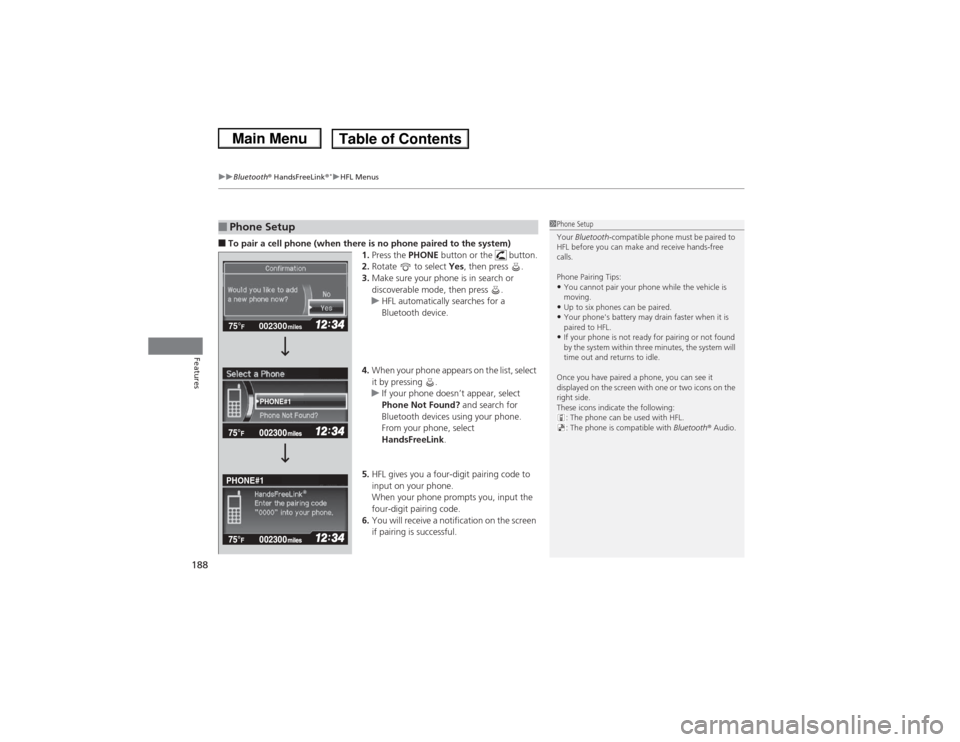
■To pair a cell phone (when there is no phone paired to the system)
1.Press the PHONE button or the button.
2. Rotate to select Yes, then press .
3. Make sure your phone is in search or
discoverable mode, then press .
u HFL automatically searches for a
Bluetooth device.
4. When your phone appears on the list, select
it by pressing .
u If your phone doesn’t appear, select
Phone Not Found? and search for
Bluetooth devices using your phone.
From your phone, select
HandsFreeLink .
5. HFL gives you a four-digit pairing code to
input on your phone.
When your phone prompts you, input the
four-digit pairing code.
6. You will receive a notification on the screen
if pairing is successful.■Phone Setup
1Phone Setup
Your Bluetooth -compatible phone must be paired to
HFL before you can make and receive hands-free
calls.
Phone Pairing Tips:•You cannot pair your phone while the vehicle is
moving.•Up to six phones can be paired.•Your phone's battery may drain faster when it is
paired to HFL.•If your phone is not ready for pairing or not found
by the system within three minutes, the system will
time out and returns to idle.
Once you have paired a phone, you can see it
displayed on the screen with one or two icons on the
right side.
These icons indicate the following: : The phone can be used with HFL.
: The phone is compatible with Bluetooth® Audio.
002300
75°
F miles
PHONE#1
PHONE#1
Page 191 of 367
190
uuBluetooth® HandsFreeLink ®
*uHFL Menus
Features
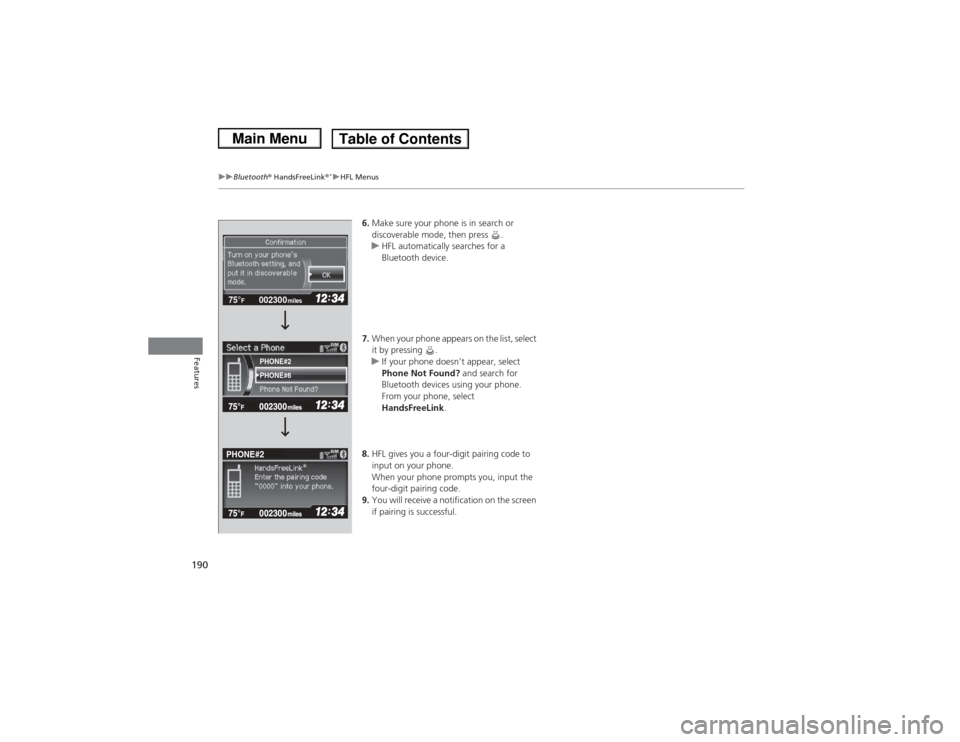
6. Make sure your phone is in search or
discoverable mode, then press .
u HFL automatically searches for a
Bluetooth device.
7. When your phone appears on the list, select
it by pressing .
u If your phone doesn’t appear, select
Phone Not Found? and search for
Bluetooth devices using your phone.
From your phone, select
HandsFreeLink .
8. HFL gives you a four-digit pairing code to
input on your phone.
When your phone prompts you, input the
four-digit pairing code.
9. You will receive a notification on the screen
if pairing is successful.
002300
75°
F miles
PHONE#6
PHONE#2
PHONE#2
Page 192 of 367
Continued
191
uuBluetooth® HandsFreeLink ®
*uHFL Menus
Features
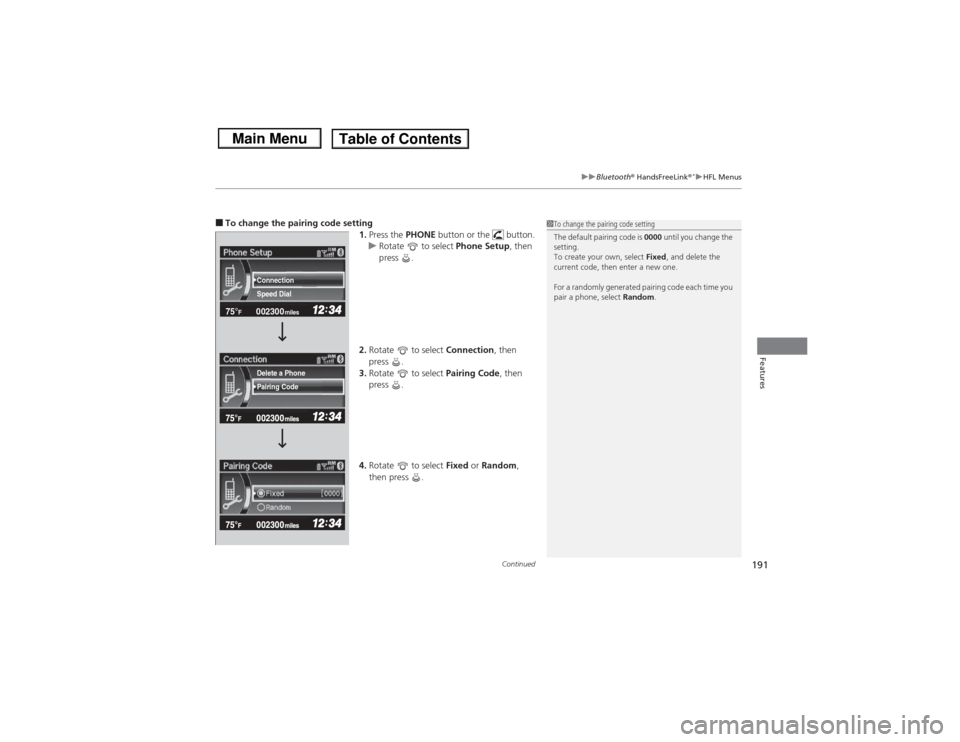
■To change the pairing code setting
1.Press the PHONE button or the button.
u Rotate to select Phone Setup, then
press .
2. Rotate to select Connection, then
press .
3. Rotate to select Pairing Code, then
press .
4. Rotate to select Fixed or Random ,
then press .
1 To change the pairing code setting
The default pairing code is 0000 until you change the
setting.
To create your own, select Fixed, and delete the
current code, then enter a new one.
For a randomly generated pairing code each time you
pair a phone, select Random.
002300
75°
F miles
Speed Dial Connection
Pairing Code Delete a Phone
Page 193 of 367
192
uuBluetooth® HandsFreeLink ®
*uHFL Menus
Features
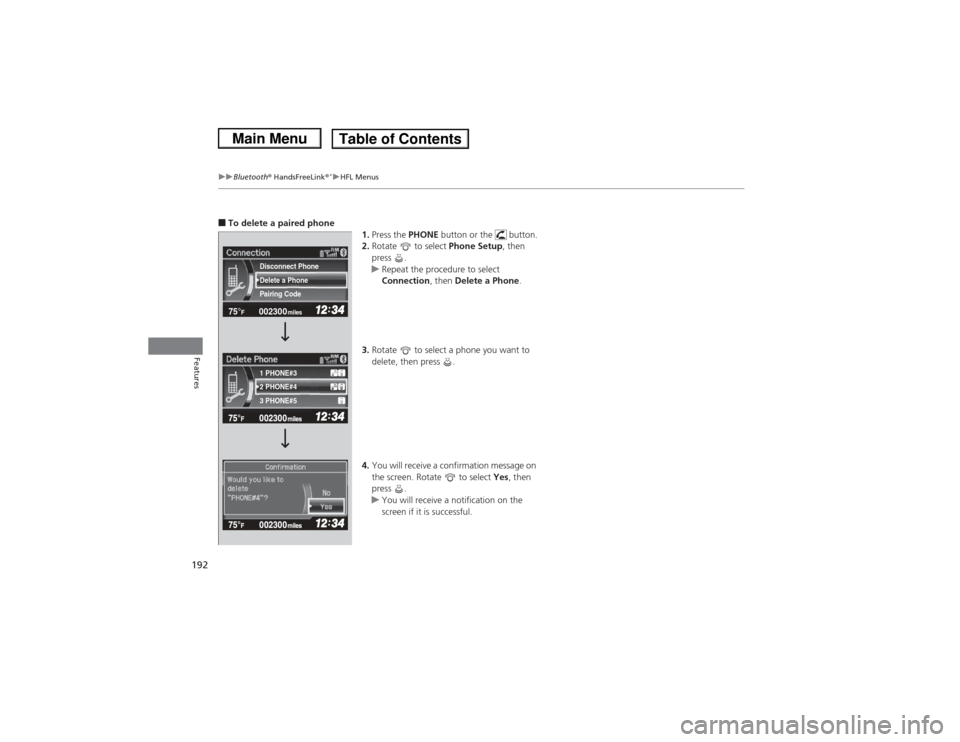
■To delete a paired phone
1.Press the PHONE button or the button.
2. Rotate to select Phone Setup, then
press .
u Repeat the procedure to select
Connection, then Delete a Phone .
3. Rotate to select a phone you want to
delete, then press .
4. You will receive a confirmation message on
the screen. Rotate to select Yes, then
press .
u You will receive a notification on the
screen if it is successful.
002300
75°
F miles
2 PHONE#4 1 PHONE#3
3 PHONE#5 Pairing Code Delete a Phone
Disconnect Phone