clutch HONDA CIVIC 2014 9.G User Guide
[x] Cancel search | Manufacturer: HONDA, Model Year: 2014, Model line: CIVIC, Model: HONDA CIVIC 2014 9.GPages: 469, PDF Size: 17.32 MB
Page 325 of 469
324
uuWhen Driving uShifting
Driving
The manual transmission has a lockout mechanism that stops you from accidentally
shifting into
(R
from a forward gear while the vehicle is moving above a certain
speed.
If you cannot shift to
(R
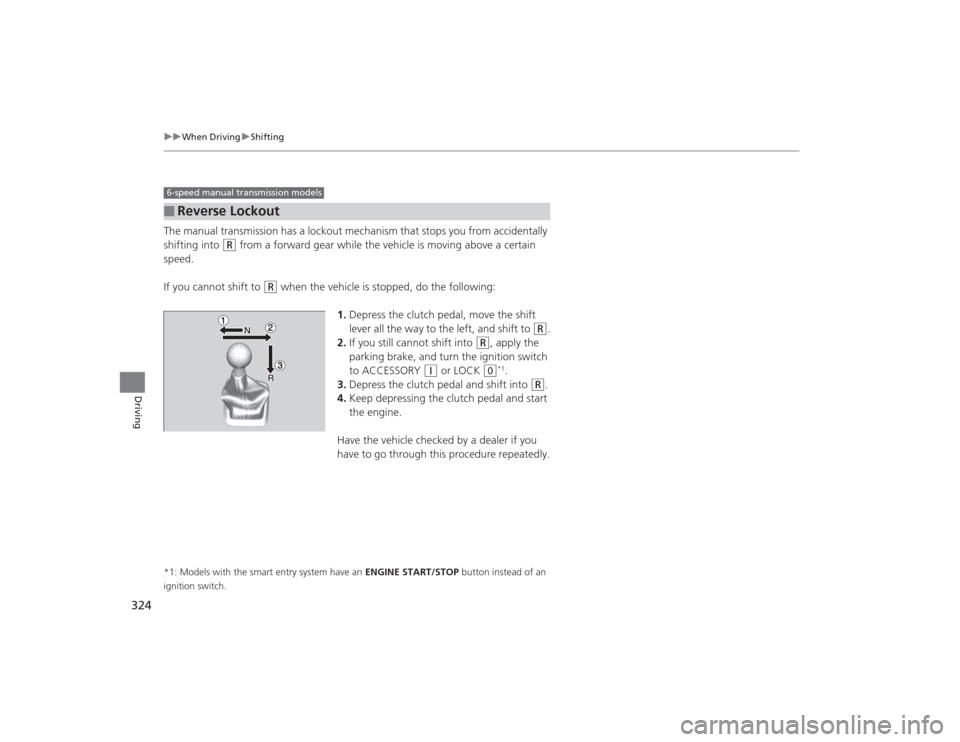
when the vehicle is stopped, do the following:
1.Depress the clutch pedal, move the shift
lever all the way to the left, and shift to
(R
.
2. If you still cannot shift into
(R
, apply the
parking brake, and turn the ignition switch
to ACCESSORY
(q
or LOCK
(0
*1.
3. Depress the clutch pedal and shift into
(R
.
4. Keep depressing the clutch pedal and start
the engine.
Have the vehicle checked by a dealer if you
have to go through this procedure repeatedly.
*1: Models with the smart entry system have an ENGINE START/STOP button instead of an
ignition switch.■
Reverse Lockout6-speed manual transmission models
Page 329 of 469
uuWhen Driving uCruise Control
*
328Driving
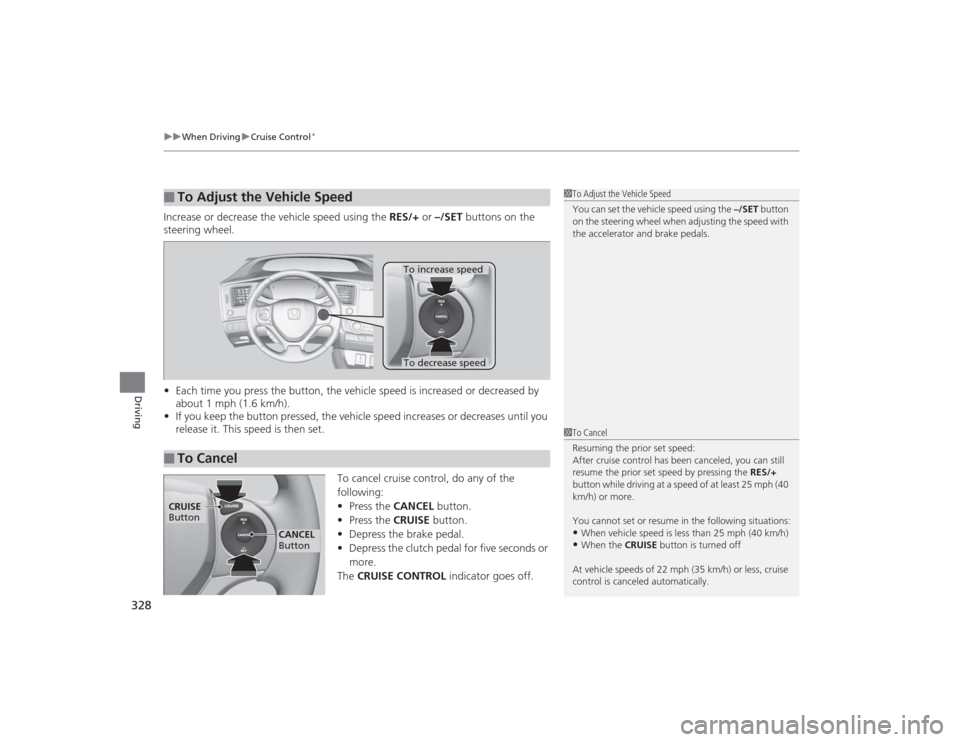
Increase or decrease the vehicle speed using the RES/+ or –/SET buttons on the
steering wheel.
• Each time you press the button, the vehicle speed is increased or decreased by
about 1 mph (1.6 km/h).
• If you keep the button pressed, the vehicle speed increases or decreases until you
release it. This speed is then set.
To cancel cruise control, do any of the
following:
•Press the CANCEL button.
• Press the CRUISE button.
• Depress the brake pedal.
• Depress the clutch pedal for five seconds or
more.
The CRUISE CONTROL indicator goes off.■
To Adjust the Vehicle Speed
1To Adjust the Vehicle Speed
You can set the vehicle speed using the –/SET button
on the steering wheel when adjusting the speed with
the accelerator and brake pedals.
■
To Cancel
To decrease speedTo increase speed
1 To Cancel
Resuming the prior set speed:
After cruise control has been canceled, you can still
resume the prior set speed by pressing the RES/+
button while driving at a speed of at least 25 mph (40
km/h) or more.
You cannot set or resume in the following situations:•When vehicle speed is less than 25 mph (40 km/h)•When the CRUISE button is turned off
At vehicle speeds of 22 mph (35 km/h) or less, cruise
control is canceled automatically.
CRUISE
Button
CANCEL
Button
Page 350 of 469
349
Maintenance
This chapter discusses basic maintenance.
Before Performing MaintenanceInspection and Maintenance ............ 350Safety When Performing Maintenance..... 351Parts and Fluids Used in Maintenance Service ........................................... 352
Maintenance Minder
TM..................... 353
Maintenance Under the Hood
Maintenance Items Under the Hood ..... 361Opening the Hood ........................... 363
Recommended Engine Oil ................ 364
Oil Check ......................................... 365
Adding Engine Oil ............................ 367Changing the Engine Oil and Oil Filter ..... 368
Engine Coolant ................................ 371
Transmission Fluid ............................ 373
Brake/Clutch Fluid ............................ 374
Refilling Window Washer Fluid......... 375
Replacing Light Bulbs ....................... 376Checking and Maintaining Wiper
Blades .......................................... 389Checking and Maintaining Tires
Checking Tires ................................. 391Tire and Loading Information Label ...... 392Tire Labeling .................................... 392DOT Tire Quality Grading (U.S. Vehicles)....... 394Wear Indicators................................ 396 Tire Service Life ................................ 396
Tire and Wheel Replacement ........... 397
Tire Rotation .................................... 398
Winter Tires ..................................... 399
Battery ............................................... 400
Remote Transmitter Care
*
Replacing the Button Battery ........... 401
Heating and Cooling System
*/Climate
Control System
* Maintenance ....... 403
Cleaning
Interior Care .................................... 404
Exterior Care.................................... 406
* Not available on all models
Page 351 of 469
350Maintenance
Before Performing MaintenanceInspection and MaintenanceFor your safety, perform all listed inspections and maintenance to keep your vehicle
in good condition. If you become aware of any abnormality (noise, smell, insufficient
brake fluid, oil residue on the ground, etc.), have your vehicle inspected by a dealer.
(Note, however, that service at a dealer is not mandatory to keep your \
warranties in
effect.) Refer to the separate maintenance booklet for detailed maintenance and
inspection information.■Daily inspections
Perform inspections before long distance trips, when washing the vehicle, or when
refueling.■Periodic inspections
• Check the continuously variable transmission fluid level monthly.2 Continuously Variable Transmission (CVT) Fluid P. 373
•Check the brake fluid level monthly.
2 Brake/Clutch Fluid P. 374
•Check the tire pressure monthly. Examine the tread for wear and foreign objects.
2 Checking and Maintaining Tires P. 391
•Check the operation of the exterior lights monthly.
2 Replacing Light Bulbs P. 376
•Check the condition of the wiper blades at least every six months.
2Checking and Maintaining Wiper Blades P. 389
■
Types of Inspection and Maintenance
1Inspection and Maintenance
Maintenance, replacement, or repair of
emissions control devices and systems may be
done by any automotive repair establishment or
individuals using parts that are “certified” to
EPA standards.
According to state and federal regulations, failure to
perform maintenance on the maintenance main
items marked with # will not void your emissions
warranties. However, all maintenance services should
be performed in accordance with the intervals
indicated by the information display
*/i-MID
*.
2 Maintenance Service Items P. 355, 359
If you want to perform complex maintenance tasks
that require mor e skills and tools, you can purchase a
subscription to the Service Express website at
www.techinfo.honda.com .
2 Authorized Manuals P. 455
If you want to perform maintenance yourself, make
sure that you have the necessary tools and skills first.
After performing maintenance, update the records in
the separate maintenance booklet.
U.S. models
* Not available on all models
Page 362 of 469
361
Continued
Maintenance
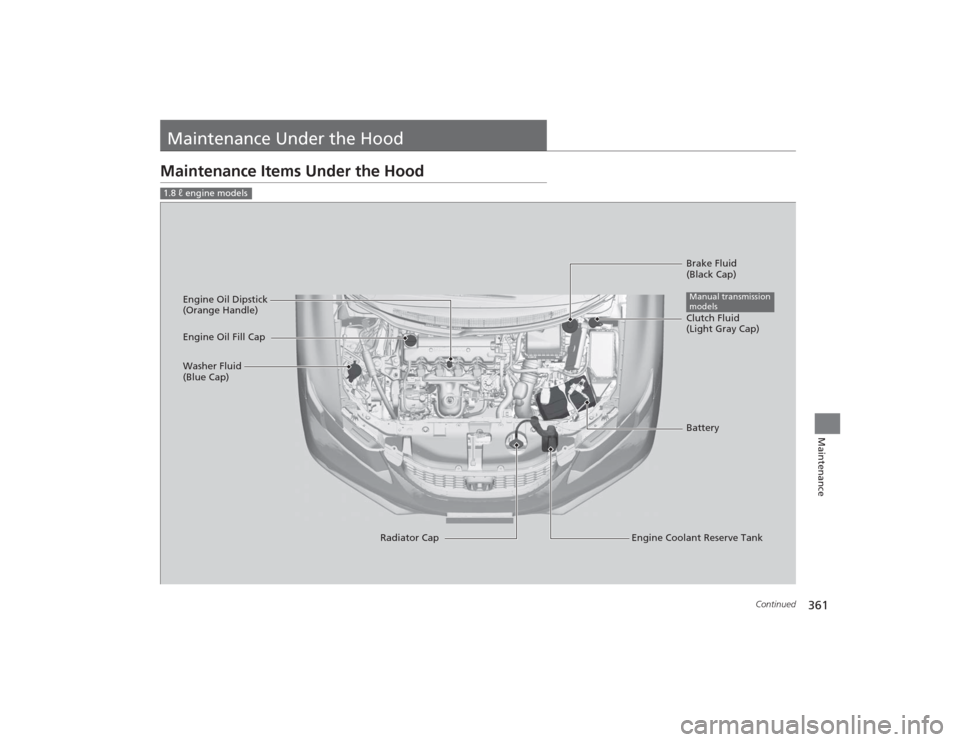
Maintenance Under the HoodMaintenance Items Under the Hood1.8 ℓ engine models
Brake Fluid
(Black Cap)
Engine Coolant Reserve Tank
Radiator Cap
Washer Fluid
(Blue Cap)
Engine Oil Dipstick
(Orange Handle)
Clutch Fluid
(Light Gray Cap)
Engine Oil Fill Cap
BatteryManual transmission
models
Page 363 of 469
362
uuMaintenance Under the Hood uMaintenance Items Under the Hood
Maintenance
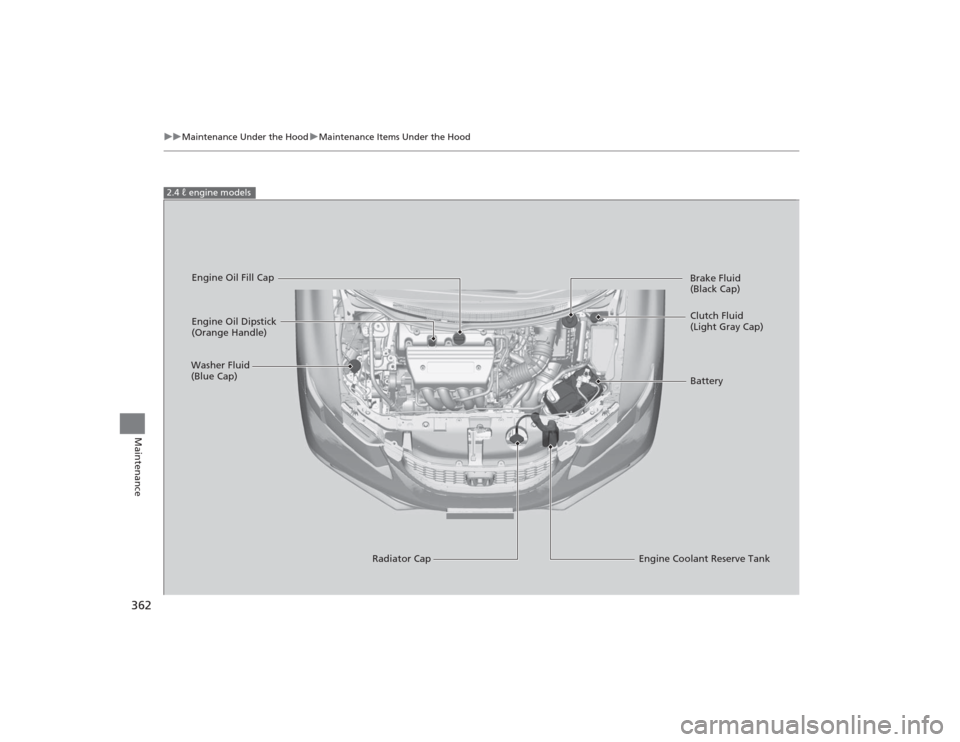
2.4 ℓ engine models
Engine Oil Dipstick
(Orange Handle)
Washer Fluid
(Blue Cap)
Engine Coolant Reserve Tank
Radiator Cap Brake Fluid
(Black Cap)
Engine Oil Fill Cap
Clutch Fluid
(Light Gray Cap)
Battery
Page 375 of 469
374
uuMaintenance Under the Hood uBrake/Clutch Fluid
Maintenance
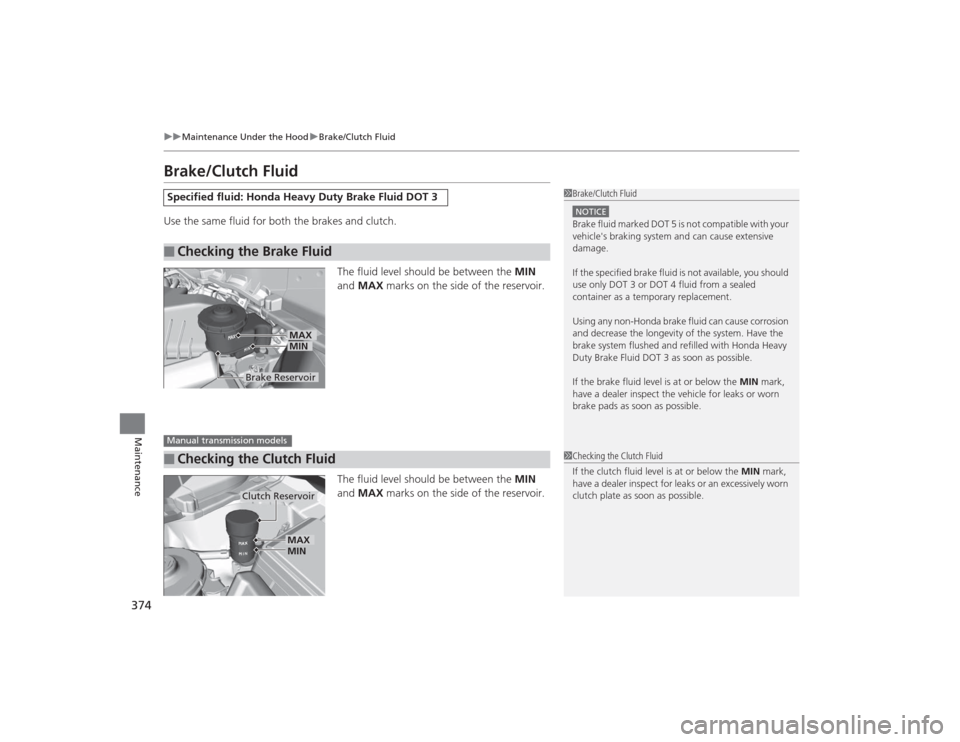
Brake/Clutch FluidUse the same fluid for both the brakes and clutch.
The fluid level should be between the MIN
and MAX marks on the side of the reservoir.
The fluid level should be between the MIN
and MAX marks on the side of the reservoir.Specified fluid: Honda Heavy Duty Brake Fluid DOT 3■
Checking the Brake Fluid
1Brake/Clutch FluidNOTICEBrake fluid marked DOT 5 is not compatible with your
vehicle's braking system and can cause extensive
damage.
If the specified brake fluid is not available, you should
use only DOT 3 or DOT 4 fluid from a sealed
container as a temporary replacement.
Using any non-Honda brake fluid can cause corrosion
and decrease the longevity of the system. Have the
brake system flushed and refilled with Honda Heavy
Duty Brake Fluid DOT 3 as soon as possible.
If the brake fluid level is at or below the MIN mark,
have a dealer inspect the vehicle for leaks or worn
brake pads as soon as possible.
Brake Reservoir
MINMAX
■
Checking the Clutch FluidManual transmission models
1 Checking the Clutch Fluid
If the clutch fluid level is at or below the MIN mark,
have a dealer inspect for leaks or an excessively worn
clutch plate as soon as possible.
Clutch Reservoir
MIN
MAX
Page 428 of 469
427
uuEngine Does Not Start uIf the Smart Entry Remote Battery is Weak
Handling the Unexpected
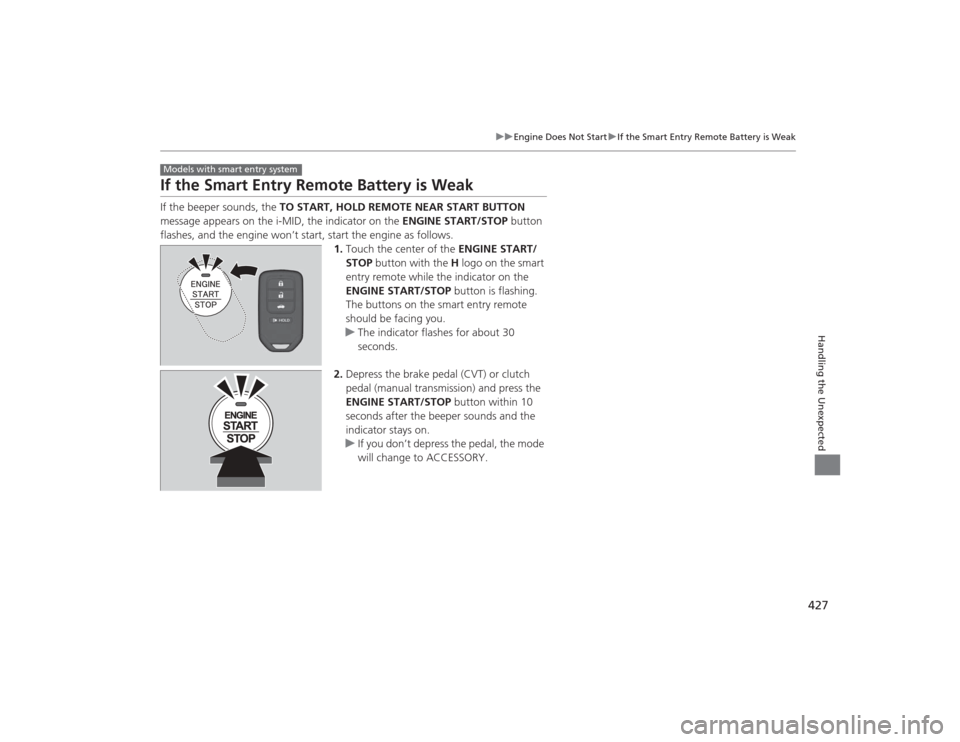
If the Smart Entry Remote Battery is WeakIf the beeper sounds, the TO START, HOLD REMOTE NEAR START BUTTON
message appears on the i-MID, the indicator on the ENGINE START/STOP button
flashes, and the engine won’t start, start the engine as follows. 1.Touch the center of the ENGINE START/
STOP button with the H logo on the smart
entry remote while the indicator on the
ENGINE START/STOP button is flashing.
The buttons on the smart entry remote
should be facing you.
u The indicator flashes for about 30
seconds.
2. Depress the brake pedal (CVT) or clutch
pedal (manual transmission) and press the
ENGINE START/STOP button within 10
seconds after the beeper sounds and the
indicator stays on.
u If you don’t depress the pedal, the mode
will change to ACCESSORY.Models with smart entry system
Page 440 of 469
439
Continued
Handling the Unexpected
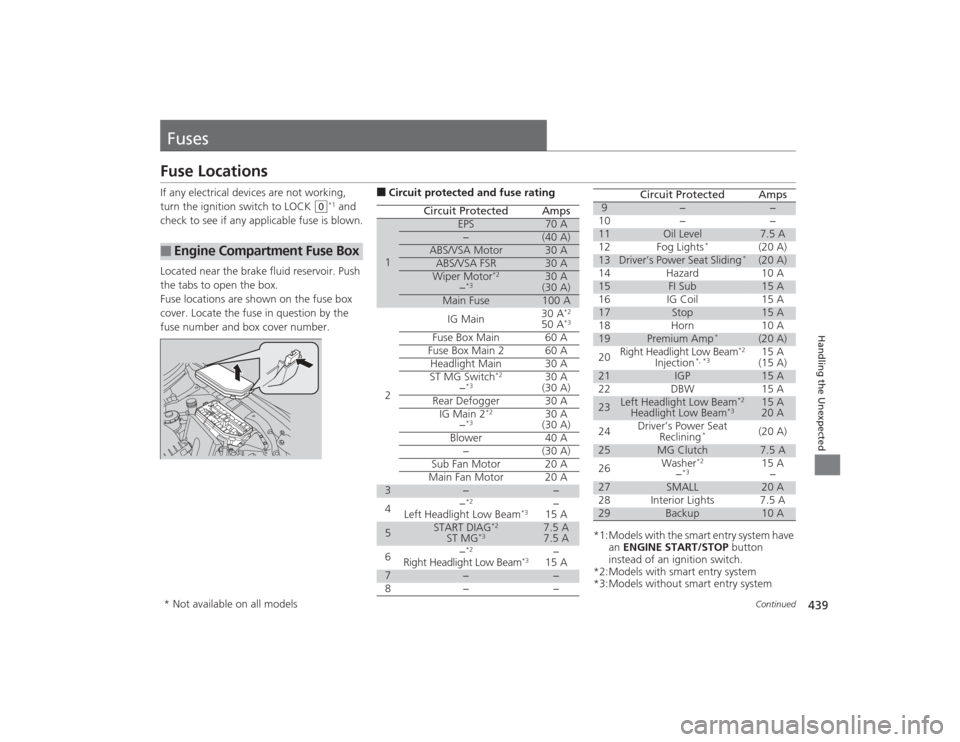
FusesFuse LocationsIf any electrical devices are not working,
turn the ignition switch to LOCK
(0
*1 and
check to see if any applicable fuse is blown.
Located near the brake fluid reservoir. Push
the tabs to open the box.
Fuse locations are shown on the fuse box
cover. Locate the fuse in question by the
fuse number and box cover number.
■
Engine Compartment Fuse Box
■Circuit protected and fuse rating
Circuit Protected
Amps
1
EPS
70 A
−
(40 A)
ABS/VSA Motor
30 A
ABS/VSA FSR
30 A
Wiper Motor
*2
−*3
30 A
(30 A)
Main Fuse
100 A
2
IG Main
30 A
*2
50 A
*3
Fuse Box Main 60 AFuse Box Main 2
60 A
Headlight Main 30 A
ST MG Switch
*2
−*3
30 A
(30 A)
Rear Defogger 30 A IG Main 2
*2
−*3
30 A
(30 A)
Blower 40 A −(30 A)
Sub Fan Motor 20 A
Main Fan Motor 20 A
3
−
−
4 −
*2
Left Headlight Low Beam
*3
−
15 A
5
START DIAG
*2
ST MG
*3
7.5 A
7.5 A
6 −
*2
Right Headlight Low Beam
*3
−
15 A
7
−
−
8− −
*1:Models with the smart entry system have an ENGINE START/STOP button
instead of an ignition switch.
*2:Models with smart entry system
*3:Models without smart entry system9
−
−
10 − −
11
Oil Level
7.5 A
12 Fog Lights
*
(20 A)
13
Driver’s Power Seat Sliding
*
(20 A)
14 Hazard 10 A
15
FI Sub
15 A
16 IG Coil 15 A
17
Stop
15 A
18 Horn 10 A
19
Premium Amp
*
(20 A)
20 Right Headlight Low Beam
*2
Injection
*, *3
15 A
(15 A)
21
IGP
15 A
22 DBW 15 A
23
Left Headlight Low Beam
*2
Headlight Low Beam
*3
15 A
20 A
24 Driver’s Power Seat
Reclining
*
(20 A)
25
MG Clutch
7.5 A
26 Washer
*2
−*3
15 A
−
27
SMALL
20 A
28 Interior Lights 7.5 A
29
Backup
10 A
Circuit Protected
Amps
* Not available on all models
Page 446 of 469
445
uuSpecifications u
Continued
Information
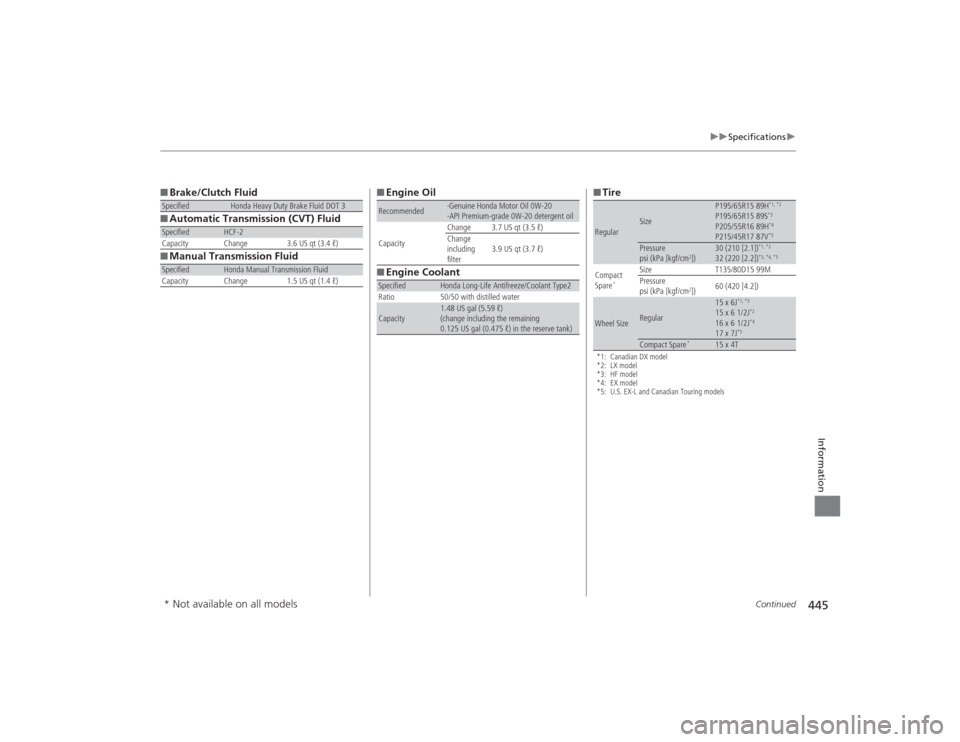
■Brake/Clutch Fluid
■ Automatic Transmission (CVT) Fluid
■ Manual Transmission FluidSpecified
Honda Heavy Duty Brake Fluid DOT 3
Specified
HCF-2
Capacity Change 3.6 US qt (3.4 ℓ)
Specified
Honda Manual Transmission Fluid
Capacity Change 1.5 US qt (1.4 ℓ)
■ Engine Oil
■ Engine CoolantRecommended
·Genuine Honda Motor Oil 0W-20
·API Premium-grade 0W-20 detergent oil
Capacity Change 3.7 US qt (3.5 ℓ)
Change
including
filter
3.9 US qt (3.7 ℓ)
Specified
Honda Long-Life Antifreeze/Coolant Type2
Ratio 50/50 with distilled water
Capacity
1.48 US gal (5.59 ℓ)
(change including the remaining
0.125 US gal (0.475 ℓ) in the reserve tank)
■ Tire*1: Canadian DX model
*2: LX model
*3: HF model
*4: EX model
*5: U.S. EX-L and Canadian Touring modelsRegular
Size
P195/65R15 89H
*1, *2
P195/65R15 89S
*3
P205/55R16 89H
*4
P215/45R17 87V
*5
Pressure
psi (kPa [kgf/cm
2])
30 (210 [2.1])
*1, *2
32 (220 [2.2])
*3, *4, *5
Compact
Spare
*
Size T135/80D15 99M
Pressure
psi (kPa [kgf/cm
2]) 60 (420 [4.2])
Wheel Size
Regular
15 x 6J
*1, *3
15 x 6 1/2J
*2
16 x 6 1/2J
*4
17 x 7J
*5
Compact Spare
*
15 x 4T
* Not available on all models