brake HONDA CIVIC 2015 9.G Quick Guide
[x] Cancel search | Manufacturer: HONDA, Model Year: 2015, Model line: CIVIC, Model: HONDA CIVIC 2015 9.GPages: 79, PDF Size: 18.16 MB
Page 58 of 79
108 || 109
HANDLING THE UNEXPECTED
HANDLING THE UNEXPECTED
*if equipped
Changing a Flat Tire
If a tire goes fl at while driving, grasp the steering wheel fi rmly, and brake gradually
to reduce speed. Then, stop in a safe place. Replace the fl at tire with the compact
spare tire*. Go to a dealer as soon as possible to have the full-size ti\
re repaired or
replaced.
Getting Ready to Change the Tire
Park the vehicle on a fi rm, level, non-slippery surface. Apply the parking brake,
shift to Park (P), and turn the vehicle off. Turn on the hazard warning lights.
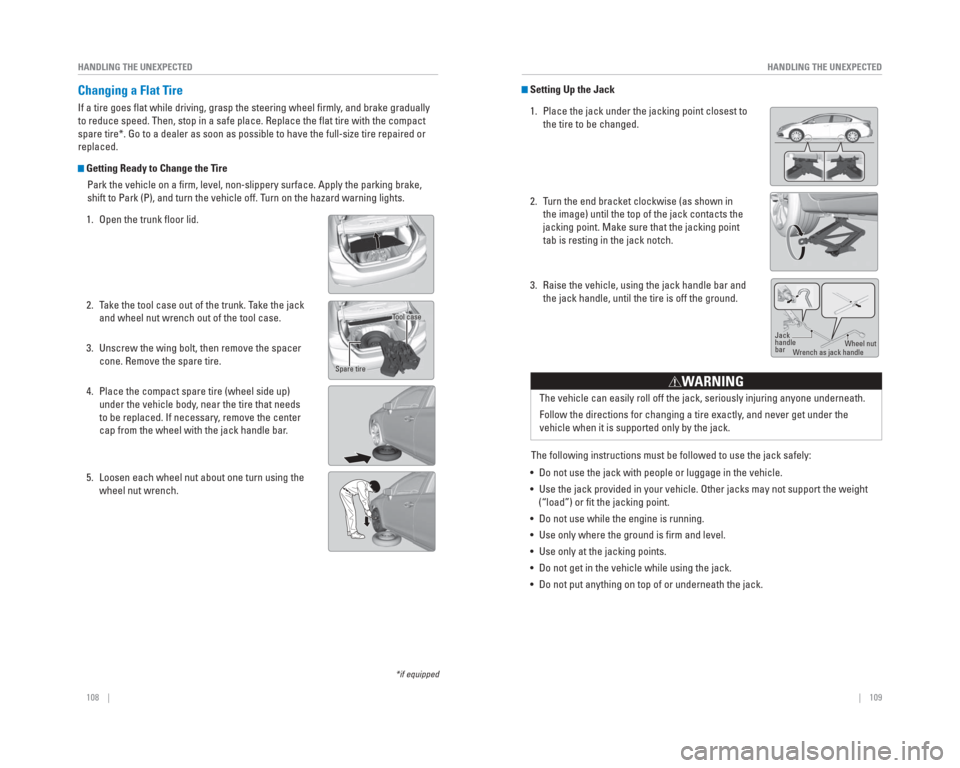
1. Open the trunk fl oor lid.
2. Take the tool case out of the trunk. Take the jack and wheel nut wrench out of the tool case.
3. Unscrew the wing bolt, then remove the spacer cone. Remove the spare tire.
4. Place the compact spare tire (wheel side up) under the vehicle body, near the tire that needs
to be replaced. If necessary, remove the center
cap from the wheel with the jack handle bar.
5. Loosen each wheel nut about one turn using the wheel nut wrench.
Tool case
Spare tire
Setting Up the Jack
1. Place the jack under the jacking point closest to the tire to be changed.
2. Turn the end bracket clockwise (as shown in the image) until the top of the jack contacts the
jacking point. Make sure that the jacking point
tab is resting in the jack notch.
3. Raise the vehicle, using the jack handle bar and the jack handle, until the tire is off the ground.
The following instructions must be followed to use the jack safely:
• Do not use the jack with people or luggage in the vehicle.
• Use the jack provided in your vehicle. Other jacks may not support the w\
eight (“load”) or fi t the jacking point.
• Do not use while the engine is running.
• Use only where the ground is fi rm and level.
• Use only at the jacking points.
• Do not get in the vehicle while using the jack.
• Do not put anything on top of or underneath the jack.
Jack
handle
bar Wheel nut
W rench as jack handle
The vehicle can easily roll off the jack, seriously injuring anyone unde\
rneath.
Follow the directions for changing a tire exactly , and never get under the
vehicle when it is supported only by the jack.
W ARNING
Page 59 of 79
110 || 111
HANDLING THE UNEXPECTED
HANDLING THE UNEXPECTED
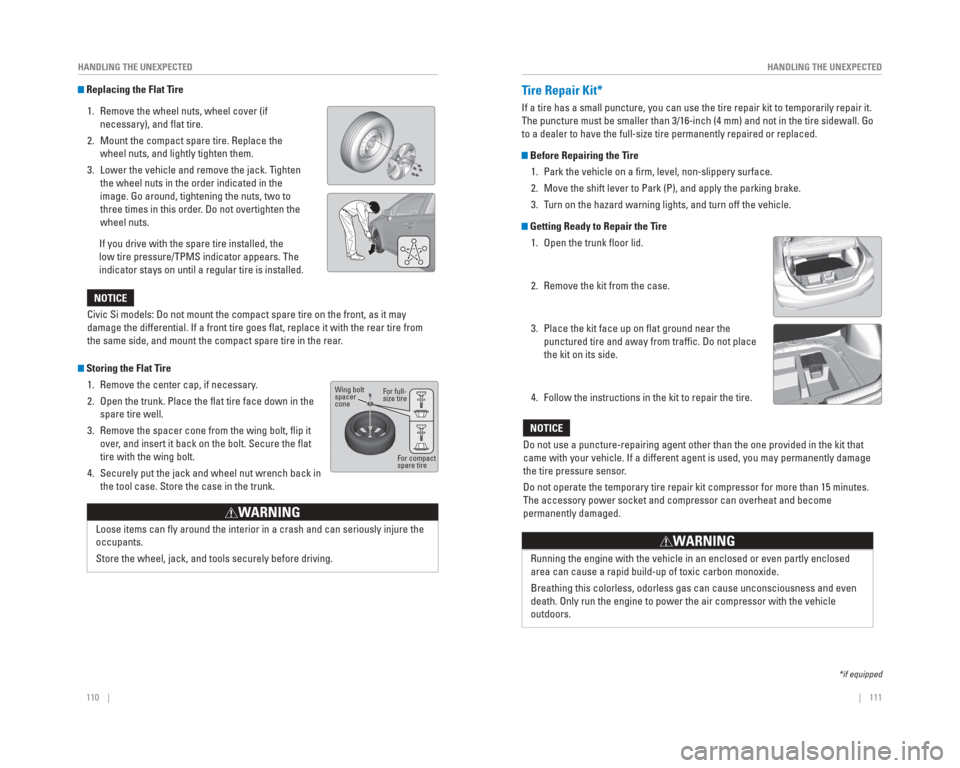
Replacing the Flat Tire
1. Remove the wheel nuts, wheel cover (if necessary), and fl at tire.
2. Mount the compact spare tire. Replace the wheel nuts, and lightly tighten them.
3. Lower the vehicle and remove the jack. Tighten the wheel nuts in the order indicated in the
image. Go around, tightening the nuts, two to
three times in this order. Do not overtighten the
wheel nuts.
If you drive with the spare tire installed, the
low tire pressure/TPMS indicator appears. The
indicator stays on until a regular tire is installed.
Storing the Flat Tire 1. Remove the center cap, if necessary.
2. Open the trunk. Place the fl at tire face down in the spare tire well.
3. Remove the spacer cone from the wing bolt, fl ip it over, and insert it back on the bolt. Secure the fl at
tire with the wing bolt.
4. Securely put the jack and wheel nut wrench back in the tool case. Store the case in the trunk.
Loose items can fl y around the interior in a crash and can seriously injure the
occupants.
Store the wheel, jack, and tools securely before driving.
W ARNING
Civic Si models: Do not mount the compact spare tire on the front, as it\
may
damage the differential. If a front tire goes fl at, replace it with the rear tire from
the same side, and mount the compact spare tire in the rear .
NOTICE
For full-
size tire
For compact
spare tire
Wing bolt
spacer
cone
Tire Repair Kit*
If a tire has a small puncture, you can use the tire repair kit to tempo\
rarily repair it.
The puncture must be smaller than 3/16-inch (4 mm) and not in the tire\
sidewall. Go
to a dealer to have the full-size tire permanently repaired or replaced.\
Before Repairing the Tire
1. Park the vehicle on a fi rm, level, non-slippery surface.
2. Move the shift lever to Park (P), and apply the parking brake.
3. Turn on the hazard warning lights, and turn off the vehicle.
Getting Ready to Repair the Tire1. Open the trunk fl oor lid.
2. Remove the kit from the case.
3. Place the kit face up on fl at ground near the punctured tire and away from traffi c. Do not place
the kit on its side.
4. Follow the instructions in the kit to repair the tire.
*if equipped
Do not use a puncture-repairing agent other than the one provided in the\
kit that
came with your vehicle. If a different agent is used, you may permanentl\
y damage
the tire pressure sensor .
Do not operate the temporary tire repair kit compressor for more than 15\
minutes.
The accessory power socket and compressor can overheat and become
permanently damaged.
NOTICE
Running the engine with the vehicle in an enclosed or even partly enclos\
ed
area can cause a rapid build-up of toxic carbon monoxide.
Breathing this colorless, odorless gas can cause unconsciousness and eve\
n
death. Only run the engine to power the air compressor with the vehicle \
outdoors.
W ARNING
Page 60 of 79

112 || 113
HANDLING THE UNEXPECTED
HANDLING THE UNEXPECTED
Fuse Locations
If any electrical devices are not working, turn the vehicle off and chec\
k to see if any
applicable fuse is blown. Fuse locations are shown on the fuse box cover\
. Locate the
fuse in question by the fuse number and box cover number.
Engine Compartment Fuse Box
Located under the hood near the brake fl uid reservoir. Push the tabs to open the
box.
*if equipped
*1: Models with smart entry system
*2: Models without smart entry system
9−−
−−
10
11Oil Level7.5 A
12 (20 A)
13Driver’s Power Seat Sliding*(20 A)
14
15FI Sub15A
15A
16
17Stop15A
18
19Premium Amp*(20A)
20 Right Headlight Low Beam*1Injection*, *215 A
(15A)
21IGP15A
15A
22
23Left Headlight Low Beam*1Headlight Low Beam*215A
20 A
24 Driver’s Power Seat
Reclining
*(20 A)
25MG Clutch7.5A
26 Washer*1−*215 A
−
27SMALL20A
28
29Backup10A
Circuit ProtectedAmps
Fog Lights*
10A
Hazard
IG Coil 10A
Horn
DBW
7.5 A
Interior Lights
Circuit ProtectedAmps
1
EPS70 A−(40 A)ABS/VSA Motor30 AABS/VSA FSR30 AWiper Motor*1−*230 A
(30 A)
Main Fuse100 A
2
IG Main30 A*250 A*3
Fuse Box MainFuse Box Main 260 A
Headlight Main
ST MG Switch*1−*230 A
30 A
(30 A)
Rear Defogger IG Main 2
*1−*230 A
40 A
(30 A)
Blower
−
Sub Fan Motor
Main Fan Motor
3−−
4 −*1Left Headlight Low Beam*2−
15 A
5START DIAG*1ST MG*27.5 A
7.5 A
6 −
*1Right Headlight Low Beam*2−
15 A
7−−
8
60 A
30 A30 A
(30 A) 20 A
20 A
−
−
Interior Fuse Box
Located under the dashboard on the driver’s side.
23HAC*(7.5 A)24ABS/VSA7.5A25ACC*(7.5 A)26−−
27Accessory Power Socket (Front)20A
28Washer(15A)29ODS7.5A
30Driver’s Door Lock Motor (Lock)*(10A)
31SMART*(10A)32Door Lock Motor 2 (Lock)15A
Circuit ProtectedAmps
33Door Lock Motor 1 (Lock)15 A34Small Lights7.5 A35Illumination7.5 A36−−37−−38Left Headlight High Beam10 A39Right Headlight High Beam10 A40TPMS*(7.5 A)41Door Lock20 A42Driver’s Power Window20 A
43Rear Passenger’s Side Power Window(20 A)
44Front Passenger’s Side Power Window20 A
45Rear Driver’s Side Power
Window(20 A)
46Wiper(30A)−STS*(7.5A)
Circuit ProtectedAmps1HAC Option*(20 A)2ACG10A3SRS10A4Fuel Pump15A5Meter7.5A6Power Window7.5A7VB SOL*(15A)8Door Lock Motor 2 (Unlock)15A9Door Lock Motor 1 (Unlock)15A
10−−11Moonroof*(20A)
12Accessory Power Socket (Center Console)*(20A)
13−−
14Seat Heaters*(15A)
15Driver’s Door Lock Motor (Unlock)*(10 A)
16−−17−−18−−19ACC7.5A20ACC Key Lock7.5A21Daytime Running Lights7.5 A22HAC7.5A
Fuse label
*if equipped
Page 61 of 79
114 || 115
MAINTENANCE
HANDLING THE UNEXPECTED
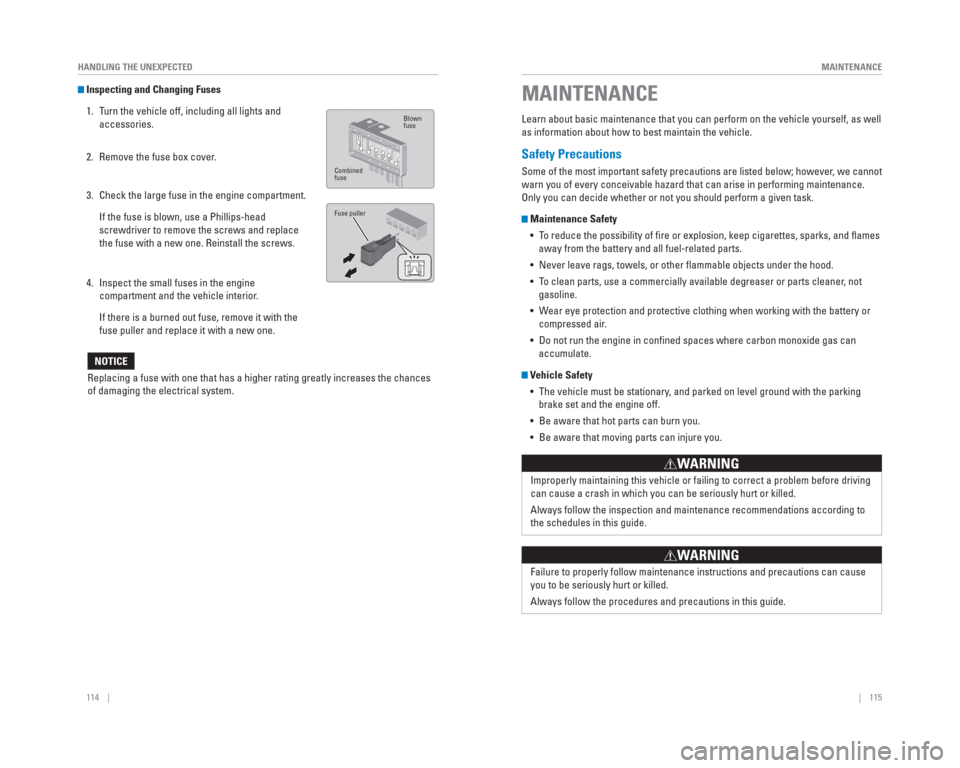
Inspecting and Changing Fuses
1. Turn the vehicle off, including all lights and accessories.
2. Remove the fuse box cover.
3. Check the large fuse in the engine compartment.
If the fuse is blown, use a Phillips-head screwdriver to remove the screws and replace
the fuse with a new one. Reinstall the screws.
4. Inspect the small fuses in the engine compartment and the vehicle interior.
If there is a burned out fuse, remove it with the fuse puller and replace it with a new one.
Replacing a fuse with one that has a higher rating greatly increases the\
chances
of damaging the electrical system.
NOTICE
Blown
fuse
Combined
fuse
Fuse puller
Learn about basic maintenance that you can perform on the vehicle yourse\
lf, as well
as information about how to best maintain the vehicle.
Safety Precautions
Some of the most important safety precautions are listed below; however, we cannot
warn you of every conceivable hazard that can arise in performing mainte\
nance.
Only you can decide whether or not you should perform a given task.
Maintenance Safety • To reduce the possibility of fi re or explosion, keep cigarettes, sparks, and fl ames away from the battery and all fuel-related parts.
• Never leave rags, towels, or other fl ammable objects under the hood.
• To clean parts, use a commercially available degreaser or parts cleaner, not gasoline.
• Wear eye protection and protective clothing when working with the battery\
or compressed air.
• Do not run the engine in confi ned spaces where carbon monoxide gas can accumulate.
Vehicle Safety
• The vehicle must be stationary, and parked on level ground with the parking brake set and the engine off.
• Be aware that hot parts can burn you.
• Be aware that moving parts can injure you.
Improperly maintaining this vehicle or failing to correct a problem befo\
re driving
can cause a crash in which you can be seriously hurt or killed.
Always follow the inspection and maintenance recommendations according t\
o
the schedules in this guide.
WARNING
Failure to properly follow maintenance instructions and precautions can \
cause
you to be seriously hurt or killed.
Always follow the procedures and precautions in this guide.
WARNING
MAINTENANCE
Page 62 of 79
116 || 117
MAINTENANCE
MAINTENANCE
Maintenance Minder™
Reminds you when indicated maintenance service is due.
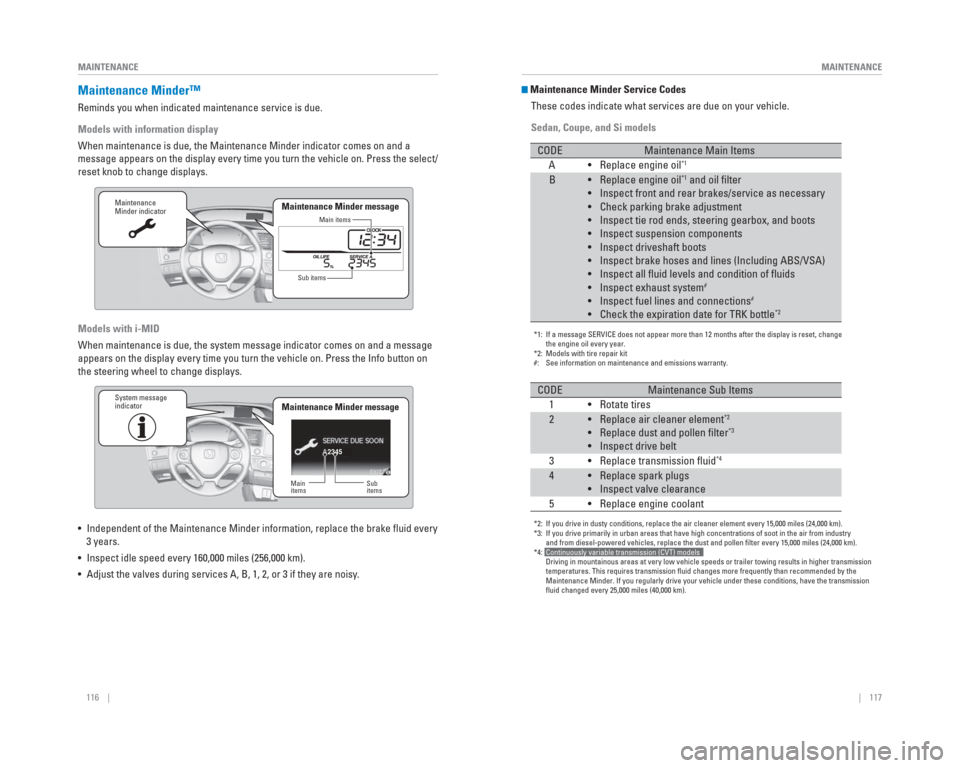
Models with information display
When maintenance is due, the Maintenance Minder indicator comes on and a\
message appears on the display every time you turn the vehicle on. Press\
the select/
reset knob to change displays.
Models with i-MID
When maintenance is due, the system message indicator comes on and a mes\
sage
appears on the display every time you turn the vehicle on. Press the Inf\
o button on
the steering wheel to change displays.
• Independent of the Maintenance Minder information, replace the brake fl\
uid every
3 years.
• Inspect idle speed every 160,000 miles (256,000 km).
• Adjust the valves during services A, B, 1, 2, or 3 if they are noisy.
Maintenance
Minder indicator
Main items
Sub items
Maintenance Minder message
2345
Maintenance
Minder indicator
Main
items Sub
items
Maintenance Minder messageSystem message
indicator
Maintenance Minder Service Codes
These codes indicate what services are due on your vehicle.
Sedan, Coupe, and Si models
*1: If a message SERVICE does not appear more than 12 months after the displ\
ay is reset, change
the engine oil every year.
*2: Models with tire repair kit
#: See information on maintenance and emissions warranty.
CODEMaintenance Main Items
A • Replace engine oil*1
B• Replace engine oil*1 and oil filter
• Inspect front and rear brakes/service as necessary
• Check parking brake adjustment
• Inspect tie rod ends, steering gearbox, and boots
• Inspect suspension components
• Inspect driveshaft boots
• Inspect brake hoses and lines (Including ABS/VSA)
• Inspect all fluid levels and condition of fluids
• Inspect exhaust system
#
• Inspect fuel lines and connections#
• Check the expiration date for TRK bottle*2
*2: If you drive in dusty conditions, replace the air cleaner element every \
15,000 miles (24,000 km).
*3: If you drive primarily in urban areas that have high concentrations of s\
oot in the air from industry
and from diesel-powered vehicles, replace the dust and pollen filter e\
very 15,000 miles (24,000 km).
*4: Continuously variable transmission (CVT) models
Driving in mountainous areas at very low vehicle speeds or trailer towin\
g results in higher transmission
temperatures. This requires transmission fluid changes more frequently\
than recommended by the
Maintenance Minder. If you regularly drive your vehicle under these cond\
itions, have the transmission
fluid changed every 25,000 miles (40,000 km).
CODEMaintenance Sub Items
1 • Rotate tires
2• Replace air cleaner element*2
• Replace dust and pollen filter*3
• Inspect drive belt
3 • Replace transmission fluid*4
4• Replace spark plugs
• Inspect valve clearance
5 • Replace engine coolant
Page 63 of 79
118 || 119
MAINTENANCE
MAINTENANCE
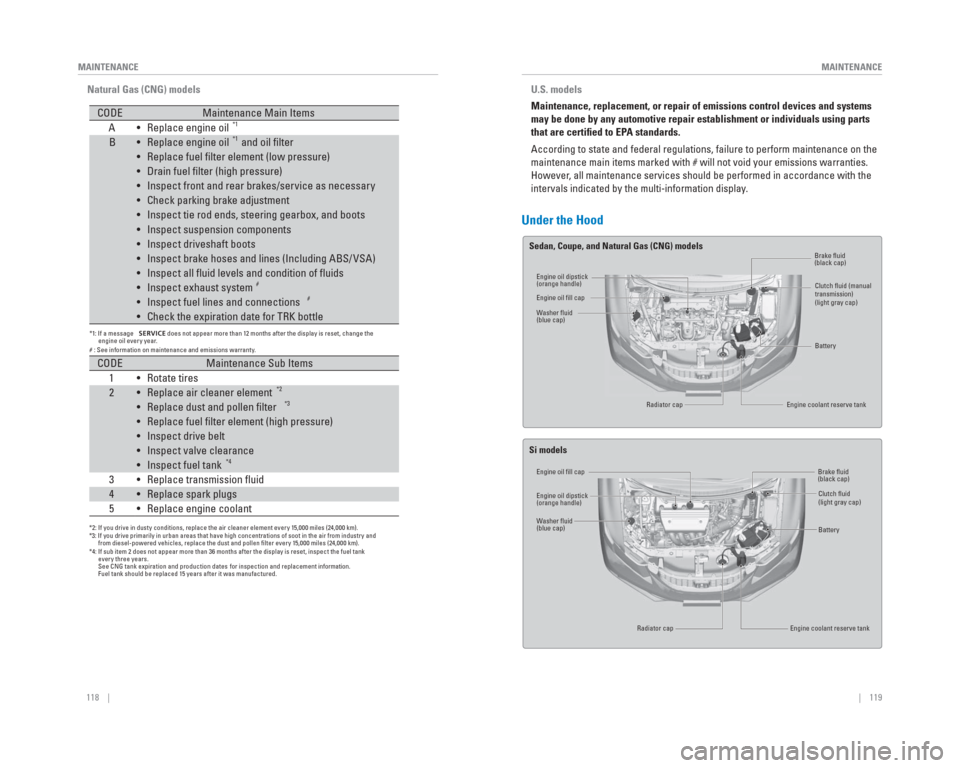
Natural Gas (CNG) models
CODE Maintenance Main Items
A Replace engine oil • *1
B Replace engine oil• *1 and oil filter
Replace fuel filter element (low pressure)
•
Drain fuel filter (high pressure)
•
Inspect front and rear brakes/service as necessary
•
Check parking brake adjustment
•
Inspect tie rod ends, steering gearbox, and boots
•
Inspect suspension components
•
Inspect driveshaft boots
•
Inspect brake hoses and lines (Including ABS/ VSA)
•
Inspect all fluid levels and condition of fluids
•
Inspect exhaust system
•
#
Inspect fuel lines and connections
• #
Check the expiration date for TRK bottle
•
CODE Maintenance Sub Items
1 Rotate tires •
2 Replace air cleaner element •
*2
Replace dust and pollen filter
• *3
Replace fuel filter element (high pressure)
•
Inspect drive belt
•
Inspect valve clearance
•
Inspect fuel tank
•
*4
3 Replace transmission fluid •
4 Replace spark plugs •
5 Replace engine coolant •
*1: If a message SERVICE does not appear more than 12 months after the display is reset, change the
engine oil every year.
# : See information on maintenance and emissions warranty.
*2: If you drive in dusty conditions, replace the air cleaner element every 15,000 miles (24,000 km).
*3: If you drive primarily in urban areas that have high concentrations of soot in the air from industry and
from diesel-powered vehicles, replace the dust and pollen filter every 15,000 miles (24,000 km).
*4: If sub item 2 does not appear more than 36 months after the display is reset, inspect the fuel tank
every three years.
See CNG tank expiration and production dates for inspection and replacement information.
Fuel tank should be replaced 15 years after it was manufactured.
Under the Hood
Engine oil dipstick
(orange handle)
Engine oil dipstick
(orange handle) Brake fl
uid
(black cap)
Brake fl uid
(black cap)
Clutch fl
uid (manual
transmission)
(light gray cap)
Clutch fl uid
(light gray cap)
Battery
Battery
Engine coolant reserve tank
Engine coolant reserve tank
Engine oil fi
ll cap
Engine oil fi ll cap
W
asher fl uid
(blue cap)
W asher fl uid
(blue cap) Radiator cap
Radiator cap
U.S. models
Maintenance, replacement, or repair of emissions control devices and sys\
tems
may be done by any automotive repair establishment or individuals using \
parts
that are certi ed to EP A standards.
According to state and federal regulations, failure to perform maintenan\
ce on the
maintenance main items marked with # will not void your emissions warran\
ties.
However , all maintenance services should be performed in accordance with the
intervals indicated by the multi-information display .
Sedan, Coupe, and Natural Gas (CNG) models
Si models
Page 64 of 79
120 || 121
MAINTENANCE
MAINTENANCE
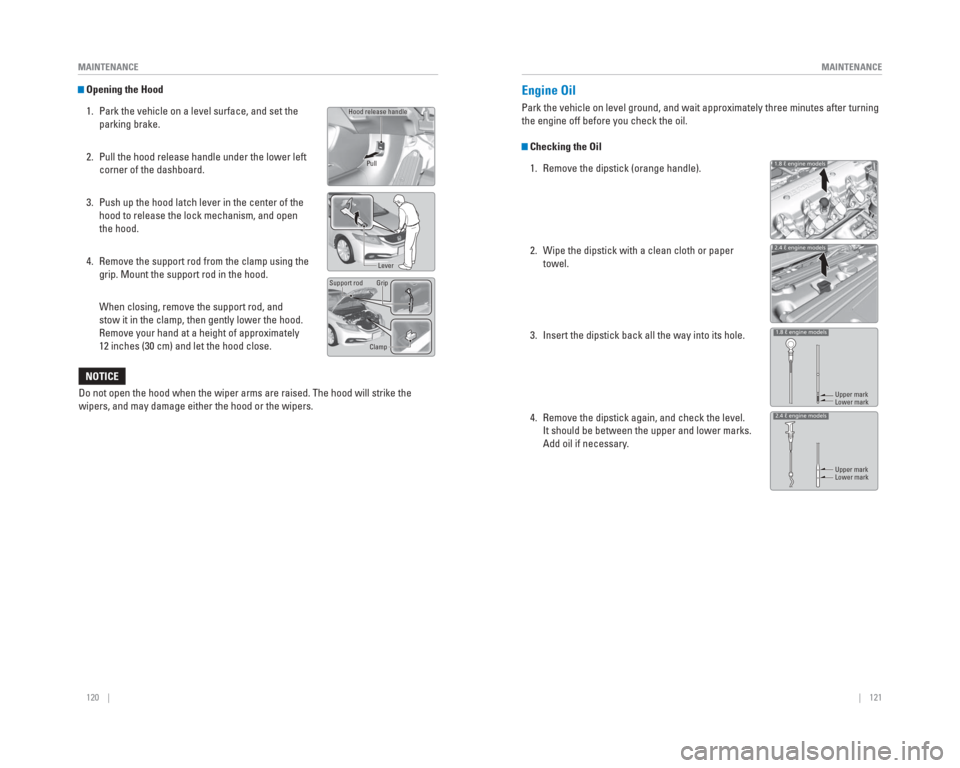
Opening the Hood
1. Park the vehicle on a level surface, and set the parking brake.
2. Pull the hood release handle under the lower left corner of the dashboard.
3. Push up the hood latch lever in the center of the hood to release the lock mechanism, and open
the hood.
4. Remove the support rod from the clamp using the grip. Mount the support rod in the hood.
When closing, remove the support rod, and stow it in the clamp, then gently lower the hood.
Remove your hand at a height of approximately
12 inches (30 cm) and let the hood close.
Hood release handle
Lever
Support rod Grip
Clamp
P
ull
Do not open the hood when the wiper arms are raised. The hood will strik\
e the
wipers, and may damage either the hood or the wipers.
NOTICE
Engine Oil
Park the vehicle on level ground, and wait approximately three minutes a\
fter turning
the engine off before you check the oil.
Checking the Oil
1. Remove the dipstick (orange handle).
2. Wipe the dipstick with a clean cloth or paper towel.
3. Insert the dipstick back all the way into its hole.
4. Remove the dipstick again, and check the level. It should be between the upper and lower marks.
Add oil if necessary.
1.8 ℓ en gine mo dels
1.8 ℓ en gine mo dels
2.4 ℓ en gine mo dels
2.4 ℓ en gine mo dels
Upper mark
Upper mark Lower mark
Lower mark
Page 68 of 79
128 || 129
MAINTENANCE
MAINTENANCE
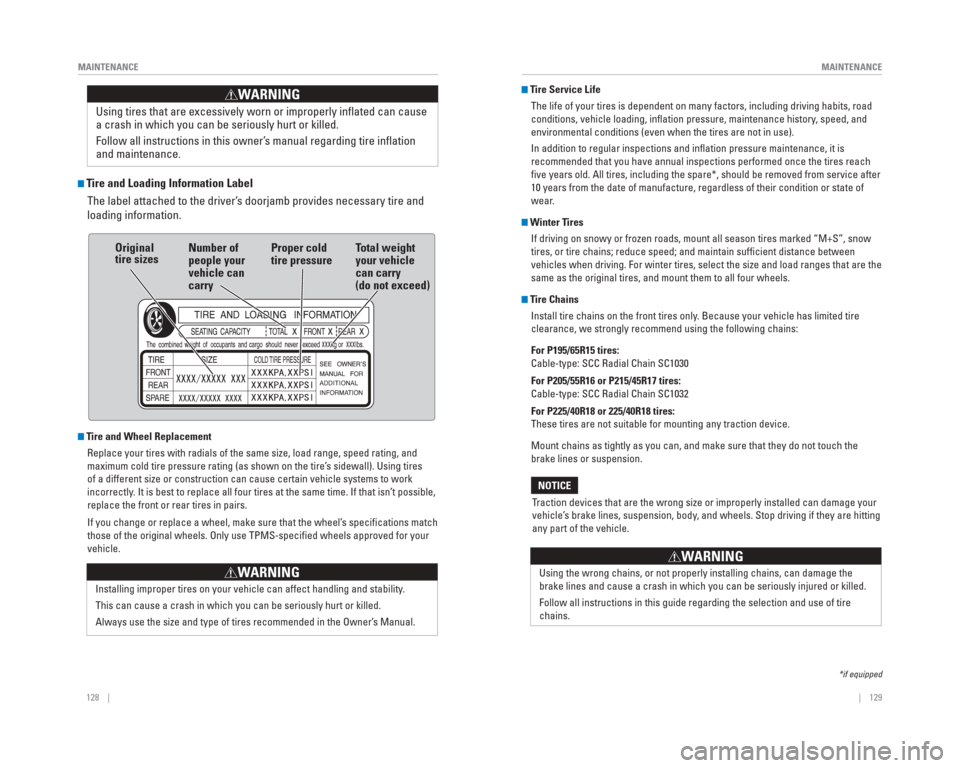
Tire and Loading Information Label
The label attached to the driver’s doorjamb provides necessary tire and
loading information.
Tire and Wheel Replacement
Replace your tires with radials of the same size, load range, speed rati\
ng, and
maximum cold tire pressure rating (as shown on the tire’s sidewall). Using tires
of a different size or construction can cause certain vehicle systems to\
work
incorrectly. It is best to replace all four tires at the same time. If that isn’\
t possible,
replace the front or rear tires in pairs.
If you change or replace a wheel, make sure that the wheel’s specifi cations match
those of the original wheels. Only use TPMS-specifi ed wheels approved for your
vehicle.
Installing improper tires on your vehicle can affect handling and stabil\
ity.
This can cause a crash in which you can be seriously hurt or killed.
Always use the size and type of tires recommended in the Owner’s Manual.
WARNING
Using tires that are excessively worn or improperly infl ated can cause
a crash in which you can be seriously hurt or killed.
Follow all instructions in this owner’s manual regarding tire infl ation
and maintenance
.
WARNING
Original
tire sizes Number of
people your
vehicle can
carry Proper cold
tire pressure
Total weight
your vehicle
can carry
(do not exceed)
Tire Service Life
The life of your tires is dependent on many factors, including driving h\
abits, road
conditions, vehicle loading, infl ation pressure, maintenance history, speed, and
environmental conditions (even when the tires are not in use).
In addition to regular inspections and infl ation pressure maintenance, it is
recommended that you have annual inspections performed once the tires re\
ach
fi ve years old. All tires, including the spare*, should be removed from se\
rvice after
10 years from the date of manufacture, regardless of their condition or \
state of
wear.
Winter TiresIf driving on snowy or frozen roads, mount all season tires marked “M\
+S”, snow
tires, or tire chains; reduce speed; and maintain suffi cient distance between
vehicles when driving. For winter tires, select the size and load ranges\
that are the
same as the original tires, and mount them to all four wheels.
Tire ChainsInstall tire chains on the front tires only. Because your vehicle has limited tire
clearance, we strongly recommend using the following chains:
For P195/65R15 tires:
Cable-type: SCC Radial Chain SC1030
For P205/55R16 or P215/45R17 tires:
Cable-type: SCC Radial Chain SC1032
For P225/40R18 or 225/40R18 tires:
These tires are not suitable for mounting any traction device.
Mount chains as tightly as you can, and make sure that they do not touch\
the
brake lines or suspension.
Traction devices that are the wrong size or improperly installed can dama\
ge your
vehicle’s brake lines, suspension, body, and wheels. Stop driving if they are hitting
any part of the vehicle.
NOTICE
Using the wrong chains, or not properly installing chains, can damage th\
e
brake lines and cause a crash in which you can be seriously injured or k\
illed.
Follow all instructions in this guide regarding the selection and use of\
tire
chains.
WARNING
*if equipped
Page 71 of 79

134 || 135
SPECIFICATIONS
MAINTENANCE
Testing of Readiness Codes
Your vehicle has “readiness codes” as part of the onboard self-diag\
nostic system.
Some states refer to these codes as a test to see if your vehicle’s emissions
components are working properly. The codes may not be read if you go through the
testing just after the battery has gone dead or been disconnected.
To check if they are set, turn the vehicle on without starting the engine\
. The
malfunction indicator lamp will come on for several seconds. If it goes \
off, the
readiness codes are set. If it blinks fi ve times, the readiness codes are not set.
If you are required to have your vehicle tested before the readiness cod\
es are set,
prepare the vehicle for retesting by doing the following:
1. Fill the gas tank to approximately 3/4 full.
2. Park the vehicle and leave the engine off for 6 hours or more.
3. Make sure the ambient temperature is between 40°F and 95°F (4°\
C and 35°C).
4. Start the engine without touching the accelerator pedal, and let it idle\
for 20
seconds.
5. Keep the vehicle in Park (P) or Neutral for manual transmission. Incre\
ase the engine speed to 2,000 rpm, and hold it there for about 3 minutes.
6. Let the engine idle with your foot off the accelerator for 20 seconds.
7. Select a nearby, lightly traveled major highway where you can maintain a speed of 50 to 60 mph (80 to 97 km/h) for at least 20 minutes. Drive on the \
highway
with the vehicle in Drive (D) or 5th gear. Do not use cruise control. When traffi c
allows, drive for 90 seconds without using the accelerator pedal. (Vehicle speed
may vary slightly; this is OK.) If you cannot do this for a continuous \
90 seconds
because of traffi c conditions, drive for at least 30 seconds, then repeat two more
times (for a total of 90 seconds).
8. Drive in city/suburban traffi c for at least 10 minutes. When traffi c conditions allow, let the vehicle coast for several seconds without using the accelerato\
r
pedal or the brake pedal.
9. Park the vehicle and leave the engine off for 30 minutes.
The readiness codes are erased when the battery is disconnected, and set\
again
only after several days of driving under a variety of conditions.
If a testing facility determines that the readiness codes are not set, y\
ou may be
requested to return at a later date to complete the test, or see your de\
aler.
Vehicle
Engine and Fuel
Tires
Light Bulbs
Fluids
*1: LX-MT, HF, and Canadian DX models
*2: LX-CVT models
*3: EX and EX-L models
*4: Canadian Touring models
ModelHonda Civic 4-Door
No. of Passengers:
Front
Rear
Total
Weights:Gross Vehicle
Weight Rating U.S.: 3,693 lbs (1,675 kg)*1Canada: 1,675 kg*1U.S.: 3,748 lbs (1,700 kg)*2Canada: 1,700 kg*2U.S.: 3,792 lbs (1,720 kg)*3Canada: 1,720 kg*3Canada: 1,755 kg*4
Gross Axle Weight
Rating (Front)U.S.: 1,984 lbs (900 kg)*1Canada: 900 kg*1U.S.: 2,017 lbs (915 kg)*2Canada: 915 kg*2U.S.: 2,028 lbs (920 kg)*3Canada: 920 kg*3Canada: 940 kg*4Gross Axle Weight
Rating (Rear)U.S.: 1,742 lbs (790 kg)*1Canada: 790 kg*1U.S.: 1,753 lbs (795 kg)*2Canada: 795 kg*2U.S.: 1,786 lbs (810 kg)*3Canada: 810 kg*3Canada: 825 kg*4
Air Conditioning:
Refrigerant Type HFC-134a (R-134a)
Charge Quantity13.2 – 15.0 oz (375 – 425 g)
Lubricant TypeSP-10
2
3
5
Fuel Engine Specifications
Displacement110 cu-in (1,798 cm3)
Spark Plugs NGK
DENSO
Fuel:
TypeUnleaded gasoline, Pump
octane number of 87 or higher
Fuel Tank Capacity 13.2 US gal (50 ℓ)
DILZKR7B11GS
DXU22HCR-D11S
*1: Canadian DX model
*2: LX model
*3: HF model *4: EX model
*5: U.S. EX-L and Canadian
Touring models
RegularSizeP195/65R15 89H*1, *2P195/65R15 89S*3P205/55R16 89H*4P215/45R17 87V*5Pressure
psi (kPa [kgf/cm2])30 (210 [2.1])*1, *232 (220 [2.2])*3, *4, *5
Compact
Spare*Size
T135/80D15 99M
Pressure
psi (kPa [kgf/cm
2]) 60 (420 [4.2])
Wheel SizeRegular15 x 6J*1, *315 x 6 1/2J*216 x 6 1/2J*417 x 7J*5Compact Spare*15 x 4T
Headlights (Low Beam)51W (HB4)
Headlights (High Beam)
Fog Lights*55W (H11)
Front Turn Signal/Parking/Side
Marker Lights 28/8W (Amber)
Brake/Taillights21/5W
Rear Turn Signal Lights
Rear Side Marker LightsLED
Back-Up Lights
Taillights3CP
High-Mount Brake Light
Rear License Plate Lights5W
Trunk Light
Interior LightsMap Lights*8WCeiling Light8W
60W (HB3)
21W (Amber)
16W
21W
5W
Brake/Clutch Fluid
Automatic Transmission (CVT) Fluid
Manual Transmission FluidSpecifiedHonda Heavy Duty Brake Fluid DOT 3
SpecifiedHCF-2
Capacity
SpecifiedHonda Manual Transmission Fluid
Capacity
Engine Oil
Engine Coolant
Recommended· Honda Genuine Motor Oil 0W-20
· API Premium-grade 0W-20
detergent oil
Capacity Change
Change
including
filter
3.9 US qt (3.7 ℓ)
SpecifiedHonda Long-Life Antifreeze/Coolant
Type2
Ratio
Capacity1.48 US gal (5.59 ℓ)
(change including the remaining 0.125
US gal (0.475 ℓ) in the reserve tank)
Washer Fluid
Tank CapacityU.S.: 2.6 US qt (2.5 ℓ)
Canada: 4.8 US qt (4.5 ℓ)
3.6 US qt (3.4 ℓ)Change
Change 1.5 US qt (1.4 ℓ)
3.7 US qt (3.5 ℓ)
50/50 with distilled water
SPECIFICATIONS
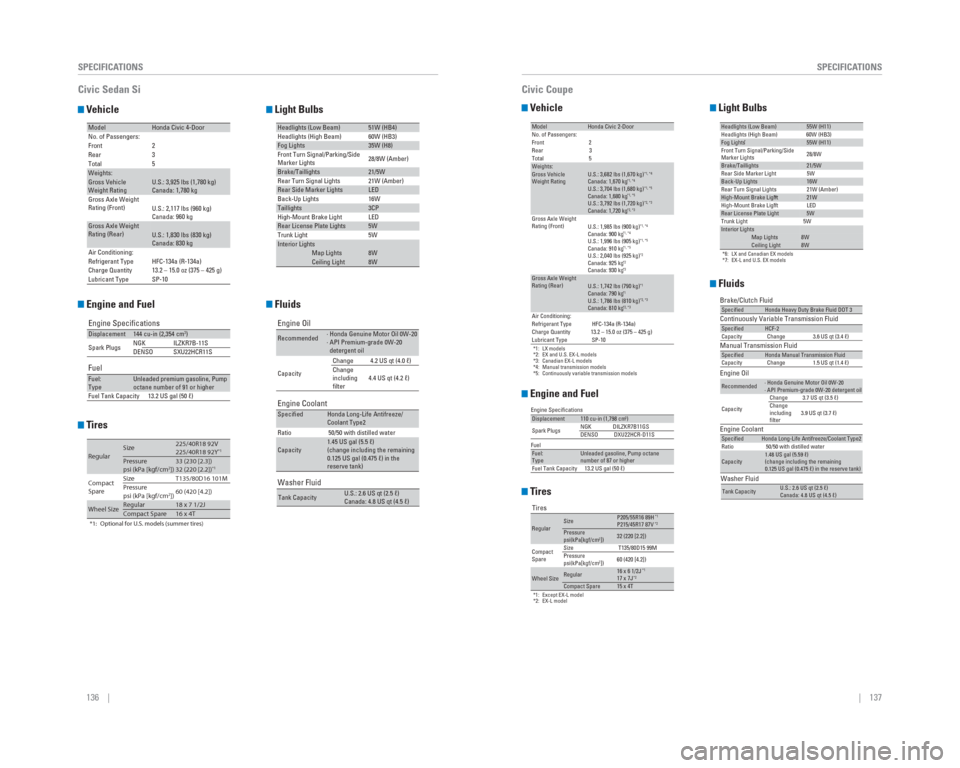
Civic Sedan
Page 72 of 79
136 || 137
SPECIFICATIONS
SPECIFICATIONS
Vehicle
Engine and Fuel
Tires
Light Bulbs
Fluids
ModelHonda Civic 4-Door
No. of Passengers: 2
3
5
Front
Rear
Total
Weights:Gross Vehicle
Weight Rating U.S.: 3,925 lbs (1,780 kg)
Canada: 1,780 kg
Gross Axle Weight
Rating (Front)U.S.: 2,117 lbs (960 kg)
Canada: 960 kg
Gross Axle Weight
Rating (Rear)U.S.: 1,830 lbs (830 kg)
Canada: 830 kg
Air Conditioning:
Refrigerant Type HFC-134a (R-134a)
Charge Quantity 13.2 – 15.0 oz (375 – 425 g)
Lubricant Type SP-10
Engine Specifications
FuelDisplacement144 cu-in (2,354 cm3)
Spark Plugs NGK
DENSOILZKR7B-11S
SXU22HCR11S
Fuel:
TypeUnleaded premium gasoline, Pump
octane number of 91 or higher
Fuel Tank Capacity 13.2 US gal (50 ℓ)
*1: Optional for U.S. models (summer tires)
RegularSize225/40R18 92V
225/40R18 92Y*1Pressure
psi (kPa [kgf/cm2])33 (230 [2.3])
32 (220 [2.2])*1
Compact
Spare Size
T135/80D16 101M
Pressure
psi (kPa [kgf/cm2]) 60 (420 [4.2])
Wheel SizeRegular18 x 7 1/2JCompact Spare16 x 4T
Headlights (Low Beam)51W (HB4)
Headlights (High Beam) 60W (HB3)
Fog Lights35W (H8)
Front Turn Signal/Parking/Side
Marker Lights 28/8W (Amber)
Brake/Taillights21/5W
Rear Turn Signal Lights 21W (Amber)
Rear Side Marker LightsLED
Back-Up Lights 16W
Taillights3CP
High-Mount Brake Light LED
Rear License Plate Lights5W
Trunk Light 5W
Interior LightsMap Lights8WCeiling Light8W
Engine Oil
Engine Coolant
Recommended· Honda Genuine Motor Oil 0W-20
· API Premium-grade 0W-20
detergent oil
Capacity Change 4.2 US qt (4.0 ℓ)
Change
including
filter
4.4 US qt (4.2 ℓ)
SpecifiedHonda Long-Life Antifreeze/
Coolant Type2
Ratio 50/50 with distilled water
Capacity1.45 US gal (5.5 ℓ)
(change including the remaining
0.125 US gal (0.475 ℓ) in the
reserve tank)
Washer Fluid
Tank CapacityU.S.: 2.6 US qt (2.5 ℓ)
Canada: 4.8 US qt (4.5 ℓ)
Civic Sedan Si
Vehicle
Engine and Fuel
Tires
Light Bulbs
Fluids
*1: LX models
*2: EX and U.S. EX-L models
*3: Canadian EX-L models
*4: Manual transmission models
*5: Continuously variable transmission models
ModelHonda Civic 2-Door
No. of Passengers:
Front 2
Rear 3
Total 5
Weights:Gross Vehicle
Weight Rating U.S.: 3,682 lbs (1,670 kg)*1, *4Canada: 1,670 kg*1, *4U.S.: 3,704 lbs (1,680 kg)*1, *5Canada: 1,680 kg*1, *5U.S.: 3,792 lbs (1,720 kg)*2, *3Canada: 1,720 kg*2, *3Gross Axle Weight
Rating (Front)U.S.: 1,985 lbs (900 kg)*1, *4Canada: 900 kg*1, *4U.S.: 1,996 lbs (905 kg)*1, *5Canada: 910 kg*1, *5U.S.: 2,040 lbs (925 kg)*2Canada: 925 kg*2Canada: 930 kg*3Gross Axle Weight
Rating (Rear)U.S.: 1,742 lbs (790 kg)*1Canada: 790 kg*1U.S.: 1,786 lbs (810 kg)*2, *3Canada: 810 kg*2, *3Air Conditioning:
Refrigerant Type HFC-134a (R-134a)
Charge Quantity 13.2 – 15.0 oz (375 – 425 g)
Lubricant Type SP-10
Displacement110 cu-in (1,798 cm3)
Spark Plugs NGK DILZKR7B11GS
DENSO DXU22HCR-D11S
Fuel:
TypeUnleaded gasoline, Pump octane
number of 87 or higher
Fuel Tank Capacity 13.2 US gal (50 ℓ)
Engine Specifications
Fuel
Tires
*1: Except EX-L model
*2: EX-L model
RegularSizeP205/55R16 89H*1P215/45R17 87V*2Pressure
psi(kPa[kgf/cm2])32 (220 [2.2])
Compact
Spare Size
T135/80D15 99M
Pressure
psi(kPa[kgf/cm
2]) 60 (420 [4.2])
Wheel SizeRegular16 x 6 1/2J*117 x 7J*2Compact Spare15 x 4T
*6: LX and Canadian EX models
*7: EX-L and U.S. EX models
Headlights (Low Beam) 55W (H11)
Headlights (High Beam) 60W (HB3)
Fog Lights* 55W (H11)
Front Turn Signal/Parking/Side
Marker Lights 28/8W
Brake/Taillights 21/5W
Rear Side Marker Light 5W
Back-Up Lights 16W
Rear Turn Signal Lights 21W (Amber)
High-Mount Brake Light*6 21W
High-Mount Brake Light*7 LEDRear License Plate Light 5W
Trunk Light 5W
Interior LightsMap Lights8WCeiling Light8W
Brake/Clutch Fluid
Continuously Variable Transmission Fluid
Manual Transmission FluidSpecifiedHonda Heavy Duty Brake Fluid DOT 3
SpecifiedHCF-2
Capacity Change 3.6 US qt (3.4 ℓ)
SpecifiedHonda Manual Transmission Fluid
Capacity Change 1.5 US qt (1.4 ℓ)
Engine Oil
Engine Coolant
Recommended· Honda Genuine Motor Oil 0W-20
· API Premium-grade 0W-20 detergent oil
Capacity Change 3.7 US qt (3.5 ℓ)
Change
including
filter
3.9 US qt (3.7 ℓ)
SpecifiedHonda Long-Life Antifreeze/Coolant Type2
Ratio 50/50 with distilled water
Capacity1.48 US gal (5.59 ℓ)
(change including the remaining
0.125 US gal (0.475 ℓ) in the reserve tank)
Washer Fluid
Tank CapacityU.S.: 2.6 US qt (2.5 ℓ)
Canada: 4.8 US qt (4.5 ℓ)
Civic Coupe