stop start HONDA CIVIC 2016 10.G Owners Manual
[x] Cancel search | Manufacturer: HONDA, Model Year: 2016, Model line: CIVIC, Model: HONDA CIVIC 2016 10.GPages: 590
Page 485 of 590
484
uuMaintenance MinderTMuTo Use Maintenance MinderTM
Maintenance
To Use Maintenance MinderTM
Certain maintenance items due soon, along with the estimated remaining oil life,
appear on the driver information interface.
You can view them on the Maintenance Minder screen at any time.
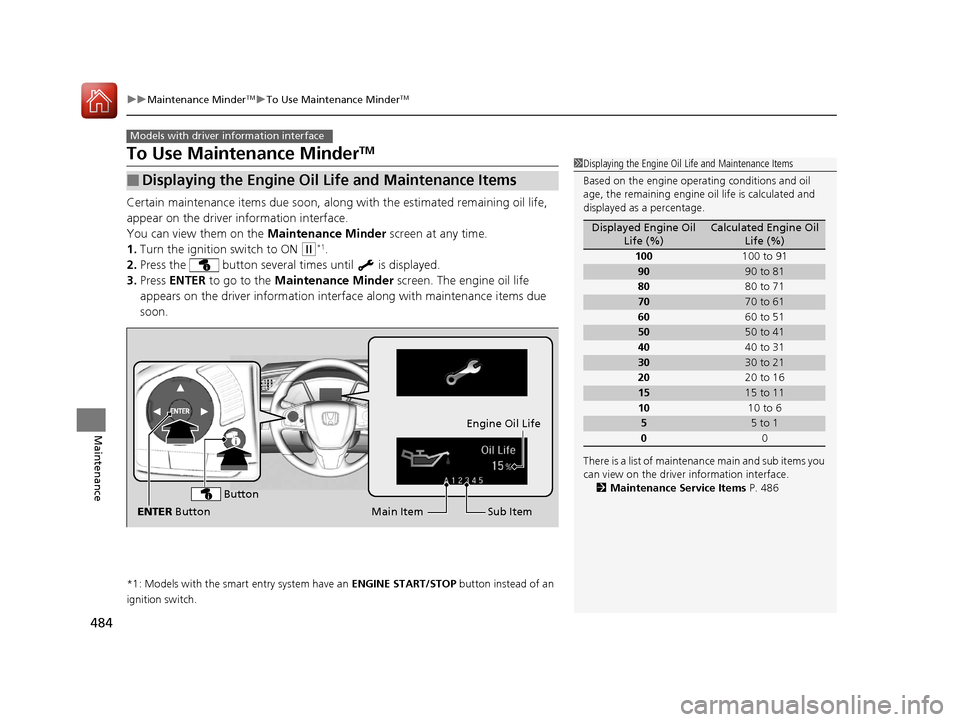
1. Turn the ignition switch to ON
(w*1.
2. Press the button several times until is displayed.
3. Press ENTER to go to the Maintenance Minder screen. The engine oil life
appears on the driver info rmation interface along with maintenance items due
soon.
*1: Models with the smart entry system have an ENGINE START/STOP button instead of an
ignition switch.
■Displaying the Engine Oil Life and Maintenance Items
Models with driver information interface
1 Displaying the Engine Oil Life and Maintenance Items
Based on the engine opera ting conditions and oil
age, the remaining engine oi l life is calculated and
displayed as a percentage.
There is a list of maintena nce main and sub items you
can view on the driver information interface.
2 Maintenance Service Items P. 486
Displayed Engine Oil
Life (%)Calculated Engine Oil Life (%)
100 100 to 91
9090 to 81
80 80 to 71
7070 to 61
60 60 to 51
5050 to 41
40 40 to 31
3030 to 21
20 20 to 16
1515 to 11
10 10 to 6
55 to 1
0 0
Sub Item
Engine Oil Life
Main Item
ENTER Button
Button
16 CIVIC 4D-31TBA6000.book 484 ページ 2015年8月31日 月曜日 午後5時56分
Page 499 of 590
uuMaintenance Under the Hood uChanging the Engine Oil and Oil Filter
498
Maintenance
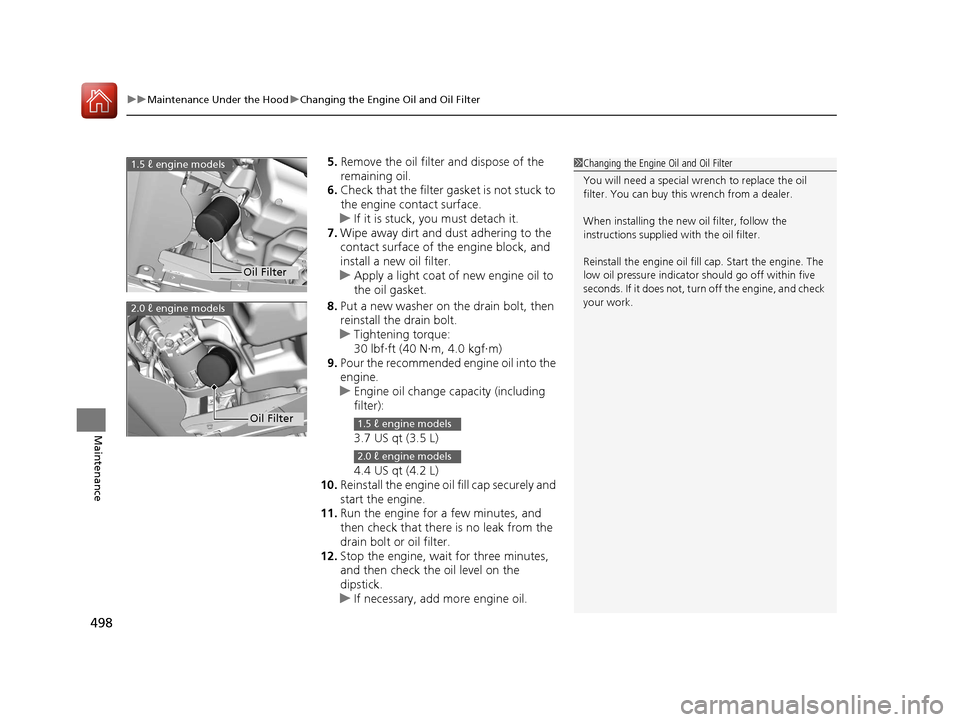
5. Remove the oil filter and dispose of the
remaining oil.
6. Check that the filter ga sket is not stuck to
the engine contact surface.
u If it is stuck, you must detach it.
7. Wipe away dirt and dust adhering to the
contact surface of the engine block, and
install a new oil filter.
u Apply a light coat of new engine oil to
the oil gasket.
8. Put a new washer on the drain bolt, then
reinstall the drain bolt.
u Tightening torque:
30 lbf∙ft (40 N∙m, 4.0 kgf∙m)
9. Pour the recommended engine oil into the
engine.
u Engine oil change capacity (including
filter):
3.7 US qt (3.5 L)
4.4 US qt (4.2 L)
10. Reinstall the engine oil fill cap securely and
start the engine.
11. Run the engine for a few minutes, and
then check that there is no leak from the
drain bolt or oil filter.
12. Stop the engine, wait for three minutes,
and then check the oil level on the
dipstick.
u If necessary, add more engine oil.1Changing the Engine Oil and Oil Filter
You will need a special wrench to replace the oil
filter. You can buy this wrench from a dealer.
When installing the new oil filter, follow the
instructions supplied with the oil filter.
Reinstall the engine oil fill cap. Start the engine. The
low oil pressure indicator should go off within five
seconds. If it does not, turn off the engine, and check
your work.
Oil Filter
1.5 ℓ engine models
2.0 ℓ engine models
Oil Filter1.5 ℓ engine models
2.0 ℓ engine models
16 CIVIC 4D-31TBA6000.book 498 ページ 2015年8月31日 月曜日 午後5時56分
Page 527 of 590
526
uuBattery uCharging the Battery
Maintenance
Charging the Battery
Disconnect both battery cables to prevent da maging your vehicle’s electrical system.
Always disconnect the negative (–) cable first, and reconnect it last.
*1: Models with the smart entry system have an ENGINE START/STOP button instead of an
ignition switch.
1 Battery
When you find corrosion, cl ean the battery terminals
by applying a baking powder and water solution.
Clean the terminal with a damp towel. Cloth/towel
dry the battery. Coat the terminals with grease to
help prevent future corrosion.
When replacing the battery, the replacement must be
of the same specifications.
Please consult a dealer for more information.
The VSA ® and CMBS
TM * indicators may come on
when your turn the ignition switch to ON
( w*1 after
re-connecting a battery.
Drive a short distance at 12 mph (20 km/h). Each
indicator should go off. If ei ther or both do not, have
your vehicle checked by a dealer.
* Not available on all models
16 CIVIC 4D-31TBA6000.book 526 ページ 2015年8月31日 月曜日 午後5時56分
Page 536 of 590
535
Handling the Unexpected
This chapter explains how to handle unexpected troubles.
ToolsTypes of Tools .................................. 536
If a Tire Goes Flat
Changing a Flat Tire ......................... 537
Engine Does Not Start Checking the Engine ........................ 543
If the Smart Entry Remote Battery is Weak .......................................... 544
Emergency Engine Stop ................... 545
Jump Starting .................................... 546
Shift Lever Does Not Move .............. 549
Overheating
How to Handle Overheating ............. 550 Indicator, Coming On/Blinking
If the Low Oil Pressure Indicator Comes
On ............................................. 552
If the Charging System Indicator Comes
On ................................................. 552
If the Malfunction Indicator Lamp Comes
On or Blinks ................................... 553
If the Brake System Indicator (Red) Comes On or Blinks ................................... 554
If the Brake System Indicator (Red) Comes On or Blinks at the Same Time When the
Brake System Indicator (Amber) Comes
On ................................................. 555 If the Electric Power Steering (EPS) System
Indicator Comes On ....................... 556
If the Low Tire Pressure/TPMS Indicator Comes On or Blinks ....................... 557
Fuses Fuse Locations ................................. 558
Inspecting and Changing Fuses ........ 561
Emergency Towing ........................... 562
When You Cannot Unlock the Fuel Fill Door ................................................. 563
When You Cannot Open the Trunk.....564
Refueling ........................................... 565
16 CIVIC 4D-31TBA6000.book 535 ページ 2015年8月31日 月曜日 午後5時56分
Page 538 of 590
537Continued
Handling the Unexpected
If a Tire Goes Flat
Changing a Flat Tire
If a tire goes flat while driving, grasp the steering wheel firmly, and brake gradually
to reduce speed. Then, stop in a safe plac e. Replace the flat tire with a compact
spare tire. Go to a dealer as soon as possib le to have the full-size tire repaired or
replaced.
1. Park the vehicle on firm, level, and non-slippery surface, and apply the parking
brake.
2. Move the shift lever to
(P.
2. Move the shift lever to
(R.
3. Turn on the hazard warning lights an d turn the ignition switch to LOCK
(0*1.
*1: Models with the smart entry system have an ENGINE START/STOP button instead of an
ignition switch.
1 Changing a Flat Tire
Follow compact spare precautions:
Periodically check the tire pressure of the compact
spare. It should be set to the specified pressure.
Specified Pressure: 60 psi (420 kPa, 4.2 kgf/cm
2)
When driving with the compact spare tire, keep the
vehicle speed under 50 mph (80 km/h). Replace with
a full-size tire as soon as possible.
The compact spare tire and wheel in your vehicle are
specifically for this model. Do not use them with
another vehicle. Do not us e another type of compact
spare tire or wheel with your vehicle.
Do not mount tire chains on a compact spare tire.
If a chain-mounted front tire goes flat, remove one of
the full-size rear tires and replace it with the compact
spare tire. Remove the flat front tire and replace it
with the full-size tire that was removed from the rear.
Mount the tire chains on the front tire.
NOTICE
Do not use the jack if it doesn’t work properly. Call
your dealer or a prof essional towing service.
Continuously variable transmission models
Manual transmission models
All models
16 CIVIC 4D-31TBA6000.book 537 ページ 2015年8月31日 月曜日 午後5時56分
Page 544 of 590
543
Handling the Unexpected
Engine Does Not Start
Checking the Engine
If the engine does not start, check the starter.
Starter conditionChecklist
Starter doesn’t turn or turns
over slowly.
The battery may be dead. Check
each of the items on the right and
respond accordingly.
Check for a message on the driver information interface.●If the To Start, Hold Remote Near Start Button message appears2If the Smart Entry Remote Battery is Weak P. 544
uMake sure the smart entry remote is in its operating range.2 ENGINE START/STOP Button Operating Range P. 152
Check the brightness of the interior lights.
Turn on the interior lights and check the brightness.
●If the interior lights are dim or do not come on at all2Battery P. 525●If the interior lights come on normally2 Fuses P. 558
The starter turns over normally
but the engine doesn’t start.
There may be a problem with the
fuse. Check each of the items on
the right and respond accordingly. Review the engine start procedure.
Follow its instructions, and try
to start the engine again.
2 Starting the Engine P. 396
Check the immobilize r system indicator.
When the immobilizer system indicator is blinking, the engine cannot be started.
2 Immobilizer System P. 144
Check the fuel level.
There should be enough fuel in the tank.
2 Fuel Gauge P. 103
Check the fuse.
Check all fuses, or have the vehicle checked by a dealer.
2Inspecting and Changing Fuses P. 561
If the problem continues:2Emergency Towing P. 562
1Checking the Engine
If you must start the vehi cle immediately, use an
assisting vehicle to jump start it.
2 Jump Starting P. 546
Models with smart entry system
16 CIVIC 4D-31TBA6000.book 543 ページ 2015年8月31日 月曜日 午後5時56分
Page 545 of 590
544
uuEngine Does Not Start uIf the Smart Entry Remote Battery is Weak
Handling the Unexpected
If the Smart Entry Remote Battery is Weak
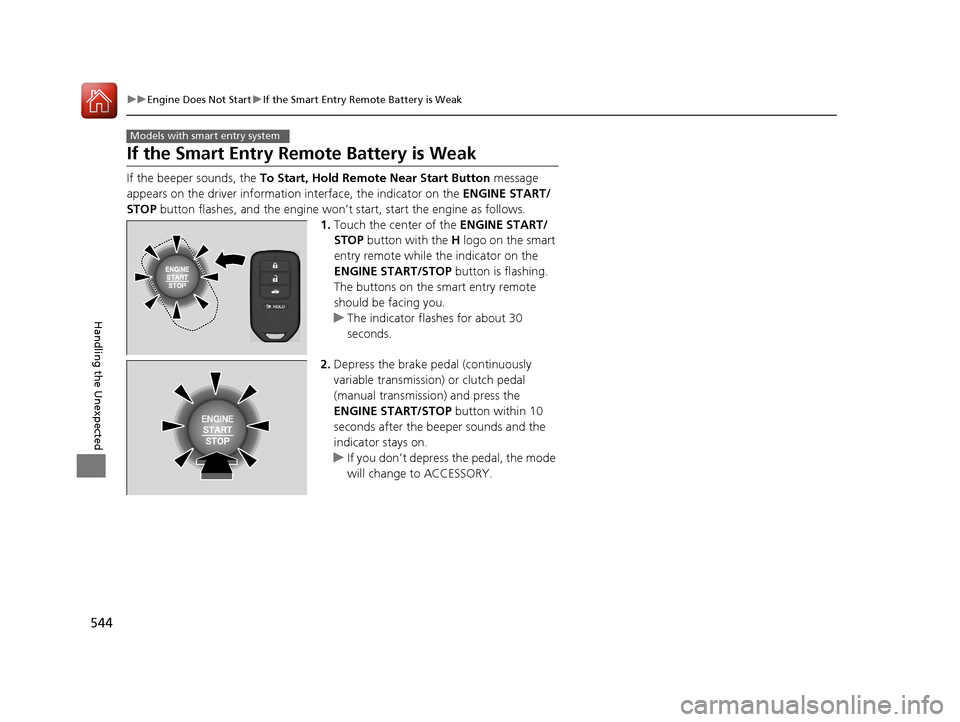
If the beeper sounds, the To Start, Hold Remote Near Start Button message
appears on the driver information interface, the indicator on the ENGINE START/
STOP button flashes, and the engine won’t start, start the engine as follows.
1.Touch the center of the ENGINE START/
STOP button with the H logo on the smart
entry remote while the indicator on the
ENGINE START/STOP button is flashing.
The buttons on the smart entry remote
should be facing you.
u The indicator flashes for about 30
seconds.
2. Depress the brake pedal (continuously
variable transmission) or clutch pedal
(manual transmission) and press the
ENGINE START/STOP button within 10
seconds after the beeper sounds and the
indicator stays on.
u If you don’t depress the pedal, the mode
will change to ACCESSORY.
Models with smart entry system
16 CIVIC 4D-31TBA6000.book 544 ページ 2015年8月31日 月曜日 午後5時56分
Page 546 of 590
545
uuEngine Does Not StartuEmergency Engine Stop
Handling the Unexpected
Emergency Engine Stop
The ENGINE START/STOP button may be used to stop the engine due to an
emergency situation even while driving. If you must stop the engine, do either of the
following operations:
• Press and hold the ENGINE START/STOP button for about two seconds.
• Firmly press the ENGINE START/STOP button twice.
The steering wheel will not lock. However, because turning off the engine disables
the power assist the engine provides to the steering and braking systems, it will
require significantly more physical effort an d time to steer and slow the vehicle. Use
both feet on the brake pedal to slow down the vehicle and stop immediately in a
safe place. With manual transmission models you can also downshift the
transmission to utilize engine braking.
The power mode is in ACCESSORY when the engine is stopped.
To change the mode to VEHICLE OFF, move the shift lever to
(P after the vehicle
comes to a complete stop.
Then press the ENGINE START/STOP button twice without depressing the brake
pedal.
The power mode changes to VEHICLE OFF.
Models with smart entry system
1 Emergency Engine Stop
Do not press the button while driving unless it is
absolutely necessary for th e engine to be switched
off.
Continuously variable transmission models
Canadian continuously variable transmission models
Manual transmission models
16 CIVIC 4D-31TBA6000.book 545 ページ 2015年8月31日 月曜日 午後5時56分
Page 549 of 590
uuJump Starting uJump Starting Procedure
548
Handling the Unexpected
Once your vehicle's engine has started, re move the jumper cables in the following
order.
1. Disconnect the jumper cable from your vehicle's ground.
2. Disconnect the other end of the jumper cable from the booster battery -
terminal.
3. Disconnect the jumper cable from your vehicle's battery + terminal.
4. Disconnect the other end of the jumper cable from the booster battery +
terminal.
Have your vehicle inspected by a n earby service station or a dealer.
*1: Models with the smart entry system have an ENGINE START/STOP button instead of an
ignition switch.
■What to Do After the Engine Starts1 What to Do After the Engine Starts
The VSA ® and CMBS
TM * indicators may come on
when your turn the ignition switch to ON ( w*1 after
re-connecting a battery.
Drive a short distance at more than12 mph (20 km/h).
Each indicator should go off. If either or both do not,
have your vehicle ch ecked by a dealer.
* Not available on all models
16 CIVIC 4D-31TBA6000.book 548 ページ 2015年8月31日 月曜日 午後5時56分
Page 552 of 590
551
uuOverheating uHow to Handle Overheating
Handling the Unexpected
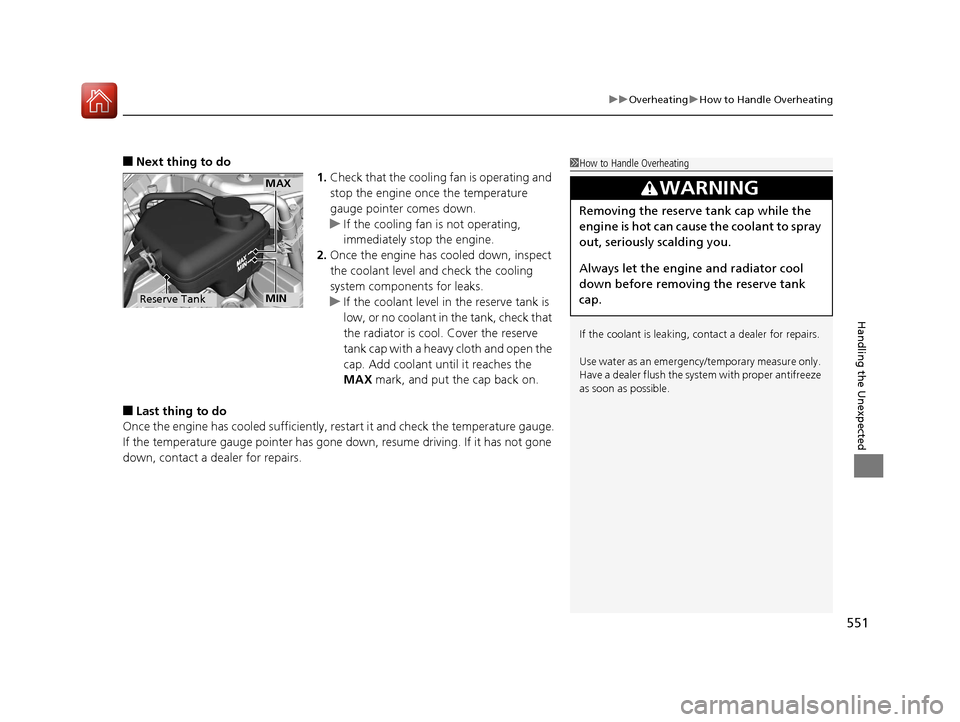
■Next thing to do
1.Check that the cooling fan is operating and
stop the engine once the temperature
gauge pointer comes down.
u If the cooling fan is not operating,
immediately stop the engine.
2. Once the engine has cooled down, inspect
the coolant level and check the cooling
system components for leaks.
u If the coolant level in the reserve tank is
low, or no coolant in the tank, check that
the radiator is cool. Cover the reserve
tank cap with a heavy cloth and open the
cap. Add coolant until it reaches the
MAX mark, and put the cap back on.
■Last thing to do
Once the engine has cooled sufficiently, restart it and check the temperature gauge.
If the temperature gauge pointer has gone down, resume driving. If it has not gone
down, contact a dealer for repairs.
1 How to Handle Overheating
If the coolant is leaking, contact a dealer for repairs.
Use water as an emergency/temporary measure only.
Have a dealer flush the system with proper antifreeze
as soon as possible.
3WARNING
Removing the reserve tank cap while the
engine is hot can cause the coolant to spray
out, seriously scalding you.
Always let the engine and radiator cool
down before removing the reserve tank
cap.
MAX
Reserve TankMIN
16 CIVIC 4D-31TBA6000.book 551 ページ 2015年8月31日 月曜日 午後5時56分