display HONDA CIVIC 2016 10.G Owners Manual
[x] Cancel search | Manufacturer: HONDA, Model Year: 2016, Model line: CIVIC, Model: HONDA CIVIC 2016 10.GPages: 590
Page 364 of 590
363
uuBluetooth ® HandsFreeLink ®*uHFL Menus
Continued
Features
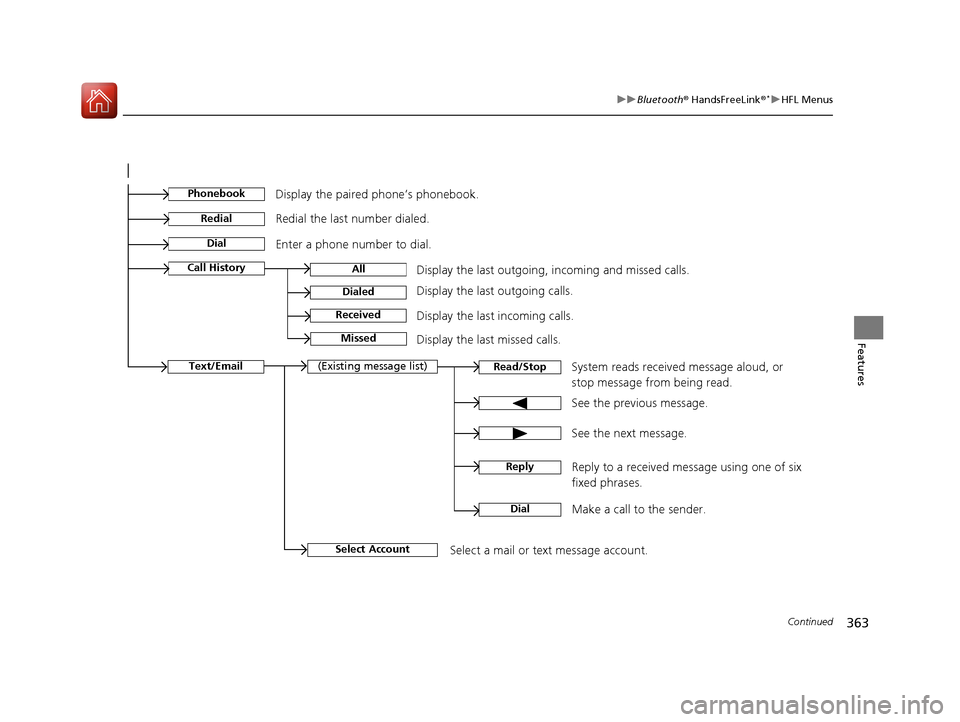
See the previous message.
Text/EmailRead/Stop(Existing message list)
See the next message. System reads received message aloud, or
stop message from being read.
Select AccountSelect a mail or text message account.
Reply to a received message using one of six
fixed phrases.
DialMake a call to the sender.
Reply
Display the last outgoing, incoming and missed calls.Call HistoryAll
Dialed
Received
Display the last outgoing calls.
Display the last incoming calls.
MissedDisplay the last missed calls.
Dial
Redial
Enter a phone number to dial. Redial the last number dialed.
PhonebookDisplay the paired phone’s phonebook.
16 CIVIC 4D-31TBA6000.book 363 ページ 2015年8月31日 月曜日 午後5時56分
Page 365 of 590
uuBluetooth ® HandsFreeLink ®*uHFL Menus
364
Features
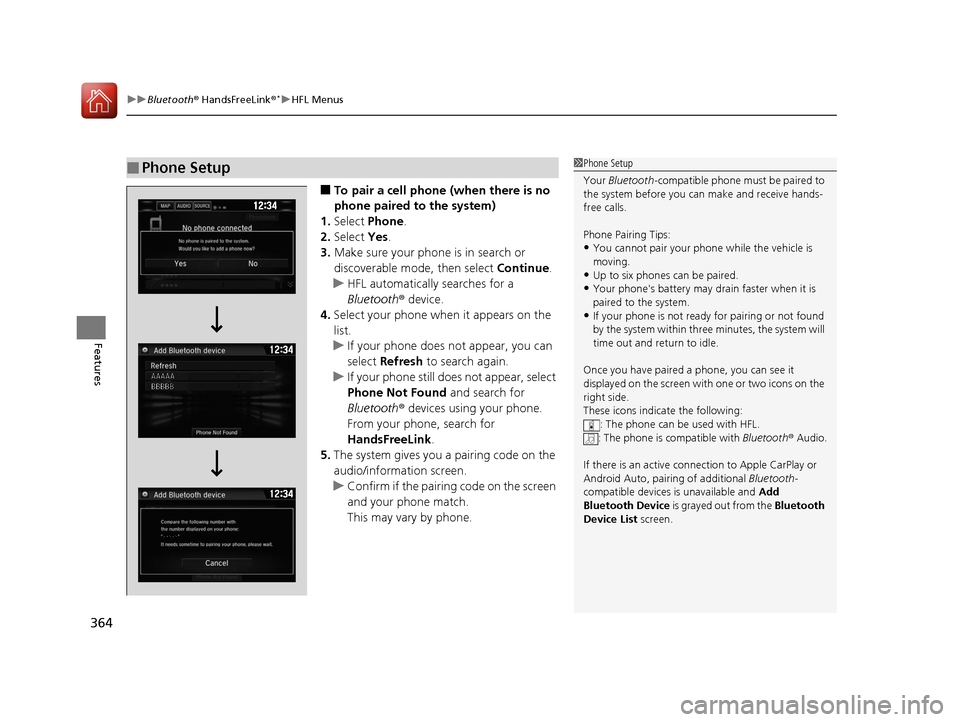
■To pair a cell phone (when there is no
phone paired to the system)
1. Select Phone .
2. Select Yes.
3. Make sure your phone is in search or
discoverable mode, then select Continue.
u HFL automatically searches for a
Bluetooth ® device.
4. Select your phone when it appears on the
list.
u If your phone does not appear, you can
select Refresh to search again.
u If your phone still does not appear, select
Phone Not Found and search for
Bluetooth ® devices using your phone.
From your phone, search for
HandsFreeLink .
5. The system gives you a pairing code on the
audio/information screen.
u Confirm if the pairing code on the screen
and your phone match.
This may vary by phone.
■Phone Setup1Phone Setup
Your Bluetooth -compatible phone must be paired to
the system before you ca n make and receive hands-
free calls.
Phone Pairing Tips:
•You cannot pair your phone while the vehicle is
moving.
•Up to six phones can be paired.
•Your phone's battery may dr ain faster when it is
paired to the system.
•If your phone is not ready for pairing or not found
by the system within three minutes, the system will
time out and return to idle.
Once you have paired a phone, you can see it
displayed on the screen with one or two icons on the
right side.
These icons indicate the following: : The phone can be used with HFL.
: The phone is compatible with Bluetooth® Audio.
If there is an active connection to Appl e CarPlay or
Android Auto, pairing of additional Bluetooth-
compatible devices is unavailable and Add
Bluetooth Device is grayed out from the Bluetooth
Device List screen.
16 CIVIC 4D-31TBA6000.book 364 ページ 2015年8月31日 月曜日 午後5時56分
Page 380 of 590
Continued379
uuBluetooth ® HandsFreeLink ®*uHFL Menus
Features
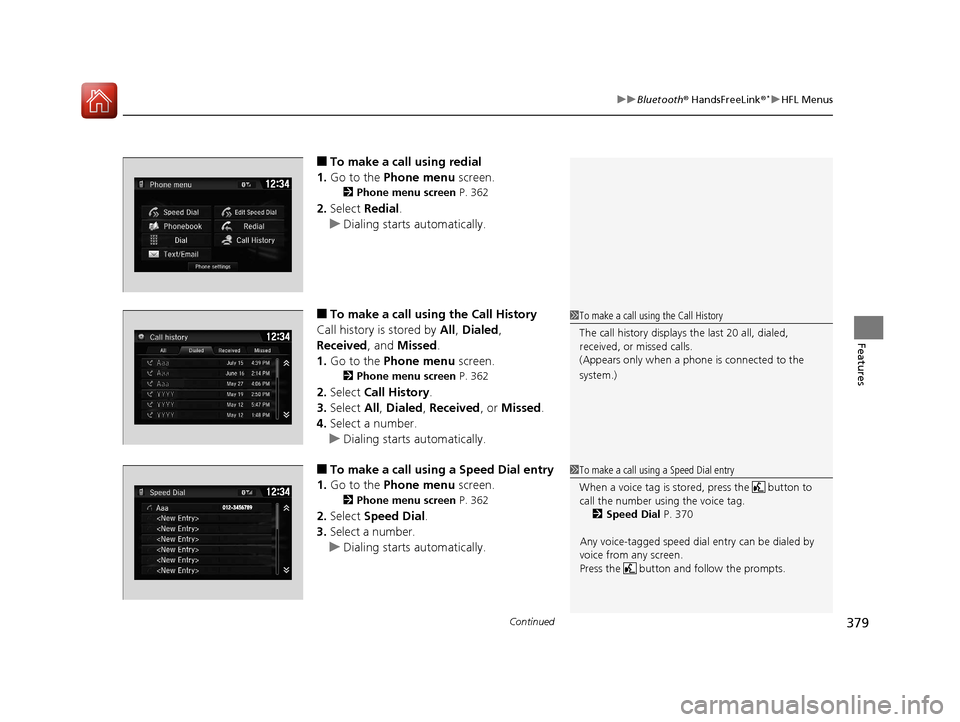
■To make a call using redial
1. Go to the Phone menu screen.
2Phone menu screen P. 362
2.Select Redial .
u Dialing starts automatically.
■To make a call usin g the Call History
Call history is stored by All, Dialed ,
Received , and Missed .
1. Go to the Phone menu screen.
2Phone menu screen P. 362
2.Select Call History .
3. Select All, Dialed , Received , or Missed .
4. Select a number.
u Dialing starts automatically.
■To make a call usin g a Speed Dial entry
1. Go to the Phone menu screen.
2Phone menu screen P. 362
2.Select Speed Dial .
3. Select a number.
u Dialing starts automatically.
1To make a call using the Call History
The call history displays the last 20 all, dialed,
received, or missed calls.
(Appears only when a phone is connected to the
system.)
1 To make a call using a Speed Dial entry
When a voice tag is stored, press the button to
call the number using the voice tag.
2 Speed Dial P. 370
Any voice-tagged speed dial entry can be dialed by
voice from any screen.
Press the button and follow the prompts.
16 CIVIC 4D-31TBA6000.book 379 ページ 2015年8月31日 月曜日 午後5時56分
Page 382 of 590
Continued381
uuBluetooth ® HandsFreeLink ®*uHFL Menus
Features
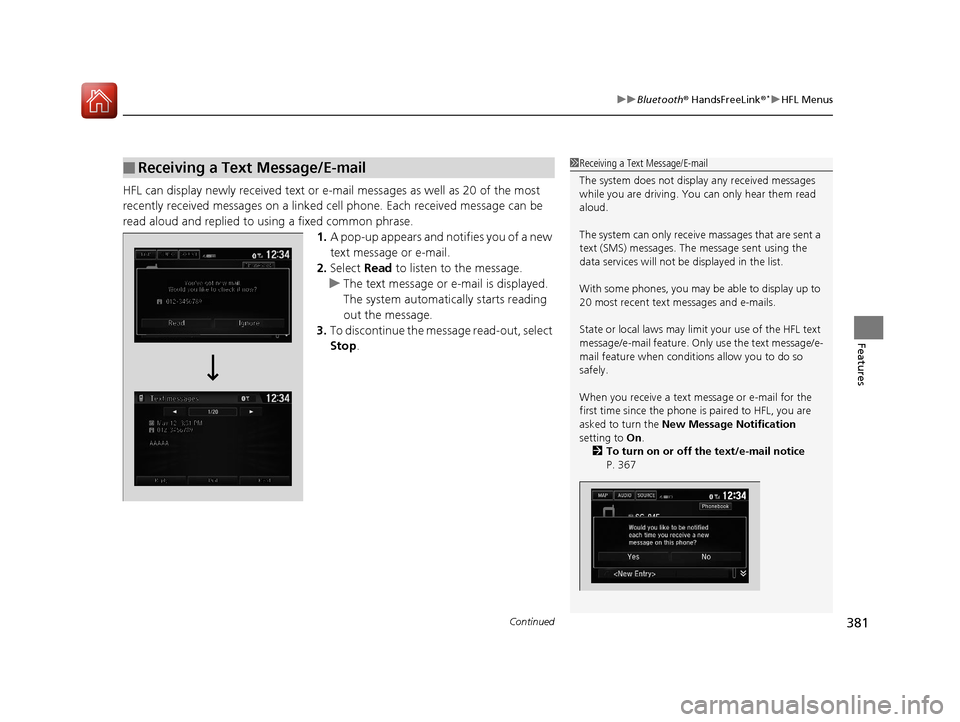
HFL can display newly received text or e-mail messages as well as 20 of the most
recently received messages on a linked cell phone. Each received message can be
read aloud and replied to using a fixed common phrase.
1.A pop-up appears and notifies you of a new
text message or e-mail.
2. Select Read to listen to the message.
u The text message or e-mail is displayed.
The system automatica lly starts reading
out the message.
3. To discontinue the mess age read-out, select
Stop .
■Receiving a Text Message/E-mail1Receiving a Text Message/E-mail
The system does not display any received messages
while you are driving. You can only hear them read
aloud.
The system can only receive massages that are sent a
text (SMS) messages. The message sent using the
data services will not be displayed in the list.
With some phones, you may be able to display up to
20 most recent text messages and e-mails.
State or local laws may limit your use of the HFL text
message/e-mail feature. Only use the text message/e-
mail feature when conditions allow you to do so
safely.
When you receive a text message or e-mail for the
first time since the phone is paired to HFL, you are
asked to turn the New Message Notification
setting to On .
2 To turn on or off the text/e-mail notice
P. 367
16 CIVIC 4D-31TBA6000.book 381 ページ 2015年8月31日 月曜日 午後5時56分
Page 384 of 590
Continued383
uuBluetooth ® HandsFreeLink ®*uHFL Menus
Features
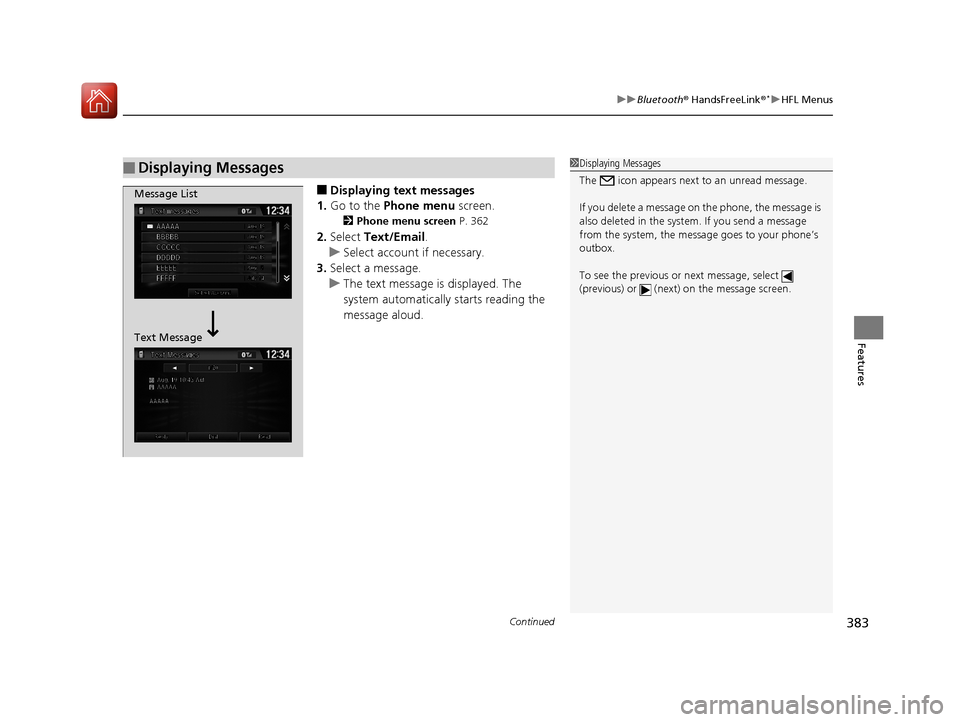
■Displaying text messages
1. Go to the Phone menu screen.
2Phone menu screen P. 362
2.Select Text/Email .
u Select account if necessary.
3. Select a message.
u The text message is displayed. The
system automatically starts reading the
message aloud.
■Displaying Messages1Displaying Messages
The icon appears next to an unread message.
If you delete a message on the phone, the message is
also deleted in the system. If you send a message
from the system, the message goes to your phone’s
outbox.
To see the previous or next message, select
(previous) or (next) on the message screen.
Message List
Text Message
16 CIVIC 4D-31TBA6000.book 383 ページ 2015年8月31日 月曜日 午後5時56分
Page 385 of 590
384
uuBluetooth ® HandsFreeLink ®*uHFL Menus
Features
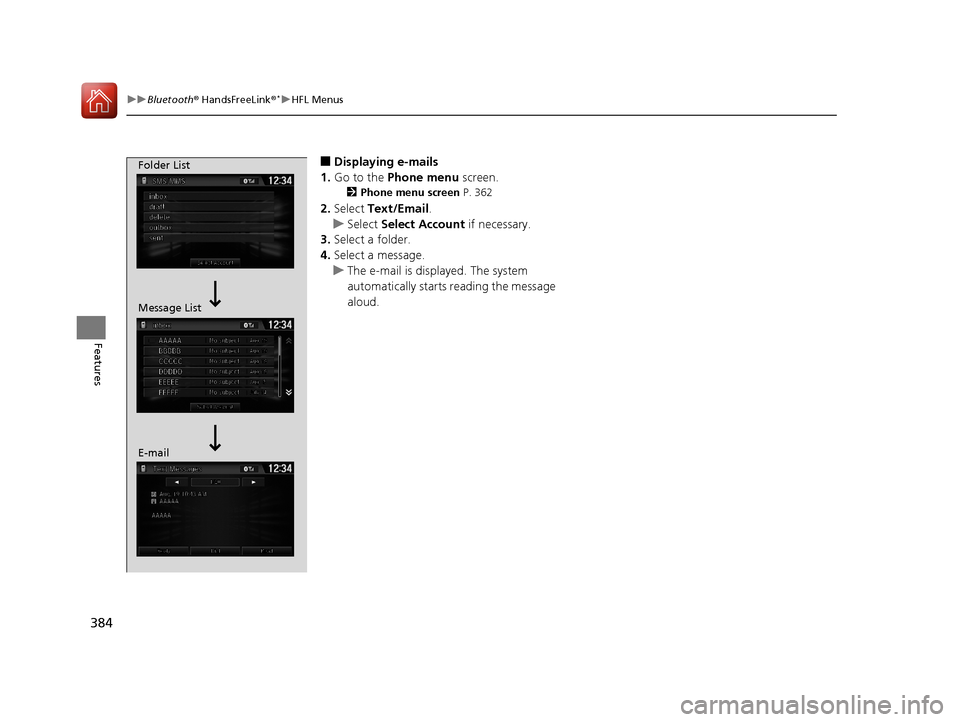
■Displaying e-mails
1. Go to the Phone menu screen.
2Phone menu screen P. 362
2.Select Text/Email .
u Select Select Account if necessary.
3. Select a folder.
4. Select a message.
u The e-mail is displayed. The system
automatically starts reading the message
aloud.
Folder List
Message List
E-mail
16 CIVIC 4D-31TBA6000.book 384 ページ 2015年8月31日 月曜日 午後5時56分
Page 386 of 590
Continued385
uuBluetooth ® HandsFreeLink ®*uHFL Menus
Features
■Read or Stop reading a message
1. Go to the text or e-mail message screen.
u The system automatica lly starts reading
the message aloud.
2 Displaying Messages P. 383
2.Select Stop to stop reading.
Select Read again to start reading the
message from the beginning.
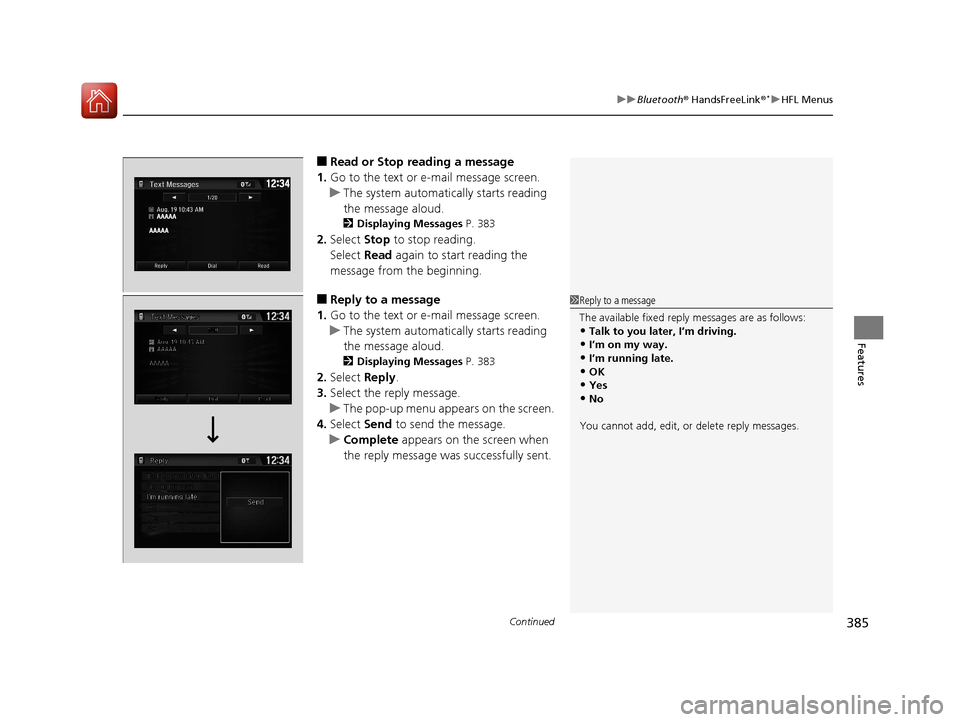
■Reply to a message
1. Go to the text or e-mail message screen.
u The system automatica lly starts reading
the message aloud.
2 Displaying Messages P. 383
2.Select Reply.
3. Select the reply message.
u The pop-up menu appears on the screen.
4. Select Send to send the message.
u Complete appears on the screen when
the reply message was successfully sent.
1 Reply to a message
The available fixed reply messages are as follows:
•Talk to you later, I’m driving.•I’m on my way.
•I’m running late.
•OK•Yes
•No
You cannot add, edit, or delete reply messages.
16 CIVIC 4D-31TBA6000.book 385 ページ 2015年8月31日 月曜日 午後5時56分
Page 407 of 590
uuWhen Driving uShifting
406
Driving
■Shift Lever Operation1Shift Lever Operation
NOTICE
When you change the shift lever from (D to (R and
vice versa, come to a complete stop and keep the
brake pedal depressed.
Operating the shift lever be fore the vehicle has come
to a complete standstill can damage the transmission.
Use the shift lever position indicator to check the
lever position befo re pulling away.
If the transmission indicator blinks when driving, in
any shift position, there is a problem with the
transmission.
Avoid sudden acceleration and have the transmission
checked by a dealer as soon as possible.
The fuel supply may be cut of f if you drive at engine
speeds in or over the tachometer’s red zone (engine
speed limit). If this happens, you may experience a
slight jolt.
It may not be possible to operate the shift lever if the
brake pedal is applied while the shift lever release
button is held down.
Depress the brake pedal first.
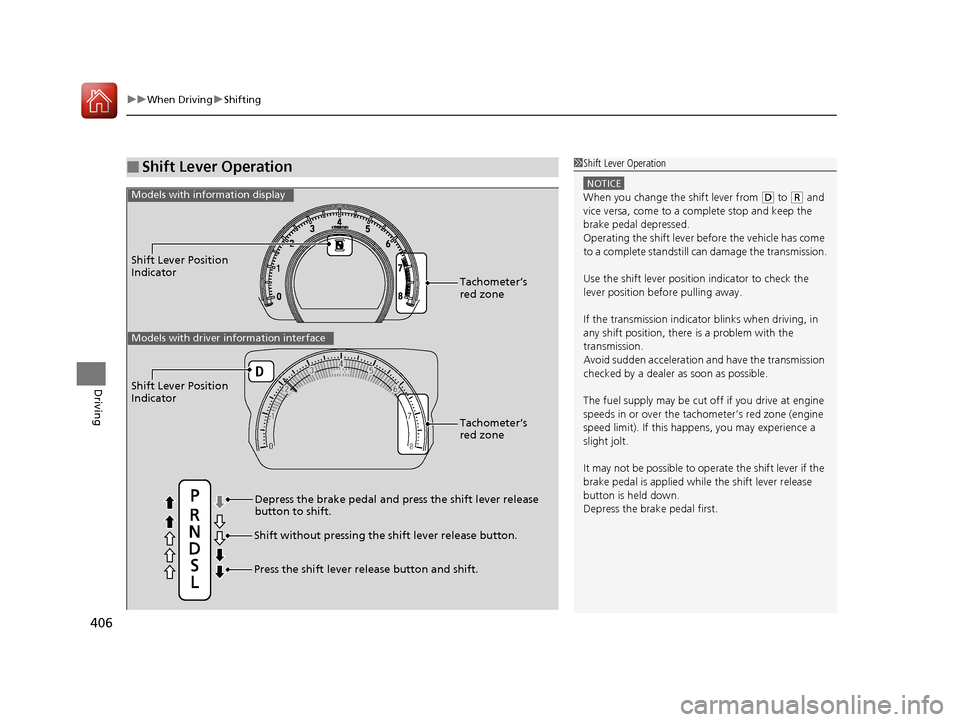
Shift Lever Position
Indicator
Depress the brake pedal and press the shift lever release
button to shift.
Shift without pressing the shift lever release button.
Press the shift lever re lease button and shift.Tachometer’s
red zone
Models with info
rmation display
Shift Lever Position
Indicator
Tachometer’s
red zone
Models with driver information interface
16 CIVIC 4D-31TBA6000.book 406 ページ 2015年8月31日 月曜日 午後5時56分
Page 411 of 590
410
uuWhen Driving uECON Button
Driving
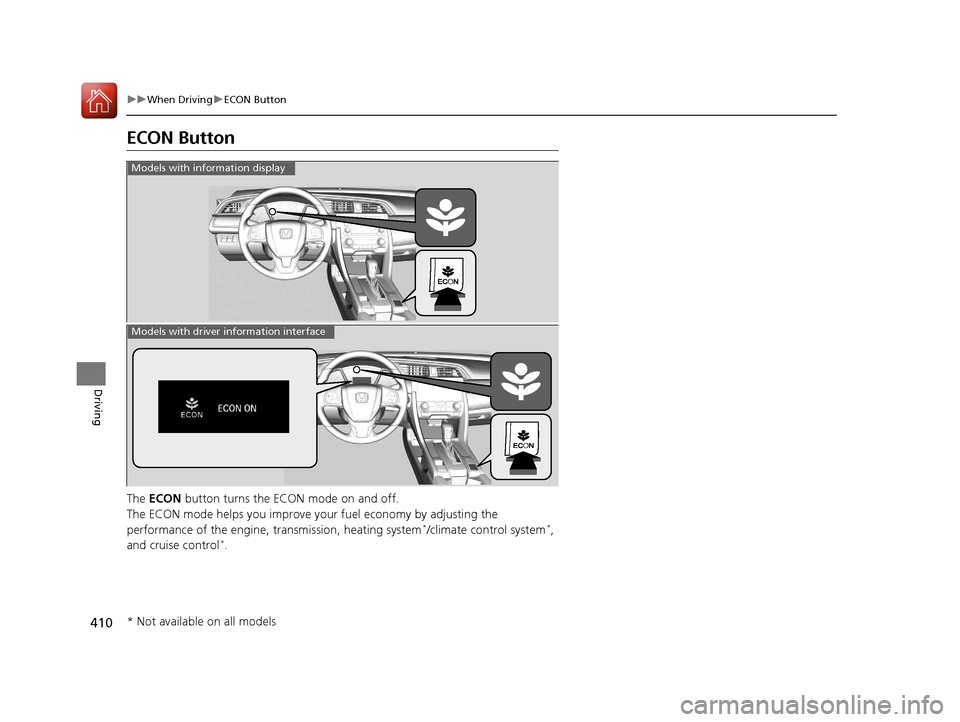
ECON Button
The ECON button turns the ECON mode on and off.
The ECON mode helps you improve your fuel economy by adjusting the
performance of the engine, transmission, heating system
*/climate control system*,
and cruise control*.
Models with info rmation display
Models with driver information interface
* Not available on all models
16 CIVIC 4D-31TBA6000.book 410 ページ 2015年8月31日 月曜日 午後5時56分
Page 419 of 590
uuWhen Driving uAdaptive Cruise Control (ACC) with Low Speed Follow (LSF)*
418
Driving
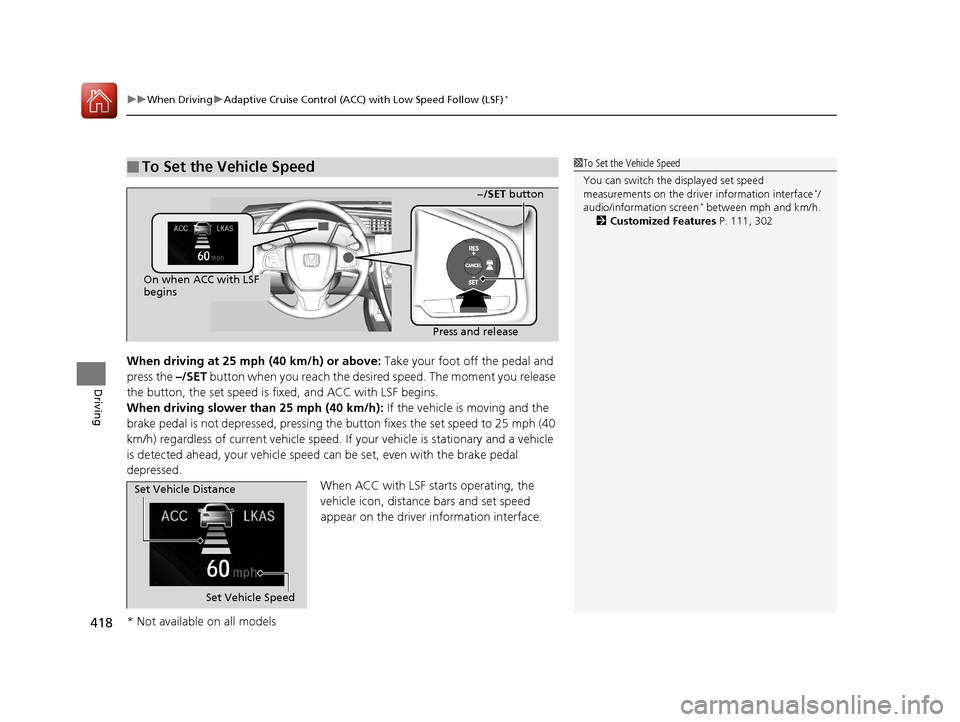
When driving at 25 mph (40 km/h) or above: Take your foot off the pedal and
press the –/SET button when you reach the desire d speed. The moment you release
the button, the set speed is fi xed, and ACC with LSF begins.
When driving slower than 25 mph (40 km/h): If the vehicle is moving and the
brake pedal is not depressed, pressing the button fixes the set speed to 25 mph (40
km/h) regardless of current vehicle speed. If your vehicle is stationary and a vehicle
is detected ahead, your vehicle speed can be set, even with the brake pedal
depressed.
When ACC with LSF starts operating, the
vehicle icon, distance bars and set speed
appear on the driver information interface.
■To Set the Vehicle Speed1 To Set the Vehicle Speed
You can switch the displayed set speed
measurements on the driver information interface
*/
audio/information screen* between mph and km/h.
2 Customized Features P. 111, 302
On when ACC with LSF
begins
Press and release−/SET button
Set Vehicle Speed
Set Vehicle Distance
* Not available on all models
16 CIVIC 4D-31TBA6000.book 418 ページ 2015年8月31日 月曜日 午後5時56分