lock HONDA CIVIC 2016 10.G Owners Manual
[x] Cancel search | Manufacturer: HONDA, Model Year: 2016, Model line: CIVIC, Model: HONDA CIVIC 2016 10.GPages: 590
Page 508 of 590
507
uuReplacing Light Bulbs uFog Light Bulbs*
Maintenance
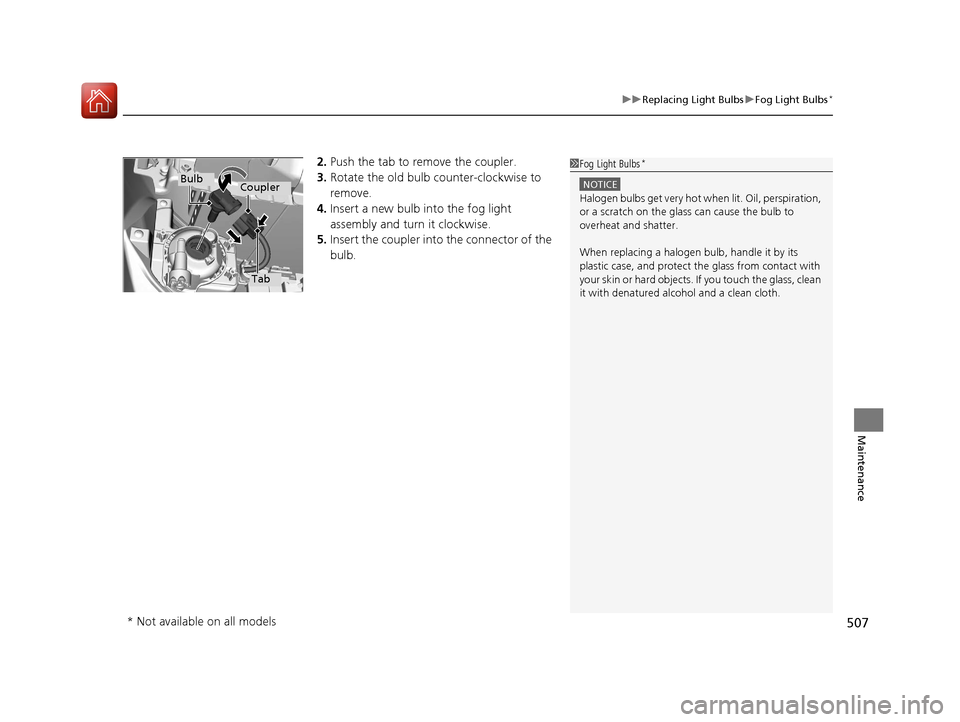
2. Push the tab to remove the coupler.
3. Rotate the old bulb counter-clockwise to
remove.
4. Insert a new bulb into the fog light
assembly and turn it clockwise.
5. Insert the coupler into the connector of the
bulb.1 Fog Light Bulbs*
NOTICE
Halogen bulbs get very hot wh en lit. Oil, perspiration,
or a scratch on the glass can cause the bulb to
overheat and shatter.
When replacing a halogen bulb, handle it by its
plastic case, and protect the glass from contact with
your skin or hard objects. If you touch the glass, clean
it with denatured alc ohol and a clean cloth.
Tab
CouplerBulb
* Not available on all models
16 CIVIC 4D-31TBA6000.book 507 ページ 2015年8月31日 月曜日 午後5時56分
Page 509 of 590
508
uuReplacing Light Bulbs uFront Turn Signal Light Bulbs
Maintenance
Front Turn Signal Light Bulbs
When replacing, use the following bulbs.
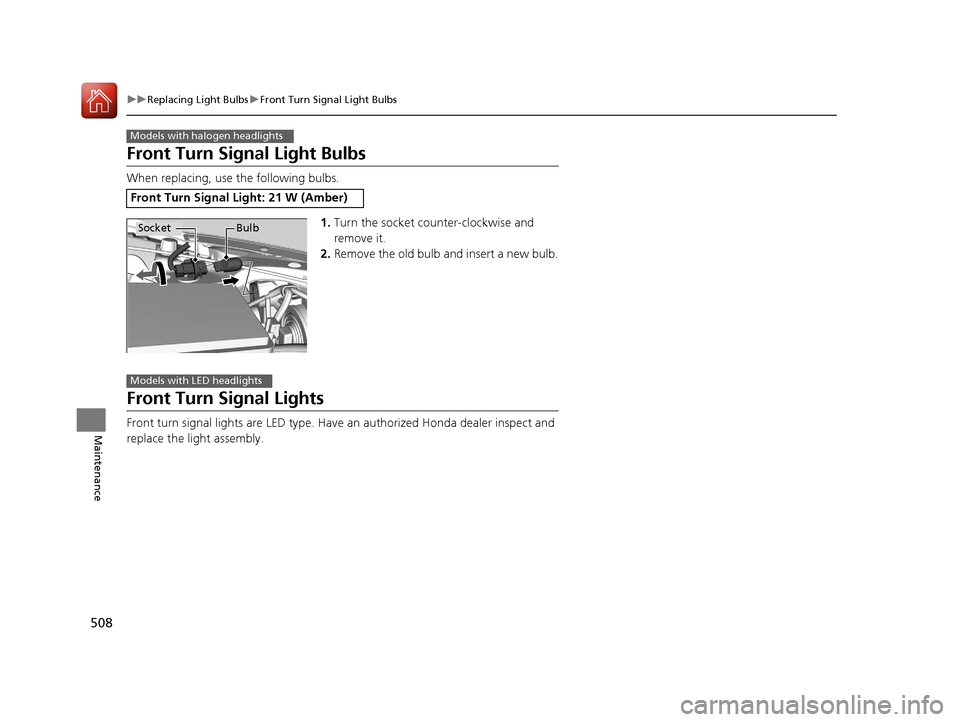
1.Turn the socket counter-clockwise and
remove it.
2. Remove the old bulb and insert a new bulb.
Front Turn Signal Lights
Front turn signal lights are LED type. Have an authorized Honda dealer inspect and
replace the light assembly.
Front Turn Signal Light: 21 W (Amber)
Models with halogen headlights
Socket Bulb
Models with LED headlights
16 CIVIC 4D-31TBA6000.book 508 ページ 2015年8月31日 月曜日 午後5時56分
Page 510 of 590
509
uuReplacing Light Bulbs uFront Side Marker Light Bulbs
Continued
Maintenance
Front Side Marker Light Bulbs
When replacing, use the following bulbs.
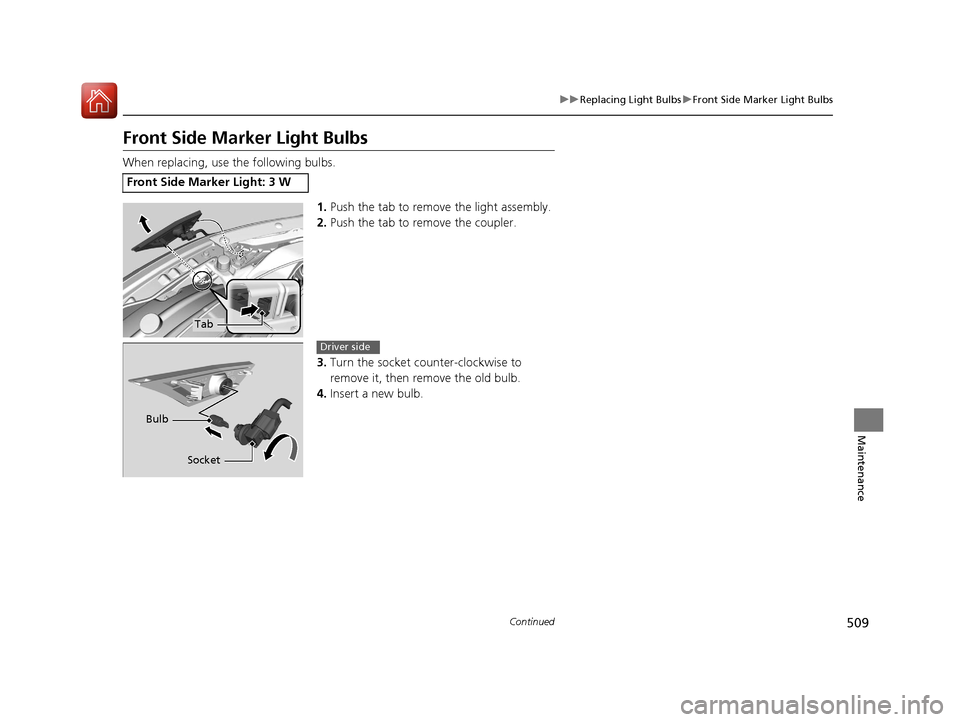
1.Push the tab to remove the light assembly.
2. Push the tab to remove the coupler.
3. Turn the socket counter-clockwise to
remove it, then remove the old bulb.
4. Insert a new bulb.
Front Side Marker Light: 3 W
Tab
Socket
Bulb
Driver side
16 CIVIC 4D-31TBA6000.book 509 ページ 2015年8月31日 月曜日 午後5時56分
Page 511 of 590
510
uuReplacing Light Bulbs uParking/Daytime Running Lights
Maintenance
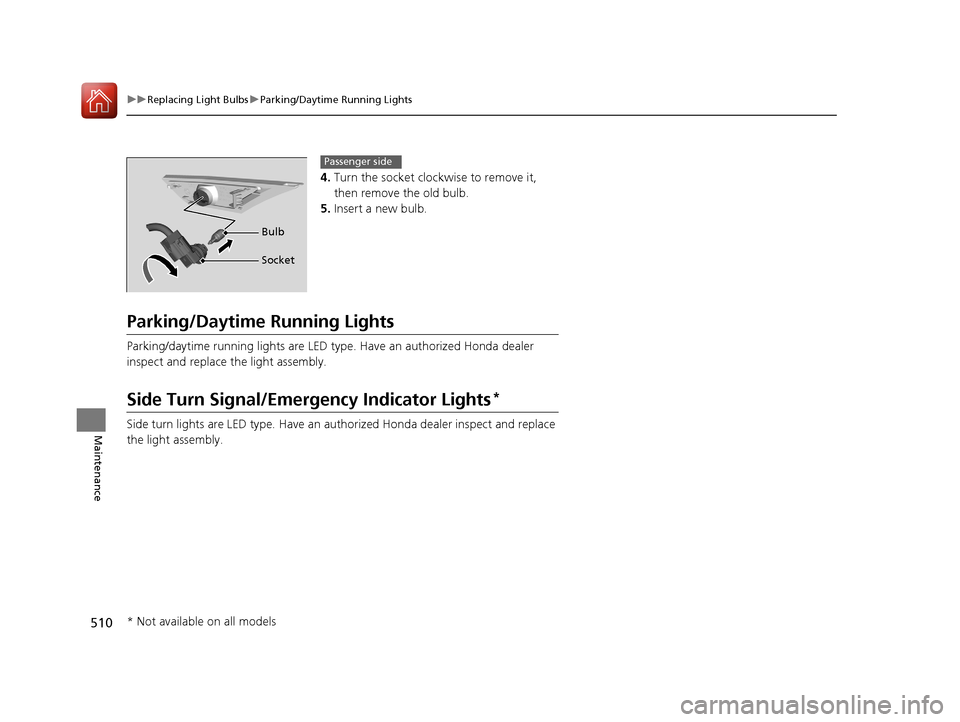
4. Turn the socket clockwise to remove it,
then remove the old bulb.
5. Insert a new bulb.
Parking/Daytime Running Lights
Parking/daytime running lights are LED type . Have an authorized Honda dealer
inspect and replace the light assembly.
Side Turn Signal/Emergency Indicator Lights*
Side turn lights are LED type. Have an au thorized Honda dealer inspect and replace
the light assembly.
Bulb
Socket
Passenger side
* Not available on all models
16 CIVIC 4D-31TBA6000.book 510 ページ 2015年8月31日 月曜日 午後5時56分
Page 512 of 590
511
uuReplacing Light Bulbs uBrake Light, Tail/Rear Side Marker Light, Rear Turn Signal Light and Back-Up Light Bulbs
Maintenance
Brake Light, Tail/Rear Side Marker Light, Rear Turn
Signal Light and Back-Up Light Bulbs
When replacing, use the following bulbs.
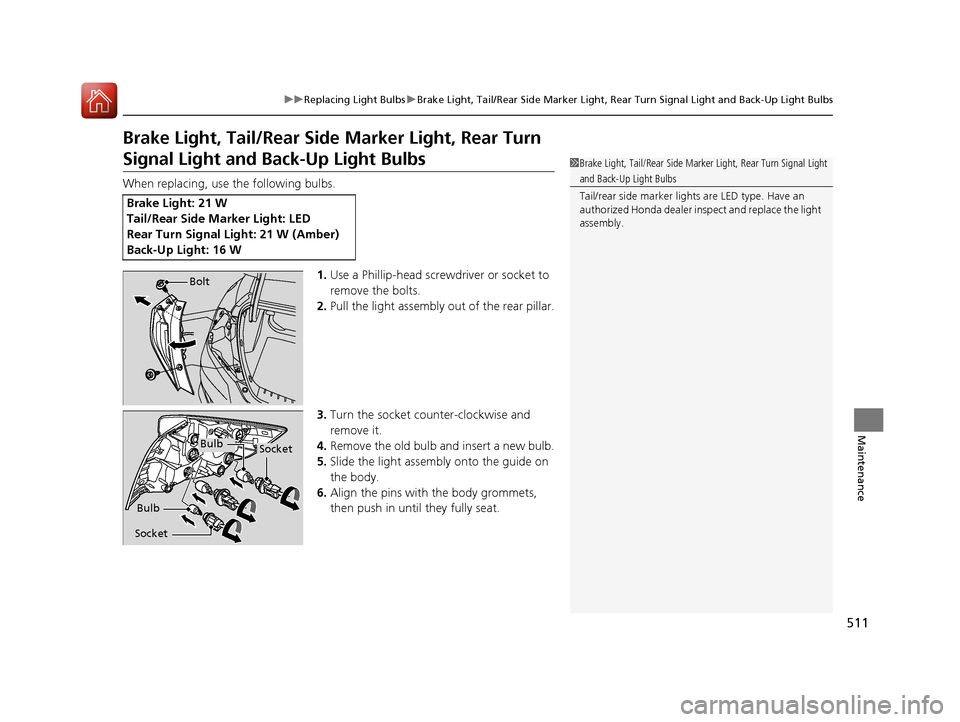
1.Use a Phillip-head screwdriver or socket to
remove the bolts.
2. Pull the light assembly out of the rear pillar.
3. Turn the socket counter-clockwise and
remove it.
4. Remove the old bulb and insert a new bulb.
5. Slide the light assembly onto the guide on
the body.
6. Align the pins with the body grommets,
then push in until they fully seat.
Brake Light: 21 W
Tail/Rear Side Marker Light: LED
Rear Turn Signal Light: 21 W (Amber)
Back-Up Light: 16 W
1Brake Light, Tail/Rear Side Marker Light, Rear Turn Signal Light
and Back-Up Light Bulbs
Tail/rear side marker lights are LED type. Have an
authorized Honda dealer in spect and replace the light
assembly.
Bolt
BulbSocket
Bulb
Socket
16 CIVIC 4D-31TBA6000.book 511 ページ 2015年8月31日 月曜日 午後5時56分
Page 514 of 590
513
uuReplacing Light Bulbs uHigh-Mount Brake Light Bulb
Maintenance
High-Mount Bra ke Light Bulb
When replacing, use the following bulb.
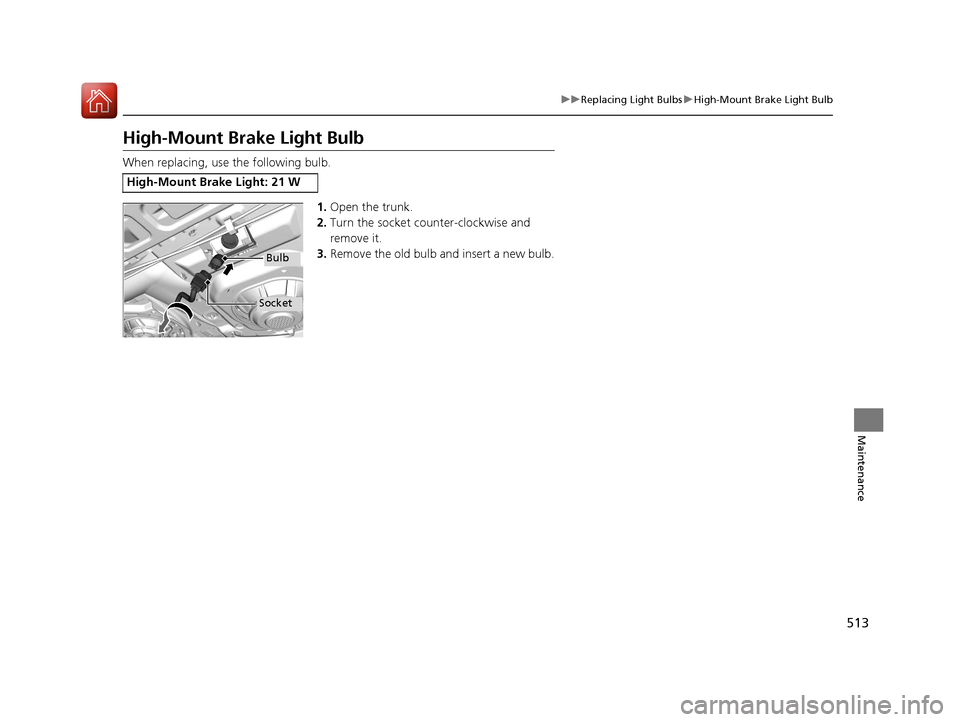
1.Open the trunk.
2. Turn the socket counter-clockwise and
remove it.
3. Remove the old bulb and insert a new bulb.
High-Mount Brake Light: 21 W
Bulb
Socket
16 CIVIC 4D-31TBA6000.book 513 ページ 2015年8月31日 月曜日 午後5時56分
Page 526 of 590
525
Maintenance
Battery
Checking the Battery
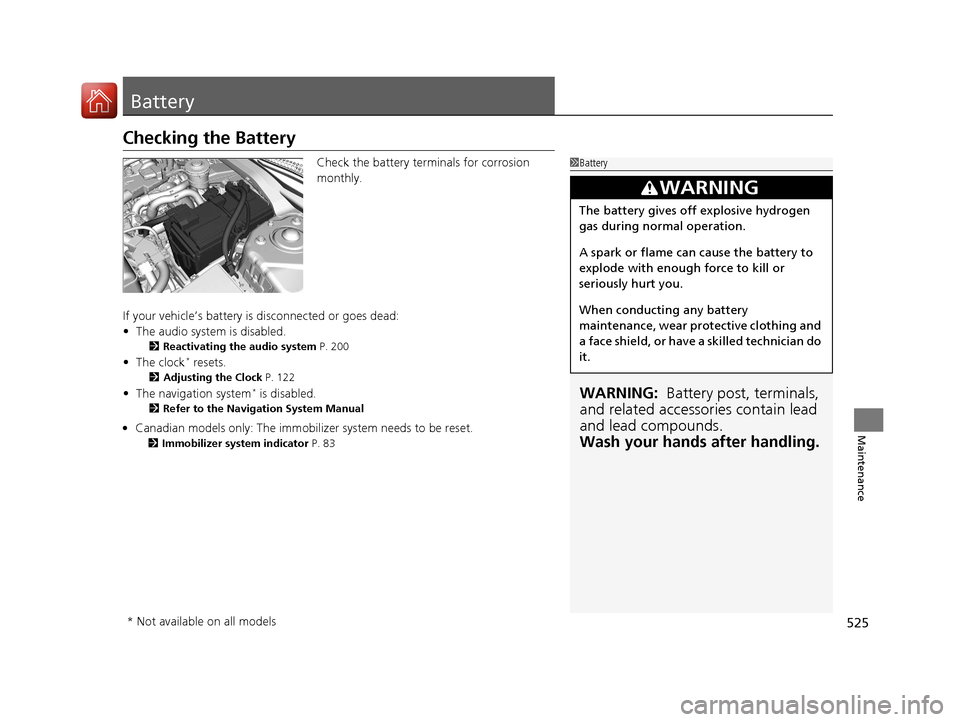
Check the battery terminals for corrosion
monthly.
If your vehicle’s battery is disconnected or goes dead:
• The audio system is disabled.
2 Reactivating the audio system P. 200
•The clock* resets.
2 Adjusting the Clock P. 122
•The navigation system* is disabled.
2 Refer to the Navigation System Manual
1Battery
WARNING: Battery post, terminals,
and related accessories contain lead
and lead compounds.
Wash your hands after handling.
3WARNING
The battery gives off explosive hydrogen
gas during normal operation.
A spark or flame can cause the battery to
explode with enough force to kill or
seriously hurt you.
When conducting any battery
maintenance, wear prot ective clothing and
a face shield, or have a skilled technician do
it.
* Not available on all models
16 CIVIC 4D-31TBA6000.book 525 ページ 2015年8月31日 月曜日 午後5時56分
• Can
adian models only: The immobilizer system needs to be reset. 2
Immobilizer system indicator P. 83
Page 532 of 590
531
uuCleaning uInterior Care
Maintenance
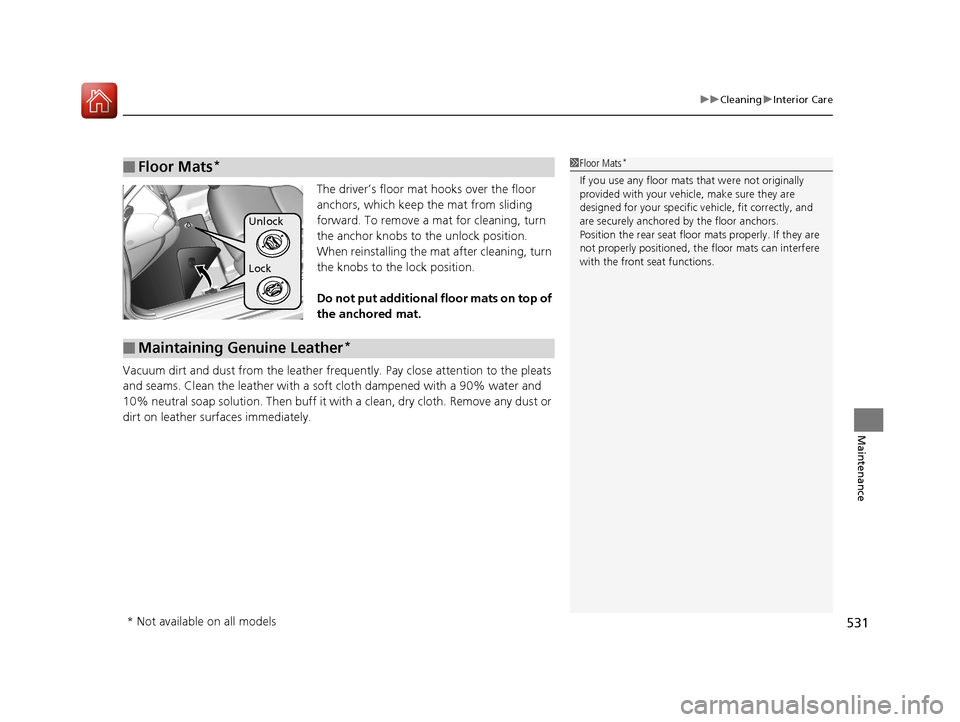
The driver’s floor mat hooks over the floor
anchors, which keep the mat from sliding
forward. To remove a mat for cleaning, turn
the anchor knobs to the unlock position.
When reinstalling the mat after cleaning, turn
the knobs to the lock position.
Do not put additional floor mats on top of
the anchored mat.
Vacuum dirt and dust from the leather frequ ently. Pay close attention to the pleats
and seams. Clean the leather with a soft cloth dampened with a 90% water and
10% neutral soap solution. Then buff it with a clean, dry cloth. Remove any dust or
dirt on leather surfaces immediately.
■Floor Mats*1 Floor Mats*
If you use any floor mats that were not originally
provided with your vehicle, make sure they are
designed for your specific ve hicle, fit correctly, and
are securely anchored by the floor anchors.
Position the rear seat floor mats properly. If they are
not properly positioned, the floor mats can interfere
with the front seat functions.
Lock Unlock
■Maintaining Genuine Leather*
* Not available on all models
16 CIVIC 4D-31TBA6000.book 531 ページ 2015年8月31日 月曜日 午後5時56分
Page 536 of 590
535
Handling the Unexpected
This chapter explains how to handle unexpected troubles.
ToolsTypes of Tools .................................. 536
If a Tire Goes Flat
Changing a Flat Tire ......................... 537
Engine Does Not Start Checking the Engine ........................ 543
If the Smart Entry Remote Battery is Weak .......................................... 544
Emergency Engine Stop ................... 545
Jump Starting .................................... 546
Shift Lever Does Not Move .............. 549
Overheating
How to Handle Overheating ............. 550 Indicator, Coming On/Blinking
If the Low Oil Pressure Indicator Comes
On ............................................. 552
If the Charging System Indicator Comes
On ................................................. 552
If the Malfunction Indicator Lamp Comes
On or Blinks ................................... 553
If the Brake System Indicator (Red) Comes On or Blinks ................................... 554
If the Brake System Indicator (Red) Comes On or Blinks at the Same Time When the
Brake System Indicator (Amber) Comes
On ................................................. 555 If the Electric Power Steering (EPS) System
Indicator Comes On ....................... 556
If the Low Tire Pressure/TPMS Indicator Comes On or Blinks ....................... 557
Fuses Fuse Locations ................................. 558
Inspecting and Changing Fuses ........ 561
Emergency Towing ........................... 562
When You Cannot Unlock the Fuel Fill Door ................................................. 563
When You Cannot Open the Trunk.....564
Refueling ........................................... 565
16 CIVIC 4D-31TBA6000.book 535 ページ 2015年8月31日 月曜日 午後5時56分
Page 538 of 590
537Continued
Handling the Unexpected
If a Tire Goes Flat
Changing a Flat Tire
If a tire goes flat while driving, grasp the steering wheel firmly, and brake gradually
to reduce speed. Then, stop in a safe plac e. Replace the flat tire with a compact
spare tire. Go to a dealer as soon as possib le to have the full-size tire repaired or
replaced.
1. Park the vehicle on firm, level, and non-slippery surface, and apply the parking
brake.
2. Move the shift lever to
(P.
2. Move the shift lever to
(R.
3. Turn on the hazard warning lights an d turn the ignition switch to LOCK
(0*1.
*1: Models with the smart entry system have an ENGINE START/STOP button instead of an
ignition switch.
1 Changing a Flat Tire
Follow compact spare precautions:
Periodically check the tire pressure of the compact
spare. It should be set to the specified pressure.
Specified Pressure: 60 psi (420 kPa, 4.2 kgf/cm
2)
When driving with the compact spare tire, keep the
vehicle speed under 50 mph (80 km/h). Replace with
a full-size tire as soon as possible.
The compact spare tire and wheel in your vehicle are
specifically for this model. Do not use them with
another vehicle. Do not us e another type of compact
spare tire or wheel with your vehicle.
Do not mount tire chains on a compact spare tire.
If a chain-mounted front tire goes flat, remove one of
the full-size rear tires and replace it with the compact
spare tire. Remove the flat front tire and replace it
with the full-size tire that was removed from the rear.
Mount the tire chains on the front tire.
NOTICE
Do not use the jack if it doesn’t work properly. Call
your dealer or a prof essional towing service.
Continuously variable transmission models
Manual transmission models
All models
16 CIVIC 4D-31TBA6000.book 537 ページ 2015年8月31日 月曜日 午後5時56分