audio HONDA CIVIC 2016 10.G User Guide
[x] Cancel search | Manufacturer: HONDA, Model Year: 2016, Model line: CIVIC, Model: HONDA CIVIC 2016 10.GPages: 590
Page 23 of 590
22
Quick Reference Guide
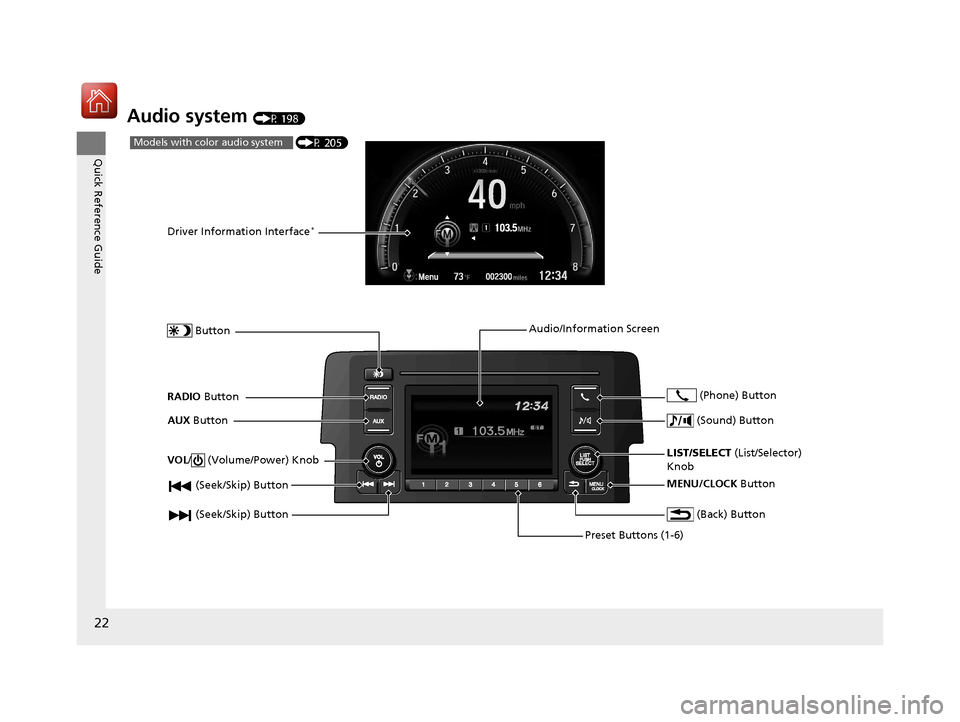
Audio system (P 198)
(P 205)Models with color audio system
(Seek/Skip) Button
RADIO Button
Driver Information Interface*
Button
AUX Button
Preset Buttons (1-6)
(Seek/Skip) Button
VOL
/ (Volume/Power) Knob
Audio/Information Screen
(Back) Button
(Sound) Button
MENU/CLOCK Button
LIST/SELECT (List/Selector)
Knob (Phone) Button
16 CIVIC 4D-31TBA6000.book 22 ページ 2015年8月31日 月曜日 午後5時56分
Page 24 of 590
23
Quick Reference Guide
Menu
(P 223)
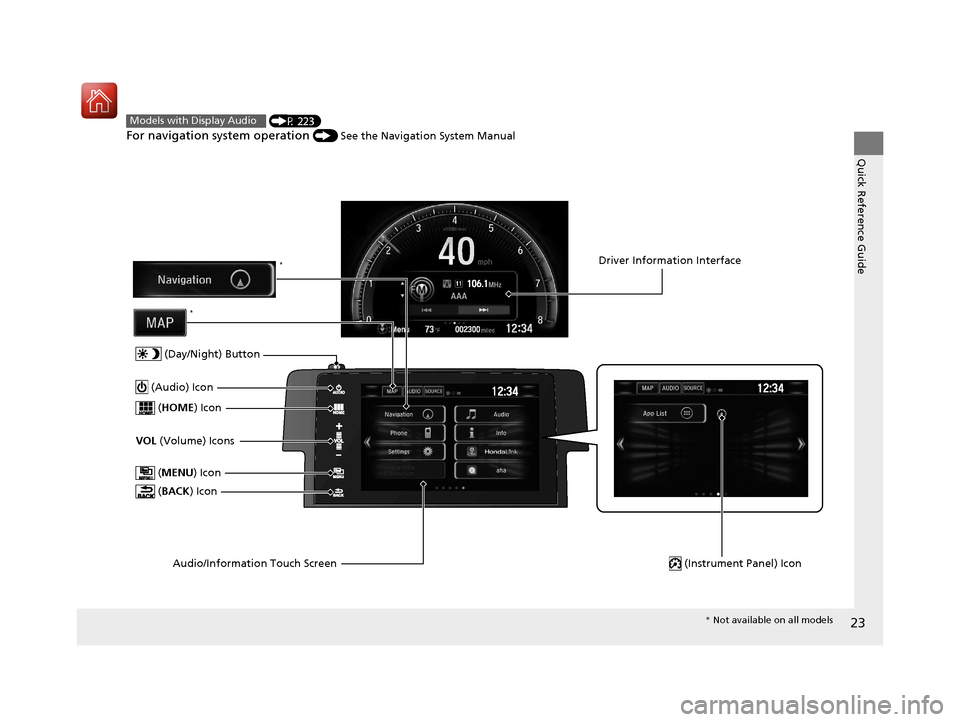
For navigation system operation () See the Navigation System Manual
Models with Display Audio
(MENU ) Icon
VOL (Volume) Icons
(
HOME ) Icon
(BACK ) Icon
Audio/Information Touch Screen
(Audio) Icon
Driver Information Interface
(Instrument Panel) Icon
(Day/Night) Button
*
*
* Not available on all models
16 CIVIC 4D-31TBA6000.book 23 ページ 2015年8月31日 月曜日 午後5時56分
Page 108 of 590
107
uuGauges and Displays uDriver Information Interface*
Continued
Instrument Panel
Driver Information Interface*
The driver information interface show s the odometer, trip meter, outside
temperature indicator, and other gauges.
It also displays important messages such as warnings and other helpful information.
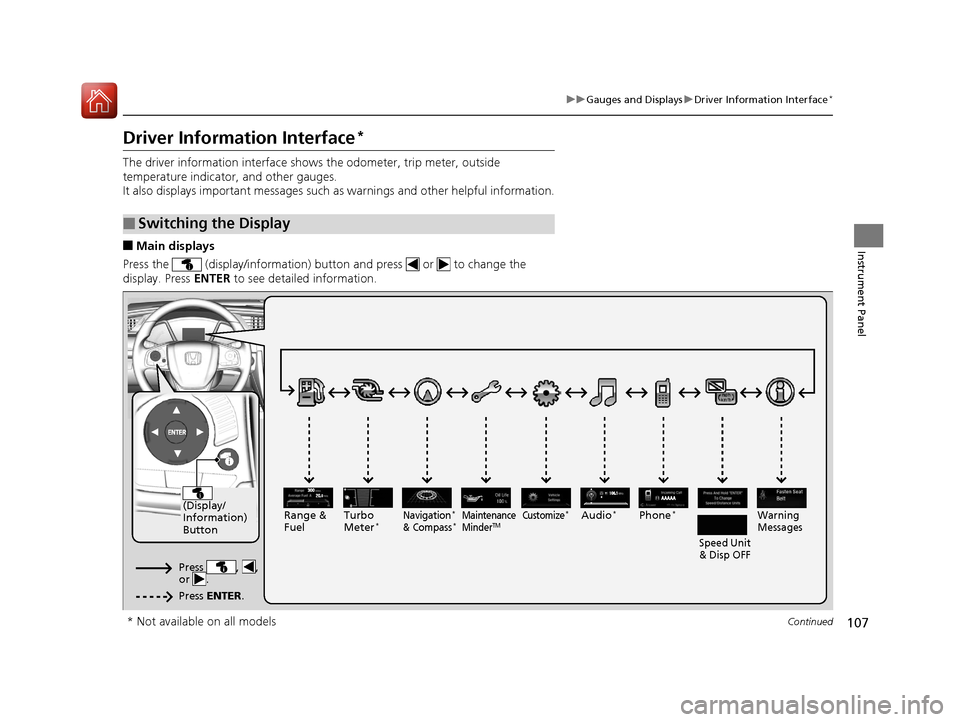
■Main displays
Press the (display/information) button and press or to change the
display. Press ENTER to see detailed information.
■Switching the Display
AAAAA
(Display/
Information)
Button
Warning
Messages
Speed Unit
& Disp OFFMaintenance
MinderTMPhone*Turbo
Meter*Audio*Navigation*
& Compass*Range &
Fuel
Press , ,
or .
Press ENTER .
Customize*
* Not available on all models
16 CIVIC 4D-31TBA6000.book 107 ページ 2015年8月31日 月曜日 午後5時56分
Page 112 of 590
Continued111
uuGauges and Displays uDriver Information Interface*
Instrument Panel
Use the driver information interface to customize certain features.
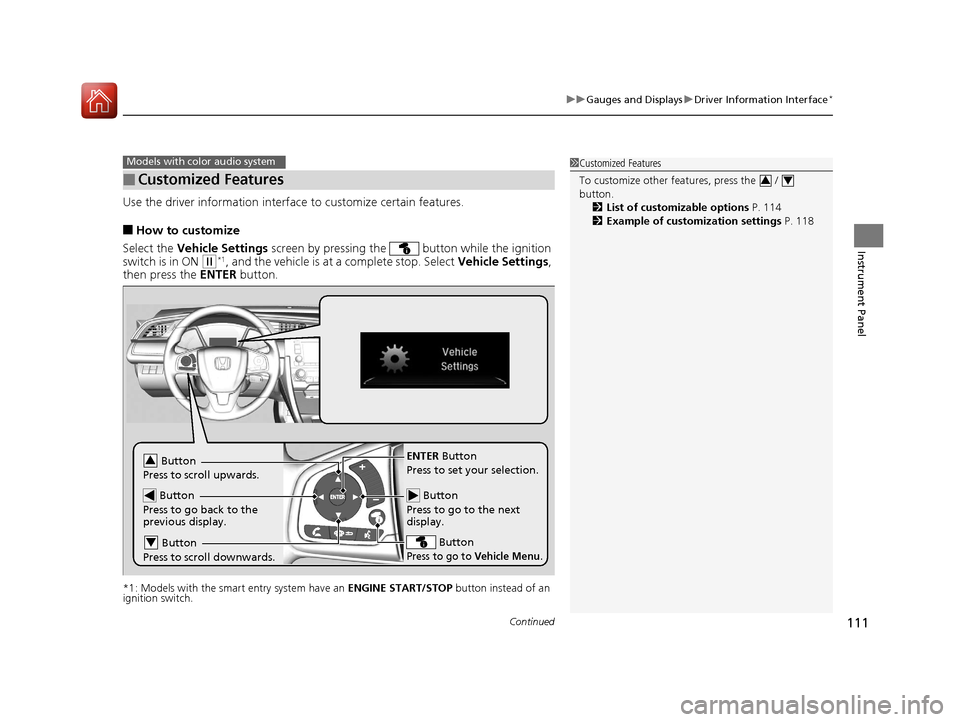
■How to customize
Select the Vehicle Settings screen by pressing the button while the ignition
switch is in ON
(w*1, and the vehicle is at a complete stop. Select Vehicle Settings,
then press the ENTER button.
*1: Models with the smart entry system have an ENGINE START/STOP button instead of an
ignition switch.
■Customized Features
Models with color audio system1 Customized Features
To customize other features, press the /
button.
2 List of customizable options P. 114
2 Example of customization settings P. 118
34
Button
Press to go to the next
display.
ENTER Button
Press to set your selection.
Button
Press to go to Vehicle Menu.
Button
Press to scroll upwards.3
Button
Press to go back to the
previous display.
Button
Press to scroll downwards.4
16 CIVIC 4D-31TBA6000.book 111 ページ 2015年8月31日 月曜日 午後5時56分
Page 123 of 590
122
Controls
Clock
Adjusting the Clock
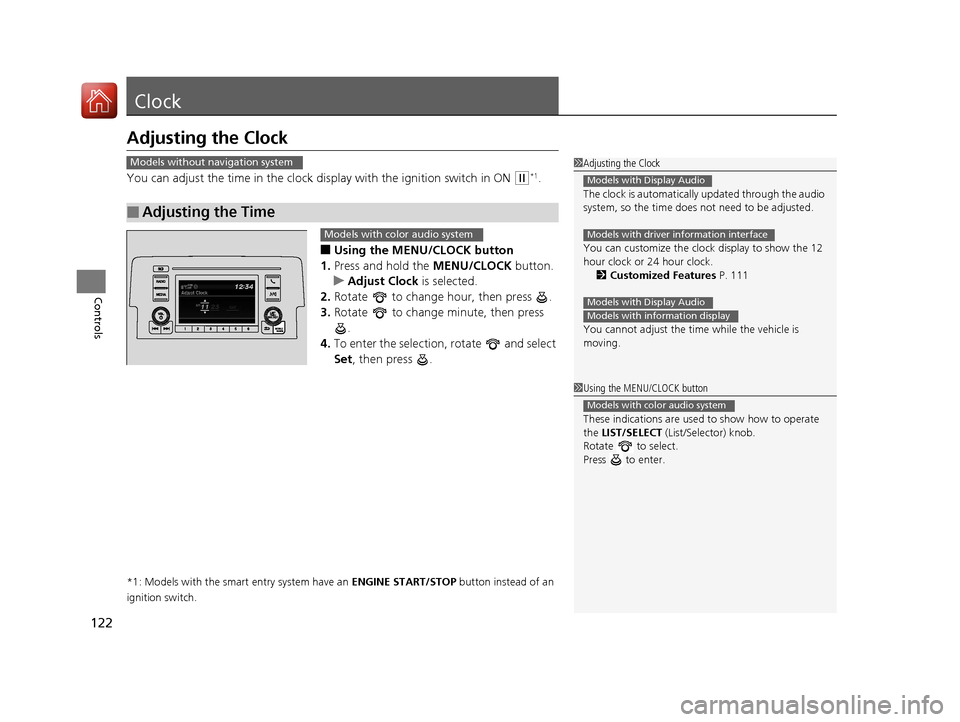
You can adjust the time in the clock display with the ignition switch in ON (w*1.
■Using the MENU/CLOCK button
1. Press and hold the MENU/CLOCK button.
u Adjust Clock is selected.
2. Rotate to change hour, then press .
3. Rotate to change minute, then press
.
4. To enter the selection, rotate and select
Set , then press .
*1: Models with the smart entry system have an ENGINE START/STOP button instead of an
ignition switch.
■Adjusting the Time
1 Adjusting the Clock
The clock is automatically updated through the audio
system, so the time does not need to be adjusted.
You can customize the clock display to show the 12
hour clock or 24 hour clock. 2 Customized Features P. 111
You cannot adjust the time while the vehicle is
moving.
Models with Display Audio
Models with driver information interface
Models with Display Audio
Models with information display
Models without navigation system
1 Using the MENU/CLOCK button
These indications are used to show how to operate
the LIST/SELECT (List/Selector) knob.
Rotate to select.
Press to enter.
Models with color audio system
Models with color audio system
16 CIVIC 4D-31TBA6000.book 122 ページ 2015年8月31日 月曜日 午後5時56分
Page 124 of 590
123
uuClock uAdjusting the Clock
Controls
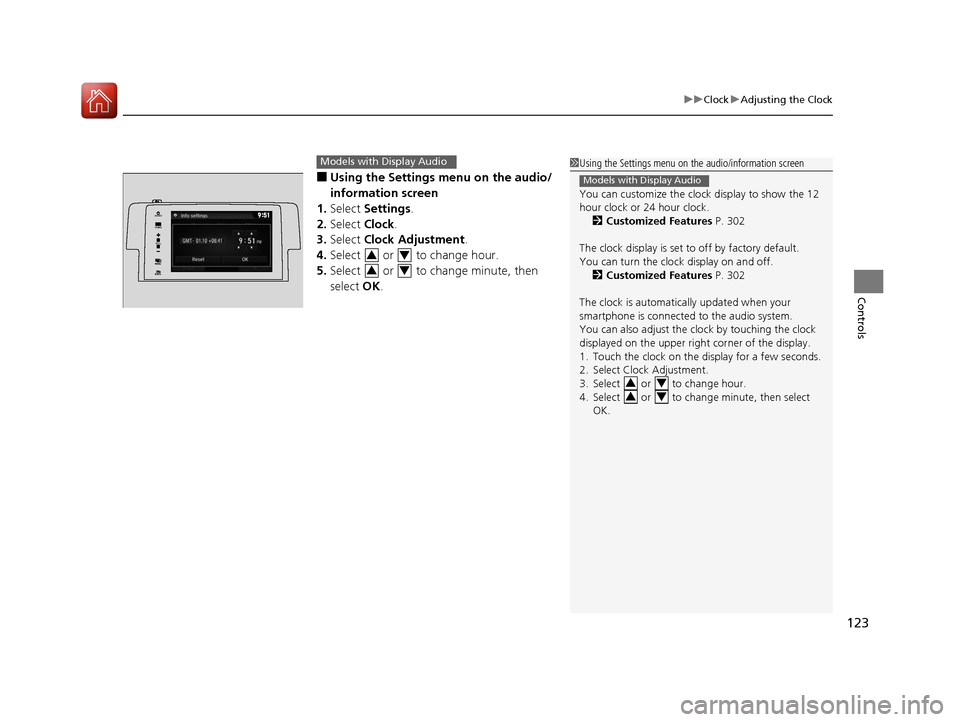
■Using the Settings menu on the audio/
information screen
1. Select Settings .
2. Select Clock.
3. Select Clock Adjustment .
4. Select or to change hour.
5. Select or to change minute, then
select OK.
Models with Display Audio1Using the Settings menu on the audio/information screen
You can customize the clock display to show the 12
hour clock or 24 hour clock.
2 Customized Features P. 302
The clock display is set to off by factory default.
You can turn the clock display on and off. 2 Customized Features P. 302
The clock is automatically updated when your
smartphone is connected to the audio system.
You can also adjust the clock by touching the clock
displayed on the upper right corner of the display.
1. Touch the clock on the display for a few seconds.
2. Select Clock Adjustment.
3. Select or to change hour.
4. Select or to change minute, then select OK.
Models with Display Audio
3434
VOL
HOME
MENUBACK
AUDIO
34
34
16 CIVIC 4D-31TBA6000.book 123 ページ 2015年8月31日 月曜日 午後5時56分
Page 129 of 590
uuLocking and Unlocking the Doors uLocking/Unlocking the Doors from the Outside
128
Controls
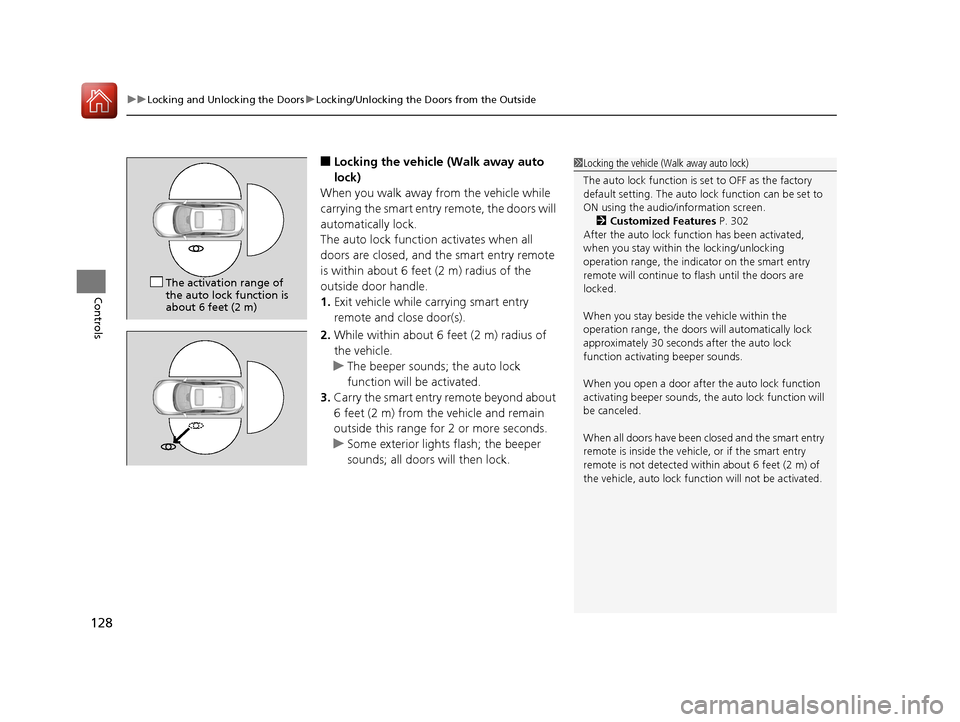
■Locking the vehicle (Walk away auto
lock)
When you walk away from the vehicle while
carrying the smart entry remote, the doors will
automatically lock.
The auto lock function activates when all
doors are closed, and the smart entry remote
is within about 6 feet (2 m) radius of the
outside door handle.
1. Exit vehicle while carrying smart entry
remote and close door(s).
2. While within about 6 feet (2 m) radius of
the vehicle.
u The beeper sounds; the auto lock
function will be activated.
3. Carry the smart entry remote beyond about
6 feet (2 m) from the vehicle and remain
outside this range fo r 2 or more seconds.
u Some exterior lights flash; the beeper
sounds; all doors will then lock.1Locking the vehicle (Walk away auto lock)
The auto lock function is set to OFF as the factory
default setting. The auto lo ck function can be set to
ON using the audio/information screen. 2 Customized Features P. 302
After the auto lock function has been activated,
when you stay within the locking/unlocking
operation range, the indicator on the smart entry
remote will continue to flash until the doors are
locked.
When you stay beside the vehicle within the
operation range, the doors wi ll automatically lock
approximately 30 seconds after the auto lock
function activating beeper sounds.
When you open a door after the auto lock function
activating beeper sounds, the auto lock function will
be canceled.
When all doors have been closed and the smart entry
remote is inside the vehicle, or if the smart entry
remote is not detected within about 6 feet (2 m) of
the vehicle, auto lock func tion will not be activated.
The activation range of
the auto lock function is
about 6 feet (2 m)
16 CIVIC 4D-31TBA6000.book 128 ページ 2015年8月31日 月曜日 午後5時56分
Page 145 of 590
144
Controls
Security System
Immobilizer System
The immobilizer system prevents a key that has not been pre-registered from
starting the engine. Each key contains el ectronic transmitters that use electronic
signals to verify the key.
Pay attention to the following when inserti ng the key into the ignition switch or
pressing the ENGINE START/STOP button:
• Do not allow objects that emit strong radio waves near the ignition switch or the
ENGINE START/STOP button.
• Make sure the key is not covered by or touching a metal object.
• Do not bring a key from anot her vehicle’s immobilizer system near the ignition
switch or the ENGINE START/STOP button.
• Do not put the key near magnetic items. Electronic devices, such as a television
set and audio system are strongly magneti c, or a key chain can become magnetic,
too.
Security System Alarm
The security system alarm activates wh en the trunk, hood or doors are forcibly
opened. The alarm does not go off if the trunk or doors are opened with the key,
remote transmitter or smart entry system.
However, the alarm goes off when a door is opened with the key, then the shift
lever is moved out of
(P (continuously variable transmission models) or the hood is
opened before the ignition switch is turned to ON (w*1.
■When the security system alarm activates
The horn sounds intermittently and all the exterior lights flash.
■To deactivate the security system alarm
Unlock the vehicle using remote transmitte r, or smart entry system. The system,
along with the horn and flashing lights, is deactivated.
*1: Models with the smart entry system have an ENGINE START/STOP button instead of an
ignition switch.
1 Immobilizer System
NOTICE
Leaving the key in the vehicl e can result in theft or
accidental movement of the vehicle.
Always take the key with you whenever you leave the
vehicle unattended. Do not alter the system or add other devices to it.
Doing so may damage the system and make your
vehicle inoperable.
1 Security System Alarm
The security alarm conti nues for a maximum of two
minutes until the security system deactivates.
16 CIVIC 4D-31TBA6000.book 144 ページ 2015年8月31日 月曜日 午後5時56分 Canadian models only: Apply and hold the brake
pedal
before
turning the vehicle on the first time
after the battery has been disconnected.
Page 152 of 590
151
Controls
Operating the Switches Around the Steering Wheel
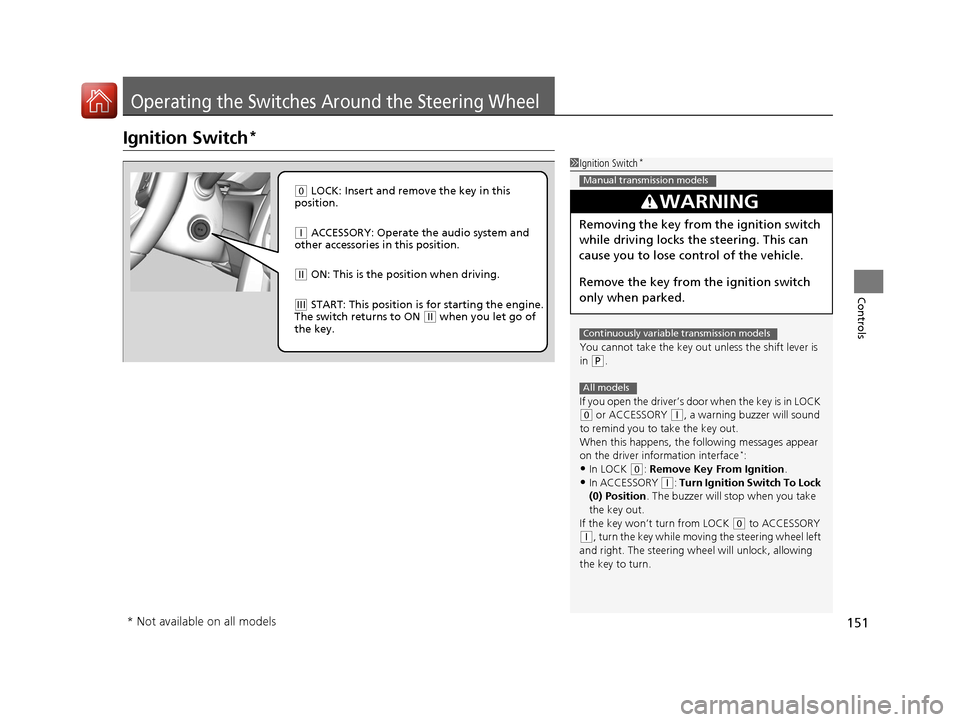
Ignition Switch*
1Ignition Switch*
You cannot take the key out unless the shift lever is
in
( P.
If you open the driver’s door when the key is in LOCK
( 0 or ACCESSORY (q, a warning buzzer will sound
to remind you to take the key out.
When this happens, the fo llowing messages appear
on the driver information interface
*:•In LOCK ( 0: Remove Key From Ignition.
•In ACCESSORY (q: Turn Ignition Switch To Lock
(0) Position . The buzzer will stop when you take
the key out.
If the key won’t turn from LOCK
( 0 to ACCESSORY
(q, turn the key while moving the steering wheel left
and right. The steering wh eel will unlock, allowing
the key to turn.
3WARNING
Removing the key from the ignition switch
while driving locks the steering. This can
cause you to lose control of the vehicle.
Remove the key from the ignition switch
only when parked.
Manual transmission models
Continuously variable transmission models
All models
( 0 LOCK: Insert and remove the key in this
position.
( q ACCESSORY: Operate the audio system and
other accessories in this position.
( w ON: This is the position when driving.
(e START: This position is for starting the engine.
The switch returns to ON ( w when you let go of
the key.
* Not available on all models
16 CIVIC 4D-31TBA6000.book 151 ページ 2015年8月31日 月曜日 午後5時56分
Page 153 of 590
152
uuOperating the Switches Around the Steering Wheel uENGINE START/STOP Button*
Controls
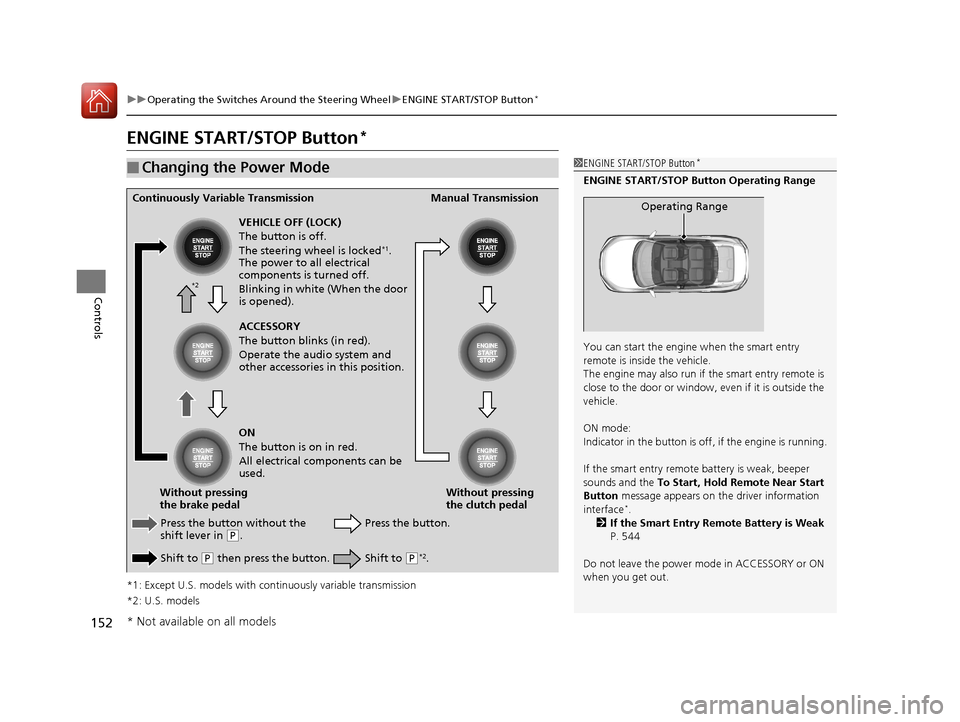
ENGINE START/STOP Button*
*1: Except U.S. models with c ontinuously variable transmission
*2: U.S. models
■Changing the Power Mode1 ENGINE START/STOP Button*
ENGINE START/STOP Button Operating Range
You can start the engine when the smart entry
remote is inside the vehicle.
The engine may also run if the smart entry remote is
close to the door or window, ev en if it is outside the
vehicle.
ON mode:
Indicator in the button is of f, if the engine is running.
If the smart entry remote battery is weak, beeper
sounds and the To Start, Hold Remote Near Start
Button message appears on th e driver information
interface
*.
2 If the Smart Entry Remote Battery is Weak
P. 544
Do not leave the power mode in ACCESSORY or ON
when you get out.
Operating RangeContinuously Variable Transmission Manual Transmission
VEHICLE OFF (LOCK)
The button is off.
The steering wheel is locked
*1.
The power to all electrical
components is turned off.
Blinking in white (When the door
is opened).
Press the button without the
shift lever in
( P.
Shift to
( P then press the button. Press the button.
Without pressing
the clutch pedal
Without pressing
the brake pedal ACCESSORY
The button blinks (in red).
Operate the audio system and
other accessories in this position.
ON
The button is on in red.
All electrical components can be
used.
Shift to (P*2.
*2
* Not available on all models
16 CIVIC 4D-31TBA6000.book 152 ページ 2015年8月31日 月曜日 午後5時56分