light HONDA CIVIC 2016 10.G User Guide
[x] Cancel search | Manufacturer: HONDA, Model Year: 2016, Model line: CIVIC, Model: HONDA CIVIC 2016 10.GPages: 590
Page 30 of 590
29
Quick Reference Guide
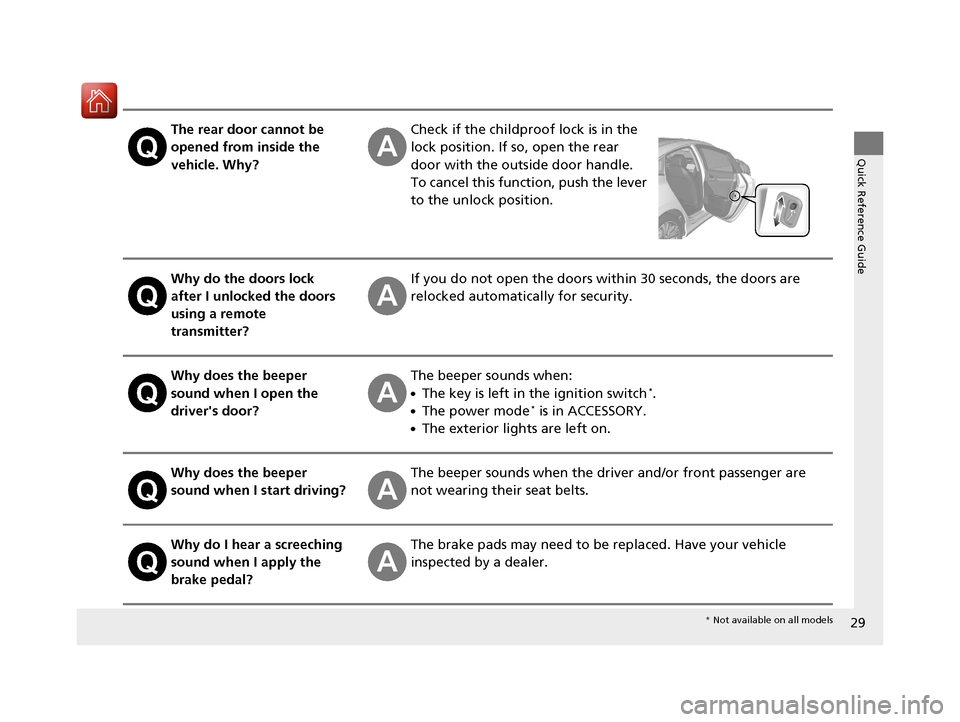
The rear door cannot be
opened from inside the
vehicle. Why?Check if the childproof lock is in the
lock position. If so, open the rear
door with the outside door handle.
To cancel this function, push the lever
to the unlock position.
Why do the doors lock
after I unlocked the doors
using a remote
transmitter?If you do not open the doors within 30 seconds, the doors are
relocked automatically for security.
Why does the beeper
sound when I open the
driver's door?The beeper sounds when:
●The key is left in the ignition switch*.
●The power mode* is in ACCESSORY.
●The exterior lights are left on.
Why does the beeper
sound when I start driving?The beeper sounds when the driver and/or front passenger are
not wearing their seat belts.
Why do I hear a screeching
sound when I apply the
brake pedal?The brake pads may need to be replaced. Have your vehicle
inspected by a dealer.
* Not available on all models
16 CIVIC 4D-31TBA6000.book 29 ページ 2015年8月31日 月曜日 午後5時56分
Page 55 of 590
54
uuAirbags uSide Curtain Airbags
Safe Driving
■When side curtain airbags deploy in a frontal collision
One or both side curtain airbags may infl ate in a moderate-to-severe angled frontal
collision.
In this case, the side curtain airbags will deploy slightly after the front airbags.
16 CIVIC 4D-31TBA6000.book 54 ページ 2015年8月31日 月曜日 午後5時56分
Page 57 of 590
uuAirbags uAirbag System Indicators
56
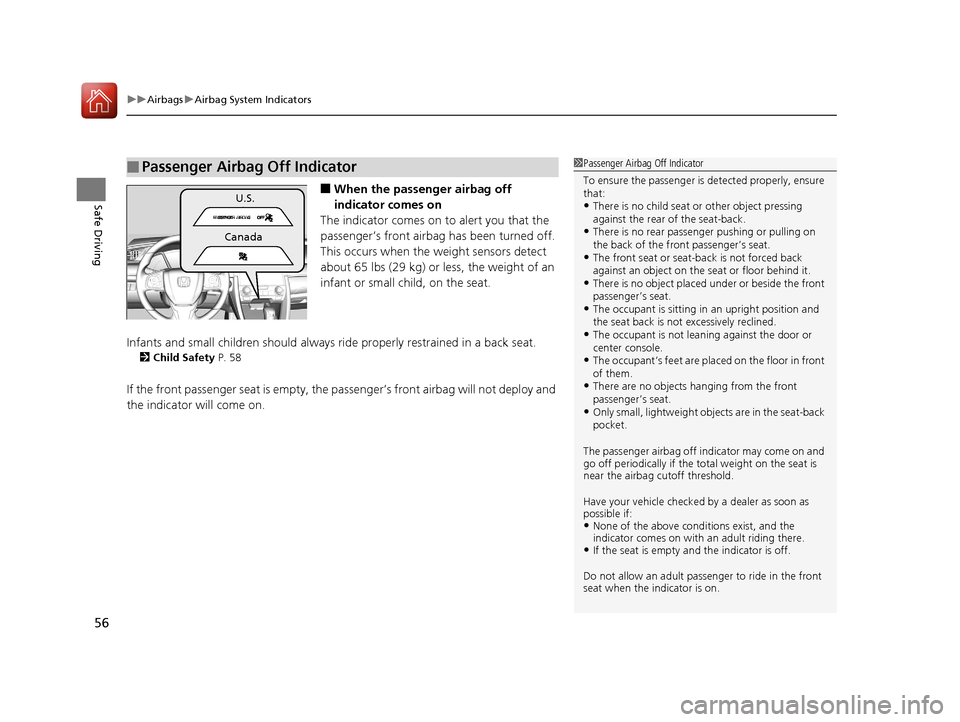
Safe Driving■When the passen ger airbag off
indicator comes on
The indicator comes on to alert you that the
passenger’s front airbag has been turned off.
This occurs when the weight sensors detect
about 65 lbs (29 kg) or less, the weight of an
infant or small child, on the seat.
Infants and small children should always ri de properly restrained in a back seat.
2Child Safety P. 58
If the front passenger seat is empty, the passenger’s front airbag will not deploy and
the indicator will come on.
■Passenger Airbag Off Indicator1Passenger Airbag Off Indicator
To ensure the passenger is detected properly, ensure
that:
•There is no child seat or other object pressing
against the rear of the seat-back.
•There is no rear passenger pushing or pulling on
the back of the front passenger’s seat.
•The front seat or seat-b ack is not forced back
against an object on the s eat or floor behind it.
•There is no object placed under or beside the front
passenger’s seat.
•The occupant is sitting in an upright position and
the seat back is not excessively reclined.
•The occupant is not leaning against the door or
center console.
•The occupant’s feet are placed on the floor in front
of them.
•There are no objects ha nging from the front
passenger’s seat.
•Only small, lightweight objects are in the seat-back
pocket.
The passenger airbag off indicator may come on and
go off periodically if the tota l weight on the seat is
near the airbag cutoff threshold.
Have your vehicle checked by a dealer as soon as
possible if:
•None of the above conditions exist, and the
indicator comes on with an adult riding there.
•If the seat is empty a nd the indicator is off.
Do not allow an adult passe nger to ride in the front
seat when the indicator is on.
U.S.
Canada
16 CIVIC 4D-31TBA6000.book 56 ページ 2015年8月31日 月曜日 午後5時56分
Page 83 of 590
82
uuIndicators u
Instrument Panel
*1:Models with the smart entry system have an ENGINE START/STOP button instead of an ignition switch.
IndicatorNameOn/BlinkingExplanationMessage*
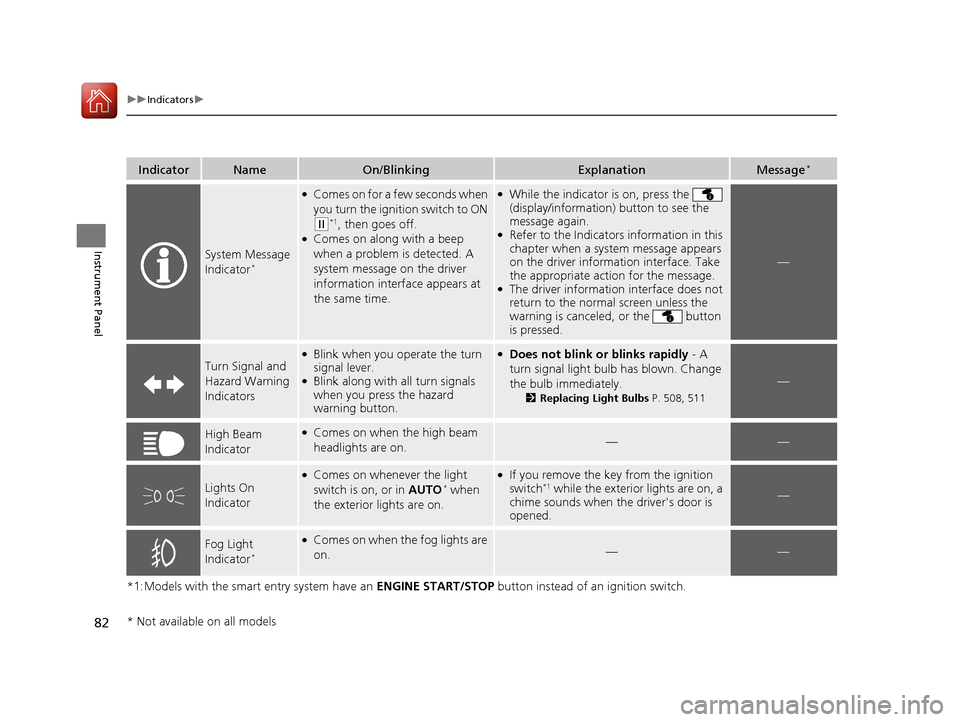
System Message
Indicator*
●Comes on for a few seconds when
you turn the ignition switch to ON
(w*1, then goes off.●Comes on along with a beep
when a problem is detected. A
system message on the driver
information interface appears at
the same time.
●While the indicator is on, press the
(display/information) button to see the
message again.
●Refer to the Indicators information in this
chapter when a system message appears
on the driver information interface. Take
the appropriate action for the message.
●The driver information interface does not
return to the normal screen unless the
warning is canceled, or the button
is pressed.
—
Turn Signal and
Hazard Warning
Indicators
●Blink when you operate the turn
signal lever.
●Blink along with all turn signals
when you press the hazard
warning button.
●Does not blink or blinks rapidly - A
turn signal light bulb has blown. Change
the bulb immediately.
2 Replacing Light Bulbs P. 508, 511
—
High Beam
Indicator●Comes on when the high beam
headlights are on.——
Lights On
Indicator
●Comes on whenever the light
switch is on, or in AUTO* when
the exterior lights are on.
●If you remove the key from the ignition
switch*1 while the exterior lights are on, a
chime sounds when the driver's door is
opened.—
Fog Light
Indicator*
●Comes on when the fog lights are
on.——
* Not available on all models
16 CIVIC 4D-31TBA6000.book 82 ページ 2015年8月31日 月曜日 午後5時56分
Page 98 of 590
97
uuIndicators uDriver Information Interface Wa rning and Information Messages*
Continued
Instrument Panel
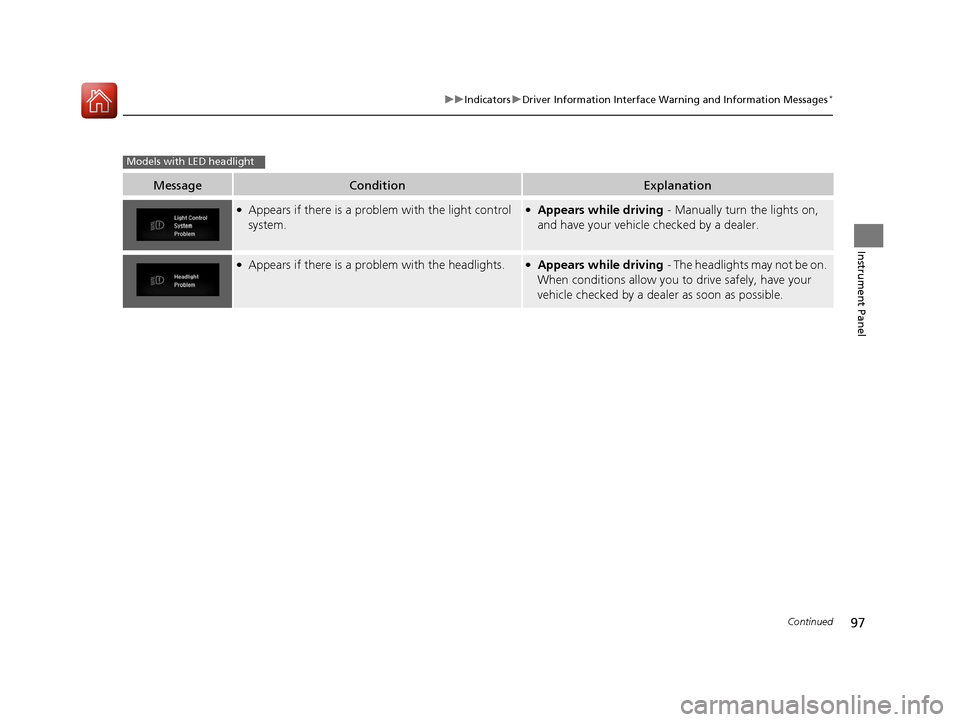
MessageConditionExplanation
●Appears if there is a problem with the light control
system.●Appears while driving - Manually turn the lights on,
and have your vehicle checked by a dealer.
●Appears if there is a pr oblem with the headlights.●Appears while driving - The headlights may not be on.
When conditions allow you to drive safely, have your
vehicle checked by a deal er as soon as possible.
Models with LED headlight
16 CIVIC 4D-31TBA6000.book 97 ページ 2015年8月31日 月曜日 午後5時56分
Page 113 of 590
112
uuGauges and Displays uDriver Information Interface*
Instrument Panel
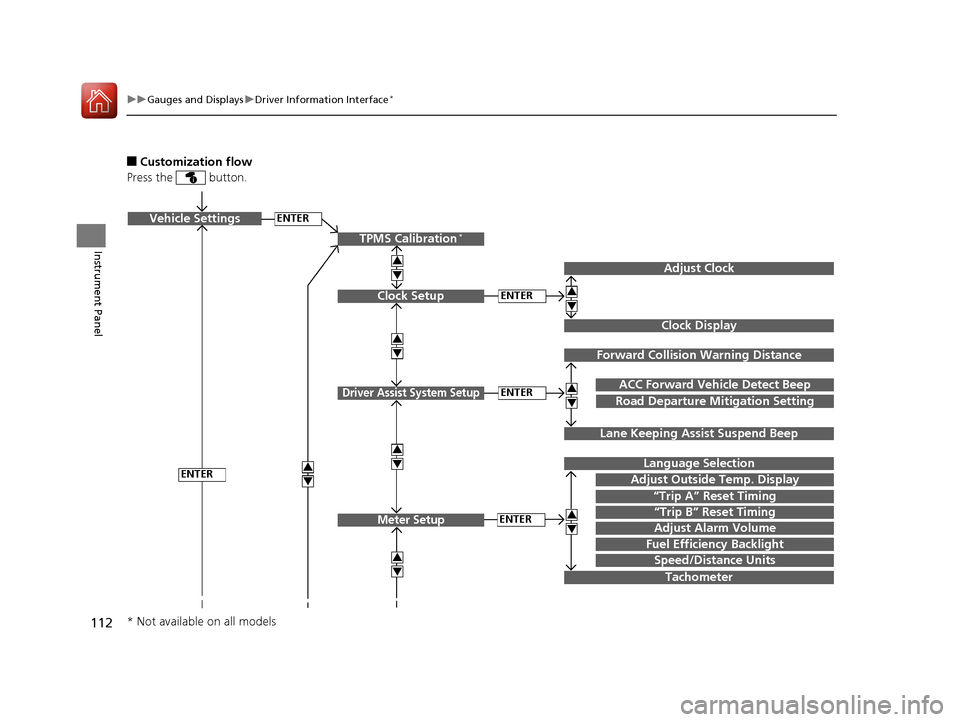
■Customization flow
Press the button.
ENTERVehicle Settings
“Trip A” Reset Timing
Language Selection
Adjust Outside Temp. Display
3
4
3
4
TPMS Calibration*
ENTER
“Trip B” Reset Timing
Fuel Efficiency Backlight
3
4
ACC Forward Vehicle Detect Beep
3
4Tachometer
ENTER
Forward Collision Warning Distance
3
4
3
4
Lane Keeping Assi st Suspend Beep
Road Departure Mi tigation Setting
Adjust Alarm Volume
Speed/Distance Units
Adjust Clock
3
4
Clock Display
3
4
ENTER
ENTERClock Setup
Driver Assist System Setup
Meter Setup
* Not available on all models
16 CIVIC 4D-31TBA6000.book 112 ページ 2015年8月31日 月曜日 午後5時56分
Page 114 of 590
113
uuGauges and Displays uDriver Information Interface*
Continued
Instrument Panel
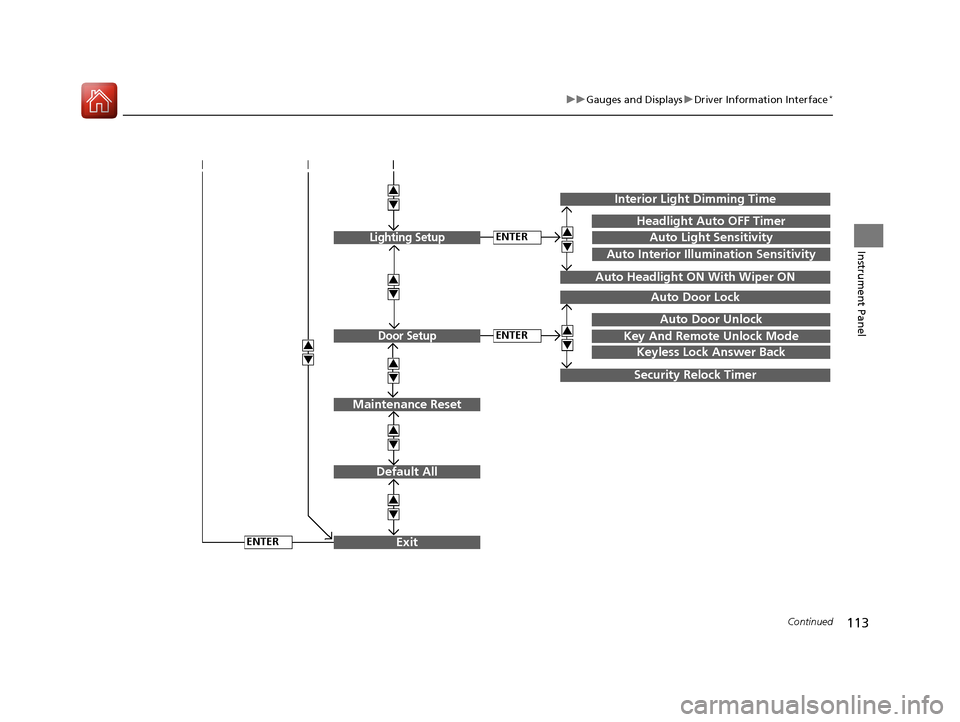
Exit
3
4
3
4
3
4
Maintenance Reset
Default All
3
4
ENTER
3
4
3
4
Key And Remote Unlock Mode
Auto Door Lock
Auto Door Unlock
Keyless Lock Answer Back
Security Relock Timer
Interior Light Dimming Time
Headlight Auto OFF Timer
Auto Light Sensitivity3
4
3
4
Auto Headlight ON With Wiper ON
ENTER
ENTER
Auto Interior Illumination Sensitivity
Lighting Setup
Door Setup
16 CIVIC 4D-31TBA6000.book 113 ページ 2015年8月31日 月曜日 午後5時56分
Page 116 of 590
115
uuGauges and Displays uDriver Information Interface*
Continued
Instrument Panel
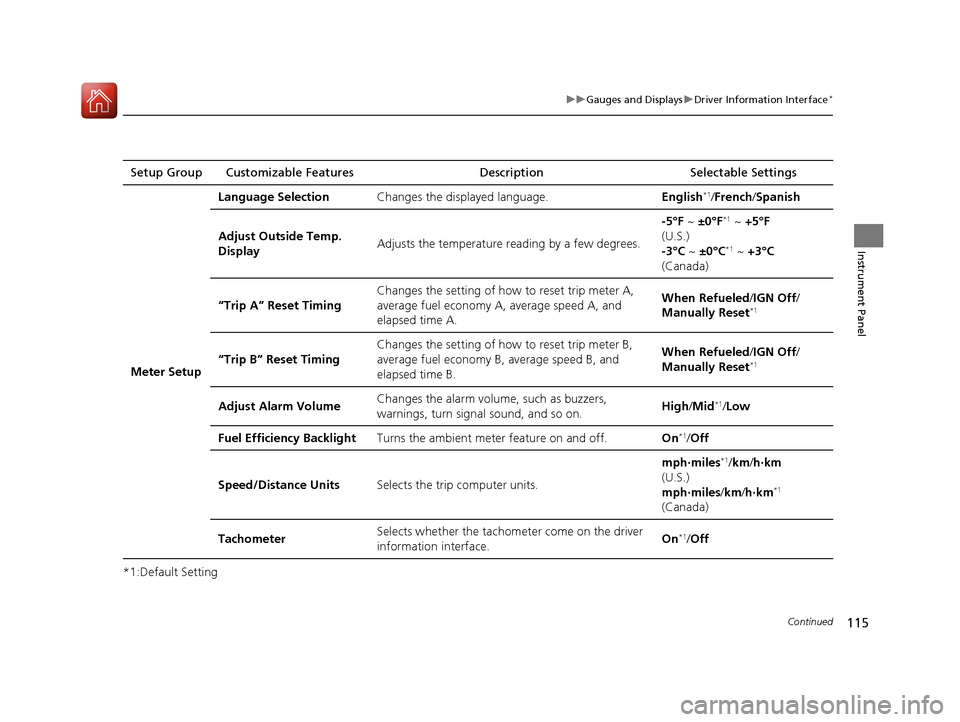
*1:Default SettingSetup Group Customizable Features
Description Selectable Settings
Meter Setup Language Selection
Changes the displayed language. English
*1/French /Spanish
Adjust Outside Temp.
Display Adjusts the temperature r
eading by a few degrees. -5°F ~
±0°F
*1 ~ +5°F
(U.S.)
-3°C ~ ±0°C
*1 ~ +3°C
(Canada)
“Trip A” Reset Timing Changes the setting of how to reset trip meter A,
average fuel economy A,
average speed A, and
elapsed time A. When Refueled
/IGN Off /
Manually Reset
*1
“Trip B” Reset Timing Changes the setting of ho
w to reset trip meter B,
average fuel economy B, average speed B, and
elapsed time B. When Refueled
/IGN Off /
Manually Reset*1
Adjust Alarm Volume Changes the alarm volu
me, such as buzzers,
warnings, turn signal sound, and so on. High
/Mid*1/Low
Fuel Efficiency Backlight Turns the ambient meter feature on and off. On
*1/Off
Speed/Distance Units Selects the trip computer units. mph∙miles
*1/
km/ h∙km
(U.S.)
mph∙miles /km/ h∙km
*1
(Canada)
Tachometer Selects whether the tachom
eter come on the driver
information interface. On
*1/
Off
16 CIVIC 4D-31TBA6000.book 115 ページ 2015年8月31日 月曜日 午後5時56分
Page 117 of 590
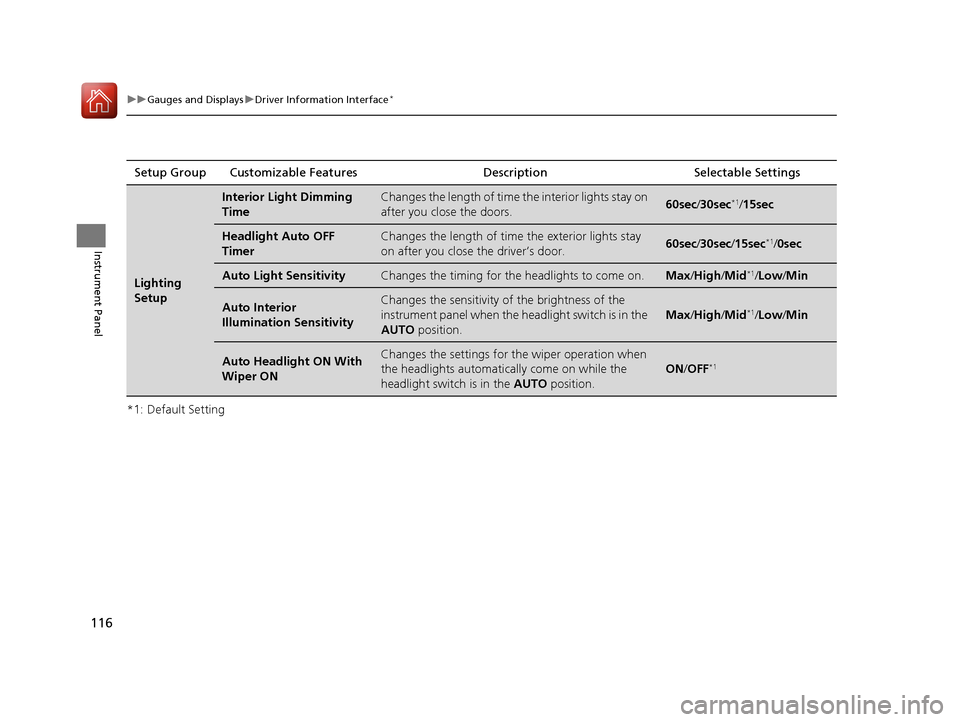
116
uuGauges and Displays uDriver Information Interface*
Instrument Panel
*1: Default SettingSetup Group Customizable Features Description Selectable Settings
Lighting
Setup
Interior Light Dimming
TimeChanges the length of time the interior lights stay on
after you close the doors.60sec
/30sec*1/15sec
Headlight Auto OFF
TimerChanges the length of time the exterior lights stay
on after you close the driver’s door.60sec /30sec /15sec*1/ 0sec
Auto Light SensitivityChanges the timing for the headlights to come on.Max/High /Mid*1/Low/ Min
Auto Interior
Illumination SensitivityChanges the sensitivity of the brightness of the
instrument panel when the headlight switch is in the
AUTO position.
Max/High /Mid*1/Low/ Min
Auto Headlight ON With
Wiper ONChanges the settings for the wiper operation when
the headlights automatically come on while the
headlight switch is in the AUTO position.
ON/OFF*1
16 CIVIC 4D-31TBA6000.book 116 ページ 2015年8月31日 月曜日 午後5時56分
Page 118 of 590
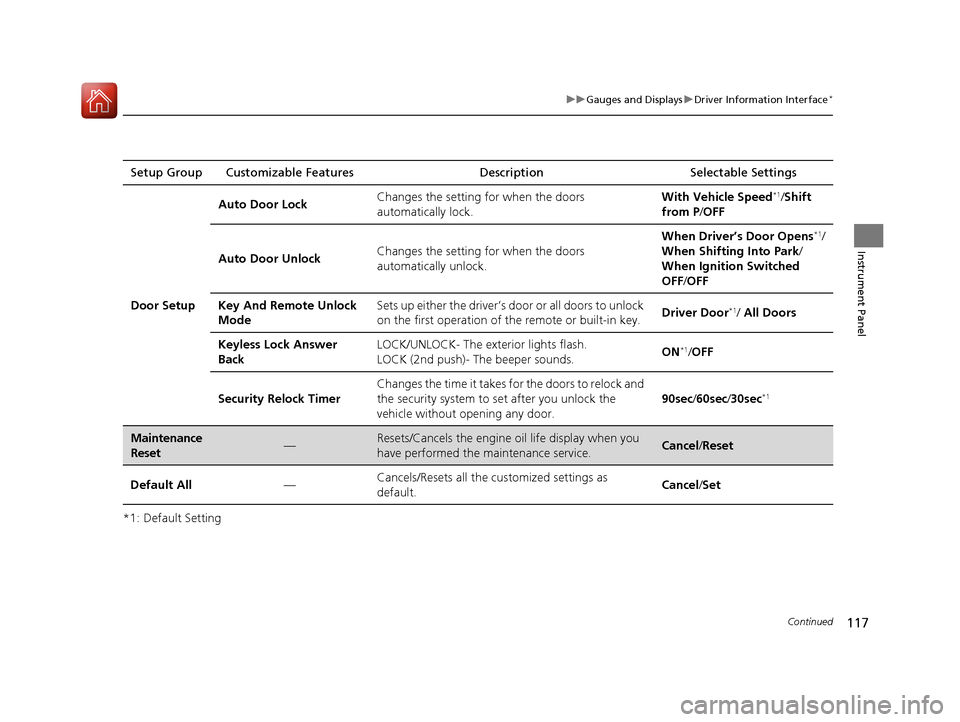
117
uuGauges and Displays uDriver Information Interface*
Continued
Instrument Panel
*1: Default SettingSetup Group Customizable Features
Description Selectable Settings
Door Setup Auto Door Lock
Changes the setting for when the doors
automatically lock. With Vehicle Speed
*1/
Shift
from P /OFF
Auto Door Unlock Changes the setting for when the doors
automatically unlock. When Driver’s Door Opens
*1/
When Shifting Into Park /
When Ignition Switched
OFF /OFF
Key And Remote Unlock
Mode Sets up either the driver’s door or all doors to unlock
on the first operation of the remote or built-in key.
Driver Door
*1/
All Doors
Keyless Lock Answer
Back LOCK/UNLOCK- The exterior lights flash.
LOCK (2nd push)- The beeper sounds.
ON
*1/
OFF
Security Relock Timer Changes the time it takes for the doors to relock and
the security system to set after you unlock the
vehicle without opening any door.
90sec
/60sec /30sec
*1
Maintenance
Reset—Resets/Cancels the engine oil life display when you
have performed the maintenance service. Cancel /Reset
Default All —Cancels/Resets all the customized settings as
default. Cancel
/Set
16 CIVIC 4D-31TBA6000.book 117 ページ 2015年8月31日 月曜日 午後5時56分