maintenance HONDA CIVIC 2016 10.G User Guide
[x] Cancel search | Manufacturer: HONDA, Model Year: 2016, Model line: CIVIC, Model: HONDA CIVIC 2016 10.GPages: 590
Page 106 of 590
Continued105
uuGauges and Displays uInformation Display*
Instrument Panel
Shows the estimated average fuel economy of each trip meter in mpg or l/100 km.
The display is updated at set intervals. Wh en a trip meter is reset, the average fuel
economy is also reset.
Shows the instant fuel economy as a bar graph in mpg or l/100km.
Shows the remaining oil life and Maintenance Minder
TM.
2 Maintenance MinderTM P. 479
Shows the estimated distance you can travel on the remaining fuel. This distance is
estimated from the fuel economy of your previous trips.
■Average Fuel Economy
■Instant Fuel Economy Gauge
■Engine Oil Life
■Range
1Instant Fuel Economy Gauge
Press and hold the km/mile change knob to switch
the measurement.
16 CIVIC 4D-31TBA6000.book 105 ページ 2015年8月31日 月曜日 午後5時56分
Page 108 of 590
107
uuGauges and Displays uDriver Information Interface*
Continued
Instrument Panel
Driver Information Interface*
The driver information interface show s the odometer, trip meter, outside
temperature indicator, and other gauges.
It also displays important messages such as warnings and other helpful information.
■Main displays
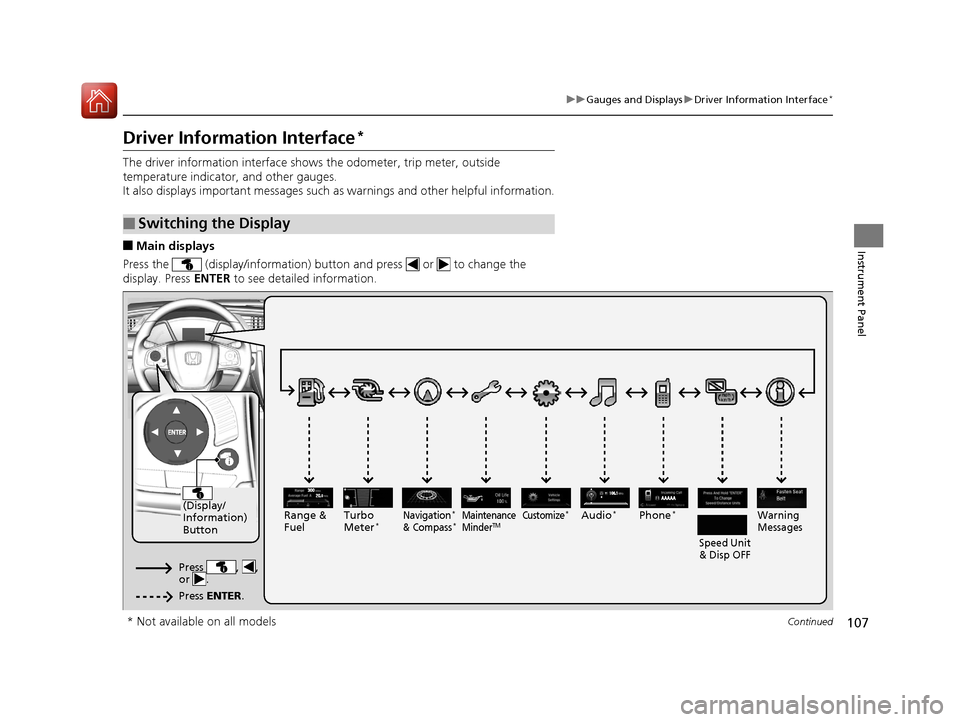
Press the (display/information) button and press or to change the
display. Press ENTER to see detailed information.
■Switching the Display
AAAAA
(Display/
Information)
Button
Warning
Messages
Speed Unit
& Disp OFFMaintenance
MinderTMPhone*Turbo
Meter*Audio*Navigation*
& Compass*Range &
Fuel
Press , ,
or .
Press ENTER .
Customize*
* Not available on all models
16 CIVIC 4D-31TBA6000.book 107 ページ 2015年8月31日 月曜日 午後5時56分
Page 110 of 590
Continued109
uuGauges and Displays uDriver Information Interface*
Instrument Panel
Shows the estimated average fuel economy of each trip meter in mpg or l/100 km.
The display is updated at set intervals. Wh en a trip meter is reset, the average fuel
economy is also reset.
Shows the estimated distance you can travel on the remaining fuel. This distance is
estimated from the fuel economy of your previous trips.
Shows the time elapsed since Trip A or Trip B was reset.
Shows the average speed in mph or km/h since Trip A or Trip B was reset.
Shows the remaining oil life and Maintenance Minder
TM.
2 Maintenance MinderTM P. 479
■Average Fuel Economy
■Range
■Elapsed Time
■Average Speed
■Engine Oil Life
1Average Fuel Economy
You can change when to reset the average fuel
economy.
2 Customized Features P. 111
16 CIVIC 4D-31TBA6000.book 109 ページ 2015年8月31日 月曜日 午後5時56分
Page 114 of 590
113
uuGauges and Displays uDriver Information Interface*
Continued
Instrument Panel
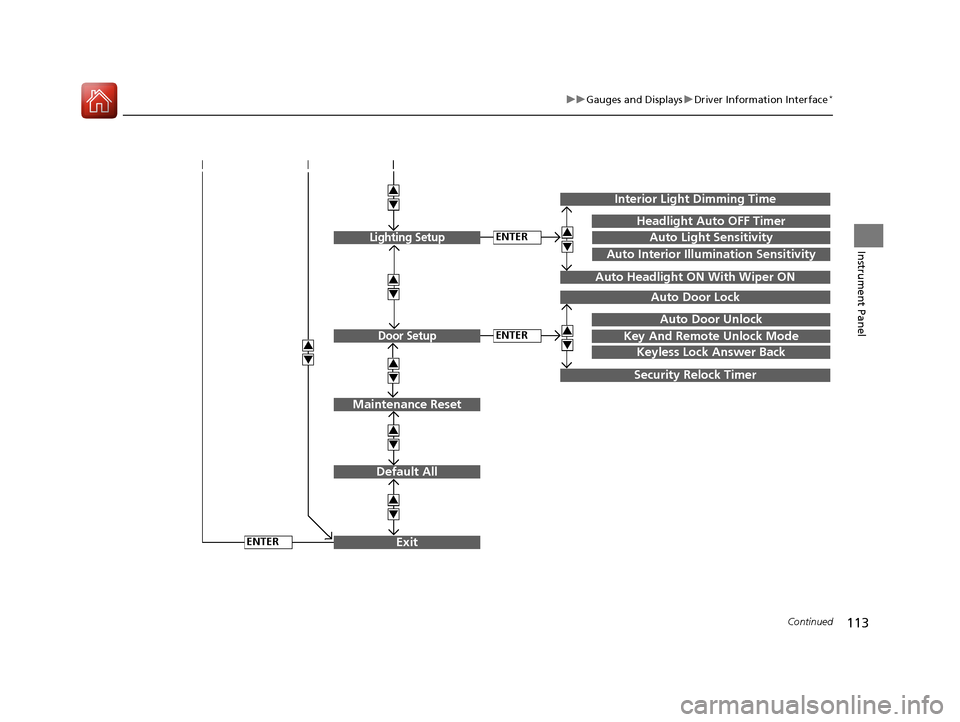
Exit
3
4
3
4
3
4
Maintenance Reset
Default All
3
4
ENTER
3
4
3
4
Key And Remote Unlock Mode
Auto Door Lock
Auto Door Unlock
Keyless Lock Answer Back
Security Relock Timer
Interior Light Dimming Time
Headlight Auto OFF Timer
Auto Light Sensitivity3
4
3
4
Auto Headlight ON With Wiper ON
ENTER
ENTER
Auto Interior Illumination Sensitivity
Lighting Setup
Door Setup
16 CIVIC 4D-31TBA6000.book 113 ページ 2015年8月31日 月曜日 午後5時56分
Page 118 of 590
117
uuGauges and Displays uDriver Information Interface*
Continued
Instrument Panel
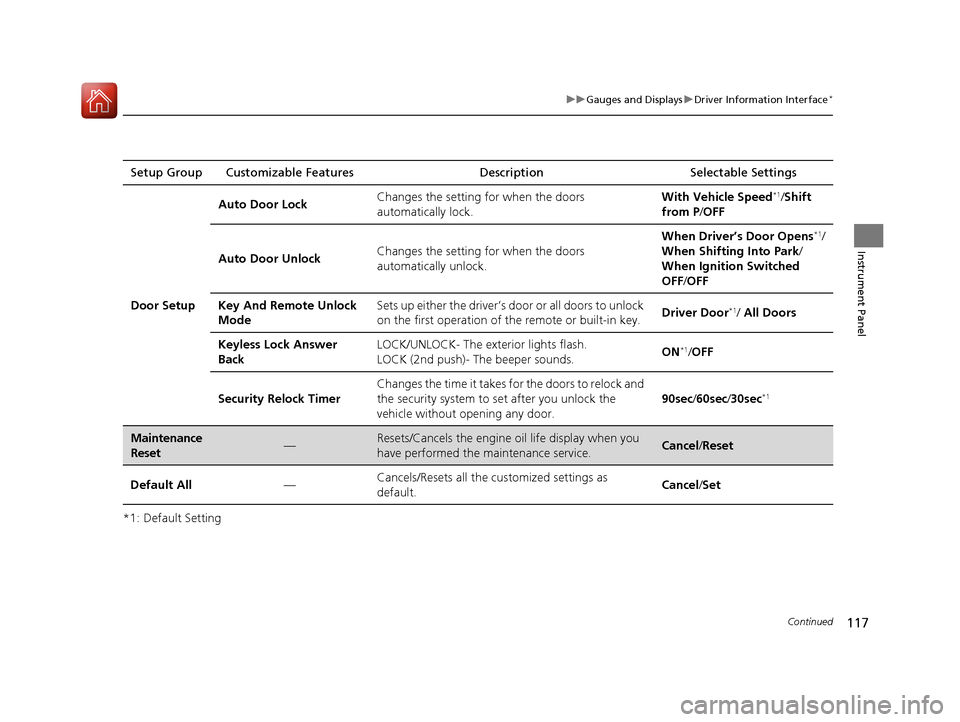
*1: Default SettingSetup Group Customizable Features
Description Selectable Settings
Door Setup Auto Door Lock
Changes the setting for when the doors
automatically lock. With Vehicle Speed
*1/
Shift
from P /OFF
Auto Door Unlock Changes the setting for when the doors
automatically unlock. When Driver’s Door Opens
*1/
When Shifting Into Park /
When Ignition Switched
OFF /OFF
Key And Remote Unlock
Mode Sets up either the driver’s door or all doors to unlock
on the first operation of the remote or built-in key.
Driver Door
*1/
All Doors
Keyless Lock Answer
Back LOCK/UNLOCK- The exterior lights flash.
LOCK (2nd push)- The beeper sounds.
ON
*1/
OFF
Security Relock Timer Changes the time it takes for the doors to relock and
the security system to set after you unlock the
vehicle without opening any door.
90sec
/60sec /30sec
*1
Maintenance
Reset—Resets/Cancels the engine oil life display when you
have performed the maintenance service. Cancel /Reset
Default All —Cancels/Resets all the customized settings as
default. Cancel
/Set
16 CIVIC 4D-31TBA6000.book 117 ページ 2015年8月31日 月曜日 午後5時56分
Page 295 of 590
294
uuAudio Error Messages uPandora®*
Features
Pandora ®*
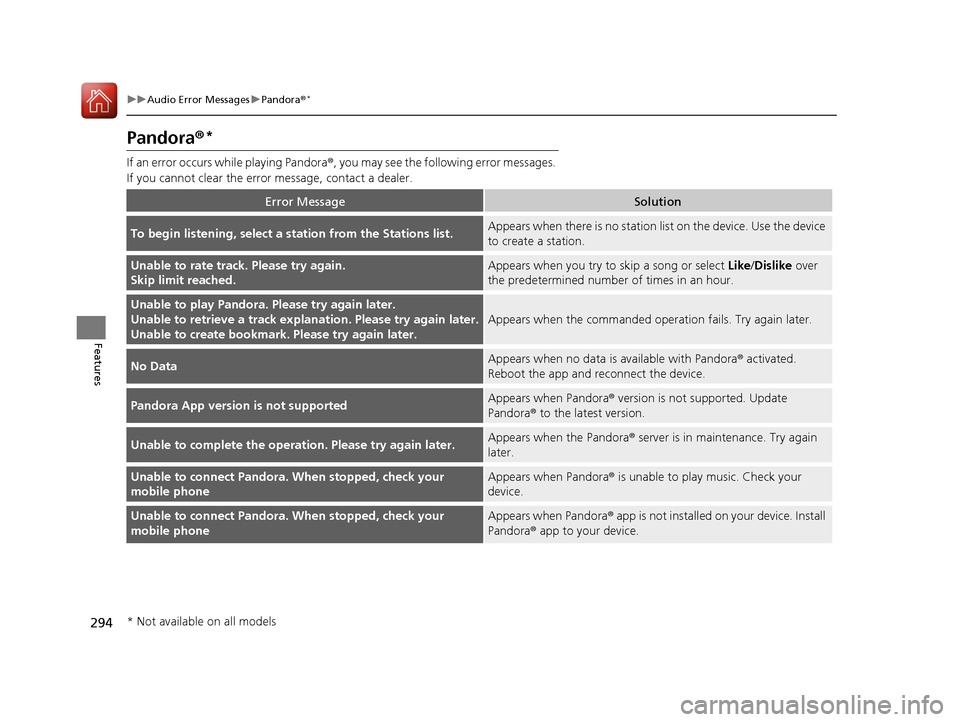
If an error occurs while playing Pandora ®, you may see the following error messages.
If you cannot clear the error message, contact a dealer.
Error MessageSolution
To begin listening, select a st ation from the Stations list.Appears when there is no station lis t on the device. Use the device
to create a station.
Unable to rate track. Please try again.
Skip limit reached.Appears when you try to skip a song or select Like/Dislike over
the predetermined number of times in an hour.
Unable to play Pandora. Please try again later.
Unable to retrieve a track explan ation. Please try again later.
Unable to create bookmark. Please try again later.
Appears when the commanded oper ation fails. Try again later.
No DataAppears when no data is available with Pandora® activated.
Reboot the app and reconnect the device.
Pandora App version is not supportedAppears when Pandora ® version is not supported. Update
Pandora® to the latest version.
Unable to complete the operat ion. Please try again later.Appears when the Pandora® server is in maintenance. Try again
later.
Unable to connect Pandora. When stopped, check your
mobile phoneAppears when Pandora ® is unable to play music. Check your
device.
Unable to connect Pandora. When stopped, check your
mobile phoneAppears when Pandora ® app is not installed on your device. Install
Pandora® app to your device.
* Not available on all models
16 CIVIC 4D-31TBA6000.book 294 ページ 2015年8月31日 月曜日 午後5時56分
Page 300 of 590
299
uuGeneral Information on the Audio System uLegal Information on Apple CarPlay/Android Auto
Features
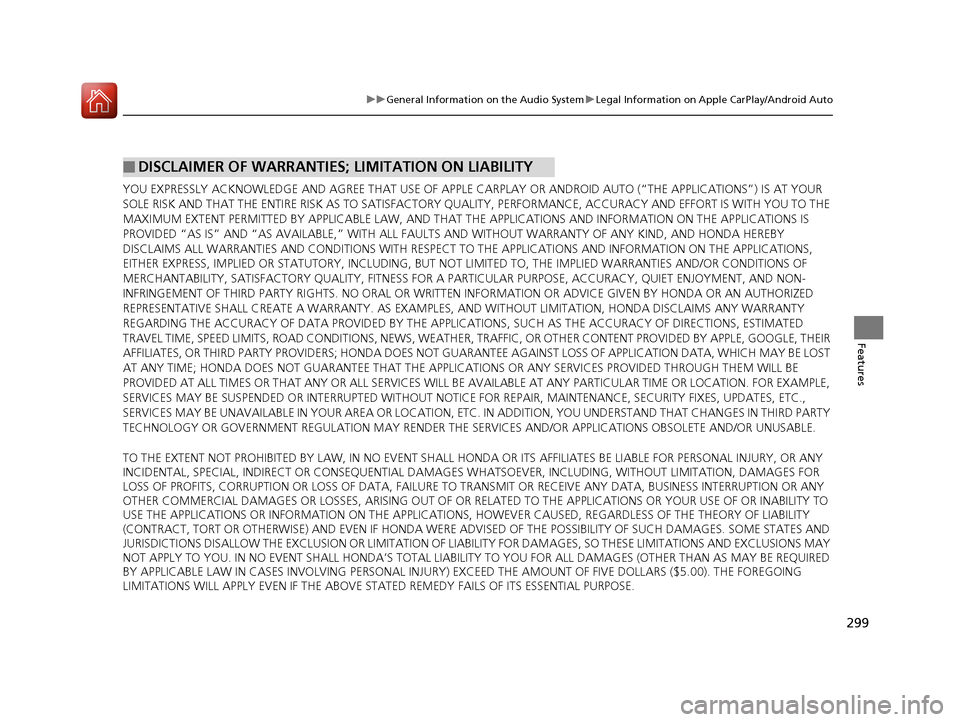
YOU EXPRESSLY ACKNOWLEDGE AND AGREE THAT USE OF APPLE CARPLAY OR ANDROID AUTO (“THE APPLICATIONS”) IS AT YOUR
SOLE RISK AND THAT THE ENTIRE RISK AS TO SATISFACTORY Q UALITY, PERFORMANCE, ACCURACY AND EFFORT IS WITH YOU TO THE
MAXIMUM EXTENT PERMITTED BY APPLICABLE LAW, AND THAT TH E APPLICATIONS AND INFORMATION ON THE APPLICATIONS IS
PROVIDED “AS IS” AND “AS AVAILABLE,” WITH ALL FAUL TS AND WITHOUT WARRANTY OF ANY KIND, AND HONDA HEREBY
DISCLAIMS ALL WARRANTIES AND CONDITIONS WITH RESPECT TO THE APPLICATIONS AND INFORMATION ON THE APPLICATIONS,
EITHER EXPRESS, IMPLIED OR STATUTORY, INCLUDING, BUT NOT LIMITED TO, THE IMPLIED WARRANTIES AND/OR CONDITIONS OF
MERCHANTABILITY, SATISFACTORY QUALITY, FITNESS FOR A PA RTICULAR PURPOSE, ACCURACY, QUIET ENJOYMENT, AND NON-
INFRINGEMENT OF THIRD PARTY RIGHTS. NO ORAL OR WRITTEN INFORMATION OR ADVICE GIVEN BY HONDA OR AN AUTHORIZED
REPRESENTATIVE SHALL CREATE A WARRANTY. AS EXAMPLES, AND WITHOUT LIMITATION, HONDA DISCLAIMS ANY WARRANTY
REGARDING THE ACCURACY OF DATA PROVIDED BY THE APPLI CATIONS, SUCH AS THE ACCURACY OF DIRECTIONS, ESTIMATED
TRAVEL TIME, SPEED LIMITS, ROAD CONDITIONS, NEWS, WEATHER, TRAF FIC, OR OTHER CONTENT PROVIDED BY APPLE, GOOGLE, THEIR
AFFILIATES, OR THIRD PARTY PROVIDERS; HONDA DOES NOT GUARANTEE AGAINST LO SS OF APPLICATION DATA, WHICH MAY BE LOST
AT ANY TIME; HONDA DOES NOT GUARANTEE THAT THE APPLICATIO NS OR ANY SERVICES PROVIDED THROUGH THEM WILL BE
PROVIDED AT ALL TIMES OR THAT ANY OR ALL SERVICES WILL BE AVAILABLE AT ANY PA RTICULAR TIME OR LOCATION. FOR EXAMPLE,
SERVICES MAY BE SUSPENDED OR INTERRUPTED WITHOUT NOTICE FOR REPAIR, MAINTENANCE, SECURITY FIXES, UPDATES, ETC.,
SERVICES MAY BE UNAVAILABLE IN YOUR AREA OR LOCATION, ETC. IN ADDITION, YOU UNDERSTAND THAT CHANGES IN THIRD PARTY
TECHNOLOGY OR GOVERNMENT REGULATION MAY RENDER THE SERVICES AND/OR APPLICATIONS OBSOLETE AND/OR UNUSABLE.
TO THE EXTENT NOT PROHIBITED BY LAW, IN NO EVENT SHALL HONDA OR ITS AFFILIATES BE LIABLE FOR PERSONAL INJURY, OR ANY
INCIDENTAL, SPECIAL, INDIRECT OR CO NSEQUENTIAL DAMAGES WHATSOEVER, INCLUDING, WITHOUT LIMITATION, DAMAGES FOR
LOSS OF PROFITS, CORRUPTION OR LOSS OF DATA, FAILURE TO TRANSMIT OR RECEIVE ANY DATA, BUSINESS INTERRUPTION OR ANY
OTHER COMMERCIAL DAMAGES OR LOSSES, ARISIN G OUT OF OR RELATED TO THE APPLICATIONS OR YOUR USE OF OR INABILITY TO
USE THE APPLICATIONS OR INFORMATION ON THE APPLICATIONS, HOWEVER CAUSED, REGARDLESS OF THE THEORY OF LIABILITY
(CONTRACT, TORT OR OTHERWISE) AND EVEN IF HONDA WERE ADVISED OF THE POSSIBILITY OF SUCH DAMAGES. SOME STATES AND
JURISDICTIONS DISALLOW THE EXCLUSION OR LIMITATION OF LI ABILITY FOR DAMAGES, SO THESE LIMITATIONS AND EXCLUSIONS MAY
NOT APPLY TO YOU. IN NO EVENT SHALL HONDA’S TOTAL LIABILITY TO YOU FOR ALL DAM AGES (OTHER THAN AS MAY BE REQUIRED
BY APPLICABLE LAW IN CASES INVOLVING PERSONAL INJURY) EXCE ED THE AMOUNT OF FIVE DOLLARS ($5.00). THE FOREGOING
LIMITATIONS WILL APPLY EVEN IF THE ABOVE STATED REMEDY FAILS OF ITS ESSENTIAL PURPOSE.
■DISCLAIMER OF WARRANTIES; LIMITATION ON LIABILITY
16 CIVIC 4D-31TBA6000.book 299 ページ 2015年8月31日 月曜日 午後5時56分
Page 317 of 590
316
uuCustomized Features u
Features
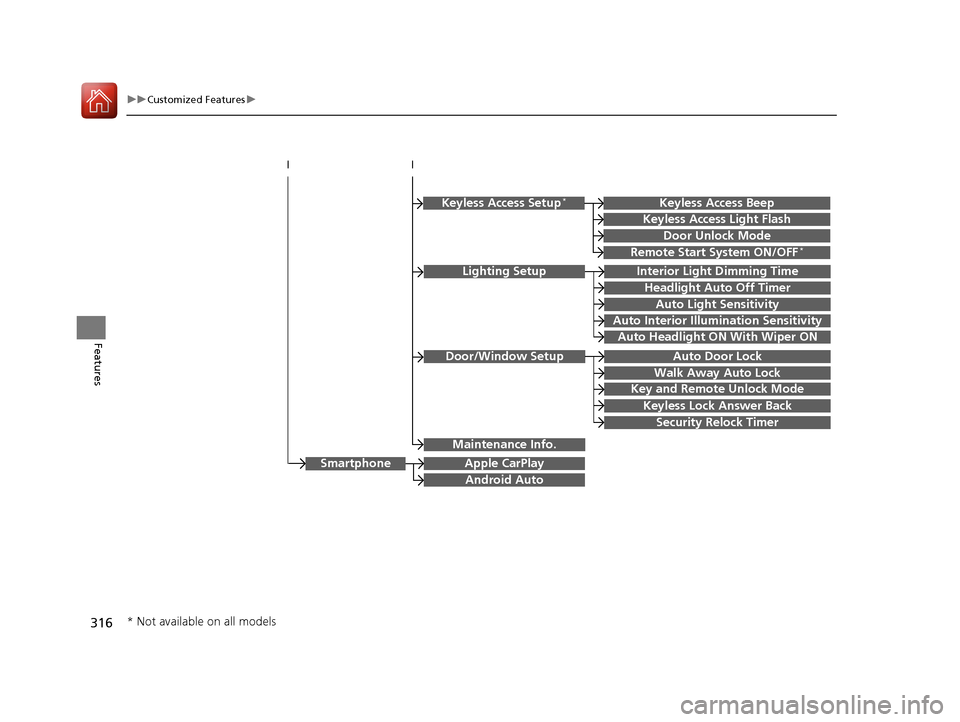
Lighting SetupInterior Light Dimming Time
Headlight Auto Off Timer
Auto Light Sensitivity
Auto Interior Illumination Sensitivity
Auto Door Lock
Key and Remote Unlock Mode
Door/Window Setup
Apple CarPlay
Maintenance Info.
Android Auto
Auto Headlight ON With Wiper ON
Keyless Lock Answer Back
Security Relock Timer
Walk Away Auto Lock
Keyless Access Setup*
Door Unlock Mode
Keyless Access Light Flash
Keyless Access Beep
Remote Start System ON/OFF*
Smartphone
* Not available on all models
16 CIVIC 4D-31TBA6000.book 316 ページ 2015年8月31日 月曜日 午後5時56分
Page 332 of 590
331
uuCustomized Features u
Features
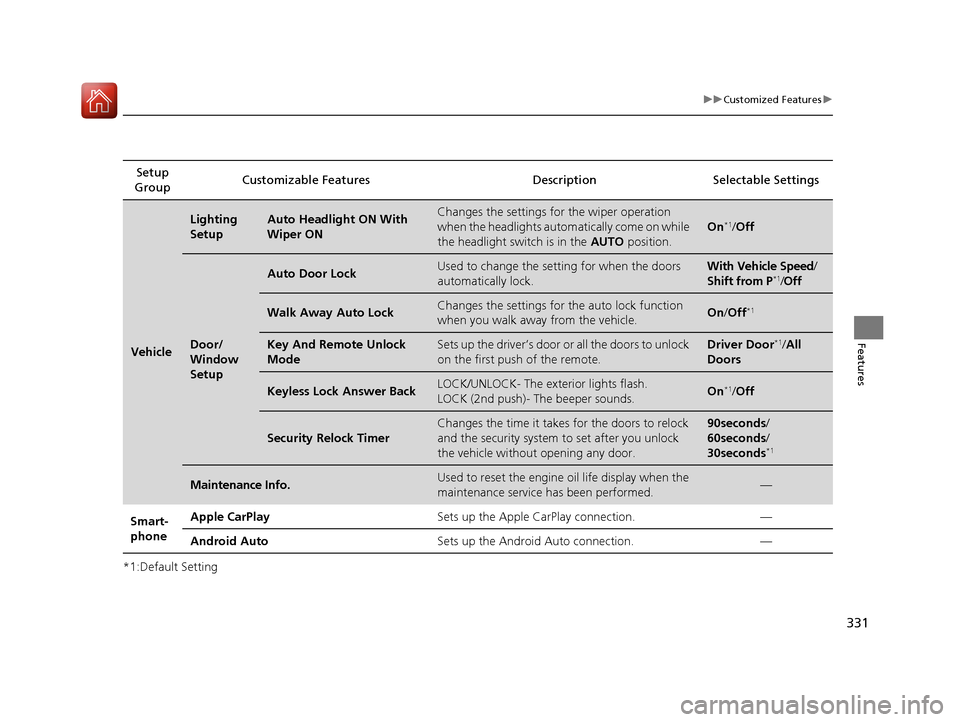
*1:Default SettingSetup
Group Customizable Features Description
Selectable Settings
Vehicle
Lighting
SetupAuto Headlight ON With
Wiper ONChanges the settings for the wiper operation
when the headlights automatically come on while
the headlight switch is in the AUTO position.
On*1/Off
Door/
Window
Setup
Auto Door LockUsed to change the setting for when the doors
automatically lock.With Vehicle Speed /
Shift from P*1/ Off
Walk Away Auto LockChanges the settings for the auto lock function
when you walk away from the vehicle.On /Off*1
Key And Remote Unlock
ModeSets up the driver’s door or all the doors to unlock
on the first push of the remote.Driver Door*1/All
Doors
Keyless Lock Answer BackLOCK/UNLOCK- The exterior lights flash.
LOCK (2nd push)- The beeper sounds.On*1/ Off
Security Relock Timer
Changes the time it takes for the doors to relock
and the security system to set after you unlock
the vehicle without opening any door.90seconds/
60seconds/
30seconds
*1
Maintenance Info.Used to reset the engine oil life display when the
maintenance service has been performed.—
Smart-
phone Apple CarPlay
Sets up the Apple CarPlay connection. —
Android Auto Sets up the Android Auto connection. —
16 CIVIC 4D-31TBA6000.book 331 ページ 2015年8月31日 月曜日 午後5時56分
Page 391 of 590
390
Driving
Before Driving
Driving Preparation
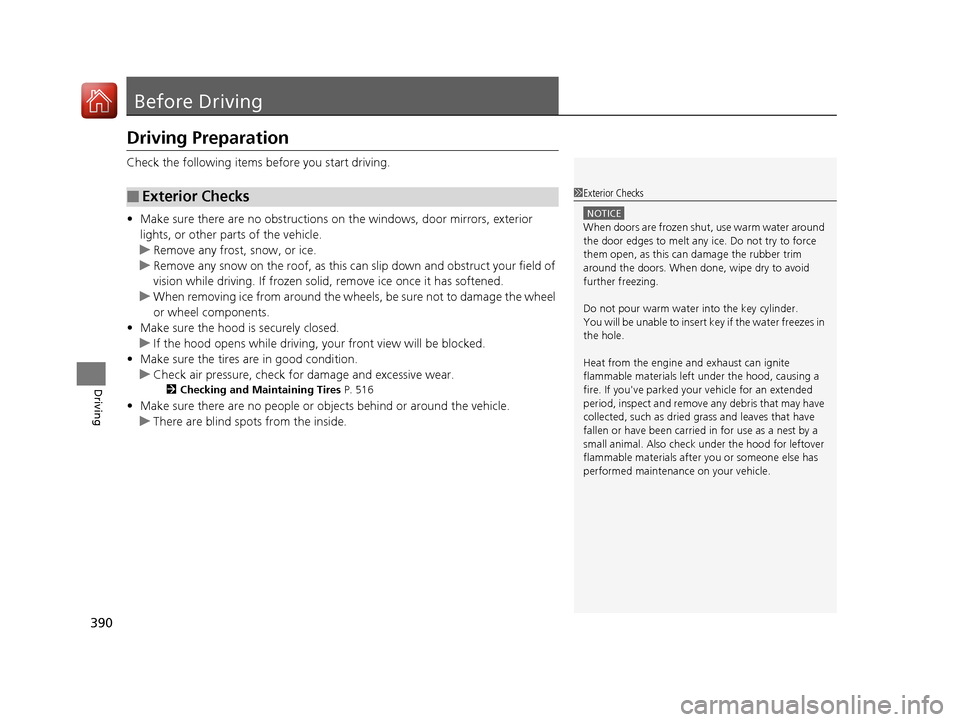
Check the following items before you start driving.
• Make sure there are no obstructions on the windows, door mirrors, exterior
lights, or other parts of the vehicle.
u Remove any frost, snow, or ice.
u Remove any snow on the roof, as this can slip down and obstruct your field of
vision while driving. If frozen solid , remove ice once it has softened.
u When removing ice from around the wheels, be sure not to damage the wheel
or wheel components.
• Make sure the hood is securely closed.
u If the hood opens while driving, your front view will be blocked.
• Make sure the tires are in good condition.
u Check air pressure, check for damage and excessive wear.
2 Checking and Maintaining Tires P. 516
•Make sure there are no people or ob jects behind or around the vehicle.
u There are blind spots from the inside.
■Exterior Checks1Exterior Checks
NOTICE
When doors are frozen s hut, use warm water around
the door edges to melt any ice. Do not try to force
them open, as this can damage the rubber trim
around the doors. When done, wipe dry to avoid
further freezing.
Do not pour warm water into the key cylinder.
You will be unable to insert key if the water freezes in
the hole.
Heat from the engine and exhaust can ignite
flammable material s left under the hood, causing a
fire. If you've parked y our vehicle for an extended
period, inspect and remove any debris that may have
collected, such as dried grass and leaves that have
fallen or have been carried in for use as a nest by a
small animal. Also check under the hood for leftover
flammable materials after you or someone else has
performed maintenance on your vehicle.
16 CIVIC 4D-31TBA6000.book 390 ページ 2015年8月31日 月曜日 午後5時56分