buttons HONDA CIVIC 2016 10.G Owner's Manual
[x] Cancel search | Manufacturer: HONDA, Model Year: 2016, Model line: CIVIC, Model: HONDA CIVIC 2016 10.GPages: 590
Page 347 of 590
uuBluetooth ® HandsFreeLink ®*uHFL Menus
346
Features
Up to 20 speed dial numbers can be stored per phone.
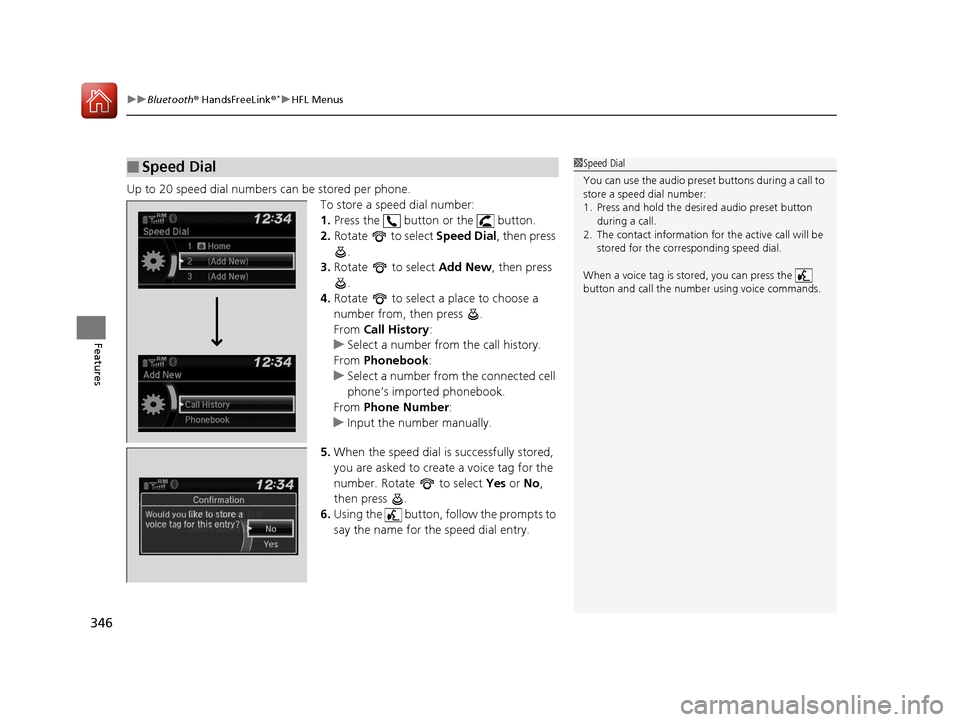
To store a speed dial number:
1.Press the button or the button.
2. Rotate to select Speed Dial, then press
.
3. Rotate to select Add New, then press
.
4. Rotate to select a place to choose a
number from, then press .
From Call History :
u Select a number from the call history.
From Phonebook :
u Select a number from the connected cell
phone’s imported phonebook.
From Phone Number :
u Input the number manually.
5. When the speed dial is successfully stored,
you are asked to create a voice tag for the
number. Rotate to select Yes or No ,
then press .
6. Using the button, follow the prompts to
say the name for the speed dial entry.
■Speed Dial1Speed Dial
You can use the audio preset buttons during a call to
store a speed dial number:
1. Press and hold the desired audio preset button
during a call.
2. The contact information for the active call will be
stored for the corresponding speed dial.
When a voice tag is stored, you can press the
button and call the numbe r using voice commands.
Change Speed Dial
Delete Speed DialChaChaChaChahaChangengengengegenge Sp SpSpSpSpSpeedeedeedeedeedeed Dial
DelDelDelDleteeteetet SpSpSpSeedeedeedd DiDiDiDiDiDiDiDiDiDiiDiDiiDiilalaaaaalaa
16 CIVIC 4D-31TBA6000.book 346 ページ 2015年8月31日 月曜日 午後5時56分
Page 354 of 590
Continued353
uuBluetooth ® HandsFreeLink ®*uHFL Menus
Features
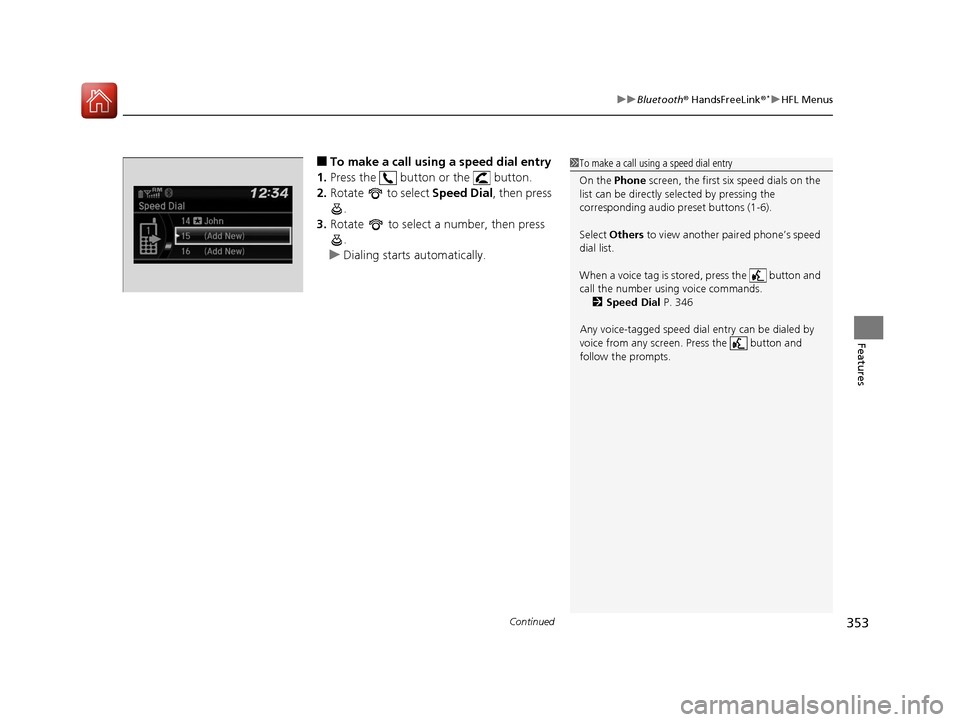
■To make a call using a speed dial entry
1. Press the button or the button.
2. Rotate to select Speed Dial, then press
.
3. Rotate to select a number, then press
.
u Dialing starts automatically.1To make a call using a speed dial entry
On the Phone screen, the first six speed dials on the
list can be directly selected by pressing the
corresponding audio preset buttons (1-6).
Select Others to view another paired phone’s speed
dial list.
When a voice tag is stored, press the button and
call the number using voice commands. 2 Speed Dial P. 346
Any voice-tagged speed dial entry can be dialed by
voice from any screen. Press the button and
follow the prompts.
16 CIVIC 4D-31TBA6000.book 353 ページ 2015年8月31日 月曜日 午後5時56分
Page 355 of 590
uuBluetooth ® HandsFreeLink ®*uHFL Menus
354
Features
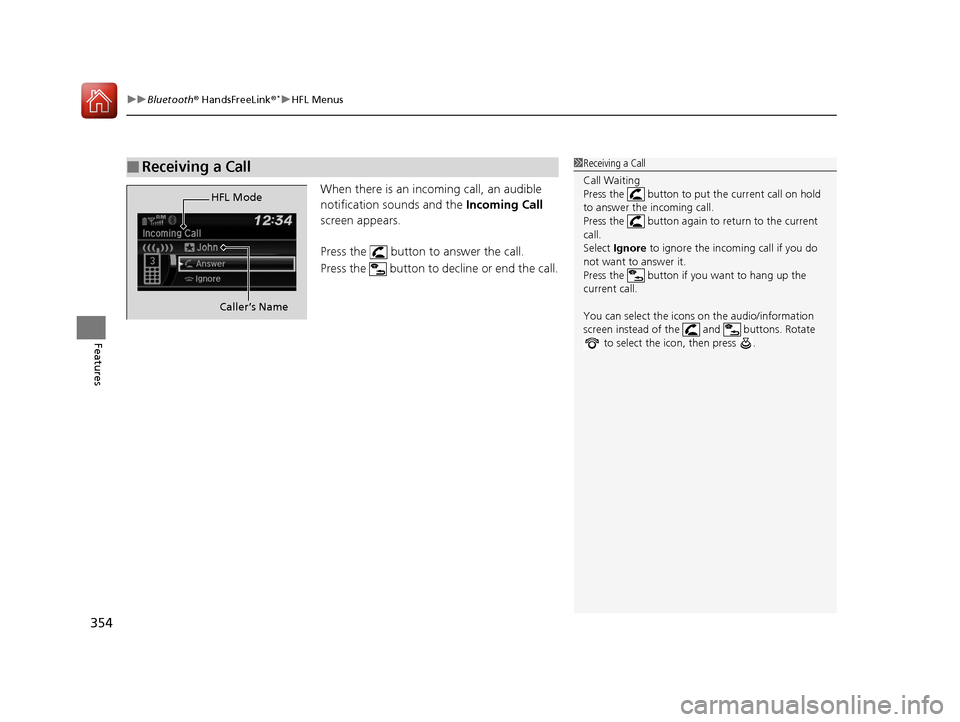
When there is an incoming call, an audible
notification sounds and the Incoming Call
screen appears.
Press the button to answer the call.
Press the button to decline or end the call.
■Receiving a Call1Receiving a Call
Call Waiting
Press the button to put the current call on hold
to answer the incoming call.
Press the button again to return to the current
call.
Select Ignore to ignore the incoming call if you do
not want to answer it.
Press the button if you want to hang up the
current call.
You can select the icons on the audio/information
screen instead of the and buttons. Rotate to select the icon, then press .
HFL Mode
Caller’s Name
16 CIVIC 4D-31TBA6000.book 354 ページ 2015年8月31日 月曜日 午後5時56分
Page 357 of 590
356
Features
Bluetooth® HandsFreeLink ®*
Bluetooth® HandsFreeLink ® (HFL) allows you to place and receive phone calls using
your vehicle’s audio system, without handling your cell phone.
Using HFL
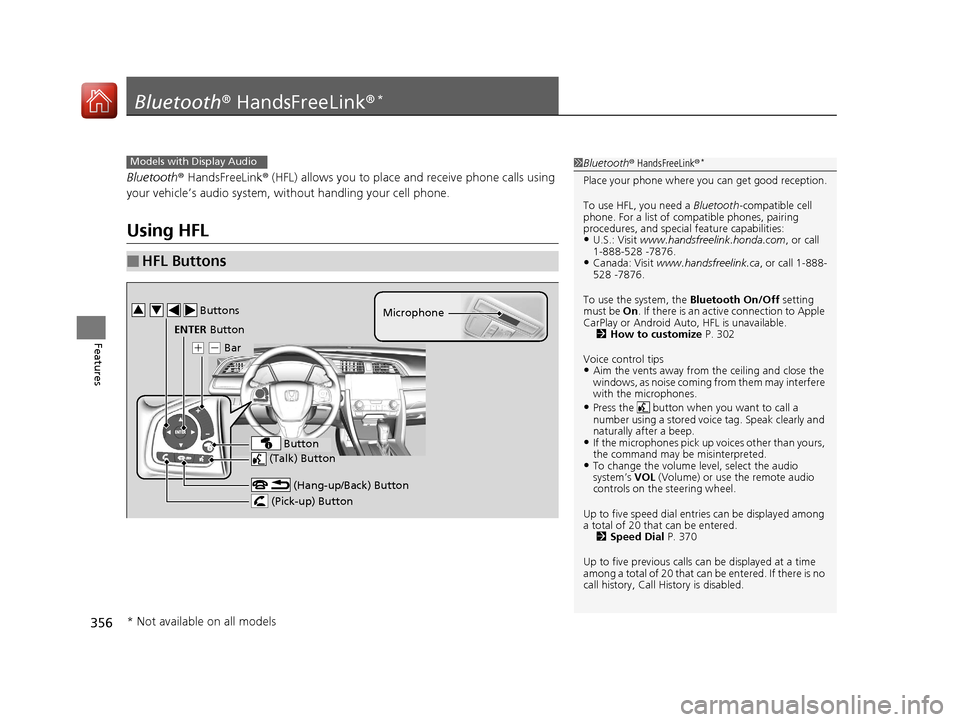
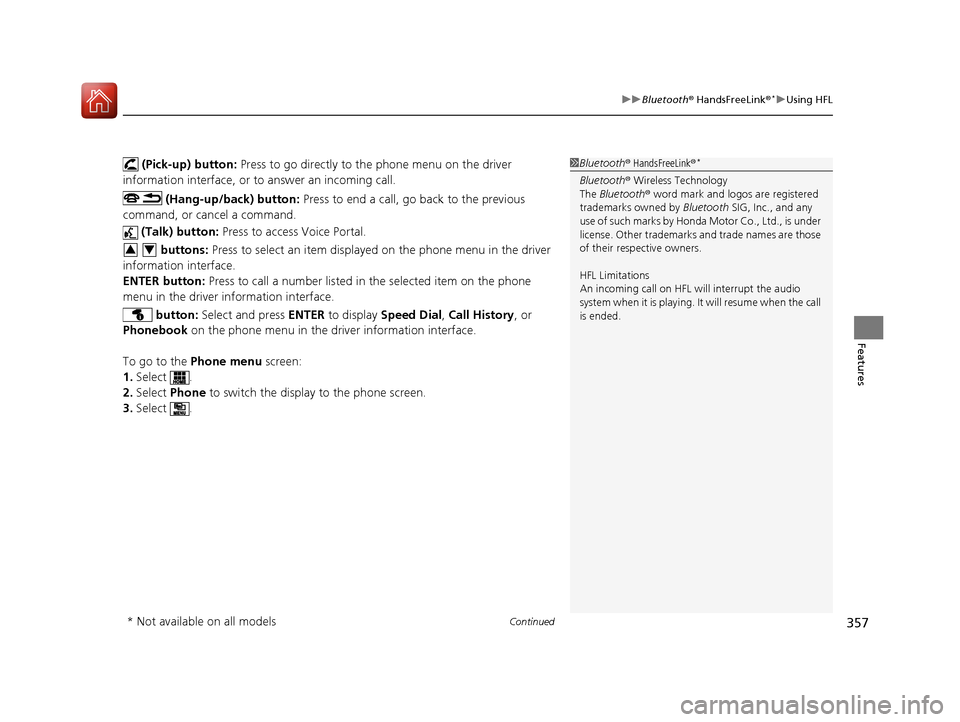
■HFL Buttons
1 Bluetooth ® HandsFreeLink ®*
Place your phone where y ou can get good reception.
To use HFL, you need a Bluetooth-compatible cell
phone. For a list of compatible phones, pairing
procedures, and special feature capabilities:
•U.S.: Visit www.handsfreelink.honda.com , or call
1-888-528 -7876.
•Canada: Visit www.handsfreelink.ca , or call 1-888-
528 -7876.
To use the system, the Bluetooth On/Off setting
must be On . If there is an acti ve connection to Apple
CarPlay or Android Auto , HFL is unavailable.
2 How to customize P. 302
Voice control tips
•Aim the vents away from the ceiling and close the
windows, as noise coming fr om them may interfere
with the microphones.
•Press the button when you want to call a
number using a stored voic e tag. Speak clearly and
naturally after a beep.
•If the microphones pick up vo ices other than yours,
the command may be misinterpreted.
•To change the volume level, select the audio
system’s VOL (Volume) or use the remote audio
controls on the steering wheel.
Up to five speed dial entries can be displayed among
a total of 20 that can be entered. 2 Speed Dial P. 370
Up to five previous calls can be displayed at a time
among a total of 20 that can be entered. If there is no
call history, Call History is disabled.
Models with Display Audio
(Talk) Button
( + (- Bar Microphone
(Hang-up/Back) Button
(Pick-up) Button
ENTER Button
Button
Buttons34
* Not available on all models
16 CIVIC 4D-31TBA6000.book 356 ページ 2015年8月31日 月曜日 午後5時56分
Page 358 of 590
Continued357
uuBluetooth® HandsFreeLink ®*uUsing HFL
Features
(Pick-up) button: Press to go directly to the phone menu on the driver
information interface, or to answer an incoming call.
(Hang-up/back) button: Press to end a call, go back to the previous
command, or cancel a command.
(Talk) button: Press to access Voice Portal.
buttons: Press to select an item displayed on the phone menu in the driver
information interface.
ENTER button: Press to call a number listed in the selected item on the phone
menu in the driver information interface.
button: Select and press ENTER to display Speed Dial , Call History , or
Phonebook on the phone menu in the driver information interface.
To go to the Phone menu screen:
1. Select .
2. Select Phone to switch the displa y to the phone screen.
3. Select .1Bluetooth ® HandsFreeLink ®*
Bluetooth® Wireless Technology
The Bluetooth ® word mark and logos are registered
trademarks owned by Bluetooth SIG, Inc., and any
use of such marks by Honda Motor Co., Ltd., is under
license. Other trademarks and trade names are those
of their respective owners.
HFL Limitations
An incoming call on HFL will interrupt the audio
system when it is playing. It will resume when the call
is ended.
34
* Not available on all models
16 CIVIC 4D-31TBA6000.book 357 ページ 2015年8月31日 月曜日 午後5時56分
Page 381 of 590
uuBluetooth ® HandsFreeLink ®*uHFL Menus
380
Features
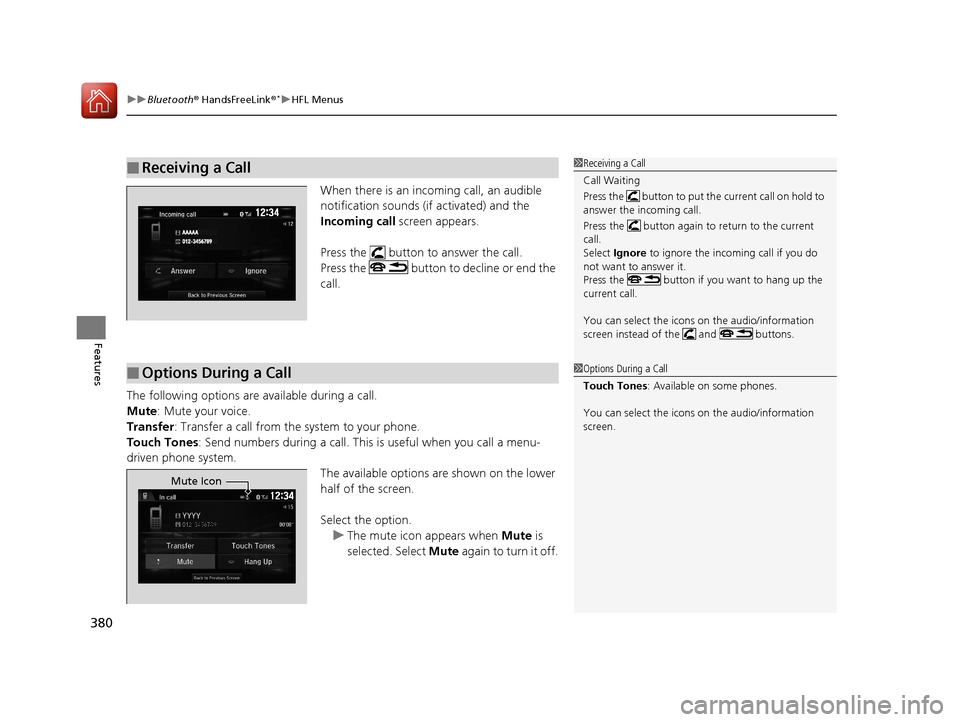
When there is an incoming call, an audible
notification sounds (if activated) and the
Incoming call screen appears.
Press the button to answer the call.
Press the button to decline or end the
call.
The following options are available during a call.
Mute : Mute your voice.
Transfer : Transfer a call from the system to your phone.
Touch Tones: Send numbers during a call. This is useful when you call a menu-
driven phone system. The available options are shown on the lower
half of the screen.
Select the option.u The mute icon appears when Mute is
selected. Select Mute again to turn it off.
■Receiving a Call1Receiving a Call
Call Waiting
Press the button to put the current call on hold to
answer the incoming call.
Press the button again to return to the current
call.
Select Ignore to ignore the incoming call if you do
not want to answer it.
Press the button if you want to hang up the
current call.
You can select the icons on the audio/information
screen instead of the and buttons.
■Options During a Call1 Options During a Call
Touch Tones : Available on some phones.
You can select the icons on the audio/information
screen.
Mute Icon
16 CIVIC 4D-31TBA6000.book 380 ページ 2015年8月31日 月曜日 午後5時56分
Page 414 of 590
413
uuWhen Driving uCruise Control*
Driving
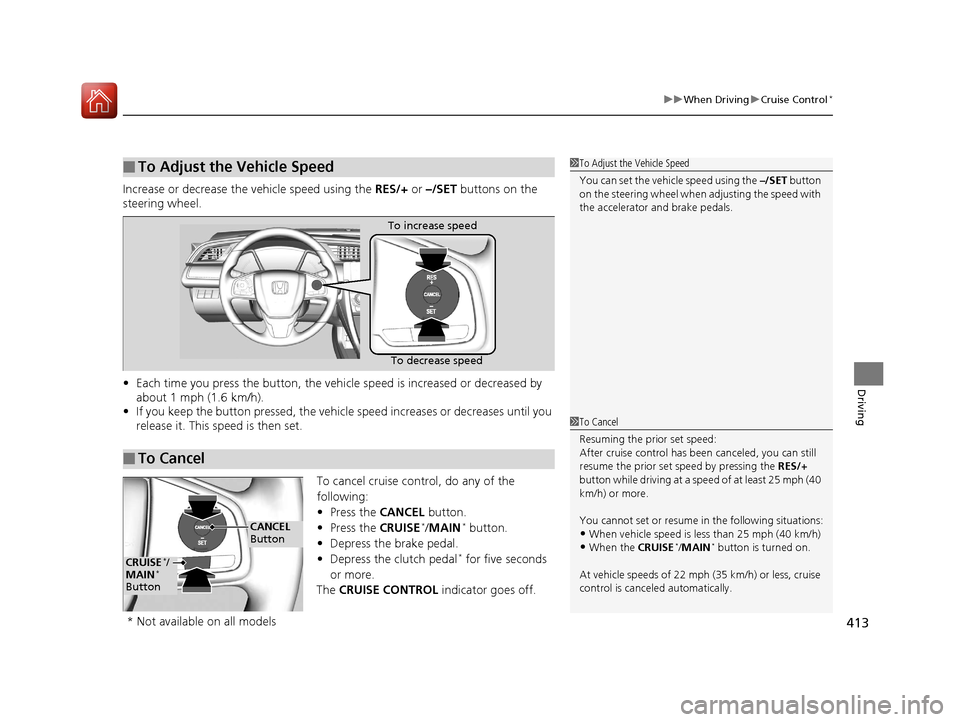
Increase or decrease the vehicle speed using the RES/+ or –/SET buttons on the
steering wheel.
• Each time you press the button, the vehicl e speed is increased or decreased by
about 1 mph (1.6 km/h).
• If you keep the button pressed, the vehicl e speed increases or decreases until you
release it. This speed is then set.
To cancel cruise control, do any of the
following:
•Press the CANCEL button.
• Press the CRUISE
*/MAIN* button.
• Depress the brake pedal.
• Depress the clutch pedal
* for five seconds
or more.
The CRUISE CONTROL indicator goes off.
■To Adjust the Vehicle Speed1To Adjust the Vehicle Speed
You can set the vehicle speed using the –/SET button
on the steering wheel when adjusting the speed with
the accelerator and brake pedals.
■To Cancel
To decrease speed
To increase speed
1
To Cancel
Resuming the prior set speed:
After cruise control has be en canceled, you can still
resume the prior set speed by pressing the RES/+
button while driving at a speed of at least 25 mph (40
km/h) or more.
You cannot set or resume in the following situations:
•When vehicle speed is less than 25 mph (40 km/h)•When the CRUISE*/MAIN* button is turned on.
At vehicle speeds of 22 m ph (35 km/h) or less, cruise
control is canceled automatically.
CRUISE*/
MAIN*
Button
CANCEL
Button
* Not available on all models
16 CIVIC 4D-31TBA6000.book 413 ページ 2015年8月31日 月曜日 午後5時56分
Page 529 of 590
528
uuRemote Transmitter Care uReplacing the Button Battery
Maintenance
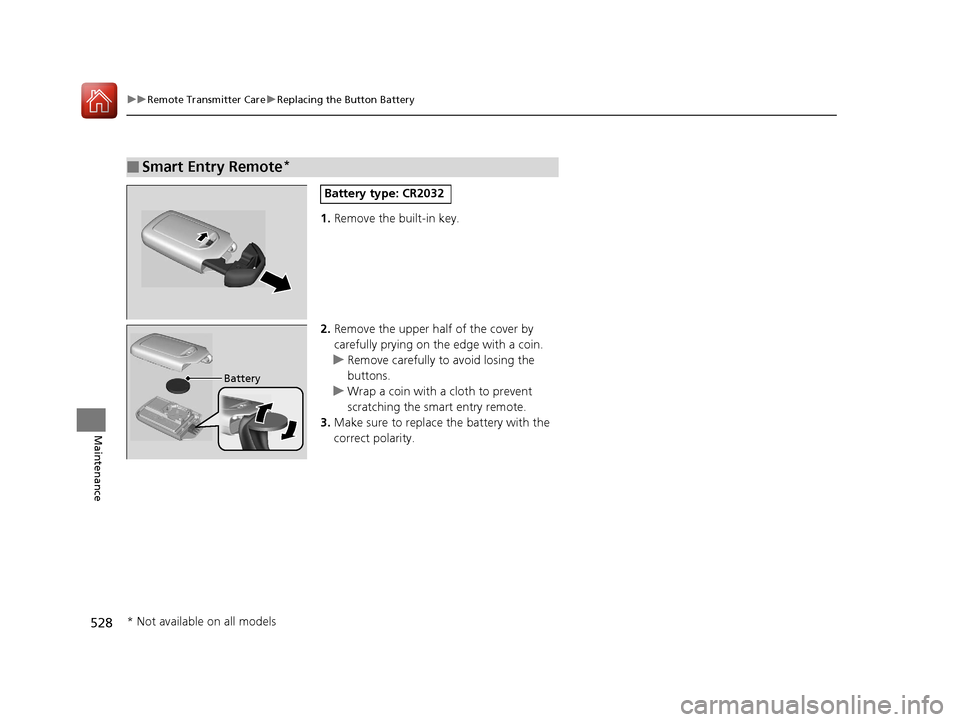
1. Remove the built-in key.
2. Remove the upper half of the cover by
carefully prying on the edge with a coin.
u Remove carefully to avoid losing the
buttons.
u Wrap a coin with a cloth to prevent
scratching the smart entry remote.
3. Make sure to replace the battery with the
correct polarity.
■Smart Entry Remote*
Battery type: CR2032
Battery
* Not available on all models
16 CIVIC 4D-31TBA6000.book 528 ページ 2015年8月31日 月曜日 午後5時56分
Page 545 of 590
544
uuEngine Does Not Start uIf the Smart Entry Remote Battery is Weak
Handling the Unexpected
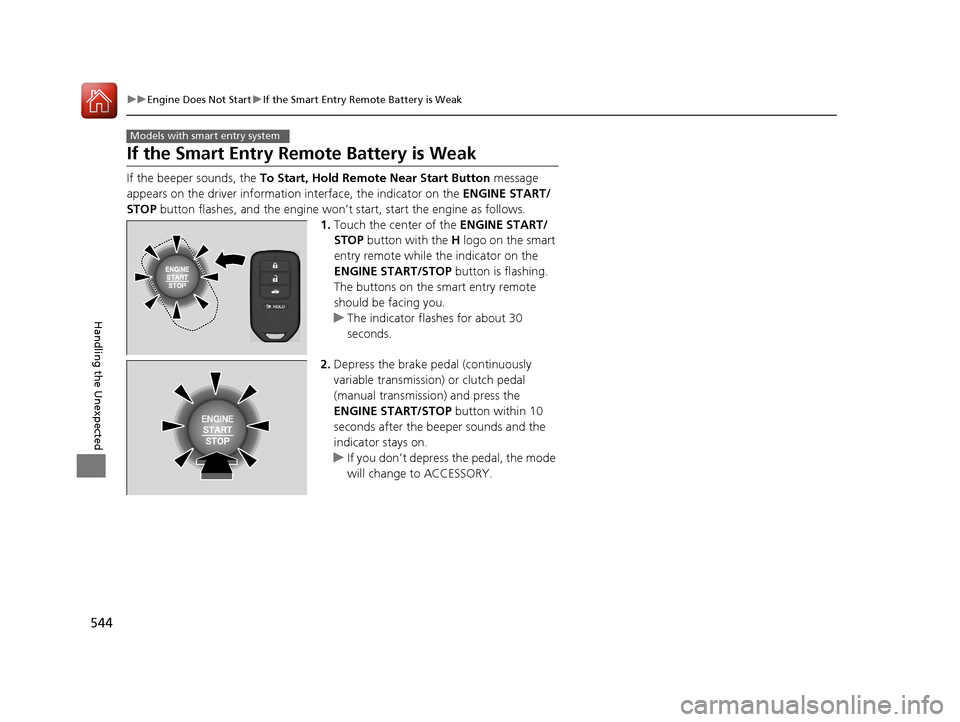
If the Smart Entry Remote Battery is Weak
If the beeper sounds, the To Start, Hold Remote Near Start Button message
appears on the driver information interface, the indicator on the ENGINE START/
STOP button flashes, and the engine won’t start, start the engine as follows.
1.Touch the center of the ENGINE START/
STOP button with the H logo on the smart
entry remote while the indicator on the
ENGINE START/STOP button is flashing.
The buttons on the smart entry remote
should be facing you.
u The indicator flashes for about 30
seconds.
2. Depress the brake pedal (continuously
variable transmission) or clutch pedal
(manual transmission) and press the
ENGINE START/STOP button within 10
seconds after the beeper sounds and the
indicator stays on.
u If you don’t depress the pedal, the mode
will change to ACCESSORY.
Models with smart entry system
16 CIVIC 4D-31TBA6000.book 544 ページ 2015年8月31日 月曜日 午後5時56分
Page 585 of 590
584
Index
FluidsBrake/Clutch ............................................ 502
Continuously Variable Transmission ......... 501
Engine Coolant ........................................ 499
Manual Transmission ............................... 501
Windshield Washer .................................. 503
FM/AM Radio .................................... 212, 252
Fog Light Indicator ..................................... 82
Folding Down the Rear Seats ................... 173
Foot Brake ................................................. 453
Front Airbags (SRS) ..................................... 47
Front Head Restraints ............................... 170
Front Seat Heaters .................................... 185
Front Seats ................................................ 167
Adjusting ................................................. 167
Front Sensor Camera ................................ 414
Fuel ...................................................... 25, 470
Economy ................................................. 473
Gauge ..................................................... 103
Instant Fuel Economy ....................... 105, 110
Low Fuel Indicator ..................................... 78
Range .............................................. 105, 109
Recommendation .................................... 470
Refueling ................................................. 470
Fuel Economy ............................................ 473
Fuel Fill Door ....................................... 25, 471
Fuses .......................................................... 558
Inspecting and Changing ......................... 561
Locations ......................................... 558, 559G
Gasoline (Fuel)
Economy ................................................. 473
Gauge ..................................................... 103
Information ............................................. 470
Instant Fuel Economy ...................... 105, 110
Low Fuel Indicator ..................................... 78
Refueling................................................. 470
Gauges ...................................................... 103
Gear Shift Lever Positions Continuously Variable Transmission ......... 405
Manual Transmission ............................... 408
Glass (care) ........................................ 530, 533
Glove Box .................................................. 177
H
Halogen Bulbs .................................. 504, 507
Handling the Unexpected ........................ 535
HandsFreeLink ® (HFL) ....................... 333, 356
Automatic Import of Ce llular Phonebook and
Call History ............................................ 369
Displaying Messages................................ 383
HFL Buttons..................................... 333, 356
HFL Menus ...................................... 335, 359
HFL Status Display ........................... 334, 358
In Case of Emergency .............................. 387
Limitations for Manual Operation .... 334, 358
Making a Call .................................. 350, 377 Options During a Call...................... 355, 380
Phone Setup ................................... 339, 364
Phonebook Phonetic M
odification........... 373
Receiving a Call............................... 354, 380
Receiving a Text Message/E-mail ............. 381
Ring Tone ............................................... 368
Selecting a Mail Account......................... 382
Speed Dial ...................................... 346, 370
To Set Up Text Message/E-mail Options ................................................. 367
Hazard Warning Button .............................. 4
HD Radio
TM............................................... 252
Headlights ................................................ 156
Aiming.................................................... 504
Automatic Operation .............................. 157
Dimming......................................... 156, 159
Operating ............................................... 156
Heaters (Front Seat) ................................. 185
Heaters (Seat) ........................................... 186
Heating and Cooling System Dust and Pollen Filter .............................. 529
Heating System ........................................ 187
Changing the Mode................................ 187
Sensors ................................................... 189
Using Automatic Heating ........................ 187
HFL (HandsFreeLink ®) ...................... 333, 356
High Beam Indicator .................................. 82
Hill Start Assist System ..................... 397, 402
HondaLink ®.............................................. 278
16 CIVIC 4D-31TBA6000.book 584 ページ 2015年8月31日 月曜日 午後5時56分