trunk HONDA CIVIC 2016 10.G Owner's Manual
[x] Cancel search | Manufacturer: HONDA, Model Year: 2016, Model line: CIVIC, Model: HONDA CIVIC 2016 10.GPages: 590
Page 145 of 590
144
Controls
Security System
Immobilizer System
The immobilizer system prevents a key that has not been pre-registered from
starting the engine. Each key contains el ectronic transmitters that use electronic
signals to verify the key.
Pay attention to the following when inserti ng the key into the ignition switch or
pressing the ENGINE START/STOP button:
• Do not allow objects that emit strong radio waves near the ignition switch or the
ENGINE START/STOP button.
• Make sure the key is not covered by or touching a metal object.
• Do not bring a key from anot her vehicle’s immobilizer system near the ignition
switch or the ENGINE START/STOP button.
• Do not put the key near magnetic items. Electronic devices, such as a television
set and audio system are strongly magneti c, or a key chain can become magnetic,
too.
Security System Alarm
The security system alarm activates wh en the trunk, hood or doors are forcibly
opened. The alarm does not go off if the trunk or doors are opened with the key,
remote transmitter or smart entry system.
However, the alarm goes off when a door is opened with the key, then the shift
lever is moved out of
(P (continuously variable transmission models) or the hood is
opened before the ignition switch is turned to ON (w*1.
■When the security system alarm activates
The horn sounds intermittently and all the exterior lights flash.
■To deactivate the security system alarm
Unlock the vehicle using remote transmitte r, or smart entry system. The system,
along with the horn and flashing lights, is deactivated.
*1: Models with the smart entry system have an ENGINE START/STOP button instead of an
ignition switch.
1 Immobilizer System
NOTICE
Leaving the key in the vehicl e can result in theft or
accidental movement of the vehicle.
Always take the key with you whenever you leave the
vehicle unattended. Do not alter the system or add other devices to it.
Doing so may damage the system and make your
vehicle inoperable.
1 Security System Alarm
The security alarm conti nues for a maximum of two
minutes until the security system deactivates.
16 CIVIC 4D-31TBA6000.book 144 ページ 2015年8月31日 月曜日 午後5時56分 Canadian models only: Apply and hold the brake
pedal
before
turning the vehicle on the first time
after the battery has been disconnected.
Page 146 of 590
Continued145
uuSecurity System uSecurity System Alarm
Controls
■Setting the security system alarm
The security system alarm automatically sets when the following conditions have
been met:
• The ignition switch is in LOCK
(0*1, and the key has been removed from the
ignition switch.
• The hood and trunk are closed.
• All doors are locked with the key, the remote transmitter, or smart entry system.
■When the security system alarm sets
The security system alarm indicator in the instrument panel blinks. When the
blinking interval changes after about 15 se conds, the security system alarm is set.
■To cancel the security system alarm
The security system is canc eled when the vehicle is unlocked using the remote
transmitter, smart entry system, or th e ignition switch is turned to ON
(w*1. The
security system indicator go es off at the same time.
*1: Models with the smart entry system have an ENGINE START/STOP button instead of an
ignition switch.
1 Security System Alarm
Do not set the security system alarm when someone
is in the vehicle or a window is open. The system can
accidentally activate when:
•Unlocking the door with the lock tab.•Opening the trunk with th e trunk release button on
the driver’s door or th e emergency trunk opener.
•Opening the hood with the hood release.
•Moving the shift lever out of (P.
If the battery goes dead after you have set the
security system alarm, the security alarm may go off
once the battery is re charged or replaced.
If this occurs, deactivate the security system alarm by
unlocking a door using the remote transmitter.
Do not attempt to alter th is system or add another
device to it.
Continuously variable transmission models
16 CIVIC 4D-31TBA6000.book 145 ページ 2015年8月31日 月曜日 午後5時56分
Page 174 of 590
173
uuAdjusting the Seats uRear Seats
Controls
Rear Seats
1. Pull the release lever in the trunk to release
the lock.
2. Fold the seat-back down.
■Folding Down the Rear Seats1Folding Down the Rear Seats
The rear seat-back(s
*) can be folded down to
accommodate bulkier items in the trunk.
Never drive with the seat-back folded down and the
trunk lid open. 2 Exhaust Gas Hazard P. 70
To lock a seat-back upright, push it backwards until it
locks.
When returning the seat-back to its original position,
push it firmly back. Also, m ake sure all rear shoulder
belts are positioned in front of the seat-back.
Make sure that the folded seat-back does not press
against the front passenger se at, as this can cause the
weight sensors in the front passenger seat to work
improperly. 2 Passenger Airbag Off Indicator P. 56
Make sure all items in the trunk or items
extending through the opening into the rear
seats are properly secured. Loose items can fly
forward if you have to brake hard.
The front seat(s) must be far enough forward so they
do not interfere with the rear seats as they fold
down.
Release
Lever*
Release Lever
* Not available on all models
16 CIVIC 4D-31TBA6000.book 173 ページ 2015年8月31日 月曜日 午後5時56分
Page 392 of 590
Continued391
uuBefore Driving uDriving Preparation
Driving
• Store or secure all items on board properly.
u Carrying too much cargo, or improperly storing it, can affect your vehicle’s
handling, stability, sto pping distance, and tires, and make it unsafe.
2Maximum Load Limit P. 393
•Do not pile items higher than the seat height.
u They can block your view and may be thrown forward in the event of sudden
braking.
• Do not place anything in the front seat footwells. Make sure to secure the floor
mat.
u An object or unsecured floor mat can in terfere with your brake and accelerator
pedal operation while driving.
• If you have any animals on board, do not let them move around in the vehicle.
u They may interfere with driving and a crash could occur.
• Securely close and lock all doors and the trunk.
2 Locking/Unlocking the Doors from the Inside P. 134
•Adjust your seating position properly.
u Adjust the front h ead restraint, too.
2Adjusting the Seats P. 167
2 Adjusting the Front Head Restraints P. 170
•Adjust the mirrors and steering wh eel properly for your driving.
u Adjust them while sitting in the proper driving position.
2 Adjusting the Mirrors P. 165
2 Adjusting the Steering Wheel P. 164
■Interior Checks1Interior Checks
The headlight aim is set by the factory, and does not
need to be adjusted. Howeve r, if you regularly carry
heavy items in the trunk, have the aiming readjusted
at a dealer or by a qualified technician.
16 CIVIC 4D-31TBA6000.book 391 ページ 2015年8月31日 月曜日 午後5時56分
Page 401 of 590
uuWhen Driving uStarting the Engine
400
Driving
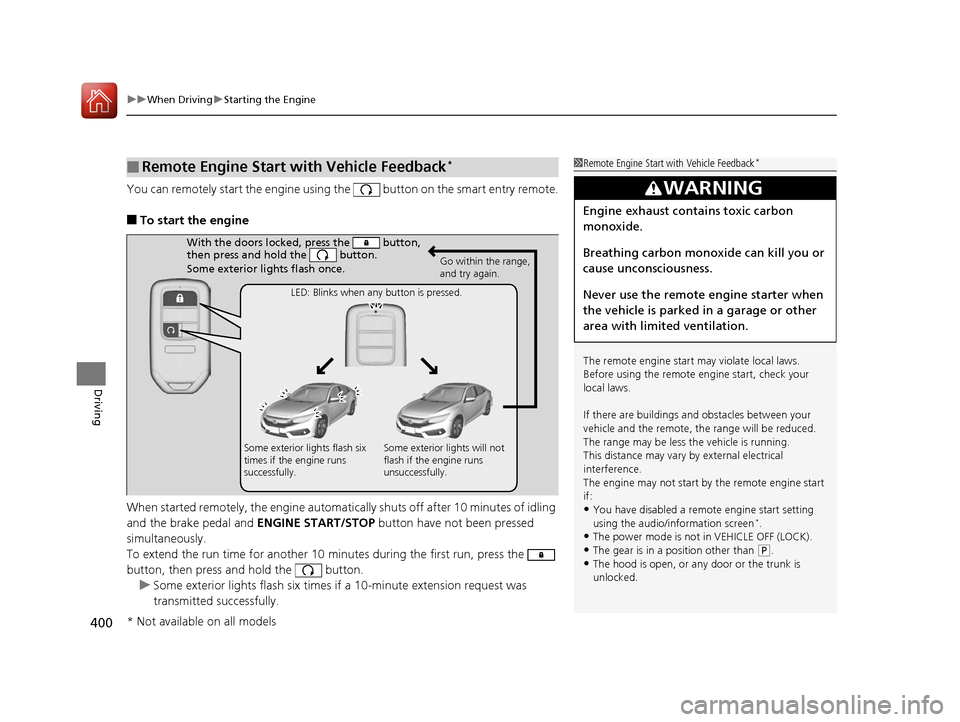
You can remotely start the engine using the button on the smart entry remote.
■To start the engine
When started remotely, the engine automati cally shuts off after 10 minutes of idling
and the brake pedal and ENGINE START/STOP button have not been pressed
simultaneously.
To extend the run time for another 10 minutes during the first run, press the
button, then press and hold the button. u Some exterior lights flash six times if a 10-minute extension request was
transmitted successfully.
■Remote Engine Start with Vehicle Feedback*1Remote Engine Start with Vehicle Feedback*
The remote engine start may violate local laws.
Before using the remote e ngine start, check your
local laws.
If there are buildings an d obstacles between your
vehicle and the remote, th e range will be reduced.
The range may be less the vehicle is running.
This distance may vary by external electrical
interference.
The engine may not start by the remote engine start
if:
•You have disabled a remo te engine start setting
using the audio/information screen*.
•The power mode is not in VEHICLE OFF (LOCK).•The gear is in a position other than ( P.
•The hood is open, or any door or the trunk is
unlocked.
3WARNING
Engine exhaust contains toxic carbon
monoxide.
Breathing carbon monoxide can kill you or
cause unconsciousness.
Never use the remote engine starter when
the vehicle is parked in a garage or other
area with limited ventilation.
With the doors locked, press the button,
then press and hold the button.
Some exterior lights flash once.
Go within the range,
and try again.
LED: Blinks when any button is pressed.
Some exterior lights flash six
times if the engine runs
successfully. Some exterior lights will not
flash if the engine runs
unsuccessfully.
* Not available on all models
16 CIVIC 4D-31TBA6000.book 400 ページ 2015年8月31日 月曜日 午後5時56分
Page 422 of 590
Continued421
uuWhen Driving uAdaptive Cruise Control (ACC) with Low Speed Follow (LSF)*
Driving
The system may automatically shut off and the ACC indicator will come on under
certain conditions. Some examples of these conditions are listed below. Other
conditions may reduce some of the ACC functions.
2 Front Sensor Camera* P. 414
■Environmental conditions
• Driving in bad weather (rain, fog, snow, etc.).
■Roadway conditions
• Driving on a snowy or wet roadway (obs cured lane marking, vehicle tracks,
reflected lights, road spray, high contrast).
■Vehicle conditions
• The outside of the windshield is blocked by dirt, mud, leaves, wet snow, etc.
• An abnormal tire or wheel condition (Wrong size, varied size or construction,
improperly inflated, co mpact spare tire, etc.).
• The camera temperature gets too high.
• The parking brake is applied.
• When the lower bumper next to the fog light is dirty.
• When the front of the vehicle tilts up due to heavy cargo in the trunk or rear seats.
• When tire chains are installed.
■ACC with LSF Conditions and Limitations1ACC with LSF Conditions and Limitations
The radar sensor for ACC with LSF is shared with the
collision mitigation braking system
TM (CMBSTM).
2 Collision Mitigation Braking SystemTM
(CMBSTM)* P. 459
You can read about handling information for the
camera equipped with this system. 2 Front Sensor Camera
* P. 414
Do not put a sticker on the radar sensor cover or
replace the radar sensor cover.
Have your vehicle checked by a dealer if you find any
unusual behavior of the system (e.g., the warning
message appears too frequently).
If the front of the vehicle is impacted in any of the
following situations, the ra dar sensor may not work
properly. Have your vehi cle checked by a dealer:
•The vehicle mounted onto a bump, curb, chock,
embankment, etc.
•You drive the vehicle where the water is deep.
•Your vehicle has a frontal collision.
* Not available on all models
16 CIVIC 4D-31TBA6000.book 421 ページ 2015年8月31日 月曜日 午後5時56分
Page 505 of 590
504
Maintenance
Replacing Light Bulbs
Headlight Bulbs
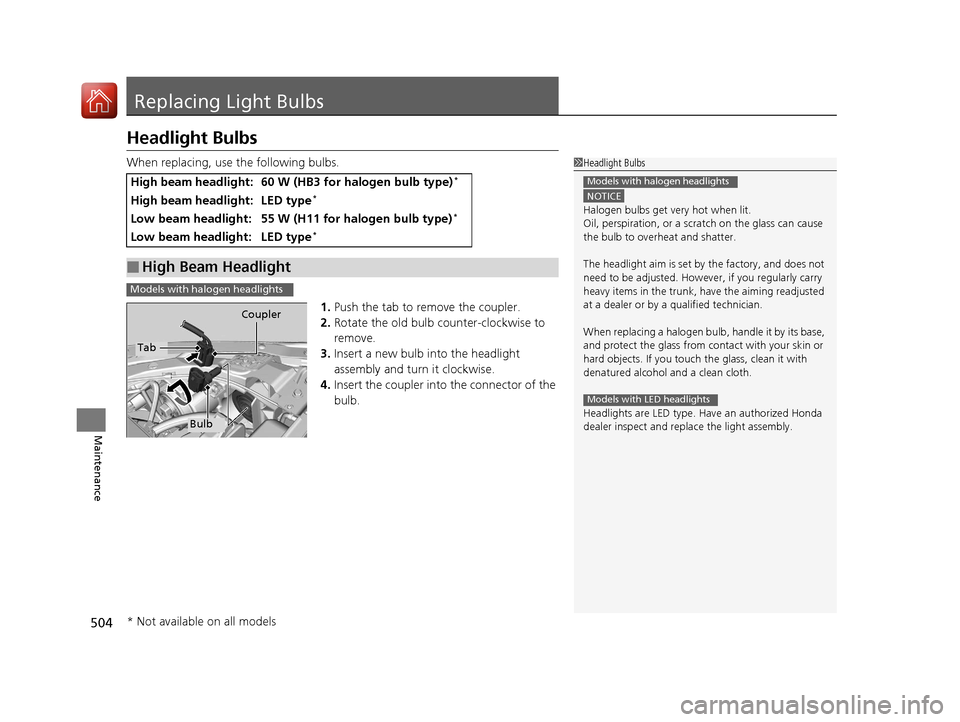
When replacing, use the following bulbs.1.Push the tab to remove the coupler.
2. Rotate the old bulb counter-clockwise to
remove.
3. Insert a new bulb into the headlight
assembly and turn it clockwise.
4. Insert the coupler into the connector of the
bulb.
High beam headlight:60 W (HB3 for halogen bulb type)*
High beam headlight:LED type*
Low beam headlight:55 W (H11 for halogen bulb type)*
Low beam headlight:LED type*
■High Beam Headlight
1Headlight Bulbs
NOTICE
Halogen bulbs get very hot when lit.
Oil, perspiration, or a scratch on th e glass can cause
the bulb to overhe at and shatter.
The headlight aim is set by the factory, and does not
need to be adjusted. Howeve r, if you regularly carry
heavy items in the trunk, have the aiming readjusted
at a dealer or by a qualified technician.
When replacing a halogen bu lb, handle it by its base,
and protect the glass from c ontact with your skin or
hard objects. If you touch the glass, clean it with
denatured alcohol and a clean cloth.
Headlights are LED type. Ha ve an authorized Honda
dealer inspect and replace the light assembly.
Models with halogen headlights
Models with LED headlights
Models with halogen headlights
Tab Coupler
Bulb
* Not available on all models
16 CIVIC 4D-31TBA6000.book 504 ページ 2015年8月31日 月曜日 午後5時56分
Page 514 of 590
513
uuReplacing Light Bulbs uHigh-Mount Brake Light Bulb
Maintenance
High-Mount Bra ke Light Bulb
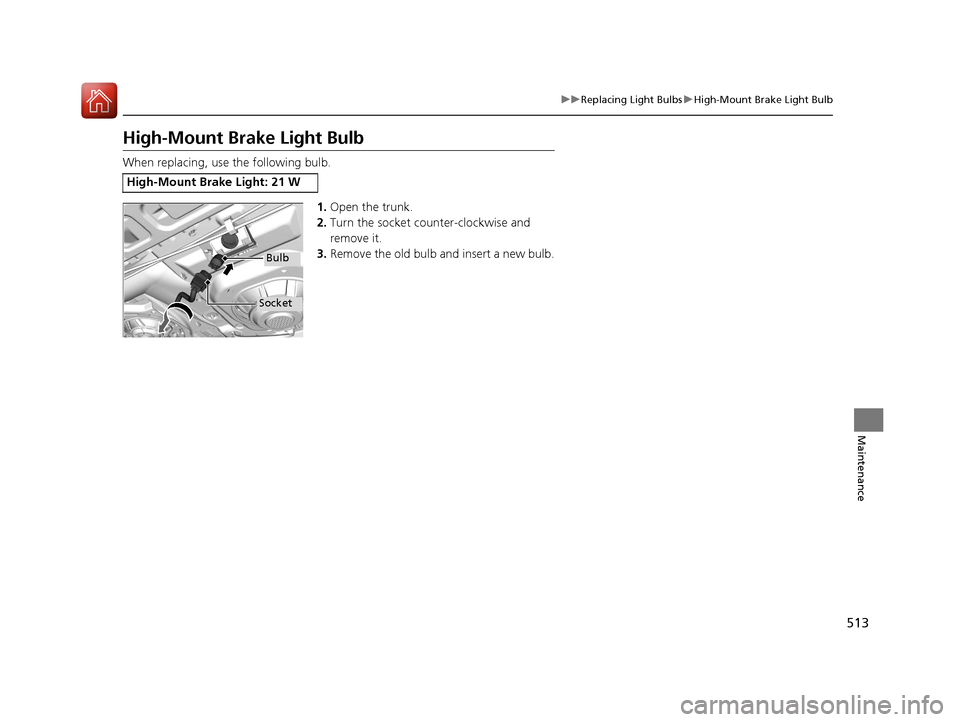
When replacing, use the following bulb.
1.Open the trunk.
2. Turn the socket counter-clockwise and
remove it.
3. Remove the old bulb and insert a new bulb.
High-Mount Brake Light: 21 W
Bulb
Socket
16 CIVIC 4D-31TBA6000.book 513 ページ 2015年8月31日 月曜日 午後5時56分
Page 536 of 590
535
Handling the Unexpected
This chapter explains how to handle unexpected troubles.
ToolsTypes of Tools .................................. 536
If a Tire Goes Flat
Changing a Flat Tire ......................... 537
Engine Does Not Start Checking the Engine ........................ 543
If the Smart Entry Remote Battery is Weak .......................................... 544
Emergency Engine Stop ................... 545
Jump Starting .................................... 546
Shift Lever Does Not Move .............. 549
Overheating
How to Handle Overheating ............. 550 Indicator, Coming On/Blinking
If the Low Oil Pressure Indicator Comes
On ............................................. 552
If the Charging System Indicator Comes
On ................................................. 552
If the Malfunction Indicator Lamp Comes
On or Blinks ................................... 553
If the Brake System Indicator (Red) Comes On or Blinks ................................... 554
If the Brake System Indicator (Red) Comes On or Blinks at the Same Time When the
Brake System Indicator (Amber) Comes
On ................................................. 555 If the Electric Power Steering (EPS) System
Indicator Comes On ....................... 556
If the Low Tire Pressure/TPMS Indicator Comes On or Blinks ....................... 557
Fuses Fuse Locations ................................. 558
Inspecting and Changing Fuses ........ 561
Emergency Towing ........................... 562
When You Cannot Unlock the Fuel Fill Door ................................................. 563
When You Cannot Open the Trunk.....564
Refueling ........................................... 565
16 CIVIC 4D-31TBA6000.book 535 ページ 2015年8月31日 月曜日 午後5時56分
Page 537 of 590
536
Handling the Unexpected
Tools
Types of Tools
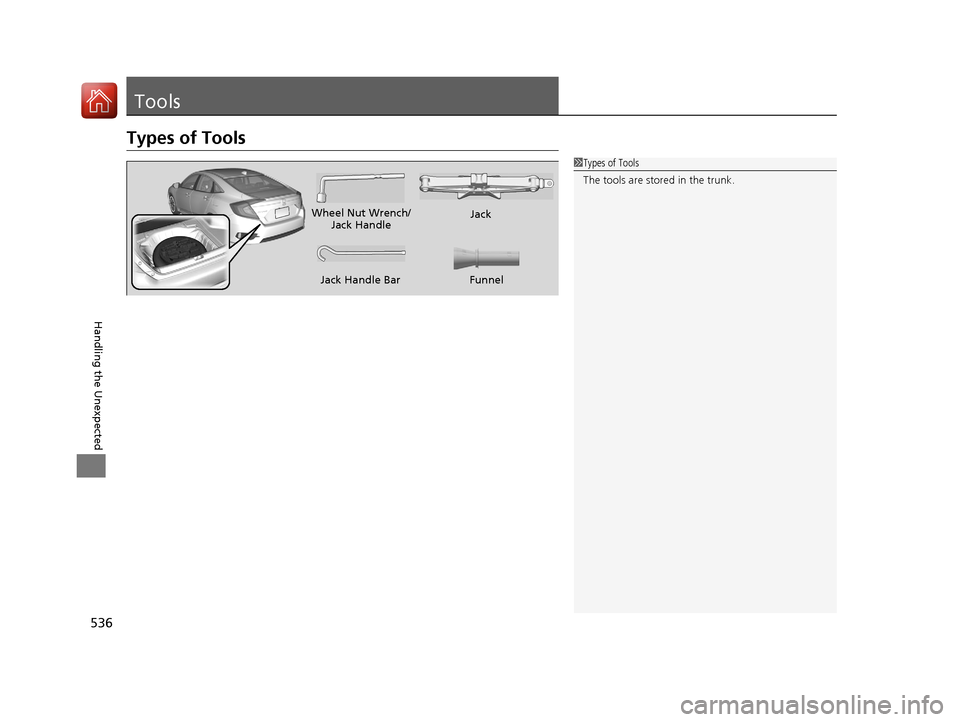
1Types of Tools
The tools are stored in the trunk.
Wheel Nut Wrench/
Jack Handle Jack
Jack Handle Bar
Funnel
16 CIVIC 4D-31TBA6000.book 536 ページ 2015年8月31日 月曜日 午後5時56分