engine oil HONDA CIVIC 2016 10.G Owners Manual
[x] Cancel search | Manufacturer: HONDA, Model Year: 2016, Model line: CIVIC, Model: HONDA CIVIC 2016 10.GPages: 590
Page 22 of 590
21
Quick Reference Guide
•When listening to an iPod
aPress ENTER to display the iPod music
list.
bPress or to select a category.
cPress ENTER to display a list of items in
the category.
dPress or to select an item, then
press ENTER .
uPress ENTER and press or
repeatedly until a desired item you
want to listen is displayed.
• When listening to Internet Radio
*
aPress ENTER to display the station list.
bPress or to select an item, then
press ENTER .
•When listening to Bluetooth ®Audio
aPress ENTER to display the track list.
bPress or to select a track, then
press ENTER .
34
34
34
34
34
● / Button
Radio: Press to change the preset station. Press and hold to select the next or
previous strong station.
USB device: Press to skip to the beginning of
the next song or return to the
beginning of the current song.
Press and hold to change a folder.
Button: Press to change contents: Trip
Computer/Turbo Booster Meter
*/
Compass/Engine Oil Life/
Customize
*/Audio*/Phone*/Change
Units/Warning Messages.
* Not available on all models
16 CIVIC 4D-31TBA6000.book 21 ページ 2015年8月31日 月曜日 午後5時56分
Page 27 of 590
26
Quick Reference Guide
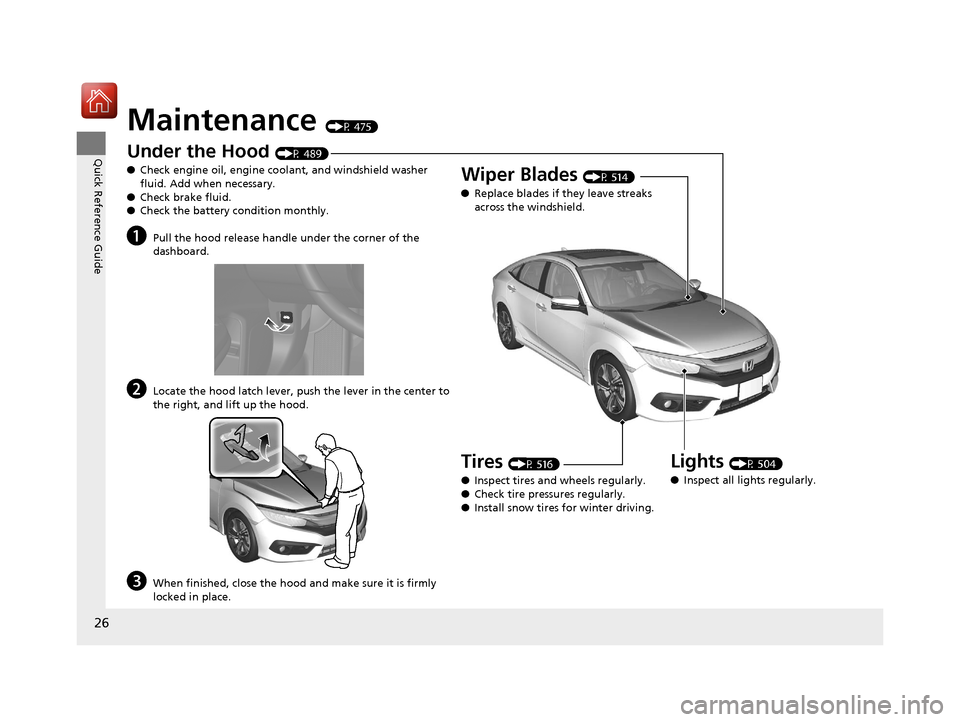
Maintenance (P 475)
Under the Hood (P 489)
● Check engine oil, engine coolant, and windshield washer
fluid. Add when necessary.
● Check brake fluid.
● Check the battery condition monthly.
aPull the hood release handle under the corner of the
dashboard.
bLocate the hood latch lever, pus h the lever in the center to
the right, and lift up the hood.
cWhen finished, close the hood and make sure it is firmly
locked in place.
Lights (P 504)
● Inspect all lights regularly.
Wiper Blades (P 514)
● Replace blades if they leave streaks
across the windshield.
Tires (P 516)
● Inspect tires and wheels regularly.
● Check tire pressures regularly.
● Install snow tires for winter driving.
16 CIVIC 4D-31TBA6000.book 26 ページ 2015年8月31日 月曜日 午後5時56分
Page 71 of 590
70
Safe Driving
Exhaust Gas Hazard
Carbon Monoxide Gas
The engine exhaust from this vehicle contains carbon monoxide, a colorless,
odorless, and highly toxic gas. As long as you properly maintain your vehicle, carbon
monoxide gas will not get into the interior.
■Have the exhaust system inspected for leaks whenever
• The exhaust system is m aking an unusual noise.
• The exhaust system may have been damaged.
• The vehicle is raised for an oil change.
When you operate a vehicle with the trunk open, airflow can pull exhaust gas into
the interior and create a hazardous condition. If you must drive with the trunk open,
open all the windows and set the heating system
*/climate control system* as shown
below.
1. Select the fresh air mode.
2. Select the mode.
3. Set the fan speed to high.
4. Set the temperature control to a comfortable setting.
Adjust the heating system
*/climate control system* in the same manner if you sit in
your parked vehicle with the engine running.
1 Carbon Monoxide Gas
An enclosed area such as a garage can quickly fill up
with carbon monoxide gas.
Do not run the engine with the garage door closed.
Even when the garage door is open, drive out of the
garage immediat ely after starting the engine.
3WARNING
Carbon monoxide gas is toxic.
Breathing it can cause unconsciousness and
even kill you.
Avoid any enclosed areas or activities that
expose you to carbon monoxide.
* Not available on all models
16 CIVIC 4D-31TBA6000.book 70 ページ 2015年8月31日 月曜日 午後5時56分
Page 77 of 590
76
uuIndicators u
Instrument Panel
*1:Models with the smart entry system have an ENGINE START/STOP button instead of an ignition switch.
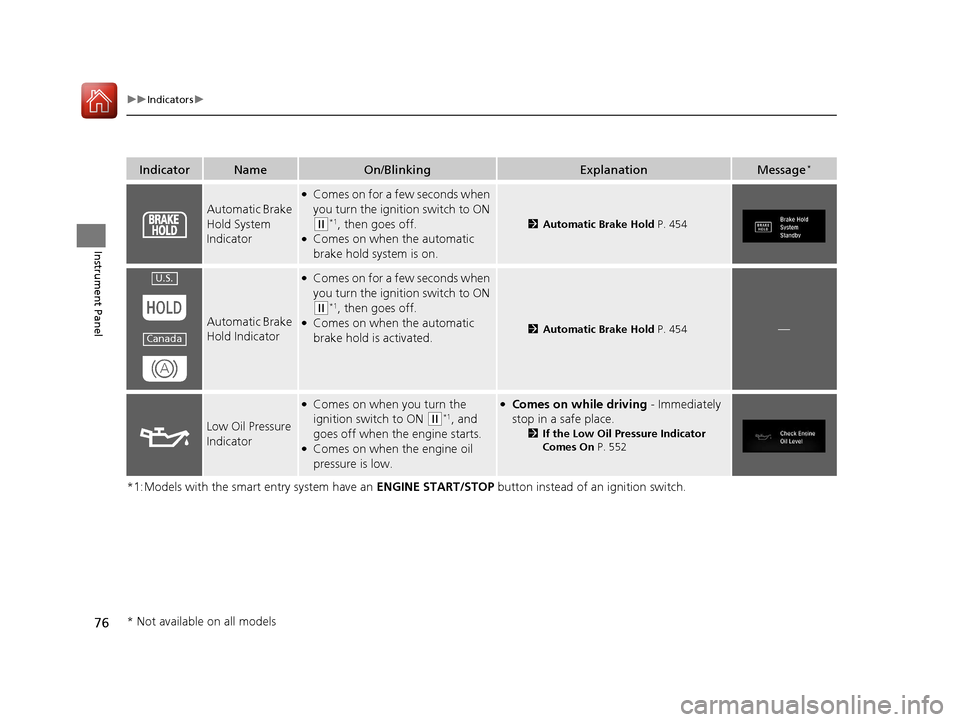
IndicatorNameOn/BlinkingExplanationMessage*
Automatic Brake
Hold System
Indicator
●Comes on for a few seconds when
you turn the ignition switch to ON
(w*1, then goes off.●Comes on when the automatic
brake hold system is on.
2Automatic Brake Hold P. 454
Automatic Brake
Hold Indicator
●Comes on for a few seconds when
you turn the ignition switch to ON
(w*1, then goes off.●Comes on when the automatic
brake hold is activated.2Automatic Brake Hold P. 454—
Low Oil Pressure
Indicator
●Comes on when you turn the
ignition switch to ON
(w*1, and
goes off when the engine starts.
●Comes on when the engine oil
pressure is low.
●Comes on while driving - Immediately
stop in a safe place.
2 If the Low Oil Pressure Indicator
Comes On P. 552
U.S.
Canada
* Not available on all models
16 CIVIC 4D-31TBA6000.book 76 ページ 2015年8月31日 月曜日 午後5時56分
Page 105 of 590
104
uuGauges and Displays uInformation Display*
Instrument Panel
Information Display*
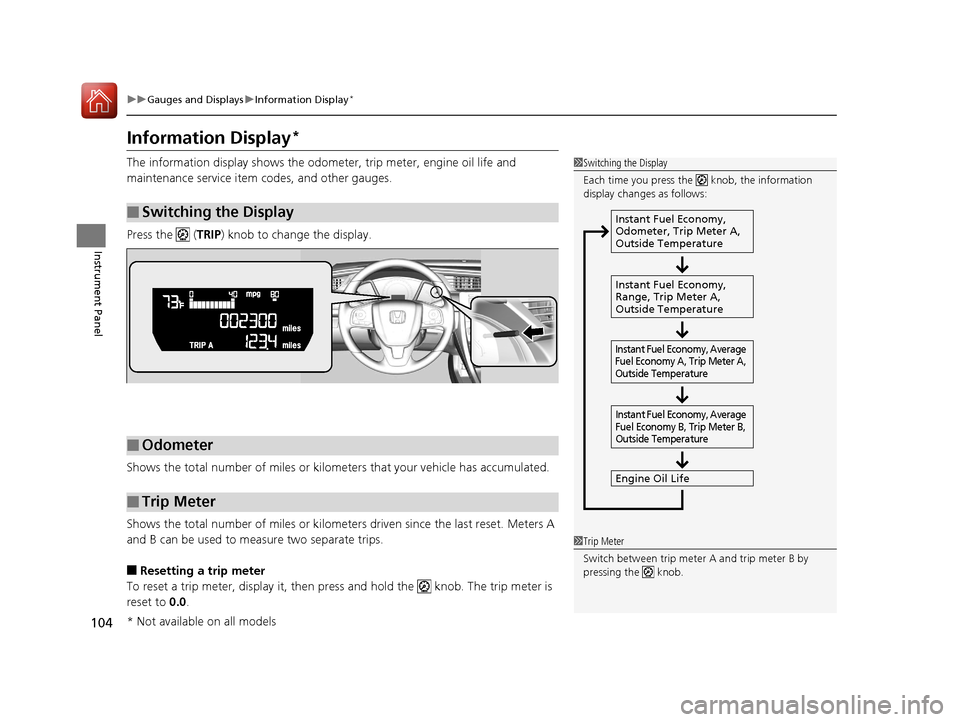
The information display shows the odome ter, trip meter, engine oil life and
maintenance service item codes, and other gauges.
Press the ( TRIP) knob to change the display.
Shows the total number of miles or kilome ters that your vehicle has accumulated.
Shows the total number of miles or kilomete rs driven since the last reset. Meters A
and B can be used to measure two separate trips.
■Resetting a trip meter
To reset a trip meter, display it, then pr ess and hold the knob. The trip meter is
reset to 0.0 .
■Switching the Display
1Switching the Display
Each time you press the knob, the information
display changes as follows:
Instant Fuel Economy,
Odometer, Trip Meter A,
Outside Temperature
Instant Fuel Economy,
Range, Trip Meter A,
Outside Temperature
Engine Oil Life
Instant Fuel Economy, Average
Fuel Economy A, Trip Meter A,
Outside Temperature Instant Fuel Economy, Average
Fuel Economy B, Trip Meter B,
Outside Temperature
■Odometer
■Trip Meter
1 Trip Meter
Switch between trip meter A and trip meter B by
pressing the knob.
* Not available on all models
16 CIVIC 4D-31TBA6000.book 104 ページ 2015年8月31日 月曜日 午後5時56分
Page 106 of 590
Continued105
uuGauges and Displays uInformation Display*
Instrument Panel
Shows the estimated average fuel economy of each trip meter in mpg or l/100 km.
The display is updated at set intervals. Wh en a trip meter is reset, the average fuel
economy is also reset.
Shows the instant fuel economy as a bar graph in mpg or l/100km.
Shows the remaining oil life and Maintenance Minder
TM.
2 Maintenance MinderTM P. 479
Shows the estimated distance you can travel on the remaining fuel. This distance is
estimated from the fuel economy of your previous trips.
■Average Fuel Economy
■Instant Fuel Economy Gauge
■Engine Oil Life
■Range
1Instant Fuel Economy Gauge
Press and hold the km/mile change knob to switch
the measurement.
16 CIVIC 4D-31TBA6000.book 105 ページ 2015年8月31日 月曜日 午後5時56分
Page 110 of 590
Continued109
uuGauges and Displays uDriver Information Interface*
Instrument Panel
Shows the estimated average fuel economy of each trip meter in mpg or l/100 km.
The display is updated at set intervals. Wh en a trip meter is reset, the average fuel
economy is also reset.
Shows the estimated distance you can travel on the remaining fuel. This distance is
estimated from the fuel economy of your previous trips.
Shows the time elapsed since Trip A or Trip B was reset.
Shows the average speed in mph or km/h since Trip A or Trip B was reset.
Shows the remaining oil life and Maintenance Minder
TM.
2 Maintenance MinderTM P. 479
■Average Fuel Economy
■Range
■Elapsed Time
■Average Speed
■Engine Oil Life
1Average Fuel Economy
You can change when to reset the average fuel
economy.
2 Customized Features P. 111
16 CIVIC 4D-31TBA6000.book 109 ページ 2015年8月31日 月曜日 午後5時56分
Page 118 of 590
117
uuGauges and Displays uDriver Information Interface*
Continued
Instrument Panel
*1: Default SettingSetup Group Customizable Features
Description Selectable Settings
Door Setup Auto Door Lock
Changes the setting for when the doors
automatically lock. With Vehicle Speed
*1/
Shift
from P /OFF
Auto Door Unlock Changes the setting for when the doors
automatically unlock. When Driver’s Door Opens
*1/
When Shifting Into Park /
When Ignition Switched
OFF /OFF
Key And Remote Unlock
Mode Sets up either the driver’s door or all doors to unlock
on the first operation of the remote or built-in key.
Driver Door
*1/
All Doors
Keyless Lock Answer
Back LOCK/UNLOCK- The exterior lights flash.
LOCK (2nd push)- The beeper sounds.
ON
*1/
OFF
Security Relock Timer Changes the time it takes for the doors to relock and
the security system to set after you unlock the
vehicle without opening any door.
90sec
/60sec /30sec
*1
Maintenance
Reset—Resets/Cancels the engine oil life display when you
have performed the maintenance service. Cancel /Reset
Default All —Cancels/Resets all the customized settings as
default. Cancel
/Set
16 CIVIC 4D-31TBA6000.book 117 ページ 2015年8月31日 月曜日 午後5時56分
Page 183 of 590
uuInterior Lights/Interior Convenience Items uInterior Convenience Items
182
Controls
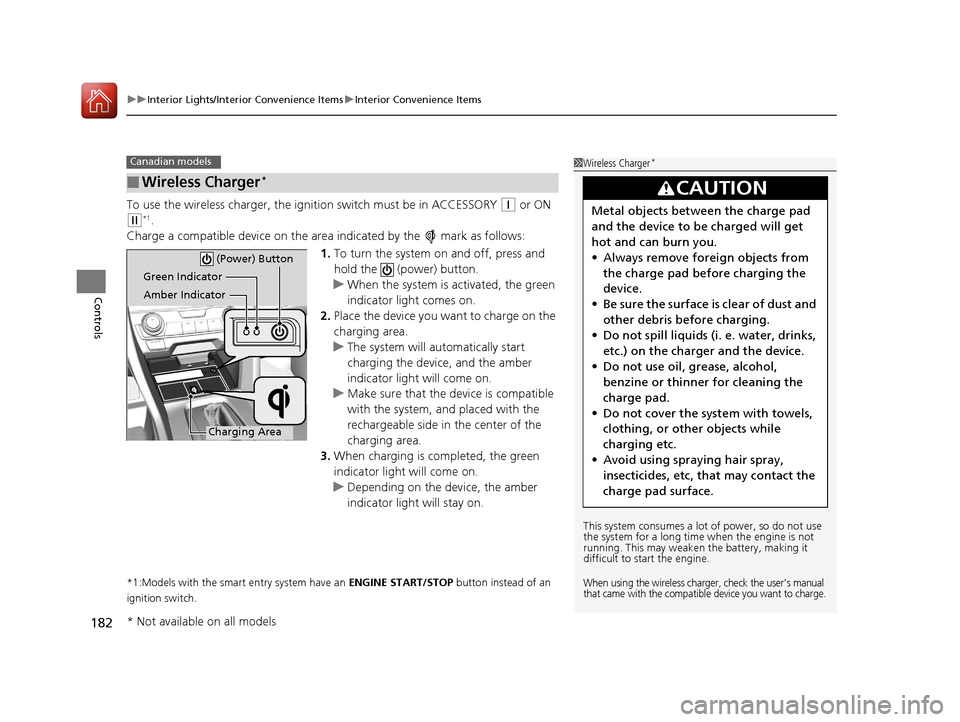
To use the wireless charger, the ig nition switch must be in ACCESSORY (q or ON
(w*1.
Charge a compatible device on the ar ea indicated by the mark as follows:
1. To turn the system on and off, press and
hold the (power) button.
u When the system is activated, the green
indicator light comes on.
2. Place the device you want to charge on the
charging area.
u The system will automatically start
charging the device, and the amber
indicator light will come on.
u Make sure that the device is compatible
with the system, a nd placed with the
rechargeable side in the center of the
charging area.
3. When charging is completed, the green
indicator light will come on.
u Depending on the device, the amber
indicator light will stay on.
*1:Models with the smart entry system have an ENGINE START/STOP button instead of an
ignition switch.
■Wireless Charger*
Canadian models1 Wireless Charger*
This system consumes a lot of power, so do not use
the system for a long time when the engine is not
running. This may weaken the battery, making it
difficult to start the engine.
When using the wireless charger, check the user’s manual
that came with the compatible device you want to charge.
3CAUTION
Metal objects between the charge pad
and the device to be charged will get
hot and can burn you.
• Always remove foreign objects from
the charge pad before charging the
device.
• Be sure the surface is clear of dust and
other debris before charging.
• Do not spill liquids (i. e. water, drinks,
etc.) on the charger and the device.
• Do not use oil, grease, alcohol,
benzine or thinner for cleaning the
charge pad.
• Do not cover the system with towels,
clothing, or other objects while
charging etc.
• Avoid using spraying hair spray,
insecticides, etc, that may contact the
charge pad surface.
Green Indicator
Amber Indicator
Charging Area (Power) Button
* Not available on all models
16 CIVIC 4D-31TBA6000.book 182 ページ 2015年8月31日 月曜日 午後5時56分
Page 332 of 590
331
uuCustomized Features u
Features
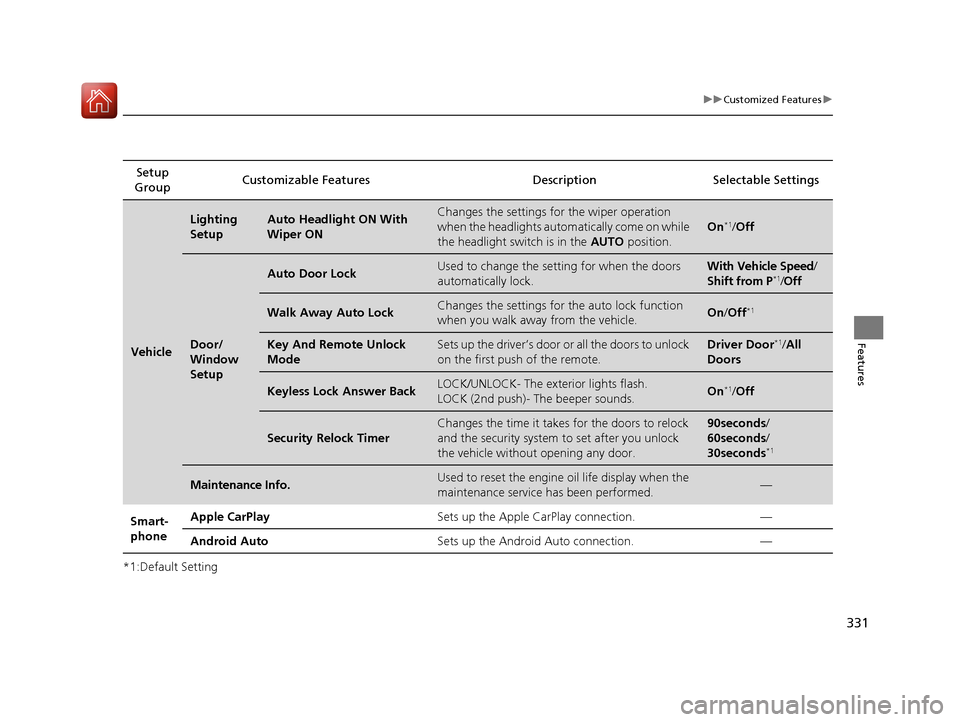
*1:Default SettingSetup
Group Customizable Features Description
Selectable Settings
Vehicle
Lighting
SetupAuto Headlight ON With
Wiper ONChanges the settings for the wiper operation
when the headlights automatically come on while
the headlight switch is in the AUTO position.
On*1/Off
Door/
Window
Setup
Auto Door LockUsed to change the setting for when the doors
automatically lock.With Vehicle Speed /
Shift from P*1/ Off
Walk Away Auto LockChanges the settings for the auto lock function
when you walk away from the vehicle.On /Off*1
Key And Remote Unlock
ModeSets up the driver’s door or all the doors to unlock
on the first push of the remote.Driver Door*1/All
Doors
Keyless Lock Answer BackLOCK/UNLOCK- The exterior lights flash.
LOCK (2nd push)- The beeper sounds.On*1/ Off
Security Relock Timer
Changes the time it takes for the doors to relock
and the security system to set after you unlock
the vehicle without opening any door.90seconds/
60seconds/
30seconds
*1
Maintenance Info.Used to reset the engine oil life display when the
maintenance service has been performed.—
Smart-
phone Apple CarPlay
Sets up the Apple CarPlay connection. —
Android Auto Sets up the Android Auto connection. —
16 CIVIC 4D-31TBA6000.book 331 ページ 2015年8月31日 月曜日 午後5時56分