ECO mode HONDA CIVIC 2016 10.G Quick Guide
[x] Cancel search | Manufacturer: HONDA, Model Year: 2016, Model line: CIVIC, Model: HONDA CIVIC 2016 10.GPages: 82, PDF Size: 5.52 MB
Page 54 of 82

100 || 101
DRIVING
DRIVING
Eco Assist™ System*
Can help improve fuel economy by adjusting the performance of the engine\
,
transmission, climate control system, and cruise control.
ECON Button
Press the eCoN button behind the shift lever to
turn the system on or off. The eCoN Mode indicator
appears when the system is turned on.
Ambient Meter
Color-coded bars change based on your driving
style and brake or accelerator pedal operation.
Green: Fuel-efficient driving
Light green: Moderate acceleration/deceleration
White: Aggressive acceleration/deceleration
*if equipped
Ambient meter
Vehicle Stability Assist (VSA®), aka Electronic Stability Control
(ESC) System
Helps to stabilize the vehicle during cornering if the vehicle turns mor\
e or less
than what was intended. It assists in maintaining traction on slippery s\
urfaces by
regulating engine output and selectively applying the brakes.
Turning VSA On or Off
Press and hold the vSA oFF button until you hear a
beep to turn vSA on or off. The vSA oFF indicator
appears when the system is off.
Traction control stops fully functioning, which may
make it easier when trying to free your vehicle if it is
stuck in mud or snow.
vSA is turned on every time you start the engine, even if you previously \
turned it
off. If you turn vSA off, your vehicle has normal braking and cornering ability, but
traction and stability enhancement become less effective.
VSA OFF
indicator
Cruise Control*
Maintain a constant vehicle speed without having to keep your foot on th\
e
accelerator pedal. Use cruise control on highways or open roads where yo\
u can
travel at a constant speed with little acceleration or deceleration.
*if equipped
reS/+ button
CANCeL button
CrUISe button
-/SeT button
Improper use of cruise control can lead to a crash.
Use cruise control only when traveling on open highways in good weather.
WARNING
Activating and Setting the Vehicle Speed
1. Press the CrUISe button. The CrUISe MAIN
indicator appears.
2. Accelerate to the desired speed (above 25 mph/
40 km/h). Take your foot off the pedal and press
the -/SeT button to set the speed. The CrUISe
CoNTroL indicator appears.
Adjusting the Vehicle Speed
Press the reS/+ button to increase speed, or the -/SeT
button to decrease speed.
each time you press the button, the vehicle speed is
increased or decreased by about 1 mph (1.6 km/h). If you
keep the button pressed, the vehicle speed increases or
decreases until you release it.
Canceling Cruise Control
Press the CANCeL button or the brake pedal. The CrUISe
CoNTroL indicator goes off.
After cruise control has been canceled, you can still
resume the prior set speed by pressing reS/+ while
driving at a speed of at least 25 mph (40 km/h).
Press the CrUISe button to turn the system off.
Page 59 of 82
110 || 111
DRIVING
DRIVING
Models with Display Audio
1. From the Home screen, select Settings.
2. Select Camera.
3. Select rear Camera.
4. Select an option:
Fixed Guideline: Guidelines appear when you shift into reverse.
Dynamic Guideline: Guidelines move as you turn the steering wheel.
5. Select on or off.
6. Press BACK to exit the menu.
Changing Camera Settings
Turn the guidelines on or off.
Models with color audio system
1. Press the MeNU/CLoCK button.
2. Select Settings.
3. Select rear Camera.
4. Select Camera Guideline.
5. Select on or off.
6. Press the Back button to exit the menu.
Refueling
Use the proper fuel and refueling procedure to ensure the best performan\
ce and
safety of your vehicle.
Fuel InformationUse of unleaded gasoline of 87 octane or higher is recommended.
•
Honda recommends ToP TIer Detergent Gasoline where available.
• Do NoT use gasoline containing more than 15% ethanol.
• Do NoT use gasoline containing methanol.
• Do NoT use gasoline containing MMT.
We recommend quality gasoline containing detergent additives that help
prevent fuel system and engine deposits. In addition, in order to mainta\
in good
performance, fuel economy, and emissions control, we strongly recommend the
use of gasoline that does NoT contain harmful manganese-based fuel additives
such as MMT, if such gasoline is available.
NOTICE
Gasoline is highly flammable and explosive. You can be burned or seriously
injured when handling fuel.
• Stop the engine, and keep heat, sparks, and flame away.
• Handle fuel only outdoors.
• Wipe up spills immediately.
WARNING
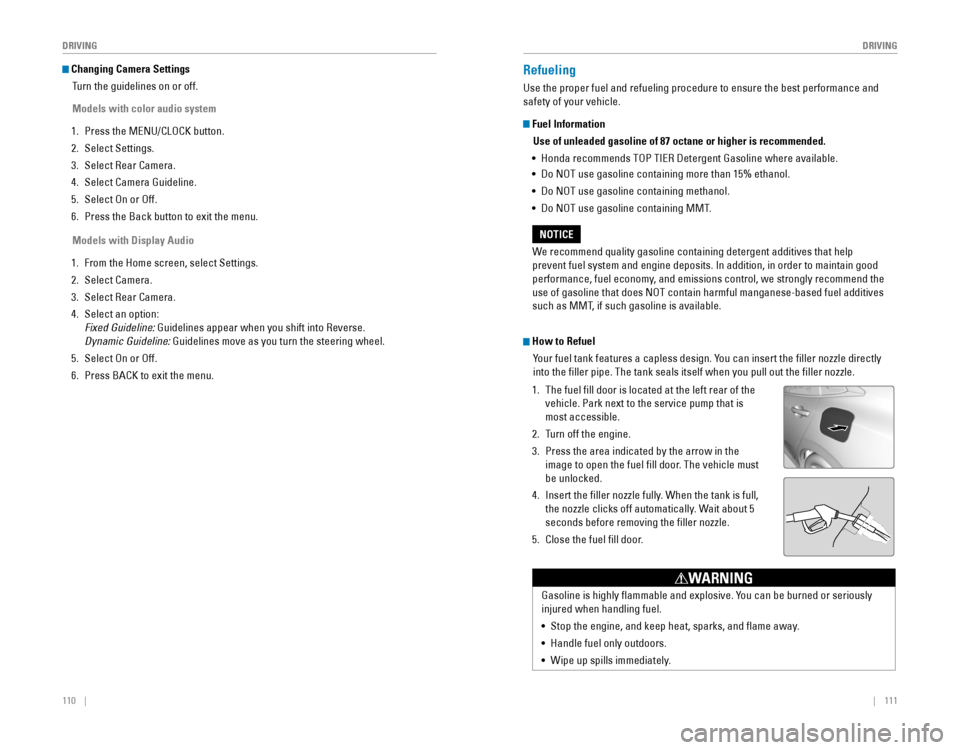
How to Refuel
Your fuel tank features a capless design. You can insert the filler nozzle directly
into the filler pipe. The tank seals itself when you pull out the fi\
ller nozzle.
1. The fuel fill door is located at the left rear of the
vehicle. Park next to the service pump that is
most accessible.
2. Turn off the engine.
3. Press the area indicated by the arrow in the
image to open the fuel fill door. The vehicle must
be unlocked.
4. Insert the filler nozzle fully. When the tank is full,
the nozzle clicks off automatically. Wait about 5
seconds before removing the filler nozzle.
5. Close the fuel fill door.
Page 61 of 82
114 || 115
HANDLING THE UNEXPECTED
HANDLING THE UNEXPECTED
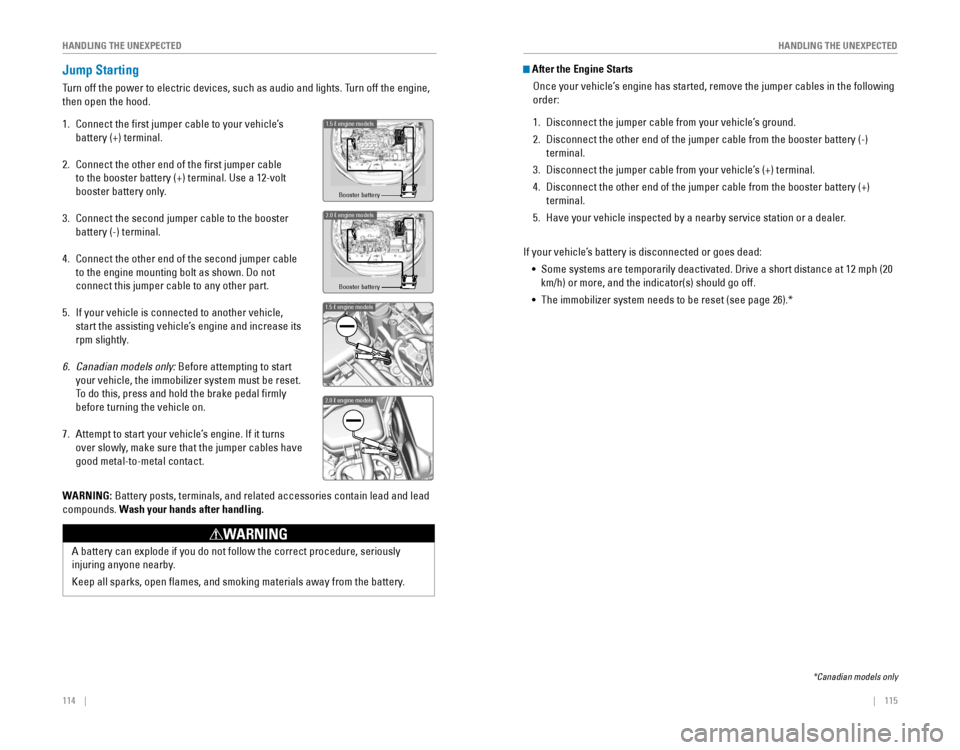
Jump Starting
Turn off the power to electric devices, such as audio and lights. Turn off the engine,
then open the hood.
1. Connect the first jumper cable to your vehicle’s
battery (+) terminal.
2. Connect the other end of the first jumper cable
to the booster battery (+) terminal. Use a 12-volt
booster battery only.
3. Connect the second jumper cable to the booster
battery (-) terminal.
4. Connect the other end of the second jumper cable
to the engine mounting bolt as shown. Do not
connect this jumper cable to any other part.
5. If your vehicle is connected to another vehicle,
start the assisting vehicle’s engine and increase its
rpm slightly.
6. Canadian models only: Before attempting to start
your vehicle, the immobilizer system must be reset.
To do this, press and hold the brake pedal firmly
before turning the vehicle on.
7. Attempt to start your vehicle’s engine. If it turns
over slowly, make sure that the jumper cables have
good metal-to-metal contact.
Booster battery
1.5 engine models
2.0 engine model\as
Booster batter\f
1.5 engine model\
s
2.0 engine model\
s
WARNING: Battery posts, terminals, and related accessories contain lead and lead\
compounds. Wash your hands after handling.
A battery can explode if you do not follow the correct procedure, seriou\
sly
injuring anyone nearby.
Keep all sparks, open flames, and smoking materials away from the batt\
ery.
WARNING
After the Engine Starts
once your vehicle’s engine has started, remove the jumper cables in the following
order:
1. Disconnect the jumper cable from your vehicle’s ground.
2. Disconnect the other end of the jumper cable from the booster battery (\
-)
terminal.
3. Disconnect the jumper cable from your vehicle’s (+) terminal.
4. Disconnect the other end of the jumper cable from the booster battery (\
+)
terminal.
5. Have your vehicle inspected by a nearby service station or a dealer.
If your vehicle’s battery is disconnected or goes dead: • Some systems are temporarily deactivated. Drive a short distance at 12 mph (20
km/h) or more, and the indicator(s) should go off.
• The immobilizer system needs to be reset (see page 26).*
*Canadian models only
Page 62 of 82

116 || 117
HANDLING THE UNEXPECTED
HANDLING THE UNEXPECTED
Overheating
If the temperature gauge pointer is at the H mark, the engine suddenly l\
oses power,
or steam or spray comes out from under the hood, your engine is overheat\
ing.
1. Immediately park the vehicle in a safe place. Turn
off all accessories and turn on the hazard warning
lights.
2. If steam or spray is not present: Keep the engine
running and open the hood.
If steam or spray is present: Turn off the engine and
wait until it subsides. Then, open the hood.
3. Check that the cooling fan is operating and stop the engine once the tem\
perature
gauge needle comes down. If the cooling fan is not operating, immediatel\
y stop
the engine.
4. once the engine has cooled down, inspect the coolant level and check the \
cooling system components for leaks. If the coolant level in the expansi\
on tank
is low, or no coolant is in the tank, check that the radiator is cool. Cover t\
he
expansion tank cap with a heavy cloth and open the cap. Add coolant unti\
l it
reaches the MAX mark, and put the cap back on.
once the engine has cooled sufficiently, restart it and check the temperature gauge.
If the temperature gauge pointer has gone down, resume driving. If it ha\
s not gone
down, contact a dealer for repairs.
MAX
Expansion tankMIN
Steam and spray from an overheated engine can seriously scald you.
Do not open the hood if steam is coming out.
WARNING
removing the radiator cap while the engine is hot can cause the coolant t\
o
spray out, seriously scalding you.
Always let the engine and radiator cool down before removing the radiato\
r cap.
WARNING
Continuing to drive with the temperature gauge pointer at the H mark may\
damage
the engine.
NOTICE
Emergency Engine Stop*
The eNGINe STArT/SToP button may be used to stop the engine due to an
emergency situation even while driving. If you must stop the engine, cho\
ose one of
the following operations:
•
Press and hold the eNGINe STArT/SToP button for
two seconds, or
•
Firmly press the eNGINe STArT/SToP button two
times.
The steering wheel will not lock. Because turning off the engine also di\
sables the
power assist the engine provides to the steering and braking systems, it\
will require
significantly more physical effort and time to steer and slow the vehi\
cle. Downshift
gears and use both feet on the brake pedal, if necessary, to slow the vehicle and
stop immediately in a safe place
Do not press the button while driving unless it is absolutely necessary \
for the engine
to be switched off.
*if equipped
Emergency Towing
Call a professional towing service if you need to tow your vehicle.
Flat bed equipment: The operator loads your vehicle on the back of a tru\
ck. This is
the best way to transport your vehicle.
Wheel lift equipment: The tow truck uses two pivoting arms that go under the front
tires and lift them off the ground. The rear tires remain on the ground.\
This is an
acceptable way to tow your vehicle.
For CvT models: If you cannot shift the transmission or turn on the engine, your
vehicle must be transported with the front wheels off the ground. Make s\
ure the
parking brake is released. If you cannot release the parking brake, your\
vehicle must
be transported by flat bed equipment.
Trying to lift or tow your vehicle by the bumpers will cause serious dama\
ge. The
bumpers are not designed to support the vehicle’s weight.
Improper towing such as towing behind a motorhome or other motor vehicle\
can
damage the transmission.
NOTICE
Page 63 of 82
118 || 119
HANDLING THE UNEXPECTED
HANDLING THE UNEXPECTED
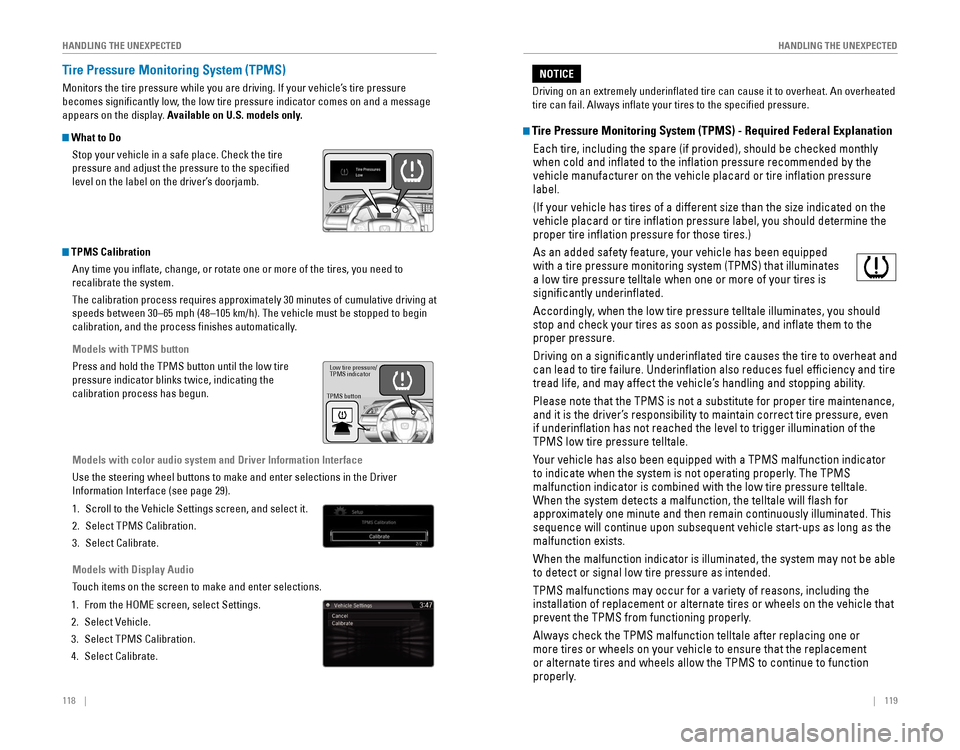
Tire Pressure Monitoring System (TPMS)
Monitors the tire pressure while you are driving. If your vehicle’s tire pressure
becomes significantly low, the low tire pressure indicator comes on and a message
appears on the display. Available on U.S. models only.
What to Do
Stop your vehicle in a safe place. Check the tire
pressure and adjust the pressure to the specified
level on the label on the driver’s doorjamb.
TPMS CalibrationAny time you inflate, change, or rotate one or more of the tires, you \
need to
recalibrate the system.
The calibration process requires approximately 30 minutes of cumulative driving at
speeds between 30–65 mph (48–105 km/h). The vehicle must be stop\
ped to begin
calibration, and the process finishes automatically.
Models with TPMS button
Press and hold the TPMS button until the low tire
pressure indicator blinks twice, indicating the
calibration process has begun.
Models with color audio system and Driver Information Interface
Use the steering wheel buttons to make and enter selections in the Drive\
r
Information Interface (see page 29).
1. Scroll to the vehicle Settings screen, and select it.
2. Select TPMS Calibration.
3. Select Calibrate.
Models with Display Audio
Touch items on the screen to make and enter selections.
1. From the HoMe screen, select Settings.
2. Select vehicle.
3. Select TPMS Calibration.
4. Select Calibrate.
TPMS button Low tire pressure/
TPMS indicator
Tire Pressure Monitoring System (TPMS) - Required Federal Explanation
each tire, including the spare (if provided), should be checked monthly\
when cold and inflated to the inflation pressure recommended by the \
vehicle manufacturer on the vehicle placard or tire inflation pressure\
label.
(If your vehicle has tires of a different size than the size indicated \
on the
vehicle placard or tire inflation pressure label, you should determine\
the
proper tire inflation pressure for those tires.)
As an added safety feature, your vehicle has been equipped
with a tire pressure monitoring system (TPMS) that illuminates
a low tire pressure telltale when one or more of your tires is
significantly underinflated.
Accordingly, when the low tire pressure telltale illuminates, you should
stop and check your tires as soon as possible, and inflate them to the\
proper pressure.
Driving on a significantly underinflated tire causes the tire to ove\
rheat and
can lead to tire failure. Underinflation also reduces fuel efficienc\
y and tire
tread life, and may affect the vehicle’s handling and stopping ability.
Please note that the TPMS is not a substitute for proper tire maintenanc\
e,
and it is the driver’s responsibility to maintain correct tire pressure, even
if underinflation has not reached the level to trigger illumination of\
the
TPMS low tire pressure telltale.
Your vehicle has also been equipped with a TPMS malfunction indicator
to indicate when the system is not operating properly. The TPMS
malfunction indicator is combined with the low tire pressure telltale.
When the system detects a malfunction, the telltale will flash for
approximately one minute and then remain continuously illuminated. This \
sequence will continue upon subsequent vehicle start-ups as long as the \
malfunction exists.
When the malfunction indicator is illuminated, the system may not be abl\
e
to detect or signal low tire pressure as intended.
TPMS malfunctions may occur for a variety of reasons, including the
installation of replacement or alternate tires or wheels on the vehicle \
that
prevent the TPMS from functioning properly.
Always check the TPMS malfunction telltale after replacing one or
more tires or wheels on your vehicle to ensure that the replacement
or alternate tires and wheels allow the TPMS to continue to function
properly.
Driving on an extremely underinflated tire can cause it to overheat. A\
n overheated
tire can fail. Always inflate your tires to the specified pressure.
NOTICE
Page 68 of 82
128 || 129
M
AINTENANCEMAINTENANCE
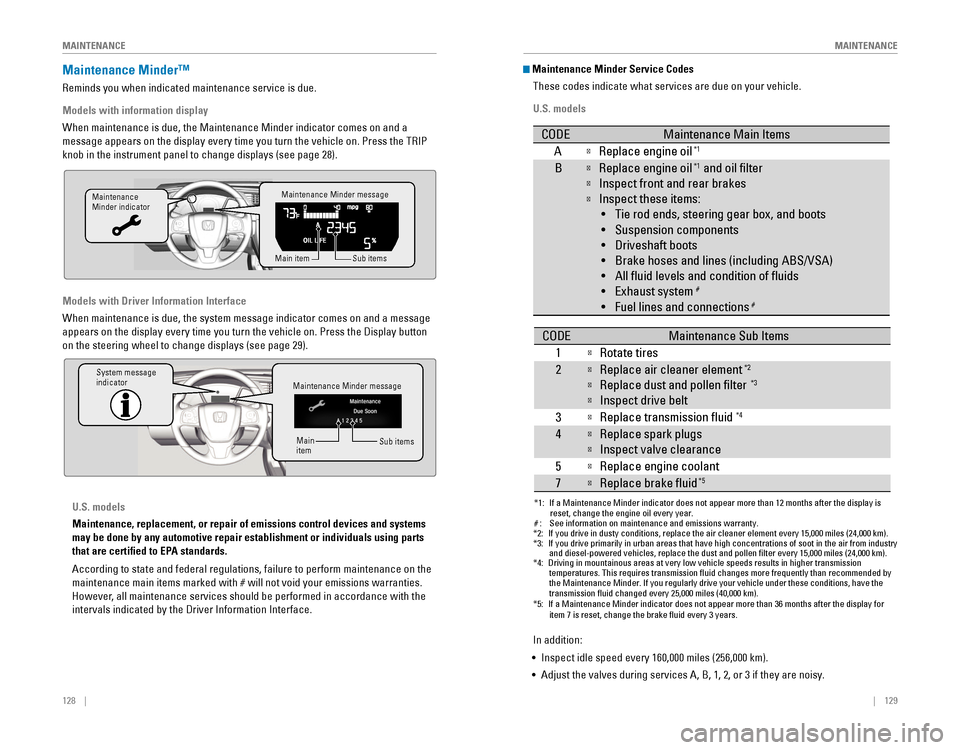
Maintenance Minder™
reminds you when indicated maintenance service is due.
Models with information display
When maintenance is due, the Maintenance Minder indicator comes on and a\
message appears on the display every time you turn the vehicle on. Press\
the TrIP
knob in the instrument panel to change displays (see page 28).
Models with Driver Information Interface
When maintenance is due, the system message indicator comes on and a mes\
sage
appears on the display every time you turn the vehicle on. Press the Dis\
play button
on the steering wheel to change displays (see page 29).
Maintenance Minder message
Maintenance
Minder indicator
Sub items
Main item
Maintenance Minder message
System message
indicator
Sub items
Main
item
U.S. models
Maintenance, replacement, or repair of emissions control devices and sys\
tems
may be done by any automotive repair establishment or individuals using \
parts
that are certified to EPA standards.
According to state and federal regulations, failure to perform maintenan\
ce on the
maintenance main items marked with # will not void your emissions warranties.
However, all maintenance services should be performed in accordance with the
intervals indicated by the Driver Information Interface.
Maintenance Minder Service Codes
These codes indicate what services are due on your vehicle.
U.S. models
*1: If a Maintenance Minder indicator does not appear more than 12 months af\
ter the display is reset, change the engine oil every year.
#: See information on maintenance and emissions warranty.
CODEMaintenance Main Items
AReplace engine oi l*1
BReplace engine oil*1 and oil lter
Inspect front and rear brakes
Inspect these items:
• Tie rod ends, steering gear box, and boots
•S uspension components
• Driveshaft boots
• Brake hoses and lines (including ABS/VSA)
• All uid levels and condition of uids
• Exhaust system
#
•F uel lines and connection s#
*2:If you drive in dusty conditions, replace the air cleaner element every \
15,000 miles (24,000 km).*3:If you drive primarily in urban areas that have high concentrations of s\
oot in the air from industryand diesel-powered vehicles, replace the dust and pollen lter every \
15,000 miles (24,000 km).*4:Driving in mountainous areas at very low vehicle speeds results in highe\
r transmission
temperatures. This requires transmission uid changes more frequently\
than recommended by
the Maintenance Minder. If you regularly drive your vehicle under these conditions, have the
transmission uid changed every 25,000 miles (40,000 km).
CODEMaintenance Sub Items
1
Rotate tires
2Replace air cleaner element*2
Replace dust and pollen lter*3
Inspect drive belt
3
Replace transmission uid*4
4Replace spark plug s
Inspect valve clearance
5
Replace engine coolant
7Replace brake uid*5
*5:If a Maintenance Minder indicator does not appear more than 36 months af\
ter the display for item 7 is reset, change the brake uid every 3 years.
In addition:
• Inspect idle speed every 160,000 miles (256,000 km).
• Adjust the valves during services A, B, 1, 2, or 3 if they are noisy.
Page 69 of 82

130 || 131
M
AINTENANCEMAINTENANCE
*1: If a Maintenance Minder message does not appear more than 12 months afte\
r the display is
reset, change the engine oil every year.
*2: If you drive in dusty conditions, replace the air cleaner element every \
24,000 km (15,000 miles).
*3:
If you drive primarily in urban areas that have high concentrations of s\
oot in the air from industryand diesel-powered vehicles, replace the dust and pollen lter every \
24,000 km (15,000 miles).
*4: Driving in mountainous areas at very low vehicle speeds results in highe\
r transmission
temperatures. This requires transmission uid changes more frequently\
than recommended by
the Maintenance Minder. If you regularly drive your vehicle under these conditions, have the
transmission uid changed every 40,000 km (25,000 miles).
*5: If a Maintenance Minder Indicator does not appear more than 36 months after the display for
item7 is reset, change the brake uid every 3 years.#: See information on maintenance and emissions warranty.
CODEMaintenance Main Items
AReplace engine oi l*1
0Replace engine oil*1 and oil lter
CODEMaintenance Sub Items
1
Rotate tires
2Replace air cleaner element*2
Replace dust and pollen lte r*3
Inspect drive belt
3
Replace transmission uid*4
4Replace spark plug s
Inspect valve clearance
5
Replace engine coolant
7Replace brake uid*5
9Inspect front and rear brakes
Inspect these items: •T ie rod ends, steering gearbox, and boots
•S uspension components
•D riveshaft boots
•B rake hoses and lines (including ABS/VSA)
•A ll uid levels and condition of uids
•E xhaust system
#
•Fuel lines and connections#
Canadian models
In addition:
• Inspect idle speed every 256,000 km (160,000 miles).
• Adjust the valves during services A, B, 1, 2, or 3 if they are noisy.Under the Hood
1.5 engine model\
s
Brake uid
(black cap)
Reserve \fank Washer uid
(blue cap)
\bngine oil dips\fick\v
(orange) \bngine oil ll cap Ba\f\fery
Reserve \fank cap
U.S. modelsWasher uid
(blue cap)Canadian models
2.0 engine model\/s
Brake/\flut\fh\b uid
(Bla\fk \fap)
Reserve tank Washer uid
(blue \fap) Engine oil dipsti\fk\/
(orange)
Engine oil ll \fap Battery
Reserve tank \fap
*if equipped
Page 71 of 82
134 || 135
M
AINTENANCEMAINTENANCE
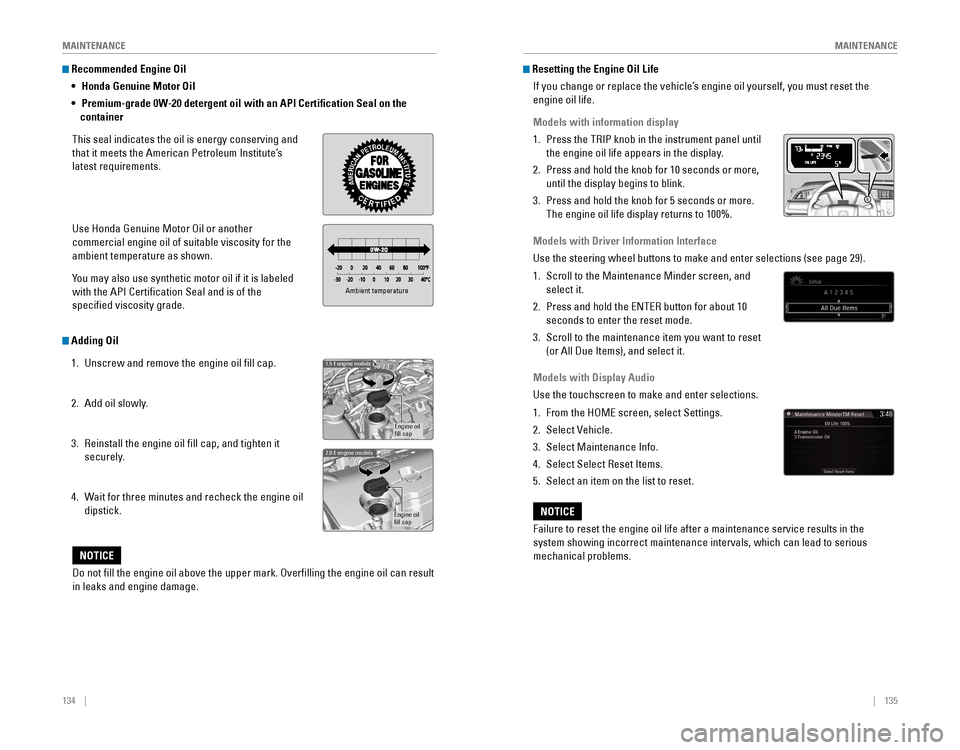
Recommended Engine Oil
•
Honda Genuine Motor Oil
• Premium-grade 0W-20 detergent oil with an API Certification Seal on the
container
This seal indicates the oil is energy conserving and
that it meets the American Petroleum Institute’s
latest requirements.
Use Honda Genuine Motor oil or another
commercial engine oil of suitable viscosity for the
ambient temperature as shown.
You may also use synthetic motor oil if it is labeled
with the API Certification Seal and is of the
specified viscosity grade.
Adding Oil
1. Unscrew and remove the engine oil fill cap.
2. Add oil slowly.
3. reinstall the engine oil fill cap, and tighten it
securely.
4. Wait for three minutes and recheck the engine oil
dipstick.
Ambient temperature
Engine oil
ll cap
1.5 engine models
Engine oil
ll ca p
2.0 engine models
Do not ll the engine oil above the upper mark. Overlling the engine oil can result
in leaks and engine damage.
NOTICE
Resetting the Engine Oil Life
If you change or replace the vehicle’s engine oil yourself, you must reset the
engine oil life.
Models with information display
1. Press the TrIP knob in the instrument panel until
the engine oil life appears in the display.
2. Press and hold the knob for 10 seconds or more,
until the display begins to blink.
3. Press and hold the knob for 5 seconds or more.
The engine oil life display returns to 100%.
Models with Driver Information Interface
Use the steering wheel buttons to make and enter selections (see page 2\
9).
1. Scroll to the Maintenance Minder screen, and
select it.
2. Press and hold the eNTer button for about 10
seconds to enter the reset mode.
3. Scroll to the maintenance item you want to reset
(or All Due Items), and select it.
Models with Display Audio
Use the touchscreen to make and enter selections.
1. From the HoMe screen, select Settings.
2. Select vehicle.
3. Select Maintenance Info.
4. Select Select reset Items.
5. Select an item on the list to reset.
Failure to reset the engine oil life after a maintenance service results\
in the
system showing incorrect maintenance intervals, which can lead to seriou\
s
mechanical problems.
NOTICE
Page 72 of 82

136 || 137
M
AINTENANCEMAINTENANCE
Engine Coolant
Park the vehicle on level ground. Check the reserve tank and the coolant\
level in the
radiator. We recommend Honda Long Life Antifreeze/Coolant Type 2.
Checking the Coolant
1. Check the amount of coolant in the reserve tank.
2. If the coolant level is below the MIN mark, add
the specified coolant until it reaches the MAX
mark.
3. Inspect the cooling system for leaks.
Adding Coolant
1. Make sure the engine and radiator are cool.
2. Turn the reserve tank cap counterclockwise and
relieve any pressure in the coolant system. Do
not push the cap down when turning.
3. Push down and turn the reserve tank cap
counterclockwise to remove it.
4. Pour coolant into the reserve tank until it reaches
the MAX mark.
5. Put the reserve tank cap back on, and tighten it
fully.
If temperatures consistently below −22°F (−30°C) are expec\
ted, the coolant
mixture should be changed to a higher concentration. Consult a dealer fo\
r details
for more information.
NOTICE
Reserve tank cap
1.5 engine models
Reserve tank cap
2.0 engine models
removing the radiator cap while the engine is hot can cause the coolant t\
o
spray out, seriously scalding you.
Always let the engine and radiator cool down before removing the radiato\
r
cap.
WARNING
Pour the fluid slowly and carefully so you do not spill any. Clean up any spills
immediately; they can damage components in the engine compartment.
NOTICE
MA X
MINReserve tan k
Window Washer Fluid
Check the amount of window washer fluid by looking
at the reservoir. If the washer fluid level is low, fill the
washer reservoir.
Pour the washer fluid carefully. Do not overflow the
reservoir.
Canadian models
If the washer fluid level is low, the washer level indicator or a message appears in
the Driver Information Interface.
Do not use engine antifreeze or a vinegar/water solution in the windshie\
ld washer
reservoir. Antifreeze can damage your vehicle’s paint. A vinegar/water solution
can damage the windshield washer pump.
NOTICE
Brake/Clutch* Fluid
The fluid level should be between the MIN and MAX marks on the side of\
the
reservoir. We recommend using Honda Heavy Duty Brake Fluid DOT 3.
Pour the fluid carefully.
If the fluid level is at or below the MIN mark, have a
dealer inspect for leaks or worn brake pads as soon as
possible.
The brake fluid reservoir is also used for your vehicle’s
clutch fluid. As long as you keep the brake fluid level
as instructed above, there is no need for checking the
clutch fluid level.
Brake fluid marked DoT 5 is not compatible with your vehicle’s braking system
and can cause extensive damage.
NOTICE
Brake reservoir
MINMAX
*if equipped
Page 77 of 82

146 || 147
SPECIFICATIONS
M
AINTENANCE
Testing of Readiness Codes
Your vehicle has “readiness codes” as part of the onboard self-diag\
nostic system.
Some states refer to these codes as a test to see if your vehicle’s emissions
components are working properly. The codes may not be read if you go through the
testing just after the battery has gone dead or been disconnected.
To check if they are set, turn the vehicle on without starting the engine\
. The
malfunction indicator lamp will come on for several seconds. If it goes \
off, the
readiness codes are set. If it blinks five times, the readiness codes \
are not set.
If you are required to have your vehicle tested before the readiness cod\
es are set,
prepare the vehicle for retesting by doing the following:
1. Fill the gas tank to approximately 3/4 full.
2. Park the vehicle and leave the engine off for 6 hours or more.
3. Make sure the ambient temperature is between 40°F and 95°F (4°\
C and 35°C).
4. Start the engine without touching the accelerator pedal, and let it idle\
for 20
seconds.
5. Keep the vehicle in Park (P) or Neutral for manual transmission. Incre\
ase the
engine speed to 2,000 rpm, and hold it there for about 3 minutes.
6. Let the engine idle with your foot off the accelerator for 20 seconds.
7. Select a nearby, lightly traveled major highway where you can maintain a speed
of 50 to 60 mph (80 to 97 km/h) for at least 20 minutes. Drive on the \
highway
with the vehicle in Drive (D) or 5th gear. Do not use cruise control. When traffic
allows, drive for 90 seconds without using the accelerator pedal. (vehicle speed
may vary slightly; this is oK.) If you cannot do this for a continuous 90 seconds
because of traffic conditions, drive for at least 30 seconds, then rep\
eat two more
times (for a total of 90 seconds).
8. Drive in city/suburban traffic for at least 10 minutes. When traffic\
conditions
allow, let the vehicle coast for several seconds without using the accelerator
pedal or the brake pedal.
9. Park the vehicle and leave the engine off for 30 minutes.
The readiness codes are erased when the battery is disconnected, and set\
again
only after several days of driving under a variety of conditions.
If a testing facility determines that the readiness codes are not set, y\
ou may be
requested to return at a later date to complete the test, or see your de\
aler.
SPECIFICATIONS
1.5-L engine models
Vehicle
ModelHonda Civic 4-Doo r
No. of Passengers :
Front2
Rear 3
Tota l5
Weights:Gross Vehicle
Weight Rating U.S.: 3,902 lbs (1,770 kg )
Canada: 1,770 kg
Gross Axle Weight
Rating (Front )U.S.: 2,105 lbs (955 kg )
Canada: 955 kg
Gross Axle Weight
Rating (Rear)U.S.: 1,808 lbs (820 kg )
Canada: 820 kg
Light Bulbs
*1:Except Touring models*2: Touring models
Headlights (Low Beam )55W (H11)*1LED*2
Headlights (High Beam )60W (HB3)*1LE
D*2Fog Lights35W (H8)
Parking/Da ytime Running Light sLED
Front Side Marker Lights3W
Front Turn Signal Lights 21W (Amber
)*1LED*2Side Turn Signal Lights
(on Door Mirrors)*LE D
Brake Light s2 1W
Rear Turn Signal Lights21W (Amber)
Rear Side Marker Lights LED
Back-Up Lights16W
DEL
sthgilliaT
High- Mount Brak e Light21W
Rear License Plate Light LED
Trunk Light5W
In terior Lights
Map Lights8 W
Ceiling Ligh t8 W
Engine and Fuel
Engine
FuelDisplacemen t91.26 cu-in (1,496 cm3)
Spark Plug sN GKILZKAR8H8S
Fuel:
TypeUnleaded gasoline, Pump octane number
of 87 or highe r
Fuel Tank Capacity 12.39 US gal (46.9 )
Fluids
Air ConditioningRefrigerant TypeHFO-1234yf (R-1234yf)
Charge Quantity 13.2 – 15.0 oz (375 – 425 g)
Lubricant TypeRL85HM (POE)
Quantity 2.7 – 3.6 oz (77 – 103 g)
Washer Fluid
Tank CapacityU.S.: 2.6 US qt (2.5 )
Canada: 4.8 US qt (4.5 )
Brake Fluid
Continuously Variable Transmission Fluid
SpecifedHonda Heavy Duty Brake Fluid DOT 3
SpecifedHonda HCF-2 Transmission Flui d
Capacity Change 3.9 US qt (3.7 )
Engine Oil
Engine Coolan
t
Recommended·Genuine Honda Motor Oil 0W-20
·API Premium-grade 0W-20 detergent oi l
Capacity Change
3.4 US qt (3.2 )
Change
including
flter 3.7 US qt (3.5 )
SpecifedHonda Long Life Anti
freeze/Coolant Type 2
Ratio 50/50 with distilled wate r
Capacity1.34 US gal (5.09 )
(change including the remaining
0.2 US gal (0.75 ) in the reserve tank )
Tires
RegularSize215/50R17 91HPressure
psi (kPa [kgf/cm2])32 (220 [2.2])
Compact
Spar e Size
T125/80D16 97M
Pressure
psi (kPa [kgf/cm
2]) 60 (420 [4.2])
Wheel SizeRegula
r17 x 7JCompact Spar e16 x 4T