instrument panel HONDA CIVIC 2016 10.G Quick Guide
[x] Cancel search | Manufacturer: HONDA, Model Year: 2016, Model line: CIVIC, Model: HONDA CIVIC 2016 10.GPages: 82, PDF Size: 5.52 MB
Page 53 of 82
98 || 99
DRIVING
DRIVING
Braking
Slow down or stop your vehicle, and keep it from moving when parked.
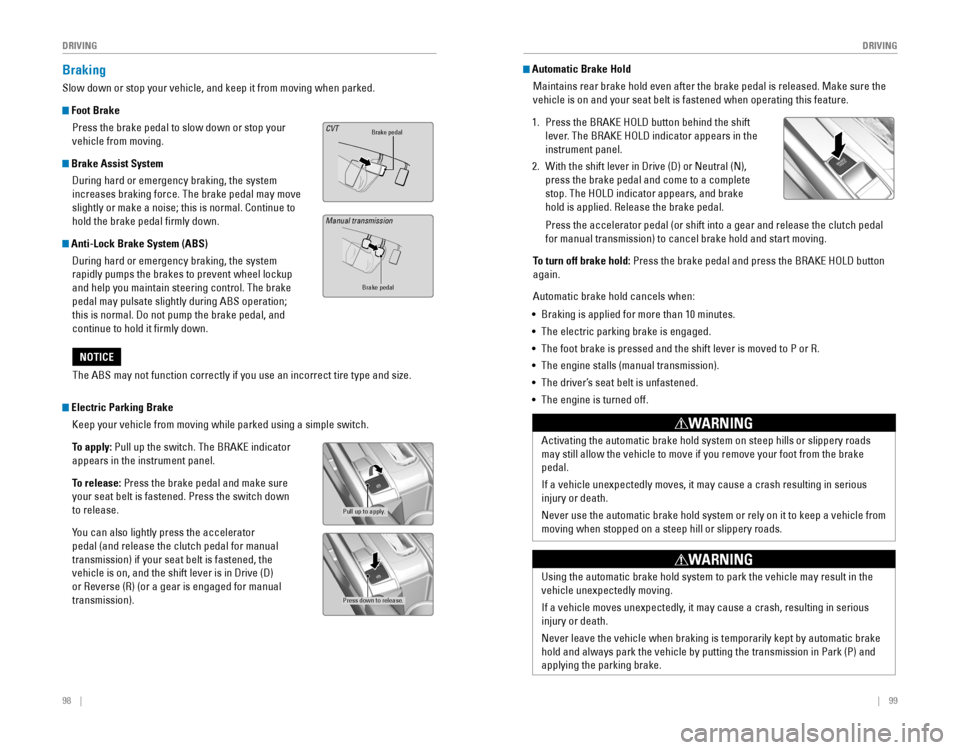
Foot Brake
Press the brake pedal to slow down or stop your
vehicle from moving.
Brake Assist System During hard or emergency braking, the system
increases braking force. The brake pedal may move
slightly or make a noise; this is normal. Continue to
hold the brake pedal firmly down.
Anti-Lock Brake System (ABS) During hard or emergency braking, the system
rapidly pumps the brakes to prevent wheel lockup
and help you maintain steering control. The brake
pedal may pulsate slightly during ABS operation;
this is normal. Do not pump the brake pedal, and
continue to hold it firmly down.
Brake pedalCVT
Brake pedal
The ABS may not function correctly if you use an incorrect tire type and\
size.
NOTICE
Electric Parking Brake Keep your vehicle from moving while parked using a simple switch.
To apply:
Pull up the switch. The BrAKe indicator
appears in the instrument panel.
To release: Press the brake pedal and make sure
your seat belt is fastened. Press the switch down
to release.
You can also lightly press the accelerator
pedal (and release the clutch pedal for manual
transmission) if your seat belt is fastened, the
vehicle is on, and the shift lever is in Drive (D)
or reverse (r) (or a gear is engaged for manual
transmission).
Pull up to apply.
Press down to release.
Manual transmission
Automatic Brake Hold Maintains rear brake hold even after the brake pedal is released. Make sure the
vehicle is on and your seat belt is fastened when operating this feature\
.
1. Press the BrAKe HoLD button behind the shift
lever. The BrAKe HoLD indicator appears in the
instrument panel.
2. With the shift lever in Drive (D) or Neutral (N),
press the brake pedal and come to a complete
stop. The HoLD indicator appears, and brake
hold is applied. release the brake pedal.
Press the accelerator pedal (or shift into a gear and release the clutc\
h pedal
for manual transmission) to cancel brake hold and start moving.
To turn off brake hold:
Press the brake pedal and press the BrAKe HoLD button
again.
Automatic brake hold cancels when:
• Braking is applied for more than 10 minutes.
• The electric parking brake is engaged.
•
The foot brake is pressed and the shift lever is moved to P or r.
• The engine stalls (manual transmission).
• The driver’s seat belt is unfastened.
• The engine is turned off.
Activating the automatic brake hold system on steep hills or slippery ro\
ads
may still allow the vehicle to move if you remove your foot from the bra\
ke
pedal.
If a vehicle unexpectedly moves, it may cause a crash resulting in serio\
us
injury or death.
Never use the automatic brake hold system or rely on it to keep a vehicl\
e from
moving when stopped on a steep hill or slippery roads.
WARNING
Using the automatic brake hold system to park the vehicle may result in \
the
vehicle unexpectedly moving.
If a vehicle moves unexpectedly, it may cause a crash, resulting in serious
injury or death.
Never leave the vehicle when braking is temporarily kept by automatic brake
hold and always park the vehicle by putting the transmission in Park (P\
) and
applying the parking brake.
WARNING
Page 56 of 82
*
Provides steering input to help keep the vehicle in the middle of a dete\
cted lane and
visual and tactile alerts if the veh")
104 || 105
DRIVING
DRIVING
Lane Keeping Assist System (LKAS)*
Provides steering input to help keep the vehicle in the middle of a dete\
cted lane and
visual and tactile alerts if the vehicle is detected drifting out of its\
lane while driving
between 45–90 mph (72–145 km/h).
If your vehicle is getting too close to detected left or
right side lane markings without a turn signal activated,
a message appears on the Driver Information Interface,
and the steering wheel vibrates. Steering torque is also
applied to help keep your vehicle within your driving
lane.
Turning the System On or Off
1. Press the MAIN button. LKAS appears in the
Driver Information Interface.
2. Press the LKAS button. Lane outlines appear
in the Driver Information Interface. Dotted lane
lines turn solid when the system starts operating.
3. Press the MAIN button or the LKAS button to turn
the system off.
Important Safety Reminder
LKAS is for your convenience only. It is not a substitute for your vehicle control. The
system does not work if you take your hands off the steering wheel or fa\
il to steer
the vehicle.
Do not place an object on the top of the instrument panel. It may refl\
ect onto the
windshield and prevent the system from detecting lane lines properly.
MAIN button
*if equipped
Steering assistance
LKAS button
Road Departure Mitigation (RDM)*
Alerts and helps to assist you if the system determines a possibility of\
your vehicle
unintentionally crossing over detected lane markings while driving betwe\
en 45–90
mph (72–145 km/h).
If your vehicle is getting too close to detected lane
markings without a turn signal activated, a message
appears in the Driver Information Interface. Steering
wheel torque and vibrations are applied to help your
vehicle stay in the lane.
Braking may also be applied if the lane lines are solid
and continuous.
If the system operates several times without detecting
driver response, the system beeps to alert you.
Changing Settings Determine the warning type.
1. From the HoMe screen, select Settings.
2. Select vehicle. The vehicle must be in Park (P).
3. Select Driver Assist System Setup.
4. Select road Departure Mitigation Setting.
5. Select from the options.
Normal (default): Steering control starts from inside the lane edge.
Wide: Steering control starts from outside the lane edge.
Warning Only: The system only provides a BrAKe message and steering wheel
vibrations, but does not apply steering torque or braking.
6. Press BACK to exit the menu.
Important Safety Reminder
The rDM system has limitations. over-reliance on it may result in a collision. It is
always your responsibility to keep your vehicle within the driving lane.\
*if equipped
Turning the System On or Off
Press the rDM button to turn the system on or off.
A green indicator appears on the button when the
system is on.
RDM button
Indicator
Steering assistance
Page 68 of 82
128 || 129
M
AINTENANCEMAINTENANCE
Maintenance Minder™
reminds you when indicated maintenance service is due.
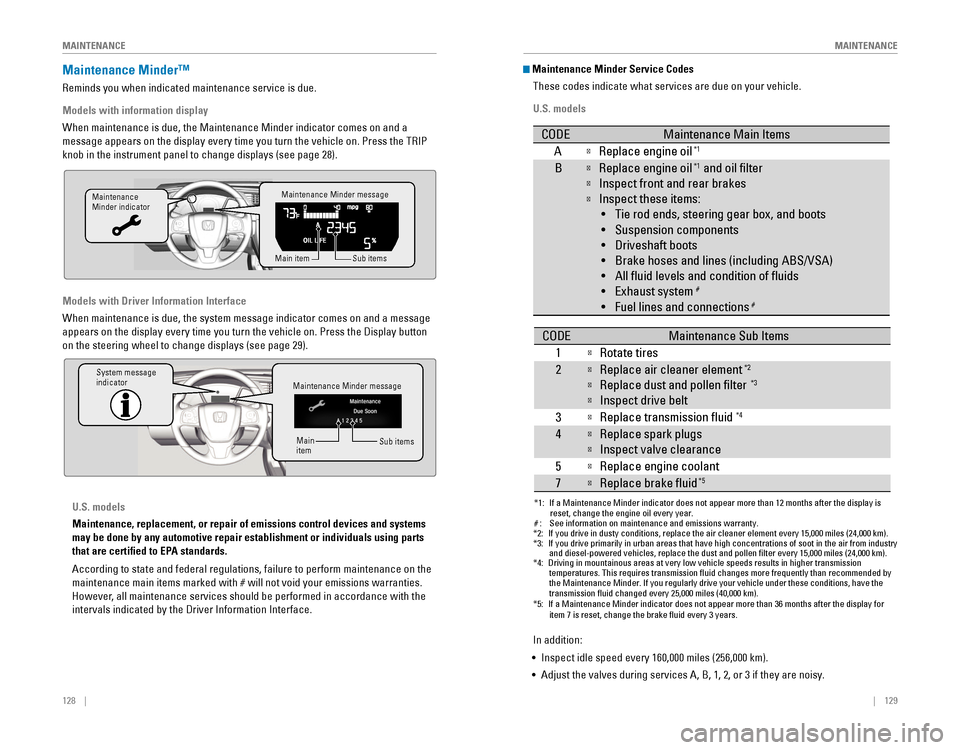
Models with information display
When maintenance is due, the Maintenance Minder indicator comes on and a\
message appears on the display every time you turn the vehicle on. Press\
the TrIP
knob in the instrument panel to change displays (see page 28).
Models with Driver Information Interface
When maintenance is due, the system message indicator comes on and a mes\
sage
appears on the display every time you turn the vehicle on. Press the Dis\
play button
on the steering wheel to change displays (see page 29).
Maintenance Minder message
Maintenance
Minder indicator
Sub items
Main item
Maintenance Minder message
System message
indicator
Sub items
Main
item
U.S. models
Maintenance, replacement, or repair of emissions control devices and sys\
tems
may be done by any automotive repair establishment or individuals using \
parts
that are certified to EPA standards.
According to state and federal regulations, failure to perform maintenan\
ce on the
maintenance main items marked with # will not void your emissions warranties.
However, all maintenance services should be performed in accordance with the
intervals indicated by the Driver Information Interface.
Maintenance Minder Service Codes
These codes indicate what services are due on your vehicle.
U.S. models
*1: If a Maintenance Minder indicator does not appear more than 12 months af\
ter the display is reset, change the engine oil every year.
#: See information on maintenance and emissions warranty.
CODEMaintenance Main Items
AReplace engine oi l*1
BReplace engine oil*1 and oil lter
Inspect front and rear brakes
Inspect these items:
• Tie rod ends, steering gear box, and boots
•S uspension components
• Driveshaft boots
• Brake hoses and lines (including ABS/VSA)
• All uid levels and condition of uids
• Exhaust system
#
•F uel lines and connection s#
*2:If you drive in dusty conditions, replace the air cleaner element every \
15,000 miles (24,000 km).*3:If you drive primarily in urban areas that have high concentrations of s\
oot in the air from industryand diesel-powered vehicles, replace the dust and pollen lter every \
15,000 miles (24,000 km).*4:Driving in mountainous areas at very low vehicle speeds results in highe\
r transmission
temperatures. This requires transmission uid changes more frequently\
than recommended by
the Maintenance Minder. If you regularly drive your vehicle under these conditions, have the
transmission uid changed every 25,000 miles (40,000 km).
CODEMaintenance Sub Items
1
Rotate tires
2Replace air cleaner element*2
Replace dust and pollen lter*3
Inspect drive belt
3
Replace transmission uid*4
4Replace spark plug s
Inspect valve clearance
5
Replace engine coolant
7Replace brake uid*5
*5:If a Maintenance Minder indicator does not appear more than 36 months af\
ter the display for item 7 is reset, change the brake uid every 3 years.
In addition:
• Inspect idle speed every 160,000 miles (256,000 km).
• Adjust the valves during services A, B, 1, 2, or 3 if they are noisy.
Page 71 of 82
134 || 135
M
AINTENANCEMAINTENANCE
Recommended Engine Oil
•
Honda Genuine Motor Oil
• Premium-grade 0W-20 detergent oil with an API Certification Seal on the
container
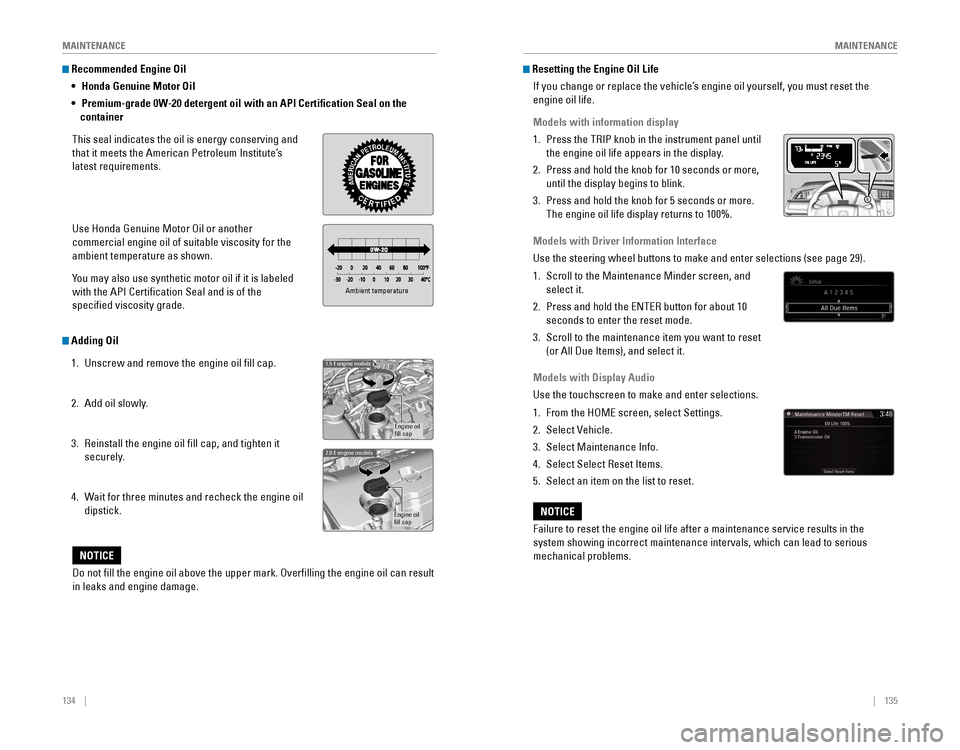
This seal indicates the oil is energy conserving and
that it meets the American Petroleum Institute’s
latest requirements.
Use Honda Genuine Motor oil or another
commercial engine oil of suitable viscosity for the
ambient temperature as shown.
You may also use synthetic motor oil if it is labeled
with the API Certification Seal and is of the
specified viscosity grade.
Adding Oil
1. Unscrew and remove the engine oil fill cap.
2. Add oil slowly.
3. reinstall the engine oil fill cap, and tighten it
securely.
4. Wait for three minutes and recheck the engine oil
dipstick.
Ambient temperature
Engine oil
ll cap
1.5 engine models
Engine oil
ll ca p
2.0 engine models
Do not ll the engine oil above the upper mark. Overlling the engine oil can result
in leaks and engine damage.
NOTICE
Resetting the Engine Oil Life
If you change or replace the vehicle’s engine oil yourself, you must reset the
engine oil life.
Models with information display
1. Press the TrIP knob in the instrument panel until
the engine oil life appears in the display.
2. Press and hold the knob for 10 seconds or more,
until the display begins to blink.
3. Press and hold the knob for 5 seconds or more.
The engine oil life display returns to 100%.
Models with Driver Information Interface
Use the steering wheel buttons to make and enter selections (see page 2\
9).
1. Scroll to the Maintenance Minder screen, and
select it.
2. Press and hold the eNTer button for about 10
seconds to enter the reset mode.
3. Scroll to the maintenance item you want to reset
(or All Due Items), and select it.
Models with Display Audio
Use the touchscreen to make and enter selections.
1. From the HoMe screen, select Settings.
2. Select vehicle.
3. Select Maintenance Info.
4. Select Select reset Items.
5. Select an item on the list to reset.
Failure to reset the engine oil life after a maintenance service results\
in the
system showing incorrect maintenance intervals, which can lead to seriou\
s
mechanical problems.
NOTICE
Page 81 of 82
154 || 155
INDEX
INDEX
INDEX
ABS .............................................................25ACC .......................................................24, 27
Accessory Power Socket ...............................52Adaptive Cruise Control (ACC) with Low Speed Follow (LSF) ...................24, 102Address .............................................................85
Advanced Airbags .............................................8Aha™ radio ......................................................64Airbags ...............................................................8
Airbag System Components .......................12
Airbag System Indicators ...........................10
Ambient Meter ................................................ 100
Android Auto™
.................................................66
Anti-Lock Brake System (ABS) ................25, 98
Apple CarPlay® .................................................65
Audio Commands ...........................................153Audio operation ...............................................52Aha™ radio ..................................................64
Android Auto™ .............................................66
Apple CarPlay® .............................................65
Bluetooth® Audio ...................................61, 71
Color Audio System .....................................57
Display Audio ................................................62FM/AM radio ..........................................58, 67
HondaLink™ ..................................................63
iPod® .......................................................59, 69
Pandora® .......................................................72
SiriusXM® radio ...........................................68Sound .............................................................56
Steering Wheel Controls .............................54
USB Flash Drive ......................................60, 70
USB Port ........................................................52
Wi-Fi Connection ..........................................64
Wireless Charger .........................................53
Automatic brake hold ................................27, 99Automatic Dimming rearview Mirror ...........44Automatic rain-Sensing Wipers ...................39Battery ...........................................................138
Bluetooth® Audio .......................................61, 71
Bluetooth® Audio Commands ......................153
Bluetooth® HandsFreeLink® (HFL) .................73e-Mail .............................................................81
HFL Controls ............................................73, 76
HondaLink™ Assist ......................................80
Making a Call ..........................................75, 79
Pairing a Phone ......................................74, 78
Phonebook ..............................................75, 79
Siri® eyes Free ..............................................82
SMS Text Messaging ..................................81
Speed Dial ...............................................75, 80
Talk Button Tips ............................................77
Brake Assist System ........................................ 98
Brake/Clutch Fluid .......................................... 137Brake depress
..................................................26
Brake system ..............................................24, 25Braking .............................................................98
Brightness Control ...........................................37
Carbon Monoxide Gas .......................................4
Changing a Flat Tire
.......................................120
Changing Settings ............................................49
Charging system ............................................... 24
Childproof Door Locks
.....................................34
Child Safety .......................................................14
Child Seat ..........................................................16
Adding Security with a Tether ...................19
LATCH-Compatible Child Seat ....................17
Climate Control Commands ..........................152
Climate Control System ...................................46Clock .............................................................51
Collision Mitigation Braking System™ (CMBS™)
...................................25, 106
Color Audio System .........................................57
Condition Indicators ........................................26
Contact Us .......................................................150Continuously variable Transmission (CvT) ...96
Cruise Control ...........................................27, 101
Customer Information ....................................149
Customized Features
.......................................50Dashboard, Ceiling, and other Controls .........2
Destination ........................................................85
Dialing a Number .......................................75, 79
Display Audio ....................................................62
Door Mirrors .....................................................44Door operation .................................................34Doors .............................................................32
Door/trunk open ...............................................26DoT Tire Quality Grading ..............................144
Driver Information Interface ..........................29Driving .............................................................90Adaptive Cruise Control (ACC) with Low Speed Follow (LSF) .........................102
Braking ...........................................................98
Collision Mitigation Braking System™ (CMBS™)
.........................................106Continuously variable Transmission (CvT) ...................................................96
Cruise Control .............................................101eco Assist™ System ..................................100eNGINe STArT/SToP button .....................96
Ignition ...........................................................95
Lane Keeping Assist System (LKAS) .......104
LaneWatch™ ..............................................108
Manual Transmission ..................................97
Maximum Load Limit ....................................92Multi-view rear Camera ..........................109
Power Mode .................................................96
refueling ......................................................111remote engine Start ....................................94road Departure Mitigation (rDM) ..........105
Shifting ...........................................................96vehicle Stability Assist (vSA®) ................100
Wiper Blades ..............................................139eco Assist™ System ......................................100eCoN Button ...................................................100eCoN mode .......................................................27electric Parking Brake ....................................98electric Power Steering (ePS) .......................25electronic Stability Control (eSC) ................100e-Mail .............................................................81emergency engine Stop ................................117emergency Towing ........................................117engine and Fuel ......................................147, 148engine Coolant................................................ 136engine oil......................................................... 133eNGINe STArT/SToP button .........................96exterior lights ..............................................27, 37
Fastening a Seat Belt ........................................7Flat Tire ...........................................................120
Floor Mats .........................................................41Fluids ...................................................147, 148FM/AM radio ..............................................58, 67FM/AM radio Commands .............................153
Fog lights ...........................................................27
Foot Brake .........................................................98
Frequently Asked Questions ........................149Front Airbags (SrS) ...........................................8
Front Door Inner Handle .................................34
Fuel Information .............................................111
Fuse Locations ................................................ 124
Hang-Up/Back button ................................73, 76
Headlight-Wiper Integration
..........................38Head restraints ................................................42
Heating System ................................................45
HFL Controls ................................................73, 76
High beams .......................................................27
Home Address ..................................................85
HondaLink™ ......................................................63
HondaLink™ Assist ..........................................80Honda roadside Assistance ........................150Hood ...........................................................131Ignition .............................................................95
Immobilizer ........................................................26
Information Display .......................................... 28
Instrument Panel
..............................................23
Interior Lights .................................................... 37
Intermittent Wipers .......................................... 39
iPod
® .......................................................59, 69
iPod® Commands ...........................................153
Jump Starting .................................................114Key .............................................................31
Lane Keeping Assist System (LKAS) ....24, 104 LaneWatch™
..................................................108
Lap/Shoulder Seat Belts ...................................5
LATCH-Compatible Child Seat ........................17
Light Bulbs ............................................... 147, 148
Lights .......................................................27, 37LKAS .............................................................27
Lock Tab .............................................................34Low fuel .............................................................26
Low oil pressure ...............................................24
Low tire pressure .............................................26
Maintenance ................................................... 127
Air Conditioning
..........................................145
Battery .........................................................138
Brake/Clutch Fluid ......................................137engine Coolant ............................................136engine oil .....................................................133
Maintenance Minder™ .............................128
Service Codes .............................................129
Under the Hood ..........................................131
Window Washer Fluid ...............................137
Making a Call ..............................................75, 79
Malfunction indicator lamp ............................25
Malfunction Indicators ....................................24
Manual Seats .................................................... 41
Manual Transmission
......................................97
Map Legend ......................................................88
Master Door Lock Switch ...............................34
Maximum Load Limit ........................................ 92
Mirrors .............................................................44
Moonroof ...........................................................36Multi-view rear Camera ..............................109
Music search ..................................................153
Navigation .........................................................83
Display and Controls ....................................84entering a Destination .................................85
Home Address ..............................................85
Map Legend ..................................................88
Place Category .............................................86recent Places ...............................................86routing ...........................................................88
Saved Places ................................................87
Steering Wheel Controls .............................83
Street Address ..............................................85System Guidance volume ...........................83
Talk Button Tips ............................................83Traffic .............................................................89
Turn-by-turn directions ...............................88
Navigation Commands ..................................152one-Touch Turn Signal ....................................36on/off Indicators ..............................................27opening the Hood ..........................................132overheating..................................................... 116
Pairing a Phone ..........................................74, 78
Pandora® ...........................................................72
Pandora® Commands ....................................153