reset HONDA CIVIC 2016 10.G Quick Guide
[x] Cancel search | Manufacturer: HONDA, Model Year: 2016, Model line: CIVIC, Model: HONDA CIVIC 2016 10.GPages: 82, PDF Size: 5.52 MB
Page 73 of 82
138 || 139
M
AINTENANCEMAINTENANCE
Checking the Battery
Check the battery terminals for corrosion monthly.
For jump starting, see page 114.
The battery gives off explosive hydrogen gas during normal operation.
A spark or flame can cause the battery to explode with enough force to\
kill or
seriously hurt you.
When conducting any battery maintenance, wear protective clothing and a \
face
shield, or have a skilled technician do it.
WARNING
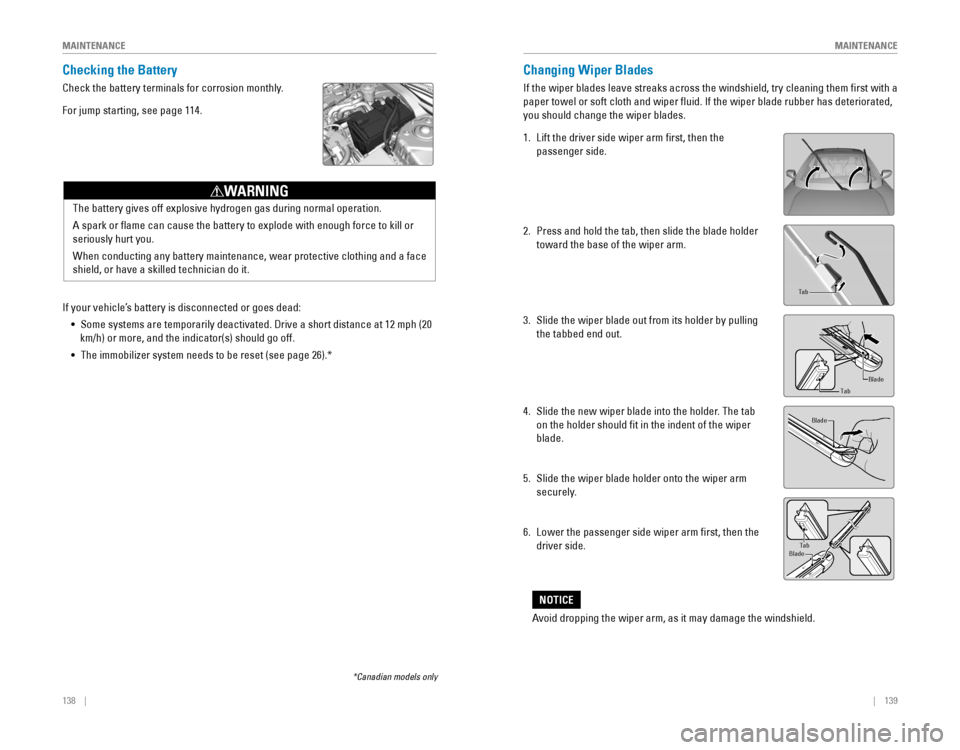
Changing Wiper Blades
If the wiper blades leave streaks across the windshield, try cleaning th\
em first with a
paper towel or soft cloth and wiper fluid. If the wiper blade rubber h\
as deteriorated,
you should change the wiper blades.
1. Lift the driver side wiper arm first, then the
passenger side.
2. Press and hold the tab, then slide the blade holder
toward the base of the wiper arm.
3. Slide the wiper blade out from its holder by pulling
the tabbed end out.
4. Slide the new wiper blade into the holder. The tab
on the holder should fit in the indent of the wiper
blade.
5. Slide the wiper blade holder onto the wiper arm
securely.
6. Lower the passenger side wiper arm first, then the
driver side.
end cap at the bottom
Holder
Holder Cap
Tab
Blade
Tab
Blade
TabBlade
Avoid dropping the wiper arm, as it may damage the windshield.
NOTICE
If your vehicle’s battery is disconnected or goes dead:
• Some systems are temporarily deactivated. Drive a short distance at 12 mph (20
km/h) or more, and the indicator(s) should go off.
• The immobilizer system needs to be reset (see page 26).*
*Canadian models only
Page 80 of 82
152 || 153
VOICE COMMAND INDEX
VOICE COMMAND INDEX
Voice Portal Commands
When you press the Talk button, the voice Portal screen appears. Say one of the
options, and follow the system prompts.
Navigation Commands*
The system accepts these commands on most screens. You only need to press the
Talk button once for navigation commands.
Learn about all available voice commands to help you operate the vehicle\
. Available
on vehicles with Display Audio.
Press the Talk button before you say a command.
VOICE COMMAND INDEX
•
Phone call
• Music search
• Audio
• Climate control
• Navigation* • voice setting
• voice help
•
What is today’s date?
• What time is it?
•
view map
• Find place
• Find category
• Find intersection
•
recently found
• Go home
• Find address
• Find city
• Saved places
*models with navigation**These commands toggle the function on and off, so the command may not match your intended action.
Climate Control Commands*
The system accepts these commands on most screens.
• Climate control on**
• Climate control off**
• Air conditioner on**
• Air conditioner off**
• Defrost on**
• Defrost off** •
Fan speed # (#: 1 to 7)
• Temperature # degrees
(#: 57 to 87°F)
• Temperature max heat
• Temperature max cool
Phone Commands
The system accepts these commands on most screens.
• Call by number
• Call by name •
Call (number)
• Call (name)
Audio Commands*
The system accepts these commands on most screens. Audio volume levels
cannot be controlled using voice commands.
FM/AM Radio Commands
• Audio on**
• Audio off**
•
radio FM
• radio AM
• radio tune to # FM (#: frequency,
e.g., 95.5)
•
radio tune to # AM (#: frequency,
e.g., 1020)
•
radio FM preset # (#: 1 to 12)
• radio AM preset # (#: 1 to 6)
SiriusXM® Radio Commands
•
radio SXM
• SXM channel # (#: 0 to 255)
• SXM channel (channel name)
•
radio SXM preset # (#: 1 to 12)
USB Commands
• USB
• USB play
• USB play track # (#: 1 to 30)
Pandora
® Commands (U.S. only)
• Pandora
• Pandora play
iPod
® Commands
• iPod
• iPod play
• iPod play track # (#: 1-30)
Bluetooth
® Audio Commands
• Bluetooth audio play
(may not work on all phones)
• Music search
• List album (specify album)
• List artist (specify artist)
• List composer (specify composer)
• List genre (specify genre)
• List playlist (specify playlist)
• Play album (specify album)
• Play artist (specify artist)
• Play composer (specify composer) •
Play genre (specify genre)
• Play playlist (specify playlist)
• Play song (specify song)
• What/Who am I listening to?
• Who is this?
• What’s playing?
• Who’s playing?
• What album is this?
Song By Voice™ Commands
Available for tracks stored on an iPod
® or USB device.
*models with navigation**These commands toggle the function on and off, so the command may not match your intended action.