service HONDA CIVIC 2016 10.G Quick Guide
[x] Cancel search | Manufacturer: HONDA, Model Year: 2016, Model line: CIVIC, Model: HONDA CIVIC 2016 10.GPages: 82, PDF Size: 5.52 MB
Page 2 of 82

Devices That Emit Radio WavesThe following products and systems on your vehicle emit radio waves when\
in
operation:
DISCLOSURES
Event Data RecordersThis vehicle is equipped with an event data recorder (EDR). The main purpose of
an eDr is to record, in certain crash or near crash-like situations, such as an air
bag deployment or hitting a road obstacle, data that will assist in unde\
rstanding
how a vehicle’s systems performed. The EDR is designed to record data related to
vehicle dynamics and safety systems for a short period of time, typicall\
y
30 seconds or less. The EDR in this vehicle is designed to record such d\
ata as:
• How various systems in your vehicle were operating;
• Whether or not the driver and passenger safety belts were buckled/fasten\
ed;
• How far (if at all) the driver was depressing the accelerator and/or b\
rake
pedal; and,
• How fast the vehicle was traveling.
These data can help provide a better understanding of the circumstances \
in
which crashes and injuries occur. NoTe: eDr data are recorded by your vehicle
only if a non-trivial crash situation occurs; no data are recorded by th\
e eDr under
normal driving conditions and no personal data (e.g., name, gender, age, and
crash location) are recorded. However, other parties, such as law enforcement,
could combine the eDr data with the type of personally identifying data routinely
acquired during a crash investigation.
To read data recorded by an eDr, special equipment is required, and access to
the vehicle or the eDr is needed. In addition to the vehicle manufacturer, other
parties such as law enforcement that have the special equipment can read\
the
information if they have access to the vehicle or the eDr.
The data belong to the vehicle owner and may not be accessed by anyone e\
lse
except as legally required or with the permission of the vehicle owner.
Service Diagnostic Recorders This vehicle is equipped with service-related devices that record inform\
ation
about powertrain performance. The data can be used to verify emissions l\
aw
requirements and/or help technicians diagnose and solve service problems. It may
also be combined with data from other sources for research purposes, but\
it remains confidential.
•
Adaptive Cruise Control (ACC)
with Low Speed Follow (LSF)*
• Audio system
• Bluetooth
® Audio
• Bluetooth
® HandsFreeLink®
• Collision Mitigation Braking
System™ (CMBS™)*
• Immobilizer system
•
remote transmitter
• Smart entry system*
• Wireless charger*
each of the above complies with the appropriate requirements or the requi\
red
standards of the FCC (Federal Communications Commission) and Industry \
Canada,
described below:
As required by the FCC:
This device complies with Part 15 of the FCC rules. Operation is subject to the
following two conditions: (1) This device may not cause harmful interference, and
(2) this device must accept any interference received, including interference that
may cause undesired operation.
Changes or modifications not expressly approved by the party responsible for
compliance could void the user’s authority to operate the equipment.
As required by Industry Canada:
This device complies with Industry Canada license-exempt RSS standard(s).
Operation is subject to the following two conditions: (1) this device may not
cause interference, and (2) this device must accept any interference, including
interference that may cause undesired operation of the device.
California Perchlorate Contamination Prevention Act
The airbags, seat belt tensioners, and Cr-type batteries in this vehicle may
contain perchlorate materials—special handling may apply. See www.dtsc.
ca.gov/hazardouswaste/perchlorate/ for more information.
California Proposition 65 Warning
WARNING: This product contains or emits chemicals known to the state of
California to cause cancer and birth defects or other reproductive harm.\
*if equipped
Page 3 of 82
INTRODUCTIONTABLE OF CONTENTS
This owner’s Guide is intended to help you quickly get acquainted with your
2016 Honda Civic Sedan. It provides basic information and instructions on technology
and convenience features, as well as emergency procedures and how to get\
assistance.
This guide is for vehicles sold in the United States and Canada. It cove\
rs all Civic
Sedan models, so you may find descriptions of features and equipment t\
hat are not
in your vehicle. Images throughout this guide are from U.S. vehicles and\
represent
features and equipment that are available on some, but not all, models.
This guide is not intended to be a substitute for the owner’s Manual. The owner
Information CD enclosed in your glove box kit includes the owner’s Manual,
Navigation Manual, and vehicle and tire warranties in electronic format.\
This
information can be viewed on a computer (PC or Mac platform) and saved or printed
for your reference. You can also visit owners.honda.com (U.S.) or myhonda.ca
(Canada) to view the complete and most current information.
If you are the first registered owner of your vehicle, you may request\
a complimentary
printed copy of the owner’s Manual, Navigation Manual, or vehicle Warranty within
the first six months of vehicle purchase. To request a copy, visit owners.honda.com
(U.S.) and create or log in to your account. In Canada, please request\
a copy from
your Honda dealer.
American Honda Motor Company strives to be proactive in protecting our
environment and natural resources. By using electronic delivery for a co\
nsiderable
portion of the information typically found in a vehicle owner’s manual, we are further
reducing our impact on the environment.
Honda Automobile Customer Service
Your authorized Honda dealer should be able to answer any questions you h\
ave
about your vehicle. However, if you are dissatisfied with the information you receive,
you can call Honda Automobile Customer Service (see page 150).
Call (800) 999-1009 (U.S.) or (888) 946-6329 (Canada)
Honda Roadside Assistance
24-hour emergency road service is available to you in the United States \
and Canada
throughout your 3-year/36,000-mile warranty term. Services include jump starting,
flat tire and lockout assistance, towing, and more (limitations apply\
).
Call (866) 864-5211 (U.S.) or (800) 465-7587 (Canada)
*if equipped
VISUAL INDEX .......................................1
Steering Wheel and Nearby Controls ...1
Dashboard, Ceiling, and Other
Controls
...................................................2
SAFETY INFORMATION
........................3
Important Safety Information
..............3
Seat Belts
...............................................5
Airbags
....................................................8
Child Safety
..........................................14
Safety Label Locations
.......................21
Reporting Safety Defects
...................22
INSTRUMENT PANEL
.........................23
Malfunction Indicators
......................24
Condition Indicators
...........................26
On/Off Indicators
.................................27
Information Display*
..........................28
Driver Information Interface*
...........29
VEHICLE CONTROLS
...........................31
Using the Key or Remote Transmitter*
...31
Smart Entry System*
...........................32
Door Operation
....................................34
Power Window Operation
................35
Power Moonroof Operation*
...........36
One-Touch Turn Signal
.......................36
Interior and Exterior Lights
...............37
Wiper Operation
..................................38
Adjusting the Seats
............................40
Adjusting the Steering Wheel
..........43
Adjusting the Mirrors
.........................44
Heating System*
................................45
Climate Control System*
..................46
Seat Heaters*
......................................49
Customized Features*
........................50
Setting the Clock
.................................51 AUDIO AND CONNECTIVITY
.............52
Basic Audio Operation
.......................52
Models with color audio system
Color Audio System ............................57
FM/AM Radio
.......................................58
iPod
®...................................................... 59
USB Flash Drive
..................................60
Bluetooth
® Audio ................................61
Models with Display Audio
Display Audio Operation ...................62
HondaLink
® ..........................................63
Wi-Fi Connection
................................64
Aha™ Radio
.........................................64
Apple CarPlay
® ....................................65
Android Auto™
....................................66
FM/AM Radio
......................................67
SiriusXM
® Radio* ...............................68
iPod
®...................................................... 69
USB Flash Drive
..................................70
Bluetooth
® Audio ................................71
Pandora
® ..............................................72
BLUETOOTH
® HANDSFREELINK® ....73
Models with color audio system
Basic HFL Operation ...........................73
Pairing a Phone
...................................74
Making a Call
......................................75
Models with Display Audio
Basic HFL Operation ...........................76
Pairing a Phone
...................................78
Making a Call
......................................79
HondaLink
® Assist ..............................80
SMS Text Messaging and E-Mail*
...81
Siri
® Eyes Free .....................................82
Page 10 of 82
12 || 13
S
AFETYSAFETY
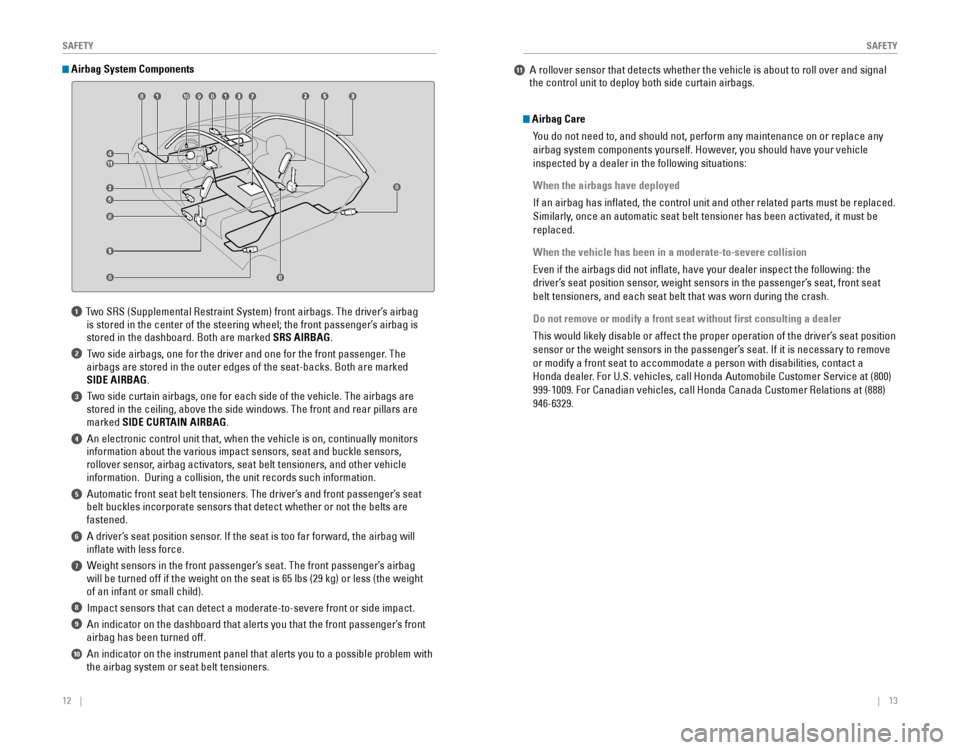
1 Two SrS (Supplemental restraint System) front airbags. The driver’s airbag
is stored in the center of the steering wheel; the front passenger’s airbag is
stored in the dashboard. Both are marked SRS AIRBAG.
2 Two side airbags, one for the driver and one for the front passenger. The
airbags are stored in the outer edges of the seat-backs. Both are marked\
SIDE AIRBAG.
3 Two side curtain airbags, one for each side of the vehicle. The airbags a\
re stored in the ceiling, above the side windows. The front and rear pillar\
s are
marked SIDE CURTAIN AIRBAG.
4 An electronic control unit that, when the vehicle is on, continually m\
onitors information about the various impact sensors, seat and buckle sensors,
rollover sensor, airbag activators, seat belt tensioners, and other vehicle
information. During a collision, the unit records such information.
5 Automatic front seat belt tensioners. The driver’s and front passenger’s seat belt buckles incorporate sensors that detect whether or not the belts ar\
e
fastened.
6 A driver’s seat position sensor. If the seat is too far forward, the airbag will inflate with less force.
7 Weight sensors in the front passenger’s seat. The front passenger’s airbag will be turned off if the weight on the seat is 65 lbs (29 kg) or less\
(the weight
of an infant or small child).
8 Impact sensors that can detect a moderate-to-severe front or side impa\
ct.
9 An indicator on the dashboard that alerts you that the front passenger\
’s front airbag has been turned off.
10 An indicator on the instrument panel that alerts you to a possible pro\
blem with the airbag system or seat belt tensioners.
Airbag System Components
Airbag Care
You do not need to, and should not, perform any maintenance on or replace\
any
airbag system components yourself. However, you should have your vehicle
inspected by a dealer in the following situations:
When the airbags have deployed
If an airbag has inflated, the control unit and other related parts mu\
st be replaced.
Similarly, once an automatic seat belt tensioner has been activated, it must be
replaced.
When the vehicle has been in a moderate-to-severe collision
even if the airbags did not inflate, have your dealer inspect the follo\
wing: the
driver’s seat position sensor, weight sensors in the passenger’s seat, front seat
belt tensioners, and each seat belt that was worn during the crash.
Do not remove or modify a front seat without first consulting a dealer
This would likely disable or affect the proper operation of the driver’\
s seat position
sensor or the weight sensors in the passenger’s seat. If it is necessary to remove
or modify a front seat to accommodate a person with disabilities, contac\
t a
Honda dealer. For U.S. vehicles, call Honda Automobile Customer Service at (800)
999-1009. For Canadian vehicles, call Honda Canada Customer relations at (888)
946-6329.
11 A rollover sensor that detects whether the vehicle is about to roll ov\
er and signal the control unit to deploy both side curtain airbags.
Page 34 of 82
60 || 61
AUDIO AND CONNECTIVITY
AUDIO AND CONNECTIVITY
Models with color audio system
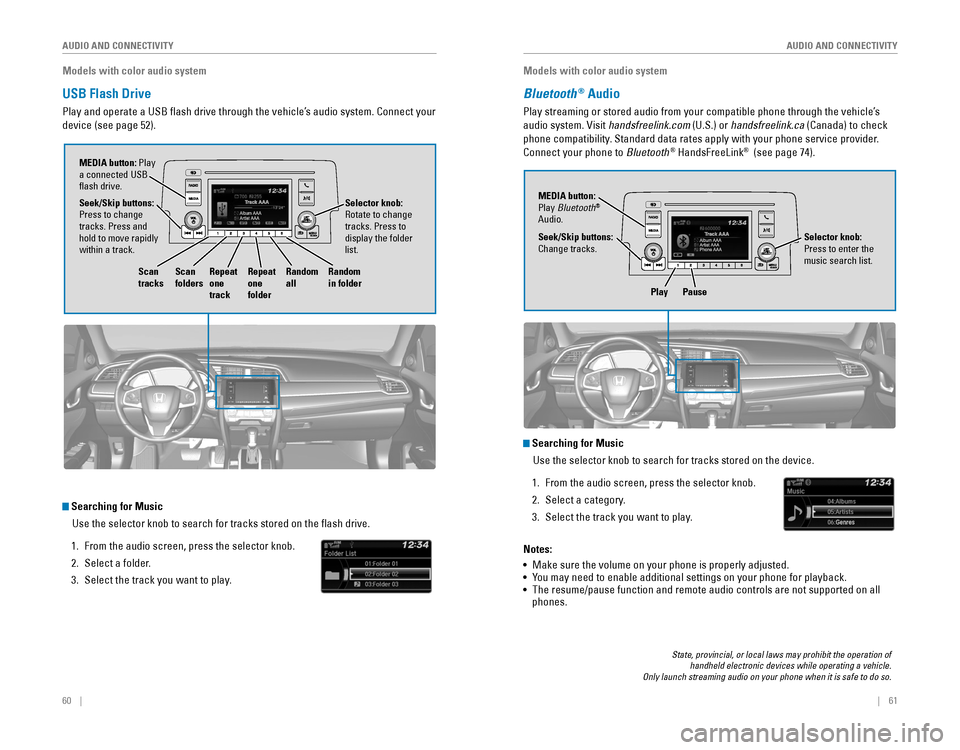
USB Flash Drive
Play and operate a USB flash drive through the vehicle’s audio system. Connect your
device (see page 52).
Searching for Music
Use the selector knob to search for tracks stored on the flash drive.
1. From the audio screen, press the selector knob.
2. Select a folder.
3. Select the track you want to play.
Selector knob: rotate to change tracks. Press to
display the folder
list.
MEDIA button: Play
a connected USB
flash drive.
Seek/Skip buttons:
Press to change
tracks. Press and
hold to move rapidly
within a track.
Scan
tracks Scan
foldersRepeat
one
track Repeat
one
folderRandom
all
Random
in folder
Models with color audio system
Bluetooth® Audio
Play streaming or stored audio from your compatible phone through the ve\
hicle’s
audio system. visit handsfreelink.com (U.S.) or handsfreelink.ca (Canada) to check
phone compatibility. Standard data rates apply with your phone service provider.
Connect your phone to Bluetooth
® HandsFreeLink® (see page 74).
Play Pause
State, provincial, or local laws may prohibit the operation of handheld electronic devices while operating a vehicle. Only launch streaming audio on your phone when it is safe to do so.
Searching for Music
Use the selector knob to search for tracks stored on the device.
1. From the audio screen, press the selector knob.
2. Select a category.
3. Select the track you want to play.
Notes:
• Make sure the volume on your phone is properly adjusted.
• You may need to enable additional settings on your phone for playback.
• The resume/pause function and remote audio controls are not supported on\
all
phones.
Seek/Skip buttons:
Change tracks. MEDIA button:
Play Bluetooth
®
Audio.
Selector knob:
Press to enter the
music search list.
Page 35 of 82

62 || 63
AUDIO AND CONNECTIVITY
AUDIO AND CONNECTIVITY
Models with Display Audio
Display Audio Operation
Use simple gestures—including touching, swiping, and scrolling—to \
operate certain
audio functions.
Some items may be grayed out during driving to reduce the potential for \
distraction.
You can select them when the vehicle is stopped or use voice commands*.
Wearing gloves may limit or prevent touchscreen response.
You can use a microfiber cleaning cloth to remove dust or fingerprint\
s from the
touchscreen.
*if equipped
VO L
HOME
MENUBACK
AUDIO
AUDIO: Turn audio
on or off.
HOME
(shown)
MENU: Display
menu items for the
selected screen.
BACK: Go back to the
previous screen. button: Change
screen brightness.
Settings: Choose
Audio for options. HondaLink
®: view HondaLink Connect features
(see page 63). Audio: Display
current audio
information.
Volume
Info: Display the
trip computer,
clock, and more.
Changing Icon Order You can change the order of the icons on the Home screen.
1. From the HoMe screen, select and hold an icon
to enter the customization screen.
2. Select and hold the icon you want to move and
slide it to a different position.
3. Select oK when complete.
Swipe left or right
for more screens.
Models with Display Audio
HondaLink®
Provides you with useful information about your vehicle directly from Ho\
nda.
To check phone compatibility, visit handsfreelink.com (U.S.) or handsfreelink.ca
(Canada). Standard data rates may apply with your phone service provid\
er.
To get more information on HondaLink, visit www.hondalink.com (U.S.) or honda.ca/
hondalink (Canada).
If there is an active connection to Apple CarPlay
® (see page 65) or Android Auto™
(see page 66), HondaLink can only be connected through Wi-Fi.
HondaLink Connection
Follow the steps below to connect to HondaLink and use its features.
1. Download the HondaLink Connect app to your
compatible smartphone.
2. Pair your phone to Bluetooth® HandsFreeLink®
(see page 78).
3. From the HoMe screen, select HondaLink.
4. Certain features require you to send vehicle information to Honda. Select enable once, Always enable, or Cancel.
HondaLink Menu
Select a menu option.
Places*: Display restaurants, gas stations, and
other locations. You can send a location to the
navigation system and set a route.
Vehicle: Get instructional messages when your
vehicle needs service.
Help & Support: Display tips for vehicle usage, get
roadside assistance, or contact customer service.
Messages from Honda: Display helpful and important information from Honda. If
you have a new message, a yellow envelope icon appears at the top of the screen
and a beep sounds. You can swipe down to view the message from any screen.
Weather: Display a weekly five-day weather forecast for any location.
*if equipped
Page 36 of 82

64 || 65
AUDIO AND CONNECTIVITY
AUDIO AND CONNECTIVITY
Models with Display Audio
Wi-Fi Connection
You can connect the audio system to the internet using Wi-Fi and use onli\
ne
services through the touchscreen. If your compatible phone has hotspot c\
apabilities,
the system can be tethered to the phone. Follow the steps below to set u\
p Wi-Fi
when the vehicle is stopped. Standard data rates apply with your phone s\
ervice
provider.
1. From the Home screen, select Settings.
2. Select Bluetooth/Wi-Fi. Select the Wi-Fi tab.
3. Select Wi-Fi on/off Status, and select on.
4. Select Wi-Fi Device List. Make sure your phone’s
Wi-Fi setting is in access point (tethering) mode.
5. Select the phone you want to connect to the
system. If the phone you want to connect does not
appear, select Scan.
6. Select Connect.
7. enter a password for your phone, if necessary.
Select oK. The Wi-Fi symbol is displayed on the list
when connection is successful.
1234AAAAA
BBBBB
CCCCC
DDDDD
EEEE E
Aha™ Radio
Access music and information programming, location-based services, and social
media through your vehicle’s audio system.
visit handsfreelink.honda.com (U.S.) or handsfreelink.ca (Canada) to check phone
compatibility. Standard data rates apply. Make sure you have an active Aha account.
If there is an active connection to Apple CarPlay
® (see page 65) or Android Auto™
(see page 66), Aha can only be connected through Wi-Fi.
Bluetooth connection
Connect your compatible smartphone via Bluetooth
® HandsFreeLink® (see page
78). Make sure the HondaLink Connect app is downloaded to your phone (\
see
page 63). Follow steps 1 and 2 below.
Wi-Fi connection
You can also connect via Wi-Fi (see page 64) or Wi-Fi tethering with yo\
ur enabled
smartphone. Follow steps 1 and 2 below.
1. From the HoMe screen, select Aha.
2. enter your Aha account email and password to begin using Aha.
Models with Display Audio
Apple CarPlay®
Connect an Apple CarPlay-compatible iPhone to the system. You can use the
touchscreen to make a phone call, listen to music, and more. visit the Apple CarPlay
website for more information.
Park in a safe place before connecting your iPhone
and launching any compatible apps.
1. Connect the iPhone to the USB port (see page
52).
2. Apple CarPlay requires you to send vehicle information to Honda. Select enable once, Always enable, or Cancel. Your phone may prompt you to allow access for CarPlay to be launched.
3. From the HoMe screen, select Apple CarPlay.
4. Select a menu option.
Phone: Access your contacts, make phone calls, or listen to voicemail. While
connected to Apple CarPlay, calls can only be made through Apple CarPlay, not
through Bluetooth
® HandsFreeLink®.
Music: Play music stored on your iPhone.
Maps:
view a map and operate navigation. You can only use Apple CarPlay or the
pre-installed navigation system to set a destination with routing guidan\
ce.
Messages:
view and reply to text messages, or have messages read to you aloud
by the system.
once connected, press and hold the Talk button on the steering wheel (see page
76) to operate the system using voice commands with Siri® eyes Free.
HOME screen
Apple CarPlay
Apple CarPlay menu
Return
to HOME
screen
Return to Apple CarPlay menu screen
Depending on use, Apple CarPlay can share certain vehicle information (e.g., vehicle location, speed, and other operating conditions) with the connected iPhone. See Apple’s privacy policy for details regarding Apple’s use and handling of data uploaded by CarPlay. Use of CarPlay is at user’s own risk, and is subject to agreement to the CarPlay terms of use, which are included as part of the Apple iOS terms of use. CarPlay vehicle integration is provided “as is,” and Honda cannot guarantee CarPlay operability or functionality now or in the future due to, among other conditions, changes in CarPlay software/Apple iOS, service interruptions, or incompatibility or obsolesce of vehicle-integrated hardware or software. See dealer for details. Only use CarPlay when conditions allow you to do so safely. See your Owner’s Manual on the Owner Information CD or at owners.honda.com (U.S.) or myhonda.ca (Canada) for further license and warranty terms.
Page 37 of 82
66 || 67
AUDIO AND CONNECTIVITY
AUDIO AND CONNECTIVITY
Models with Display Audio
Android Auto™
Connect a compatible Android phone to the system. You can use the touchscreen
to make a phone call, listen to music, and more. visit the Android Auto website for
more information.
Park in a safe place before connecting your iPhone
and launching any compatible apps.
1. Download the Android Auto app to your phone.
2. Connect the phone to the USB port (see page 52).
The phone is automatically paired. A tutorial also
appears.
3. From the HoMe screen, select Android Auto.
4. Android Auto requires you to send vehicle
information to Honda. Select enable once, Always
enable, or Cancel.
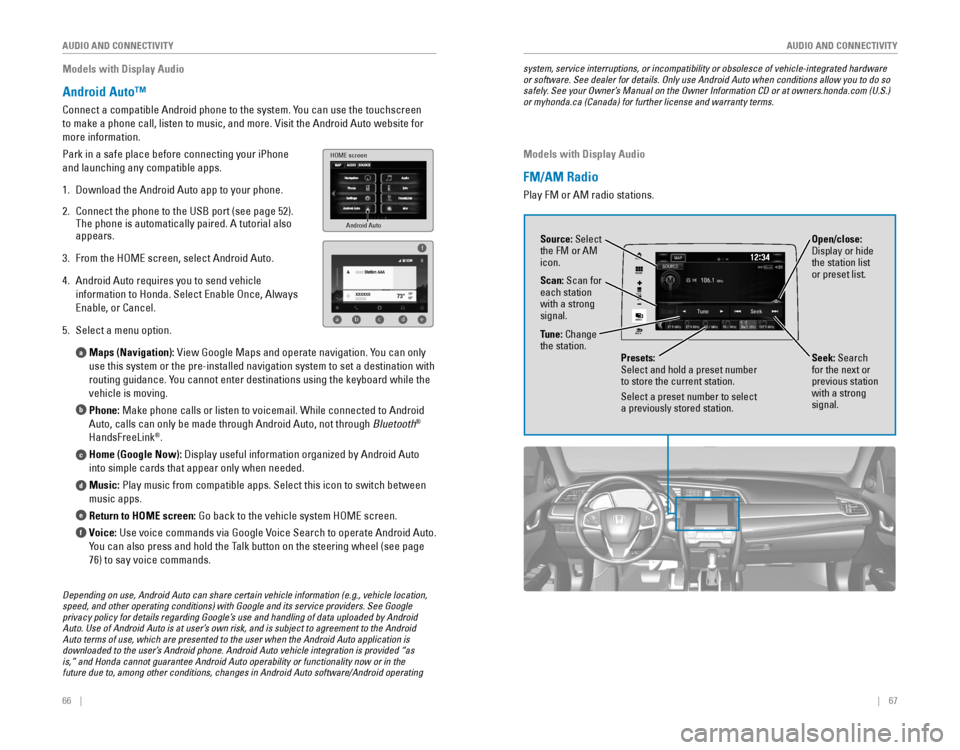
5. Select a menu option.
Maps (Navigation):
view Google Maps and operate navigation. You can only
use this system or the pre-installed navigation system to set a destinat\
ion with
routing guidance. You cannot enter destinations using the keyboard while the
vehicle is moving.
Phone: Make phone calls or listen to voicemail. While connected to Android
Auto, calls can only be made through Android Auto, not through Bluetooth
®
HandsFreeLink®.
Home (Google Now): Display useful information organized by Android Auto
into simple cards that appear only when needed.
Music: Play music from compatible apps. Select this icon to switch between
music apps.
Return to HOME screen:
Go back to the vehicle system HoMe screen.
Voice: Use voice commands via Google voice Search to operate Android Auto.
You can also press and hold the Talk button on the steering wheel (see page
76) to say voice commands.
a
b
c
d
e
f
Android Auto
HOME screen
f
ab cde
Depending on use, Android Auto can share certain vehicle information (e.g., vehicle location, speed, and other operating conditions) with Google and its service providers. See Google privacy policy for details regarding Google’s use and handling of data uploaded by Android Auto. Use of Android Auto is at user’s own risk, and is subject to agreement to the Android Auto terms of use, which are presented to the user when the Android Auto application is downloaded to the user’s Android phone. Android Auto vehicle integration is provided “as is,” and Honda cannot guarantee Android Auto operability or functionality now or in the future due to, among other conditions, changes in Android Auto software/Android operating
system, service interruptions, or incompatibility or obsolesce of vehicle-integrated hardware or software. See dealer for details. Only use Android Auto when conditions allow you to do so safely. See your Owner’s Manual on the Owner Information CD or at owners.honda.com (U.S.) or myhonda.ca (Canada) for further license and warranty terms.
Models with Display Audio
FM/AM Radio
Play FM or AM radio stations.
VOL
HOME
MENU
BACK
AUDIO
Source: Select
the FM or AM
icon.
Tune: Change
the station.
Seek: Search
for the next or
previous station
with a strong
signal. Open/close:
Display or hide
the station list
or preset list.
Scan: Scan for
each station
with a strong
signal.
Presets:
Select and hold a preset number
to store the current station.
Select a preset number to select
a previously stored station.
Page 39 of 82
70 || 71
AUDIO AND CONNECTIVITY
AUDIO AND CONNECTIVITY
Models with Display Audio
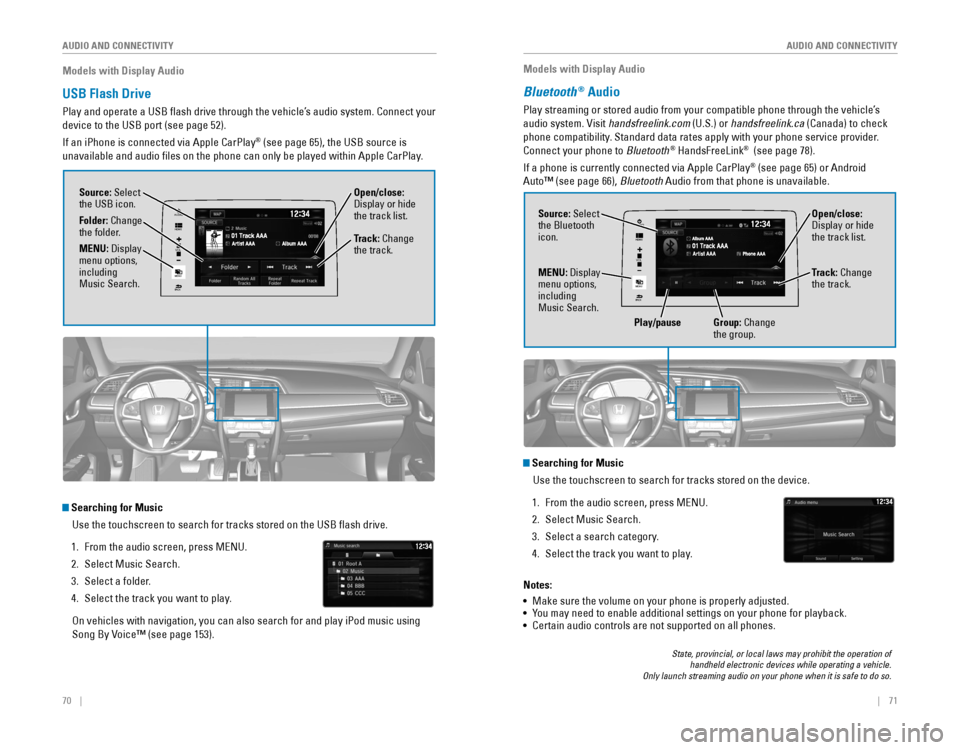
USB Flash Drive
Play and operate a USB flash drive through the vehicle’s audio system. Connect your
device to the USB port (see page 52).
If an iPhone is connected via Apple CarPlay
® (see page 65), the USB source is
unavailable and audio files on the phone can only be played within App\
le CarPlay.
Searching for Music
Use the touchscreen to search for tracks stored on the USB flash drive\
.
1. From the audio screen, press MeNU.
2. Select Music Search.
3. Select a folder.
4. Select the track you want to play.
on vehicles with navigation, you can also search for and play iPod music using
Song By voice™ (see page 153).
VO L
HOME
MENU
BACK
AUDIO
Source: Select
the USB icon.
Folder: Change
the folder. Open/close:
Display or hide
the track list.
MENU: Display
menu options,
including
Music Search. Track: Change
the track.
Models with Display Audio
Bluetooth® Audio
Play streaming or stored audio from your compatible phone through the ve\
hicle’s
audio system. visit handsfreelink.com (U.S.) or handsfreelink.ca (Canada) to check
phone compatibility. Standard data rates apply with your phone service provider.
Connect your phone to Bluetooth
® HandsFreeLink® (see page 78).
If a phone is currently connected via Apple CarPlay
® (see page 65) or Android
Auto™ (see page 66), Bluetooth Audio from that phone is unavailable.
State, provincial, or local laws may prohibit the operation of handheld electronic devices while operating a vehicle. Only launch streaming audio on your phone when it is safe to do so.
Searching for Music
Use the touchscreen to search for tracks stored on the device.
1. From the audio screen, press MeNU.
2. Select Music Search.
3. Select a search category.
4. Select the track you want to play.
Notes:
• Make sure the volume on your phone is properly adjusted.
• You may need to enable additional settings on your phone for playback.
• Certain audio controls are not supported on all phones.
VO L
HOME
MENU
BACK
AUDIOSource: Select
the Bluetooth
icon. Open/close:
Display or hide
the track list.
MENU: Display
menu options,
including
Music Search. Track: Change
the track.
Play/pause Group: Change
the group.
Page 40 of 82

| 7372 | AUDIO AND CONNECTIVITY
Models with Display Audio
Pandora®
Play and operate Pandora from your compatible phone through the vehicle’\
s audio
system. visit handsfreelink.com to check phone compatibility. Standard data rates
apply with your phone service provider.
Connect your phone when the vehicle is stopped.
For iPhone:
• Connect via Bluetooth
® HandsFreeLink® (see page 78) or USB port (see page 52).
• A pop-up may appear on your phone requesting you to allow access for Pan\
dora
to be launched.
• If you cannot operate Pandora through the audio system, it may be stream\
ing
through Bluetooth
® Audio. Make sure Pandora is selected on the audio system.
• If Pandora still does not operate, try rebooting the phone and reconnect\
ing the
cable if necessary.
For other compatible smartphones:
• Connect via Bluetooth
® HandsFreeLink® (see page 78).
• If your phone is connected to Android Auto™ (see page 66), Pandora \
is only
available through the Android Auto interface. visit the Android Auto website to
check compatibility.
Pandora is only available in certain countries. Visit the Pandora website for more information.
State, provincial, or local laws may prohibit the operation of handheld electronic devices while operating a vehicle. Only launch streaming audio on your phone when it is safe to do so.
VO L
HOME
MENU
BACK
AUDIO
Source: Select
the Pandora icon.
Station: Change
the station. Skip: Go to
the next song.
MENU: Display
menu options,
including the
Station List.
Like/dislike
song
Play/Pause
Learn how to operate the vehicle’s hands-free calling system.
Models with color audio system
Basic HFL Operation
Make and receive phone calls using the vehicle’s audio system, without handling
your phone. visit handsfreelink.com (U.S.) or handsfreelink.ca (Canada) to check
phone compatibility.
To reduce the potential for driver distraction, certain manual functions \
may be
inoperable or grayed out while the vehicle is moving. Stop or pull over \
to perform
the function.
HFL Controls
Use the controls to enter information and make selections.
BLUETOOTH® HANDSFREELINK® (HFL)
Hang-Up/Back button: end or decline a call, or cancel an operation.
Pick-Up button: Go to the phone screen, or
answer an incoming call.
Talk button: Make a call using a stored voice tag.
Selector knob: rotate and press to make selections.
Back button: Go back to the
previous display.
PHONE button: Display the
phone screen.
BLUETOOTH® HANDSFreeLINK®
BLUETOOTH® HANDSFreeLINK®
Page 44 of 82
80 || 81
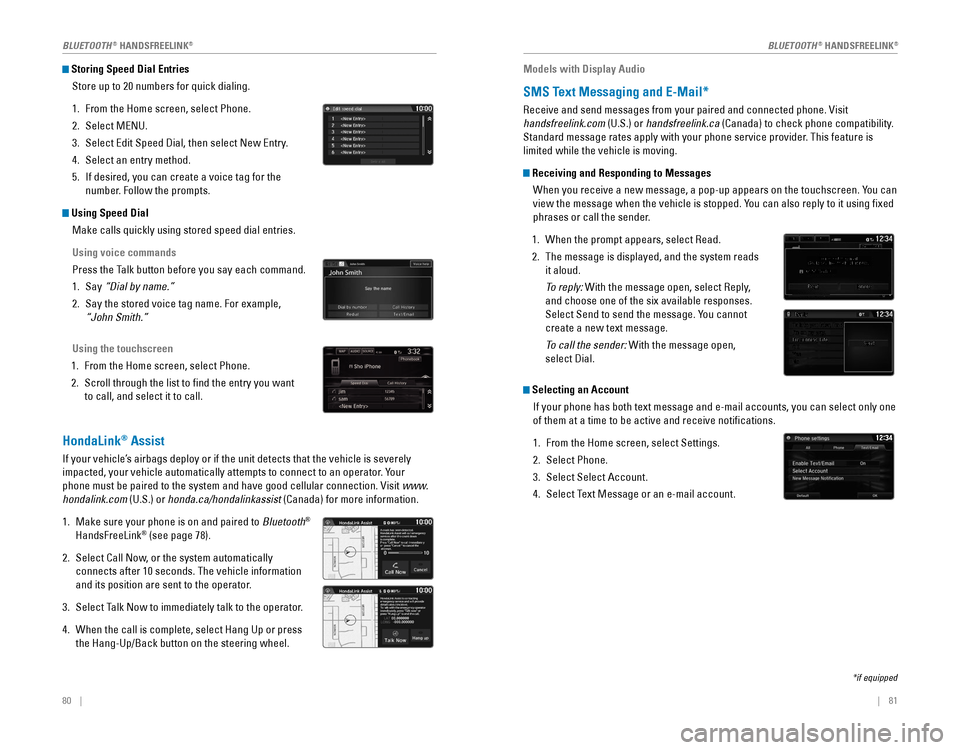
Storing Speed Dial Entries
Store up to 20 numbers for quick dialing.
1. From the Home screen, select Phone.
2. Select MeNU.
3. Select edit Speed Dial, then select New entry.
4. Select an entry method.
5. If desired, you can create a voice tag for the
number. Follow the prompts.
Using Speed DialMake calls quickly using stored speed dial entries.
Using voice commands
Press the Talk button before you say each command.
1. Say “Dial by name.”
2. Say the stored voice tag name. For example,
“John Smith.”
Using the touchscreen
1. From the Home screen, select Phone.
2. Scroll through the list to find the entry you want
to call, and select it to call.
HondaLink® Assist
If your vehicle’s airbags deploy or if the unit detects that the vehicle is severely
impacted, your vehicle automatically attempts to connect to an operator. Your
phone must be paired to the system and have good cellular connection. visit www.
hondalink.com (U.S.) or honda.ca/hondalinkassist (Canada) for more information.
1. Make sure your phone is on and paired to Bluetooth®
HandsFreeLink® (see page 78).
2. Select Call Now, or the system automatically
connects after 10 seconds. The vehicle information
and its position are sent to the operator.
3. Select Talk Now to immediately talk to the operator.
4. When the call is complete, select Hang Up or press
the Hang-Up/Back button on the steering wheel.
Models with Display Audio
SMS Text Messaging and E-Mail*
receive and send messages from your paired and connected phone. visit
handsfreelink.com (U.S.) or handsfreelink.ca (Canada) to check phone compatibility.
Standard message rates apply with your phone service provider. This feature is
limited while the vehicle is moving.
Receiving and Responding to Messages
When you receive a new message, a pop-up appears on the touchscreen. You can
view the message when the vehicle is stopped. You can also reply to it using fixed
phrases or call the sender.
1. When the prompt appears, select read.
2. The message is displayed, and the system reads
it aloud.
To reply: With the message open, select reply,
and choose one of the six available responses.
Select Send to send the message. You cannot
create a new text message.
To call the sender: With the message open,
select Dial.
Selecting an Account
If your phone has both text message and e-mail accounts, you can select \
only one
of them at a time to be active and receive notifications.
1. From the Home screen, select Settings.
2. Select Phone.
3. Select Select Account.
4. Select Text Message or an e-mail account.
*if equipped
BLUETOOTH® HANDSFreeLINK®BLUETOOTH® HANDSFreeLINK®