turn signal HONDA CIVIC 2016 10.G Quick Guide
[x] Cancel search | Manufacturer: HONDA, Model Year: 2016, Model line: CIVIC, Model: HONDA CIVIC 2016 10.GPages: 82, PDF Size: 5.52 MB
Page 3 of 82
INTRODUCTIONTABLE OF CONTENTS
This owner’s Guide is intended to help you quickly get acquainted with your
2016 Honda Civic Sedan. It provides basic information and instructions on technology
and convenience features, as well as emergency procedures and how to get\
assistance.
This guide is for vehicles sold in the United States and Canada. It cove\
rs all Civic
Sedan models, so you may find descriptions of features and equipment t\
hat are not
in your vehicle. Images throughout this guide are from U.S. vehicles and\
represent
features and equipment that are available on some, but not all, models.
This guide is not intended to be a substitute for the owner’s Manual. The owner
Information CD enclosed in your glove box kit includes the owner’s Manual,
Navigation Manual, and vehicle and tire warranties in electronic format.\
This
information can be viewed on a computer (PC or Mac platform) and saved or printed
for your reference. You can also visit owners.honda.com (U.S.) or myhonda.ca
(Canada) to view the complete and most current information.
If you are the first registered owner of your vehicle, you may request\
a complimentary
printed copy of the owner’s Manual, Navigation Manual, or vehicle Warranty within
the first six months of vehicle purchase. To request a copy, visit owners.honda.com
(U.S.) and create or log in to your account. In Canada, please request\
a copy from
your Honda dealer.
American Honda Motor Company strives to be proactive in protecting our
environment and natural resources. By using electronic delivery for a co\
nsiderable
portion of the information typically found in a vehicle owner’s manual, we are further
reducing our impact on the environment.
Honda Automobile Customer Service
Your authorized Honda dealer should be able to answer any questions you h\
ave
about your vehicle. However, if you are dissatisfied with the information you receive,
you can call Honda Automobile Customer Service (see page 150).
Call (800) 999-1009 (U.S.) or (888) 946-6329 (Canada)
Honda Roadside Assistance
24-hour emergency road service is available to you in the United States \
and Canada
throughout your 3-year/36,000-mile warranty term. Services include jump starting,
flat tire and lockout assistance, towing, and more (limitations apply\
).
Call (866) 864-5211 (U.S.) or (800) 465-7587 (Canada)
*if equipped
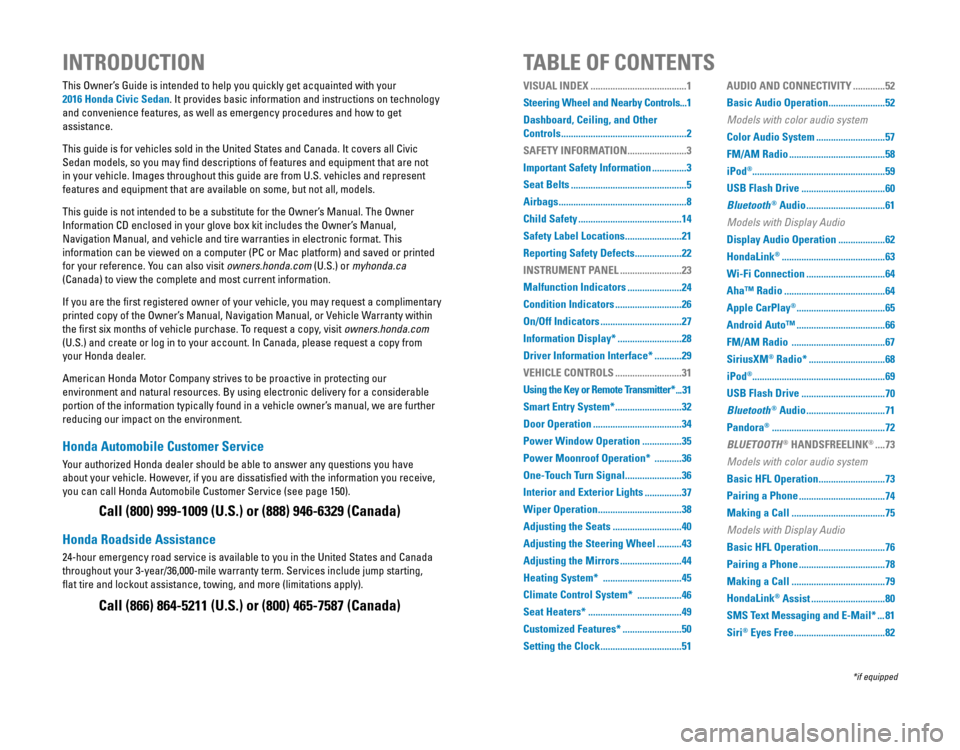
VISUAL INDEX .......................................1
Steering Wheel and Nearby Controls ...1
Dashboard, Ceiling, and Other
Controls
...................................................2
SAFETY INFORMATION
........................3
Important Safety Information
..............3
Seat Belts
...............................................5
Airbags
....................................................8
Child Safety
..........................................14
Safety Label Locations
.......................21
Reporting Safety Defects
...................22
INSTRUMENT PANEL
.........................23
Malfunction Indicators
......................24
Condition Indicators
...........................26
On/Off Indicators
.................................27
Information Display*
..........................28
Driver Information Interface*
...........29
VEHICLE CONTROLS
...........................31
Using the Key or Remote Transmitter*
...31
Smart Entry System*
...........................32
Door Operation
....................................34
Power Window Operation
................35
Power Moonroof Operation*
...........36
One-Touch Turn Signal
.......................36
Interior and Exterior Lights
...............37
Wiper Operation
..................................38
Adjusting the Seats
............................40
Adjusting the Steering Wheel
..........43
Adjusting the Mirrors
.........................44
Heating System*
................................45
Climate Control System*
..................46
Seat Heaters*
......................................49
Customized Features*
........................50
Setting the Clock
.................................51 AUDIO AND CONNECTIVITY
.............52
Basic Audio Operation
.......................52
Models with color audio system
Color Audio System ............................57
FM/AM Radio
.......................................58
iPod
®...................................................... 59
USB Flash Drive
..................................60
Bluetooth
® Audio ................................61
Models with Display Audio
Display Audio Operation ...................62
HondaLink
® ..........................................63
Wi-Fi Connection
................................64
Aha™ Radio
.........................................64
Apple CarPlay
® ....................................65
Android Auto™
....................................66
FM/AM Radio
......................................67
SiriusXM
® Radio* ...............................68
iPod
®...................................................... 69
USB Flash Drive
..................................70
Bluetooth
® Audio ................................71
Pandora
® ..............................................72
BLUETOOTH
® HANDSFREELINK® ....73
Models with color audio system
Basic HFL Operation ...........................73
Pairing a Phone
...................................74
Making a Call
......................................75
Models with Display Audio
Basic HFL Operation ...........................76
Pairing a Phone
...................................78
Making a Call
......................................79
HondaLink
® Assist ..............................80
SMS Text Messaging and E-Mail*
...81
Siri
® Eyes Free .....................................82
Page 4 of 82
| 1
VISUAL INDEX
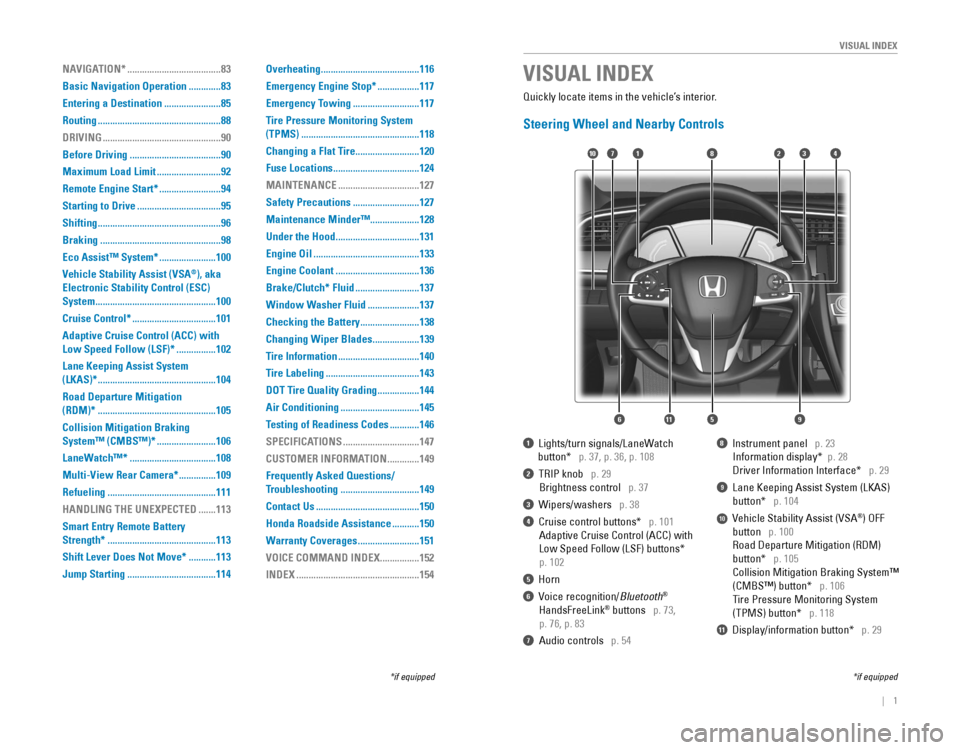
1 Lights/turn signals/LaneWatch
button* p. 37, p. 36, p. 108
2 TrIP knob p. 29
Brightness control p. 37
3 Wipers/washers p. 38
4 Cruise control buttons* p. 101
Adaptive Cruise Control (ACC) with
Low Speed Follow (LSF) buttons*
p. 102
5 Horn
6 voice recognition/Bluetooth®
HandsFreeLink® buttons p. 73,
p. 76, p. 83
7 Audio controls p. 54
8 Instrument panel p. 23
Information display* p. 28
Driver Information Interface* p. 29
9 Lane Keeping Assist System (LKAS)
button* p. 104
10 vehicle Stability Assist (vSA®) oFF
button p. 100
road Departure Mitigation (rDM)
button* p. 105
Collision Mitigation Braking System™
(CMBS™) button* p. 106
Tire Pressure Monitoring System
(TPMS) button* p. 118
11 Display/information button* p. 29
VISUAL INDEX
*if equipped*if equipped
Quickly locate items in the vehicle’s interior.
Steering Wheel and Nearby Controls
2
5
71310
6
48
911
NAVIGATION* ......................................83
Basic Navigation Operation
.............83
Entering a Destination
.......................85
Routing
..................................................88
DRIVING
................................................90
Before Driving
.....................................90
Maximum Load Limit
..........................92
Remote Engine Start*
.........................94
Starting to Drive
..................................95
Shifting
..................................................96
Braking
.................................................98
Eco Assist™ System*
.......................100
Vehicle Stability Assist (VSA
®), aka
Electronic Stability Control (ESC)
System
.................................................100
Cruise Control*
..................................101
Adaptive Cruise Control (ACC) with
Low Speed Follow (LSF)* ................102
Lane Keeping Assist System
(LKAS)*
................................................104
Road Departure Mitigation
(RDM)*
................................................105
Collision Mitigation Braking
System™ (CMBS™)*
........................106
LaneWatch™*
...................................108
Multi-View Rear Camera*
...............109
Refueling
............................................111
HANDLING THE UNEXPECTED
.......113
Smart Entry Remote Battery
Strength*
............................................113
Shift Lever Does Not Move*
...........113
Jump Starting
....................................114 Overheating
........................................116
Emergency Engine Stop*
.................117
Emergency Towing
...........................117
Tire Pressure Monitoring System
(TPMS)
................................................118
Changing a Flat Tire
..........................120
Fuse Locations
...................................124
MAINTENANCE
.................................127
Safety Precautions
...........................127
Maintenance Minder™ ....................128
Under the Hood
..................................131
Engine Oil
...........................................133
Engine Coolant
..................................136
Brake/Clutch* Fluid
..........................137
Window Washer Fluid
.....................137
Checking the Battery
........................138
Changing Wiper Blades
...................139
Tire Information
.................................140
Tire Labeling
......................................143
DOT Tire Quality Grading
.................144
Air Conditioning
................................145
Testing of Readiness Codes
............146
SPECIFICATIONS
...............................147
CUSTOMER INFORMATION
.............149
Frequently Asked Questions/
Troubleshooting
................................149
Contact Us
..........................................150
Honda Roadside Assistance
...........150
Warranty Coverages
.........................151
VOICE COMMAND INDEX
................152
INDEX
..................................................154
Page 10 of 82
12 || 13
S
AFETYSAFETY
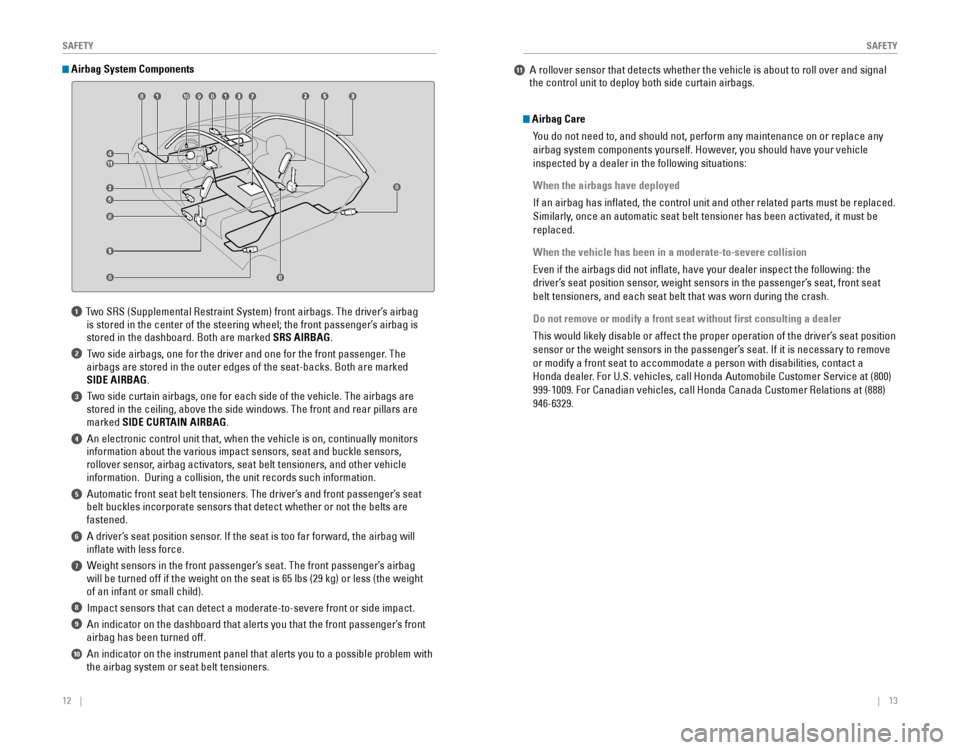
1 Two SrS (Supplemental restraint System) front airbags. The driver’s airbag
is stored in the center of the steering wheel; the front passenger’s airbag is
stored in the dashboard. Both are marked SRS AIRBAG.
2 Two side airbags, one for the driver and one for the front passenger. The
airbags are stored in the outer edges of the seat-backs. Both are marked\
SIDE AIRBAG.
3 Two side curtain airbags, one for each side of the vehicle. The airbags a\
re stored in the ceiling, above the side windows. The front and rear pillar\
s are
marked SIDE CURTAIN AIRBAG.
4 An electronic control unit that, when the vehicle is on, continually m\
onitors information about the various impact sensors, seat and buckle sensors,
rollover sensor, airbag activators, seat belt tensioners, and other vehicle
information. During a collision, the unit records such information.
5 Automatic front seat belt tensioners. The driver’s and front passenger’s seat belt buckles incorporate sensors that detect whether or not the belts ar\
e
fastened.
6 A driver’s seat position sensor. If the seat is too far forward, the airbag will inflate with less force.
7 Weight sensors in the front passenger’s seat. The front passenger’s airbag will be turned off if the weight on the seat is 65 lbs (29 kg) or less\
(the weight
of an infant or small child).
8 Impact sensors that can detect a moderate-to-severe front or side impa\
ct.
9 An indicator on the dashboard that alerts you that the front passenger\
’s front airbag has been turned off.
10 An indicator on the instrument panel that alerts you to a possible pro\
blem with the airbag system or seat belt tensioners.
Airbag System Components
Airbag Care
You do not need to, and should not, perform any maintenance on or replace\
any
airbag system components yourself. However, you should have your vehicle
inspected by a dealer in the following situations:
When the airbags have deployed
If an airbag has inflated, the control unit and other related parts mu\
st be replaced.
Similarly, once an automatic seat belt tensioner has been activated, it must be
replaced.
When the vehicle has been in a moderate-to-severe collision
even if the airbags did not inflate, have your dealer inspect the follo\
wing: the
driver’s seat position sensor, weight sensors in the passenger’s seat, front seat
belt tensioners, and each seat belt that was worn during the crash.
Do not remove or modify a front seat without first consulting a dealer
This would likely disable or affect the proper operation of the driver’\
s seat position
sensor or the weight sensors in the passenger’s seat. If it is necessary to remove
or modify a front seat to accommodate a person with disabilities, contac\
t a
Honda dealer. For U.S. vehicles, call Honda Automobile Customer Service at (800)
999-1009. For Canadian vehicles, call Honda Canada Customer relations at (888)
946-6329.
11 A rollover sensor that detects whether the vehicle is about to roll ov\
er and signal the control unit to deploy both side curtain airbags.
Page 17 of 82
26 || 27
I
NSTRUMENT PANELINSTRUMENT PANEL
Condition Indicators
These indicators may require you to perform an action.
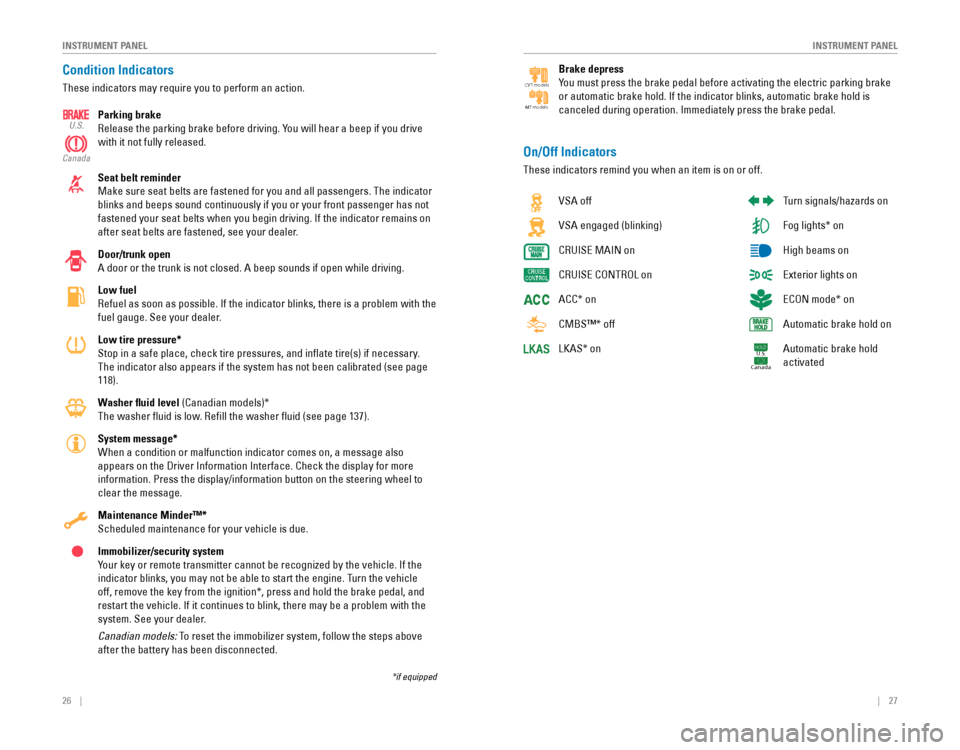
Parking brake
release the parking brake before driving. You will hear a beep if you drive
with it not fully released.
Seat belt reminder
Make sure seat belts are fastened for you and all passengers. The indica\
tor
blinks and beeps sound continuously if you or your front passenger has not
fastened your seat belts when you begin driving. If the indicator remain\
s on
after seat belts are fastened, see your dealer.
Door/trunk open
A door or the trunk is not closed. A beep sounds if open while driving.
Low fuel
refuel as soon as possible. If the indicator blinks, there is a problem w\
ith the
fuel gauge. See your dealer.
Low tire pressure*
Stop in a safe place, check tire pressures, and inflate tire(s) if n\
ecessary.
The indicator also appears if the system has not been calibrated (see p\
age
118).
Washer fluid level (Canadian models)*
The washer fluid is low. refill the washer fluid (see page 137).
System message*
When a condition or malfunction indicator comes on, a message also
appears on the Driver Information Interface. Check the display for more \
information. Press the display/information button on the steering wheel \
to
clear the message.
Maintenance Minder™*
Scheduled maintenance for your vehicle is due.
Immobilizer/security system
Your key or remote transmitter cannot be recognized by the vehicle. If th\
e
indicator blinks, you may not be able to start the engine. Turn the vehicle
off, remove the key from the ignition*, press and hold the brake pedal, \
and
restart the vehicle. If it continues to blink, there may be a problem wi\
th the
system. See your dealer.
Canadian models: To reset the immobilizer system, follow the steps above
after the battery has been disconnected.
U.S.
Canada
*if equipped
vSA off
vSA engaged (blinking)
CrUISe MAIN on
CrUISe CoNTroL on
ACC* on
CMBS™* off
LKAS* on
Turn signals/hazards on
Fog lights* on
High beams on
exterior lights on
eCoN mode* on
Automatic brake hold on
Automatic brake hold
activated
U.S.
Canada
On/Off Indicators
These indicators remind you when an item is on or off.
Brake depress
You must press the brake pedal before activating the electric parking bra\
ke
or automatic brake hold. If the indicator blinks, automatic brake hold i\
s
canceled during operation. Immediately press the brake pedal.
CV T models
MT models
Page 22 of 82

36 || 37
V
EHICLE CONTROLSVEHICLE CONTROLS
Power Moonroof Operation*
The moonroof can be opened and closed when the vehicle is on by using th\
e switch
on the ceiling.
Automatic Operation
To open: Push the switch back firmly to the second
detent, then release.
To close: Push the switch forward firmly to the
second detent, then release.
The moonroof opens or closes completely. To stop
the moonroof at any time, push the switch briefly.
Manual OperationTo open: Push and hold the switch back to the first detent until the desired p\
osition
is reached.
To close: Push and hold the switch forward to the first detent until the desir\
ed
position is reached.
Moonroof TiltTo tilt: Push the center of the switch.
To close: Push the switch forward firmly, then release.
*if equipped
Open
Clos eTilt
opening the moonroof in below freezing temperatures or when it is covered\
with
snow or ice can damage the moonroof panel or motor.
NOTICEClosing the moonroof on someone’s hands or fingers can cause serious injury.
Make sure your passengers are away from the moonroof before closing it.
WARNING
Interior and Exterior Lights
operate interior and exterior lights when the vehicle is on or off.
Brightness Control
Adjust instrument panel brightness when the vehicle is on.
To brighten: Turn the knob to the right.
To dim: Turn the knob to the left.
A beep sounds when the brightness reaches
minimum or maximum.
Interior LightsChange the interior light settings using the front and rear switches on \
the ceiling.
ON position (rear): Interior lights remain on.
Door-activated position (front): Interior lights come
on when any of the doors are opened, the driver’s
door is unlocked, or the vehicle is turned off.
OFF position: Interior lights remain off.
Map lights: Press the map lights to turn on or off.
Exterior Lights
rotate the switches on the headlight lever to operate the exterior lights\
.
OFF: All exterior lights are off.
: Turn on exterior lights except headlights.
AUTO: Turn on the automatic lighting feature.*
Headlights turn on or off depending on ambient
brightness when the vehicle is on. Headlights
automatically come on after the wipers are
engaged for a certain time.
: Turn on all exterior lights including headlights.
: Turn fog lights* on or off.
*if equipped
TRIP knob
Door-activated position
Of f
Fron t
Map lights
High beams
Flash the high beams
Low beams
Fog
lights*
One-Touch Turn Signal
Use this quick and convenient method to signal a lane change.
Lightly push the turn signal lever up or down for a
three-blink sequence.
For a continuous signal, push the lever up or down
until it locks into place.
Page 37 of 82
66 || 67
AUDIO AND CONNECTIVITY
AUDIO AND CONNECTIVITY
Models with Display Audio
Android Auto™
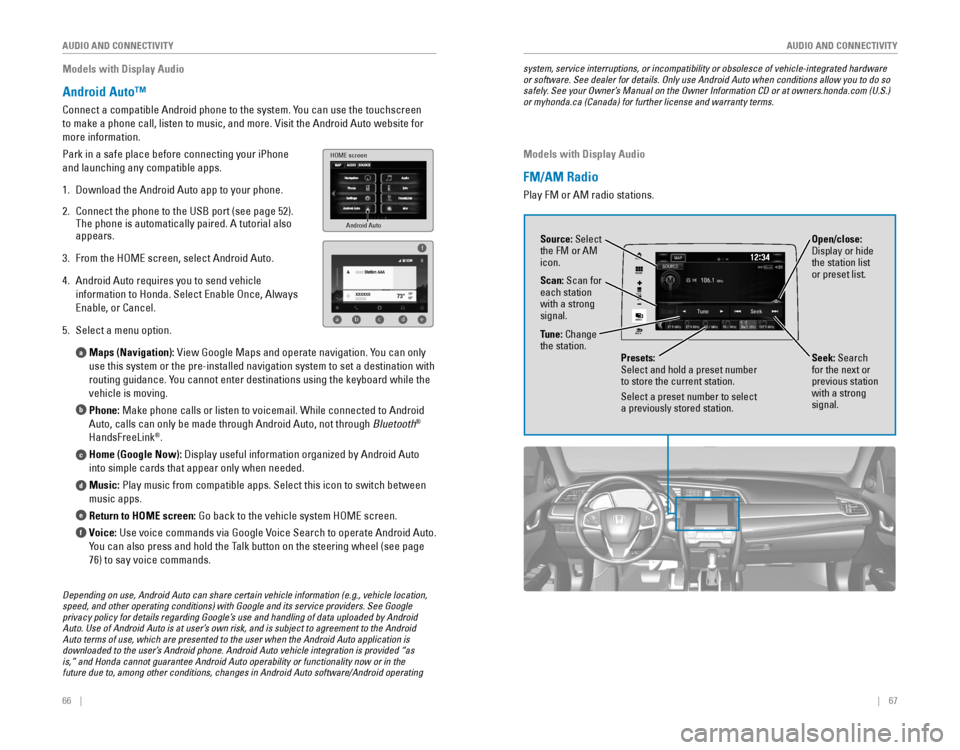
Connect a compatible Android phone to the system. You can use the touchscreen
to make a phone call, listen to music, and more. visit the Android Auto website for
more information.
Park in a safe place before connecting your iPhone
and launching any compatible apps.
1. Download the Android Auto app to your phone.
2. Connect the phone to the USB port (see page 52).
The phone is automatically paired. A tutorial also
appears.
3. From the HoMe screen, select Android Auto.
4. Android Auto requires you to send vehicle
information to Honda. Select enable once, Always
enable, or Cancel.
5. Select a menu option.
Maps (Navigation):
view Google Maps and operate navigation. You can only
use this system or the pre-installed navigation system to set a destinat\
ion with
routing guidance. You cannot enter destinations using the keyboard while the
vehicle is moving.
Phone: Make phone calls or listen to voicemail. While connected to Android
Auto, calls can only be made through Android Auto, not through Bluetooth
®
HandsFreeLink®.
Home (Google Now): Display useful information organized by Android Auto
into simple cards that appear only when needed.
Music: Play music from compatible apps. Select this icon to switch between
music apps.
Return to HOME screen:
Go back to the vehicle system HoMe screen.
Voice: Use voice commands via Google voice Search to operate Android Auto.
You can also press and hold the Talk button on the steering wheel (see page
76) to say voice commands.
a
b
c
d
e
f
Android Auto
HOME screen
f
ab cde
Depending on use, Android Auto can share certain vehicle information (e.g., vehicle location, speed, and other operating conditions) with Google and its service providers. See Google privacy policy for details regarding Google’s use and handling of data uploaded by Android Auto. Use of Android Auto is at user’s own risk, and is subject to agreement to the Android Auto terms of use, which are presented to the user when the Android Auto application is downloaded to the user’s Android phone. Android Auto vehicle integration is provided “as is,” and Honda cannot guarantee Android Auto operability or functionality now or in the future due to, among other conditions, changes in Android Auto software/Android operating
system, service interruptions, or incompatibility or obsolesce of vehicle-integrated hardware or software. See dealer for details. Only use Android Auto when conditions allow you to do so safely. See your Owner’s Manual on the Owner Information CD or at owners.honda.com (U.S.) or myhonda.ca (Canada) for further license and warranty terms.
Models with Display Audio
FM/AM Radio
Play FM or AM radio stations.
VOL
HOME
MENU
BACK
AUDIO
Source: Select
the FM or AM
icon.
Tune: Change
the station.
Seek: Search
for the next or
previous station
with a strong
signal. Open/close:
Display or hide
the station list
or preset list.
Scan: Scan for
each station
with a strong
signal.
Presets:
Select and hold a preset number
to store the current station.
Select a preset number to select
a previously stored station.
Page 56 of 82
*
Provides steering input to help keep the vehicle in the middle of a dete\
cted lane and
visual and tactile alerts if the veh")
104 || 105
DRIVING
DRIVING
Lane Keeping Assist System (LKAS)*
Provides steering input to help keep the vehicle in the middle of a dete\
cted lane and
visual and tactile alerts if the vehicle is detected drifting out of its\
lane while driving
between 45–90 mph (72–145 km/h).
If your vehicle is getting too close to detected left or
right side lane markings without a turn signal activated,
a message appears on the Driver Information Interface,
and the steering wheel vibrates. Steering torque is also
applied to help keep your vehicle within your driving
lane.
Turning the System On or Off
1. Press the MAIN button. LKAS appears in the
Driver Information Interface.
2. Press the LKAS button. Lane outlines appear
in the Driver Information Interface. Dotted lane
lines turn solid when the system starts operating.
3. Press the MAIN button or the LKAS button to turn
the system off.
Important Safety Reminder
LKAS is for your convenience only. It is not a substitute for your vehicle control. The
system does not work if you take your hands off the steering wheel or fa\
il to steer
the vehicle.
Do not place an object on the top of the instrument panel. It may refl\
ect onto the
windshield and prevent the system from detecting lane lines properly.
MAIN button
*if equipped
Steering assistance
LKAS button
Road Departure Mitigation (RDM)*
Alerts and helps to assist you if the system determines a possibility of\
your vehicle
unintentionally crossing over detected lane markings while driving betwe\
en 45–90
mph (72–145 km/h).
If your vehicle is getting too close to detected lane
markings without a turn signal activated, a message
appears in the Driver Information Interface. Steering
wheel torque and vibrations are applied to help your
vehicle stay in the lane.
Braking may also be applied if the lane lines are solid
and continuous.
If the system operates several times without detecting
driver response, the system beeps to alert you.
Changing Settings Determine the warning type.
1. From the HoMe screen, select Settings.
2. Select vehicle. The vehicle must be in Park (P).
3. Select Driver Assist System Setup.
4. Select road Departure Mitigation Setting.
5. Select from the options.
Normal (default): Steering control starts from inside the lane edge.
Wide: Steering control starts from outside the lane edge.
Warning Only: The system only provides a BrAKe message and steering wheel
vibrations, but does not apply steering torque or braking.
6. Press BACK to exit the menu.
Important Safety Reminder
The rDM system has limitations. over-reliance on it may result in a collision. It is
always your responsibility to keep your vehicle within the driving lane.\
*if equipped
Turning the System On or Off
Press the rDM button to turn the system on or off.
A green indicator appears on the button when the
system is on.
RDM button
Indicator
Steering assistance
Page 58 of 82
108 || 109
DRIVING
DRIVING
LaneWatch™*
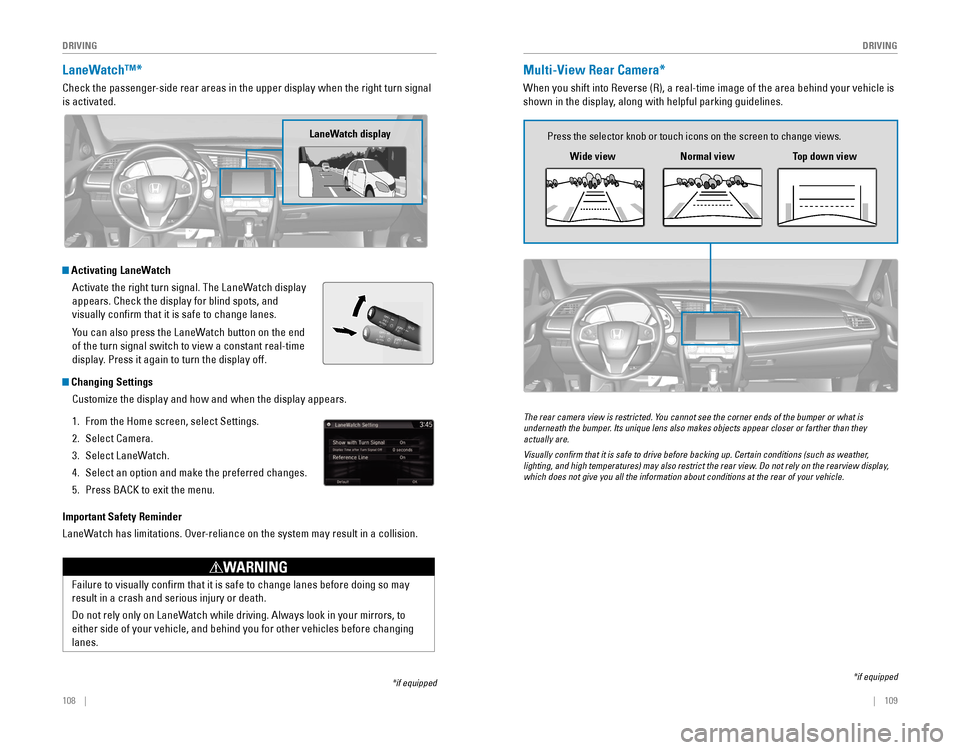
Check the passenger-side rear areas in the upper display when the right turn signal
is activated.
Activating LaneWatch
Activate the right turn signal. The LaneWatch display
appears. Check the display for blind spots, and
visually confirm that it is safe to change lanes.
You can also press the LaneWatch button on the end
of the turn signal switch to view a constant real-time
display. Press it again to turn the display off.
Changing SettingsCustomize the display and how and when the display appears.
1. From the Home screen, select Settings.
2. Select Camera.
3. Select LaneWatch.
4. Select an option and make the preferred changes.
5. Press BACK to exit the menu.
Important Safety Reminder
LaneWatch has limitations. over-reliance on the system may result in a collision.
*if equipped
Failure to visually confirm that it is safe to change lanes before doi\
ng so may
result in a crash and serious injury or death.
Do not rely only on LaneWatch while driving. Always look in your mirrors, to
either side of your vehicle, and behind you for other vehicles before ch\
anging
lanes.
WARNING
LaneWatch display
Multi-View Rear Camera*
When you shift into reverse (r), a real-time image of the area behind your vehicle is
shown in the display, along with helpful parking guidelines.
*if equipped
Wide view
Press the selector knob or touch icons on the screen to change views.
Normal viewTop down view
The rear camera view is restricted. You cannot see the corner ends of the bumper or what is underneath the bumper. Its unique lens also makes objects appear closer or farther than they actually are.
Visually confirm that it is safe to drive before backing up. Certain conditions (such as weather, lighting, and high temperatures) may also restrict the rear view. Do not rely on the rearview display, which does not give you all the information about conditions at the rear of your vehicle.
Page 77 of 82

146 || 147
SPECIFICATIONS
M
AINTENANCE
Testing of Readiness Codes
Your vehicle has “readiness codes” as part of the onboard self-diag\
nostic system.
Some states refer to these codes as a test to see if your vehicle’s emissions
components are working properly. The codes may not be read if you go through the
testing just after the battery has gone dead or been disconnected.
To check if they are set, turn the vehicle on without starting the engine\
. The
malfunction indicator lamp will come on for several seconds. If it goes \
off, the
readiness codes are set. If it blinks five times, the readiness codes \
are not set.
If you are required to have your vehicle tested before the readiness cod\
es are set,
prepare the vehicle for retesting by doing the following:
1. Fill the gas tank to approximately 3/4 full.
2. Park the vehicle and leave the engine off for 6 hours or more.
3. Make sure the ambient temperature is between 40°F and 95°F (4°\
C and 35°C).
4. Start the engine without touching the accelerator pedal, and let it idle\
for 20
seconds.
5. Keep the vehicle in Park (P) or Neutral for manual transmission. Incre\
ase the
engine speed to 2,000 rpm, and hold it there for about 3 minutes.
6. Let the engine idle with your foot off the accelerator for 20 seconds.
7. Select a nearby, lightly traveled major highway where you can maintain a speed
of 50 to 60 mph (80 to 97 km/h) for at least 20 minutes. Drive on the \
highway
with the vehicle in Drive (D) or 5th gear. Do not use cruise control. When traffic
allows, drive for 90 seconds without using the accelerator pedal. (vehicle speed
may vary slightly; this is oK.) If you cannot do this for a continuous 90 seconds
because of traffic conditions, drive for at least 30 seconds, then rep\
eat two more
times (for a total of 90 seconds).
8. Drive in city/suburban traffic for at least 10 minutes. When traffic\
conditions
allow, let the vehicle coast for several seconds without using the accelerator
pedal or the brake pedal.
9. Park the vehicle and leave the engine off for 30 minutes.
The readiness codes are erased when the battery is disconnected, and set\
again
only after several days of driving under a variety of conditions.
If a testing facility determines that the readiness codes are not set, y\
ou may be
requested to return at a later date to complete the test, or see your de\
aler.
SPECIFICATIONS
1.5-L engine models
Vehicle
ModelHonda Civic 4-Doo r
No. of Passengers :
Front2
Rear 3
Tota l5
Weights:Gross Vehicle
Weight Rating U.S.: 3,902 lbs (1,770 kg )
Canada: 1,770 kg
Gross Axle Weight
Rating (Front )U.S.: 2,105 lbs (955 kg )
Canada: 955 kg
Gross Axle Weight
Rating (Rear)U.S.: 1,808 lbs (820 kg )
Canada: 820 kg
Light Bulbs
*1:Except Touring models*2: Touring models
Headlights (Low Beam )55W (H11)*1LED*2
Headlights (High Beam )60W (HB3)*1LE
D*2Fog Lights35W (H8)
Parking/Da ytime Running Light sLED
Front Side Marker Lights3W
Front Turn Signal Lights 21W (Amber
)*1LED*2Side Turn Signal Lights
(on Door Mirrors)*LE D
Brake Light s2 1W
Rear Turn Signal Lights21W (Amber)
Rear Side Marker Lights LED
Back-Up Lights16W
DEL
sthgilliaT
High- Mount Brak e Light21W
Rear License Plate Light LED
Trunk Light5W
In terior Lights
Map Lights8 W
Ceiling Ligh t8 W
Engine and Fuel
Engine
FuelDisplacemen t91.26 cu-in (1,496 cm3)
Spark Plug sN GKILZKAR8H8S
Fuel:
TypeUnleaded gasoline, Pump octane number
of 87 or highe r
Fuel Tank Capacity 12.39 US gal (46.9 )
Fluids
Air ConditioningRefrigerant TypeHFO-1234yf (R-1234yf)
Charge Quantity 13.2 – 15.0 oz (375 – 425 g)
Lubricant TypeRL85HM (POE)
Quantity 2.7 – 3.6 oz (77 – 103 g)
Washer Fluid
Tank CapacityU.S.: 2.6 US qt (2.5 )
Canada: 4.8 US qt (4.5 )
Brake Fluid
Continuously Variable Transmission Fluid
SpecifedHonda Heavy Duty Brake Fluid DOT 3
SpecifedHonda HCF-2 Transmission Flui d
Capacity Change 3.9 US qt (3.7 )
Engine Oil
Engine Coolan
t
Recommended·Genuine Honda Motor Oil 0W-20
·API Premium-grade 0W-20 detergent oi l
Capacity Change
3.4 US qt (3.2 )
Change
including
flter 3.7 US qt (3.5 )
SpecifedHonda Long Life Anti
freeze/Coolant Type 2
Ratio 50/50 with distilled wate r
Capacity1.34 US gal (5.09 )
(change including the remaining
0.2 US gal (0.75 ) in the reserve tank )
Tires
RegularSize215/50R17 91HPressure
psi (kPa [kgf/cm2])32 (220 [2.2])
Compact
Spar e Size
T125/80D16 97M
Pressure
psi (kPa [kgf/cm
2]) 60 (420 [4.2])
Wheel SizeRegula
r17 x 7JCompact Spar e16 x 4T
Page 78 of 82
148 || 149
CUSTOMER INFORMATION
SPECIFICATIONS
2.0-L engine models
Vehicle
ModelHonda Civic 4-Doo r
No. of Passengers :
Front2
Rear 3
Tota l5
Weights:Gross Vehicle
Weight Rating U.S.: 3,737 lbs (1,695 kg )
Canada: 1,695 kg
Gross Axle Weight
Rating (Front)U.S.: 1,984 lbs (900 kg )
Canada: 900 kg
Gross Axle Weight
Rating (Rear)U.S.: 1,786 lbs (810 kg )
Canada: 810 kg
Light Bulbs
*1:Canadian DX models*2: Except Canadian DX models
Headlights (Low Beam)55W (H11)Headlights (High Beam )60W (HB3)Parking/Daytime Running Light sLED
Front Side Marker Ligh t
Front Turn Signal Lights21W (Amber )
Brake Light s2 1W
Rear Turn Signal Lights21W (Amber)
Rear Side Marker Lights LED
Back-Up Lights16W
DEL
sthgilliaT
High-M ount Brake Light21W
Rear License Plate Light LED
Trunk Light5W
In terior Lights
Map Lights8W*15W*2Ceiling Ligh t8 W
3W
Engine and Fuel
Engine
FuelDisplacemen t121.76 cu-in (1,996 cm3)
Spark Plug s NG
K DILKAR7H11GS
DILKAR7G11GS
DENSO DXE22HQR-D11 S
Fuel:
TypeUnleaded gasoline, Pump octane number
of 87 or highe r
Fuel Tank Capacity 12.39 US gal (46.9 )
Fluids
Air Conditioning*
Refrigerant TypeHFO-1234yf (R-1234yf)
Charge Quantity 13.2 – 15.0 oz (375 – 425 g)
Lubricant TypeRL85HM (POE)
Quantity 2.7 – 3.6 oz (77 – 103 g)
Washer Fluid
Tank CapacityU.S.: 2.6 US qt (2.5 )
Canada: 4.8 US qt (4.5 )
Brake/Clutch Fluid
Continuously Variable Transmission Fluid
Manual Transmission Fluid
SpecifedHonda Heavy Duty Brake Fluid DOT 3
SpecifedHonda HCF-2 Transmission Flui d
Capacity Change 3.7 US qt (3.5 )
SpecifedHonda Manual Transmission Fluid (MTF )
Capacity Change 2.0 US qt (1.9 )
Engine Oil
Engine Coolan
t
Recommended·Genuine Honda Motor Oil 0W-20
·API Premium-grade 0W-20 detergent oi l
Capacity Change
4.2 US qt (4.0 )
Change
including
flter 4.4 US qt (4.2 )
SpecifedHonda Long Life Anti
freeze/Coolant Type 2
Ratio 50/50 with distilled wate r
Capacity1.4 US gal (5.30 )
(change including the remaining
0.2 US gal (0.75 ) in the reserve tank )
*
*
*
Tires
RegularSize215/55R16 93HPressure
psi (kPa [kgf/cm2])32 (220 [2.2])
Compact
Spar e
*Size T125/80D16 97M
Pressure
psi (kPa [kgf/cm
2]) 60 (420 [4.2])
Wheel SizeRegula
r16 x 7JCompact Spar e16 x 4T
*if equipped
CUSTOMER INFORMATION
*if equipped
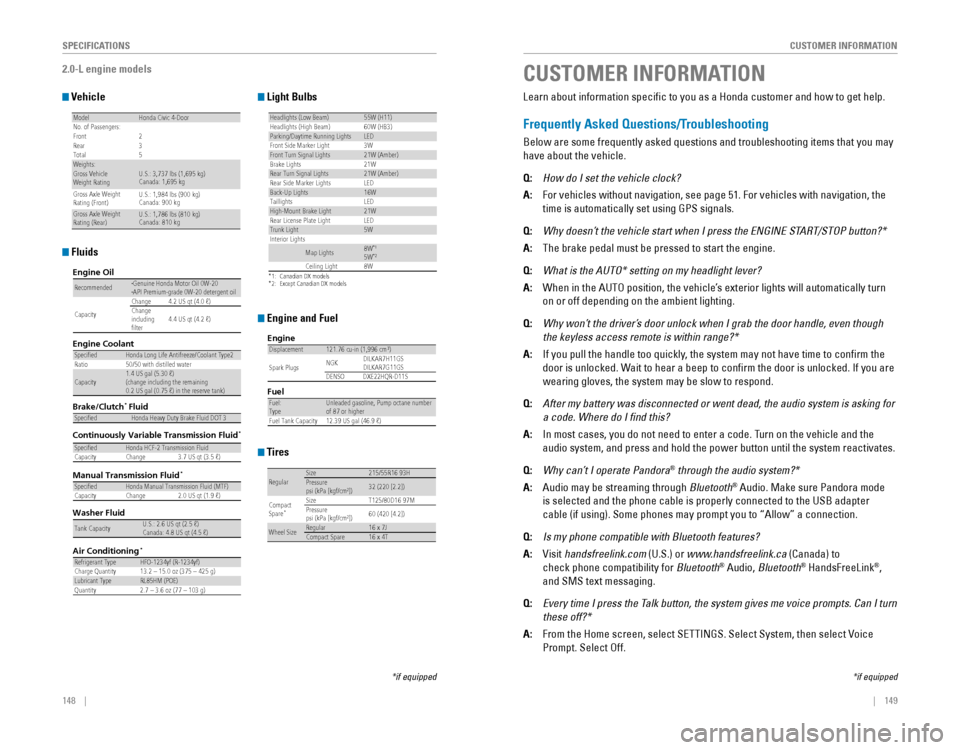
Learn about information specific to you as a Honda customer and how to\
get help.
Frequently Asked Questions/Troubleshooting
Below are some frequently asked questions and troubleshooting items that\
you may
have about the vehicle.
Q:
How do I set the vehicle clock?
A: For vehicles without navigation, see page 51. For vehicles with navigati\
on, the
time is automatically set using GPS signals.
Q: Why doesn’t the vehicle start when I press the ENGINE START/STOP button?*
A: The brake pedal must be pressed to start the engine.
Q: What is the AUTO* setting on my headlight lever?
A: When in the AUTo position, the vehicle’s exterior lights will automatically turn
on or off depending on the ambient lighting.
Q: Why won’t the driver’s door unlock when I grab the door handle, even though
the keyless access remote is within range?*
A: If you pull the handle too quickly, the system may not have time to confirm the
door is unlocked. Wait to hear a beep to confirm the door is unlocked. If you are
wearing gloves, the system may be slow to respond.
Q: After my battery was disconnected or went dead, the audio system is asking for
a code. Where do I find this?
A: In most cases, you do not need to enter a code. Turn on the vehicle and the
audio system, and press and hold the power button until the system react\
ivates.
Q: Why can’t I operate Pandora® through the audio system?*
A: Audio may be streaming through Bluetooth® Audio. Make sure Pandora mode
is selected and the phone cable is properly connected to the USB adapter\
cable (if using). Some phones may prompt you to “Allow” a connec\
tion.
Q: Is my phone compatible with Bluetooth features?
A: visit handsfreelink.com (U.S.) or www.handsfreelink.ca (Canada) to
check phone compatibility for Bluetooth® Audio, Bluetooth® HandsFreeLink®,
and SMS text messaging.
Q: Every time I press the Talk button, the system gives me voice prompts. Can I turn
these off?*
A: From the Home screen, select SeTTINGS. Select System, then select voice
Prompt. Select off.