ECO mode HONDA CIVIC 2017 10.G Owners Manual
[x] Cancel search | Manufacturer: HONDA, Model Year: 2017, Model line: CIVIC, Model: HONDA CIVIC 2017 10.GPages: 601, PDF Size: 32.51 MB
Page 304 of 601
303
uuGeneral Information on the Audio System uCompatible iPod, iPhone, and USB Flash Drives
Features
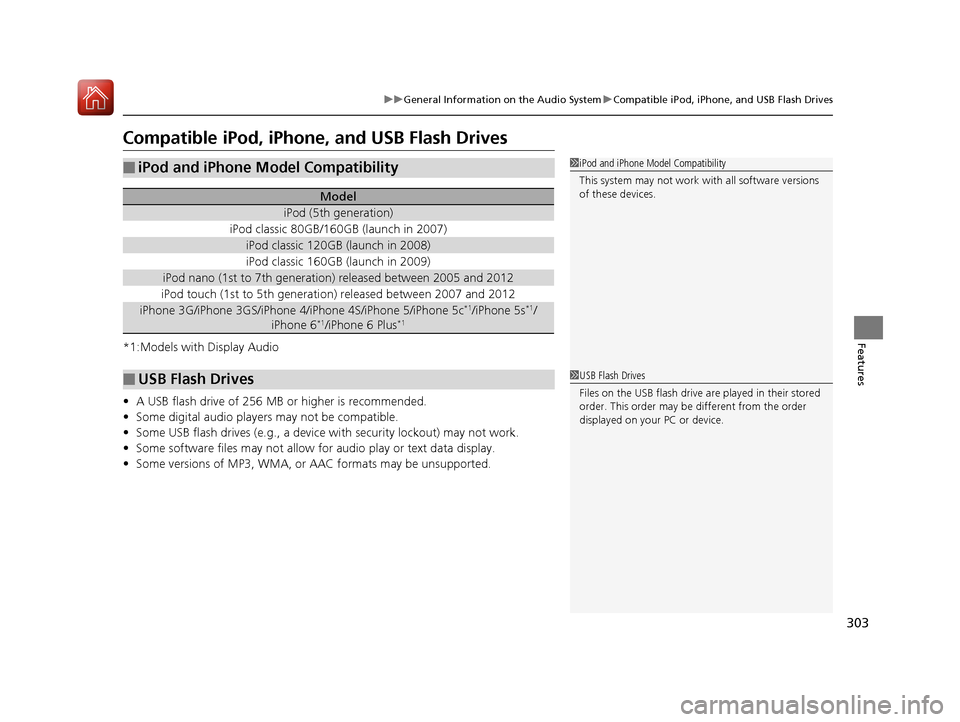
Compatible iPod, iPhone , and USB Flash Drives
*1:Models with Display Audio
•A USB flash drive of 256 MB or higher is recommended.
• Some digital audio players may not be compatible.
• Some USB flash drives (e.g., a device with security lockout) may not work.
• Some software files may not allow for audio play or text data display.
• Some versions of MP3, WMA, or AAC formats may be unsupported.
■iPod and iPhone Model Compatibility
Model
iPod (5th generation)
iPod classic 80GB/160GB (launch in 2007)
iPod classic 120GB (launch in 2008)
iPod classic 160GB (launch in 2009)
iPod nano (1st to 7th generation) released between 2005 and 2012
iPod touch (1st to 5th generation) released between 2007 and 2012
iPhone 3G/iPhone 3GS/iPhone 4/iPhone 4S/iPhone 5/iPhone 5c*1/iPhone 5s*1/
iPhone 6*1/iPhone 6 Plus*1
■USB Flash Drives
1 iPod and iPhone Model Compatibility
This system may not work with all software versions
of these devices.
1USB Flash Drives
Files on the USB flash drive are played in their stored
order. This order may be different from the order
displayed on your PC or device.
17 CIVIC 4D HCM (KA KC KL)-31TBA6100.book 303 ページ 2016年8月31日 水曜日 午後6時5分
Page 320 of 601
319
uuCustomized Features u
Continued
Features
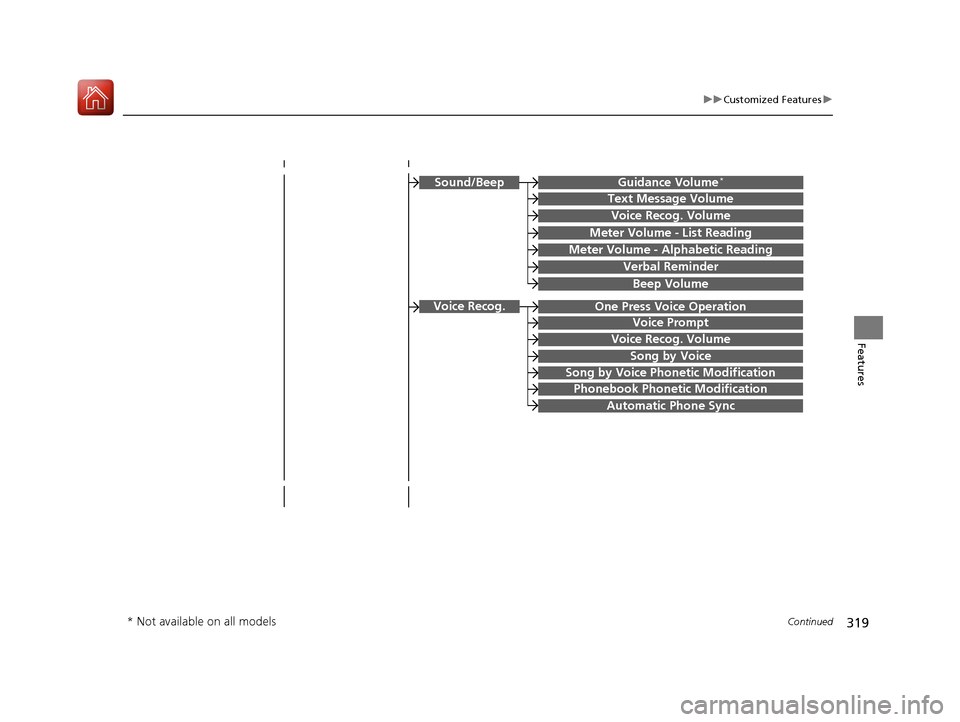
Guidance Volume*
Text Message Volume
Sound/Beep
Voice Recog. Volume
Verbal Reminder
Beep Volume
Meter Volume - List Reading
Meter Volume - Alphabetic Reading
Voice Prompt
Voice Recog. Volume
Song by Voice
Song by Voice Phonetic Modification
Phonebook Phonetic Modification
Automatic Phone Sync
One Press Voice OperationVoice Recog.
* Not available on all models
17 CIVIC 4D HCM (KA KC KL)-31TBA6100.book 319 ページ 2016年8月31日 水曜日 午後6時5分
Page 326 of 601
325
uuCustomized Features u
Continued
Features
*1:Default SettingSetup
Group Customizable Features Desc
ription Selectable Settings
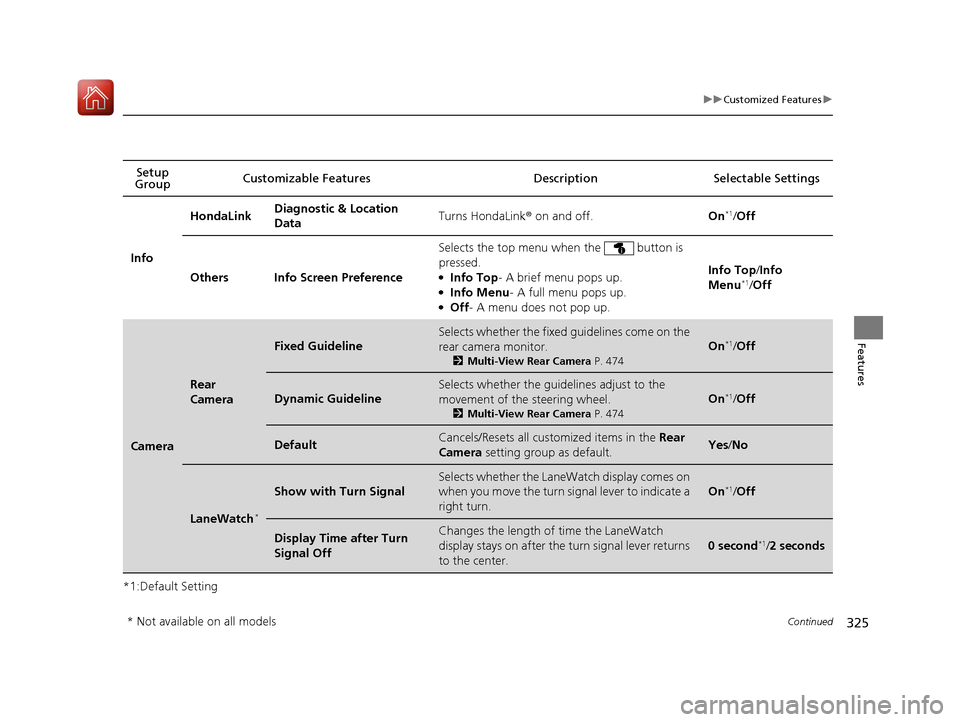
Info HondaLink
Diagnostic & Location
Data
Turns HondaLink
® on and off. On
*1/Off
Others Info Screen Preference Selects the top menu when the button is
pressed.
●Info Top
- A brief menu pops up.●Info Menu- A full menu pops up.●Off- A menu does not pop up. Info Top
/Info
Menu
*1/ Off
Camera
Rear
Camera
Fixed Guideline
Selects whether the fixed guidelines come on the
rear camera monitor.
2 Multi-View Rear Camera P. 474
On*1/Off
Dynamic Guideline
Selects whether the guidelines adjust to the
movement of the steering wheel.
2 Multi-View Rear Camera P. 474
On*1/Off
DefaultCancels/Resets all cust omized items in the Rear
Camera setting group as default.Yes/No
LaneWatch*
Show with Turn Signal
Selects whether the LaneWatch display comes on
when you move the turn signal lever to indicate a
right turn.
On*1/Off
Display Time after Turn
Signal OffChanges the length of time the LaneWatch
display stays on after the turn signal lever returns
to the center.
0 second*1/2 seconds
* Not available on all models
17 CIVIC 4D HCM (KA KC KL)-31TBA6100.book 325 ページ 2016年8月31日 水曜日 午後6時5分
Page 335 of 601

334
uuCustomized Features u
Features
*1:Default SettingSetup
Group Customizable Features Desc
ription Selectable Settings
System Others Climate screen timeout
Changes the length of time the climate control
display stays on when you press the
CLIMATE
button. Never/
5 Seconds /10
Seconds
*1/ 20
Seconds
Detail Information Displays the details of the head unit and
operating system information.
Default Cancels/Resets all customized items in the
System
group as default. Yes
/No
Vehicle
TPMS Calibration*Cancels/Calibrates the TPMS.Cancel /Calibrate
Driver
Assist
System
Setup
*
Forward Collision Warning
DistanceChanges CMBSTM alert distance.Long /Normal*1/Short
ACC Forward Vehicle
Detect BeepCauses the system to beep when the system
detects a vehicle, or when the vehicle goes out of
the ACC range.
On /Off*1
Lane Keeping Assist
Suspend BeepCauses the system to beep when LKAS is
suspended.On /Off*1
Road Departure Mitigation
SettingChanges the setting for the road departure
mitigation system.Normal*1/Wide /
Warning Only
* Not available on all models
17 CIVIC 4D HCM (KA KC KL)-31TBA6100.book 334 ページ 2016年8月31日 水曜日 午後6時5分
Page 337 of 601
336
uuCustomized Features u
Features
*1:Default SettingSetup
Group Customizable Features Desc
ription Selectable Settings
Vehicle
Keyless
Access
Setup
*
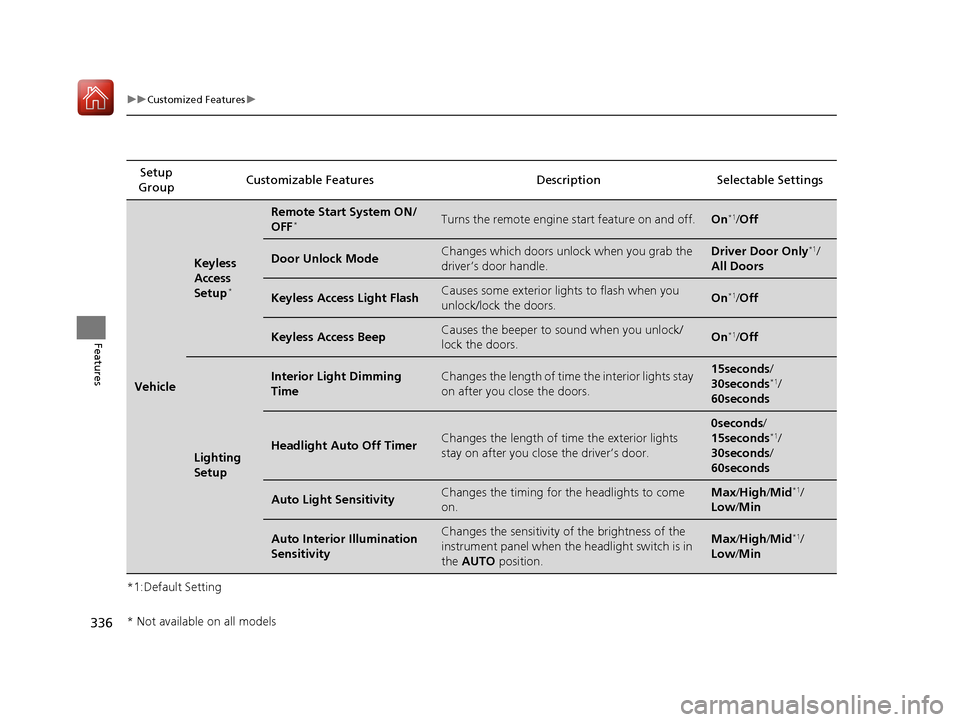
Remote Start System ON/
OFF*Turns the remote engine start feature on and off.On*1/Off
Door Unlock ModeChanges which doors unlock when you grab the
driver’s door handle.Driver Door Only*1/
All Doors
Keyless Access Light FlashCauses some exterior lights to flash when you
unlock/lock the doors.On*1/ Off
Keyless Access BeepCauses the beeper to sound when you unlock/
lock the doors.On*1/Off
Lighting
Setup
Interior Light Dimming
TimeChanges the length of time the interior lights stay
on after you close the doors.15seconds /
30seconds*1/
60seconds
Headlight Auto Off TimerChanges the length of ti me the exterior lights
stay on after you close the driver’s door.
0seconds /
15seconds*1/
30seconds /
60seconds
Auto Light SensitivityChanges the timing for the headlights to come
on.Max /High/ Mid*1/
Low/ Min
Auto Interior Illumination
SensitivityChanges the sensitivity of the brightness of the
instrument panel when the headlight switch is in
the AUTO position.Max/High/ Mid*1/
Low/ Min
* Not available on all models
17 CIVIC 4D HCM (KA KC KL)-31TBA6100.book 336 ページ 2016年8月31日 水曜日 午後6時5分
Page 338 of 601
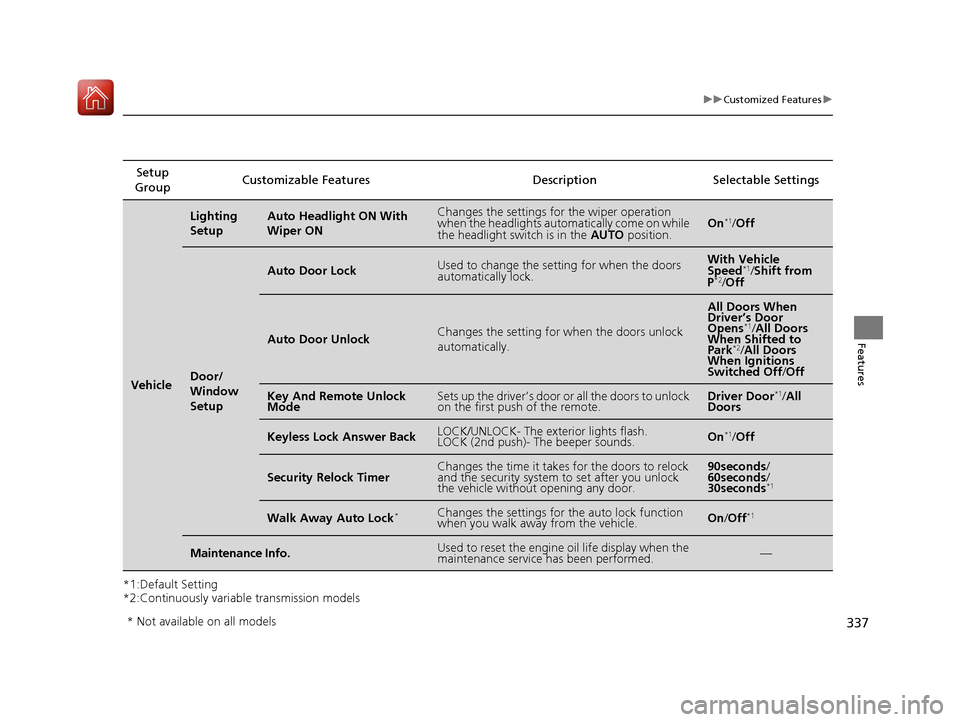
337
uuCustomized Features u
Features
*1:Default Setting
*2:Continuously variable transmission modelsSetup
Group Customizable Features
DescriptionSelectable Settings
Vehicle
Lighting
SetupAuto Headlight ON With
Wiper ONChanges the settings for the wiper operation
when the headlights automatically come on while
the headlight switch is in the AUTO position.On*1/Off
Door/
Window
Setup
Auto Door LockUsed to change the sett ing for when the doors
automatically lock.With Vehicle
Speed*1/ Shift from
P*2/ Off
Auto Door UnlockChanges the setting for when the doors unlock
automatically.
All Doors When
Driver’s Door
Opens
*1/ All Doors
When Shifted to
Park
*2/ All Doors
When Ignitions
Switched Off /Off
Key And Remote Unlock
ModeSets up the driver’s door or all the doors to unlock
on the first push of the remote.Driver Door*1/ All
Doors
Keyless Lock Answer BackLOCK/UNLOCK- The exterior lights flash.
LOCK (2nd push)- The beeper sounds.On*1/ Off
Security Relock TimerChanges the time it takes for the doors to relock
and the security system to set after you unlock
the vehicle without opening any door.90seconds /
60seconds /
30seconds
*1
Walk Away Auto Lock*Changes the settings for the auto lock function
when you walk away from the vehicle.On /Off*1
Maintenance Info.Used to reset the engine oil life display when the
maintenance service has been performed.—
* Not available on all models
17 CIVIC 4D HCM (KA KC KL)-31TBA6100.book 337 ページ 2016年8月31日 水曜日 午後6時5分
Page 339 of 601
338
uuCustomized Features uDefaulting All the Settings
Features
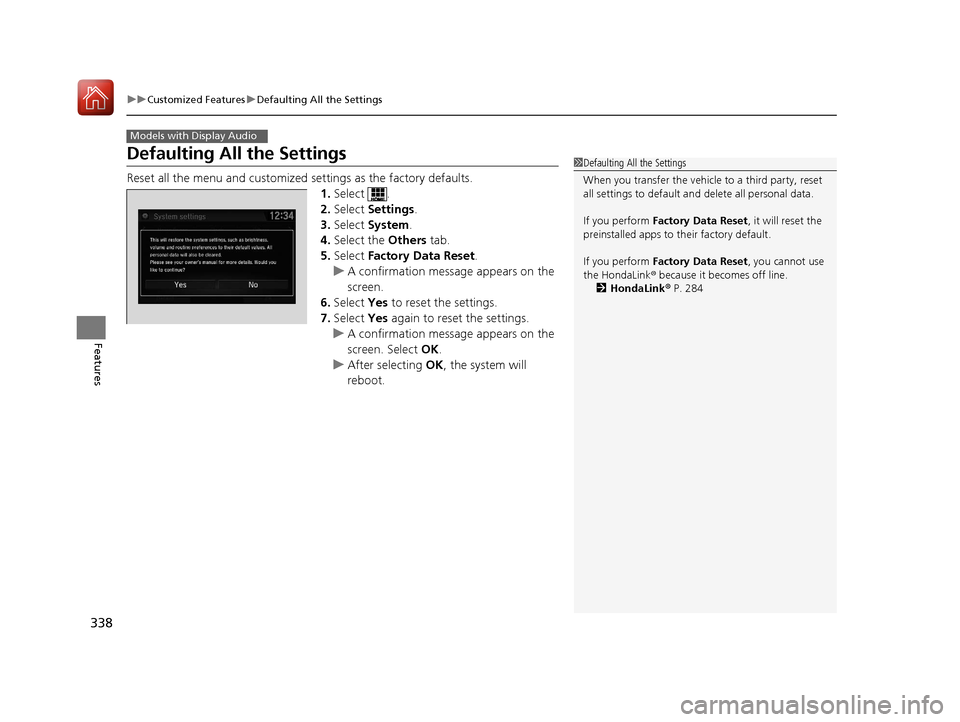
Defaulting All the Settings
Reset all the menu and customized settings as the factory defaults.
1. Select .
2. Select Settings .
3. Select System .
4. Select the Others tab.
5. Select Factory Data Reset .
u A confirmation message appears on the
screen.
6. Select Yes to reset the settings.
7. Select Yes again to reset the settings.
u A confirmation message appears on the
screen. Select OK.
u After selecting OK, the system will
reboot.
Models with Display Audio
1 Defaulting All the Settings
When you transfer the vehicle to a third party, reset
all settings to default a nd delete all personal data.
If you perform Factory Data Reset , it will reset the
preinstalled apps to their factory default.
If you perform Factory Data Reset , you cannot use
the HondaLink ® because it becomes off line.
2 HondaLink ® P. 284
17 CIVIC 4D HCM (KA KC KL)-31TBA6100.book 338 ページ 2016年8月31日 水曜日 午後6時5分
Page 396 of 601
395
Driving
This chapter discusses driving, refueling, and information on items such as accessories.
Before Driving
Driving Preparation .......................... 396
Maximum Load Limit........................ 399
Towing a Trailer ................................ 401
When Driving Starting the Engine .................. 402, 404
Precautions While Driving................. 409
Continuously Variable Transmission*... 410
Shifting .................................... 411, 413
ECON Button ................................... 416
Cruise Control
*................................ 417
Front Sensor Camera*...................... 420 Adaptive Cruise Control (ACC) with Low
Speed Follow (LSF)
*....................... 422Road Departure Mitigation (RDM) System*...... 436Lane Keeping Assist System (LKAS)*.... 440
Vehicle Stabilit y Assist (VSA®), aka Electronic
Stability Control (ESC), System........... 447
LaneWatchTM*.................................. 450Tire Pressure Monitoring System (TPMS) ...... 452Tire Pressure Monitoring System (TPMS) -
Required Federal Explanation ......... 455
Braking Brake System ................................... 457
Anti-lock Brake System (ABS) ........... 463 Brake Assist System ......................... 464
Collision Mitigation Braking System
TM
(CMBSTM)*..................................... 465
Parking Your Vehicle When Stopped ................................ 473
Multi-View Rear Camera .................. 474
Refueling Fuel Information .............................. 476
How to Refuel ................................. 477
Fuel Economy and CO
2 Emissions
Improving Fuel Economy and Reducing
CO
2 Emissions ................................ 479
Turbo Engine Vehicle*
Handling Precautions ....................... 480
* Not available on all models
17 CIVIC 4D HCM (KA KC KL)-31TBA6100.book 395 ページ 2016年8月31日 水曜日 午後6時5分
Page 403 of 601
402
Driving
When Driving
Starting the Engine
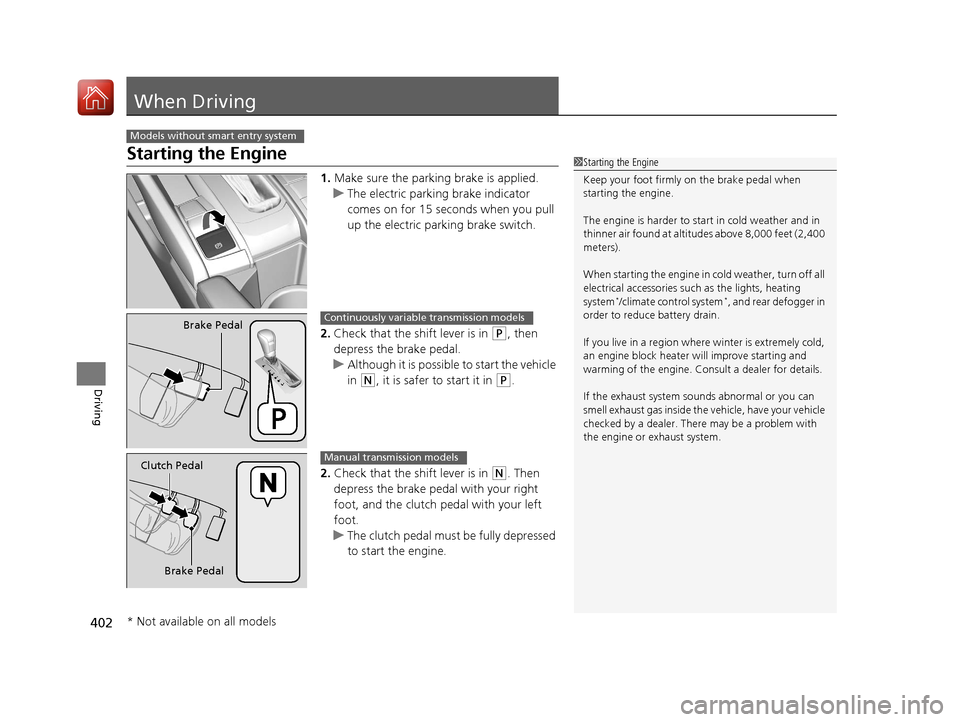
1.Make sure the parking brake is applied.
u The electric parking brake indicator
comes on for 15 seconds when you pull
up the electric parking brake switch.
2. Check that the shift lever is in
(P, then
depress the brake pedal.
u Although it is possible to start the vehicle
in
(N, it is safer to start it in (P.
2. Check that the shift lever is in
(N. Then
depress the brake pedal with your right
foot, and the clutch pedal with your left
foot.
u The clutch pedal must be fully depressed
to start the engine.
Models without smart entry system
1Starting the Engine
Keep your foot firmly on the brake pedal when
starting the engine.
The engine is harder to st art in cold weather and in
thinner air found at altitudes above 8,000 feet (2,400
meters).
When starting the engine in cold weather, turn off all
electrical accessories such as the lights, heating
system
*/climate control system*, and rear defogger in
order to reduce battery drain.
If you live in a region where winter is extremely cold,
an engine block heater will improve starting and
warming of the engine. Cons ult a dealer for details.
If the exhaust system sounds abnormal or you can
smell exhaust gas inside the vehicle, have your vehicle
checked by a dealer. There may be a problem with
the engine or exhaust system.
Brake PedalContinuously variable transmission models
Brake Pedal
Clutch Pedal
Manual transmission models
* Not available on all models
17 CIVIC 4D HCM (KA KC KL)-31TBA6100.book 402 ページ 2016年8月31日 水曜日 午後6時5分
Page 404 of 601
403
uuWhen Driving uStarting the Engine
Driving
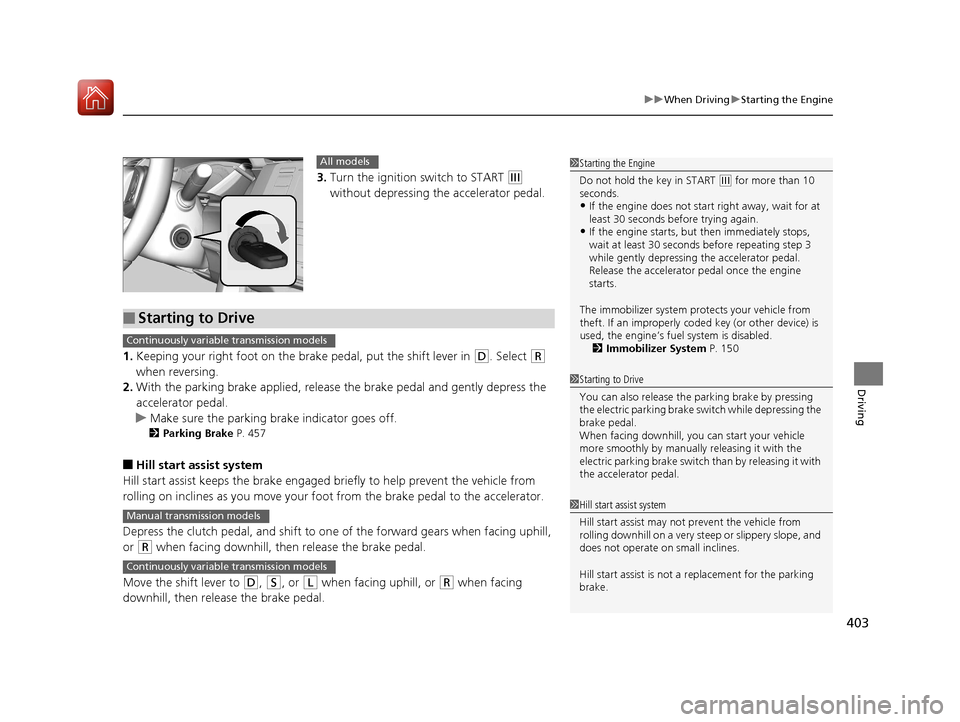
3. Turn the ignition switch to START (e
without depressing the accelerator pedal.
1. Keeping your right foot on the br ake pedal, put the shift lever in
(D. Select (R
when reversing.
2. With the parking brake applied, release the brake pedal and gently depress the
accelerator pedal.
u Make sure the parking brake indicator goes off.
2 Parking Brake P. 457
■Hill start assist system
Hill start assist keeps the brake engaged br iefly to help prevent the vehicle from
rolling on inclines as you move your foot from the brake pedal to the accelerator.
Depress the clutch pedal, and shift to on e of the forward gears when facing uphill,
or
(R when facing downhill, th en release the brake pedal.
Move the shift lever to
(D, (S, or (L when facing uphill, or (R when facing
downhill, then release the brake pedal.
1 Starting the Engine
Do not hold the key in START
(e for more than 10
seconds.
•If the engine does not start right away, wait for at
least 30 seconds before trying again.
•If the engine starts, but then immediately stops,
wait at least 30 seconds before repeating step 3
while gently depressing the accelerator pedal.
Release the accelerator pedal once the engine
starts.
The immobilizer system pr otects your vehicle from
theft. If an improperly code d key (or other device) is
used, the engine’s fuel system is disabled.
2 Immobilizer System P. 150
All models
■Starting to Drive
1Starting to Drive
You can also release the parking brake by pressing
the electric parking brake sw itch while depressing the
brake pedal.
When facing downhill, y ou can start your vehicle
more smoothly by manually releasing it with the
electric parking brake switch than by releasing it with
the accelerator pedal.
Continuously variable transmission models
1 Hill start assist system
Hill start assist may not prevent the vehicle from
rolling downhill on a very st eep or slippery slope, and
does not operate on small inclines.
Hill start assist is not a replacement for the parking
brake.Manual transmission models
Continuously variable transmission models
17 CIVIC 4D HCM (KA KC KL)-31TBA6100.book 403 ページ 2016年8月31日 水曜日 午後6時5分