sensor HONDA CIVIC 2017 10.G User Guide
[x] Cancel search | Manufacturer: HONDA, Model Year: 2017, Model line: CIVIC, Model: HONDA CIVIC 2017 10.GPages: 601, PDF Size: 32.51 MB
Page 81 of 601
80
uuIndicators u
Instrument Panel
*1:Models with the smart entry system have an ENGINE START/STOP button instead of an ignition switch.
IndicatorNameOn/BlinkingExplanationMessage*
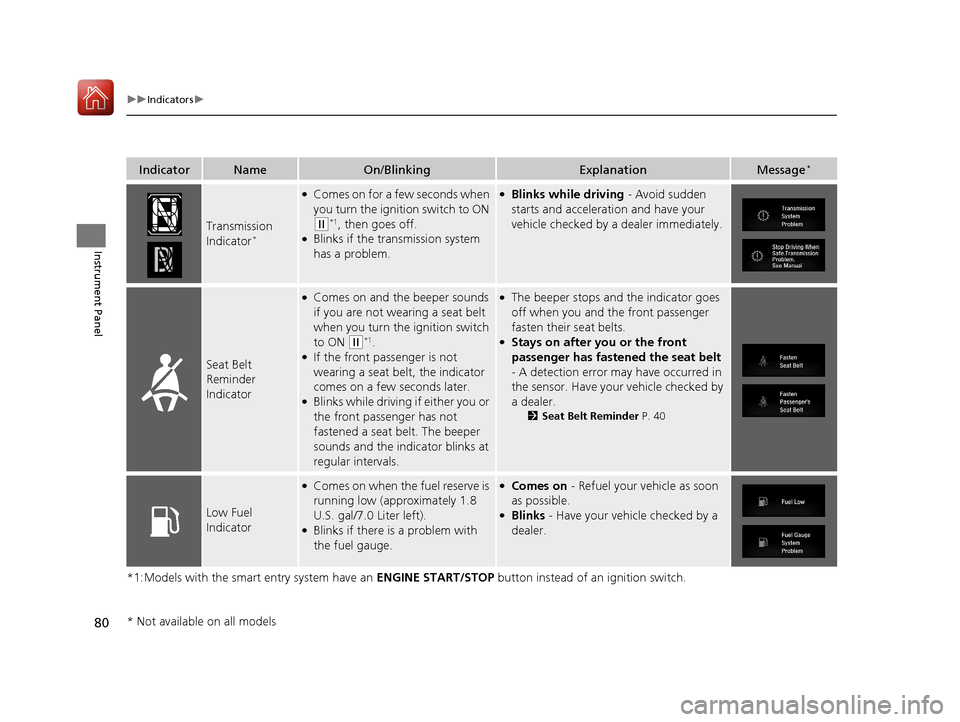
Transmission
Indicator*
●Comes on for a few seconds when
you turn the ignition switch to ON
(w*1, then goes off.●Blinks if the transmission system
has a problem.
●Blinks while driving - Avoid sudden
starts and acceleration and have your
vehicle checked by a dealer immediately.
Seat Belt
Reminder
Indicator
●Comes on and the beeper sounds
if you are not wearing a seat belt
when you turn the ignition switch
to ON
(w*1.●If the front passenger is not
wearing a seat belt, the indicator
comes on a few seconds later.
●Blinks while driving if either you or
the front passenger has not
fastened a seat belt. The beeper
sounds and the indicator blinks at
regular intervals.
●The beeper stops and the indicator goes
off when you and the front passenger
fasten their seat belts.
●Stays on after you or the front
passenger has fastened the seat belt
- A detection error may have occurred in
the sensor. Have your vehicle checked by
a dealer.
2 Seat Belt Reminder P. 40
Low Fuel
Indicator
●Comes on when the fuel reserve is
running low (approximately 1.8
U.S. gal/7.0 Liter left).
●Blinks if there is a problem with
the fuel gauge.
●Comes on - Refuel your vehicle as soon
as possible.
●Blinks - Have your vehicle checked by a
dealer.
* Not available on all models
17 CIVIC 4D HCM (KA KC KL)-31TBA6100.book 80 ページ 2016年8月31日 水曜日 午後6時5分
Page 89 of 601
88
uuIndicators u
Instrument Panel
*1:Models with the smart entry system have an ENGINE START/STOP button instead of an ignition switch.
IndicatorNameOn/BlinkingExplanationMessage*
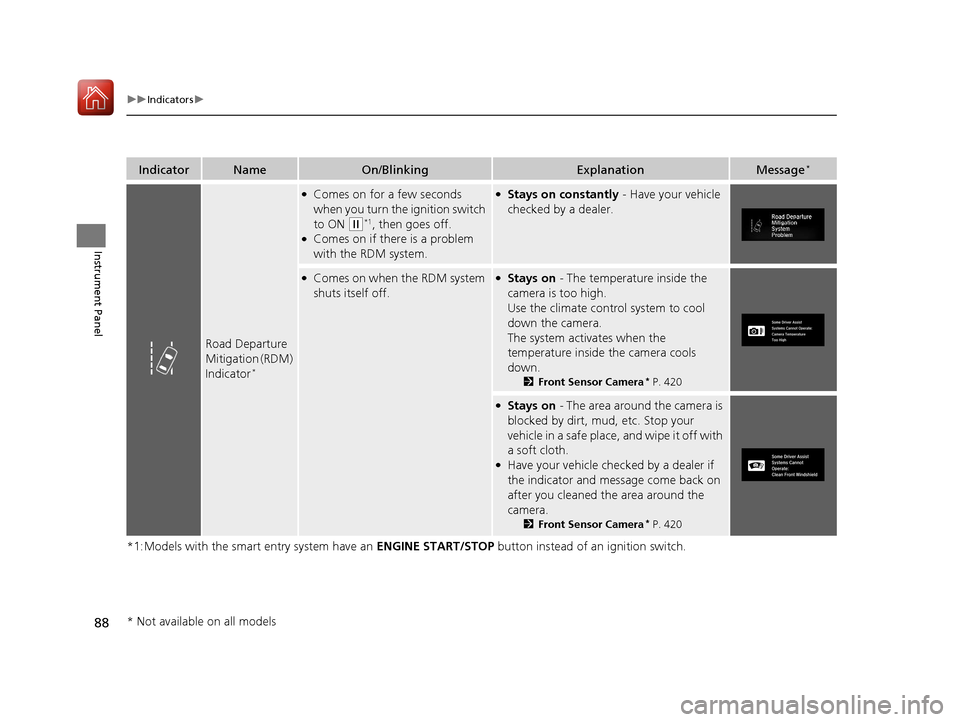
Road Departure
Mitigation (RDM)
Indicator
*
●Comes on for a few seconds
when you turn the ignition switch
to ON
(w*1, then goes off.●Comes on if there is a problem
with the RDM system.
●Stays on constantly - Have your vehicle
checked by a dealer.
●Comes on when the RDM system
shuts itself off.●Stays on - The temperature inside the
camera is too high.
Use the climate control system to cool
down the camera.
The system acti vates when the
temperature inside the camera cools
down.
2 Front Sensor Camera* P. 420
●Stays on - The area around the camera is
blocked by dirt, mud, etc. Stop your
vehicle in a safe place, and wipe it off with
a soft cloth.
●Have your vehicle checked by a dealer if
the indicator and message come back on
after you cleaned the area around the
camera.
2 Front Sensor Camera* P. 420
* Not available on all models
17 CIVIC 4D HCM (KA KC KL)-31TBA6100.book 88 ページ 2016年8月31日 水曜日 午後6時5分
Page 90 of 601
89
uuIndicators u
Continued
Instrument Panel
*1:Models with the smart entry system have an ENGINE START/STOP button instead of an ignition switch.
IndicatorNameOn/BlinkingExplanationMessage*
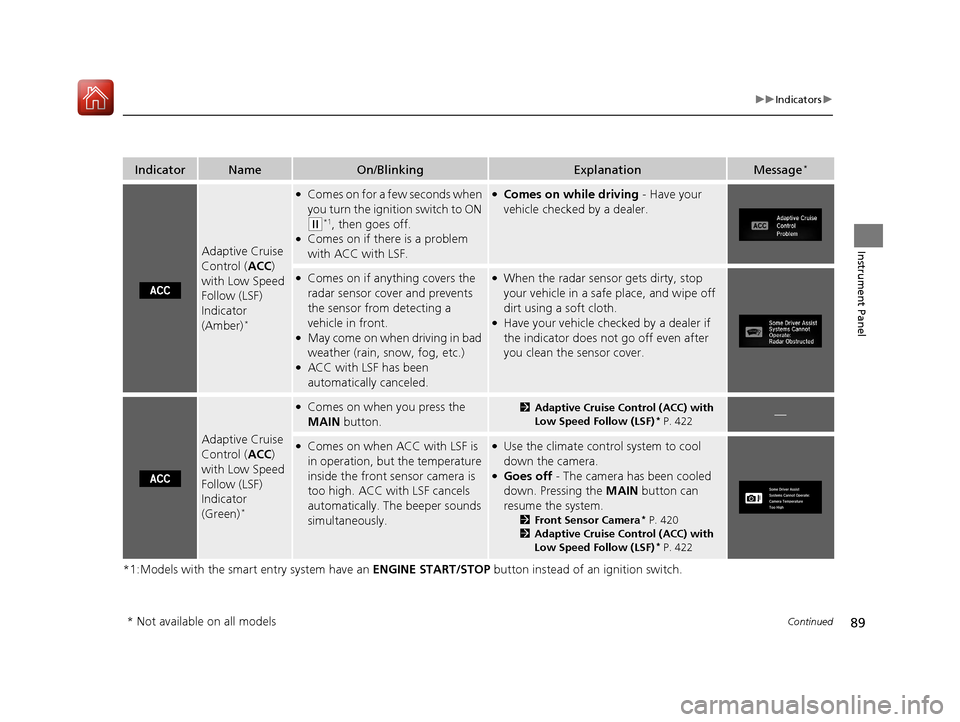
Adaptive Cruise
Control (ACC)
with Low Speed
Follow (LSF)
Indicator
(Amber)
*
●Comes on for a few seconds when
you turn the ignition switch to ON
(w*1, then goes off.●Comes on if there is a problem
with ACC with LSF.
●Comes on while driving - Have your
vehicle checked by a dealer.
●Comes on if anything covers the
radar sensor cover and prevents
the sensor from detecting a
vehicle in front.
●May come on when driving in bad
weather (rain, snow, fog, etc.)
●ACC with LSF has been
automatically canceled.
●When the radar sensor gets dirty, stop
your vehicle in a safe place, and wipe off
dirt using a soft cloth.
●Have your vehicle checked by a dealer if
the indicator does not go off even after
you clean the sensor cover.
Adaptive Cruise
Control ( ACC)
with Low Speed
Follow (LSF)
Indicator
(Green)
*
●Comes on when you press the
MAIN button.2Adaptive Cruise Control (ACC) with
Low Speed Follow (LSF)* P. 422—
●Comes on when ACC with LSF is
in operation, but the temperature
inside the front sensor camera is
too high. ACC with LSF cancels
automatically. The beeper sounds
simultaneously.●Use the climate contro l system to cool
down the camera.
●Goes off - The camera has been cooled
down. Pressing the MAIN button can
resume the system.
2 Front Sensor Camera* P. 420
2 Adaptive Cruise Control (ACC) with
Low Speed Follow (LSF)
* P. 422
* Not available on all models
17 CIVIC 4D HCM (KA KC KL)-31TBA6100.book 89 ページ 2016年8月31日 水曜日 午後6時5分
Page 91 of 601
90
uuIndicators u
Instrument Panel
*1:Models with the smart entry system have an ENGINE START/STOP button instead of an ignition switch.
IndicatorNameOn/BlinkingExplanationMessage*
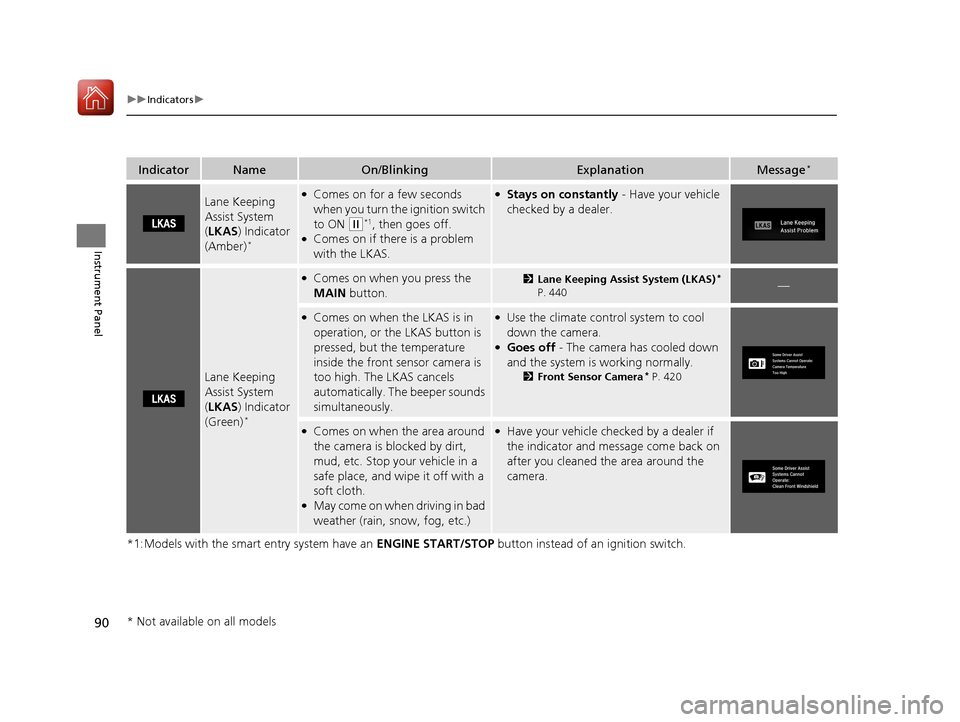
Lane Keeping
Assist System
(LKAS ) Indicator
(Amber)
*
●Comes on for a few seconds
when you turn the ignition switch
to ON
(w*1, then goes off.●Comes on if there is a problem
with the LKAS.
●Stays on constantly - Have your vehicle
checked by a dealer.
Lane Keeping
Assist System
( LKAS ) Indicator
(Green)
*
●Comes on when you press the
MAIN button.2Lane Keeping Assist System (LKAS)*
P. 440—
●Comes on when the LKAS is in
operation, or the LKAS button is
pressed, but the temperature
inside the front sensor camera is
too high. The LKAS cancels
automatically. The beeper sounds
simultaneously.●Use the climate contro l system to cool
down the camera.
●Goes off - The camera has cooled down
and the system is working normally.
2 Front Sensor Camera* P. 420
●Comes on when the area around
the camera is blocked by dirt,
mud, etc. Stop your vehicle in a
safe place, and wipe it off with a
soft cloth.
●May come on when driving in bad
weather (rain, snow, fog, etc.)
●Have your vehicle checked by a dealer if
the indicator and message come back on
after you cleaned the area around the
camera.
* Not available on all models
17 CIVIC 4D HCM (KA KC KL)-31TBA6100.book 90 ページ 2016年8月31日 水曜日 午後6時5分
Page 93 of 601
92
uuIndicators u
Instrument Panel
IndicatorNameOn/BlinkingExplanationMessage*
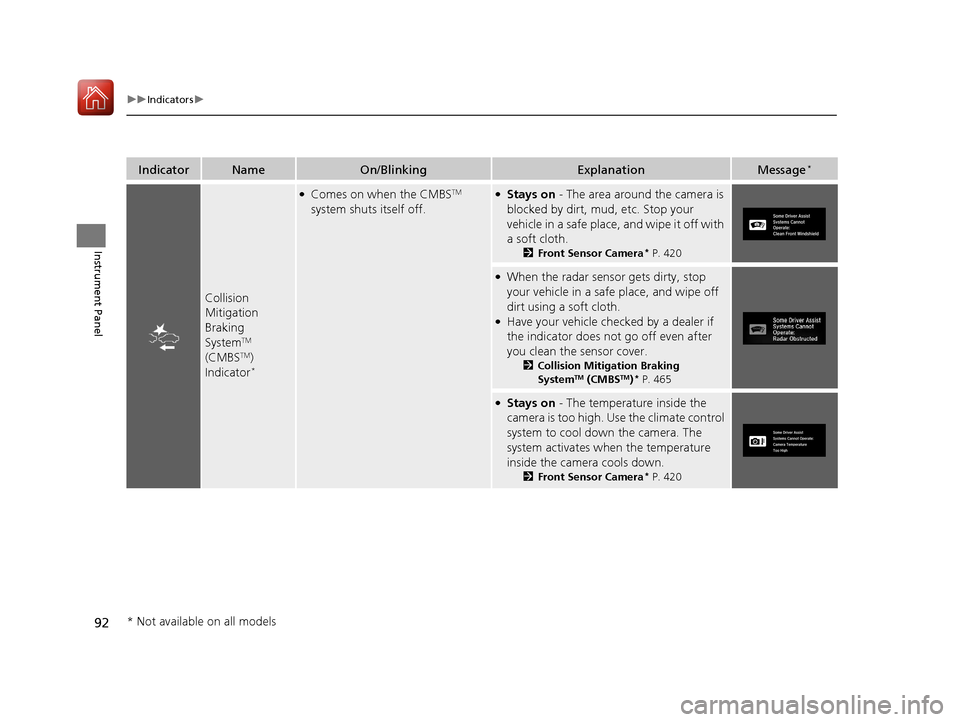
Collision
Mitigation
Braking
System
TM
(CMBSTM)
Indicator*
●Comes on when the CMBSTM
system shuts itself off.●Stays on - The area around the camera is
blocked by dirt, mud, etc. Stop your
vehicle in a safe place, and wipe it off with
a soft cloth.
2 Front Sensor Camera* P. 420
●When the radar sensor gets dirty, stop
your vehicle in a safe place, and wipe off
dirt using a soft cloth.
●Have your vehicle checked by a dealer if
the indicator does not go off even after
you clean the sensor cover.
2Collision Mitigation Braking
SystemTM (CMBSTM)* P. 465
●Stays on - The temperature inside the
camera is too high. Use the climate control
system to cool down the camera. The
system activates when the temperature
inside the camera cools down.
2 Front Sensor Camera* P. 420
* Not available on all models
17 CIVIC 4D HCM (KA KC KL)-31TBA6100.book 92 ページ 2016年8月31日 水曜日 午後6時5分
Page 94 of 601
93
uuIndicators uInformation Display Warning and Information Messages*
Instrument Panel
Information Display Warning and Information Messages*
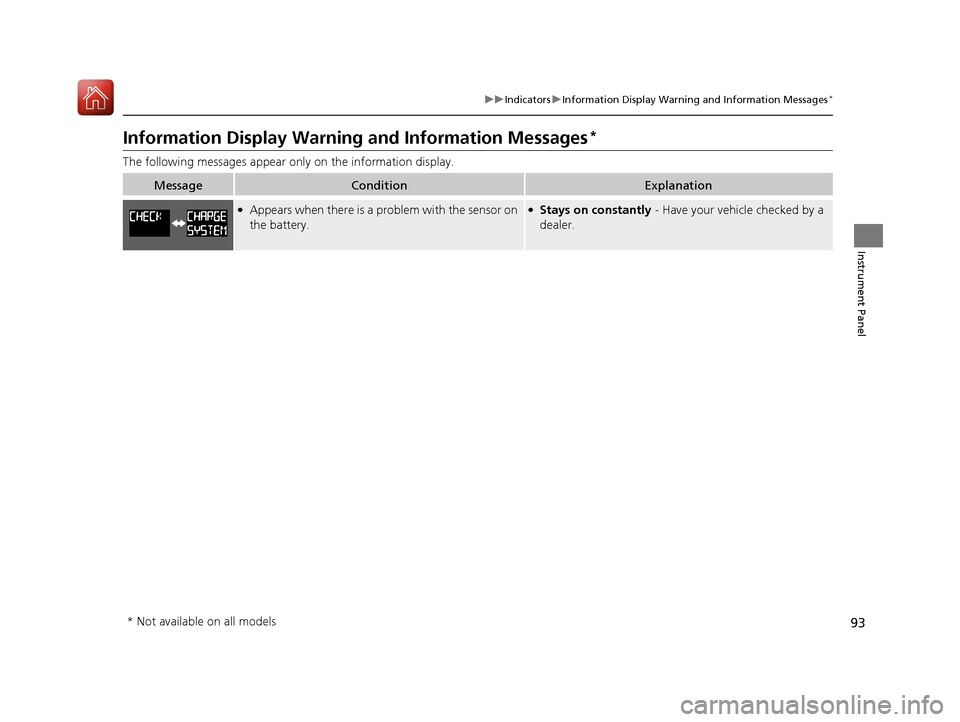
The following messages appear only on the information display.
MessageConditionExplanation
●Appears when there is a problem with the sensor on
the battery.●Stays on constantly - Have your vehicle checked by a
dealer.
* Not available on all models
17 CIVIC 4D HCM (KA KC KL)-31TBA6100.book 93 ページ 2016年8月31日 水曜日 午後6時5分
Page 95 of 601
94
uuIndicators uDriver Information Interface Wa rning and Information Messages*
Instrument Panel
Driver Information Interface Warning and Information Messages*
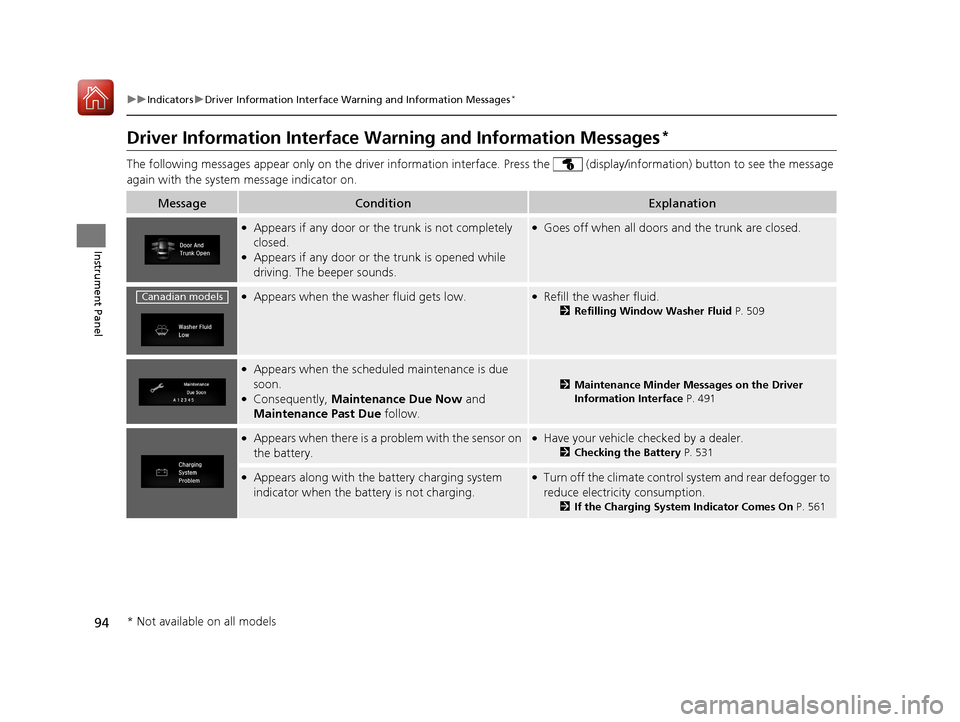
The following messages appear only on the dr iver information interface. Press the (display/information) button to see the message
again with the system message indicator on.
MessageConditionExplanation
●Appears if any door or the trunk is not completely
closed.
●Appears if any door or the trunk is opened while
driving. The beeper sounds.
●Goes off when all doors and the trunk are closed.
●Appears when the washer fluid gets low.●Refill the washer fluid.
2Refilling Window Washer Fluid P. 509
●Appears when the scheduled maintenance is due
soon.
●Consequently, Maintenance Due Now and
Maintenance Past Due follow.
2Maintenance Minder Messages on the Driver
Information Interface P. 491
●Appears when there is a problem with the sensor on
the battery.●Have your vehicle checked by a dealer.
2Checking the Battery P. 531
●Appears along with the battery charging system
indicator when the batte ry is not charging.●Turn off the climate control system and rear defogger to
reduce electricity consumption.
2If the Charging System Indicator Comes On P. 561
Canadian models
* Not available on all models
17 CIVIC 4D HCM (KA KC KL)-31TBA6100.book 94 ページ 2016年8月31日 水曜日 午後6時5分
Page 113 of 601
uuGauges and Displays uInformation Display*
112
Instrument Panel
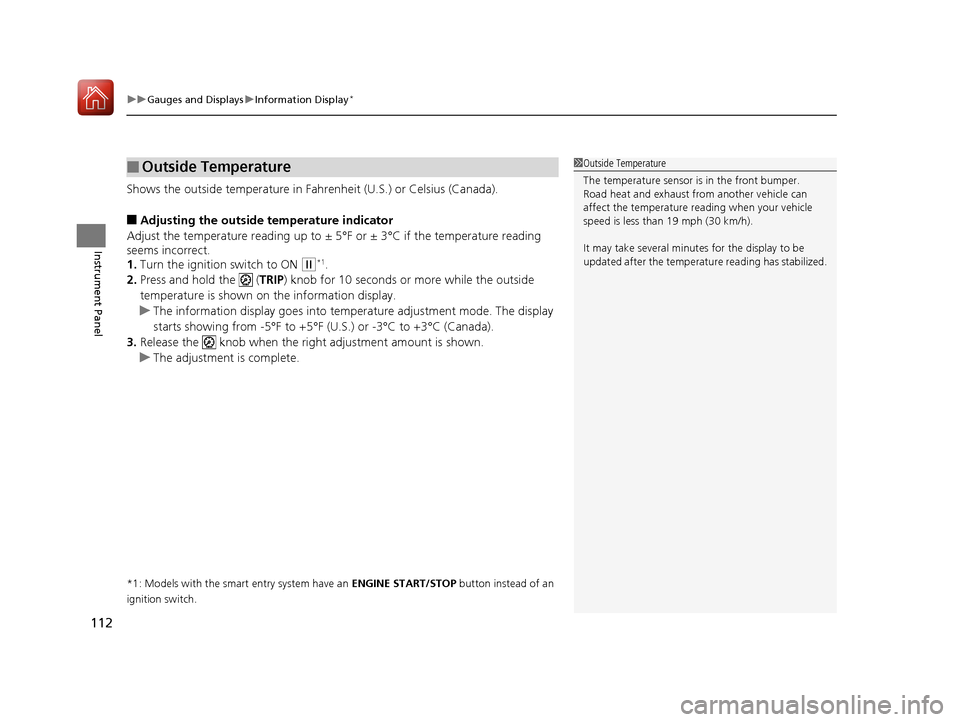
Shows the outside temperature in Fahr enheit (U.S.) or Celsius (Canada).
■Adjusting the outside temperature indicator
Adjust the temperature reading up to ± 5° F or ± 3°C if the temperature reading
seems incorrect.
1. Turn the ignition switch to ON
(w*1.
2. Press and hold the ( TRIP) knob for 10 seconds or more while the outside
temperature is shown on the information display.
u The information display goes into temp erature adjustment mode. The display
starts showing from -5°F to +5°F (U .S.) or -3°C to +3°C (Canada).
3. Release the knob when the righ t adjustment amount is shown.
u The adjustment is complete.
*1: Models with the smart entry system have an ENGINE START/STOP button instead of an
ignition switch.
■Outside Temperature1 Outside Temperature
The temperature sensor is in the front bumper.
Road heat and exhaust from another vehicle can
affect the temperature reading when your vehicle
speed is less than 19 mph (30 km/h).
It may take several minutes for the display to be
updated after the temperature reading has stabilized.
17 CIVIC 4D HCM (KA KC KL)-31TBA6100.book 112 ページ 2016年8月31日 水曜日 午後6時5分
Page 117 of 601
uuGauges and Displays uDriver Information Interface*
116
Instrument Panel
Shows the outside temperature in Fahr enheit (U.S.) or Celsius (Canada).
■Adjusting the outside temperature display
Adjust the temperature reading up to ±5°F or ±3°C if the temperature reading
seems incorrect.
Use the driver information interface’s customized features or audio/information
screen to correct the temperature.
2 Customized Features P. 118, 308
Shows the instant fuel economy as a bar graph in mpg or l/100 km.
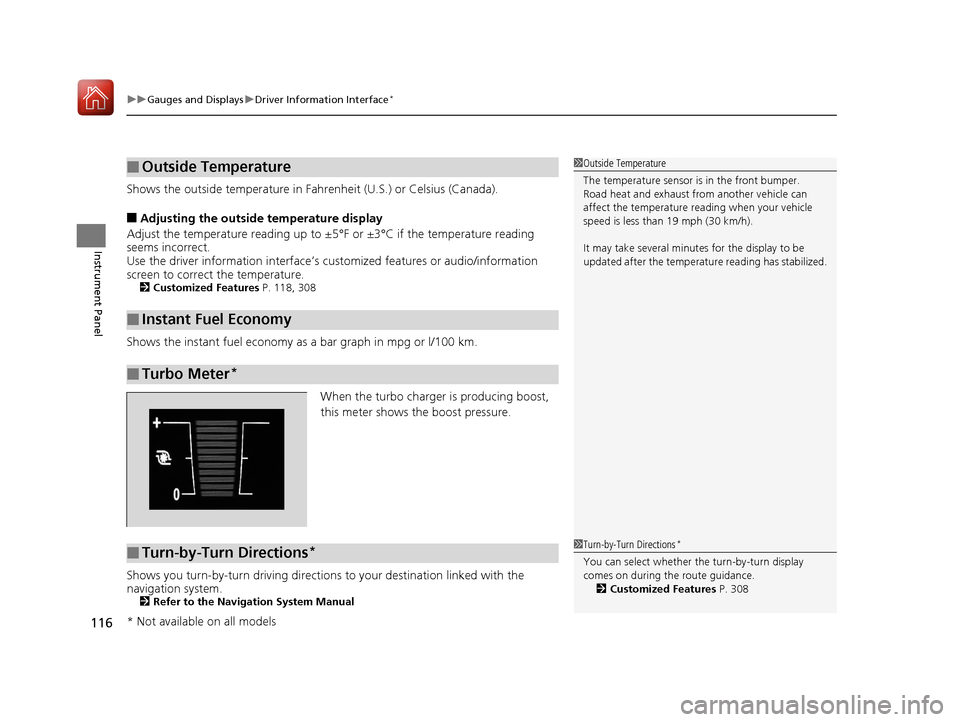
When the turbo charger is producing boost,
this meter shows th e boost pressure.
Shows you turn-by-turn driving directions to your destination linked with the
navigation system.
2 Refer to the Navigation System Manual
■Outside Temperature
■Instant Fuel Economy
■Turbo Meter*
1Outside Temperature
The temperature sensor is in the front bumper.
Road heat and exhaust from another vehicle can
affect the temperature reading when your vehicle
speed is less than 19 mph (30 km/h).
It may take several minutes for the display to be
updated after the temperature reading has stabilized.
■Turn-by-Turn Directions*1Turn-by-Turn Directions*
You can select whether th e turn-by-turn display
comes on during the route guidance. 2 Customized Features P. 308
* Not available on all models
17 CIVIC 4D HCM (KA KC KL)-31TBA6100.book 116 ページ 2016年8月31日 水曜日 午後6時5分
Page 128 of 601
127
Controls
This chapter explains how to operate the various controls necessary for driving.
Clock.................................................. 128
Locking and Unlocking the Doors Key Types and Functions .................. 130
Low Smart Entry Remote Signal Strength*... 132Locking/Unlocking the Doors from the Outside .......................................... 133
Locking/Unlocking the Doors from the Inside ............................................. 140
Childproof Door Locks ..................... 142
Auto Door Locking/Unlocking .......... 143
Opening and Closing the Trunk ....... 147
Security System Immobilizer System .......................... 150
Security System Alarm ...................... 150
Opening and Closing the Windows ..... 153Opening and Closing the Moonroof*..... 156
Operating the Switches Around the
Steering Wheel
Ignition Switch
*............................... 157
ENGINE START/STOP Button*........... 158
Ignition Switch and Power Mode Comparison ................................... 161
Turn Signals ..................................... 162
Light Switches.................................. 162
Fog Lights
*...................................... 165
Daytime Running Lights ................... 165
Wipers and Washers ........................ 166
Brightness Control ........................... 168
Rear Defogger/Heat ed Door Mirror
*
Button ........................................... 169
Adjusting the Steering Wheel........... 170 Adjusting the Mirrors
Interior Rearview Mirror ................... 171
Power Door Mirrors ......................... 172
Adjusting the Seats .......................... 173
Interior Lights/Interior Convenience Items ................................................ 181
Heating System
*
Using Automatic Heating ................. 193
Automatic Heating Sensors .............. 195
Climate Control System
*
Using Automatic Climate Control .... 196
Automatic Climate Control Sensors......202
* Not available on all models
17 CIVIC 4D HCM (KA KC KL)-31TBA6100.book 127 ページ 2016年8月31日 水曜日 午後6時5分